1
PainShield® MD – Instructions for Use
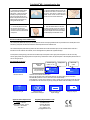
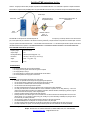
1. Ensure that the treatment area is
2. Attach the treatment patch to the skin with
clean, dry and free of wounds or
other lesions. Remove excess hair.
Carefully cut open foil pouch and
keep to store patch between uses.
Remove the protective liner from the
treatment patch and keep liner for
storing patch between uses.
the adhesive side down over the area where
the pain is most intense or adjacent to the
treated wound. Ensure that the ultrasound
transducer is in full contact with the skin.
3. Connect the patch to the cable
4. Press the ON/OFF button on the driver
from the driver using the snap
connectors. It does not matter which
connector connects to which terminal
on the patch..
for about 2 seconds until you hear a beeping
sound indicating that the device is turned on.
The driver requires a few seconds to initialize
and then displays the information screen.
ON /OFF
Removal and Storage of the Treatment Patch
The reusable patch (Model PRP-20) may be used multiple times because of its hydrogel adhesive that may be refreshed. The reusable patch can be
used as long as the patch and ultrasound transducer remain firmly adherent to the treatment area.
The reusable facial patch (Model PRP-40) provides the same treatment as the PRP-20 treatment patch, but has a smaller adhesive area and is
intended for use when adhesion area is limited, such as facial application for patients with Trigeminal Neuralgia.
For both patches, following therapy, first disconnect the cable snaps from the patch and then gently remove the patch from the skin. Once fully
removed, lightly moisten the hydrogel portions of the patch using a small amount of water, then place the patch on the transparent protective liner and
store it in its original pouch.
Pain Shield Driver Screens
Battery level
indicator
C1
PainShield
Time of treatment in
the cycle: 0-30 min
Ver: 30.03
Device is turned on
Treatment cycle
number: C1- C6
Output power
0. 4 W
29 min
IDLE mode
screen
C1
0W
IDLE
Treatment screen indicates treatment phase.
Each cycle has an active period of 30 minutes followed by an inactive (IDLE) period of 30 minutes.
PainShield MD operates for 6.5 hours, after which it turns off automatically.
During treatment, a screen saver is activated. To return to normal screen, press shortly the ON/ OFF button.
It is possible to turn the device off at any time by pressing the ON/OFF button and holding it for 2 seconds.
-- Off --
-3Device is turning off
Approvals and Compliance with
StandardsFDA 510(k) cleared
CE Mark – Class IIa
Health Canada License – Class II
IEC 60601-1; IEC-60601-2
ISO 10993
Treatment patch is
disconnected or damaged
Battery discharged and
requires charging
Regulatory Representative in USA
MedicSense
291 Hillside Avenue
Somerset, MA 02726
Tel.: 1-508-479-6116
Fax: 1-508-677-1418
[email protected]
Charging in progress