1
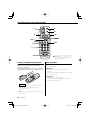
CD-RECEIVER
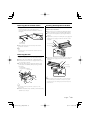
KDC-X591
KDC-MP535U
INSTRUCTION MANUAL
Take the time to read through this instruction manual.
Familiarity with installation and operation procedures will help you obtain the best
performance from your new CD-receiver.
For your records
Record the serial number, found on the back of the unit, in the spaces designated on the
warranty card, and in the space provided below. Refer to the model and serial numbers
whenever you call upon your Kenwood dealer for information or service on the product.
Model KDC-X591/MP535U Serial number
US Residence Only
Register Online
Register your Kenwood product at
www.kenwoodusa.com
© B64-3616-00/00 (KW)
B64-3616-00_00_English.indd 1
06.12.11 8:46:43 AM
Contents
Safety precautions
3
Notes
4
General features
7
Power
Selecting the Source
Volume
Attenuator
Audio Control
Adjusting the detail of Audio Control
Audio Setup
Speaker Setting
Switching Display
Subwoofer Output
Theft Deterrent Faceplate
TEL Mute
Tuner features
12
Tuning
Tuning Mode
Direct Access Tuning
Station Preset Memory
Auto Memory Entry
Preset Tuning
CD/USB device/Audio file/External disc
control features
14
Playing CD & Audio file
Playing USB (iPod) device
Drive Search
Playing External Disc
Fast Forwarding and Reversing
Music Search
Disc Search/Folder/Album Search
Direct Music Search
Direct Disc Search
Track/File/Disc/Folder Repeat
Scan Play
Random Play
Magazine Random Play
All Random Play
File select
File Select 1 mode
File Select 2 mode
Text/Title Scroll
HD Radio control features
Menu system
21
Menu System
Activating Security Code
Deactivating Security Code
Touch Sensor Tone
Manual Clock Adjustment
DSI (Disabled System Indicator)
Display Illumination Control
Dimmer
Built-in Amp Setting
Dual Zone System Setting
Supreme Setting
AMP Control
CRSC (Clean Reception System Circuit)
Receive mode Setting
Electronic Serial Number (ESN) display
Auxiliary Input Display Setting
Text Scroll
Built-in Auxiliary input Setting
CD Read Setting
Audio Preset Memory
Audio Preset Recall
Firmware version display
Demonstration mode Setting
Basic Operations of remote control 28
Accessories/ Installation Procedure 30
Connecting Wires to Terminals
31
Installation
32
Troubleshooting Guide
34
Specifications
37
20
About HD Radio
Tuning
2 |
English
B64-3616-00_00_English.indd 2
06.12.11 8:46:46 AM
Safety precautions
2WARNING
To prevent injury or fire, take the following
precautions:
• To prevent a short circuit, never put or leave any
metallic objects (such as coins or metal tools) inside
the unit.
• Do not watch or fix your eyes on the unit’s display
when you are driving for any extended period.
• Mounting and wiring this product requires skills and
experience. For safety’s sake, leave the mounting
and wiring work to professionals.
2CAUTION
To prevent damage to the machine, take
the following precautions:
• Make sure to ground the unit to a negative 12V DC
power supply.
• Do not install the unit in a spot exposed to direct
sunlight or excessive heat or humidity. Also avoid
places with too much dust or the possibility of
water splashing.
• Do not place the faceplate (and the faceplate case)
in areas exposed to direct sunlight, excessive heat or
humidity. Also avoid places with too much dust or
the possibility of water splashing.
• To prevent deterioration, do not touch the terminals
of the unit or faceplate with your fingers.
• Do not subject the faceplate to excessive shock, as it
is a piece of precision equipment.
• When replacing a fuse, only use a new fuse with
the prescribed rating. Using a fuse with the wrong
rating may cause your unit to malfunction.
• Do not apply excessive force to the open faceplate
or place objects on it. Doing so will cause damage
or breakdown.
• Use only the screws provided or specified for
installation. If you use wrong screws, you could
damage the unit.
Do Not Load 3-in. CDs in the CD slot
If you try to load a 3 in. CD with its adapter into the
unit, the adapter might separate from the CD and
damage the unit.
About CD players/disc changers connected
to this unit
Kenwood disc changers/ CD players released in 1998
or later can be connected to this unit.
Refer to the catalog or consult your Kenwood dealer
for connectable models of disc changers/ CD players.
Note that any Kenwood disc changers/ CD players
released in 1997 or earlier and disc changers made by
other makers cannot be connected to this unit.
Connecting unsupported disc changers/CD players to
this unit may result in damage.
Set the "O-N" Switch to the "N" position for the
applicable Kenwood disc changers/ CD players.
The functions you can use and the information that
can be displayed may differ depending on the models
being connected.
¤
• You can damage both your unit and the CD changer if you
connect them incorrectly.
Lens Fogging
When you turn on the car heater in cold weather,
dew or condensation may form on the lens in the
CD player of the unit. Called lens fogging, this
condensation on the lens may not allow CDs to play.
In such a situation, remove the disc and wait for the
condensation to evaporate. If the unit still does not
operate normally after a while, consult your Kenwood
dealer.
Attach the panel while you are on the
vehicle
The panel lock arm appears when the panel is
removed. Therefore, the panel must be attached while
the electrical system of the car is operating.
iPod is a trademark of Apple Computer, Inc.,
registered in the U.S. and other countries.
The "AAC" logo is trademark of Dolby
Laboratories.
English |
B64-3616-00_00_English.indd 3
3
06.12.11 8:46:46 AM
Notes
• If you experience problems during installation,
consult your Kenwood dealer.
• When you purchase optional accessories, check with
your Kenwood dealer to make sure that they work
with your model and in your area.
• We recommend the use of <Activating Security
Code> (page 22) to prevent theft.
• The characters which can be displayed by this unit
are A-Z 0-9 @ " ‘ ` % & * + – = , . / \ < > [ ] ( ) : ; ^ - { } |
~.
• The illustrations of the display and the panel
appearing in this manual are examples used to
explain more clearly how the controls are used.
Therefore, what appears on the display in the
illustrations may differ from what appears on the
display on the actual equipment, and some of the
illustrations on the display may be inapplicable.
Cleaning the Unit
If the faceplate of this unit is stained, wipe it with a
dry soft cloth such as a silicon cloth.
If the faceplate is stained badly, wipe the stain off with
a cloth moistened with neutral cleaner, then wipe it
again with a clean soft dry cloth.
¤
• Applying spray cleaner directly to the unit may affect its
mechanical parts. Wiping the faceplate with a hard cloth or
using a volatile liquid such as thinner or alcohol may scratch
the surface or erases characters.
Cleaning the Faceplate Terminals
If the terminals on the unit or faceplate get dirty, wipe
them with a clean soft dry cloth.
Before using this unit for the first time
How to reset your unit
• If the unit fails to operate properly, press the Reset
button. The unit returns to factory settings when the
Reset button is pressed.
• Remove the USB device before pressing the Reset
button. Pressing the Reset button with the USB
device installed can damage the data contained in
the USB device. For how to remove the USB device,
refer to <Playing USB (iPod) device> (page 15).
• Press the reset button if the disc auto changer fails
to operate correctly. Normal operation should be
restored.
This unit is initially set on the Demonstration mode.
When using this unit for the first time, cancel the
<Demonstration mode Setting> (page 27).
About KENWOOD "Music Editor" of PC
application attached to KDC-X591/MP535U
• "Music Editor" is recorded in the CD-ROM attached
to this unit.
• Refer to the attached installation manual for the
installation method of "Music Editor".
• Refer to the user’s manual recorded in the
installation CD-ROM and Help of "Music Editor" for
the operation method of "Music Editor".
• The unit can play CD/ USB device created by "Music
Editor".
• Information about "Music Editor" upgrade is put on
the site, www.kenwood.com.
Reset button
4 |
English
B64-3616-00_00_English.indd 4
06.12.11 8:46:46 AM
About Audio file
About USB device
• Playable Audio file
AAC-LC (.m4a), MP3 (.mp3), WMA (.wma),
WAV (.wav)
• Playable disc media
CD-R/RW/ROM
• Playable disc file format
ISO 9660 Level 1/2, Joliet, Romeo, Long file name.
• Playable USB device
USB mass storage class, iPod with KCA-iP200
• Playable USB device file system
FAT16, FAT32
Although the audio files are complied with the
standards listed above, the play maybe impossible
depending on the types or conditions of media or
device.
• Playing order of the Audio file
In the example of folder/file tree shown below, the
files are played in the order from ① to ⑩.
<: Folder
Folder
CD ()
v : Audio
Audiofile
fi
• Install the USB device in the place where it will not
prevent you from driving your vehicle properly.
• You cannot connect a USB device via a USB hub.
• Take backups of the audio files used with this unit.
The files can be erased depending on the operating
conditions of the USB device.
We shall have no compensation for any damage
arising out of erasure of the stored data.
• No USB device comes with this unit. You need to
purchase a commercially available USB device.
• For how to play the audio files recorded in a USB
device, see <CD/USB device/Audio file/External disc
control features> (page 14).
• When connecting the USB device, usage of the CAU1EX (option) is recommended.
Normal playback is not guaranteed when a cable
other than the USB compatible cable is used.
Connecting a cable whose total length is longer
than 5 m can result in abnormal playback.
v
v
v
v
v
About Satellite Radio tuner
This unit supports Satellite Radio tuners which are
released by SIRIUS and XM.
Refer to the instruction manual of Satellite radio tuner.
v.
An online manual about audio files is put on the
site, www.kenwood.com/audiofile/. On this online
manual, detailed information and notes which are not
written in this manual are provided. Make sure to read
through the online manual as well.
⁄
• In this manual, the word "USB device" is used for flash
memories and digital audio players which have USB
terminals.
• The word "iPod" appearing in this manual indicates the iPod
connected with the KCA-iP200 (optional accessory). The
iPod connected with the KCA-iP200 can be controlled from
this unit. iPods that can be connected with the KCA-iP200
are the iPod nano and the iPod with video. When an iPod
is connected using a commercially available USB cable, it is
handled as a mass-storage-class device.
• For the supported formats and types of USB device, refer to
www.kenwood.com/usb/.
English |
B64-3616-00_00_English.indd 5
5
06.12.11 8:46:47 AM
Notes
Handling CDs
• Do not touch the recording surface of the CD.
• Do not stick tape etc. on the CD, or use a CD with
tape stuck on it.
• Do not use disc type accessories.
• Clean from the center of the disc and move
outward.
• When removing CDs from this unit, pull them out
horizontally.
• If the CD center hole or outside rim has burrs,
use the CD only after removing the burrs with a
ballpoint pen etc.
CDs that cannot be used
• CDs that are not round cannot be used.
2CAUTION
Use of controls or adjustments or performance of
procedures other than those specified herein may
result in hazardous radiation exposure.
In compliance with Federal Regulations, following
are reproductions of labels on, or inside the product
relating to laser product safety.
Kenwood Corporation
2967-3, ISHIKAWA-MACHI,
HACHIOJI-SHI
TOKYO, JAPAN
KENWOOD CORP. CERTIFIES THIS EQUIPMENT
CONFORMS TO DHHS REGULATIONS N0.21 CFR
1040. 10, CHAPTER 1, SUBCHAPTER J.
Location : Bottom Panel
FCC WARNING
• CDs with coloring on the recording surface or CDs
that are dirty cannot be used.
• This unit can only play the CDs with
.
This unit may not correctly play discs which do not
have the mark.
• You cannot play a CD-R or CD-RW that has not been
finalized. (For the finalization process refer to your
CD-R/CD-RW writing software, and your CD-R/CDRW recorder instruction manual.)
6 |
This equipment may generate or use radio
frequency energy. Changes or modifications to this
equipment may cause harmful interference unless
the modifications are expressly approved in the
instruction manual. The user could lose the authority
to operate this equipment if an unauthorized change
or modification is made.
NOTE
This equipment has been tested and found to
comply with the limits for a Class B digital device,
pursuant to Part 15 of the FCC Rules. These limits are
designed to provide reasonable protection against
harmful interference in a residential installation. This
equipment may cause harmful interference to radio
communications, if it is not installed and used in
accordance with the instructions. However, there
is no guarantee that interference will not occur in a
particular installation. If this equipment does cause
harmful interference to radio or television reception,
which can be determined by turning the equipment
off and on, the user is encouraged to try to correct
the interference by one or more of the following
measures:
• Reorient or relocate the receiving antenna.
• Increase the separation between the equipment
and receiver.
• Connect the equipment into an outlet on a
circuit different from that to which the receiver is
connected.
• Consult the dealer or an experienced radio/TV
technician for help.
English
B64-3616-00_00_English.indd 6
06.12.11 8:46:47 AM
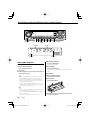
General features
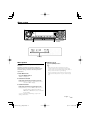
ATT
VOL
SRC
Release button
Control knob
Clock display
LOUD indicator
ATT indicator
Power
⁄
Turning ON the Power
Press the [SRC] button.
• When connection of the iPod is recognized, the source
display changes from "USB" to "iPod".
• USB (iPod) source is recognized as CD source on the
connected unit.
Turning OFF the Power
Press the [SRC] button for at least 1 second.
Volume
Selecting the Source
Increasing Volume
Turn the [VOL] knob clockwise.
Press the [SRC] button.
Source required
Satellite radio (Optional accessory)
Tuner or HD Radio (Optional accessory)
USB device (iPod)
CD
External disc (Optional accessory)
Auxiliary input
Auxiliary input (Optional accessory)
Standby (Illumination only mode)
Display
"SAT"
"TUNER" or "HD RADIO"
"USB" ("iPod")
"CD"
"CD CH"
"AUX"
"AUX EXT"
"STANDBY"
Decreasing Volume
Turn the [VOL] knob counterclockwise.
Attenuator
Turning the volume down quickly.
Press the [ATT] button.
Each time you press the button, the Attenuator
turns ON and OFF.
When the Attenuator is ON, the "ATT" indicator
blinks.
English |
B64-3616-00_00_English.indd 7
7
06.12.11 8:46:47 AM
General features
Function of KDC-X591
Audio Control
Adjusting the detail of Audio Control
1 Select the source to adjust
Among the Basic Audio items, you can adjust the Bass
level, Middle level, and Treble level in detail.
Press the [SRC] button.
2 Enter Audio Control mode
1 Select the Basic Audio item
Press the [VOL] knob.
3 Select the Basic Audio item to adjust
Press the [VOL] knob.
Each time you press the knob, the item to be
adjusted alternates between the items shown in
the table below.
4 Adjust the Basic Audio item
Turn the [VOL] knob.
Adjustment Item
Rear Volume
Subwoofer level
System Q
Display
"R-VOL"
"SW L"
"USER"/"ROCK"/"POPS"/
"EASY"/"TOP40"/"JAZZ"/
"NATURAL"
Bass level*
"BAS L"
Middle level*
"MID L"
Treble level*
"TRE L"
Balance
"BAL"
Fader
"FAD"
Exit Audio Control mode (Volume control mode)
2 Enter Detail adjustment mode of Audio
Range
0 — 35
–15 — +15
User/Rock/Pops/
Easy/Top 40/Jazz/
Natural
–8 — +8
–8 — +8
–8 — +8
Left 15 — Right 15
Rear 15 — Front 15
* You can adjust these items in detail. Refer to <Adjusting
the detail of Audio Control> (Page8). (Function of KDCX591)
* Source tone memory: Puts the set up value in the
memory per source. (Detail Audio item is included)
⁄
Select the desired item to be set in detail from
followings;
• Bass level
• Middle level
• Treble level
For how to select Basic Audio items, see <Audio
Control> (page 8).
About System Q
• You can recall the best preset sound setting for different
types of music.
• Change each setting value with the <Speaker Setting>
(page 9). First, select the speaker type with the Speaker
setting.
• "USER": The ranges selected lastly for Bass level, Middle
level, and Treble level are recalled automatically.
5 Exit Audio Control mode
Press any button.
Press a button other than the [VOL] knob and [ATT]
button.
Control
Press the [VOL] knob for at least 1 second.
3 Select the Detail Audio item to adjust
Press the [VOL] knob.
Each time you press the knob, the item to be
adjusted alternates between the items shown in
the table below.
4 Adjust the Detail Audio item
Turn the [VOL] knob.
Bass level
Adjustment Item
Bass Center Frequency
Display
"BAS F"
Bass Q Factor
Bass Extend
"BAS Q"
"B EX"
Range
40/50/60/70/80/100/
120/150 Hz
1.00/1.25/1.50/2.00
OFF/ON
Middle level
Adjustment Item
Middle Center Frequency
Middle Q Factor
Display
"MID F"
"MID Q"
Range
0.5/1.0/1.5/2.0 kHz
1.0/2.0
Treble level
Adjustment Item
Treble Center Frequency
Display
"TRE"
Range
10.0/12.5/15.0/17.5 kHz
5 Exit the Detail Audio Control mode
Press the [VOL] knob for at least 1 second.
⁄
• When you set the Bass Extend to ON, low frequency
response is extended by 20%.
• You can exit the Audio Control mode at anytime by
pressing any button except for [VOL] knob and [ATT]
button.
8 |
English
B64-3616-00_00_English.indd 8
06.12.11 8:46:48 AM
Audio Setup
Speaker Setting
Setting the Sound system, such as Cross over
Network.
Fine-tuning so that the System Q value is optimal
when setting the speaker type.
1 Select the source to adjust
1 Enter Standby
Press the [SRC] button.
Press the [SRC] button.
Select the "STANDBY" display.
2 Enter Audio Setup mode
Press the [VOL] knob for at least 1 second.
3 Select the Audio Setup item to adjust
Press the [VOL] knob.
Each time you press the knob, the item to be
adjusted alternates between the items shown in
the table below.
4 Setup the Audio item
Turn the [VOL] knob.
Adjustment Item
Front High Pass Filter
Display
"HPF"
Rear High Pass Filter
"HPR"
Low Pass Filter
"LPF"
Subwoofer Phase
Volume offset
Loudness
Dual Zone System
"PHAS"
"V-OFF"
"LOUD"
"2ZON"
Range
Through/40*/60*/80/100/120/
150/180/220* Hz
Through/40*/60*/80/100/120/
150/180/220* Hz
50*/60/80/100*/120/
Through Hz
Reverse (180°)/ Normal (0°)
–8 — ±0 (AUX: -8— +8)
OFF/ON
OFF/ON
2 Enter Speaker Setting mode
Press the [VOL] knob.
3 Select the Speaker type
Turn the [VOL] knob.
Each time you turn the knob, the setting alternates
between the settings shown in the table below.
Speaker type
OFF
For 5 & 4 in. speaker
For 6 & 6x9 in. speaker
For the OEM speaker
Display
"SP OFF"
"SP 5/4"
"SP 6*9/6"
"SP OEM"
4 Exit Speaker Setting mode
Press the [VOL] knob.
⁄
• * Function of KDC-X591.
• Volume offset: Sets each source’s volume as a difference
from the basic volume.
• Loudness: Compensates for low and high tones
during low volume. (Only the low tone is
compensated for when the tuner is selected
as a source.)
• Dual Zone System
Main source and sub source (Auxiliary input) output
Front channel and Rear channel separately.
- Set up the channel of sub source by <Dual Zone
System Setting> (page 24).
- Select Main source by [SRC] button.
- Adjust the volume of Front channel by [VOL] knob.
- Adjust the volume of Rear channel by <Audio Control>
(page 8).
- The Audio Control has no effect on sub source.
• You can use the Dual Zone System with the internal
auxiliary input.
5 Exit Audio Setup mode
Press the [VOL] knob for at least 1 second.
English |
B64-3616-00_00_English.indd 9
9
06.12.11 8:46:48 AM
General features
Switching Display
Clock
Changing the information displayed.
1 Enter Switching Display mode
Press the Control knob for at least 1 second.
"DISP SEL" is displayed.
2 Select the Display item
Push the Control knob towards right or left.
In Tuner source
Information
Frequency
Clock
Display
"FREQ"
"CLOCK"
Display
"D-TITLE"
"T-TITLE"
"P-TIME"
"CLOCK"
In Audio file source
Information
Music title & Artist name
Album name & Artist name
Folder name*
File name
Play time & Music number
Clock
Display
"TITLE"
"ALBUM"
"FOLDER"
"FILE"
"P-TIME"
"CLOCK"
In HD Radio source
Information
Station name
Music title/ Artist name/
Album name/ Genre
Frequency
Clock
In Standby/ Auxiliary input source
Information
Source name
Clock
Display
"SRC NAME"
"CLOCK"
3 Exit Switching Display mode
Press the Control knob.
⁄
In CD & External disc source
Information
Disc title
Track title
Track number & Play time
Clock
"CLOCK"
Display
"ST NAME"
"TITLE"
• When LX-AMP is connected, the item setup by the
Display mode of LX-AMP is displayed. (KDC-X591 only)
• When the music number exceeds 1000, only the last 3
digits of its number are displayed.
• When you select the clock display, the display setting of
each source will be changed to the clock display.
• Music title, Artist name, and Album name cannot be
displayed in WAV file.
• If the selected display item does not have any
information, alternative information is displayed.
• * When playing music from iPod or music edited by
"Music Editor", the folder name display may show
something different such as playlist or artist name
depending on the music selection procedure.
Subwoofer Output
Turning the Subwoofer output ON or OFF.
Push the Control knob toward down for at least
2 seconds.
Each time you push the knob, Subwoofer output
switches ON and OFF.
When it is ON, "SW ON" is displayed.
"FREQ"
"CLOCK"
In Satellite radio source
Information
Channel name
Music title
Artist name
Composer name
Category name
Label name
Comment
Band & Channel number
10 |
Display
"CH NAME"
"SONG"
"ARTIST"
"COMPOSER"
"CATEGORY"
"LABEL"
"COMMENT"
"CH NUM"
English
B64-3616-00_00_English.indd 10
06.12.11 8:46:49 AM
Theft Deterrent Faceplate
TEL Mute
The faceplate of the unit can be detached and taken
with you, helping to deter theft.
The audio system automatically mutes when a call
comes in.
Removing the Faceplate
When a call comes in
"CALL" is displayed.
The audio system pauses.
1 Press the Release button.
Drop open the faceplate.
2 Drawing the faceplate to left side pull it to
forward and remove it.
Listening to the audio during a call
Press the [SRC] button.
The "CALL" display disappears and the audio system
comes back ON.
When the call ends
Hang up the phone.
The "CALL" display disappears and the audio system
comes back ON.
⁄
¤
• The faceplate is a precision piece of equipment and can
be damaged by shocks or jolts.
• Keep the faceplate in its faceplate case while detached.
• Do not expose the faceplate (and the faceplate case) to
direct sunlight or excessive heat or humidity. Also avoid
places with too much dust or the possibility of water
splashing.
• To use the TEL Mute feature, you need to hook up
the MUTE wire to your telephone using a commercial
telephone accessory. Refer to <Connecting Wires to
Terminals> (page 31).
Reattaching the Faceplate
1 Align the shaft on the unit with the depression
on the faceplate.
2 Push the faceplate in until it clicks.
The faceplate is locked in place, allowing you to use
the unit.
English |
B64-3616-00_00_English.indd 11
11
06.12.11 8:46:49 AM
Tuner features
AUTO/AME
FM
AM
SRC
1-6
Band display
ST indicator
Control knob
Frequency display
Preset station number
Tuning
Tuning Mode
Selecting the station.
Choose the tuning mode.
1 Select tuner source
Press the [SRC] button.
Select the "TUNER" display.
2 Select the band
Push the Control knob towards [FM] or [AM].
Each time you push the knob toward [FM], it
switches between the FM1, FM2, and FM3 bands.
3 Tune up or down band
Press the [AUTO] button.
Each time you press the button, the Tuning mode
alternates between the modes shown in the table
below.
Tuning mode
Display
Operation
Auto seek
"AUTO 1"
Automatic search for a station.
Preset station seek "AUTO 2"
Search in order of the stations in
the Preset memory.
Manual
"MANUAL" Normal manual tuning control.
Push the Control knob towards [4] or [¢].
⁄
• During reception of stereo stations the "ST" indicator is
ON.
12 |
English
B64-3616-00_00_English.indd 12
06.12.11 8:46:49 AM
Function of remote control
Direct Access Tuning
Auto Memory Entry
Entering the frequency and tuning.
Putting stations with good reception in the memory
automatically.
1 Select the band
1 Select the band for Auto Memory Entry
Press the [FM] or [AM] button.
2 Enter Direct Access Tuning mode
Press the [DIRECT] button on the remote
control.
"– – – –" is displayed.
3 Enter the frequency
Press the number buttons on the remote
control.
Example:
Desired frequency
Press button
92.1 MHz (FM)
[0], [9], [2], [1]
810 kHz (AM)
[0], [8], [1], [0]
Cancelling Direct Access Tuning
Press the [DIRECT] button on the remote
control.
Push the Control knob towards [FM] or [AM].
2 Open Auto Memory Entry
Press the [AME] button for at least 2 seconds.
"A-MEMORY" is displayed.
When 6 stations that can be received are put in the
memory Auto Memory Entry closes.
Preset Tuning
Recalling the stations in the memory.
1 Select the band
Push the Control knob towards [FM] or [AM].
2 Recall the station
Press the desired [1] — [6] button.
Station Preset Memory
Putting a station in the memory.
1 Select the band
Push the Control knob towards [FM] or [AM].
2 Select the frequency to put in the memory
Push the Control knob towards [4] or [¢].
3 Put the frequency in the memory
Press the desired [1] — [6] button for at least 2
seconds.
The preset number display blinks 1 time.
On each band, 1 station can be put in the memory
on each [1] — [6] button.
English |
B64-3616-00_00_English.indd 13
13
06.12.11 8:46:50 AM
CD/USB device/Audio file/External disc control features
S.MODE SCAN RDM/3/ REP
A.RDM
Release button
Track number
IN indicator
Playing CD & Audio file
When there is no disc inserted
1 Drop open the faceplate
Press the Release button.
2 Insert a disc.
3 Push the faceplate on the left side, and return it
F.SEL M.RDM
SRC
Control knob
Play time
Disc number
When a disc is inserted
Press the [SRC] button.
Select the "CD" display.
Pause and play
Press the Control knob.
Each time you press the knob, the audio pauses or
plays.
to its former position.
Eject the disc
¤
1 Drop open the faceplate
• When the faceplate has been dropped open, it might
interfere with the shift lever or other vehicle function.
If this happens, pay attention to safety and move the
shift lever or take an appropriate action to remove the
obstacle, then operate the unit.
• Do not use the unit with the faceplate in the open
condition. If it’s used in the open position dust can enter
the inside part and cause damage.
Press the Release button.
2 Eject the disc
Press the [0] button.
⁄
• For the audio files and discs you can play with this unit,
refer to <About Audio file> (page 5).
• You can play the file made by KENWOOD Music Editor by
the same operation.
• When a disc is inserted, the "IN" indicator is ON.
14 |
3 Press the faceplate on the left side, and return it
to its former position.
English
B64-3616-00_00_English.indd 14
06.12.11 8:46:50 AM
⁄
Removing the USB device
• You can eject the disc for 10 minutes after switching off
the engine.
1 Drop open the faceplate
Press the Release button.
2 Set the remove mode as the USB source
Playing USB (iPod) device
Press the [0] button for at least 2 seconds.
The 0 indicator blinks.
3 Remove the USB device.
When the USB device is not connected
Connect the USB device
Playback of the file contained in the USB device
starts.
When the USB device is connected
Drive Search
Selecting the device inserted in the Multi Card
Reader.
Select USB source
Press the [SRC] button.
Select the "USB" (or "iPod") display.
1 Put the playback to pause
⁄
2 Select a device
• For the audio files that can be played with this unit and
the devices that can be connected to this unit, refer to
<About Audio file> (page 5).
• The word "iPod" appearing in this manual indicates the
iPod connected with the KCA-iP200 (optional accessory).
Refer to <About Audio file> (page 5).
• If you start playback after connecting the iPod, the music
that has been played by the iPod is played first.
In this case, "RESUMING" is displayed without displaying
a folder name, etc. Changing the browse item will
display a correct title, etc.
• When the iPod is connected to this unit, “KENWOOD” or
“✓” is displayed on the iPod to indicate that you cannot
operate the iPod.
• When the USB device is connected to this unit, it can be
charged up provided that this unit is powered.
• When the Multi Card Reader is used, refer to <Drive
Search> (page 15).
• After you stopped playing a file contained in the USB
device, you can restart playing the file from the point
where you stopped its playback.
Even after removing the USB device, you can restart
playing the file from the point where you stopped its
playback as long as the files contained in the USB device
are all the same.
• Be sure to insert the USB device connector as far as it will
go.
• You can play the file made by KENWOOD Music Editor by
the same operation.
Press the [S.MODE] button.
Push the Control knob towards up or down.
3 Restart playback
Press the [S.MODE] button.
⁄
• This unit is compliant with Multi Card Readers with a
maximum of 4 slots.
• If a device is inserted during connection of the Multi
Card Reader, it is not recognized. Select the Remove
mode with reference to <Playing USB (iPod) device>
(page 15), remove the Card Reader, and then insert the
memory.
Pause and play
Press the Control knob.
Each time you press the knob, the audio pauses or
plays.
English |
B64-3616-00_00_English.indd 15
15
06.12.11 8:46:51 AM
CD/USB device/Audio file/External disc control features
Playing External Disc
Playing discs set in the optional accessory disc
player connected to this unit.
Press the [SRC] button.
Select the display for the disc player you want.
Display examples:
Display
"CD CH"
"MD CH"
Function of disc changer/ Audio file
Disc Search/Folder/Album Search
Switching between folders/albums contained in
the disc in the disc changer, media, or device being
played now.
Push the Control knob towards up or down.
Disc player
CD changer
MD changer
Function of remote control
Pause and play
Press the Control knob.
Each time you press the knob, the audio pauses or
plays.
⁄
• Disc 10 is displayed as "0".
• The functions that can be used and the information that
can be displayed will differ depending on the external
disc players being connected.
Direct Music Search
Doing Music Search by entering the music number.
1 Enter the music number
Press the number buttons on the remote
control.
⁄
• You can select Direct music Search up to 999.
2 Do music Search
Press the [4] or [¢] button.
Fast Forwarding and Reversing
Fast Forwarding
Hold down toward [¢] with the Control knob.
Release to resume the playback.
Reversing
Hold down toward [4] with the Control knob.
Release to resume the playback.
⁄
• The accurate play time is not displayed during fast
forwarding or reversing of the Audio file.
Cancelling Direct Music Search
Press the [38] button.
⁄
• This function is not available on iPod and the music
edited by "Music Editor".
Function of disc changers with remote control
Direct Disc Search
Doing Disc Search by entering the disc number.
1 Enter the disc number
Press the number buttons on the remote
control.
Music Search
Switching between music contained in the disc or
folder being played now.
Push the Control knob towards [4] or [¢].
2 Do Disc Search
Press the [+] or [–] button.
Cancelling Direct Disc Search
Press the [38] button.
⁄
• Input "0" to select disc 10.
16 |
English
B64-3616-00_00_English.indd 16
06.12.11 8:46:51 AM
Track/File/Disc/Folder Repeat
Random Play
Replaying the music, disc in the Disc changer or
Audio file folder you are listening to.
Play all the music on the disc or Audio file folder in
random order.
Press the [REP] button.
Each time you press the button, the Repeat Play
alternates between the modes shown in the tables
below.
In CD & External disc source
Repeat play
Track Repeat
Disc Repeat (In Disc Changer)
OFF
Display
"TRAC REP"
"DISC REP"
"REP OFF"
Press the [RDM] button.
Each time you press the button, Random Play turns
ON or OFF.
When the Random mode is ON, "DISC RDM"/"FOLD
RDM"/"RDM ON" is displayed.
⁄
• When you push the Control knob toward [¢], the next
selected music starts.
In Audio file source
Repeat play
File Repeat
Folder Repeat*
OFF
Display
"FILE REP"
"FOLD REP"
"REP OFF"
⁄
• * This function is not available on iPod and the music
edited by "Music Editor".
Function of disc changer
Magazine Random Play
Play the music on all the discs in the disc changer in
random order.
Press the [M.RDM] button.
Each time you press the button, the Magazine
Random Play turns ON or OFF.
When the Magazine Random mode is ON, "MGZN
RDM" is displayed.
⁄
Scan Play
• When you push the Control knob toward [¢], the next
selected music starts.
Playing the first part of each music on the disc or
Audio file folder you are listening to and searching
for the music you want to hear.
1 Start Scan Play
Press the [SCAN] button.
"TRAC SCN"/"FILE SCN"/"SCAN ON" is displayed.
2 Release it when the music you want to listen
to is played
Press the [SCAN] button.
⁄
• This function is not available on iPod and the music
edited by "Music Editor".
English |
B64-3616-00_00_English.indd 17
17
06.12.11 8:46:51 AM
CD/USB device/Audio file/External disc control features
Function of Audio file
Function of non-iPod and non-"Music Editor" file
All Random Play
File Select 1 mode
Playing randomly from all of the Audio files
recorded in the media.
Select the target folder by tracing the hierarchical
levels of folders. This is convenient when managing
audio files by folder.
Press the [A.RDM] button for at least 1 second.
When the random mode is ON, "ALL RDM" is
displayed.
Cancelling the All Random Play
Press the [A.RDM] button.
⁄
1 Enter Folder Select 1 mode
Press the [F.SEL] button.
Select the "F-SEL1" display.
Folder name display
Displays the current folder name.
• When you push the Control knob toward [¢], the next
selected music starts.
• This function is not available on iPod and the music
edited by "Music Editor".
2 Select the folder
Function of iPod, "Music Editor" file
File select
Selecting the music you want to listen to from the
device or media being played now.
1 Enter File Select mode
Press the [F.SEL] button.
Select the "F-SEL" display.
2 Search for a music
Select the category item using the Control
knob.
Operation type
Movement between
items
Selection of item
Return to previous item
Return to first item
Operation
Push the Control knob towards right or left.
Press the Control knob.
Push the Control knob for at least 1 second.
Press the [3] button.
Names of all the music are displayed in "SONGS" in
the audio file.
Selecting a music will play it from the beginning.
Cancelling File Select
Press the [F.SEL] button.
18 |
Operation type
Movement between folders
Selection of folder
Return to previous folder
Return to root folder
Operation
Push the Control knob towards right or left.
Push the Control knob towards up.
Push the Control knob towards down.
Press the [3] button.
Select the folder containing the music you want to
listen to.
3 Determine the folder
Press the Control knob.
The music in the determined folder are displayed.
4 Select the music you want to listen to
Operation type
Movement between music
Return to folder selection
step
Return to root folder
Operation
Push the Control knob towards right or left.
Press the Control knob for at least 1 second.
Press the [3] button.
5 Play the selected music
Press the Control knob.
Scrolling the file/folder name display
Push the Control knob toward up for at least 2
seconds.
Cancelling File Select 1
Press the [F.SEL] button twice.
English
B64-3616-00_00_English.indd 18
06.12.11 8:46:51 AM
Function of non-iPod and non-"Music Editor" file
File Select 2 mode
Select the target folder within the folders
containing audio files. The folder which contains
playable audio files is only displayed.
1 Enter Folder Select 2 mode
Press the [F.SEL] button twice.
Select the "F-SEL2" display.
Folder name display
Displays the current folder name.
Text/Title Scroll
Scrolling the displayed CD text, Audio file text, or
MD title.
Push the Control knob toward up for at least 2
seconds.
⁄
• When the <Display Illumination Control> (page 23) is set
to OFF, the display may black out while scrolling.
2 Select the folder
Push the Control knob towards right or left.
Each time you push the knob, the folders
containing audio files are displayed one after
another.
Check the name of upper level folder
Push the Control knob towards up.
Each time you push the knob towards up, the
folder just above the current folder is displayed.
Each time you push the knob towards down, the
folder just below the current folder is displayed.
"
" is displayed while the upper level folder is
displayed.
3 Determine the folder
Press the Control knob.
The music in the determined folder are displayed.
4 Select the music you want to listen to
Operation type
Operation
Movement between music Push the Control knob towards right or left.
Return to folder selection Press the Control knob for at least 1 second.
step
5 Play the selected music
Press the Control knob.
Scrolling the file/folder name display
Push the Control knob toward up for at least 2
seconds.
Cancelling Folder Select 2
Press the [F.SEL] button.
English |
B64-3616-00_00_English.indd 19
19
06.12.11 8:46:52 AM
HD Radio control features
AUTO/AME
FM
AM
1-6
Band display
SRC
Control knob
Frequency display
ST indicator
About HD Radio
• When you connect an HD Radio, Tuner features
of the unit are disabled and changed to HD Radio
tuner features. A portion of the setting methods
including the Tuning Mode will change.
• With the HD Radio tuner, you can use the similar
functions to <Station Preset Memory>, <Auto
Memory Entry>, <Tuning Mode> and <Preset
Tuning> of Tuner features. Refer to Tuner features
for how to use the functions.
Preset station number
Tuning
Selecting the station.
1 Select HD Radio source
Press the [SRC] button.
Select the "HD RADIO" display.
2 Select the HD FM band
Push the Control knob toward [FM].
Each time you push the knob to [FM], the band
alternates between the HF1, HF2, and HF3 bands.
Select the HD AM band
Push the Control knob toward [AM].
3 Tune up or down band
Push the Control knob towards [4] or [¢].
20 |
English
B64-3616-00_00_English.indd 20
06.12.11 8:46:52 AM
Menu system
MENU
SRC
Control knob
Menu display
Menu System
Setting beep sound during operation, etc.
functions.
The Menu system basic operation method is
explained here. The reference for the Menu items
and their setting content is after this operation
explanation.
1 Enter Menu mode
Press the [MENU] button.
"MENU" is displayed.
4 Exit Menu mode
Press the [MENU] button.
⁄
• When other items those applicable to the basic
operation method above are displayed, their setting
content chart is entered. (Normally the setting listed at
the top of the chart is the original setting.)
Also, the explanation for items that are not applicable
(<Manual Clock Adjustment> etc.) are entered step by
step.
2 Select the menu item
Push the Control knob towards up or down.
Example: When you want to set the beep sound
select the "BEEP" display.
3 Set the menu item
Push the Control knob towards right or left.
Example: When you select "BEEP", each time you
push the knob it alternates between
"BEEP ON" or "BEEP OFF". Select 1 of them
as the setting.
You can continue by returning to step 2 and
setting other items.
English |
B64-3616-00_00_English.indd 21
21
06.12.11 8:46:53 AM
Menu system
In Standby mode
Activating Security Code
Activating the Security Code disables the usage
of audio unit by someone else. Once the Security
Code is activated, the entry of authorized Security
Code is required to turn on the audio unit when it is
removed from the vehicle. Indication of this Security
Code activation prevents your precious audio unit
from stealing.
Resetting the Security Code function when the
audio unit is first used after removed from the
battery power source or the Reset button is
pressed
1 Turn the power ON.
2 Do the step 4 through 7 operation, and enter
the Security Code.
"APPROVED" is displayed.
Now, you can use the unit.
⁄
⁄
• You can set the Security Code with a 4 digit number of your
choice.
• The Security Code cannot be displayed or referenced. Make
a note of the Security Code and treasure it up.
• When the Security Code function is activated, "CODE
SET" changes to "CODE CLR".
• To deactivate the Security Code function, see the next
section <Deactivating Security Code>.
1 Enter Standby
Press the [SRC] button.
Select the "STANDBY" display.
2 Enter Menu mode
Press the [MENU] button.
When "MENU" is displayed, "CODE SET" is also
displayed.
3 Enter Security Code mode
Press the Control knob for at least 1 second.
When "ENTER" is displayed, "CODE" is also
displayed.
4 Select the digits to enter
Push the Control knob towards right or left.
5 Select the Security Code numbers
Push the Control knob towards up or down.
6 Repeat step 4 and 5, and complete the Security
Code.
7 Confirm the Security Code
Press the Control knob for at least 3 seconds.
When "RE-ENTER" is displayed, "CODE" is also
displayed.
8 Do the step 4 through 7 operation, and reenter
the Security Code.
"APPROVED" is displayed.
The Security Code function activates.
⁄
• If you enter the wrong code in step 4 through 6, repeat
from step 4.
In Standby mode
Deactivating Security Code
To deactivate the Security Code function.
1 Select Security Code mode
Push the Control knob towards up or down.
Select the "CODE CLR" display.
2 Enter Security Code mode
Press the Control knob for at least 1 second.
When "ENTER" is displayed, "CODE" is also
displayed.
3 Select the digits to enter
Push the Control knob towards right or left.
4 Select the Security Code numbers
Push the Control knob towards up or down.
5 Repeat step 3 and 4, and complete the Security
Code.
6 Press the Control knob for at least 3 seconds.
"CLEAR" is displayed.
The Security Code function deactivates.
7 Exit Security Code mode
Press the [MENU] button.
⁄
• If a wrong security code is entered, "ERROR" is displayed.
Enter a correct security code.
9 Exit Security Code mode
Press the [MENU] button.
22 |
English
B64-3616-00_00_English.indd 22
06.12.11 8:46:53 AM
In Standby mode
Display Illumination Control
Touch Sensor Tone
Setting the operation check sound (beep sound)
ON/OFF.
Display
"BEEP ON"
"BEEP OFF"
Setting
Beep is heard.
Beep canceled.
This function turns off the display when you
perform no operation for 5 seconds. This function is
effective when you are driving at night.
Display
"DISP ON"
"DISP OFF"
Setting
Keeps the display on.
Turns off the display when you perform no
operation for 5 seconds.
⁄
In Standby mode
Manual Clock Adjustment
1 Select Clock Adjustment mode
Push the Control knob towards up or down.
Select the "CLK ADJ" display.
2 Enter Clock Adjust mode
Press the Control knob for at least 1 second.
The clock display blinks.
3 Adjust the hours
• Set the Display Illumination Control when the
<Demonstration mode Setting> (page 27) is set to OFF.
• When the display is off, pressing any key will turn on the
display.
• When the display is off, you cannot perform any
operation except for the following:
• Volume
• Attenuator
• Selecting the source
• Turning off the power
• During function control, such as the Menu System, the
display stays on.
Push the Control knob towards up or down.
Adjust the minutes
Push the Control knob towards right or left.
4 Exit Clock adjustment mode
Press the [MENU] button.
In Standby mode
Dimmer
Dimming this unit’s display automatically when the
vehicle light switch is turned ON.
In Standby mode
DSI (Disabled System Indicator)
Display
"DIM AUTO"
"DIM OFF"
Setting
The display dims.
The display doesn’t dim.
A red indicator will blink on the unit after the
faceplate is removed, warning potential thieves.
Display
"DSI ON"
"DSI OFF"
Setting
LED flashes.
LED OFF.
English |
B64-3616-00_00_English.indd 23
23
06.12.11 8:46:54 AM
Menu system
In Standby mode
Built-in Amp Setting
Controlling the built-in amplifier.
Turning OFF this control enhances the preout
quality.
Display
"AMP ON"
"AMP OFF"
Setting
The built-in amplifier activates.
The built-in amplifier deactivates.
Function of KDC-X591
When LX AMP unit connecting
AMP Control
You can control the LX AMP connected to the unit.
1 Select AMP Control mode
Push the Control knob towards up or down.
Select the "AMS CTRL" display.
2 Enter AMP Control mode
Press the Control knob for at least 1 second.
3 Select the AMP Control item for adjustment
Push the Control knob towards up or down.
Other than Standby mode/
When the Dual Zone System is ON
Dual Zone System Setting
Setting the Front channel and Rear channel sound
in the Dual Zone System.
Display
"ZONE2 R"
"ZONE2 F"
Setting
Sub source (Auxiliary input source) is to be rear
channel.
Sub source (Auxiliary input source) is to be front
channel.
⁄
• For the details on the AMP Control item, see the
Instruction manual attached to the LX AMP.
4 Adjust the AMP Control item
Push the Control knob towards right or left.
5 Exit AMP Control mode
Press the [MENU] button.
⁄
• You cannot use the LX AMP operation during standby
mode.
In Audio file source
In FM reception
Supreme Setting
CRSC (Clean Reception System Circuit)
When AAC, MP3 or WMA files encoded at a low bit
rate (less than 96kbps (fs=44.1k, 48kHz)) are played,
this function restores their high frequency region
to approach the sound quality of equivalents of
these files encoded at a high bit rate. Processing is
optimized for the compression format used (AAC,
MP3, or WMA), and adjustment is made for the bit
rate used.
Temporarily have reception alternate from stereo to
mono to reduce multi-path noise when listening to
the FM station.
Display
"SPRM ON"
"SPRM OFF"
Setting
Plays sound using the Supreme function.
Plays the original sound stored in the audio file.
Display
"CRSC ON"
"CRSC OFF"
Setting
The CRSC is ON.
The CRSC is OFF.
⁄
• Strong electrical fields (such as from power lines) may
cause unstable sound quality when CRSC is turned ON.
In such a situation, turn it OFF.
⁄
• The sound effect may be imperceptible depending
on the relationship between the audio file format and
setting.
• This function is not available on iPod.
24 |
English
B64-3616-00_00_English.indd 24
06.12.11 8:46:54 AM
In HD Radio mode
Auxiliary Input Display Setting
Receive mode Setting
Sets the receive mode.
Selecting the display when changing to Auxiliary
input source.
1 Select the Receive mode
1 Select Auxiliary input source
Push the Control knob towards up or down.
Select the "HDR MODE" display.
2 Enter Menu mode
2 Enter Receive mode
Press the Control knob for at least 1 second.
3 Set the Receive mode
Push the Control knob towards up or down.
Each time you push the knob, the Receive mode
alternates between the modes shown in the table
below.
Receive mode
Auto mode
Digital
Analog
Display
"AUTO"
"DIGITAL"
"ANALOG"
Press the [SRC] button.
Select the "AUX"/"AUX EXT" display.
Operation
Analog broadcasts and digital
broadcasts will be switched
automatically.
When both are being transmitted,
the digital broadcast will have
priority.
Digital broadcasts only.
Analog broadcasts only.
4 Exit Receive mode
Press the [MENU] button.
⁄
• Even if the Receive mode is set to "AUTO", when the Ball
game mode program (non-delayed broadcast program)
is received, the Receive mode will automatically switch
to Analog broadcast only.
In Satellite radio source
Electronic Serial Number (ESN)
display
Press the [MENU] button.
"MENU" is displayed.
3 Select Auxiliary input display setting mode
Push the Control knob towards up or down.
Select the "NAME SET" display.
4 Enter Auxiliary input display setting mode
Press the Control knob for at least 1 second.
The presently selected Auxiliary input display is
displayed.
5 Select the Auxiliary input display
Push the Control knob towards right or left.
Each time you push the knob, the display alternates
as listed below.
• "AUX"/"AUX EXT"
• "DVD"
• "PORTABLE"
• "GAME"
• "VIDEO"
• "TV"
6 Exit Auxiliary input display setting mode
Press the [MENU] button.
⁄
• When operation stops for 10 seconds, the name at that
time is registered, and the Auxiliary input display setting
mode closes.
• You can only set the Auxiliary input display when the
built-in auxiliary input or the auxiliary input of optional
KCA-S220A is used.
Displaying the Electronic Serial Number.
Display
"ESN = ************"
⁄
• Electronic Serial Number (ESN)
It is important to retain the unit serial number and the
electronic Satellite radio Identification number for service
activation and potential service changes.
English |
B64-3616-00_00_English.indd 25
25
06.12.11 8:46:54 AM
Menu system
Text Scroll
Other than Standby mode
Setting the displayed text scroll.
Audio Preset Memory
Display
"SCL AUTO"
"SCL MANU"
Setting
Repeats scroll.
Scrolls when the display changes.
Registering the value setup by Sound Control. The
memory cannot be erased by the Reset button.
1 Setup Sound Control
⁄
Refer to the following operations to setup the
Sound Control.
• The text scrolled is listed below.
- CD text
- Folder name/ File name/ Music title/ Artist name/
Album name
- MD title
- Text for the Satellite radio source, HD Radio source,
including Channel name, etc.
- <Audio Control> (page 8)
- <Audio Setup> (page 9)
2 Enter Menu mode
Press the [MENU] button.
"MENU" is displayed.
3 Select Audio Preset mode
Push the Control knob towards up or down.
Select the "A-PRESET" display.
4 Enter Audio Preset mode
In Standby mode
Built-in Auxiliary input Setting
Set the Built-in Auxiliary Input function.
Display
"AUX OFF"
"AUX ON"
Setting
When selecting the source there’s no Auxiliary Input.
When selecting the source there’s Auxiliary Input.
Press the Control knob for at least 1 second.
5 Select the Audio Preset Memory
Push the Control knob towards up or down.
Select the "MEMORY" display.
6 Put the Audio Preset in the memory
Press the Control knob for at least 2 seconds.
The "MEMORY" display blinks 1 time.
7 Exit Audio Preset mode
Press the [MENU] button.
In Standby mode
⁄
CD Read Setting
When there is a problem with playing a CD with
special format, this setting plays the CD by force.
Display
"CD READ1"
"CD READ2"
Setting
Play CD and Audio file.
Play CD by force.
• Register 1 pair of Audio Preset Memory. You cannot
register by the source.
• When you press the Reset, all the sources will be the
setting value which is registered.
• The following items cannot be registered.
Volume, Balance, Fader, Loudness, Volume offset, Dual
Zone System, Rear Volume
⁄
• Some music CDs may not play even in the "CD READ2"
mode.
26 |
English
B64-3616-00_00_English.indd 26
06.12.11 8:46:54 AM
Other than Standby mode
In Standby mode
Audio Preset Recall
Demonstration mode Setting
Recalling the sound setup registered by <Audio
Preset Memory> (page 26).
Sets the demonstration mode.
1 Select the source
Press the [SRC] button.
2 Enter Menu mode
Press the [MENU] button.
"MENU" is displayed.
3 Select Audio Preset mode
Push the Control knob towards up or down.
Select the "A-PRESET" display.
4 Enter Audio Preset mode
Press the Control knob for at least 1 second.
1 Select the Demonstration mode
Push the Control knob towards up or down.
Select the "DEMO" display.
2 Set the Demonstration mode
Press the Control knob for at least 2 seconds.
Each time you press the knob at least 2 seconds,
the Demonstration mode alternates between the
settings shown in the table below.
Display
"DEMO ON"
"DEMO OFF"
Setting
The Demonstration mode function is ON.
Exit Demonstration mode (Normal mode).
5 Select the Audio Preset Recall
Push the Control knob towards up or down
down..
Select the "RECALL" display.
6 Recall the Audio Preset
Press the Control knob for at least 2 seconds.
The "RECALL" display blinks 1 time.
7 Exit Audio Preset mode
Press the [MENU] button.
⁄
• The User memory of "System Q" in <Audio Control>
(page 8) is changed to the value which was recalled.
• The source tone memory item of <Audio Control> (page
8) is changed to the value which was recalled by the
selected source.
In Standby mode
Firmware version display
Displaying the firmware version with the unit.
1 Select the firmware version display mode
Push the Control knob towards up or down.
Select the "F/W VER" display.
2 Display the firmware version
Push the Control knob towards right or left.
English |
B64-3616-00_00_English.indd 27
27
06.12.11 8:46:55 AM
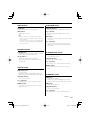
Basic Operations of remote control
SRC
VOL
SRC
ATT
ATT
VOL
AUD
AUD
FM/AM/+/–
2-ZONE
DIRECT
[0] — [9]
: This button is used when Kenwood Bluetooth
HANDS FREE BOX is connected. For more
information, refer to the instruction manual of
Bluetooth HANDS FREE BOX.
Loading and Replacing the battery
Use two "AA"/ "R6"-size batteries.
Slide the cover while pressing downwards to
remove it as illustrated.
Insert the batteries with the + and – poles aligned
properly, following the illustration inside the case.
Basic operations
[VOL] buttons
Adjusts the volume.
[SRC] button
Each time you press the button, the source
alternates.
For the source alternating order refer to <Selecting
the Source> (page 7).
[ATT] button
Turns the volume down quickly.
When the button is pressed again, the volume
returns to the previous level.
2WARNING
• Store unused batteries out of the reach of children.
Contact a doctor immediately if the battery is
accidentally swallowed.
¤
• Do not set the remote control in hot places such as on
the dashboard.
28 |
English
B64-3616-00_00_English.indd 28
06.12.11 8:46:55 AM
Audio Control
In Disc/USB source
[AUD] button
Selects the Audio item to be adjusted.
[4]/ [¢] buttons
Going forwards and backwards between music.
[VOL] buttons
Adjusts the Audio item.
[+]/ [–] buttons
Going forwards and backwards between disc/
folders.
⁄
• Refer to <Audio Control> (page 8) for the operation
method, such as the procedures for Audio control and
others operations.
• The remote control can only select and adjust the Basic
Audio item. Selecting and adjusting of the Detail Audio
item cannot be done.
[38] button
Each time you press the button, the music is played
or paused.
[0] — [9] buttons
When in <Direct Music Search> (page 16) and
<Direct Disc Search> (page 16), enters the music/
disc number.
Dual Zone System
[2-ZONE] button
Each time you press the button, "2ZON" of <Audio
Setup> (page 9) is turned ON or OFF.
[5]/ [∞] buttons
Adjusts the volume of the rear channel.
The rear channel activates while the Dual Zone
System is ON.
In Satellite radio source
[FM] button
Selects the preset band.
[4]/ [¢] buttons
Searches up or down channels.
[0] — [9] buttons
Press buttons [1] — [6] to recall preset channels.
In Tuner source
[DIRECT] button
Enters and cancels the <Direct Access Tuning>
mode.
[FM]/ [AM] buttons
Selects the band.
Each time you press the [FM] button, the band
alternates between the FM1, FM2, and FM3 bands.
In HD Radio source
[4]/ [¢] buttons
Tune up or down band.
[0] — [9] buttons
Press buttons [1] — [6] to recall preset stations.
[DIRECT] button
Enters and cancels the <Direct Access Tuning>
(page 13) mode.
[FM] button
Selects the HD FM band.
Each time you press the [FM] button, the band
alternates between the HF1, HF2, and HF3 bands.
[AM] button
Selects the HD AM band.
[4]/ [¢] buttons
Tunes up or down bands.
[0] — [9] buttons
Press buttons [1] — [6] to recall preset stations.
English |
B64-3616-00_00_English.indd 29
29
06.12.11 8:46:55 AM
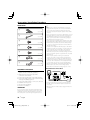
Accessories/ Installation Procedure
¤
1
..........1
2
..........2
3
..........4
4
..........4
5
..........2
6
..........1
7
..........1
Installation Procedure
1. To prevent a short circuit, remove the key from the
ignition and disconnect the - battery.
2. Make the proper input and output wire
connections for each unit.
3. Connect the speaker wires of the wiring harness.
4. Connect the wiring harness wires in the following
order: ground, battery, ignition.
5. Connect the wiring harness connector to the unit.
6. Install the unit in your car.
7. Reconnect the - battery.
8. Press the reset button.
2WARNING
• If the power is not turned ON ("PROTECT" is displayed),
the speaker wire may have a short-circuit or touched the
chassis of the vehicle and the protection function may
have been activated. Therefore, the speaker wire should be
checked.
• If your car’s ignition does not have an ACC position, connect
the ignition wires to a power source that can be turned on
and off with the ignition key. If you connect the ignition
wire to a power source with a constant voltage supply, as
with battery wires, the battery may die.
• If the console has a lid, make sure to install the unit so that
the faceplate will not hit the lid when closing and opening.
• If the fuse blows, first make sure the wires aren’t touching
to cause a short circuit, then replace the old fuse with one
with the same rating.
• Insulate unconnected wires with vinyl tape or other similar
material. To prevent a short circuit, do not remove the caps
on the ends of the unconnected wires or the terminals.
• Connect the speaker wires correctly to the terminals to
which they correspond. The unit may be damaged or fail to
work if you share the - wires or ground them to any metal
part in the car.
• When only two speakers are being connected to the
system, connect the connectors either to both the front
output terminals or to both the rear output terminals (do
not mix front and rear). For example, if you connect the +
connector of the left speaker to a front output terminal, do
not connect the - connector to a rear output terminal.
• After the unit is installed, check whether the brake lamps,
blinkers, wipers, etc. on the car are working properly.
• Mount the unit so that the mounting angle is 30° or less.
If You Want to Connect iPod
AUX IN
Accessories
KCA-iP200 (Optional accessory)
iPod
AUDIO OUT
• No other optional accessory can be connected because
the USB connector and the AUX input are used for iPod
connection.
• Dual Zone System in <Audio Setup> (page 9) will become
unavailable.
If you connect the ignition wire (red) and the battery wire
(yellow) to the car chassis (ground), you may cause a short
circuit, that in turn may start a fire. Always connect those
wires to the power source running through the fuse box.
30 |
English
B64-3616-00_00_English.indd 30
06.12.11 8:46:56 AM
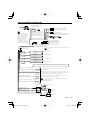
Connecting Wires to Terminals
REMO.CONT
To use the steering wheel
remote control feature, you
need to an exclusive remote
adapter (not supplied)
matches your car is required.
Do not remove the cap
when you do not use the
USB cable. The connector
will cause the unit to
malfunction if it gets in
touch with any metallic
part of the vehicle.
• Fasten the connector
with the tape so that the
cable will not come off.
Sub Woofer left output (White)
Sub Woofer right output (Red)
SUB
WOOFER
Steering remote control
(Light Blue/Yellow)
(KDC-X591 only)
To USB device
USB connector (1m)
AUX input (Stereo)
Use the mini-plug which is stereo type
and does not have any resistance.
AUX IN
Tape
FM/AM antenna input
Front left output (White)
Front right output (Red)
Rear left output (White)
Rear right output (Red)
Fuse (10A)
To Kenwood disc changer/
External optional accessory
Wiring harness
(Accessory1)
FRONT L
To connect these leads, refer to the relevant instruction
manuals.
White
White/Black
To front left speaker
Gray
FRONT R
Gray/Black
To front right speaker
Green
REAR L
REAR R
Green/Black
To rear left speaker
Purple
Purple/Black
To rear right speaker
If no connections are made, do not let the wire come out from the tab.
Power control wire (Blue/White)
P.CONT
Motor antenna control wire (Blue)
ANT.
CONT
TEL mute wire (Brown)
MUTE
Dimmer control wire (Orange / White)
ILLUMI
Car fuse
box
Ignition wire (Red)
When using the optional power amplifier, connect to its power
control terminal.
Depending on what antenna you are using, connect either to the
control terminal of the motor antenna, or to the power terminal
for the booster amplifier of the film-type antenna.
Connect to the terminal that is grounded when either the
telephone rings or during conversation.
To connect the Kenwood navigation system, consult your
navigation manual.
To car light control switch
Ignition key
switch
ACC
Battery wire (Yellow)
Car fuse box
(Main fuse)
Ground wire (Black) · (To car chassis)
–
+ Battery
English |
B64-3616-00_00_English.indd 31
31
06.12.11 8:46:56 AM
Installation
non-Japanese cars
Japanese cars
1 Refer to the section <Removing the hard rubber
Metal mounting strap
(commercially available)
frame> and then remove the hard rubber frame.
Firewall or metal support
2 Align the holes in the unit (two locations on each
side) with the vehicle mounting bracket and secure
the unit with the accessory screws.
T
N
N
T: Toyota cars
N: Nissan cars
Bend the tabs of the
mounting sleeve with a
screwdriver or similar utensil
and attach it in place.
8 mm
MAX.
Self-tapping screw
(commercially available)
Screw (M4X8)
(commercially available)
T/N
T
8mm
MAX.
3
ø5mm
4
ø5mm
Accessory3...for Nissan car
Accessory4...for Toyota car
⁄
¤
• Make sure that the unit is installed securely in place. If the
unit is unstable, it may malfunction (for example, the sound
may skip).
• During installation, do not use any screws except for
those provided. The use of different screws might result in
damage to the main unit.
• Damage may occur if a screwdriver or similar tool is used
with excessive force during the installations.
32 |
English
B64-3616-00_00_English.indd 32
06.12.11 8:46:57 AM
Removing the hard rubber frame
1 Engage the catch pins on the removal tool and
remove the two locks on the upper level.
Upper the frame and pull it forward as shown in
the figure.
Screwing the Faceplate on the Unit
If you want to fasten the faceplate to the main unit
so that it does not fall off.
1 Refer to the section <Removing the hard rubber
frame> and then remove the hard rubber frame.
2 Drop open the faceplate by pressing the Release
button.
3 Tighten the screw (ø2 × 5 mm) (Accessory 5) and
Lock
Catch
Accessory2
Removal tool
2 When the upper level is removed, remove the
lower two locations.
bracket (Accessory6 ) in the hole shown on the
diagram.
Accessory6
Accessory5
⁄
• The frame can be removed from the bottom side in the
same manner.
Removing the Unit
1 Refer to the section <Removing the hard rubber
frame> and then remove the hard rubber frame.
2 Remove the screw (M4 × 8) on the back panel.
3 Insert the two removal tools deeply into the slots
4 Tighten the screw (ø2 × 5 mm) (Accessory 5) and
bracket (Accessory7) in the hole shown on the
diagram.
on each side, as shown.
4 Lower the removal tool toward the bottom, and
Accessory7
pull out the unit halfway while pressing towards
the inside.
Accessory5
Screw (M4X8)
(commercially available)
Accessory2
¤
• Never insert the screws in any other screw hole than the
one specified. If you screw them in another hole, it will
contact and may cause damage to the mechanical parts
inside the unit.
¤
• Be careful to avoid injury from the catch pins on the
removal tool.
5 Pull the unit all the way out with your hands, being
careful not to drop it.
English |
B64-3616-00_00_English.indd 33
33
06.12.11 8:46:57 AM
Troubleshooting Guide
Some functions of this unit may be disabled by
some settings made on this unit.
!
!
Cannot switch to Aux source.
▲ • AUX is not turned on. ☞ <Built-in Auxiliary input
Setting> (page 26)
• AUX cannot be used when the KCA-iP200 is
connected.
• Cannot set up the subwoofer.
• Cannot set up subwoofer phase.
• No output from the subwoofer.
• Cannot set up the low pass filter.
▲ • <Subwoofer Output> (page 10) is not set to On.
• The Dual zone function is enabled. ☞ <Audio
Setup> (page 9)
!
• Cannot set up the high pass filter.
• Cannot set up the Fader.
▲ The Dual zone function is enabled. ☞ <Audio
Setup> (page 9)
!
Cannot set up the subwoofer phase.
▲ Low pass filter is set to Through. ☞ <Audio Setup>
(page 9)
!
• Cannot select the output destination of the
subsource in the Dual zone.
• Cannot adjust the volume of the rear speakers.
▲ The Dual zone function is disabled. ☞ <Audio
Setup> (page 9)
!
No Audio control effect on AUX.
▲ The Dual zone function is enabled. ☞ <Audio
Setup> (page 9)
!
• Cannot register a security code.
• Cannot set up Display Illumination Control.
▲ <Demonstration mode Setting> (page 27) is not
turned off.
!
Cannot play audio files.
▲ <CD Read Setting> (page 26) is set to "2".
!
Cannot File select.
▲ The Scan play or Random play function is enabled.
34 |
What might seem to be a malfunction in your unit
may just be the result of slight misoperation or
miswiring. Before calling service, first check the
following table for possible problems.
General
?
The Touch Sensor Tone doesn’t sound.
✔ The preout jack is being used.
☞ The Touch Sensor Tone can’t be output from the
preout jack.
Tuner source
?
Radio reception is poor.
✔ The car antenna is not extended.
☞ Pull the antenna out all the way.
✔ The antenna control wire is not connected.
☞ Connect the wire correctly, referring to the
section on <Connecting Wires to Terminals>
(page 31).
Disc source
?
The specified disc does not play, but another one
plays instead.
✔ The specified CD is quite dirty.
☞ Clean the CD.
✔ The disc is loaded in a different slot from that
specified.
☞ Eject the disc magazine and check the number
for the specified disc.
✔ The disc is severely scratched.
☞ Try another disc instead.
Audio file source
?
The sound skips when an Audio file is being
played.
✔ The media is scratched or dirty.
☞ Clean the media, referring to the CD cleaning of
the section on <Handling CDs> (page 6).
✔ The audio file is broken or not supported.
☞ Damaged and unsupported files are skipped.
✔ The recording condition is bad.
☞ Record the media again or use another media.
English
B64-3616-00_00_English.indd 34
06.12.11 8:46:58 AM
HD Radio source
?
No sound can be heard, or the volume is low.
✔ The preset broadcast station is not transmitting in
the mode that was set with <Receive mode Setting>
(page 25).
☞ Please set <Receive mode Setting> to "AUTO".
✔ In digital AM broadcasting, receive mode switches
between stereo and monaural too often.
☞ Receiving condition is bad or unstable. Stereo is
chosen when receiving condition is good, and
it switches to monaural when the condition
becomes bad.
✔ HD Radio tuner is connected to KCA-S220A or other
units.
☞ Connect the HD Radio tuner directly to this unit.
USB device source
?
The USB device is not detected.
✔ The USB connector is disconnected.
☞ Connect the connector of the USB device
properly.
?
The USB device does not play its audio files.
✔ The USB connector is disconnected.
☞ Connect the connector of the USB device
properly.
English |
B64-3616-00_00_English.indd 35
35
06.12.11 8:46:58 AM
Troubleshooting Guide
The messages shown below display your
systems condition.
IN (Blink):
The CD player section is not operating
properly.
➪ Reinsert the CD. If the CD cannot be
ejected or the display continues to flash
even when the CD has been properly
reinserted, please switch off the power
and consult your nearest service center.
PROTECT:
The speaker wire has a short-circuit or
touches the chassis of the vehicle, and then
the protection function is activated.
➪ Wire or insulate the speaker cable
properly and press the reset button. If
the "PROTECT" code does not disappear,
consult your nearest service center.
EJECT:
• No disc magazine has been loaded in
the changer. The disc magazine is not
completely loaded.
• No CD in the unit.
NO DISC:
No disc has been loaded in the disc
magazine.
TOC ERR:
• No disc has been loaded in the disc
magazine.
• The CD is quite dirty. The CD is upsidedown. The CD is scratched a lot.
READ ERR:
• The number of files or folders which are
stored in the connected USB device is above
the limitation.
• The file system of the connected USB device
is broken.
➪ Copy the files and folders for the USB
device again referring to http://www.
kenwood.com/usb/. If the error message is
still displayed, initialize the USB device or
use other USB devices.
NA FILE:
An Audio file is played with a format that this
unit can’t support.
➪ ----
COPY PRO:
A copy-protected file is played.
➪ ----
DEMO:
The Demonstration mode has been selected.
➪ The <Demonstration mode Setting> (page
27) is ON. Turn it OFF.
E-05:
The disc is unreadable.
NO DVICE:
BLANK:
Nothing has been recorded on the MD.
NO TRACK:
No tracks are recorded on the MD, although it
has a title.
The USB device is selected as a source
although no USB device is connected.
➪ Change the source to any source other
than USB. Connect an USB device, and
change the source to USB again.
NO PANEL:
The faceplate of the slave unit being
connected to this unit has been removed.
NA DVICE:
An unsupported USB device is connected.
➪ For the supported USB devices, refer to
<http://www.kenwood.com/usb/>.
E-77:
The unit is malfunctioning for some reason.
➪ Press the reset button on the unit. If the
"E-77" code does not disappear, consult
your nearest service center.
NO MUSIC/E-15:• The connected USB device contains no
playable audio file.
• Media was played that doesn’t have data
recorded that the unit can play.
E-99:
Something is wrong with the disc magazine.
Or the unit is malfunctioning for some reason.
➪ Check the disc magazine. And then press
the reset button on the unit. If the "E-99"
code does not disappear, consult your
nearest service center.
USB ERR:
LOAD:
Discs are being exchanged in the Disc
changer.
The connected USB device is rated a current
capacity higher than the allowable limit.
➪ Check the USB device with reference to
<http://www.kenwood.com/usb/>.
Some trouble may have occurred to the
connected USB device.
➪ Change the source to any source other
than USB. Remove the USB device.
READING:
The unit is reading the data on the disc.
iPod ERR:
HOLD:
The protective circuit in the unit activates
when the temperature inside the automatic
disc changer exceeds 60°C (140°F), stopping
all operation.
➪ Cool down the unit by opening the
windows or turning on the air conditioner.
As the temperature falls below 60°C
(140°F), the disc will start playing again.
Connection to the iPod has failed.
➪ Remove the USB device and then
reconnect it.
➪ Confirm that the software for the iPod is
the latest version.
REMOVE:
The Remove mode has been selected for the
USB device. You can remove the USB device
safely.
36 |
English
B64-3616-00_00_English.indd 36
06.12.11 8:46:58 AM
Specifications
Specifications subject to change without notice.
FM tuner section
Frequency range (200 kHz space)
: 87.9 MHz – 107.9 MHz
Usable sensitivity (S/N = 30dB)
: 9.3dBf (0.8 μV /75 Ω)
Quieting Sensitivity (S/N = 50dB)
: 15.2dBf (1.6 μV /75 Ω)
Frequency response (±3.0 dB)
: 30 Hz – 15 kHz
Signal to Noise ratio (MONO)
: 70 dB
Selectivity (±400 kHz)
: ≥ 80 dB
Stereo separation (1 kHz)
: 40 dB
Audio section
Maximum output power
: 50 W x 4
Full Bandwidth Power (at less than 1% THD)
: 22 W x 4
Speaker impedance
:4-8Ω
Tone action
Bass : 100 Hz ±8 dB
Middle : 1 kHz ±8 dB
Treble : 10 kHz ±8 dB
Preout level / Load (during disc play)
: 4000 mV/10 kΩ (KDC-X591)
: 2500 mV/10 kΩ (KDC-MP535U)
Preout impedance
: ≤ 600 Ω
AM tuner section
Frequency range (10 kHz space)
: 530 kHz – 1700 kHz
Usable sensitivity (S/N = 20dB)
: 28 dBμ (25 μV)
CD player section
Laser diode
: GaAlAs
Digital filter (D/A)
: 8 Times Over Sampling
D/A Converter
: 1 Bit
Spindle speed
: 1000 – 400 rpm (CLV 2times)
Wow & Flutter
: Below Measurable Limit
Frequency response (±1 dB)
: 10 Hz – 20 kHz
Total harmonic distortion (1 kHz)
: 0.008 % (KDC-X591)
: 0.01 % (KDC-MP535U)
Signal to Noise ratio (1 kHz)
: 110 dB (KDC-X591)
: 105 dB (KDC-MP535U)
Dynamic range
: 93 dB
MP3 decode
: Compliant with MPEG-1/2 Audio Layer-3
WMA decode
: Compliant with Windows Media Audio
AAC decode
: AAC-LC ".m4a" files
WAV signal
: Linear-PCM
USB Interface
USB Standard
: USB1.0/ 1.1/ 2.0
File System
: FAT16/ 32
Maximum Supply current
: 500 mA
MP3 decode
: Compliant with MPEG-1/2 Audio Layer-3
WMA decode
: Compliant with Windows Media Audio
AAC decode
: AAC-LC ".m4a" files
WAV signal
: Linear-PCM
Auxiliary input
Frequency response (±1 dB)
: 20 Hz – 20 kHz
Input Maximum Voltage
: 1200 mV
Input Impedance
: 100 kΩ
General
Operating voltage (11 – 16V allowable)
: 14.4 V
Current consumption
: 10 A
Installation Size (W x H x D)
: 182 x 53 x 155 mm
7-3/16 x 2-1/16 x 6-1/8 inch
Weight
: 3.1 lbs (1.40 kg)
English |
B64-3616-00_00_English.indd 37
37
06.12.11 8:46:58 AM
B64-3616-00_00_English.indd 38
06.12.11 8:46:59 AM
B64-3616-00_00_English.indd 39
06.12.11 8:46:59 AM
B64-3616-00_00_English.indd 40
06.12.11 8:46:59 AM