1
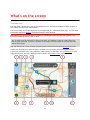
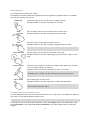
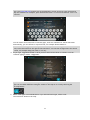
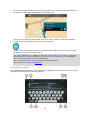
Welcome to navigation with TomTom This Reference Guide explains all you need to know about your new TomTom START navigation device. If you want a quick read of the essentials, we recommend that you read the Get going chapter. This covers installation, switching on, setting up and planning your first route. After that, you will probably want to learn about Quick Search and you can read all about that in the Using Quick Search chapter. For information about what you see on the device itself, go to: New in this release What's on the screen Using gestures Main menu Tip: There are also frequently asked questions (FAQs) at tomtom.com/support. Select your product model from the list or enter a search term. We hope you enjoy reading about and, most importantly, using your new navigation device! 5