1
Invacare® Softform® Premier Active 2 and Active Care
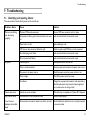
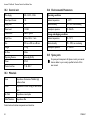
* Low pressure alarm will only function after the system has gone through full cycle set up and “System OK” displayed.
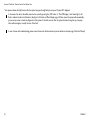
In the event of an alarm, the audible sound can be muted by pressing the „OK“ button C. The LCD display A and Green light E will
flash to indicate the alarm is still evident. (See figure 5.4 Control unit Menu Display, page 14) Once muted, the system will automatically
go into set up mode, to check the diagnostics of the system. If the fault reoccurs after the system has been through set up, the pump
alarm will sound again, to notify the user of the fault.
In case of issues with troubleshooting, please contact Invacare for further assistance (contact details on the back page of this User Manual).
22
1576248-C