1
User Manual
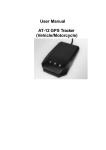
AT-17 GPS Personal/ Tracker
(Vehicle/Motorcycle)
The AT-17 combined with the GSM and GPS technique and use the fireproofing material that arrived Industry
standard which is 6PCS 18MM×3MM super magnet and IPX-5,the internal battery is 8000MAH that can
standby 100 days. The AT-17 can track the vehicle and person’s position by SMS and GPRS on line tracking
software.
Application Fields
●
●
●
●
●
●
●
Car Rental/Fleet Management
Out Door Activity
Children/Old Man/Deformed Man/Valuables
Personal Safe
Personal Management
Tracking Position
Animal Protection
1. Specification
Item
Standard
Recharge Voltage
DC 5V/1000mA (MICRO USB)
Internal battery
8000 mAh (3.7V)
Dimension
130 mm × 72 mm × 20mm
Weight
300g (include battery)
Work Temperature
-20° to 55° C
Work Humidity
5% to 95% Non-condensing
GSM Module
GSM 850/900/1800/1900Mhz
GPS Chipset
UBLOX7020
GPS Sensitivity
--162Db
GPS Frequency
L1, 1575.42 MHz
C/A Code
1.023 MHz chip rate
Channel
56 channel all-in-view tracking
Position Precision
10 meters, 2D RMS
Speed Precision
0.1 m/s
Time Precision
Satellite Time 1 microsecond synchronization
Default Date
WGS-84
Update Time
Average 0.1 sec.
Hot Start
Average 1 sec.
Warm Start
Average 30 sec.
Cold Start
Average 32 sec.
Maxi height
18,000 meters (60,000 feet) max.
Maxi Speed
515 meters/second (1000 knots) max.
Maxi Acceleration
Less than 4g
Moment Move
20 m/sec
Standby
100 Days
LED Light
Three LED light for recharge、GPS、GSM Status
2. Product Listing
● 5V 8000MA Charger (1PCS)
● USB Cable for charging (1PCS)
● User Manual (CD)
● GPS TRACKER AT-17 (1PCS)
3 .How to install the SIM Card in the ATAT-17
3.1 Open the package, check the model and accessories whether correct and full ,or contact your seller
3.2 Get ready a SIM Card .
3.3 Disconnect the waterproof bloc, insert the SIM Card .
Pay Attention:
:
(1)Tracker will switch on automatically after insert the SIM card
(2)SIM Card should open the GPRS function
(3)SIM Card should open the “Caller ID display” function
(4)If your SIM Card is open and need enter SIM PIN, please check your mobile phone user manual and
close the SIM PIN function
(5)Please confirm that the SIM Card have enough money。
(6)To avoid the stealer break it, please put the tracker in a covert place
(7)Do not put the tracker near the emissive source
(8)Tracker have internal GSM and GPS antenna, please ensure that the tracker should face the sky without
any metal block it
3.4 LED Status
3.5 Red Light- Recharge
LED Status
Description
Light On
Recharging
Light Off
Normally Work
3.6 Yellow LED - GSM
LED Status
Description
Flash One time in 2 seconds
GSM Initialization
Light On
GPRS Work Normally
Light Off
GSM Dormancy
3.7 Blue LED - GPS
LED Status
Flash One time in 2 seconds
Description
GPS finding the signal
Light On
GPS work normally
Light Off
GPS Dormancy
4. Tracker Recharge
Please recharge above 12 hours in the first recharging and use the original charger and battery.
Pay Attention :
(1) Our battery have chemical composition ,please do not break or stick and throw it in the fire .
(2) Please keep the batter have enough power
5. Work Mode
This tracker have two work mode which is SMS and GPRS Mode. SMS mode is for off line tracking by Mobile phone. GPRS
Mode is for on line tracking by computer and mobile phone .
6. Tracker Default Work Mode
The Original password of the tracker is : 0000
The Default work mode is : Sleep Mode (SMS Mode)
All the alarm information will only to the first pre-saved number
Detail Operation
1. Controller phone number
Command: * controller phone number * user password *Sequence number (1-3) **
Eg: *13900000000*0000*1-3**
Reply : SET USER NUMBER 1-3 OK
Note:
1. Tracker can have three pre-saved number
2. New Number can cover the old number
3. No pre-saved number also can control the tracker, but alarm information only to
pre-saved number
2. Change user password
Command: 777+new password +old password (4 figures)
Eg: 77700001234
Reply: SET USER PASSWORD OK
3. Work Mode Exchange :
SMS Mode Command:700+ user password
Eg: 7000000
Reply: SET MODE OK, CURRENT MODE: SMS
GPRS Mode Command:710+ user password
Eg: 7100000
Reply: SET MODE OK, CURRENT MODE: GPRS
4. Get Position by SMS
Command:g0000 or 6660000
Reply: when the tracker receive the command, then will send the position with longitude and
latitude
Explanation : Any phone number can send command to the tracker to get the position from the
tracker. (without admin number )
Explanation : If no admin account, any phone number can call the tracker, but without
any reply from the tracker
5. Monitor
Command:66
Explanation : the admin number send command to the tracker, then tracker will call the phone
number and be the monitor mode .
6 . Vibration Alarm
6.1 Open vibration sms alarm:125#
alarm
Reply:OK
6.2 Close vibration sms alarm:126#
alarm
Reply:OK
6.3 Open vibration Phone Alarm:122#
Alarm
Reply:OK
6.4 Close vibration Phone Alarm:121#
Alarm
Reply:OK
6.5 Set the time of Shake Alarm 1-15 seconds
Command:vibtime123456,n
Reply:vibtime set ok
n(0~15),0 cancel shake alarm, the default is 3 seconds
Explanation : Before use this shake alarm, you need open the Defence function firstly .
7. Set Defence ON/OFF
Set Up Defence:712+password
Eg:7120000
Reply:SF OK
Set Down Defence:713+password
Eg: 7130000
Reply:CF OK
8. Daily Report
Command: 665+user password+HHMM
eg: 66500001022
Reply : SET DAILY REPORT OK.
Close Daily report: 665+user password+OFF
eg: 6650000OFF
Reply : SET DAILY REPORT OFF
Note: HH stands for hour with defined range of [00, 23]. MM stands for minute with defined
range of [00, 59].
9. Move Alarm
Turn On Geo-fence
Command: 211+ password
Eg: 2110000
Reply: GEO-FENCE ON
Set Geo Fence Command: 005+user password+Rzzz.z
E.g: 0050000R1.0 (1000M)
Reply: GEOFENCE ON
Turn geo-fence off
Command: 210+ password
Eg: 2100000
Reply: GEO-FENCE OFF
10.
10. Overspeed Alarm
Command : #122#user password#X##
Eg: #122#0000#120##
Reply: SET RATE LIMIT:120
Close command : #122#0000#0##
Note : X is speed benchmark value, which is an integral number. unit is KM/H with defined
domain of [0, 999].
11. Low Power Alarm
While device detect internal battery is low power, it will send low power alarm sms to you
12. Time Zone Exchange
Command: 896 + user password + D + NN
Eg: 8960000E08
Reply : TIME ZONE SET OK,CURRENT:E8.
Note : D takes E or W to indicate east or west time zone respectively. N takes a 2-digit number
(1-12) to indicate time zone number.
13. Set Sleep Mode ON/OFF
Open Sleep Mode Command :SLEEP,0000,1
Close Sleep Command : SLEEP,0000,0
Explanation : Tracker will close gps/gsm/power in sleep mode for save power, once shake,
tracker will work ag
For GPRS Work Mode :
14. Set Access Point Name (APN)
Command 1:#803#user password#APN##
eg:#803#0000#CMNET##
Command2
:
#803#user
password#APN#APN user name#APN
password##
Eg :#803#0000#CMENT#intert#internet##
Reply: SET GPRS APN OK
15. Set server IP address and Port
Command:#804#user password#
IP # Port ##
Eg:#804#0000#115.160.150.155#
8080#
Reply: SET SERVER IP AND
PORT OK
16. Set Data upload interval time
Command:#805#user password#
X #1# (ACC ON)
eg:#805#0000#20#1##
Reply: SET GPS SAMPLING
TIME AND QUANTITY OK
Note : X is mean interval time, the unit is seconds,the wide is 【10,59999】,1 is mean the
interval quantity, when X=0, Close the upload function .
Special Command :
Reset Command : *RESET#0000##
Restart Command *RESTART#0000##
Read the current setup information Command: *RCONF# and *RCONF1#