1
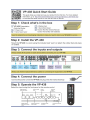
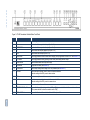
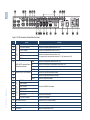
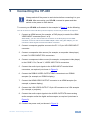
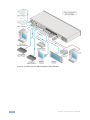
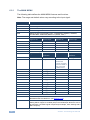
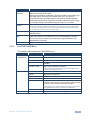
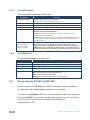
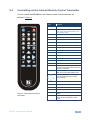
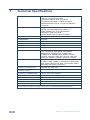
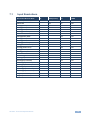
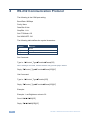
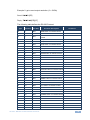
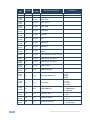
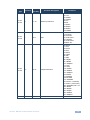
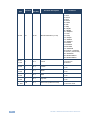
K R A ME R E LE CT R O N IC S L TD . USER MANUAL MODEL: VP-438 Presentation Switcher /Scaler P/N: 2900-000642 Rev 5 Contents 1 Introduction 1 2 2.1 2.2 2.3 3 3.1 Getting Started Achieving the Best Performance Safety Instructions Recycling Kramer Products Overview Defining the VP-438 Presentation Switcher/Scaler 2 2 3 3 4 5 4 Installing in a Rack 8 5 Connecting the VP-438 6 6.1 6.2 6.3 6.4 Controlling the VP-438 Controlling via the Front Panel Buttons Using the OSD Menu Connecting to VP-438 via RS-232 Controlling via the Infrared Remote Control Transmitter 11 11 11 14 15 7 7.1 Technical Specifications Input Resolutions 16 17 8 RS-232 Communication Protocol 18 9 Figures Figure 1: VP-438 Presentation Switcher/Scaler Front Panel Figure 2: VP-438 Presentation Switcher/Scaler Rear Panel Figure 3: Connecting the VP-438 Presentation Switcher/Scaler Figure 4: Infrared Remote Control Transmitter 6 7 10 15 VP-438 – Contents i 1 Introduction Welcome to Kramer Electronics! Since 1981, Kramer Electronics has been providing a world of unique, creative, and affordable solutions to the vast range of problems that confront video, audio, presentation, and broadcasting professionals on a daily basis. In recent years, we have redesigned and upgraded most of our line, making the best even better! Our 1,000-plus different models now appear in 11 groups that are clearly defined by function: GROUP 1: Distribution Amplifiers; GROUP 2: Switchers and Routers; GROUP 3: Control Systems; GROUP 4: Format/Standards Converters; GROUP 5: Range Extenders and Repeaters; GROUP 6: Specialty AV Products; GROUP 7: Scan Converters and Scalers; GROUP 8: Cables and Connectors; GROUP 9: Room Connectivity; GROUP 10: Accessories and Rack Adapters and GROUP 11: Sierra Products. Congratulations on purchasing your Kramer VP-438 Presentation Switcher/Scaler, which is ideal for the following typical applications: Projection systems in conference rooms, boardrooms, auditoriums, hotels and churches, production studios, rental and staging Home theater up-scaling VP-438 - Introduction 1 2 Getting Started We recommend that you: Unpack the equipment carefully and save the original box and packaging materials for possible future shipment i 2.1 Review the contents of this user manual Go to http://www.kramerelectronics.com to check for up-to-date user manuals, application programs, and to check if firmware upgrades are available (where appropriate). Achieving the Best Performance To achieve the best performance: Use only good quality connection cables (we recommend Kramer highperformance, high-resolution cables) to avoid interference, deterioration in signal quality due to poor matching, and elevated noise levels (often associated with low quality cables) Do not secure the cables in tight bundles or roll the slack into tight coils Avoid interference from neighboring electrical appliances that may adversely influence signal quality Position your Kramer VP-438 away from moisture, excessive sunlight and dust ! 2 This equipment is to be used only inside a building. It may only be connected to other equipment that is installed inside a building. VP-438 - Getting Started 2.2 Safety Instructions ! 2.3 Caution: There are no operator serviceable parts inside the unit Warning: Use only the power cord that is supplied with the unit Warning: Do not open the unit. High voltages can cause electrical shock! Servicing by qualified personnel only Warning: Disconnect the power and unplug the unit from the wall before installing Recycling Kramer Products The Waste Electrical and Electronic Equipment (WEEE) Directive 2002/96/EC aims to reduce the amount of WEEE sent for disposal to landfill or incineration by requiring it to be collected and recycled. To comply with the WEEE Directive, Kramer Electronics has made arrangements with the European Advanced Recycling Network (EARN) and will cover any costs of treatment, recycling and recovery of waste Kramer Electronics branded equipment on arrival at the EARN facility. For details of Kramer’s recycling arrangements in your particular country go to our recycling pages at http://www.kramerelectronics.com/support/recycling/. VP-438 - Getting Started 3 3 Overview The Kramer VP-438 is a high-quality presentation switcher and scaler. It accepts one of 10 inputs: four HDMI signals, two computer graphics signals on 15-pin HD connectors, two composite video signals on RCA connectors and two component video signals (also known as Y, Pb, Pr, Y, Cb, Cr and YUV; compatible with both SD and HD component) on RCA connectors. It scales the video, embeds the audio, and outputs the signal to the HDMI output, as well as to a computer graphics output and an RGBHV video output with digital audio and analog stereo audio outputs. The VP-438 Presentation Switcher/Scaler: Is HDTV compatible and the resolution can be up- or down-scaled Is HDCP compliant, the HDCP (High Definition Content Protection) license agreement allows copy−protected data on the HDMI input to pass only to the HDMI output Output signal is available in three formats: 1 HDMI and 2 RGBHV (on 5 BNC connectors, and one 15−pin HD connector) Has analog audio inputs, which include volume control, and digital (S/PDIF) and analog stereo audio outputs Automatically detects and selects the audio source for the HDMI input. Default selection is HDMI – if this is not present, then the machine uses the audio from the analog input Comes with an On-Screen Display (OSD) for easy setup and adjustment, accessible via the IR remote control and via the front-panel buttons 4 Has a non-volatile memory that retains the last settings used Supports firmware upgrade via RS-232 VP-438 - Overview Control your VP-438: Directly, via the front panel push buttons By RS-232 serial commands transmitted by a touch screen system, PC, or other serial controller Remotely, from the infrared remote control transmitter The VP-438 is housed in a 19” 1U rack mountable enclosure, with rack “ears” included, and is fed from a 100-240V AC universal switching power supply. 3.1 Defining the VP-438 Presentation Switcher/Scaler This section defines the VP-438. VP-438 - Overview 5 VP-438 – Overview Figure 1: VP-438 Presentation Switcher/Scaler Front Panel # Feature Function 1 IR Receiver Receives signals from the remote control transmitter 2 CV Press to select the composite video input (from 1 to 2) 3 COMPONENT Press to select the component video input (from 1 to 2) 4 PC Press to select the computer graphics input (from 1 to 2) 5 HDMI Press to select the HDMI input (from 1 to 4) 6 BLANK Button Press to toggle between a blank screen and the display (can be programmed to follow MUTE, see Section 6.2.3) 7 MUTE Button Press to toggle between muting (blocking out the sound) and enabling the audio output 8 FREEZE Button Press to freeze/unfreeze the output video image 9 MENU Button Displays the OSD menu (see Section 6.2) 10 ENTER Button Press to accept changes and change the SETUP parameters (see Section 6.2) 11 - Button Press to decrease numerical values or select from several definitions. When not working in the OSD—press to reduce volume 12 Button Press to move up the menu list 13 + Button Press to increase numerical values or select from several definitions. When not working in the OSD—press to increase volume 14 Button Press to move down the menu list 15 RESET TO XGA/720p Button Press and hold to reset the video resolution to XGA or 720p (press and hold for about 2 seconds to reset to XGA; or press and hold for about 5 seconds to reset to 720p) 16 PANEL LOCK Button Press and hold for about 2 seconds to lock/unlock the front panel buttons 5 6 VP-438 - Overview 7 Figure 2: VP-438 Presentation Switcher/Scaler Rear Panel VIDEO INPUTS # 17 18 19 20 21 22 Feature HDMI Connector Connect to the HDMI source (from 1 to 4) Function PC 15-pin HD Connector Connect to the computer graphics source (from 1 to 2) CV RCA Connector Connect to the composite video source (from 1 to 2) PR RCA Connector Connect to the component video source (from 1 to 2) For component video, connect all three connectors: Y, Pr, Pb (also known as YUV) PB RCA Connector Y RCA Connector 23 HDMI Connect to the analog audio HDMI source (from 1 to 4) PC Connect to the analog audio computer graphics source (from 1 to 2) CV Connect to the analog audio composite video source (from 1 to 2) COMP Connect to the analog audio component video source (from 1 to 2) L Connect to the left stereo analog audio acceptor 25 R Connect to the right stereo analog audio acceptor 26 S/PDIF Connect to a digital audio acceptor AUDIO INPUTS Unbalanced Stereo Terminal Block Connectors 24 AUDIO OUTPUTS RCA Connectors H BNC Connector VIDEO OUTPUTS 27 28 29 VP-438 – Overview 30 31 32 33 V BNC Connector R BNC Connector Connect to the RGBHV video acceptor G BNC Connector B BNC Connector HDMI Connector Connect to the HDMI acceptor PC 15-pin HD Connector Connect to a VGA acceptor 34 RS-232 9-pin D-sub Port Connect to the PC or the remote controller 35 ETHERNET RJ-45 Connector Connect to a network 36 Power Connector with Fuse AC connector, enabling power supply to the unit 37 Power Switch Switch for turning the unit ON or OFF VP-438 - Overview 7 4 Installing in a Rack This section provides instructions for rack mounting the unit. 8 VP-438 - Installing in a Rack 5 Connecting the VP-438 i Always switch off the power to each device before connecting it to your VP-438. After connecting your VP-438, connect its power and then switch on the power to each device. To connect your VP-438, as illustrated in the example in Figure 3, do the following: You do not have to connect all the inputs and outputs, connect only those that are required. 1. Connect an HDMI source (for example, a DVD player) to each of the HDMI VIDEO INPUT connectors (from 1 to 4). Alternatively, you can connect the DVI connector on the DVD player to the HDMI connector on the VP-438 via a DVI-HDMI adapter. When using this adapter, you can connect the audio signal via the terminal block connector. 2. Connect a computer graphics source to the PC 1 15-pin HD VIDEO INPUT connector. 3. Connect a composite video source (for example, a composite video player) to both CV VIDEO INPUT RCA connectors. 4. Connect a component video source (for example, a component video player) to the COMP 1 PR, PB and Y, VIDEO INPUT RCA connectors. 5. Connect the audio input signals to the AUDIO INPUT terminal block connectors, as required (not shown in Figure 3). 6. Connect the RGBHV VIDEO OUTPUT BNC connectors to an RGBHV acceptor (for example, an RGBHV display). 7. Connect the HDMI VIDEO OUTPUT connector to an HDMI acceptor (for example, a plasma display). 8. Connect the VGA VIDEO OUTPUT 15-pin HD connector to a VGA acceptor (for example, a projector). 9. Connect the audio output signals to the AUDIO OUTPUTS stereo analog audio acceptor and/or the digital audio acceptor, as required (not shown in Figure 3). 10. Connect the power cord (not shown in Figure 3). VP-438 - Connecting the VP-438 9 Figure 3: Connecting the VP-438 Presentation Switcher/Scaler 10 VP-438 - Connecting the VP-438 6 Controlling the VP-438 The VP-438 can be controlled via: The front panel buttons (see Section 6.1) The OSD menu (see Section 6.2) RS-232 serial commands transmitted by a touch screen system, PC, or other serial controller (see Section 6.3) 6.1 The infrared remote control transmitter (see Section 6.4) Controlling via the Front Panel Buttons The VP-438 includes the following front panel buttons: Input selector buttons for selecting the required input: CV (1 and 2), COMPONENT (1 and 2), PC (1 and 2) or HDMI (1 to 4) 6.2 BLANK, MUTE and FREEZE buttons MENU, ENTER, and up, down, left and right arrow buttons RESET TO XGA/720p and PANEL LOCK buttons Using the OSD Menu The control buttons let you control the VP-438 via the OSD menu. Press the: MENU button to enter the menu (The default timeout is set to 10 seconds) ENTER button to accept changes and to change the menu settings Arrow buttons to move through the OSD menu, which is displayed on the video output On the OSD menu, select EXIT to exit the menu. VP-438 - Controlling the VP-438 11 6.2.1 The MAIN MENU The following table defines the MAIN MENU features and functions. Note: The range and default values vary according to the input signal. Mode CONTRAST Set the contrast BRIGHTNESS Set the brightness FINETUNE (see Section 6.2.2) COLOR Set the red, green and blue shades SIZE Select the size of the display: FULL, OVERSCAN, UNDER1, UNDER2, LETTER BOX, PANSCAN, BEST FIT (default, FULL) SOURCE Select the source: (default VGA) OUTPUT Function Appears as: Source input Appears as: Source input CV1 CV 1 PC2 VGA 2 CV2 CV 2 HDMI1 HDMI 1 YPBPR1 COMP 1 HDMI2 HDMI 2 YPBPR2 COMP 2 HDMI3 HDMI 3 PC1 VGA 1 HDMI4 HDMI 4 Select the output resolution from the menu (default NATIVE): Appears as: Output resolution: Appears as: Output resolution: 480I 480i 1080P59 [email protected] 480P 480p NATIVE Selects the output resolution from the EDID of the connected HDMI monitor 720P60 720p @50Hz VGA 640x480 1080I60 1080i @60Hz SVGA 800x600 1080P60 1080p @60Hz XGA 1024x768 576I 576i SXGA 1280x1024 576P 576p UXGA 1600x1200 720P50 720p @50Hz WXGA 1366x768 1080I50 1080i @50Hz WSXGA 1680x1050 1080P50 1080p @50Hz WUXGA 1920x1200 480I59 [email protected] 1280x800 1280x800 480P59 [email protected] Hz WXGA+ 1440x900 720P59 [email protected] SXGA+ 1400x1050 1080I59 [email protected] 1600x900 1600x900 AUDIO See Section 6.2.3 OSD Set the OSD parameters: H POSITION, V POSITION, TIMER, BACKGROUND and DISPLAY (see Section 6.2.4) HDCP ON INPUT Select the HDCP option for the HDMI input: either ON (the default) or OFF. Setting HDCP support to enabled (ON) on the HDMI input allows the source to transmit a non-HDCP signal if required (for example, when working with a Mac computer) 12 VP-438 - Controlling the VP-438 6.2.2 Mode HDCP ON OUTPUT Function Select FOLLOW INPUT or FOLLOW OUTPUT to define whether the HDCP will follow the input or the output When FOLLOW INPUT is selected, it changes its HDCP output setting (for the HDMI output) according to the HDCP of the input. This option is recommended when the HDMI output is connected to a splitter/switcher When FOLLOW OUTPUT is selected, the scaler matches its HDCP output to the HDCP setting of the HDMI acceptor to which it is connected FACTORY RESET Resets to the default parameters (resolution is set to XGA or 720p) INFORMATION Displays the source, the input resolution, the output resolution and the software version AUTO SYNC OFF Turn the auto sync ON/OFF. When ON, a short period after not detecting a valid video signal on the selected input, the unit will disable the H and V syncs on the analog outputs until a valid input is again detected or any keypad button is pressed EXIT Select to exit the menu If you cannot see the display after factory reset, use the front panel Res. button to set the correct resolution: press continuously for 2 seconds to reset to XGA, or continuously for 5 seconds to reset to 720p The FINETUNE Menu The following table defines the FINETUNE menu: Input Signal CV, COMPONENT Parameter Function HUE Set the color hue SATURATION Set the color saturation SHARPNESS Set the sharpness of the picture NOISE REDUCTION Select the noise reduction: OFF, HI, LOW and MID (middle) COLOR FILTER Set to ON to enable color filtering May improve the output image for certain graphic cards where color fringing is seen VGA PHASE Set the clock phase CLOCK Set the clock frequency H-POSITION Set the horizontal position of the picture V-POSITION Set the vertical position of the picture AUTO TUNE When set to ON, automatically centers the picture correctly on the screen every time the input is switched to VGA or when the input resolution changes Alternatively, you can auto adjust the image by pressing the ENTER button when not within the OSD menu HDMI COLOR FILTER Set to ON to enable color filtering COLOR FILTER Set to ON to enable color filtering VP-438 - Controlling the VP-438 13 6.2.3 The AUDIO Menu The following table defines the AUDIO menu. Parameter OUTPUT VOLUME Function Set the output volume (from 0 to 100) INPUT VOLUME Set the input volume (from 0 to 100) DELAY Select the audio delay time: OFF, 40ms, 110ms and 150ms SOUND Select the sound options: ON, MUTE MUTE FOLLOWS Select the action that will be followed by mute: INDEPENDENT, FREEZE, BLANK, FREEZE/BLANK Not applicable for embedded HDMI audio inputs INDEPENDENT means that the audio muting is independent of the FREEZE and BLANK functions FREEZE/BLANK means that when you FREEZE or BLANK the video, then the audio will be muted (the MUTE function follows the FREEZE and the BLANK functions) HDMI AUDIO IN Enabled only when one of the HDMI inputs is selected 6.2.4 Select AUTOMATIC (In this case, the embedded audio on the HDMI input is selected for an HDMI signal, or the analog audio input is selected if the input is not HDMI (for example, for a DVI input signal), EMBEDDED (In this case, the embedded audio in the HDMI signal is selected) or ANALOG (In this case, the analog audio input is selected) The OSD Menu The following table defines the OSD menu. 6.3 Parameter H POSITION Function Set the horizontal position of the OSD (from 0 to 100) V POSITION Set the vertical position of the OSD (from 0 to 100) TIMER Set the timeout period in seconds (from 5 to 100) BACKGROUND Set the OSD background between 0 (solid black) and 8 (transparent) DISPLAY Select the information shown on the screen during operation: ON - the information is shown permanently OFF - the information is not shown INFO - the information is shown for a few seconds Connecting to VP-438 via RS-232 You can connect to the VP-438 via an RS-232 connection using, for example, a PC. Note that a null-modem adapter/connection is not required. To connect to the VP-438 via RS-232, connect the RS-232 9-pin D-sub rear panel port on the VP-438 unit via a 9-wire straight cable (only pin 2 to pin 2, pin 3 to pin 3, and pin 5 to pin 5 need to be connected) to the RS-232 9-pin D-sub port on your PC. 14 VP-438 - Controlling the VP-438 6.4 Controlling via the Infrared Remote Control Transmitter You can control the VP-438 from the infrared remote control transmitter, as defined in Figure 4: SIZE POWER CV1 CV2 COMP1 COMP2 PC1 PC2 HDMI1 HDMI2 HDMI3 HDMI4 INFO NATIVE MENU EXIT FREEZE BLANK MUTE Keys Function SIZE Set the size of the image displayed POWER Turn the VP-438 ON or OFF OFF in this case means that the unit is in standby mode CV1 Select the composite video 1 input CV2 Select the composite video 2 input COMP1 Select the component video 1 input COMP2 Select the component video 2 input PC1 Select the UXGA 1 input PC2 Select the UXGA 2 input HDMI1 Select the HDMI 1 input HDMI2 Select the HDMI 2 input HDMI3 Select the HDMI 3 input HDMI4 Select the HDMI 4 input XGA Reset Reset the resolution to XGA 720p Reset Reset the resolution to 720p INFO Displays the selected input, the input and output resolutions and the firmware versions on the OSD NATIVE Select the output resolution via the EDID of the connected HDMI monitor Four navigation keys (Left and right arrow keys also function as output volume control) LR-30 Figure 4: Infrared Remote Control Transmitter VP-438 - Controlling the VP-438 OK Press to accept changes MENU Enter the OSD menu EXIT EXIT the menu FREEZE Freeze/unfreeze the output video image BLANK Toggle between a blank screen and the display MUTE Toggle between muting (blocking out the sound) and enabling the audio output 15 7 Technical Specifications INPUTS: 4 HDMI connectors (HDMI, HDCP version 1.1) 2 VGA on a 15-pin HD connector 2 composite video on an RCA connector 2 component video each on 3 RCA connectors Unbalanced stereo audio on 10 3-pin terminal block connectors OUTPUT: 1 RGBHV on 5 BNC connectors 1 HDMI connector (HDMI, HDCP version 1.1) 1 VGA (RGBHV) on a 15-pin HD connector 1 S/PDIF on an RCA connector 1 analog stereo audio on 2 RCA connectors H FREQUENCY: 15.63-90kHz V FREQUENCY: 50-100Hz RGB SYNCS: H and V TTL separated syncs RGB LEVEL: 1.2Vpp max, 75 load XGA OUT LEVEL: 1.2Vpp max, 75 load S/PDIF OUT LEVEL: 0.55Vpp constant OUTPUT RESOLUTIONS: 480i, 480p, 720p @50Hz, 1080i @60Hz, 1080p @60Hz, 576i, 576p, 720p @50Hz, 1080i @50Hz, 1080p @50Hz, [email protected], [email protected] Hz, [email protected], [email protected], [email protected], 640x480, 800x600, 1024x768, 1280x1024, 1600x1200, 1366x768, 1680x1050, 1920x1200, 1280x800, 1440x900, 1400x1050, 1600x900 CONTROLS: CV 1, CV 2, component 1, component 2, PC 1, PC 2, HDMI 1, HDMI 2, HDMI 3, HDMI 4, input selector buttons; blank, mute, freeze buttons; menu, enter, menu arrows, reset to XGA/720p, lock buttons, RS-232, IR POWER CONSUMPTION: 100-240V AC, 25VA max. OPERATING TEMPERATURE: 0° to +40°C (32° to 104°F) STORAGE TEMPERATURE: -40° to +70°C (-40° to 158°F) HUMIDITY: 10% to 90%, RHL non-condensing DIMENSIONS: 100-240V AC, 25VA max. WEIGHT: 19" x 7" x 1U (W, D, H) rack mountable ACCESSORIES: 2.7kg (6lbs) approx OPTIONS: Power cord, rack ears, IR remote control Specifications are subject to change without notice at http://www.kramerelectronics.com 16 VP-438 - Technical Specifications 7.1 Input Resolutions Y, Pb, Pr (Component) Yes PC HDMI No Yes 480P/576P Yes No Yes 720P@(60/50) Yes No Yes 1080I@(60/50) Yes No Yes 1080P@(60/50) Yes No Yes 1080P@(24/25/30) Yes No Yes 480P/576P-RGB Yes Yes 720P@(60/50)-RGB Yes Yes 1080I@(60/50)-RGB No Yes 1080P@(60/50)-RGB Yes Yes 1080P@(24/25/30)-RGB No Yes VGA@(60/67/72/75/85) Yes Yes SVGA@(56/60/72/75) Yes Yes XGA@(60/70/75) Yes Yes SXGA@(60/75) Yes Yes 1280X960 Yes Yes 1600X900@60 Yes Yes UXGA@60 ( 1600X1200 ) Yes Yes WXGA@60(1280x800) Yes Yes WXGA+@60(1440x900) Yes Yes WXGA@60(1366x768) Yes Yes SXGA+@60(1400x1050) Yes Yes WSXGA@60(1680x1050) Yes Yes WUXGA@60(1920x1200) Yes Yes 2K@50 ( 2048X1080) Yes Yes 2K@60 ( 2048X1080) Yes Yes Resolution/Refresh Rate CV 480I/576I(NTSC/PAL) Yes VP-438 - Technical Specifications 17 8 RS-232 Communication Protocol The following is the COM port setting: Baud Rate: 9600bps Parity: None Data Bits: 8 bits Stop Bits: 1 bit Set CTS Mode: Off Set XON/XOFF: Off The following table defines the symbol characters: Symbol Meaning Space [CR] Carriage Return, ASCII code 0x0D [LF] Line Feed, ASCII code 0x0A Set Command Type in: YControl_TypeFunctionParam[CR] When sending a command, a blank character may precede [CR] if desired. Reply: ZControl_TypeFunctionParam[CR][LF] Get Command: Type in: YControl_TypeFunction[CR] Reply: ZControl_TypeFunctionParam[CR][LF] Example: Example 1: set Brightness value to 32 Send: Y11632[CR] Reply: Z11632[CR][LF] 18 VP-438 - RS-232 Communication Protocol Example 2: get current output resolution (2 = SVGA) Send: Y421[CR] Reply: Z4212[CR][LF] The following table defines the RS-232 Protocol: Control Type 0 0 Param (for Set) N/A SIZE button on remote control 0 1 N/A POWER button on remote control 0 2 N/A FREEZE button on remote control 0 3 N/A 480p button on remote control 0 4 N/A 576p button on remote control 0 5 N/A 720p button on remote control 0 6 N/A 1080i button on remote control 0 7 N/A 1080p button on remote control 0 8 N/A VGA button on remote control 0 9 N/A SVGA button on remote control 0 10 N/A XGA button on remote control 0 11 N/A SXGA button on remote control 0 12 N/A WXGA button on remote control 0 13 N/A UXGA button on remote control 0 14 N/A INFO button on remote control 0 15 N/A UP button on remote control 0 16 N/A NATIVE button on remote control 0 17 N/A LEFT button on remote control 0 18 N/A OK button on remote control 0 19 N/A RIGHT button on remote control 0 20 N/A MENU button on remote control 0 21 N/A DOWN button on remote control 0 22 N/A EXIT button on remote control 0 23 N/A CV1 button on remote control 0 25 N/A COMP1 button on remote control 0 26 N/A HDMI1 button on remote control 0 27 N/A HDMI2 button on remote control 0 28 N/A COMP2 button on remote control 0 29 N/A PC 1 button on remote control 0 30 N/A BLANK button on remote control 0 31 N/A MUTE button on remote control 33 N/A Auto adjust 0 34 N/A CV2 button on remote control 0 35 N/A PC2 button on remote control Function VP-438 - RS-232 Communication Protocol Function Description Comment FW V6.12 19 20 Control Type 0 36 Param (for Set) N/A 0 HDMI3 button on remote control 37 N/A HDMI4 button on remote control 1: Set 2: Get 4 0~100 Color: Red 1: Set 2: Get 5 0~100 Color: Green 1: Set 2: Get 6 0~100 Color: Blue 1: Set 2: Get 16 0~100 Brightness 1: Set 2: Get 17 0~100 Contrast 1: Set 2: Get 25 0~100 Hue 1: Set 2: Get 26 0~100 Sharpness 1: Set 2: Get 29 0~100 Saturation 1: Set 2: Get 33 0~100 set an absolute volume for Output 1: Set 2: Get 34 0~100 set an absolute volume for Input 1: Set 2: Get 41 0~100 OSD Setting :H-Position 1: Set 2: Get 42 0~100 OSD Setting: V-Position 1: Set 2: Get 43 0~100 OSD Timeout 1: Set 2: Get 44 0~8 OSD Background 1: Set 2: Get 50 0~3 NR (Noise Reduction) 1: Set 2: Get 51 0~3 Audio delay 1: Set 2: Get 52 0~2 HDMI AUDIO IN 0 : AUTOMATIC 1 : EMBEDDED 2 : ANALOG 1: Set 2: Get 84 0~1 Auto Sync Off 0 : OFF (FW:6.14) 1 : ON 1: Set 2: Get 160 0~1 HDCP ON INPUT 0 : OFF 1 : ON 1: Set 2: Get 161 0~1 HDCP ON OUTPUT 0 : Follow input 1 : Follow output Function Function Description Comment 0: Off 1: Low 2: Mid 3: High 0: Off 1: 40ms 2: 110ms 3: 150ms VP-438 - RS-232 Communication Protocol Control Type 3: Set 4: Get 3: Set 4: Get 3: Set 4: Get Function 0 1 21 Param (for Set) 1~10 0~6 0~27 Function Description Comment Select Input Source 1: CV1 2: CV2 3: COMP1 4: COMP2 5: PC1 6:PC2 7: HDMI1 8: HDMI2 9: HDMI3 10: HDMI4 Size 0: Full 1: Panscan 2: Overscan 3: Underscan1 4: Letterbox 5: Underscan2 6. BEST FIT Output Resolution 0: Native 1: VGA 2: SVGA 3: XGA 4: SXGA 5: UXGA 6: 480i 7: 480p 8: 720p60 9: 1080i60 10: 1080p60 11: 576i 12: 576p 13: 720p50 14: 1080i50 15: 1080p50 16: WXGA 17: WSXGA 18: WUXGA 19: 1280x800 20: WXGA+ (1440X900) 21: SXGA+ (1400X1050) 22: 1600x900 F/W 1.32 23: 480i59 24: 480p59 25: 720p59 26: 1080i59 27: 1080p59 3: Set 23 1 VP-438 - RS-232 Communication Protocol Factory Reset 21 Control Type 4: Get Function 24 Param (for Set) 0~24 Function Description INPUT Resolution (V1.41) Comment 0: Un-known 1: VGA 2. SVGA 3: XGA 4: SXGA 5: UXGA 6: 480i 7: 480p 8: 720p60 9: 1080i60 10: 1080p60 11: 576i 12: 576p 13: 720p50 14: 1080i50 15: 1080p50 16: WXGA 17: WSXGA 18: WUXGA 19: 1280x800 20: WXGA+ (1440X900) 21: SXGA+ (1400X1050) 22: 1600X900 23: 2048X1080/50 24: 2048X1080/60 22 6: Set 7: Get 0 0~2 Power 0: Power Down 1: Power On 2: Reboot 6: Set 7: Get 1 0~1 Freeze 0: Off 1: On 6: Set 7: Get 2 0~1 Blank 0: Off 1: On 6: Set 7: Get 3 0~1 Mute 0: Off 1: On 6: Set 7: Get 4 0~1 Key lock 0: Off 1: On 6 : Set 7 : Get 140 0~1 Auto Tune (under fine tune) 0: Clear Auto Tune 1: Set Auto Tune VP-438 - RS-232 Communication Protocol For the latest information on our products and a list of Kramer distributors, visit our Web site where updates to this user manual may be found. We welcome your questions, comments, and feedback. Web site: www.kramerelectronics.com E-mail: [email protected] ! P/N: SAFETY WARNING Disconnect the unit from the power supply before opening and servicing 2900- 000642 Rev: 5