1
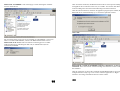
WARNING CIPHER 1160/1260 Bluetooth Wireless Scanner User’s Manual This equipment has been tested and found to comply with the limits for a Class A digital device, pursuant to Part 15 of FCC Rules. These limits are designed to provide reasonable protection against harmful interference in a residential installation. This equipment generates, uses and can radiate radio frequency energy and, if not installed and used in accordance with the instructions, may cause harmful interference to radio communications. However, there is no guarantee that interference will not occur in a particular installation. If this equipment does cause harmful interference to radio or television reception, which can be determined by turning the equipment off and on, the user is encouraged to try correct the interference by one or more of the following measures: • Reorient or relocate the receiving antenna. • Increase the separation between the equipment and receiver. • Connect the equipment into an outlet on a circuit different from that to which the receiver is connected. • Consult the dealer or an experienced radio/TV technician for help. Document Number : 1X60-0200 Release Date : Nov 20, 2003 2003, SYNTECH INFORMATION Co., Ltd.. All rights reserved. CipherLab is a registered trademark of SYNTECH INFORMATION Co., Ltd. Table of Contents 1. 2. Introduction.....................................................................................................1 Installation.......................................................................................................2 2.1 Power Up the 3660 Base Station.............................................................2 2.2 Power Up the 1160/1260.........................................................................3 2.3 Setup RF Connection ..............................................................................3 2.4 Charging your 1160/1260........................................................................4 2.5 Interface Setting ......................................................................................5 3. General Features .............................................................................................6 3.1 Buzzer .....................................................................................................6 3.2 Indicator ..................................................................................................6 3.3 Scan Modes .............................................................................................6 3.4 Auto-Sense ..............................................................................................7 3.5 Re-read Delay..........................................................................................7 3.6 Scanner Time-out Duration .....................................................................8 3.7 Reading Redundancy...............................................................................8 3.8 Supported Symbologies...........................................................................8 3.9 Negative Barcodes ..................................................................................8 4. Output Interface (3660 Base Unit) ................................................................10 4.1 Keyboard Wedge Interface....................................................................10 4.1.1 Keyboard Type..............................................................................10 4.1.2 Keyboard Style - Alphabets...........................................................10 4.1.3 Keyboard Style – Digits ................................................................10 4.1.4 Capital Lock Status .......................................................................11 4.1.5 Alphabets Transmission ................................................................11 4.1.6 Digits Transmission.......................................................................11 4.1.7 Inter-Character Delay ....................................................................11 4.2 RS232 Interface.....................................................................................11 4.2.1 Baud Rate / Parity / Data Bits .......................................................12 4.2.2 Flow Control .................................................................................12 4.2.3 Inter-Character Delay ....................................................................12 4.3 USB Interface........................................................................................12 4.4 Memory Parameters ..............................................................................12 4.4.1 Memory Mode...............................................................................12 4.4.2 Clear Data .....................................................................................12 4.4.3 Send Data ......................................................................................13 4.4.4 Memory Data Delay ......................................................................13 5. Bluetooth Serial Port.....................................................................................14 5.1 Configuring 1160/1260 .........................................................................14 5.1.1 Activate Bluetooth Serial Port Interface........................................14 5.1.2 Authentication & PIN Code ..........................................................14 5.1.3 Device Name Broadcasting........................................................... 14 5.1.4 Update Settings ............................................................................. 15 5.1.5 Timeout......................................................................................... 15 5.2 Configuring Bluetooth Device Driver................................................... 15 6. Symbology Parameters ................................................................................. 21 6.1 Code39.................................................................................................. 21 6.2 Italy / French Pharmacode .................................................................... 21 6.3 Industrial / Interleave / Matrix 25 ......................................................... 21 6.4 Codabar................................................................................................. 22 6.5 UPCE .................................................................................................... 22 6.6 EAN8 .................................................................................................... 22 6.7 UPCA.................................................................................................... 23 6.8 EAN13 .................................................................................................. 23 6.9 MSI ....................................................................................................... 23 6.10 Plessey .................................................................................................. 23 6.11 Telepen ................................................................................................. 24 6.12 RSS ....................................................................................................... 24 7. Data Output Format ...................................................................................... 25 7.1 Character Substitution........................................................................... 25 7.2 Prefix / Postfix Code............................................................................. 25 7.3 Code ID................................................................................................. 25 7.4 Length Code.......................................................................................... 26 8. Data Editing .................................................................................................. 27 8.1 Select Editing Format............................................................................ 27 8.2 Restore Default Format......................................................................... 27 8.3 Applicable Conditions .......................................................................... 27 8.4 Total Number of Fields......................................................................... 28 8.5 Dividing Data into Fields...................................................................... 28 8.6 Additional Fields................................................................................... 29 8.7 Field Transmission Sequence................................................................ 29 8.8 End of Format Programming................................................................. 29 8.9 Activate Data Editing Formats.............................................................. 29 8.10 Exclusive Data Editing.......................................................................... 29 8.11 Programming Examples ........................................................................ 29 9. Configuring your 1160/1260......................................................................... 31 9.1 Enter Configuration Mode .................................................................... 31 9.2 Default .................................................................................................. 31 9.3 List Setting ............................................................................................ 31 9.4 Setting Parameter Values ...................................................................... 31 9.4.1 Numeric Parameters...................................................................... 32 9.4.2 Character String Parameters.......................................................... 32 9.4.3 Key Type/Status Setting................................................................ 33 9.5 Exit Configuration Mode.......................................................................34 1. Introduction 2. Installation The 1160/1260 is the first CipherLab Wireless scanner utilizing Bluetooth Technology. The scanner has a range of over 50 meters and a battery life of over 50,000 scans. The difference between 1160 and 1260 is the barcode scan engine installed inside the scanner. The 1160 uses CCD linear imager, whereas the 1260 uses a Laser engine. This manual contains all the information needed to operate and configure the 1160/1260 Wireless Barcode Scanner. It is divided into two parts. The first part of this manual describes the installation, operation and programmable features of the scanner. The second part of this manual contains the setup barcodes used to configure the scanner. The 1160/1260 is one of the most versatile and flexible wireless barcode scanners available today. All the features and functions required for up to date barcode reading are included. Owing to the compact design and extremely low power consumption, this scanner provides for easy installation and high product durability. The scanner will not only cater for the requirements needed today, but also can fulfill your long-term needs. The main functions and features provided on the 1160/1260 are listed below. The 1160/1260 kit contains: 1160/1260 Wireless Barcode Scanner 3660 Base and / or Charger dock Serial/Keyboard/USB Cable (depending on configuration ordered) Power Supply for Base/charger. Diskette containing “Scan Manager” and this manual Note : For installation and configuration instructions on Bluetooth Serial Port operation, please refer to the section “Bluetooth Serial Port”. 2.1 Power Up the 3660 Base Station • Barcode Readability: Most popular barcode symbologies are supported including the newest RSS Code. • Support for negative barcodes. • Supports eight scan modes. • Programmable Beeping Tone • Dual Color Indicator • Interface Support (base unit): KB Wedge, RS232, and USB • Bluetooth Serial Port Profile Support : The scanner can transmit scanned data to Bluetooth enabled computer/PDA via standard Bluetooth Serial Port communication. Connect the interface cable into the 15 pin connector at the back of the base. The cable you connect will depend on the interface you and cable you ordered. There are various cables available: RS232, Keyboard or USB. • Programmable Code ID: Code ID can be individually configured for each symbology. Turn OFF your PC or Laptop where you will connect the base into. Once your cable is connected to the base, plug the other end into the appropriate connection on your PC. E.g. If you have a serial cable then plug into the com port of your PC, if you have a Keyboard cable then plug into keyboard port of your PC and if you have a USB cable plug into the USB port on your PC. • Programmable Length Code • Programmable Prefix Code • Programmable Postfix Code • Character Substitution Connect the power supply provided to your AC outlet and plug the other end into your base. Power ON your PC. • Data Editing: Data can be reorganized according to user programmable formats. Up to three data editing formats are supported. You are now ready to configure your scanner and base. • Extremely Low Power Consumption 1 2 2.4 Charging your 1160/1260 2.2 Power Up the 1160/1260 When you receive your 1160/1260 it will be in an OFF mode. This is done to conserve power and for transportation purposes. At the base of the scanner you will find a small pin hole. Using a straightened paper clip insert the end of the paper clip into the pin hole. The scanner will beep its LED will light up and it will power up. The scanner will also power up once inserted into the base. Please ensure that you power down the scanner if it will not be used for prolonged periods. This is done by inserting a paper clip into the pin hole at the base of the scanner. The scanner’s LED will go off and the power to the scanner will be disconnected. To charge your scanner just place it on the base. The LED on the top of the scanner will flash RED whilst it charges. When the battery is fully charged, around 4 hours from completely empty battery, the LED will stay on solid RED. 2.3 Setup RF Connection Upon powering up the scanner will try to establish an RF connection with its base. At this stage we need to “pair” the scanner and base. Turn the base upside down and you will find 2 labels. The first label has the words “SET CONNECTION” and a barcode. The second label is the serial number. To link the scanner to the base, scan the “SET CONNECTION” barcode label, the scanner will beep once, then scan the SERIAL number barcode. The scanner will beep twice, low then high beep. When it establishes RF connection with the base the scanner will then emit three short ascending beeps. Your “pairing” is established. 3 4 3. General Features 2.5 Interface Setting Once you have “paired” the scanner and base, you need to specify the interface type to your PC. The interface settings are stored in the base. So ensure that you have RF connection between your scanner and base prior to setting the interface type. For details on selecting interfaces please refer to the relevant section in this manual. 3.1 Buzzer The buzzer of the scanner beeps differently to indicate various operating conditions. • Power On Beep: The scanner will issue a long beep to indicate a successful power on. • Good Read Beep: There are four volume levels and four beeping tones (frequencies) that the user can select from to signify a good read. The available options are: Volume: Maximum/Loud/Medium/Minimum Frequency: 8 / 4 / 2 / 1 kHz • Error Beep: The scanner will issue a long beep with a low tone to indicate errors. • Enter / Exit Configuration Beep: The scanner will issue 6 beeps upon entering / exiting the configuration mode. • Setup Beep: In configuration mode, the scanner will normally beep twice when a setup barcode is read. If the particular setup parameter needs more than one read, the scanner will only issue a short beep to indicate that there are more setup barcodes needed to complete the current parameter setting. 3.2 Indicator There is a dual color indicator on top of the scanner. Normally it is off, and will turn red when there is a good read. The indicator will be green when the scanner is in configuration mode. 3.3 Scan Modes There are eight scan modes supported by the scanner. The user can choose the desired scan mode depending on the application requirements. But, if the scanner is a switch-less scanner, only Continuous mode or Testing mode can be selected (other scan modes involve trigger switch interaction). The supported scan modes are described below. • Auto Off Mode: The scanner will start scanning once the switch is triggered. The scanning continues until either a barcode is read or a preset scanning period (Scanner Time-Out Duration) is expired. • Continuous Mode: The scanner is always scanning. • Auto Power Off Mode: The scanner will start scanning once the switch is triggered. The scanning continues until a preset scanning period (Scanner Time-Out Duration) is expired. Unlike the Auto Off mode, the scanner will 5 6 continue to scan and the scanning period is re-counted each time there is a successful read. • Alternate Mode: The scanner will start scanning once the switch is triggered. The scanner will continue scanning until the switch is triggered again. • Momentary Mode: The scanner will be scanning as long as the switch is depressed. • Repeat Mode: The scanner is always scanning just like Continuous Mode. But now the switch acts like a “re-transmit button”. If the switch is triggered within 1 second after a good read, the same data will be transmitted again without actually reading the barcode. This “re-transmit button” can be triggered as many times as user desired, as long as the time between each triggering does not exceed 1 second. This scan mode is most useful when the same barcode is to be read many times. • Laser Mode: This is the scan mode most often used on laser scanners. The scanner will start scanning once the switch is pressed. The scanning continues until either a barcode is read, the switch is released or a preset scanning period (Scanner Time-Out Duration) is expired. 3.6 Scanner Time-out Duration This parameter is used to limit the maximum scanning period when the scan mode is either Auto Off Mode or Auto Power Off Mode. This time-out duration is specified in units of second. The default time-out duration is ten seconds. 3.7 Reading Redundancy This parameter is used to specify the levels of reading (decoding) security. If No Redundancy is selected, only one successful decoding can make the reading valid. If Three Times Redundancy is selected, it will take 3 successful decodes to make the reading valid. It is obvious that the more redundancy the user selects, the higher the reading security and thus the slower the reading speed. The user must compromise between decoding security and decoding speed if the security feature is needed. 3.8 Supported Symbologies Most of the popular barcode symbologies are supported. Each symbology can be individually enabled or disabled. The scanner will automatically discriminate and recognize all the symbologies that are enabled. The supported barcode symbologies are listed below. • • • • • • • • • • • • • • • • • • Test Mode: The scanner is always scanning. The scanner will decode repeatedly even with the same barcode. By default, the scan mode is Auto Off mode for scanners with trigger switch, and is Continuous mode for switch-less scanners. 3.4 Auto-Sense Auto-Sense is used in conjunction with the auto-sense stand. It will enable the scanner to start scanning once a barcode is brought within Range of the scanner. This will activate the LEDs and the scanner will start decoding the barcode. The auto-sense mode works only under Auto Off mode or Laser mode only. 3.5 Re-read Delay If the scanner mode is set to Continuous, Auto Power Off, Alternate, or Momentary mode, the scanner will prevent accidentally reading the same barcode twice by using a Re-read Delay (Blocking Time). The barcode must be taken away from the scanning line longer than the Re-read Delay to allow second reading of the same barcode. The Re-read Delay can be set by the user. Code 39 (Standard / Full ASCII) Italy Pharmacode French Pharmacode Industrial 25 Interleave 25 Matrix 25 Codabar (NW-7) UPCA (with or without Addon) UPCE (with or without Addon) EAN8 (with or without Addon) EAN13 (with or without Addon) Code 93 Code 128 EAN 128 MSI Telepen Plessey 3.9 Negative Barcodes The scanner can be configured to read negative barcodes. Normally, barcodes are printed with the color of the bars darker than that of the spaces. But for negative 7 8 4. Output Interface (3660 Base Unit) barcodes, they are printed in the opposite sense just like negative films. The spaces of the negative barcodes are printed with a color darker than that of the bars. The 1160/1260 is a multi-interface scanner. It can be used as a keyboard wedge scanner, an RS-232 scanner, or a USB scanner. The output interface can be programmed using the setup barcodes in this manual. Please ensure that you have an RF connection between the scanner and the base prior to selecting the interface type. 4.1 Keyboard Wedge Interface 4.1.1 Keyboard Type The keyboard wedge interface is enabled by configuring/selecting keyboard type. The supported keyboard types are listed below. • PCAT - US, French German, Italian, Swedish, Norwegian, UK, Belgium, Spanish, and Portuguese KBD • PS2-30 • IBM 3477 TYPE (Japanese KBD) • IBM 34XX, 319X & Memorex Telex (122Keys) 4.1.2 Keyboard Style - Alphabets Keyboard layout style can be selected. There are three options to this setting : default layout (US or English style), AZERTY layout, and QWERTZ layout. This setting only works when the keyboard type selected is for US keyboard. The scanner will make necessary adjustment when sending the ‘A’, ‘Q’, ‘W’, ‘Z’, ‘Y’, and ‘M’ character according to this setting. 4.1.3 Keyboard Style – Digits There are two digit layout styles as shown on the following figures. One has its digit keys on top (upper row), the other has them on bottom (lower row). The digit layout style can be changed by configuring this setting. There are three options to this setting : Default, Lower Row, and Upper Row. The scanner will make necessary adjustment when sending digits according to the setting value of this parameter. This setting is meant to be used with the above setting (Keyboard Style – Alphabets) and perhaps Character Substitution setting, when support to languages not available on the scanner is needed. ! 1 @ 2 # 3 Digits on Lower Row 9 10 $ 4 1 ! 2 @ 3 # 4.2.1 Baud Rate / Parity / Data Bits The supported baud rate, parity, and data bit are listed below. 4 $ • Baud Rate : 115200 / 38400 / 19200 / 9600 / 4800 / 2400 / 1200 / 600 • Parity : None / Even / Odd • Data bit : 8 / 7 Digits on Upper Row 4.1.4 Capital Lock Status In order to send alphabets with correct case, the scanner needs to know the capital lock status of the keyboard. Incorrect settings may result in reversed case of alphabets being transmitted. There are 3 options to this parameter : On, Off, or Auto Detection. If this parameter is set to Auto Detection, the scanner will automatically detect the capital lock status of the keyboard before it transmits data. 4.1.5 Alphabets Transmission User can choose how alphabets are sent by configuring this parameter. The alphabets can be sent according to their case (the Case Sensitive option), or the case is ignored (the Ignore Case option) when transmitting. 4.1.6 Digits Transmission User can choose how the scanner transmits digits by configuring this parameter. The scanner can transmit digits by using the alphanumeric key or by using the numeric keypad. The Num Lock status of the keyboard should be ON if numeric keypad option is selected. 4.2.2 Flow Control The user can further configure the flow (handshake) control method to be used. The available options are listed below. • No Flow Control • Scanner Ready : The scanner will activate the RTS signal after power on. After each good read the scanner will then wait for the CTS signal becomes active. The data will not be sent until CTS signal becomes active. • Data Ready : The RTS signal will be activated after each good read. The scanner will then wait for the CTS signal becomes active. The data will not be sent until CTS signal becomes active. • Inverted Data Ready : It is like the Data Ready flow control, but the RTS signal level is inverted. 4.2.3 Inter-Character Delay An inter-character delay of 0 to 255 ms can be configured to match the computer response time. The delay time configured is inserted between transmitting every character. The longer the delay time configured, the slower the transmission speed will be. The inter-character delay is zero by default. Numeric Key Pad 4.3 USB Interface A USB interface is also available. For installation instructions please refer to the separate diskette included with your scanner. 4.4 Memory Parameters The 1160/1260 can work offline and store the reading data into the internal Flash memory for later upload to the host. The stored data can be up to 32Kbytes. Alpha Numeric Key 4.1.7 Inter-Character Delay An inter-character delay of 0 to 255 ms can be configured to match the computer response time of the keyboard interface. The delay time configured is inserted between transmitting every character. The longer the delay time configured, the slower the transmission speed will be. The inter-character delay is zero by default. 4.2 RS232 Interface User can select the desired, flow control, baud rate, parity, and data bits to be used in this output interface. 11 4.4.1 Memory Mode This setting enables or disables the memory function of the scanner. 4.4.2 Clear Data The CLEAR label will enable the user to CLEAR or ERASE the data in the scanner’s memory. The user must also scan the CONFIRM label immediately after the CLEAR label. 12 4.4.3 Send Data This enables the user to transmit the data in the scanner’s memory to the host. The interface selected by the user will be used for the transmission. During the transmission the red LED of 1160/1260 will be flashing. 4.4.4 Memory Data Delay This will enable the user to set a delay between each data records in memory at time of transmission. 5. Bluetooth Serial Port The 1160/1260 can be configured to use the standard Bluetooth Serial Port as the data output interface. This will make the 1160/1260 send the scanned barcode data to Bluetooth enabled computer or PDA directly without the 3660 base unit (however, a charging dock is still needed for charging the 1160/1260 battery). In this section, a step by step procedure for installing and configuring the 1160/1260 for Bluetooth Serial Port is illustrated. Bluetooth transceivers/dongles always come with their own driver. There are several Bluetooth device drivers for Windows and WinCE/Pocket PC from different companies. Here we use WIDCOMM driver as an example. For detail installation procedures, please refer to the user’s manual of the Bluetooth transceiver in use. 5.1 Configuring 1160/1260 Before starting the configuration, the scanner must be powered up. If you have not done so, please follow the procedures described in section 2.2 “Power Up the 1160/1260” to power up the scanner. The first step of the configuration is always to put the scanner in configuration mode. This is done by scanning the “Enter Setup” barcode. After all the desired configurations are done, the “Update” barcode must be scanned to save the new settings and put the scanner back to normal operation mode. 5.1.1 Activate Bluetooth Serial Port Interface Scan the “Activate Bluetooth Serial Port” barcode will change the interface type to Bluetooth Serial Port. 5.1.2 Authentication & PIN Code The 1160/1260 can do connection authentication if communication security is desired. Once this setting is enabled, a user configurable PIN code is verified during connection establishment. The scanner will refuse connection if the PIN code is incorrect. User can specify up to six characters of PIN code. 5.1.3 Device Name Broadcasting The scanner can be configured to hide itself by NOT broadcasting itself on the air. This can avoid unwanted computer/PDA from connecting to the scanner. But for the initial (first time) connection setup, this setting must be enabled. User can disable this setting for security reasons after initial connection setup is completed. 13 14 5.1.4 Update Settings After all the desired settings are completed, the “Update” barcode must be scanned to make the new settings effective. The scanner will re-start itself after “Update” barcode is scanned. 5.1.5 Timeout The scanner will stay active only for one minute waiting for connection. If there is no connection request during that period, the scanner will go to power down mode to conserve power with three serial descending tones as indication. User can make the scanner go back to active mode by pulling the trigger. And again, the scanner will stay active for another one minute waiting for connection before it goes to power down mode again. Once there is a successful connection, the scanner will stay active until the connection is closed (when the host application closes the COM port). After the connection is closed, the scanner will again wait for new connection request for one minute before it goes to power down mode. 5.2 Configuring Bluetooth Device Driver Please follow the procedures below to configure the Bluetooth driver on the host system. Right click “My Device”. Select “Property” Go to “My Computer” Double click on the “My Bluetooth Places”. Select “Client Applications” tab. 15 16 Click “Apply” and “OK” Click “OK” to go back to “My Bluetooth Places” Wake up 1160/1260 by pulling the trigger (just in case it falls asleep). Double click “Find Bluetooth Devices”. Select “Bluetooth Serial Port” from the list. Click “Property” button. Uncheck “Secure Connection”. If you have enabled the Authentication and have configured a PIN Code on 1160/1260, you can leave “Secure Connection” checked. 17 Now the 1160/1260 should be shown on the screen with the scanner’s serial number as the device name. In this case, the device name is “SW3000006”. 18 Double click “SW3000006”. This will bring up a screen showing the available services on this device. After successful connection, the Bluetooth Device Driver will report the COM port it mapped for this connection. In this case, it is COM3. You can also hear three serial ascending tones from the scanner indicating successful connection. After this initial connection, whenever an application program opens COM3, the Bluetooth driver will automatically try to connect this particular scanner. Click “OK” We can see that there is only one service available on “SW3000006”. The service name is “COM1 on SW3000006”, which is the Bluetooth Serial Port service. Double click on the service. This will start the connecting process. Another window might pop up and asking for PIN code, if Authentication (Secure Connection) is enabled. Right click the “COM1 on SW3000006” and select “Disconnect” to close the connection. There will be three serial descending tones from the scanner to indicate this condition. After the connection is closed, the 1160/1260 and the Bluetooth driver are properly configured and are ready to go. User can now run their application or “Hyper Terminal” for testing, and make the best use of this scanner. 19 20 6. Symbology Parameters read by qualifying the allowable code length. Code length parameters can be configured in two ways : Fixed Code Length or Max / Min code length. If the fixed code length is selected, up to 2 fixed lengths can be specified. And if max / min code length is selected, the max length and the min length must be specified, and the scanner will only accept those codes with lengths fall between max / min length specified. This section describes user configurable parameters that are pertaining to barcode symbologies. 6.1 Code39 • Standard / Full ASCII Code 39 : User can choose to read either Standard Code 39 or Full ASCII Code 39 by configuring this parameter. 6.4 Codabar • Start/Stop Transmission : This parameter specifies whether the start/stop characters of Code 39 are included in the data being transmitted. • Start/Stop Transmission: This parameter specifies whether the start/stop characters of Codabar are included in the data being transmitted. • Checksum Verification : This parameter specifies whether the scanner will perform checksum verification when decoding barcodes. If the checksum is incorrect, the barcode will not be read. • Start / Stop Selection: Four different start / stop pairs can be selected as start / stop characters as listed below. abcd / abcd abcd / tn*e ABCD / ABCD ABCD / TN*E • Checksum Transmission : This parameter specifies whether the checksum character are included in the data being transmitted. 6.2 Italy / French Pharmacode For Italy /French Pharmacode, there is always a checksum character included in the barcode. So the checksum verification is always performed when decoding these symbologies. User though can choose whether the checksum character is to be transmitted or not. The start / stop transmission of this code shares the same setting of Code 39. • Checksum Transmission: This parameter specifies whether the checksum character is included in the data being transmitted. 6.3 Industrial / Interleave / Matrix 25 6.5 UPCE • System Number Selection: The UPCE comes with 2 flavors : System Number 0 and System Number 1. These two differ in the way data are encoded. The system number 1 is the new UPCE extension to the ordinary UPCE (system number 0). User can have the choice of enabling both system numbers or just system number 0. Warning: Because of the way system number 1 is encoded, if both system numbers are enabled, user might suffer from short scanning UPCA or EAN13 into UPCE system number 1 barcodes. • Start / Stop Selection: This parameter provides the readability of all 2 of 5 symbology variants. For example, flight tickets actually use an Industrial 25 barcode but with Interleave 25 start / stop. In order to read this barcode, the start / stop selection parameter of Industrial 25 should set to ‘Interleave 25. • Convert to UPCA: If this parameter is enabled, the UPCE read will be expanded into UPCA, and the following processing will follow the parameters configured for UPCA. • Checksum Verification: This parameter specifies whether the scanner will perform checksum verification when decoding barcodes. If the checksum is incorrect, the barcode will not be read. • Checksum Transmission: If this parameter is enabled, the checksum character will be included in the data being transmitted. • Checksum Transmission: This parameter specifies whether the checksum character is included in the data being transmitted. • Code Length Qualification: Because of the weak structure of the 2 of 5 codes, a partial scan has a high probability of decoding as a valid but shorter 2 of 5 codes (known as short scan). To prevent this kind of undesired reading, the Code Length settings can help to insure that the correct code is 21 • System Number Transmission: If this parameter is enabled, the system number will be included in the data being transmitted. 6.6 EAN8 • Convert to EAN13: If this parameter is enabled, the EAN8 read will be expanded into EAN13, and the following processing will follow the parameters configured for EAN13. • Checksum Transmission: If this parameter is enabled, the checksum character will be included in the data being transmitted. 22 6.7 UPCA • Convert to EAN13: If this parameter is enabled, the UPCA read will be expanded into EAN13, and the following processing will follow the parameters configured for EAN13. • System Number Transmission: If this parameter is enabled, the system number will be included in the data being transmitted. • Checksum Transmission: If this parameter is enabled, the checksum character will be included in the data being transmitted. 6.8 EAN13 • ISBN / ISSN Conversion: If these parameters are enabled, the scanner will convert the code read into ISBN or ISSN code if the formats are correct (EAN13 codes start with 978 or 979 for ISBN, and 977 for ISSN). • Checksum Transmission: If this parameter is enabled, the checksum character will be included in the data being transmitted. 6.9 MSI • Checksum Transmission: If this parameter is enabled, the checksum characters (two characters) will be transmitted together with data. 6.11 Telepen • Telepen Output: There are two flavors of encoding formats for Telepen. One is the original Telepen format, the other is AIM Telepen format. User can choose the desired encoding format for Telepen readings. 6.12 RSS • Code ID Selection: User has choice of using RSS Code ID (‘]e0’) or EAN128 Code ID (‘]C1’). • Code ID Transmission: If this parameter is enabled, the Code ID selected by the preceding setting will be included in the data being transmitted. • Application ID Transmission: If this parameter is enabled, the Application ID will be included in the data being transmitted. • Checksum Transmission: If this parameter is enabled, the checksum character will be transmitted together with data. • Checksum Verification: Three kinds of checksum calculations can be implemented into MSI code : Single Modulo 10, Double Modulo 10, or Modulo 11 & 10 checksum. If the checksum character is incorrect, the barcode will not be read. • Checksum Transmission: User can control how the checksum is transmitted by configuring this parameter. 1) Transmitted 2) Last digit not transmitted 3) Last 2 digits not transmitted • Code Length Qualification: Because of the weak structure of the MSI code, a partial scan has a high probability of decoding as a valid but shorter MSI codes (known as short scan). To prevent this kind of undesired readings, the Code Length settings can help to ensure that the correct code is read by qualifying the allowable code length. Code length limitations can be set in 2 ways: Fixed Code Length and Max/Min code length. If the fixed code length is selected, up to 2 fixed lengths can be specified. And if max / min code length is selected, the max length and the min length must be specified, and the scanner will only accept those codes with lengths fall between max / min length specified. 6.10 Plessey • Convert to UK Plessey: If this parameter is enabled, the scanner will change each occurrence of the character ‘A’ into character ‘X’ in the code. 23 24 7. Data Output Format Data read by the scanner will be processed in the following sequence (RS-232, Keyboard Wedge and USB interfaces). 1) The character substitution is performed on the barcode data. 2) The Code ID and the Length Code are inserted at the beginning of the data as shown below. [Code ID] [Length Code] [Data] 3) The resulting data of step 1 will be processed by the editing formats. For details, please refer to the section “Data Editing”. 4) And finally the Prefix Code and the Postfix Code will be added before transmission. [Prefix Code] [Resulting Data of Step 3] [Postfix Code] 7.1 Character Substitution There are three character substitution settings on the scanner. These settings are configured on a character base. That is, a specific character is to be substituted by another character. The character substitution is performed on every occurrence of the characters specified in these settings. Be aware, the substitution is performed only on the barcode itself (exclude Prefix Code, Postfix Code, Code ID, Length Code or any Additional Field) and is performed before editing mode processing. If only the character to be replaced is specified, every occurrence of that character in the barcode will be taken away. Code 39 Italy Pharmacode French Pharmacode Industrial 25 Interleave 25 Matrix 25 Codabar Code 93 Code 128 UPCE EAN8 EAN13 MSI Plessey UPCA Telepen 7.4 Length Code Two digits Length Code representing the length of data (character count) can be inserted in front of data being transmitted. This Length Code parameter can be individually enabled or disabled for each barcode symbology. 7.2 Prefix / Postfix Code Up to four characters of prefix / postfix code can be configured for the scanner. 7.3 Code ID Up to two characters of Code ID can be configured for each symbology. To minimize the Code ID configuration efforts, the scanner provides five predefined Code ID Sets that user can select from. User can first select one of the Code ID Sets and then make desired modifications. The pre-defined Code ID Sets are shown below. 25 Set 1 Set 2 Set 3 Set 4 Set 5 A C Y M A A C Y M A A C Y M A C H H H S D I Z I S E G G G S F N X N F I L L L G H K K K C S E C E E P B B FF E M A A F E V V D P M W W E Q P J A A A E Z 26 8. Data Editing The 1160/1260 scanner provides advanced data editing functions for data formatting. Data editing is performed according to user configured editing formats. Up to three editing formats can be configured. Data is divided into fields by user specified rules. These fields together with user configurable additional fields constitute the data actually sent to the host computer. The detailed descriptions and the configuration procedures of the editing format are described in this section. 8.1 Select Editing Format To start configuring an editing format, the editing format to be configured must first be selected. Once it is selected, the parameters pertaining to editing format (applicable condition, total number of field, field dividing rules, additional fields, and field transmission sequence parameters) can be configured. After all the desired parameters are configured, the “End of Format Programming” label must be read to complete the configuration of that editing format. Note: Before completing the configuration of the editing format, if parameters other than those pertaining to editing format are read, the editing format under configuration will be aborted. User must restart the configuration again by selecting editing format to be configured. 8.2 Restore Default Format After the editing format to be configured is selected, user can read the “Restore Default Format” label to put the editing format back to default setting. The default settings of the editing format are listed below. • • • • • • • • • Code Type: This parameter specifies the code type of the data eligible for data editing. Multiple code types can be specified for this parameter. • Data Length: This parameter specifies the length (character count) of the data eligible for data editing. It is specified in the range format. The length of the data must fall between max and min length limits. If the max length and the min length configured is both zero, the scanner will not perform this length qualification. • Matching String and its Location: User can specify a particular character string (up to four characters) that must appear in the data that is eligible for data editing. User can also specify where (character position, starts from one) this string should appear in the data by configuring the matching string location. If the location specified is zero, the scanner only checks for the existence of the matching string in the data. To disable the matching string qualification, just leave the matching string empty. 8.4 Total Number of Fields Data can be divided into at most 6 fields. The total number of fields configured must be correctly specified. The fields are numbered from F1 to F6 accordingly, but only F1 to F5 can be configured. Please note that, the number of fields can be configured is always one less than total number of fields specified. The extra data characters beyond the last field configured will be automatically assigned to the next field. That is, if three fields are configured for the editing format, the data characters after F3 will be assigned to F4 automatically. This feature is quite useful especially when data of variable lengths is processed by editing formats. 8.5 Dividing Data into Fields Data eligible for editing format is divided into fields according to user specified rules. The rule for each field can be configured in two ways. Applicable Code Type: All Applicable Length: Both max and min length are zero. Matching string: Empty Matching String Location: 0 Total number of field: 1 Field Setting: Not Configured Additional Fields: Empty Field Transmission Sequence: F1 • Field Terminating String: The field dividing rule can be configured by specifying the field terminating string. The field terminating string configured can be up to two characters. The scanner will search for the occurrence of this particular string in the data for the field. The field terminating string is always included in the field. User though, has the option of discarding this terminating string. 8.3 Applicable Conditions Three applicable conditions can be configured to qualify whether the data read by the scanner can be processed by the particular editing format. Data editing will not be performed unless all three applicable conditions are met. The configurable applicable conditions are described below. 27 • Field Length: The field dividing rule can be configured by simply specifying the field length. The scanner will assign the next specified number of characters into the field. 28 8.6 Additional Fields User can create up to five additional fields for each editing format. Each additional field can have at most four characters. The additional fields are numbered AF1 to AF5 accordingly. 8.7 Field Transmission Sequence After the data fields and the additional fields are configured, user can now program the transmission sequence of these fields that comprise the final data. The “Start” label must be read before assigning the field transmission sequence. And then the desired field transmission sequence can be specified. The scanner will transmit the fields in the order (sequence) user programmed when sending data. The field transmission sequence can be assigned in any desired order and fields can also be assigned multiple times. The maximum number of fields can be assigned is twelve. After the sequence has been assigned, the “End” label must be read to complete the setting. 6th character is the date code. From the 7th character is the item number, its length is not fixed but is delimited by a ‘-’ character. After the ‘-’ character is the quantity information. Data should be transmitted like this: Item number goes first, then a TAB character, and then the date code, and then another TAB character and finally the quantity. Total Number of Fields: 3 Field 1: Divide field by field length, set the field length to 6. Field 2: Divide field by field terminating string. Set terminating string to ‘-’, and discard the terminating string. Additional Field 1: Set to one TAB character. Field Transmission Sequence: F2 AF1 F1 AF1 F3 8.8 End of Format Programming After all the desired parameters are configured, the “End of Format Programming” label must be read to conclude the programming of the editing format. This label is located at the bottom of every even page in the “Editing Format Parameters” section of the configuration manual. 8.9 Activate Data Editing Formats Before data can be processed by a particular editing format, that format must be enabled. The editing formats can be enabled or disabled individually. 8.10 Exclusive Data Editing If this parameter is enabled, all data read by the scanner must be processed by the editing format. If the data is not eligible for all enabled editing formats, the scanner will not accept the reading and the data will not be transmitted. 8.11 Programming Examples Example 1: Extracts data from the 10th character to the 19th character. Total Number of Fields: 3 Field 1: Divide field by field length, set field length to 9 Field 2: Divide field by field length, set field length to 10 Field Transmission Sequence: F2 Example 2: Extract the date code, item number, and quantity information from barcodes. Data is encoded in the barcode like this: From the first character to the 29 30 9. Configuring your 1160/1260 Configuring the 1160/1260 Scanner is done by reading the setup labels contained in the Configuration Manual (the second part of this manual). This section describes the procedure of configuring the scanner. Some configuration examples are also given in this section for illustration. Finally, the “Validate” label must be read to complete the setting. The scanner will respond with two beeps when the “Validate” label is read. 9.4.1 Numeric Parameters The configuration procedures for numeric parameters are shown below. 9.1 Enter Configuration Mode Parameter Label To start the configuration, the “Enter Setup” label must be read. This will put the scanner in the configuration mode. The scanner will respond with 6 beeps and the indicator will turn green after the label is read. This “Enter Setup” label is located at the bottom of almost every even page of the Configuration Manual. Decimal Label 9.2 Default All the parameters of the scanner will return to their default values by reading the “Default” label. The scanner will beep twice when the “Default” label is read. 9.3 List Setting The current setting of all scanner parameters can be sent to the host computer for user inspection. The listing is separated into ten pages. User can select the page of interest by reading the “Page x” label Page 1: Interface, Buzzer, and Scanner Parameters Page 2: Prefix, Postfix, and Length Code Setting Page 3: Code ID Page 4: Readable Symbologies Page 5: Symbology Parameters (1/3) Page 6: Symbology Parameters (2/3) Page 7: Symbology Parameters (3/3) Page 8: Editing Format 1 Page 9: Editing Format 2 Page 10: Editing Format 3 "Validate" Label For example, to configure the Inter-Character Delay to be 15 ms, the “InterCharacter Delay” label is first read, and then the decimal digit labels “1” and “5”, and finally, the “Validate” label to complete the setting. 9.4.2 Character String Parameters Basically, each character programmed for the character string parameters is represented by two hexadecimal digits. The two hexadecimal digits usually comprise a value that is the ASCII code equivalence of the character being programmed. Beside the two hexadecimal digits, there is an optional key type/status can also be specified for each character of the string parameters. This optional key type/status can only be specified for some particular parameters when keyboard interface is used. These parameters are: Prefix Code, Postfix Code, Code ID, and Additional Fields of Editing Formats. 9.4 Setting Parameter Values For most of the parameters, only one read is required to set them to new values. The scanner will respond with two beeps when these parameters are configured. But for some special parameters, multiple reads are required to complete the setting. The scanner will respond with a short beep if the configuration of the parameter is still not complete. These parameters usually refer to a numeric value or a string of characters, such as keyboard type, inter-character delay, prefix / postfix code, etc.. The available key type/status settings can be selected will be described briefly. The configuration procedures for character string parameters are shown below. For these kinds of parameters, the label of the parameter to be configured must be read first. Then the labels comprising the numeric value or character string are read. 31 32 • Add Control (R): The right Control key will be sent together with the character programmed. Parameter Label • Add Alternate (R): The right Alternate key will be sent together with the character programmed. Key Type / Status Label For example, to program the Prefix Code to be “Ctrl-Shift-B”, “C”, the programming sequence should be: 1) “Prefix Code” label 2) “Add Control (L)” label 3) “Add Shift” label 4) “4” of the hexadecimal digit 5) “2” of the hexadecimal digit 6) “4” of the hexadecimal digit 7) “3” of the hexadecimal digit 8) “Validate” Two Hexadecimal Labels "Validate" Label Note: In internal representation, characters that are specified with either scan code For example, to configure the Prefix Code to be “AB”, the “Prefix Code” label is first read, and then the hexadecimal digit labels “4”, “1”, “4”, and “2” are read, and finally, the “Validate” label to complete the setting. 9.4.3 Key Type/Status Setting The key type/status is specified in character basis. Each character programmed is by default of Normal key type. A character of normal key type can have associate status settings (add Shift/Control/Alternate). Whereas a character of Scan Code type may not have any associate key status settings. or associate key status, occupy two normal character space each. So the maximum number of characters can be configured for a string parameter will decrease, if these character specifications are used. 9.5 Exit Configuration Mode Both the “Update”, and the “Exit Setup without Changes” labels will exit the scanner from configuration mode when they are read. These two labels differ in whether to keep the new settings on the scanner or not, as their names suggest. The scanner will respond with 6 beeps and restart itself, if either label is read. • Normal Key Type: When this label is read, the scanner will assume the following hexadecimal digits are the ASCII code of the character being programmed. And it will also clear all the associate key status settings made to the current character. • Scan Code: When this label is read, the scanner will assume the following hexadecimal digits are the scan code value of the character being programmed. • Add Shift: The Shift key will be sent together with the character programmed. • Add Control (L): The left Control key will be sent together with the character programmed. • Add Alternate (L): The left Alternate key will be sent together with the character programmed. 33 34