1
How To Use This Manual
LaCie Bigger Disk Extreme with Triple Interface
User’s Manual
How To Use This Manual
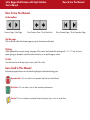
In the toolbar:
Previous Page / Next Page
Go to Previous View / Go to Next View
Go to Contents Page / Go to Precautions Page
On the page:
Click on the text within the Contents page to jump to information on that topic.
Printing:
While optimized for onscreen viewing, the pages of this manual are formatted for printing on 8
paper, giving you the option to print the entire manual or just a specific page or section.
1/2”
To Exit:
From the Menu bar at the top of your screen, select: File > Quit.
Icons Used In This Manual
Italicized paragraphs feature an icon describing the type of information being given.
Important Info: This icon refers to an important step that must be followed.
Tech Note: This icon refers to tips to help maximize performance.
Caution! This icon indicates a potential hazard, and gives tips on how to avoid them.
x 11” and A4 sized
LaCie Bigger Disk Extreme with Triple Interface
User’s Manual
Table of Contents
Table of Contents
Foreword
Precautions
1. Introduction
1.1. What Your LaCie Drive Can Do
1.2. Heat Management
2. Your LaCie Drive
2.1. Minimum System Requirements
2.2. Package Contents And Views Of The Drive
2.2.1. Package Contents
2.2.2. Views Of The Drive
2.3. Cables And Connectors
2.3.1. FireWire
2.3.2. USB
3. Installing Your LaCie Drive
3.1. Connecting The Power Supply
3.1.1. Turning The LaCie Bigger Disk Extreme with Triple Interface On And Off
3.2. Connecting The Interface Cable
3.2.1. Mac Users
3.2.2. Windows Users
3.3 Installing Multiple Devices
3.3.1. FireWire
3.3.2. USB
3.3.3. Connecting Digital Video Cameras To The Drive
3.4. Disconnecting Your LaCie Drive
3.5. Switching Interfaces
3.6. Attaching The Drive Stand
4. Using Your LaCie Drive
4.1. Formatting And Partitioning Your LaCie Drive
4.1.1. Mac Users
4
6
7
7
8
10
10
11
11
13
14
14
15
16
17
18
19
19
27
32
32
33
34
35
36
37
38
39
39
LaCie Bigger Disk Extreme with Triple Interface
User’s Manual
4.1.2. Windows Users
5. Tech Tips
5.1. File System Formats
5.1.1. Mac Users
5.1.2. Windows Users
5.2. Available Storage Capacity
5.3. Optimizing Data Transfers
5.3.1. FireWire 800 Ports And Performance
5.3.2. Hi-Speed USB 2.0 Ports And Performance
5.4. Hi-Speed USB 2.0 vs. FireWire 400 vs. FireWire 800
6. FireWire Questions & Answers
7. USB Questions & Answers
8. Troubleshooting
8.1. Mac Users
8.2. Windows Users
9. Contacting Customer Support
10. Warranty
Glossary
Table of Contents
41
43
43
43
44
45
45
46
47
48
49
51
53
54
59
63
65
66
LaCie Bigger Disk Extreme with Triple Interface
User’s Manual
Foreword
page 4
Copyrights
Copyright © 2005 LaCie. All rights reserved. No part of this publication may be reproduced, stored in a retrieval system, or
transmitted in any form or by any means, electronic, mechanical, photocopying, recording or otherwise, without the prior
written consent of LaCie.
Trademarks
Apple, Mac, Macintosh and FireWire are registered trademarks of Apple Computer, Inc. Microsoft, Windows 98, Windows
98 SE, Windows 2000, Windows Millennium Edition and Windows XP are registered trademarks of Microsoft Corporation.
Sony and iLink are registered trademarks of Sony Electronics. Other trademarks mentioned in this manual are the property of
their respective owners.
Changes
The material in this document is for information only and subject to change without notice. While reasonable efforts have
been made in the preparation of this document to assure its accuracy, LaCie assumes no liability resulting from errors or omissions in this document, or from the use of the information contained herein. LaCie reserves the right to make changes or revisions in the product design or the product manual without reservation and without obligation to notify any person of such
revisions and changes.
FCC Statement:
Caution! Modifications not authorized by the manufacturer may void the user’s authority to operate this device.
NOTE: This equipment has been tested and found to comply with the limits for a
LaCie Bigger Disk Extreme with Triple Interface
Class A digital device, pursuant to Part 15 of the FCC Rules. These limits are
designed to provide reasonable protection against harmful interference when the
Tested To Comply
equipment is operated in a commercial environment. This equipment generates,
With FCC standards
uses, and can radiate radio frequency energy and, if not installed and used in
FOR HOME OR OFFICE USE
accordance with the instruction manual, may cause harmful interference to radio
communications. Operation of this equipment in a residential area is likely to cause
harmful interference in which case the user will be required to correct the interference at his own expense.
NOTE: This equipment has been tested and found to comply with the limits for a Class B digital device, pursuant to Part 15 of
the FCC Rules. These limits are designed to provide reasonable protection against harmful interference in a residential installation. This equipment generates, uses and can radiate radio frequency energy and, if not installed and used in accordance
with the instructions, may cause harmful interference to radio communications. However, there is no guarantee that interference will not occur in a particular installation. If this equipment does cause harmful interference to radio or television reception, which can be determined by turning the equipment off and on, the user is encouraged to try and correct the interference
by one or more of the following measures:
LaCie Bigger Disk Extreme with Triple Interface
User’s Manual
Foreword
• Reorient or relocate the receiving antenna.
• Increase the separation between the equipment and receiver.
• Connect the equipment into an outlet on a circuit different from that to which the receiver is connected.
• Consult the dealer or an experienced radio/TV technician for help.
Canada Compliance Statement
This Class A digital apparatus meets all requirements of the Canadian Interference-Causing Equipment Regulations.
Manufacturer’s Declaration for CE Certification
We, LaCie, solemnly declare that this product conforms to the following European standards:
Class B EN60950, EN55022, EN50082-1, EN61000-3-2
With reference to the following conditions:
73/23/EEC Low Voltage Directive
89/336/EEC EMC Directive
page 5
LaCie Bigger Disk Extreme with Triple Interface
User’s Manual
Precautions
page 6
Health And Safety Precautions
Only qualified persons are authorized to carry out maintenance on this device.
• Read this User's Guide carefully, and follow the correct procedure when setting up the device.
• Do not open your hard drive or attempt to disassemble or modify it. Never insert any metallic object into the drive to avoid
any risk of electrical shock, fire, short-circuiting or dangerous emissions. Your hard drive contains no user-serviceable parts. If
it appears to be malfunctioning, have it inspected by a qualified LaCie Technical Support representative.
• Never expose your device to rain, or use it near water, or in damp or wet conditions. Never place objects containing liquids on the drive, as they may spill into its openings. Doing so increases the risk of electrical shock, short-circuiting, fire or
personal injury.
General Use Precautions:
• Do not expose the hard drive to temperatures outside the range of 5° C to 35° C (41° F to 95° F). Doing so may damage
the drive or disfigure its casing. Avoid placing your drive near a source of heat or exposing it to sunlight (even through a window). Inversely, placing your drive in an environment that is too cold or humid may damage the unit.
• Always unplug the hard drive from the electrical outlet if there is a risk of lightning or if it will be unused for an extended
period of time. Otherwise, there is an increased risk of electrical shock, short-circuiting or fire.
• Use only the power supply shipped with the device.
• Do not use the hard drive near other electrical appliances such as televisions, radios or speakers. Doing so may cause interference which will adversely affect the operation of the other products.
• Do not place the drive near sources of magnetic interference, such as computer displays, televisions or speakers. Magnetic
interference can affect the operation and stability of your hard drive.
• Do not place heavy objects on top of the drive or use excessive force on it.
• Never use excessive force on your drive. If you detect a problem, consult the "Troubleshooting" section in this manual.
• Protect your hard drive from excessive exposure to dust during use or storage. Dust can build up inside the device, increasing the risk of damage or malfunction.
• Never use benzene, paint thinners, detergent or other chemical products to clean the outside of the drive. Such products will
disfigure and discolor the casing. Instead, use a soft, dry cloth to wipe the device.
Caution! The drive's warranty may be void as a result of the failure to respect the precautions listed above.
LaCie Bigger Disk Extreme with Triple Interface
User’s Manual
1. Introduction
page 7
1. Introduction
Thank you for the purchase of your new LaCie Bigger Disk
Extreme with Triple Interface! This triple interface hard drive
system combines compatibility, convenience and a generous
storage capacity to help you manage your data. Your LaCie
external hard drive system is cross-platform, which enables you to
use it on both Macs and PCs; it can be connected via FireWire
800, FireWire, iLink/DV or Hi-Speed USB 2.0 interfaces; and
you can customize the format and partitions of your LaCie drive
to match your exact needs.
LaCie’s Hard Drive is ideally suited for a wide range of high-end,
high-traffic environments, including:
• Workstations
• Audio/Video Editing
• Database Management
Engineered to fit seamlessly in to any work environment, the
LaCie Bigger Disk Extreme with Triple Interface can be stood vertically on the LaCie Drive Stand (included), placed in the
LaCie Desk Rack (sold separately) or incorporated into standard 19” computer equipment racks with the LaCie Rackmount Kit
(sold separately).
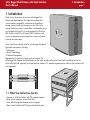
1.1. What Your LaCie Drive Can Do
• Connects to all of the FireWire and USB standard interfaces.
• Back up your computers’ internal hard drive.
• Store and exchange data between several computers.
• Daisy-chain FireWire/iLink/DV devices directly to the drive.
LaCie Bigger Disk Extreme with Triple Interface
User’s Manual
1.2 Introduction
page 8
1.2 Hard Drive Heat Management
Heat Dissipation Design
The LaCie Bigger drive’s metal body is ideal for naturally dissipating internal drive heat. Its unique design actually draws heat
away from the internal drive toward the external casing. The casing absorbs heat and will take advantage of its large surface
to further dissipate heat outside the casing. Because of this advantageous feature, heat is taken away from the internal drive,
keeping it safe and prolonging its life and reliability. As a consequence, it is normal that the external casing is hot to the
touch. Please make sure that the vents of the back-bezel and front-bezel are not obstructed so that there is a natural airflow
across the casing.
To Fan or Not to Fan
The casing alone is a great way to dissipate heat without the need of a fan. Therefore, at the date of this publication, most
drives (1 to 3 internal platters*) do not require a fan. Only the largest capacity drives (3 to 5 internal platters*) may need a
fan. To find out if your drive includes a fan, please refer to the item number and product datasheet.
Drives Equipped with a Fan
If your LaCie Big or Bigger Disk is equipped with a “smart fan,” it will only start when the heat inside the casing reaches a
certain temperature. Then the smart fan starts to turn at a low and very quiet speed. In exceptionally hot conditions (summer
heat, stacked configuration, etc.) the fan will detect heat and turn to a second, faster speed. Once the heat inside the casing
decreases, the smart fan automatically slows down or stops, allowing for the quietest working environment.
*Indicative information - may vary depending on the internal drive models, manufacturers and technology evolutions.
1.2 Introduction
LaCie Bigger Disk Extreme with Triple Interface
User’s Manual
page 9
Upright, Stack & Rackmount Configuration
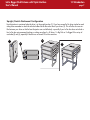
Heat dissipation is maximized when the drive is in the upright position (1). If you have several LaCie drives stacked on each
other, please remember to attach the included rubber feet on the under side of your drives (2). This will allow for some airflow between your drives so that the heat dissipation can work effectively - especially if your LaCie drive does not include a
fan. LaCie does not recommend stacking or racking more than 3 x d2 drives, 2 x Big Disks or 2 x Bigger Disks on top of
each other(3) and (4), especially if these drives are turned ON at the same time.
3
1
2
4
LaCie Bigger Disk Extreme with Triple Interface
User’s Manual
2. Your LaCie Drive
page 10
2. Your LaCie Drive
2.1. Minimum System Requirements
Mac Users
FireWire 800
Hardware Requirements for FireWire 800:
• G4 with a FireWire 800/IEEE 1394b interface card
System Requirements for FireWire 800:
• OS 10.2.4 or higher
FireWire
Hardware Requirements for FireWire 400:
• G3 or greater, with FireWire 400/IEEE 1394a interface
card
System Requirements for FireWire 400:
• OS 9.x (Apple FireWire support 2.3.3 and greater) and
10.x
Hi-Speed USB 2.0
Hardware Requirements for USB:
• G3 or greater, with USB 2.0 or 1.1 interface card
System Requirements for USB:
• OS 9.x and 10.x (Apple USB support 1.3.5 and greater)
Windows Users
FireWire 800
Hardware Requirements for FireWire 800:
• Pentium III or higher compatible processor, with a FireWire
800/IEEE 1394b interface card
• 128MB RAM or higher
System Requirements for FireWire 800:
• Windows 2000 and Windows XP
FireWire/IEEE 1394/iLink
Hardware Requirements for FireWire 400:
• Pentium II or higher -compatible processor, with a
FireWire/IEEE 1394/iLink interface card (SBP-2 compatible)
that supports mass storage devices.
• 64MB RAM or greater
System Requirements for FireWire 400:
• Windows 2000 and Windows XP
Hi-Speed USB 2.0
Hardware Requirements for USB:
• Pentium II or higher -compatible processor, with a USB 2.0
or 1.1 interface card
• 32MB RAM or greater
System Requirements for USB:
• Windows 2000 and Windows XP
2. Your LaCie Drive
LaCie Bigger Disk Extreme with Triple Interface
User’s Manual
page 11
2.2. Package Contents and Views of the Drive
2.2.1. Package Contents
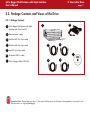
1
LaCie Bigger Disk Extreme with Triple
Interface and Drive Stand kit
2
External power supply
2
1
3 FireWire 800 9-to-9-pin cable
4 FireWire 400 6-to-6-pin cable
5
iLink/DV 6-to-4-pin cable
6
Hi-Speed USB 2.0 cable
7
LaCie Storage Utilities CD-ROM
3
4
7
5
6
Important Info: Please keep your box. In the event that the drive should need to be repaired or serviced, it must
be returned in its original packaging.
LaCie Bigger Disk Extreme with Triple Interface
User’s Manual
2.2.2. Views of the Drive
2.2.2.1. Front View
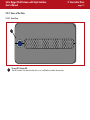
1
1
Power LED /Activity LED
The LED remains lit to show that the drive is on, and blinks to indicate drive activity.
2. Your LaCie Drive
page 12
2. Your LaCie Drive
LaCie Bigger Disk Extreme with Triple Interface
User’s Manual
page 13
2.2.2.2. Back View
1
3
on
off
auto
4
2
4
10
3
8
FW800
6
FW800
FW400
USB 2.0
9
7
5
1
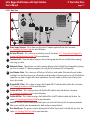
Power Supply Connector - This is where you plug in the AC adapter supplied with the drive. See section
3.1. Connecting The Power Supply for more information.
2
On/Auto/Off Switch - This is where you turn the drive on or off. See section 3.1.1. Turning The LaCie Bigger Disk
Extreme with Triple Interface On And Off for more information.
3
Ventilation Outlet - These holes help to keep your drive cool during operation. Be sure not to block these openings
when using your drive.
4
Rackmount Grooves - These grooves are used for mounting the drive in the Desk Rack kit (sold separately) or placing
your drive in standard 19” computer equipment racks using the LaCie Rackmount Kit (sold separately).
5
Serial Number Sticker - This is where you will find your LaCie drive's serial number. Write down the serial number
and keep it in a safe place, because you will need to provide the number in the event you have to call LaCie Technical
Support for any reason in regards to the drive’s performance. The serial number would also come in handy if your
drive is lost or stolen.
6
Hi-Speed USB 2.0 Port - This is where you plug in the Hi-Speed USB 2.0 cable furnished with the drive. See section
3.2. Connecting the Interface Cable for more information.
7
FireWire 800 Ports - This is where you plug in the FireWire 800 cable furnished with the drive. See section
3.2. Connecting the Interface Cable for more information.
8
FireWire 400 Port - This is where you plug in the FireWire 400 or iLink/DV cables furnished with the drive. See
section 3.2. Connecting the Interface Cable for more information.
9
Lock Slot - This slot is used to connect an anti-theft system, such as the LaCie Security Lock, for maximum protection.
Refer to your anti-theft system documentation for details on how to connect the lock.
10
Drive Stand Groove - This groove is used for attaching the LaCie Drive Stand, which is included with your drive. See
section 3.6. Attaching The Drive Stand for more information.
LaCie Bigger Disk Extreme with Triple Interface
User’s Manual
2. Your LaCie Drive
page 14
2.3. Cables and Connectors
2.3.1. FireWire
FireWire Icons
Theses icons will help you easily
FireWire 400, also known as IEEE 1394, is a high-speed serial input/output
identify the FireWire interface. They
technology for connecting peripheral devices to a computer or to each other, and
appear on FireWire cables, and
FireWire 800 is the implementation of the new IEEE 1394b standard.
next to the FireWire port connectors
Pushing the speed barrier to new limits, FireWire 800 offers increased bandwidth and on certain computers.
extended cabling distance between devices. FireWire 800 is ideal for bandwidthFireWire icon
intensive applications, such as audio, video and graphics. Benefits of FireWire 800
include:
• Resourceful architecture: FireWire 800 reduces delays in arbitration and signal
distortion, and increases throughput.
• Backwards compatibility: adapter cables allow FireWire 400 devices to operate
iLink icon
under the FireWire 800 port.
FireWire 400 and FireWire 800 also share the following features:
• Hot-pluggable: devices can be added and removed while the bus is active.
• Isochronous data delivery: no dropped frames – FireWire supports real-time data
delivery.
• Flexible: up to 63 devices can be connected on a single bus.
DV icon
Please see 6. FireWire Questions And Answers for a more detailed discussion of
FireWire’s uses and capabilities.
FireWire Cables
There are two categories of FireWire cables on the market: FireWire 800 cables, which feature the 9-to-9-pin, 9-to-6-pin,
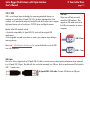
and 9-to-4-pin cables; and the original FireWire cables which feature the 6-to-6-pin and 6-to-4-pin cables.
9-to-9-pin cable: Connects FireWire 800 devices to FireWire 800 ports.
6-to-6-pin cable: Connects FireWire 400 devices to FireWire 400 ports.
6-to-4-pin cable: Connects FireWire 400 devices to iLink/DV ports.
LaCie Bigger Disk Extreme with Triple Interface
User’s Manual
2.3.2. USB
USB is a serial input/output technology for connecting peripheral devices to a
computer or to each other. Hi-Speed USB 2.0 is the latest implementation of this
standard, and it provides the necessary bandwidth and data transfer rates to support
high-speed devices such as hard drives, CD/DVD drives and digital cameras.
Benefits of the USB standard include:
• Backwards compatibility: Hi-Speed USB 2.0 works with the original USB
specifications.
• Hot-swappable: no need to shut down or restart your computer when adding or
removing devices.
Please see 7. USB Questions And Answers for a more detailed discussion of USB’s
uses and capabilities.
2. Your LaCie Drive
page 15
USB Icons
These icons will help you easily
identify the USB interfaces. They
appear on USB cables and next to
the USB port connectors on certain
computers.
USB 2.0 icon
USB 1.1 icon
USB Cables
Your LaCie drive is shipped with a Hi-Speed USB 2.0 cable, to ensure maximum data transfer performance when connected
to a Hi-Speed USB 2.0 port. The cable will also work when connected to a USB port, but drive performance will be limited to
USB 1.1 transfer rates.
Hi-Speed USB 2.0 2.0 cable: Connects USB devices to USB ports.
LaCie Bigger Disk Extreme with Triple Interface
User’s Manual
3. Installing Your LaCie Drive
page 14
3. Installing Your LaCie Drive
Getting your LaCie drive installed and connected is very simple; essentially there are two steps:
1) connect the power supply to the drive and to an outlet
2) connecting an interface cable to the drive and to your computer.
Thanks to its support of three different interfaces and its support of both the Mac and Windows
operating system, the LaCie Bigger Disk Extreme with Triple Interface gives you several different
connectivity options. These steps are divided into sections by operating system (Mac or Windows) and
the type of interface cable (FireWire 800, FireWire 400, iLink and Hi-Speed USB 2.0).
This chapter also has helpful information about connecting digital video cameras to the LaCie drive,
connecting multiple devices and special steps that need to be followed when disconnecting the drive or
switching between the different interfaces.
To get started, go to section 3.1. Connecting The Power Supply.
Caution! The LaCie Bigger Disk Extreme with Triple Interface utilizes the aluminum alloy casing to help dissipate
heat. There are important location consideration precautions to keep in mind when setting up your drive. Make
sure to place your drive in a well ventilated space, do not block the ventilation outlet on the back of the drive
and keep the area in front of the drive unobstructed to allow for proper airflow. If you will be stacking or racking
your drive, please follow these considerations:
• When stacking drives, place no more than two drives on top of each other.
• When stacking drives, make sure and adhere the rubber feet to the bottom of the drives.
• When racking in 19” equipment racks, only rack the equipment in a regulated, air-conditioned room, keep
cables and other obstructions away from the rear of the drive and do not place more than two drives on top of
each other.
3. Installing Your LaCie Drive
LaCie Bigger Disk Extreme with Triple Interface
User’s Manual
page 17
3.1. Connecting the Power Supply
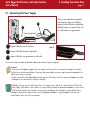
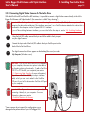
There are two cables that are supplied
with the power supply: one cable (A)
connects to the LaCie drive; and the other
cable (B) connects to a power outlet, such
as a wall outlet or a surge protector.
B
FW800
A
FW800
FW400
USB 2.0
on
auto
off
Power Supply brick
1
Connect Cable A to your LaCie Drive.
2
Connect Cable B to the Power Supply brick.
3
Connect Cable B to a surge protector or wall outlet.
Step 2)
You are now ready to connect the interface cable to your drive and to your computer.
Caution!
•Only use the AC adapter supplied with your specific LaCie drive. Do not use a power supply from another
LaCie drive or another manufacturer. Using any other power cable or power supply may cause damage to the
device and void your warranty.
•Always remove the AC adapter before transporting your LaCie drive. Failure to remove the adapter may result
in damage to your drive and will void your warranty.
Tech Note: You may use your LaCie drive when in a foreign country, thanks to its autoswitching 100-240 Volt
power supply. To be able to use this feature, you may need to purchase an appropriate adapter or cord. Consult
LaCie Technical Support for assistance in choosing the right adapter. LaCie accepts no responsibility for any
damage to the drive resulting from the use of an inappropriate adapter. Using an adapter other than one
authorized by LaCie will void your warranty.
LaCie Bigger Disk Extreme with Triple Interface
User’s Manual
3. Installing Your LaCie Drive
page 18
3.1.1. Turning The LaCie Bigger Disk Extreme with Triple Interface On And Off
FW800
Power Switch
FW800
FW400
USB 2.0
on
auto
off
After connecting the power supply to your LaCie Bigger
Disk, there are three options for powering your drive on
and off. To manually power the drive on and/or off,
move the Power Switch to the On or Off position. To utilize
the Auto power feature, set the Power Swith in the middle,
at the Auto position.
Caution! Do not turn the drive off when it is
reading or writing information! This may
damage your drive or corrupt data.
Tech Note: To utilize the Auto feature, your
drive must be connected to your computer with
a FireWire 400, FireWire 800 or Hi-Speed
USB 2.0 interface cable.
Important Info: iLink/DV Users! If you will be
using the iLink or DV cable to connect your
drive to your computer, or if you use a notpowered USB hub, you will need to manually
turn the LaCie Bigger Disk with Triple Interface
on and off. iLink/DV does not support the
Auto feature.
Auto: This position allows the drive to be powered on and off with your computer. When the LaCie Bigger Disk Extreme with
Triple Interface is connected to your computer via the FireWire interface, the drive will power on and off when your computer
is turned on or off.
This feature also allows the drive to manage power consumption. If the system’s power save feature supports it, the LaCie
Bigger Disk Extreme with Triple Interface will spin down during the power save mode. After the system comes out of power
save, the drive will take a few seconds to spin up to full power before it can be accessed.
On: This position turns the power to the drive on, and the drive will stay on unless the switch is moved to the Off position.
Off: This position turns the power to the drive off, and the drive will stay off unless the switch is moved to the On position or
the Auto position.
LaCie Bigger Disk Extreme with Triple Interface
User’s Manual
3. Installing Your LaCie Drive
page 19
3.2. Connecting The Interface Cable
There are three interface connectivity options when connecting your LaCie Bigger Disk Extreme with Triple Interface to your
computer: FireWire 800, FireWire 400 and Hi-Speed USB 2.0. The installation steps below follow the connectivity options for
each of the specific interfaces, depending on your operating system.
Important Info: Windows Users! Move to section 3.2.2. Windows Users to view installation steps for the
Windows OS.
3.2.2. Mac Users
These installation steps are separated by interface and Mac OS. To view the installation steps of the interface you plan on
using, click on the appropriate operating system and interface:
Mac OS 10.x – FireWire 800
Mac OS 10.x – FireWire 400
Mac OS 9.x – FireWire 400
Mac OS 10.x – Hi-Speed USB 2.0
Mac OS 9.x – USB
Important Info: You can not have the FireWire and USB interfaces connected at the same time! If you will be
switching between interfaces, you must also follow the steps in section 3.5. Switching Interfaces.
Tech Note: Tech Note:To connect additional devices, you must be using the same interface, either FireWire or
USB, and a hub if you are using USB. Your computer will not recognize the daisy-chained device if the interfaces
are mixed, i.e. a FireWire device attached to a drive that is connected to the computer via the Hi-Speed USB
2.0 interface.
• If information about connecting additional FireWire and USB devices to the LaCie Bigger Disk Extreme with
Triple Interface, please see section 3.3. Installing Multiple Devices.
• If you will be using your LaCie drive in a cross-platform (Mac/Windows) environment, please see the following
sections for more information
4.1. Formatting And Partitioning Your LaCie Drive - 4.1.1. Mac Users
5.1. File System Formats - 5.1.1. Mac Users
3. Installing Your LaCie Drive
LaCie Bigger Disk Extreme with Triple Interface
User’s Manual
page 20
Mac OS 10.x – FireWire 800
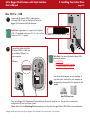
1
Connect the 9-pin end of the FireWire 800 cable into the
FireWire 800 port on the back of the LaCie Bigger Disk
Extreme with Triple Interface.
Tech Note: For more information about FireWire, please
see sections:
• 2.3.1. FireWire
• 5.3. Optimizing Data Transfers
• 6. FireWire Questions & Answers
FW800
FW800
FW400
FireWire 800 Cable 9-pin end
USB 2.0
on
auto
off
2
Connect the other end of the
9-pin FireWire 800 cable
into an available FireWire
800 port on your computer.
FireWire 800 port
3
Your drive should appear on your desktop. It will
take a few seconds for your computer to
recognize the drive and for it to appear on the
dektop.
Mac OS Drive Icons
FW800
FW800
FW400
USB 2.0
on
auto
off
Your LaCie Bigger Disk Extreme with Triple
Interface will now be ready for use. You can also
customize the configuration of your hard drive
system.
Please refer to the following sections for more
information:
• 4.1. Formatting And Partitioning Your LaCie
Drive – 4.1.1. Mac Users
Computer models vary. Please consult your computer’s User’s Manual for the exact location of your interface.
3. Installing Your LaCie Drive
LaCie Bigger Disk Extreme with Triple Interface
User’s Manual
page 21
Mac OS 10.x – FireWire 400
1
Connect the 6-pin end of the FireWire 400 cable into the
FireWire 400 port on the back of the LaCie Bigger Disk
Extreme with Triple Interface.
Tech Note: For more information about FireWire, please
see sections:
• 2.3.1. FireWire
• 5.3. Optimizing Data Transfers
• 6. FireWire Questions & Answers.
FW800
FW800
FW400
FireWire 400 Cable 6-pin end
USB 2.0
on
auto
off
2
Connect the other end of the
6-pin FireWire 400 cable
into an available FireWire
400 port on your computer.
3
FireWire 400 port
Your drive should appear on your desktop. It
may take a few seconds for your computer to
recognize the drive and for it to appear on the
dektop.
Mac OS Drive Icons
FW800
FW800
FW400
USB 2.0
on
auto
off
Your LaCie Bigger Disk Extreme with Triple
Interface will now be ready for use. You can
also customize the configuration of your hard
drive system.
Please refer to the following sections for more
information:
• 4.1. Formatting And Partitioning Your LaCie
Drive – 4.1.1. Mac Users
Computer models vary. Please consult your computer’s User’s Manual for the exact location of your interface.
LaCie Bigger Disk Extreme with Triple Interface
User’s Manual
3. Installing Your LaCie Drive
Mac OS 9.x – FireWire 400
To use your new LaCie Bigger Disk Extreme with Triple Interface, first install the necessary driver software.
Silverlining Pro Installation
1) Insert the LaCie Storage Utilities CD in your computer’s internal CD/DVD drive.
2) Open the CD icon, double-click the Silverlining Software folder and doubleclick on the Silverlining Installer.
3) The Silverlining Utilities screen appears. Click on Continue.
4) The About to Install screen appears. Read the following information and click
on Continue.
5) The License Agreement screen appears. Click on Agree.
6) The Installation screen appears.
7) Leave the installation setting at Easy Install unless you want to customize the
installation process.
8) Click on Install.
9) A message appears to confirm that the installation was successful.
10) Click on Restart to use your FireWire peripheral immediately.
Now you are ready to move to the next step, Connecting the Drive to the
Computer.
page 22
3. Installing Your LaCie Drive
LaCie Bigger Disk Extreme with Triple Interface
User’s Manual
page 23
Mac OS 9.x – FireWire 400
1
Connect the 6-pin end of the FireWire 400 cable into the
FireWire 400 port on the back of the LaCie Bigger Disk
Extreme with Triple Interface.
Tech Note: For more information about FireWire, please
see sections:
• 2.3.1. FireWire
• 5.3. Optimizing Data Transfers
• 6. FireWire Questions & Answers.
FW800
FW800
FireWire 400 Cable 9-pin end
FW400
USB 2.0
on
auto
off
2
Connect the other end of the 6pin FireWire 400 cable into an
available FireWire 400 port
on your computer.
FireWire 400 port
3
Your drive should appear on your desktop. It
may take a few seconds for your computer to
recognize the drive and for it to appear on the
dektop.
Mac OS Drive Icons
FW800
FW800
FW400
USB 2.0
on
auto
off
Your LaCie Bigger Disk Extreme with Triple
Interface will now be ready for use. You can
also customize the configuration of your hard
drive system.
Please refer to the the Silverlining Pro
documentation on the LaCie Storage Utilities CDROM for more information.
Computer models vary. Please consult your computer’s User’s Manual for the exact location of your interface.
3. Installing Your LaCie Drive
LaCie Bigger Disk Extreme with Triple Interface
User’s Manual
page 24
Mac OS 10.x – Hi-Speed USB 2.0
1
Connect the Hi-Speed USB 2.0 cable into the
Hi-Speed USB 2.0 port on the back of the LaCie
Bigger Disk Extreme with Triple Interface.
FW800
Tech Note: For more information about USB, please
see sections:
• 2.3.2. USB
• 5.3. Optimizing Data Transfers
• 7. USB Questions & Answers.
2
FW800
USB 2.0
on
auto
off
Connect the other end of the
Hi-Speed USB 2.0 cable into
an available USB port* on
your computer.
Tech Note: To achieve Hi-Speed USB 2.0 data
transfer rates you need to be connected to a
Hi-Speed USB 2.0 host interface. Otherwise,
you will be limited to USB 1.1 speeds. For
more information, please see sections:
5.3. Optimizing Data Transfers
5.3.2. Hi-Speed USB 2.0 Ports And
Performance.
USB port
3
FW800
FW800
FW400
USB 2.0
on
auto
off
FW400
Hi-Speed USB 2.0 cable - device end
Your drive should appear on your desktop. It
may take a few seconds for your computer to
recognize the drive and for it to appear on the
dektop.
Mac OS Drive Icons
Your LaCie Bigger Disk Extreme with Triple Interface will now be ready for use. You can also customize the
configuration of your hard drive system.
Please refer to the following sections for more information:
• 4.1. Formatting And Partitioning Your LaCie Drive – 4.1.1. Mac Users
Computer models vary. Please consult your computer’s User’s Manual for the exact location of your interface.
LaCie Bigger Disk Extreme with Triple Interface
User’s Manual
3. Installing Your LaCie Drive
Mac OS 9.x – USB
To use your new LaCie Bigger Disk Extreme with Triple Interface, first install the necessary driver software.
Silverlining Pro Installation
1) Insert the LaCie Storage Utilities CD in your computer’s internal CD/DVD drive.
2) Open the CD icon, double-click the Silverlining Software folder and doubleclick on the Silverlining Installer.
3) The Silverlining Utilities screen appears. Click on Continue.
4) The About to Install screen appears. Read the following information and click
on Continue.
5) The License Agreement screen appears. Click on Agree.
6) The Installation screen appears.
7) Leave the installation setting at Easy Install unless you want to customize the
installation process.
8) Click on Install.
9) A message appears to confirm that the installation was successful.
10) Click on Restart to use your USB peripheral immediately.
Now you are ready to move to the next step, Connecting the Drive to the
Computer.
page 25
3. Installing Your LaCie Drive
LaCie Bigger Disk Extreme with Triple Interface
User’s Manual
page 26
Mac OS 9.x – USB
1
Connect the Hi-Speed USB 2.0 cable into the
Hi-Speed USB 2.0 port on the back of the LaCie
Bigger Disk Extreme with Triple Interface.
FW800
Tech Note: Apple does not support the Hi-Speed
USB 2.0 standard under Mac OS 9.x. You will be
limited to USB 1.1 speeds.
FW800
FW400
Hi-Speed USB 2.0 cable - device end
USB 2.0
on
auto
off
2
Connect the other end of the
Hi-Speed USB 2.0 cable into
an available USB port* on
your computer.
Tech Note: For more information about USB,
please see sections:
• 2.3.2. USB
• 5.3. Optimizing Data Transfers
• 7. USB Questions & Answers.
USB port
FW800
FW800
FW400
USB 2.0
on
auto
off
3
Your drive should appear on your desktop. It
may take a few seconds for your computer to
recognize the drive and for it to appear on the
dektop.
Mac OS Drive Icons
Your LaCie Bigger Disk Extreme with Triple Interface will now be ready for use. You can also customize the
configuration of your hard drive system.
Please refer to the the Silverlining Pro documentation on the LaCie Storage Utilities CD-ROM for more information.
Computer models vary. Please consult your computer’s User’s Manual for the exact location of your interface.
LaCie Bigger Disk Extreme with Triple Interface
User’s Manual
3. Installing Your LaCie Drive
page 27
3.2.1. Windows Users
These installation steps are separated by interface and version of Windows operating system. To view the installation steps of
the interface and operating system you plan on using, click on the appropriate interface:
Windows 2000/Windows XP – FireWire 800
Windows 2000/Windows XP – FireWire/IEEE 1394
Windows 2000/Windows XP – iLink/DV
Windows 2000/Windows XP – Hi-Speed USB 2.0
Important Info: You can not have the FireWire and USB interfaces connected at the same time! If you will be
switching between interfaces, you must also follow the steps in section 3.5. Switching Interfaces.
Tech Note: To connect additional devices, you must be using the same interface, either FireWire or USB, and a
hub if you are using USB. Your computer will not recognize the daisy-chained device if the interfaces are mixed,
i.e. a FireWire device attached to a drive that is connected to the computer via the Hi-Speed USB 2.0 interface.
• If information about connecting additional FireWire or USB devices to the LaCie Bigger Disk Extreme with
Triple Interface, please see section 3.3. Installing Multiple Devices.
• If you will be using your LaCie drive in a cross-platform (Mac/Windows) environment, please see the following
sections for more information
4.1. Formatting And Partitioning Your LaCie Drive - 4.1.2. Windows Users
5.1. File System Formats - 5.1.2. Windows Users
3. Installing Your LaCie Drive
LaCie Bigger Disk Extreme with Triple Interface
User’s Manual
page 28
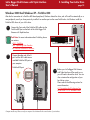
Windows 2000 And Windows XP – FireWire 800
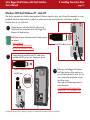
After the first connection of a FireWire 800-based peripheral, Windows detects the drive, and will install it automatically as a
new peripheral, even if you have previously installed it on another port on the same FireWire bus. Let Windows install the
FireWire 800 drivers of your LaCie drive.
1
Connect the 9-pin end of the FireWire 800 cable into the
FireWire 800 port on the back of the LaCie Bigger Disk
Extreme with Triple Interface.
Tech Note: For more information about FireWire, please
see sections:
• 2.3.1. FireWire
• 5.3. Optimizing Data Transfers
• 6. FireWire Questions & Answers.
FW800
FW800
FireWire 800 Cable 9-pin end
FW400
USB 2.0
on
auto
off
2
Connect the other end of the 9pin FireWire 800 cable into an
available FireWire 800 port on
your computer.
FireWire 800 port
FW800
3
Before your LaCie Bigger Disk Extreme
with Triple Interface will be ready to use,
you will need to format the drive. You can
also customize the configuration of your
hard drive system.
Please refer to the following sections for
more information:
4.1. Formatting And Partitioning Your
LaCie Drive – 4.1.2. Windows Users
FW800
FW400
USB 2.0
on
auto
off
Computer models vary. Please consult your computer’s User’s Manual for the exact location of your interface.
3. Installing Your LaCie Drive
LaCie Bigger Disk Extreme with Triple Interface
User’s Manual
page 29
Windows 2000 And Windows XP – FireWire 400
After the first connection of a FireWire-based peripheral, Windows detects the drive, and will install it automatically as a new
peripheral, even if you have previously installed it on another port on the same FireWire bus. Let Windows install the
FireWire drivers of your LaCie drive.
1
Connect the 6-pin end of the FireWire 400 cable into the
FireWire 400 port on the back of the LaCie Bigger Disk
Extreme with Triple Interface.
Tech Note: For more information about FireWire, please
see sections:
• 2.3.1. FireWire
• 5.3. Optimizing Data Transfers
• 6. FireWire Questions & Answers.
FW800
FW800
FW400
FireWire 400 Cable 6-pin end
USB 2.0
on
auto
off
2
Connect the 6-pin end of the
FireWire 400 cable into an
available FireWire 400 port on
your computer.
FireWire 400 port
3
Before your LaCie Bigger Disk Extreme
with Triple Interface will be ready to use,
you will need to format the drive. You can
also customize the configuration of your
hard drive system.
Please refer to the following sections for
more information:
4.1. Formatting And Partitioning Your
LaCie Drive – 4.1.2. Windows Users
FW800
FW800
FW400
USB 2.0
on
auto
off
Computer models vary. Please consult your computer’s User’s Manual for the exact location of your interface.
3. Installing Your LaCie Drive
LaCie Bigger Disk Extreme with Triple Interface
User’s Manual
page 30
Windows 2000 And Windows XP – iLink/DV
After the first connection of a FireWire-based peripheral, Windows detects the drive, and will install it automatically as a new
peripheral, even if you have previously installed it on another port on the same FireWire bus. Let Windows install the
FireWire drivers of your LaCie drive.
1
Connect the 6-pin end of the iLink/DV cable into the
FireWire 400 port on the back of the LaCie Bigger Disk
Extreme with Triple Interface.
FW800
Tech Note: For more information about FireWire, please
see sections:
• 2.3.1. FireWire
• 5.3. Optimizing Data Transfers
• 6. FireWire Questions & Answers.
2
FW800
FW400
iLink/DV Cable 6-pin end
USB 2.0
on
auto
off
Connect the 4-pin end of the iLink/DV cable into an
available iLink/DV port on your computer or device.
iLink/DV Cable 4-pin end
iLink/DV port
3
Before your LaCie Bigger Disk Extreme
with Triple Interface will be ready to use,
you will need to format the drive. You can
also customize the configuration of your
hard drive system.
Please refer to the following sections for
more information:
4.1. Formatting And Partitioning Your
LaCie Drive – 4.1.2. Windows Users
FW800
FW800
FW400
USB 2.0
on
auto
off
Computer models vary. Please consult your computer’s User’s Manual for the exact location of your interface.
3. Installing Your LaCie Drive
LaCie Bigger Disk Extreme with Triple Interface
User’s Manual
page 31
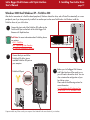
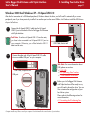
Windows 2000 And Windows XP – Hi-Speed USB 2.0
After the first connection of a USB-based peripheral, Windows detects the drive, and will install it automatically as a new
peripheral, even if you have previously installed it on another port on the same USB bus. Let Windows install the USB drivers
of your LaCie drive.
1
Connect the Hi-Speed USB 2.0 cable into the Hi-Speed
USB 2.0 port on the back of the LaCie Bigger Disk Extreme
with Triple Interface.
FW800
Tech Note: To achieve Hi-Speed USB 2.0 transfer rates,
you have to be connected to a Hi-Speed USB 2.0 port on
your computer. Otherwise, you will be limited to USB 1.1
data transfer rates.
FW800
USB Cable, device end
FW400
USB 2.0
on
auto
off
2
Connect the other end of the Hi-Speed USB 2.0 cable
into an available USB port* on your computer.
Tech Note: For more information about
USB, please see sections:
• 2.3.2. USB
• 5.3. Optimizing Data Transfers
• 7. USB Questions & Answers.
USB Cable, computer end
USB port
3
FW800
FW800
FW400
USB 2.0
on
Before your LaCie Bigger Disk Extreme
with Triple Interface will be ready to use,
you will need to format the drive. You can
also customize the configuration of your
hard drive system.
Please refer to the following sections for
more information:
4.1. Formatting And Partitioning Your
auto
off
Computer models vary. Please consult your computer’s User’s Manual for the exact location of your interface.
LaCie Bigger Disk Extreme with Triple Interface
User’s Manual
3. Installing Your LaCie Drive
page 32
3.3. Installing Multiple Devices
Tech Note: For more information about
FireWire and improving performance,
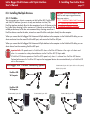
3.3.1. FireWire
please see sections:
You can connect your drive to a computer via the FireWire 800, FireWire 400 • 2.3.1. FireWire Cables And Connectors
and iLink/DV interfaces (you must use only one interface at a time). The
• 5.3. Optimizing Data Transfers
FireWire interface standard allows for the connection of up to 63 devices on the
• 6. FireWire Questions & Answers
bus (called daisy-chaining), with a maximum of 16 devices on one branch. For
reliable performance, LaCie does not recommend daisy-chaining more than 4
FireWire devices one after the other; instead use several FireWire cards/ports directly from the computer.
When you connect the LaCie Bigger Disk Extreme with Triple Interface to the computer via the FireWire 800 cable, you can
chain one device from the second FireWire 800 port, and one via the FireWire 400 port.
When you connect the LaCie Bigger Disk Extreme with Triple Interface to the computer via the FireWire 400 cable, you can
chain devices from the remaining FireWire 800 ports.
Important Info: All speeds revert to FireWire 400 when a FireWire 400 device is the origin of a chain and
when it is connected as a daisy-chained device via the FireWire 800 9/6-pin cable.
A FireWire 800 device operates at FireWire 800 speeds only when it is chained to a FireWire 800 device.
Optimal performance for FireWire 800 requires that equipped devices be connected directly to a FireWire 800
port on the computer.
LaCie Bigger Disk - FireWire Connectivity Options
FireWire 400 6/6-pin cable
*FireWire 800 9/6-pin and 9/4-pin cables are sold separately.
ilink/DV 6/4-pin cable
FireWire 400
To Computer
FireWire 800
To Computer
FireWire 800 9/9-pin cable
FireWire 800 9/6-pin cable*
FireWire 800 9/4-pin cable*
LaCie Bigger Disk Extreme with Triple Interface
User’s Manual
3. Installing Your LaCie Drive
3.3.2. USB
Tech Note: For more information about
USB and improving performance,
please see sections:
• 2.3.2. USB Cables And Connectors
• 5.3. Optimizing Data Transfers
• 7. USB Questions & Answers
page 33
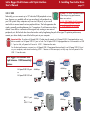
Technically, you can connect up to 127 individual USB peripherals at one
time. However, you probably will not use more than 6 to 8 peripherals on
your USB system. Many computers only have two USB ports, so you would
need a hub to connect more than two peripheral drives. The hub regenerates the
signals, generally providing between 4 to 7 connections. To add even more drives,
connect a new hub to a connector of the original hub, creating a new series of
peripherals, etc. But the hub slows down the transfer rate by lengthening the path of the signal. To optimize performance,
connect your drive directly to one of the built-in ports in your computer.
Important Info: To achieve Hi-Speed USB 2.0 data transfer speeds, a Hi-Speed USB 2.0-equipped device must
be connected to a Hi-Speed USB 2.0 port or hub. If a Hi-Speed USB 2.0-equipped device is connected to a USB
1.1 port or hub, all speeds will revert to USB 1.1 data transfer rates.
For the best performance, connect your Hi-Speed USB 2.0-equipped device directly to a Hi-Speed USB 2.0 port
on your computer, and avoid connecting USB 1.1 devices to the same port, as they may slow all speeds to the
USB 1.1 transfer rates.
LaCie Bigger Disk Extreme with
Triple Interace - USB Connectivity
Options
Hi-Speed USB 2.0 port
or
Hi-Speed USB 2.0 hub
480M/bps
480M/bps
or
or
off
on
auto
off
on
auto
USB 1.1 port
or
USB 1.1 hub
12M/bps
12M/bps
or
or
off
on
auto
off
on
auto
3. Installing Your LaCie Drive
LaCie Bigger Disk Extreme with Triple Interface
User’s Manual
page 34
3.3.3 Connecting Digital Video Cameras To The LaCie Drive
With both FireWire 400 and FireWire 800 interfaces, it is possible to connect a digital video camera directly to the LaCie
Bigger Disk Extreme with Triple Interface* (this connection is called “daisy-chaining”).
Important Info: To daisy-chain devices, you must be using the same interface (FireWire). Your computer will not
recognize the daisy-chained device if the interfaces are mixed, i.e. a FireWire device attached to a drive that is
connected to the computer via the Hi-Speed USB 2.0 interface.
If you will be switching between interfaces, you must also follow the steps in section 3.6. Switching Interfaces.
1
Using the iLink/DV cable, connect the 4-pin end of the cable to the 4-pin port
on your digital camera.
2
Connect the 6-pin end of the iLink/DV cable to the 6-pin FireWire port on the
back of the LaCie Hard Drive.
3
The digital camera should now appear on the desktop (Mac users) or under
My Computer (Windows users).
Tech Note: If you do not have FireWire 800 capability
on your computer, there are two options to be able to
use the daisy-chaining functionality: 1) add a FireWire
800 PCI or PC Card to your computer (see section
5.3. Optimizing Data Transfers for more information);
2) purchase a FireWire 800 9-pin-to-6-pin interface
cable, which you can use to attach to the FireWire
800 port of your LaCie drive and a FireWire 400 port
on your computer.
Important Info: If your device is not recognized, try
connecting it directly to your computer. For more
information, please see section
6. FireWire Questions & Answers.
*Some cameras do not support this configuration or may
downgrade the performances of your LaCie Bigger Disk.
FW800
FW800
FW400
USB 2.0
on
auto
off
LaCie Bigger Disk Extreme with Triple Interface
User’s Manual
3. Installing Your LaCie Drive
page 35
3.4. Disconnecting Your LaCie Drive
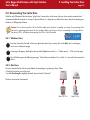
FireWire and USB external devices feature “plug & play” connectivity, which means that your drive can be connected and
disconnected while the computer is running. To prevent failures, it is important you follow these steps when disconnecting your
FireWire or USB peripheral device.
Caution! Do not disconnect the USB or FireWire cable when the drive is reading or writing. Disconnecting while
the drive is operating could cause the loss of data. Make sure that your drive is not reading or writing and that
the activity LED is off before disconnecting the USB or FireWire cable.
3.4.1. Windows Users
1
From the System Tray (located in the lower right-hand side of your screen), click on the Eject icon (a small green
arrow over a hardware image).
2
A message will appear, detailing the devices that the Eject icon controls, i.e. “Safely remove…” Click on this prompt.
3
You will then be given the following message: “Safe to Remove Hardware” (or similar). It is now safe to disconnect the
device.
3.4.2. Mac Users
You must unmount the hard drive system before disconnecting it or powering it down. Either:
• Drag the hard drive icon to the trash.
• Launch Silverlining Pro, highlight the hard drive and select “Unmount.”
The drive can now be disconnected.
Mac OS 10.x
Mac OS 9.x
LaCie Bigger Disk Extreme with Triple Interface
User’s Manual
3. Installing Your LaCie Drive
page 36
3.5. Switching Between USB And FireWire Connections
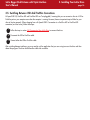
Hi-Speed USB 2.0, FireWire 400 and FireWire 800 are “hot-pluggable,” meaning that you can connect a drive to a USB or
FireWire port on your computer even when the computer is running. However, there are important steps to follow for your
drive to function properly. When changing from a Hi-Speed USB 2.0 connection to a FireWire 400 or FireWire 800
connection (and vice versa), follow these steps:
1
Follow the steps in section 3.5 Disconnecting Your LaCie Drive to unmount the drive.
2
Disconnect the USB or FireWire cable.
3
Connect either the USB or FireWire cable.
After switching between interfaces, you may need to quit the application that you were using to access the drive and then
reboot the program. The drive should then be visible and accessible.
3. Installing Your LaCie Drive
LaCie Bigger Disk Extreme with Triple Interface
User’s Manual
page 37
3.6. Attaching The Drive Stand
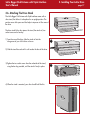
The LaCie Bigger Disk Extreme with Triple Interface comes with a
drive stand, that allows it to be placed in an upright position. This
position saves desk space and also helps to improve air flow around
the drive.
The drive stand kit has four pieces: the stand, the stand rail, two
socket screws and a hex key.
1) From the rear of the drive, slide the stand rail into the
side groove of your LaCie drive as shown.
1
2) Slide the stand forward until its rail touches the face of the drive.
3) Tighten the two socket screws from the underside of the stand,
using the hex key provided, until the stand is firmly in place.
4) When the stand is mounted, your drive should look like this:
3
LaCie Bigger Disk Extreme with Triple Interface
User’s Manual
4. Using Your LaCie Drive
Formatting a disk consists of the following: the operating system erases
all of the bookkeeping information on the disk, tests the disk to make
sure that all of the sectors are reliable, marks bad sectors (i.e., those that
are scratched) and creates internal address tables that it later uses to
locate information.
As you format the drive, you will have the opportunity to divide the hard
drive into sections, called partitions. A partition is a section of the hard
drive’s storage capacity that is created to contain files and data.
Once formatted, the actual available storage capacity varies, depending
on operating environment, and is generally about 10% less than the nonformatted capacity.
File System Formats
There are three different file system formats that are predominately found
in Mac and Windows environments:
•Mac OS Extended (HFS+) - for Mac OS 9.x and Mac OS 10.x
•NTFS - for Windows 2000 and XP
•FAT 32 - for Windows Me and legacy operating systems
4. Using Your LaCie Drive
page 38
Tech Note: Windows Users! This LaCie
Hard Drive is formatted for the Mac
operating system, and you will need to
re-format the drive in order for it to
appear and operate under the Windows
operating system. See section 4.1.2.
Formatting And Partitioning Your LaCie
Drive - Windows Users for detailed
instructions.
Important Info: If you will be using this
drive between Mac and Windows
operating environments, you can create
two partitions: one 32GB FAT 32 volume,
and one large Mac OS Extended volume.
There are certain limitations to this
configuration, though; to achieve the best
performance and reliability, it is
recommended that you utilize a thirdparty utility, such as Mediafour’s
MacDrive, which allows Windows
computers to read and write files on a
volume formatted for the Mac.
Mac Users
• If you will be using the drive in a strictly Mac OS
environment, leave the drive formatted as one large Mac
OS Extended volume.
• If you want to be able to install multiple Mac operating
systems on the LaCie Bigger Disk Extreme with Triple
Interface, partition the drive into multiple Mac OS Extended
volumes.
Windows Users
• If you will be using this drive betweenWin Me, 2000 or XP
environments, it is recommended that you create two
partitions: one that is a 32GB FAT 32 (MS-DOS File System)
volume, and the other as a large NTFS volume.
• If you will be using the drive in a strictly Win 2000/XP
environment, create one large NTFS volume.
LaCie Bigger Disk Extreme with Triple Interface
User’s Manual
4. Using Your LaCie Drive
page 39
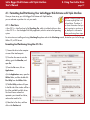
4.1. Formatting And Partitioning Your LaCie Bigger Disk Extreme with Triple Interface
Once you have set-up your LaCie Bigger Disk Extreme with Triple Interface,
you can reformat or partition it to suit your needs.
4.1.1. Mac Users
• Mac OS 9.x – Install and use LaCie Silverlining Pro, which is included with your drive.
• Mac OS 10.x – Use the Apple Disk Utility application, which is native to the operating
system.
Caution! Following these steps
will erase anything that is on
the hard drive. Therefore, if
you have information that you
want to protect or continue to
use, backup this information
before performing these steps.
For instructions on installing and using Silverlining Pro, please refer to the Silverlining manual, located on your LaCie Storage
Utilities CD, in PDF format.
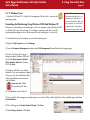
Formatting And Partitioning Using Mac OS 10.x
1) Connect the drive to the computer
via one of the interface ports.
2) Once the drive mounts onto the
desktop, go to the Menu Bar, and
open Go.
3) From the Go menu, click on
Applications.
4) In the Applications menu, open the
Utilities folder, and then double-click
Disc Utility from the Utilities folder.
5) The Disc Utility window will open.
In the left side of the window will be a
list of the available hard disk drives.
You should see a volume that
represents your internal hard drive,
and one that reads LaCie.
6) Select the LaCie drive, and then
click on the Partition tab.
LaCie Bigger Disk Extreme with Triple Interface
User’s Manual
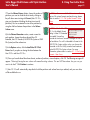
7) From the Volume Scheme: button, choose the number of
partitions you want to divide the drive into by clicking on
the pull down menu starting with Current (Mac OS 10.x
gives you the option of dividing the drive into at most 8
partitions). You can customize the size of the partitions by
using the slide bar between the partitions in the Volume
Scheme: area.
8) In the Volume Information section, create a name for
each partition, choose the volume format (Mac OS
Extended, Mac OS Standard, MS-DOS File System or UNIX
File System) and the volume size.
9) In the Options section, click the Install Mac OS 9 Disk
Drivers box if you plan on sharing the drive between the
Mac OS 9.x and Mac OS 10.x.
4. Using Your LaCie Drive
page 40
Tech Note: For a more detailed discussion on the
various file system formats and partitioning, please
refer to section 5.1.1. File System Formats – Mac
Users.
Tech Note: Under Mac OS
10.3.x, the default format
setting is Mac OS Extended
(Journaled). Journaling
provides a continuous record of changes to files on
the hard drive. You will not be able to format in the
MS-DOS File System, either, unless you choose the
Erase tab in the Disc Utility window and create an
entire MS-DOS File System volume. For more
information, please refer to section 5.1.1. File System
Formats - Mac Users.
10) Once you have finalized the volume format, number of partitions, size and options, click OK. The following message will
appear: “Warning! Saving the new volume will erase all existing volumes. This can NOT be undone. Are you sure you
want to do that?” Click Partition to continue.
11) Mac OS 10.x will automatically setup the disk with the partitions and volume format you selected, and your new drive
will be available for use.
LaCie Bigger Disk Extreme with Triple Interface
User’s Manual
4.1.2. Windows Users
• Windows 2000 and XP – Use the Disk Management Utility, which is native to the
operating system.
Formatting And Partitioning Using Windows 2000 And Windows XP
The process of formatting and partitioning a drive on a computer running Windows 2000
or Windows XP consists of two steps: (1) installing a signature on the drive, and (2)
partitioning/formatting the drive. These steps will erase anything that is on the disk.
4. Using Your LaCie Drive
page 41
Caution! Following these steps
will erase anything that is on
the hard drive. Therefore, if
you have information that you
want to protect or continue to
use, backup this information
before performing these steps.
1) Connect the drive to the computer via one of the interface ports.
2) Right-click My Computer and click Manage.
3) From the Computer Management window, select Disk Management (located below the Storage group).
4) If this is the first time the drive is
being formatted, Windows 2000 will
launch the Write Signature Wizard
(Write Initialize Wizard in Windows
XP). Click Next.
5) Windows will list the new drive(s)
attached. If you are formatting a single
drive, only one drive should be visible.
Select the checkbox next to the drive
and click Next.
Important Info: Check
the "quick format" box.
6) Click Finish to exit the Wizard.
7) Now, with the disk management window open, a new drive will be visible. Right-click on the available space and select
Create Partition...
8) This will bring up the Create Partition Wizard. Click Next.
9) Select Primary Partition. Click Next.
LaCie Bigger Disk Extreme with Triple Interface
User’s Manual
4. Using Your LaCie Drive
page 42
10). Here you must specify partition size. It is recommended that you leave the partition set to the maximum available size,
unless you want multiple partitions on the same drive. Click Next.
11) Select Assign drive letter and select the desired letter for the drive.
Click Next.
12) Select Format this partition… and then select a file system:
FAT32
FAT32 is a file system that is compatible with Windows 98 SE, Windows
Me, Windows 2000 and Windows XP; however, it has limitations. In
Windows 2000, Windows XP, and MAC OS and X, you will not be able
to create a partition greater than 32GB.
NTFS
NTFS is a newer file system that is compatible only with Windows NT,
Windows 2000 and Windows XP. It has fewer limitations than FAT 32
and will enable a partition to be created that is larger than 32GB. NTFS
is also compatible with Mac OS X in read-only, and for 32K block-sized partitions.
13) Click Next.
14) Click Finish.
15) Disk Management will create the partition and begin formatting the
drive. Once completed, close Disk Management and your new drive will be
ready to use.
Tech Note: For a more detailed
discussion on the various file system
formats and partitioning, please refer to
section 5.1.2. File System Formats –
Windows Users.
LaCie Bigger Disk Extreme with Triple Interface
User’s Manual
5. Tech Tips
5.1 File System Formats
5.1.1. Mac Users
5. Tech Tips
page 43
Important Info: If you will be sharing the hard drive
between Mac and Windows operating environments,
you will want to follow these guidelines:
Mac OS 9.x • Works reliably with FAT 32 partitions less than 32GB
Mac OS 10.x Users:
The LaCie Bigger Disk Extreme with Triple Interface is preformatted as a Mac OS Extended volume. You may customize the
drive by reformatting and/or partitioning the drive with separate
file system formats. For optimal peformance in Mac OS
environments, format and partition the drive as one large Mac OS
Extended volume.
Mac OS X prefers that all paritions be the same format,
therefore only the first FAT 32 partition is guaranteed to
mount.
Mac OS 10.1.x • Works reliably with FAT 32 partitions less than 32GB
Mac OS 10.2.x • Works reliably with FAT 32 partitions less than
128GB
Mac OS Extended (HFS+)
• Does not mount FAT 32 partitions greater than 128GB
Mac OS Extended refers to the file system used by Mac OS 8.1
Mac OS 10.3.x and later. HFS+ represents an optimization of the older HFS file
system by using hard disk space more efficiently. With HFS+, you • Mounts any FAT 32 drive of any size
• Mounts NTFS volumes as READ-only
are no longer limited by block size.
MS-DOS File System (FAT 32)
This is the Microsoft file system, more typically known as
FAT 32. This is the file system to use if you are going to
be using your LaCie Bigger Disk Extreme with Triple
Interface between Macs and Windows operating
systems.
Tech Note: Mac OS 10.3.x Users - Mac OS Extended
(Journaled) Under Panther, Apple introduced journaling
to the Mac OS Extended file system, which helps protect
the file systems on Mac OS volumes. When journaling is
enabled, file system transactions are maintained and
recorded continuously in a separate file, called a
journal.
Mac OS Standard (HFS)
In the event of an unplanned shutdown, the OS uses the
Mac OS Standard refers to the file system used by Mac OS 8.0
and earlier. Only use this file system if you are creating a volume journal to restore the file system. Journaling is also
backward compatible, and all volumes with journaling
smaller than 32MB, using a Mac with a 680X0 processor or
enabled can be fully used by computers not running
creating a file structure that will be need to be used by Macs
Mac OS 10.3.x.
running Mac OS 8.0 or earlier.
For more information, please visit Apple’s Web site.
UNIX File System
This is the file system based on UNIX, and is preferrable for users developing UNIX-based applications within Mac OS 10.x.
Unless you have a specific reason to use the UNIX File System, you should instead format your drive using Mac OS Extended
(HFS+), because it provides Mac users with a more familiar operating experience.
LaCie Bigger Disk Extreme with Triple Interface
User’s Manual
5. Tech Tips
page 44
Mac OS 9.x Users:
You will be able to format the drive in one of two formats, HFS (Mac OS Standard) or HFS+ (Mac OS Extended), using
Silverlining Pro (for specific instructions, please refer to the Silverlining User’s Manual, in the Silverlining folder).
5.1.2. Windows Users
There are basically two file system formats for Windows: FAT 32 and NTFS. The following information will hopefully make
choosing one or the other a little easier.
FAT 32
FAT is an acronym for File Allocation Table, which dates back to the beginnings of DOS programming. Originally, FAT was
only 16 bits, but after the second release of Windows 95 it was upgraded to 32 bits, hence the name FAT 32. In theory, FAT
32 volume sizes can range from less than 1MB all the way to 2TB. It is the native file system of Windows 98 and Windows
Me, and is supported by Windows 2000 and XP. When FAT 32 is used with Windows 2000 and XP, though, volume size is
limited to 32GB (by the Windows partition utility, i.e. Disk Manager), and the individual file size is limited to 4GB.
NTFS
This acronym stands for New Technology Filing System, and it is the native file system for Windows NT, Windows 2000 and
XP. NTFS offers several features that are not available with FAT 32; i.e. file compression, encryption, permissions, and
auditing, as well as the ability to mirror drives and RAID 5 capabilities. The minimum supported volume size for NTFS is
10MB, with a maximum of 2TB, with no limit to file size. Volumes created in NTFS can only be directly accessed (not through
shares) by Windows NT, Windows 2000 and XP, without resorting to help from third-party products.
Guidelines for Choosing FAT 32 Or NTFS
Use FAT 32 if:
• You want to access your data on any Operating System - FAT 32 is compatible with Windows 98 SE, Me, 2000, XP, NT,
Mac OS 9.x and Mac OS 10.x (see Important Info note in section 5.1.1. File System Formats - Mac Users for more
information).
• You will be dual booting with an Operating System other than Windows NT or Windows 2000.
• You may need the ability to dual boot down the line. Once you have converted a volume from NTFS to FAT 32, there is no
going back. You can convert from FAT 32 to NTFS, but not the other way around.
Use NTFS if:
• You want to optimize drive performance under Windows 2000 or XP.
• You want to encrypt files, assign permissions to files, or want to audit files for access.
• You will be formatting partitions larger than 32GB.
• You need to store individual files that are larger than 4GB.
• You need a filing system that can be mirrored or structured like a RAID 5 configuration.
LaCie Bigger Disk Extreme with Triple Interface
User’s Manual
5. Tech Tips
page 45
5.2. Available Storage Capacity
A gigabyte (GB) means 1,000,000,000 bytes. In order to utilize a hard disk drive, it has to be formatted first. Formatting a
disk consists of the following: the operating system erases all of the bookkeeping information on the disk, tests the disk to
make sure that all of the sectors are reliable, marks bad sectors (i.e., those that are scratched) and creates internal address
tables that it later uses to locate information. Once formatted, the actual available storage capacity varies, depending on
operating environment, and is generally about 10% less than the non-formatted capacity.
5.3. Optimizing Data Transfers
Data transfers are the flow of data that accomplishes a task, usually related to
moving data from storage to computer RAM, or between storage devices. With
external drives, such as the LaCie Bigger Disk Extreme with Triple Interface, the
data is transferred from the drive to the computer via the FireWire or USB
interface. The data is fed from the drive through the FireWire port on the drive,
and passes to the computer through the FireWire host-bus adapter interface.
Computer manufacturer’s implementation of the FireWire host-bus adapter
interfaces vary widely. For computers running Windows 2000 and later, the
FireWire interface, which is referred to as either IEEE 1394 or iLink on PCs*, is
less common as a native host-bus adapter. Nearly all recent Apple computers
have native FireWire interface ports.
The FireWire interfaces specify certain requirements, filed under the OHCI
(Open Host Controller Interface) standards. All LaCie drives comply to OHCI
standards and have been rigorously tested on computers that have host bus
adapters that also comply to OHCI standards. Unfortunately, not all
manufacturers respect these guidelines, and anomalies may arise with computers
that have host bus adapters that do not conform to OHCI standards.
*Tech Note: For more
information on the FireWire
interfaces, please see:
6.FireWire Questions & Answers
Tech Note: Please see
3.3.Connecting Multiple Devices
for more information.
Tech Note: Another important
factor in file transfer speeds is
how the drive has been
formatted. For more information
in choosing the correct file
system fomat, please see section
5.1 File System Formats.
For the best performance, connect your LaCie Bigger Disk Extreme with Triple Interface directly to a native FireWire port on
your computer, and avoid daisy-chaining*. During data transfers, it’s best to wait before launching other applications that will
be using the same port.
If you do not have a native FireWire port, LaCie offers FireWire host bust adapter cards, also known as PCI or PC/PCMCIA
cards, that have been tested and comply with LaCie drives. Please contact your reseller or LaCie Customer Support for more
information.
LaCie Bigger Disk Extreme with Triple Interface
User’s Manual
5. Tech Tips
page 46
5.3.1. FireWire 800 Ports And Performance
To utilize the newly enhanced FireWire 800 performances, your computer must be equipped with a FireWire 800 host bus
adapter card (either sold separately, or integrated by your computer’s manufacturer); these host bus adapter cards include
one or more FireWire 800 ports, and you must be running Mac OS 10.2.4 and higher, or Windows 2000 or Windows XP in
order to achieve FireWire 800 performance and functionality.
If you use FireWire equipped peripherals (either the original FireWire standard or the new FireWire 800), one of the easiest
and least expensive ways to improve the performance, reliability and value of your system is by installing additional ports. By
adding a FireWire PCI/PC card you can isolate fast and slow devices, create more effective RAID configurations, take full
advantage of bus-powered devices and protect and increase the overall value of your system.
Not all FireWire devices are created equal; some devices support faster transfer rates than others. For example, DV
camcorders deliver data at the slower 100Mb/s and 200Mb/s rates, while hard drives typically deliver data at the 400Mb/s
rates. When the devices are daisy-chained (connected to each other and sharing a single port), the devices may be reduced
to the transfer rate of the slowest device. With a separate FireWire PCI card, you can isolate the slow devices to one port,
while dedicating another port to your high-speed devices.
This principle also has a great effect on the efficiency and performance of RAID 0 striped configurations, where each
interface can operate at maximum speed without being affected by the other devices on the same bus. Essentially, by adding
an additional PCI card, you create another controller for the data. Instead of having four drives connected to one port and
daisy-chained, with an additional PCI card you can connect two drives to one port, and two drives on a second port on
another controller, improving speed by spreading the data over two controllers instead of one.
Also think of an additional FireWire bus as a serious way to protect your expensive computer system. If you happen to work
in an environment where you frequently share devices with other computers and users, you can inadvertently “blow” a
FireWire port, if, for instance, you have a defective cable, or the connector is forced in upside down. Replacing a FireWire
PCI/PC card is far less expensive than repairing or replacing an entire motherboard.
Important Note: At the time of publication (January 2004), only Mac OS 10.2.4 and higher, and Windows
2000 and Windows XP, support FireWire 800 functionality, and the IEEE 1394b interface is not a standard
feature implemented on the motherboards of all PC-compatible computers.
Contact your LaCie reseller or LaCie Customer Support for information abut FireWire 800 PCI or PC Cards, or visit our Web
site: www.lacie.com.
LaCie Bigger Disk Extreme with Triple Interface
User’s Manual
5. Tech Tips
page 47
5.3.2. Hi-Speed USB 2.0 Ports And Performance
To utilize the enhanced Hi-Speed USB 2.0 performance, your computer must be equipped with a Hi-Speed USB 2.0 host bus
adapter card (either sold separately, or integrated by your computer’s manufacturer) and the appropriate drivers. These host
bus adapter cards, which include one or more USB ports, are shipped with special Hi-Speed USB 2.0 drivers that enable the
computer to control the card. These drivers must be installed in order for USB 2.0 devices connected to the port to work at
their correct speeds.
Computers running Windows 2000 and Windows XP automatically manage Hi-Speed USB 2.0 devices and drivers, while
Windows 98 SE and Windows Me will require that drivers be installed before a Hi-Speed USB 2.0 device is attached.
Mac OS 9.x does not support Hi-Speed USB 2.0 functionality, and all Hi-Speed USB 2.0 devices will only operate at the
original USB specifications. Mac OS 10.2.7 and later supports Hi-Speed USB 2.0, and Mac OS 10.x also supports Hi-Speed
USB 2.0, but you will have to purchase a third-party PCI or PC Card and appropriate drivers.
Contact your LaCie reseller or LaCie Customer Support for information about Hi-Speed USB 2.0 PCI or PC Cards, or visit our
Web site: www.lacie.com.
LaCie Bigger Disk Extreme with Triple Interface
User’s Manual
5. Tech Tips
page 48
5.4. Hi-Speed USB 2.0 vs. FireWire 400 vs. FireWire 800
Trying to decide which interface to use, Hi-Speed USB 2.0, FireWire 400 or FireWire 800, can be a complicated decision.
Your decision should be based on the following:
Computer With Hi-Speed USB 2.0, FireWire 400 And FireWire 800 Ports
If your computer is equipped with all three interfaces, you have several options to consider. The key decision in this equation
is simple: speed. FireWire 800 effectively offers twice the bandwidth of both Hi-Speed USB 2.0 and FireWire 400. So, if you
are running bandwidth-intensive applications, such as digital audio, video or graphics, FireWire 800 is your clear choice.
Computer With Hi-Speed USB 2.0 And FireWire 400 Ports
If your computer is equipped with both Hi-Speed USB 2.0 and FireWire ports, drive performance will be relatively similar. The
theoretical transfer rates are 480Mb/s for Hi-Speed USB 2.0 and 400Mb/s for FireWire. Realistically, the two are extremely
close to each other in terms of performance and speed.
The main reason for choosing one over the other should be hinged on the existing devices you are already using. For
instance, if you are already using both of your Hi-Speed USB 2.0 ports on your computer, you would use the FireWire port to
connect your drive, and vice versa. Avoiding hubs (for USB topology) and daisy-chains (for FireWire topology) will help
improve performance because your drive will be connected directly to your computer.
Computer With USB And FireWire 400 Ports
If your computer is equipped with a USB port and a FireWire port, you will get noticeably better performance by using the
FireWire connection. Even though your LaCie drive comes with a Hi-Speed USB 2.0 cable and interface, by connecting
through the USB port, the drive will be limited to USB 1.1 speeds and performance.
Computer With Only USB Ports
If your computer is only equipped with a USB port, your decision is fairly simple: connect via the USB cable provided with
your drive. Hi-Speed USB 2.0 is backward compatible and can be used in USB ports. Again, you will be limited to USB
speeds and performance.
Another alternative is to purchase a FireWire or Hi-Speed USB 2.0 host adapter card that you would install into a PCI or
PCMCIA slot on your computer, thereby allowing your computer to take advantage of the performances that FireWire and HiSpeed USB 2.0 have to offer.
Contact your LaCie reseller or LaCie Customer Support for information about FireWire and Hi-Speed USB 2.0 PCI or PC
Cards, or visit our Web site:
www.lacie.com.
LaCie Bigger Disk Extreme with Triple Interface
User’s Manual
6. FireWire Questions & Answers
page 49
6. FireWire Questions & Answers
What Does IEEE 1394 Mean?
IEEE (the Institute of Electrical and Electronics Engineers) refers to the engineering corps that developed the 1394th standard,
defining the high-performance serial input/output (I/O) bus used to connect peripheral devices. There are now two standards:
IEEE 1394a, which refers to the original standard adopted in 1995, and IEEE 1394b, which refers to the new standard,
adopted in 2002.
What Is The Relationship Between IEEE 1394, FireWire, iLink And DV?
These four names all refer to the same interface:
• IEEE 1394 is the term commonly used in the computer industry.
• FireWire is the brand name used by Apple.
• iLink is the brand name used by Sony for both consumer electronics and personal computers.
• DV is short for “Digital Video,” and is used as the logo for the interface on most video camcorders.
What Are The Benefits Of The FireWire Interfaces?
The FireWire interface is a fast, cross-platform serial bus, and is ideal for digital audio, video and graphic applications that
demand plenty of bandwidth. Both versions of FireWire offer Plug & Play connectivity, so all you have to do is plug in your
drive and begin using it, they also allow up to 63 devices to be connected via a single bus and offer peer-to-peer connectivity, enabling multiple computers and FireWire devices to be connected at the same time. FireWire also supports both isochronous and asynchronous capabilities, meaning that it can guarantee real-time data delivery, so there is no danger of inaccurately ordered or delayed frames.
What Is The Difference Between FireWire 400 And FireWire 800?
Essentially, the main difference between the two interfaces can be summed up in one word: speed. FireWire 800 effectively
doubles the bandwidth of the original FireWire 400 interface. The new FireWire 800 interface offers truly impressive results,
with speeds up to 800Mb/s for a single bus, and even greater for several buses in RAID 0 configurations.
Other key advancements include the support of increased cabling distances and a newly enhanced arbitration architecture.
Utilizing cables constructed of professional-grade glass optical fiber, when both devices are connected via a FireWire 800
hub, FireWire 800 can burst data across 100 meters of cable.
The new arbitration scheme greatly improves on the existing architecture by incorporating advanced 8B10B data encoding
(based on codes used by Gigabit Ethernet and Fibre Channel), which reduces signal distortion, and also improves the arbitration time by prepping the arbitration while the current data packet is being sent, so that data is sent as soon as the current
transmission is completed.
LaCie Bigger Disk Extreme with Triple Interface
User’s Manual
6. FireWire Questions & Answers
page 50
What Are The Ideal Uses For FireWire?
FireWire helped fuel a revolution for digital content creators, and was awarded a 2001 Primetime Emmy Engineering Award
by the Academy of Television Arts & Sciences for its contribution. Due to its high bandwidth and support of both isochronous
and asynchronous data delivery, FireWire has found a very successful place in both the computer and consumer electronics
industries. Whether connecting game consoles, personal video recorders, home stereo equipment, digital TVs, hard drives,
CD/DVD-RW drives, printers, scanners, tape drives or other digital hardware equipment, FireWire is well-suited to handle all
these various requirements.
With the advent of the new FireWire 800 standard, the revolution created by the original will only grow. For those working
with digital video, the new standard will enable new bandwidth-intensive applications, such as multiple-stream, uncompressed, standard-definition video.
Will FireWire 400 Devices Run Faster When Connected To A FireWire 800 Port?
Unfortunately, this is not the case. In order to attain FireWire 800 speeds, both the device and port have to be FireWire 800
enabled. For instance, an external hard drive with a FireWire 800 9-pin connection will only reach FireWire 800 transfer
rates when it is connected to a FireWire 800 9-pin host bus adapter card via a properly certified FireWire 800 9-pin to 9-pin
beta cable.
When a FireWire 400 device is connected to a FireWire 800 port, the FireWire 400 device will only operate at the original
FireWire 400 speeds.
Will FireWire 800 Devices Work On FireWire 400 Ports And Vice Versa?
The new standard was designed to be backwards compatible, meaning that FireWire 800 devices will still operate via the
original FireWire 400 port. To connect a FireWire 800 device to a FireWire 400 port, a specific adapter cable must be used,
though. There are two types of FireWire 400 ports: 6-pin and 4-pin. For FireWire 800 devices to work, they must be connected by placing the 9-pin end of the FireWire cable into the FireWire 800 port of the device, and the opposite 6-pin or 4-pin
end into the FireWire 400 port.
The same holds true for FireWire 400 devices being connected to a FireWire 800 host port. The 4-pin or 6-pin end of the
FireWire cable must be connected to the FireWire 400 port of the device, and the 9-pin end must be connected to the
FireWire 800 port.
When FireWire 400 and FireWire 800 devices are mixed, all transfer rates revert to the original FireWire 400 speed.
What Do I Do If My Computer Does Not Have A FireWire Port?
Most computers manufactured today incorporate at least one FireWire port. If your computer does not have a native port, you
can install one by adding a PCI or PCMCIA host bus adapter card. Please contact your computer supply specialist for a specific card that will work with your system.
For more information about the FireWire interface, please visit:
www.lacie.com/technologies
LaCie Bigger Disk Extreme with Triple Interface
User’s Manual
7. USB Questions & Answers
page 51
7. USB Questions & Answers
What Are The Benefits Of The USB Interfaces?
• Cross-platform: Use your USB peripherals on both Mac and Windows platforms.
• “Hot Swappable”: No need to shut down or restart your computer when adding or removing a USB device. Plug it in and
its ready.
• Automatic configuration: Once your device is connected, your computer recognizes the device and automatically configures
the necessary software.
• Daisy-Chaining: with USB ports on your computer, you can connect up to 127 peripherals using hubs.
• Easy Installation: One standardized port and plug combination makes it simple to connect.
What Is The Difference Between USB And Hi-Speed USB 2.0?
The main difference is speed. The original version of the interface is capable of throughput up to 12Mb/s. Hi-Speed USB 2.0
supports data speeds up to 480 Mb/s, making it 40 times faster than its predecessor. This increased bandwidth translates into
higher performance in demanding applications requiring high transfer rates.
What Are The Ideal Uses For USB?
USB is perfect for more traditional connections such as keyboards, mice, joysticks and scanners. These types of devices don’t
require fast data transfer rates, and operate very successfully at the slower speeds.
What Are The Ideal Applications For Hi-Speed USB 2.0?
Digital cameras, CD/DVD drives, hard drives and scanners will all benefit from the added bandwidth and performance gains
of the new implementation of the USB standard. Hi-Speed USB 2.0 provides the necessary fast data transfer rates that today’s
devices require, and combines the earlier specifications so older devices that operated under the original USB standards will
still work with Hi-Speed USB 2.0.
Will USB Devices Run Faster When Connected To A Hi-Speed USB 2.0 Bus?
Unfortunately, no. The Hi-Speed USB 2.0 specification is specifically written to allow developers to design higher speed
peripherals that can take advantage of the extra bandwidth. USB devices, though, will still operate at 12Mb/s at full-speed
and 1.5Mb/s at low-speed on a Hi-Speed USB 2.0 bus. Even though USB devices won’t run any faster, they can work
alongside Hi-Speed USB 2.0 devices on the same bus. However, if you plug in a Hi-Speed USB 2.0 device to a USB bus, the
speed of the Hi-Speed USB 2.0 device will decrease to 12Mb/s.
LaCie Bigger Disk Extreme with Triple Interface
User’s Manual
7. USB Questions & Answers
page 52
What Is A USB Hub?
Technically, you can connect up to 127 devices to a single USB bus. For more than two devices, though, you must make new
connections using a peripheral called a "hub.” A hub, which you hook up directly to a USB connector on your computer,
usually has 4 or 7 output connections enabling you to connect the same number of peripherals. One of the hub's main
functions is to regenerate signals that lose part of their strength as they are transmitted via the USB cable. By connecting yet
another hub to a connector on the existing hub, you can then plug in a new set of peripherals and so on, up to a maximum
of 127.
Some hubs have no power supply and others are self-powered. When you choose a hub, opt for the self-powered variety, as
they have their own AC adapter. The most powerful hubs provide 0.5A of power to each port.
If you buy a hub, make sure that it supports per-port switching. This function prevents the entire chain of peripherals from
freezing up if one of them is not working properly or is down.
Will Hi-Speed USB 2.0 Devices Work On USB Hubs And Vice Versa?
You can use your Hi-Speed USB 2.0 devices with USB hubs, but the peripherals will be limited to USB performance levels.
There are Hi-Speed USB 2.0 hubs that are able to communicate in three modes: high-speed (480Mb/s), full-speed (12Mb/s),
and low-speed (1.5Mb/s). Hi-Speed USB 2.0 is backwards compatible, so you will be able to connect USB devices to HiSpeed USB 2.0 hubs; however, the USB devices will still maintain their normal performance levels (i.e. 12 Mb/s).
In order to achieve the fast data transfer rates of Hi-Speed USB 2.0, you must connect your Hi-Speed USB 2.0 device directly
to a Hi-Speed USB 2.0 port on either a computer or hub.
Tech Note:
• Avoid using USB connectors found on certain peripherals such as keyboards. These are passive (or passthrough) connectors that lead to power loss and unstable operation.
• Only use USB cables shorter than 5 meters (approximately 15 feet). Using longer cables may cause the
peripherals to malfunction due to excessive reduction in electrical signal strength.
For more information about the USB interface, please visit:
www.lacie.com/technologies
LaCie Bigger Disk Extreme with Triple Interface
User’s Manual
8. Troubleshooting
page 53
8. Troubleshooting
In the event that your LaCie Bigger Disk Extreme with Triple Interface is not working correctly, please refer to the following
checklist to find out where the problem is coming from. If you have gone through all of the points on the checklist and your
drive is still not working correctly, please have a look at the FAQs that are regularly published on our Web site –
www.lacie.com. One of these FAQs may provide an answer to your specific question. You can also visit the drivers pages,
where the most recent software updates will be available.
If you need further assistance, please contact your LaCie reseller or LaCie Technical Support (see 9. Contacting Customer
Service for details).
Manual Updates
LaCie is constantly striving to give you the most up-to-date, comprehensive User’s Manuals available on the market. It is our
goal to provide you with a friendly, easy-to-use format that will help you quickly install and utilize the many functions of your
new device.
If your manual does not reflect the configurations of the product that you purchased, please check our Web site for the most
current version available.
These Troubleshooting tips are divided up by operating system:
8.1. Mac Users – click here
8.2. Windows Users – click here
LaCie Bigger Disk Extreme with Triple Interface
User’s Manual
8. Troubleshooting
page 54
8.1. Mac Users
The Problem
Questions to Ask
Possible Solutions
The drive is not
recognized by the
computer.
Does your computer’s
configuration meet the minimum
system requirements for use with
this drive?
Check section 2.1. Minimum System Requirements – Mac
Users for more information.
Is the drive’s power supply
connected and turned on?
Make sure that the power supply is properly connected (see
section 3.1. Connecting The Power Supply), that the drive
has been turned on by pressing the On/Off button on the
back of the drive, and that the outlet the power supply is
connected to is also turned on.
Did you follow the correct
installation steps for the specific
interface and operating system.
Review the installation steps under 3.2. Connecting The
Interface Cable – 3.2.1. Mac Users.
Is there an icon for the drive
appear on the desktop?
There should be an icon for the LaCie drive on the desktop.
Open Apple System Profiler and click on the Devices and
Volumes tab. If your device is not listed, follow the rest of the
Troubleshooting tips to isolate the problem.
Are both ends of the
FireWire/USB cable firmly
attached?
•Disconnect the FireWire/USB cable, wait 10 seconds and
then reconnect.
•Ensure that the FireWire/USB connectors are properly
aligned. FireWire/USB cables can only be inserted one way.
Make sure that they are correctly oriented.
•Check that the FireWire/USB connectors are straight and
fully seated int he FireWire/USB ports.
•Only use certified FireWire/USB cables, such as the cables
provided with your LaCie drive.
If you have followed all of these steps and the drive is still
not recognized, shut down your computer, wait 3 to 5
minutes, restart your computer and try again.
LaCie Bigger Disk Extreme with Triple Interface
User’s Manual
8. Troubleshooting
page 55
The Problem
Questions to Ask
The drive is not
recognized by the
computer.
Is the drive connected to the
Try connecting the drive directly to the computer. For best
computer through another drive? performance and reliability, connect the LaCie Bigger Disk
Extreme with Triple Interface directly to the computer.
Possible Solutions
Has the drive been formatted?
Make sure that the drive has been formatted properly. Please
see sections 4.1. Formatting And Partitioning Your LaCie
Drive and 5.1. File System Formats for more information.
Is there a conflict with other
device drivers or extensions?
Contact LaCie Technical Support for help.
A device connected to the Is the LaCie Bigger Disk Extreme
LaCie Bigger Disk
with Triple Interface connected
Extreme with Triple
directly to the host computer?
Interface is not
recognized by the
computer.
Make sure that your LaCie Bigger Disk Extreme with Triple
Interface is connected directly to the computer (see section
3.2. Connecting The Interface Cable for more information).
For best performance, avoid daisy-chain configurations and
connect devices directly to the computer. For more
information, see section 5.3. Optimizing Data Transfers.
Is the LaCie Bigger Disk Extreme
with Triple Interface recognized
by the computer?
If the LaCie Bigger Disk Extreme with Triple Interface is
recognized by the computer, try connecting the other device
directly to the computer. Check your device manufacturer’s
documentation for information about connectivity options.
If the LaCie Bigger Disk Extreme with Triple Interface is not
recognized by the computer, disconnect the other device
from the LaCie Bigger Disk Extreme with Triple Interface.
Unplug the LaCie Bigger Disk Extreme with Triple Interface
from the computer and reconnect. If the LaCie Bigger Disk
Extreme with Triple Interface still isn’t recognized, restart the
computer, and try reconnecting the device.
LaCie Bigger Disk Extreme with Triple Interface
User’s Manual
8. Troubleshooting
page 56
The Problem
Questions to Ask
Possible Solutions
The drive is working
slowly.
Is the LaCie Bigger Disk Extreme
with Triple Interface connected
directly to the host computer?
Make sure that your LaCie Bigger Disk Extreme with Triple
Interface is connected directly to the computer (see section
3.2. Connecting The Interface Cable for more information).
For best performance, avoid daisy-chain configurations and
connect devices directly to the computer. For more
information, see section 5.3. Optimizing Data Transfers.
The drive is not running
noticeably faster when
connected via FireWire
800.
Are you running Mac OS 9.x?
Mac OS 9.x does not support the speed and performance of
the FireWire 800 interface. But you can connect a FireWire
800 device to a computer running Mac OS 9.x if you
connect using either the FireWire 400 6-to-6-pin cable and
the FireWire 400 port on the drive; or connect via the
FireWire 800 port using a FireWire 800 9-to-6-pin cable
(sold separately).
Are you running Mac OS 10.2.3 Apple support of the FireWire 800 interface begins with
or earlier?
Mac OS 10.2.4. All releaes since have incorporated the
standard, as well. If you wish to be able to utilize the
performance of FireWire 800 and you are not running Mac
OS 10.2.4 or later, you will need to upgrade. If not, you will
need to use the FireWire 400 interface or use a FireWire
800 9-to-6-pin cable (sold separately).
Is the drive connected via the
To acheive the high transfer rates of the FireWire 800
FireWire 800 9-to-9-pin cable to standard, you must have the drive connected, using the
the a FireWire 800 port?
FireWire 800 9-to-9-pin cable, to a FireWire 800 port on
another device or computer. For the best performance and
reliabiltiy, connect your LaCie Bigger Disk Extreme with
Triple Interface directly to a computer’s FireWire 800 port
using the LaCie 9-to-9-pin cable provided with your drive.
LaCie Bigger Disk Extreme with Triple Interface
User’s Manual
8. Troubleshooting
page 57
The Problem
Questions to Ask
Possible Solutions
The drive is not running
noticeably faster when
connected via Hi-Speed
USB 2.0.
Are there other USB or FireWire
devices connected to the same
port or hub?
Disconnect any other USB or FireWire devices and see if the
drive’s performance increases.
Are you operating in Mac OS
9.x?
Apple does not support the Hi-Speed USB 2.0 standard
under Mac OS 9.x. You will be limited to the slower transfer
rates of the original USB standard. For more information,
please see 5.3.2. Hi-Speed USB 2.0 Ports And Performance.
Are you operating in Mac OS
10.x?
Apple has only recently begun incorporating native HiSpeed USB 2.0 ports in their computers. To achieve HiSpeed USB 2.0 transfer rates, you will need to add a HiSpeed USB 2.0 PCI or PC card to your computer. For more
information, please see 5.3.2. Hi-Speed USB 2.0 Ports And
Performance.
Is the drive connected to a USB
port on your computer, or to a
USB hub?
If your drive is connected to a USB port or hub, this is
normal. A Hi-Speed USB 2.0 device can only operate at HiSpeed USB 2.0 performance levels when it is connected
directly to a Hi-Speed USB 2.0 port or hub. Otherwise, the
Hi-Speed USB 2.0 device will operate at the slower USB
transfer rates. For more information, please see sections
5.3.2. Hi-Speed USB 2.0 Ports and Performance and
7. USB Questions And Answers.
Is the drive connected to a HiSpeed USB 2.0 port on your
computer?
Check to see that the Hi-Speed USB 2.0 drivers for both
your host bus adapter and device have been installed
correctly. If in doubt, un-install the drivers and re-install
them.
Does your computer or
operating system support HiSpeed USB 2.0?
See sections 2.1. Minimum System Requirements – Mac
Users and 5.3. Optimizing Data Transfers for more
information.
LaCie Bigger Disk Extreme with Triple Interface
User’s Manual
8. Troubleshooting
page 58
The Problem
Questions to Ask
Possible Solutions
Error messages under
Mac OS 10.x.
Did you get an “Error –50”
message while copying to a FAT
32 volume?
When copying files or folders from Mac OS 10.x to a FAT
32 volume, certain characters cannot be copied. These
characters include, but are not limited to:
?<>/\:
Check your files and folders to ensure that these types of
characters are not being used.
Did you get an error message
telling you that the drive has
been disconnected when coming
out of sleep mode?
Simply ignore this message. The drive will remount to the
desktop. LaCie drives conserve power by spinning down
when you set your computer to sleep mode, and when the
computer is “woken” from sleep, it does not give the drive
enough time to spin-up from its sleep mode.
Are you having problems getting If you are having problems with your FireWire connection
your FireWire device to be
under Mac OS 10.2.x, upgrade to the latest version.
recognized?
Unplanned shutdown.
Did you have an improper
shutdown, forced restart or
power interuption?
If this happens and you are running Mac OS 10.x, you can
utilize Apple’s Disc Utility to check the status of the drive and
recover from such an event. Please refer to Apple’s Web site
article: Mac OS X: About Using Disc Utility and fsck for File
System Management.
Mac OS 10.3.x “hangs”
when you connect a
LaCie Bigger Disk
Extreme with Triple
Interface.
Is the drive formatted as a NTFS
volume?
If the file cluster size is set at 4KB (which is the default setting
under Windows), this may be too small. Reformat the drive
and change the cluster size to 32KB.
The drive turns on and off This is normal. Your drive has an autoswitching power feature, which means that if your drive is
when you turn your
connected to your computer, turning the computer on will automatically turn the drive on.
computer on and off.
Likewise, turning the computer off will automatically turn the drive off. If you wish to power off
the drive while it is connected to your computer, first make sure that your computer is not
accessing the drive and then follow the steps in section 3.4. Disconnecting Your LaCie Drive.
After you have disconnected the drive, push the blue On/Off button on the front of the drive to
turn the drive off.
LaCie Bigger Disk Extreme with Triple Interface
User’s Manual
8. Troubleshooting
page 59
8.2. Windows Users
The Problem
Questions to Ask
Possible Solutions
The drive is not
recognized by the
computer.
Has the drive been formatted?
Make sure that the drive has been formatted properly. See
sections 4.1. Formatting And Partitioning Your LaCie Drive
and 5.1. File System Formats for more information.
Was the drive formatted as a
removable disk?
If the drive is configured as a removable disk drive under
Windows Me, the removable setting will need to be rechecked each time that the drive is taken to a new system. To
do this, go the Device Manager (Start > Settings > Control
Panel > System > Device Manager) and click on the Drives
Settings tab.
Does your computer’s operating
system support the file system?
Check your computer’s documentation and see sections
4.1. Formatting And Partitioning Your LaCie Drive and
5.1. File System Formats for more information.
Is there an icon for the drive in
My Computer?
Go into My Computer and look for an icon and drive letter
assigned to the LaCie drive. If the drive does not appear,
follow the rest of the Troubleshooting tips to isolate the
problem.
Does your computer’s
Check section 2.1. Minimum System Requirements –
configuration meet the minimum Windows Users for more information.
system requirements for use with
this drive?
Is the drive’s power supply
connected and turned on?
Make sure that the power supply is properly connected (see
section 3.1. Connecting The Power Supply), that the drive has
been turned on by pressing the On/Off button on the back
of the drive, and that the outlet the power supply is connected
to is also turned on.
Did you follow the correct
installation steps for the specific
interface and operating system.
Review the installation steps under 3.2. Connecting The
Interface Cable – 3.2.2. Windows Users.
LaCie Bigger Disk Extreme with Triple Interface
User’s Manual
8. Troubleshooting
page 60
The Problem
Questions to Ask
Possible Solutions
The drive is not
recognized by the
computer.
Are both ends of the
FireWire/USB cable firmly
attached?
•Disconnect the FireWire cable, wait 10 seconds and then
reconnect.
•Ensure that the FireWire/USB connectors are properly
aligned. FireWire/USB cables can only be inserted one way.
Make sure that they are correctly oriented.
•Check that the FireWire/USB connectors are straight and
fully seated int he FireWire/USB ports.
•Only use certified FireWire/USB cables, such as the cables
provided with your LaCie drive.
If you have followed all of these steps and the drive is still
not recognized, shut down your computer, wait 3 to 5
minutes, restart your computer and try again.
Have the FireWire drivers been
installed correctly and enabled?
Windows 2000 Users: Go to Start > Settings > Control
Panel > System > Hardware tab > Device Manager button
> USB Controller or IEEE 1394 Controller. Click on the +
sign next to the controller icon, and you should see your
device listed.
Windows XP Users: Go to Start > Control Panel >
Performance and Maintenance > System > Hardware tab >
Device Manager button > USB Controller or IEEE 1394
Controller. Click on the + sign next to the controller icon,
and you should see your device listed.
If you still can’t see your device, recheck the cables and try
the other troubleshooting tips listed here.
Is there a conflict with other
device drivers?
Contact LaCie Technical Support for help.
LaCie Bigger Disk Extreme with Triple Interface
User’s Manual
8. Troubleshooting
page 61
The Problem
Questions to Ask
Possible Solutions
The drive is working
slowly.
Is the LaCie Bigger Disk Extreme
with Triple Interface connected
directly to the host computer?
Make sure that your LaCie Bigger Disk Extreme with Triple
Interface is connected directly to the computer (see section
3.2. Connecting The Interface Cable for more information).
For best performance, avoid daisy-chain configurations and
connect devices directly to the computer. For more information, see section 5.3. Optimizing FireWire Performance.
The drive is not running
noticeably faster when
connected via FireWire
800.
Are you running Windows 2000 In order to operate FireWire 800 devices under Windows
and have you installed the
2000, the Service Pack 4 update must be installed. This is a
Windows 2000 Service Pack 4? free download offered on Microsoft’s Web site. If not, you
will need to use the FireWire 400 interface or use a
FireWire 800 9-to-6-pin cable (sold separately).
Is the drive connected via the
To acheive the high transfer rates of the FireWire 800
FireWire 800 9-to-9-pin cable to standard, you must have the drive connected, using the
the a FireWire 800 port?
FireWire 800 9-to-9-pin cable, to a FireWire 800 port on
another device or computer. For the best performance and
reliabiltiy, connect your LaCie Bigger Disk Extreme with
Triple Interface directly to a computer’s FireWire 800 port
using the LaCie 9-to-9-pin cable provided with your drive.
The drive turns on and off This is normal. Your drive has an autoswitching power feature, which means that if your drive is
when you turn your
connected to your computer, turning the computer on will automatically turn the drive on.
computer on and off.
Likewise, turning the computer off will automatically turn the drive off. If you wish to power off
the drive while it is connected to your computer, first make sure that your computer is not
accessing the drive and then follow the steps in section 3.4. Disconnecting Your LaCie Drive.
After you have disconnected the drive, push the blue On/Off button on the front of the drive to
turn the drive off.
LaCie Bigger Disk Extreme with Triple Interface
User’s Manual
8. Troubleshooting
page 62
The Problem
Questions to Ask
Possible Solutions
The drive is not running
noticeably faster when
connected via Hi-Speed
USB 2.0.
Is the drive connected to a USB
port on your computer, or to a
USB hub?
If your drive is connected to a USB port or hub, this is
normal. A Hi-Speed USB 2.0 device can only operate at HiSpeed USB 2.0 performance levels when it is connected
directly to a Hi-Speed USB 2.0 port or hub. Otherwise, the
Hi-Speed USB 2.0 device will operate at the slower USB
transfer rates. For more information, please see sections
5.3.2. Hi-Speed USB 2.0 Ports and Performance and
7. USB Questions And Answers.
Is the drive connected to a HiSpeed USB 2.0 port on your
computer?
Check to see that the Hi-Speed USB 2.0 drivers for both
your host bus adapter and device have been installed
correctly. If in doubt, un-install the drivers and re-install
them.
Does your computer or
operating system support HiSpeed USB 2.0?
See sections 2.1. Minimum System Requirements –
Windows Users and 5.3. Optimizing Data Transfers for
more information.
Are you using a certified HiSpeed USB 2.0 cable to connect
your drive?
Ensure that the cable you are using has been properly
certified. The Hi-Speed USB 2.0 cable that was shipped with
your LaCie drive has been properly certified and tested to
comply with USB standards.
LaCie Bigger Disk Extreme with Triple Interface
User’s Manual
9. Contacting Customer Support
page 63
9. Contacting Customer Support
Before You Contact Technical Support
1) Read the manuals and review the Troubleshooting section.
2) Try to isolate the problem. If possible, make the drive the only external device on the CPU, and make sure that all of the
cables are correctly and firmly attached.
If you have asked yourself all of the pertinent questions in the troubleshooting checklist, and you still can't get your LaCie drive
to work properly, contact us via the provided Web link. Before contacting us, make sure that you are in front of your
computer and that you have the following information on hand:
• Your LaCie drive's serial number
• Operating system(Mac OS or Windows) and version
• Computer brand and model
• Names of CD or DVD drives installed on your computer
• Amount of memory installed
• Names of any other devices installed on your computer
LaCie Bigger Disk Extreme with Triple Interface
User’s Manual
9. Contacting Customer Support
LaCie Technical Support
LaCie Asia
Contact Us At:
http://www.lacie.com/asia/contact
LaCie Australia
Contact Us At:
http://www.lacie.com/au/contact/
LaCie Belgium
Contact Us At:
http://www.lacie.com/be/contact/
LaCie Canada
Contact Us At:
http://www.lacie.com/caen/contact/ (English)
LaCie Denmark
Contact Us At:
http://www.lacie.com/dk/contact/
LaCie Finland
Contact Us At:
http://www.lacie.com/fi/contact
LaCie France
Contact Us At:
http://www.lacie.com/fr/contact/
LaCie Germany
Contact Us At:
http://www.lacie.com/de/contact/
LaCie Italy
Contact Us At:
http://www.lacie.com/it/contact/
LaCie Japan
Contact Us At:
http://www.lacie.co.jp
LaCie Netherlands
Contact Us At:
http://www.lacie.com/nl/contact/
LaCie Norway
Contact Us At:
http://www.lacie.com/no/contact/
LaCie Spain
Contact Us At:
http://www.lacie.com/es/support/request
LaCie Sweden
Contact Us At:
http://www.lacie.com/se/contact/
LaCie Switzerland
Contact Us At:
http://www.lacie.com/chfr/contact
LaCie United Kingdom & Ireland
Contact Us At:
http://www.lacie.com/uk/support/request
LaCie USA
Contact Us At:
http://www.lacie.com/contact/
LaCie Grand Export
Contact Us At:
http://www.lacie.com/intl/contact/
page 64
10. Warranty
LaCie Bigger Disk Extreme with Triple Interface
User’s Manual
page 65
10. Warranty
LaCie warrants your drive against any defect in material and workmanship, under normal use, for the period designated on
your warranty certificate. In the event this product is found to be defective within the warranty period, LaCie will, at its option,
repair or replace the defective drive.
This warranty is void if:
• The drive was operated/stored in abnormal use or maintenance conditions;
• The drive is repaired, modified or altered, unless such repair, modification or alteration is expressly authorized in writing by
LaCie;
• The drive was subjected to abuse, neglect, lightning strike, electrical fault, improper packaging or accident;
• The drive was installed improperly;
• The serial number of the drive is defaced or missing;
• The broken part is a replacement part such as a pickup tray, etc.
• The tamper seal on the drive casing is broken.
LaCie and its suppliers accept no liability for any loss of data during the use of this device, or for any of the problems caused
as a result.
LaCie will not, under any circumstances, be liable for direct, special or consequential damages such as, but not limited to,
damage or loss of property or equipment, loss of profits or revenues, cost of replacement goods, or expense or inconvenience
caused by service interruptions.
Any loss, corruption or destruction of data while using a LaCie drive is the sole responsibility of the user, and under no
circumstances will LaCie be held liable for the recovery or restoration of this data.
Under no circumstances will any person be entitled to any sum greater than the purchase price paid for the drive.
To obtain warranty service, call LaCie Technical Support. You will be asked to provide your LaCie product’s serial number, and
you may be asked to furnish proof of purchase to confirm that the drive is still under warranty.
All drives returned to LaCie must be securely packaged in their original box and shipped with postage prepaid.
Important Info: Register online for free technical support:
www.lacie.com/register
LaCie Bigger Disk Extreme with Triple Interface
User’s Manual
Glossary
page 66
Glossary
Asynchronous – Data transfer method where the data is transferred independently of other processes. With this transfer
method, the intervals between transmissions can vary, and data can be resent if it is initially missed.
Backup – (1) The act of creating at least one additional copy of data onto a different (and safe) storage device from where it
can be retrieved at a later time if needed. (2) A copy of a file, directory, or volume on a separate storage device from the
original, for the purposes of retrieval in case the original is erased, damaged, or destroyed.
Bit – The smallest measure of computerized data, either a 1 or a 0. Eight bits equal one byte, or one character.
Block – A very small section of the storage media comprised of one or more sectors. A block is the smallest amount of space
allocated on a drive for data storage. By default, a sector of data consists of 512 bytes.
Buffer – RAM cache that is faster than the data that is being delivered. Buffers are used so data may be stored and delivered
to the receiving item as it is needed.
Bus – Electronic links that enable data to flow between the processor, RAM and extension cables (peripherals).
Byte – A sequence of adjacent binary digits, or bits, considered as a unit, 8 bits in length. There are 8 bits in 1 byte. See also
MB (Megabyte) or GB (Gigabyte).
Cache, -ing – This is an area of electronic storage (usually RAM) set aside to store frequently used data from electromechanical storage (hard drives, floppy disks, CD/DVD-ROM, tape cartridges, etc.) Therefore, storing frequently used data in
RAM can enhance your system’s overall response to disk-intensive operations significantly.
Configuration – When talking about a PC, configuration is understood to be the sum of the internal and external components
of the system, including memory, disk drives, the keyboard, the video subsystem and other peripherals, such as the mouse,
modem or printer. The configuration also implies software: the operating system and various device managers (drivers), as
well as hardware settings and options set by the user via configuration files.
Controller – This is a component or an electronic card (referred to in this case as a "controller card," such as PCI or PCMCIA
cards) that enables a computer to communicate with or manage certain peripherals. The controller manages the operation of
the peripheral associated with it, and links the PC bus to the peripheral via a ribbon cable inside the PC. An external
controller is an expansion card which fills one of the free slots inside your PC and which enables a peripheral (CD-ROM
drive, scanner or printer, for instance) to be connected to the computer.
Cross-platform – Term that refers to a device that is able to be operated by both Mac and Windows operating systems.
Data Stream – The flow of data that accomplishes a task, usually related to moving data from storage to computer RAM or
between storage devices.
LaCie Bigger Disk Extreme with Triple Interface
User’s Manual
Glossary
page 67
Digital – Discrete information that can be broken down to zero or one bits.
Driver (peripheral manager) – A software component that enables the computer system to communicate with a peripheral.
Most peripherals will not operate correctly – if at all – if the appropriate drivers are not installed on the system.
File System – Links the physical map of a disc to its logical structure. Thanks to the file system, users and computers can easily
display path, directories and files recorded onto the disc.
Firmware – Permanent or semi-permanent instructions and data programmed directly into the circuitry of a programmable
read-only memory or an electronically-erasable, programmable read-only memory chip. Used for controlling the operation of
the computer or tape drive. Distinct from the software, which is stored in random access memory and can be altered.
Folder – A list created on a disk to store files. Creating folders and sub-folders enables you to organize the storage of your
files in a logical, hierarchical manner so that you can find and manage them more easily.
Format, -ting, -ted – This is a process where a device is prepared to record data. In this process, the hard disk writes special
information onto its own recording surfaces into areas (blocks) that are ready to accept user data. Since this operation causes
all current user data stored on the hard disk to be lost, this is an infrequent operation that usually only happens at the factory
that created the hard disk. It is unusual for something to happen to a hard disk that requires the end-user to initially perform
this operation.
GB (GigaByte) – This value is normally associated with data storage capacity. Basically, it means a thousand million or a
billion bytes. In fact, it equals 1,073,741,824 bytes (or 1,024 x 1,024 x 1,024).
Hardware – Physical components of a computer system, including the computer itself and peripherals such as printers,
modems, mice, etc.
Host Bus Adapter (HBA) – A printed circuit board that installs in a standard microcomputer and an interface between the
device controller and the computer. Also called a controller.
Initialize, -ed, Initialization – After a hard drive (or other storage device) is formatted and partitioned, some special data
needs to be written to it that helps the Mac and Windows create files and save data. The process is called initialization. This
process, like formatting, causes all user data on the storage device to be lost.
Interface – The protocol data transmitters, data receivers, logic and wiring that link one piece of computer equipment to
another, such as a hard drive to an adapter or an adapter to a system bus. Protocol means a set of rules for operating the
physical interface, such as: do not read or write before the drive is ready.
I/O (Input/Output) – Refers to an operation, program or device whose purpose is to enter data into or to extract data from a
computer.
Isochronous – Data transfer method that ensures that data flows continuously and at a steady rate. These transfers provide
guaranteed transmission opportunities at defined intervals.
LaCie Bigger Disk Extreme with Triple Interface
User’s Manual
Glossary
page 68
Kb (Kilobit) – Equivalent to 1,000 bits.
Kb/s – Kilobits per second. 480Kb/s is equal to 60KB/s.
KB (KiloByte) – Basically, this means 1,000 bytes, but it is actually 1,024 bytes.
KB/s – Kilobytes per second. A means of measuring throughput.
Mb (Megabit) – Equivalent to 1,000,000 bits.
Mb/s – Megabits per second. A means of measuring throughput. 480Mb/s is equal to 60MB/s.
MB (Megabyte) – Basically means one million bytes, but is actually 1,024 Kilobytes or 1,024 x 1,024 bytes, which equals
1,048,576 bytes.
MB/s – Megabytes per second. A means of measuring throughput.
Media – The material or device used to store information in a storage subsystem, such as a tape cartridge, CD, DVD or disk
drive.
Operating System (OS) – Software that controls the assignment and use of hardware resources such as memory, processor
time, disk space and peripherals. An operating system is the basis on which software (applications) run. Windows, Mac OS
and UNIX are among the most common.
Overwrite – To write data on top of existing data thus erasing the original data.
Partition, -ing – After formatting, the hard drive is not yet ready to store files. It must be divided into sections that will contain
special information required for a Mac or PC to operate and other sections that will contain the files. This process of dividing
up the hard drive is called partitioning. A partition is just one section of the hard drive that will contain either special data put
there by Silverlining or other files and data.
Peripheral – A generic term applied to printers, scanners, mice, keyboards, serial ports, graphics cords, disk drives and other
computer subsystems. This type of peripheral often relies on its own control software, known as a peripheral driver.
Port, hardware – A connection component (SCSI port, for example) that enables a microprocessor to communicate with a
compatible peripheral.
Port, software – A memory address that identifies the physical circuit used to transfer information between a microprocessor
and a peripheral.
RAM (Random Access Memory) – Generally referred to as a computer’s “memory.” An integrated circuit memory chip that
allows information to be stored and retrieved by a microprocessor or controller. The information can be stored or accessed in
any order, and all storage locations are equally accessible.
LaCie Bigger Disk Extreme with Triple Interface
User’s Manual
Glossary
page 69
Seek Time – The amount of time (in thousandths of a second, or milliseconds) that it takes a hard drive’s read/write head to
move to a specific location on the disk. Average seek, then, is the average of a large number of random samplings all over
the disk. Seek time is CPU independent, meaning that seek time is the same for a disk drive, whether it is attached to a
computer or not.
Software – In a nutshell, software is a set of instructions for the computer. A set of instructions to perform a particular task is
called a program. There are two main types of software: system software (an operating system such as Mac OS or Windows)
which controls the operation of the computer and application software (programs such as Word or Excel) which enable users
to perform tasks such as word processing, spreadsheet creation, graphics, etc.
Storage – In computers, any equipment in which information may be kept. PCs generally use disk units and other external
storage media (diskettes, CD-ROMs, magnetic disks, etc.) for permanent storage of information.
Striping – Spreading data evenly over multiple disk drives to enhance performance. Data striping can be performed on a bit,
byte or block basis for optimum application performance.
Transfer Rate – The rate at which the drive sends and receives data from the controller. Transfer rates for reading data from
the disk drive may not be the same as the transfer rate for writing data to the disk drive. Transfer rates are CPU dependent,
meaning that regardless of how great a transfer rate your drive is capable of, the actual transfer rate can only be as fast as
the slowest of your hard drive and computer.
Volume – A desktop mountable storage area, may be a partition of a hard drive, a removable disk or a cartridge. Typically
measured in Megabytes or Gigabytes.
Utility – Software designed to perform maintenance tasks on the system or its components. Examples include backup
programs, programs to retrieve files and data on disk, programs for preparing (or formatting) a disk or and resource editors.