1
Set Up and Calibration Procedures
Relays Set Up Group
Relay connector #1
Relay connector #2
Relay connector #3
Relay connector #4
Figure 22 Relay connectors
Relay Examples
Relay Type - Position Range
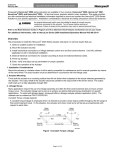
Selecting PosR relay type, you can cause the relay to energize when the actuator motor travels below 20%
of range and above 80% of range. Note in the example below that Relay 1 is set up to provide two trip
points. The first trip point (R11VAL) causes the relay to energize when the motor travels above 80%, the
second trip point (R12VAL) is set so the relay energizes when the motor travels below 20%.
Set Up Group
SET RELAY1
Parameter
Value
RTYP11
PosR
R11VAL
80.0
R11HL
HI
RTYP12
PosR
R12VAL
20.0
R12HL
LO
RLY1HY
0.0
The figure below shows the resulting action.
Motor
Position
0%
20%
80%
100%
17
17
Open
18
18
Closed
Closed
RELAY 1
Normally Open
46
HercuLine™ 2000 Series Actuator - Installation, Operation and Maintenance Manual
Revision 8
3/13