1
6
Printer Monitoring
RISO Console PS7R
An HC5000 connected to a LAN can be used in many different
ways to use networking and send high-speed data. You can also
check to see if the printer is ready, without going to the printer.
Open your browser and enter the IP address of the HC5000
and the console screen will appear.
See User's Manual for Console page 1-3.
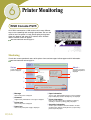
Monitoring
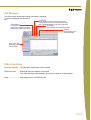
Checks the current operational status of the printer. Icons and messages indicate paper and ink information.
See User's Manual for Console page 1-4.
Status
Current status of the
printer is displayed.
About ..
1
2
5
3
6
The status of the print
controller and printer is
displayed.
4
7
1 Message
Status of the printer is displayed.
2 Comment
Supplementary information for a message is displayed.
3 Printer icon
Status of the printer is displayed.
4 Power icon
Status of the printer power supply is displayed
US/UK-46
5 Paper information
The size, type, and orientation of paper set in the Standard
Paper Feeding Tray and other Feeding Trays are displayed.
6 Printer information
Paper size in the selected tray is displayed. If [Auto tray
selection] is selected in printing, [Auto] is displayed.
7 Controller information
The disk space available in the built-in hard disk, the data
reception status, and the current job name (if a job is being
processed) are displayed.




















![1 Click the [OK] button.](http://vs1.manualzilla.com/store/data/005894494_1-d1f52ee6fd3b2146a5f252d3f1858c3b-150x150.png)