1
INSTALLATION GUIDES
CAUTION: Before any installation or cable connection to the set, please
always make certain that the system is turned off and the
external power source to the set is removed to prevent electric
hazard! Never touch any metal pin in the connectors or
circuits to avoid high voltage hazard or electrostatic discharge
damage unless the operator is well grounded. Failure to do the
above will void the product warranty!
TILTING LCD PANEL
The tilting mechanism in KS-6810 series utilizes hinges
and there is no particular skill to turn the LCD panel to
most suitable angle for either viewing or convenience in
cable connection.
DISCONNECTING ALL CABLES
With the LCD panel turned to most backward position, the main I/O connector
area will be easily accessible at bottom side of the main unit. Please first note
orientations of every existing cable connection and then disconnect every
cable properly before any further reconfiguration of cable connections. Please
note that the click lock spring has to be pressed down prior to pulling out the
connector such as the LAN port or the 2 alternate RJ45 form COM ports.
Please also note that the fixing screws have to be loosened free prior to
disconnection such as the 2 regular DB9 form COM ports. Please always hold
the connector head instead of pulling on the cable wire when disconnecting
any connector. Failure to do this could damage the cable and jack that is
considered as an artificial destruction. Damages due to incorrect
disconnection operation are not covered by product warranty!
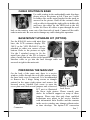
OPENING BASE BACK COVER
In order to settle the touch terminal
properly in a point of sale system, all
the cable connections have to be
routed through its base. Therefore,
please observe the side view pictures
of the base trunk at the left and
release the triangle marked hooks to
remove the back cover.
Part 6