1
Installation Manual
and User Guide
ESET Mobile Antivirus for Symbian
Copyright © 2009 by ESET, spol. s r. o.
ESET Mobile Antivirus for Symbian was developed by ESET,
spol. s r.o. For more information visit www.eset.com.
All rights reserved. No part of this documentation may be
reproduced, stored in a retrieval system or transmitted in any
form or by any means, electronic, mechanical, photocopying,
recording, scanning, or otherwise without permission in
writing from the author.
ESET, spol. s r.o. reserves the right to change any of the
described application software without prior notice.
Customer Care Worldwide: www.eset.eu/support
Customer Care North America: www.eset.com/support
REV.20090911‑001
contents
1. Installation of ESET Mobile Antivirus.........4
1.1 Minimum system requirements....................................... 4
1.2 Installation.................................................................... 4
1.2.1
Installation on your device......................................4
1.2.2
Installation using your computer.............................4
1.3 Product activation......................................................... 5
1.4 Uninstalling................................................................... 6
2. On-Access scanner.................................. 7
2.1
Settings........................................................................ 7
3. On-Demand scanner...............................8
3.1
3.2
3.3
3.4
Running a Whole device scan.......................................... 8
Scanning a folder........................................................... 8
Settings........................................................................ 9
Scan objects setup......................................................... 9
4. Virus found........................................... 10
4.1 Quarantine...................................................................10
5. Update.................................................. 11
5.1
Settings........................................................................11
6. Viewing logs and statistics......................12
7. Troubleshooting.....................................13
7.1 Connection to update server failed ................................. 13
7.2 Unsuccessful Installation............................................... 13
8. Technical support................................. 14
1. Installation of ESET Mobile Antivirus
1.1
Minimum system requirements
To install ESET Mobile Antivirus for Symbian,
your mobile device must meet following system
requirements:
ESET Mobile Antivirus for
Symbian
Operating System
System
Requirements
S60 3rd Edition Feature Pack 1 or 2
Memory
S60 5th Edition
1MB
1.2
Installation
Save all open documents and exit all running
applications before installing.
You can install ESET Mobile Antivirus for Symbian
directly on your device or use your computer.
1.2.1 Installation on your device
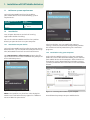
To install ESET Mobile Antivirus directly on your device,
download the .sisx installation file onto your device by
WiFi, Bluetooth file transfer or email attachment.
Go to My Content > File manager to locate the file.
Tap it to launch the installer and follow the prompts of
the installation process.
Figure 1-1: Installing ESET Mobile Antivirus
NOTE: The Symbian user interface varies by device
model. The installation file may appear in a different
menu or folder on your device.
4
Figure 1-2: Installation progress
After installation, you can modify the program
settings. However, the default configuration provides
the maximum level of protection against malicious
programs.
1.2.2 Installation using your computer
To install ESET Mobile Antivirus using your computer
(Nokia PC Suite in Microsoft Windows), please connect
your mobile device to the computer. After the device is
recognized, run the downloaded installation package
(.sisx file) and follow the instructions in the installation
wizard.
Figure 1-3: Launching the installer on your computer
Then follow the prompts on your mobile device.
1.3 Product activation
After successful installation, ESET Mobile Antivirus for
Symbian must be activated. If you are not prompted to
activate your product, tap Options > Activate from the
ESET Mobile Antivirus main program window.
Enter the license information you received from your
local distributor into Username and Password fields,
then enter valid email address in the Email field and tap
Options > Activate to complete activation.
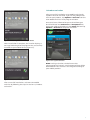
Figure 1-4: Installing the .sisx file on your device
When installation is complete, the installer displays a
message indicating that the program was successfully
installed on your mobile device (Figure 1-5).
Figure.1-6: Program activation
NOTE: During activation, the device must be
connected to the internet. Small amount of data will be
downloaded. These transfers are charged according to
your mobile provider.
Figure 1-5: Installation is complete
After successful installation, activate ESET Mobile
Antivirus by following the steps in section 1.3, “Product
activation”.
5
1.4
Uninstallation
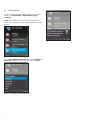
To uninstall ESET Mobile Antivirus from your mobile
device, tap My Content > Applications > App.
manager.
NOTE: The Symbian user interface varies by device
model. These options may be slightly different on your
device.
Figure 1-9: Confirm uninstallation
Figure 1-7: Application manager
Select ESET Mobile Antivirus, then select Options >
Remove and confirm your choice by selecting Yes.
Figure 1-8: Removing ESET Mobile Antivirus
6
2. On-Access scanner
The main ESET Mobile Antivirus for Symbian window
(My Content > Applications > ESET Mobile
Antivirus) is the starting point for all instructions in
this manual.
The On-access scanner checks files that you interact
with in real time. Files that are run, opened or saved
are checked for viruses automatically. Scanning takes
place before any action is performed on a file, ensuring
maximum protection with default settings. The Onaccess scanner launches automatically at system
startup.
2.1
Settings
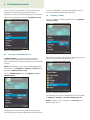
Tap Options > Settings > On Access to enable or
disable the following options:
•
Enable On Access Scan – If selected,
the On-access scanner runs in the background.
•
Heuristics – Select this option to apply heuristic
scanning techniques.
Heuristics proactively identifies new malware
not yet detected by the virus signature database
by analyzing code and recognizing typical virus
behavior.
•
Run After Restart – If selected, the On-access
scanner will automatically initiate after restart.
Figure 2-1: On-access scanner settings
7
3. On-Demand scanner
You can use the On-demand scanner to check your
mobile device for the presence of infiltrations.
By default, specific, predefined file types are scanned.
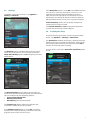
To run the On-demand scanner, tap Options > Scan.
scans files and folders. The full path and file name of
each scanned file will be displayed briefly.
3.2
Scanning a folder
To scan a particular folder on your device, tap Options
> Scan > Folder.
Figure 3-1: On-demand scan
3.1
Running a Whole device scan
A Whole Device scan checks memory, running
processes, their dependent dynamic link libraries
(DLLs) and files that are part of internal and removable
storage.
Figure 3-3: Scanning a folder
Select the memory for your device or memory card and
then specify the folder you wish to scan.
NOTE: The memory scan is not performed by default.
To activate it, tap Options > Settings > General and
switch the Memory Scan to On.
To run a Whole Device scan, tap Options > Scan >
Whole Device.
Figure 3-4: Selecting a folder to scan
The memory Scan will also be performed if it is enabled
in Options > Settings > General > Memory Scan.
NOTE: To abort a scan in progress, tap Cancel in the
bottom right corner.
Figure 3-2: Whole Device scan
The program scans system memory first (including
running processes and their dependent DLLs) and then
8
3.3
Settings
To modify scanning parameters, tap Options >
Settings > General.
If the Heuristics option is set to On, ESET Mobile Antivirus
uses heuristic scanning techniques. Heuristics is an
algorithm-based detection method that analyzes
code and searches for typical virus behavior. Its main
advantage is the ability to identify malicious software
not yet known by the current virus signature database.
Archive Nesting allows you to specify the depth of
nested archives to be scanned.
Set Archive Deletion to On to automatically delete
archive files containing infected objects.
3.4
Scan objects setup
To specify the file types to be scanned on your mobile
device, tap Options > Settings > Extensions.
The Extensions window will display, showing the most
common file types exposed to infiltration. Select On for
the file types you wish to be scanned and select Off to
exclude an extension from scanning.
Figure 3-5: Settings
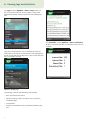
The General settings window allows you to specify
which action to take if a virus is found. Switch the
Show Alert Dialog option to On to display virus alert
notifications.
To scan all files, switch the Extension Sensitive option
to Off.
Figure 3-7: Extensions setup
Figure 3-6: General settings
The Default Action option allows you to select an
action to be performed automatically for infected files.
You can choose from the following options:
• Quarantine Infected File
• Delete Infected File
• Do Nothing (not recommended)
The Stored Logs option allows you to define the
maximum number of logs to be stored.
If the Memory Scan option is set to On, the device
memory will automatically be scanned for malicious
programs prior to the actual file scan.
9
4. Virus found
If a virus is found, ESET Mobile Antivirus will prompt you
to take an action.
4.1
Quarantine
The main task of the quarantine is to safely store
infected files. Files should be quarantined if they cannot
be cleaned, if it is not safe or advisable to delete them
or if they are being falsely detected by ESET Mobile
Antivirus.
Files stored in the quarantine folder can be viewed in a
log that displays the date and time of quarantine. The
original location of the infected file is shown inside of
each log entry.
You can restore quarantined files by tapping Options
> View > Quarantine List > Options > Restore (each
file will be restored to its original location).
Figure 4-1: Virus alert dialog
We recommend you select Options > Delete. If you
select Quarantine, the file will be moved from its
original location to quarantine. If you select Ignore,
no action will be performed and the infected file will
remain on your mobile device.
If an infiltration is detected in an archive (e.g., .zip file),
you can enable archive deletion by tapping Options >
Enable archive deletion and then delete the archive
(Options > Delete).
Figure 4-3: Quarantine List
You can also choose to permanently remove the files
by tapping Options > Delete. If you wish to select
multiple files, tap Options > Mark/Unmark and make
your selection.
Figure 4-2: Virus alert dialog
10
5. Update
By default, ESET Mobile Antivirus is installed with an
update task to ensure that the program is updated
regularly. You can also perform updates manually.
After installation, we recommend you run the first
update manually. To do so, tap Options > Update.
NOTE: To prevent unnecessary bandwidth usage, virus
signature database updates are issued as needed,
when a new threat occurs. While virus signature
database updates are free with your active license, you
may be charged by your mobile service provider for
data transfers. Please check with your mobile service
provider.
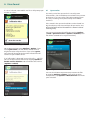
Figure 5-1: Running the update manually
5.1
Settings
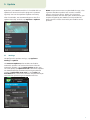
To configure the update settings, tap Options >
Settings > Update.
The Internet Update option enables or disables
automatic updates. To set the time interval for the
automatic update, use the Auto Update option. You
can also specify the Update Server from which updates
are downloaded (we recommend leaving the default
setting of updmobile.eset.com). In the Login and
Password fields, enter the username and password you
received after purchasing ESET Mobile Antivirus.
Figure 5-2: Update settings
11
6. Viewing logs and statistics
The Logs section (Options > View > Logs) stores all
file scan results and scan status reports, along with
information about infected, quarantined and deleted
files.
Figure 6-3: Log details
The Statistics screen (Options > View > Statistics)
displays a summary of files scanned by the On-access
scanner.
Figure 6-1: Opening scan log
Logs are created when a scan is initiated or when an
infiltration is detected. All infected files are highlighted
in red. At the end of each log entry is the reason why the
file is included in the log.
Figure 6-4: Statistics
Figure 6-2: Viewing logs
System logs contain the following information:
• Date and time of the event
• Log file name (usually in the form “Eset_AntiVirus_
UI.number.log”)
• Scanned files
• Actions performed or errors encountered during the
scan
12
7. Troubleshooting
This section provides solutions to common questions
about ESET Mobile Antivirus.
7.1
Connection to update server failed
This error message is displayed after an unsuccessful
update attempt if the program is not able to contact the
update servers.
Try the following solutions:
1. Check your Internet connection
Open your Internet browser to http://www.eset.com
to verify that you are connected to the Internet
2.Check if the program is using the correct
update server.
To check the server address, tap Options > Settings
> Update and you should see updmobile.eset.com
in the Update Server field.
7.2
Unsuccessful Installation
If an error message displays when you begin
installation, the most common cause is installing the
wrong version of ESET Mobile Antivirus to your device.
When downloading the installation file from the ESET
homepage, please make sure you are downloading the
correct product version for your device.
13
8. Technical support
For administrative assistance or technical support
related to ESET Mobile Antivirus or any other ESET
security product, our Customer Care specialists are
available to help. To find a solution to your technical
support issue, you can choose from the following
options:
To find answers to the most frequently asked questions,
access the ESET Knowledgebase, here: http://kb.eset.com
The Knowledgebase contains an abundance of useful
information for resolving the most common issues with
categories and an advanced search.
To contact ESET Customer Care, use the support
request form available here:
http://eset.com/support/contact.php
14