1
00CP-X885WBasic-四 02.10.7 6:55 PM ページ2
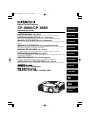
Liquid Crystal Projector
CP-X880/CP-X885
(CP-X880W/CP-X885W)
USER'S MANUAL Vol.1 Basic
Please read this user's manual thoroughly to ensure correct usage through understanding.
ENGLISH
DEUTSCH
BEDIENUNGSANLEITUNG Teil 1 Grundlagen
Bitte lessen Sie diese Benutzerhandbuch zugunsten der korrekten Bedienung aufmerksam.
MANUEL D'UTILISATION Vol.1 Fondements
Nous vous recommandons de lire attentivement ce manuel pour bien assimiler le fonctionnement de
l'appareil.
FRANÇAIS
MANUALE D'ISTRUZIONI Vol.1 Informazioni di base
Vi preghiamo voler leggere attentamente il manuale d'istruzioni in modo tale da poter comprendere
quanto riportato ai fini di un corretto utilizzo del proiettore.
ITALIANO
MANUAL DE USUARIO Vol.1 Básico
Lea cuidadosamente este manual del usuario para poder utilizar corretamente el producto.
GEBRUIKSAANWIJZING Vol.1 Basis
ESPAÑOL
Lees voor het qebruik alstublieft deze handleiding aandachtig door, om volledig profijt te hebben van
de uitgebreide mogelijkheden.
BRUKERHÅNDBOK Vol.1 Grunnleggende
Vennligst les denne bruksanvisningen grundig for å være garantert driftssikker bruk.
NEDERLANDS
NSTRUÇÕES DO PROPRIETÁRIO Vol.1 Básico
Para assegurar o uso correto do equipamento, por favor leia atentamente este manual do utilizador.
NORSK
PORTGÊS
中文
REGULATORY
NOTICES
01CP-X885W/Vol1/E-責 02.10.8 9:05 PM ページ1
LCD Projector CP-X880/CP-X885
USER'S MANUAL
Vol.1 (Basic)
Thank you for purchasing this projector.
WARNING • Please read the accompanying manual “SAFETY
INSTRUCTIONS” and this “USER'S MANUAL” thoroughly to ensure correct
usage through understanding. After reading, store this instruction manual in a
safe place for future reference.
NOTE • The information in this manual is subject to change without notice.
• The manufacturer assumes no responsibility for any errors that may appear in this manual
• The reproduction, transmission or use of this document or contents is not permitted without express
written authority.
TRADEMARK ACKNOWLEDGEMENT :
• PS/2, VGA and XGA are registered trademarks of the International Business Machines Corporation.
• Apple, Mac and ADB are registered trademarks of Apple Computer, Inc.
• VESA and SVGA are trademarks of the Video Electronics Standard Association.
• Windows is a registered trademark of Microsoft Corporation.
• All other trademarks are the property of their respective owners.
CONTENTS
Page
Page
PROJECTOR FEATURES ................2
PREPARATIONS ..............................2
PART NAMES ...................................4
SETTING UP
THE PROJECTOR ............................6
CONNECTING
YOUR DEVICES................................8
USING THE REMOTE
CONTROL .......................................13
TURNING ON THE POWER ...........15
TURNING OFF THE POWER .........17
ADJUSTING THE VOLUME ...........18
TEMPORARILY MUTING
THE SOUND....................................18
ADJUSTING THE POSITION..........19
USING THE AUTOMATIC
ADJUSTMENT FEATURE ..............20
CORRECTING KEYSTONE
DISTORTIONS ................................21
USING THE MAGNIFY
FEATURE........................................22
FREEZING THE SCREEN ..............22
ADJUSTING SCREEN WITH
ONE-TOUCH ...................................23
SELECTING THE ASPECT
RATIO..............................................24
TEMPORARILY BLANKING
THE SCREEN..................................24
DISPLAYING CHILD WINDOW
(P. IN. P: Picture in Picture) ..........24
USING THE MENU
FUNCTIONS....................................25
OPERATING THE PC SCREEN .....26
THE LAMP ......................................27
THE AIR FILTER.............................29
OTHER CARE .................................31
1
01CP-X885W/Vol1/E-責 02.10.8 9:05 PM ページ2
PROJECTOR
FEATURES
This liquid crystal projector is used to project
various computer signals as well as NTSC / PAL /
SECAM video signals onto a screen. Little space
is required for installation and large images can
easily be realized.
●Ultra High Brightness
●One Touch Function
●Partial Magnification Function
●Whisper Mode Equipped
Crisp, ultra-bright presentations is achieved
by using a UHB (ultra high brightness) lamp
and a highly efficient optical system
Interesting parts of images can be magnified
for closer viewing
PREPARATIONS
Just press the ONE TOUCH button to
automatically retrieve input signals, calibrate
images, and correct keystone distortion
Special mode is available for reducing
projector noise to achieve quieter operation
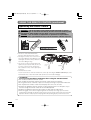
Your projector should come with the items
shown below. Check to make sure that all the
items are included. Contact your dealer if
anything is missing.
NOTE • Keep the original packing material for future reshipment.
Power cord
(US Type)
Power cord
(UK Type)
Power cord
(Europe Type)
RGB cable
Video/Audio cable
USB mouse
cable
Projector
(with Lens Cap)
Liquid Crystal Projector
CP-X880/CP-X885
(CP-X880W/CP-X885W)
USER'S MANUAL Vol.1 Basic
Please read this user's manual thoroughly to ensure correct usage through understanding.
ENGLISH
DEUTSCH
BEDIENUNGSANLEITUNG Teil 1 Grundlagen
Bitte lessen Sie diese Benutzerhandbuch zugunsten der korrekten Bedienung aufmerksam.
MANUEL D'UTILISATION Vol.1 Fondements
Nous vous recommandons de lire attentivement ce manuel pour bien assimiler le fonctionnement de
l'appareil.
FRANÇAIS
MANUALE D'ISTRUZIONI Vol.1 Informazioni di base
Vi preghiamo voler leggere attentamente il manuale d'istruzioni in modo tale da poter comprendere
quanto riportato ai fini di un corretto utilizzo del proiettore.
ITALIANO
MANUAL DE USUARIO Vol.1 Básico
Lea cuidadosamente este manual del usuario para poder utilizar corretamente el producto.
GEBRUIKSAANWIJZING Vol.1 Basis
ESPAÑOL
Lees voor het qebruik alstublieft deze handleiding aandachtig door, om volledig profijt te hebben van
de uitgebreide mogelijkheden.
BRUKERHÅNDBOK Vol.1 Grunnleggende
Vennligst les denne bruksanvisningen grundig for å være garantert driftssikker bruk.
NEDERLANDS
NSTRUÇÕES DO PROPRIETÁRIO Vol.1 Básico
Para assegurar o uso correto do equipamento, por favor leia atentamente este manual do utilizador.
NORSK
PORTGÊS
中文
REGULATORY
NOTICES
User's Manuals
(Vol.1/Vol.2)
Safety Instructions
LASER
INDICATOR
STANDBY/ON
VIDEO
RGB
FOCUS
ZOOM
PAGE
UP
DOWN
BLANK
LASER
ASPECT
PUSH
RS-232C
adapter
Soft carrying case
2
Two AA batteries
(for the remote
control)
ENTER
ESC
MENU
POSITION
AUTO
MAGNIFY
RESET
PinP
VOLUME
ON
FREEZE
MUTE
OFF
WIRELESS
KEYSTONE ONE TOUCH
Remote control
01CP-X885W/Vol1/E-責 02.10.8 9:05 PM ページ3
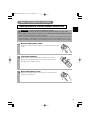
WARNING Precautions to observe in regards to the power cord: Please use extra
caution when connecting the projector's power cord as incorrect or faulty
connections may result in FIRE AND/OR ELECTRICAL SHOCK. Please adhere to the
following safety guidelines to insure safe operation of the projector:
• Only plug the power cord into outlets rated for use with the power cord's specified voltage range.
• Only use the power cord that came with the projector.
• NEVER ATTEMPT TO DEFEAT THE GROUND CONNECTION OF THE THREEPRONGED PLUG!
• Make sure that you firmly connect the power cord to the projector and wall outlet.
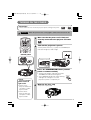
1
Connect your devices to the projector
2
Insert the batteries into the remote
control
3
Connect the power cord
Connect your computer, VCR and/or other
devices you will be using to the projector.
8
∼ 12
13
(1) Connect the connector of the electrical power cord to the AC inlet of the main unit.
(2) Firmly plug the power cord's plug into the outlet
Power outlet
(1)
AC inlet
(2)
Power cord
3
01CP-X885W/Vol1/E-責 02.10.8 9:05 PM ページ4
THE PROJECTOR
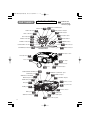
PART NAMES
Indicates the
corresponding
reference page
21 KEYSTONE button
INPUT dial 16
22 ONE TOUCH button
RGB indicator 16
19 RESET button
BNC indicator 16
DVI indicator 16
RGB
INPUT
16 FOCUS button
KEYSTONE
BNC
VIDEO indicator 16
FOCUS
VIDEO
S-VIDEO indicator 16
16 ZOOM button
ONE TOUCH
DVI
ZOOM
RESET
25 MENU button
S-VIDEO
COMPONENT
COMPONENT indicator 16
STANDBY/ON
STANDBY/ON button 15
MENU
9 LAMP indicator
Vol.2
TENP
LANP
9 TEMP indicator
Vol.2
Control Panel
Elevator screw
6
Elevator feet
6
Lens cap 15
29 Air filter
14 Remote sensor
15 Lens
COMPONENT VIDEO port 12
CONTROL port 10
WIRELESS & NETWORK
MODULE port Vol.2
7
6
Elevator button
14 REMOTE CONTROL port
12 VIDEO IN port
12 S-VIDEO IN port
RGB OUT port 12
14 Remote sensor
DVI port 11
3 AC power inlet
RGB port 10
15 Power switch
BNC port 11
AUDIO IN R/L port 12
10 USB port
9 AUDIO OUT port
10 AUDIO IN 1/2 port
4
01CP-X885W/Vol1/E-責 02.10.8 9:05 PM ページ5
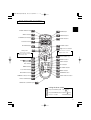
THE REMOTE CONTROL
LASER INDICATOR 14
16 RGB button
VIDEO button 16
STANDBY/ON button 15
LASER
INDICATOR
STANDBY/ON
VIDEO
16 ZOOM buttons
RGB
26 PAGE buttons
UP
FOCUS buttons 16
FOCUS
ZOOM
PAGE
DOWN
BLANK button 24
LASER
BLANK
14 LASER button
26 Right mouse button
Disk pad
26
<For mouse control>
<For mouse control>
Right mouse click
Mouse cursor movement
Left mouse click
ASPECT
25 Lever switch (*)
ASPECT button 24
19 RESET button
PUSH
Left
/Right
25
Key buttons
ESC button 25
ENTER
ESC
MENU
RESET
POSITION
AUTO
PinP
MAGNIFY
MENU button 25
POSITION button 19
MAGNIFY buttons 22
WIRELESS button Vol.2
7
VOLUME
ON
FREEZE
MUTE
20 AUTO button
24 PinP button
18 VOLUME button
OFF
WIRELESS
KEYSTONE ONE TOUCH
18 MUTE button
22 FREEZE button
23 ONE TOUCH button
KEYSTONE button 21
REMOTE CONTROL port 14
* Using the lever switch
Flip toward disk pad : Up ( ) key
Flip toward MENU button: Down ( ) key
Press in center
: ENTER button
5
01CP-X885W/Vol1/E-責 02.10.8 9:05 PM ページ6
SETTING UP THE PROJECTOR
CAUTION • Install the projector in a suitable environment according to instructions
of the accompanying manual “SAFETY INSTRUCTIONS” and this manual.
• If you press the elevator buttons without holding the projector, the projector might
crash down, overturn, smash your fingers and possibly result in malfunction. To
prevent damaging the projector and injuring yourself, ALWAYS HOLD THE
PROJECTOR whenever using the elevator buttons to adjust the elevator feet.
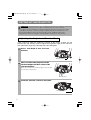
Adjusting the Projector's Elevator Feet
If the surface on which the projector is placed, or the screen is tilted, use the
elevator feet and elevator screw to adjust the projection angle of the main unit.
The adjustment range of the elevator feet is 0 to 9 degrees.
1
Press and hold in the elevator
buttons
Elevator button
2
Raise or lower the projector to the
desired height and then release the
elevator buttons
When you release the elevator buttons, the elevator
feet will lock into position.
Elevator feet
3
Turn the elevator screw to fine tune.
Elevator screw
6
01CP-X885W/Vol1/E-責 02.10.8 9:05 PM ページ7
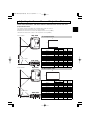
Adjusting the Screen Size and Projection Distance
Refer to the illustrations and tables below to determine the screen size and
projection distance.
The values shown in the table are calculated for a full size screen
a:Distance from the projector to the screen (±10%)
b:Distance from the lens center to the bottom of the screen (±10%)
c:Distance from the lens center to the top of the screen (±10%)
The screen
Top view
If 4:3 aspect ratio
4
3
Screen Size [inch (m)]
30 (0.8)
40 (1.0)
50 (1.3)
60 (1.5)
70 (1.8)
80 (2.0)
90 (2.3)
100 (2.5)
120 (3.0)
150 (3.8)
200 (5.0)
250 (6.3)
300 (7.5)
Lens center
c
Side view
a
The screen
Top view
a [inch (m)]
b
Min.
Max. [inch (cm)]
34 (0.9) 52 (1.3) 0 (0)
46 (1.2) 71 (1.8) 0 (0)
58 (1.5) 89 (2.3) 0 (0)
71 (1.8) 107 (2.7) 0 (0)
83 (2.1) 126 (3.2) 0 (0)
95 (2.4) 144 (3.7) 0 (0)
108 (2.7) 162 (4.1) 0 (0)
120 (3.0) 181 (4.6) 0 (0)
144 (3.7) 217 (5.5) 0 (0)
181 (4.6) 272 (6.9) 0 (0)
243 (6.2) 364 (9.2) 0 (0)
304 (7.7) 455 (11.6) 0 (0)
366 (9.3) 547 (13.9) 0 (0)
c
[inch (cm)]
18 (46)
24 (61)
30 (76)
36 (91)
42 (107)
48 (122)
54 (137)
60 (152)
72 (183)
90 (229)
120 (305)
150 (381)
180 (457)
If 16:9 aspect ratio
16
9
Screen Size [inch (m)]
c
Lens center
Side view
b
a
30 (0.8)
40 (1.0)
50 (1.3)
60 (1.5)
70 (1.8)
80 (2.0)
90 (2.3)
100 (2.5)
120 (3.0)
150 (3.8)
200 (5.0)
250 (6.3)
300 (7.5)
a [inch (m)]
Min.
Max.
37 (0.9) 57 (1.4)
50 (1.3) 77 (2.0)
64 (1.6) 97 (2.5)
77 (2.0) 117 (3.0)
90 (2.3) 137 (3.5)
104 (2.6) 157 (4.0)
117 (3.0) 177 (4.5)
131 (3.3) 197 (5.0)
157 (4.0) 237 (6.0)
198 (5.0) 296 (7.5)
265 (6.7) 396 (10.1)
332 (8.4) 496 (12.6)
399 (10.1) 596 (15.1)
b
[inch (cm)]
2 (6.2)
13 (32)
16 (41)
19 (49)
22 (57)
26 (65)
29 (73)
32 (81)
38 (97)
48 (121)
64 (162)
80 (202)
96 (243)
c
[inch (cm)]
17 (44)
27 (70)
31 (78)
34 (86)
37 (94)
40 (102)
43 (110)
47 (118)
53 (134)
63 (159)
78 (199)
94 (240)
110 (280)
7
01CP-X885W/Vol1/E-責 02.10.8 9:05 PM ページ8
CONNECTING YOUR DEVICES
Devices You Can Connect to the Projector
(Refer to this section for planning your device
configuration to use for your presentation.)
CAUTION • Incorrect connecting could result in fire or electrical shock. Please
read this manual and the separate “SAFETY INSTRUCTIONS”.
ATTENTION Precautions to observe when connecting other devices to the projector
• Whenever attempting to connect other devices to the projector, please thoroughly
read the manual of each device to be connected.
• TURN OFF ALL DEVICES prior to connecting them to the projector. Attempting to
connect a live device to the projector may generate extremely loud noises or other
abnormalities that may result in malfunction and/or damage to the device and/or
projector. Refer to the “TECHNICAL” of the USER’S MANUAL (Vol.2) for the pin
assignment of connectors and RS-232C communication data.
• Make sure that you connect devices to the correct port. Incorrect connection may
result in malfunction and/or damage to the device and/or projector.
• Some other cables have to be used with core set. Use the accessory cable or a
designated-type cable for the connection. For cables that have a core only at one
end, connect the core to the projector.
• Secure the screws on the connectors and tighten.
Indicates the
corresponding
reference page
12 Display monitors
11 DVD players
10 Laptop computers
11 VCRs
10 Desktop computers
8
01CP-X885W/Vol1/E-責 02.10.8 9:05 PM ページ9
Ports and Cables
Refer to the table below to find out which projector port and cable to use for connecting a
given device. Use this table for determining which cables to prepare.
Function
Projector Port
Connection Cables
RGB
RGB cable
(With D-sub 15-pin shrink jack and inch
thread screws)
BNC(R/CR/PR)(G/Y)(B/CB/PB)(H)(V)
• When BNC (RGB) is selected (*)
BNC cable
Analog output
RGB OUT
RGB cable
(With D-sub 15-pin shrink jack and inch
thread screws)
DVI input
DVI
DVI cable
Analog RGB input
Audio input from computer
USB mouse control
AUDIO IN 1
• Linked to RGB or DVI port input
AUDIO IN 2
• Linked to BNC (RGB) port input (*)
USB
PS/2 mouse control
Audio/video cable (Stereo mini)
USB cable
PS/2 mouse cable
ADB mouse control
ADB mouse cable
CONTROL
Serial mouse control
Serial mouse cable
RS-232C communications
RS-232C adapter + RS-232C cable
S video input
S-VIDEO IN
S-video cable (mini DIN 4-pin jack)
Video input
VIDEO IN
Audio/video cable
COMPONENT(CR/PR)(CB/PB)(Y)
Component video input
BNC(R/CR/PR)(G/Y)(B/CB/PB)
Component video cable
• When BNC (COMPONENT) is
selected (*)
Audio input from video equipment
AUDIO IN R,L
Audio/video cable or audio cable (RCA jack)
Audio output
AUDIO OUT
Audio cable (Stereo mini)
Wired remote control signal input
REMOTE CONTROL
Audio cable (Stereo mini)
* Before using the BNC port, change RGB input to component video input on the BNC menu item of
the INPUT menu.
NOTE About Plug-and-Play Capability
• This projector is compatible with VESA DDC 1/2B. Plug-and-Play can be achieved by connecting
this projector to computers that are VESA DDC (display data channel) compatible. Please take
advantage of this function by connecting the accessory RGB cable to the RGB port (DDC 1/2B
compatible). Plug-and-Play may not work properly if any other type of connection is attempted.
• Plug-and-Play is a system composed of the computer, its operating system and
peripheral equipment (i.e. display devices).
• Please use the standard drivers as this projector is a Plug-and-Play monitor.
9
01CP-X885W/Vol1/E-責 02.10.8 9:05 PM ページ10
CONNECTING YOUR DEVICES (continued)
Connecting to a Computer
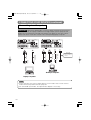
ATTENTION Whenever attempting to connect a laptop computer to the projector,
be sure to activate the laptop's RGB external image output (set the laptop to CRT
display or to simultaneous LCD and CRT display). For details on how this is done,
please refer to the instruction manual of the corresponding laptop computer.
REMOTE
CONTROL
REMOTE
CONTROL
DVI
CR/PR
Ca/Pa
Y
CR/PR
A
A
RGB
R/CR/PR
DVI
COMPONENT VIIDEO
RGB OUT
G/Y
B/Ca/Pa
V
R-AUDIO IN-L VIDEO IN
1
2
RGB OUT
G/Y
B/Ca/Pa
H
R-AUDIO IN-L VIDEO IN
1
2
V
C
B
BNC
AUDIO IN
AUDIO OUT
BNC
USB
A
B
A
COMPONENT VIIDEO
CONTROL
S-VIDEO IN
R/CR/PR
Y
B
RGB
CONTROL
H
Ca/Pa
D
AUDIO IN
AUDIO OUT
C
B
S-VIDEO IN
USB
D
USB cable
USB OUT
AUDIO cable
(Stereo mini) AUDIO OUT
Analogue
RGB OUT
CONTROL OUT
MOUSE cable
RGB cable
Analogue
RGB OUT
AUDIO cable
(Stereo mini) AUDIO OUT
RGB cable
If connecting to a
USB port equipped
computer
Desktop computer
Laptop computer
NOTE
• Some computers may have multiple display screen modes. Use of some of these
modes will not be possible with this projector.
• For some RGB input modes, the optional Mac adapter is necessary.
10
01CP-X885W/Vol1/E-責 02.10.8 9:05 PM ページ11
Connecting to a Computer (continued)
BNC Input
DVI Input
A
REMOTE
CONTROL
DVI
CR/PR
RGB
R/CR/PR
RGB OUT
G/Y
B/Ca/Pa
Ca/Pa
Y
CONTROL
H
V
A A A A A
BNC
CR/PR
RGB
R-AUDIO IN-L VIDEO IN
1
2
RGB OUT
R/CR/PR
G/Y
B/Ca/Pa
Ca/Pa
Y
COMPONENT VIIDEO
CONTROL
S-VIDEO IN
H
V
B
AUDIO IN
A
REMOTE
CONTROL
DVI
COMPONENT VIIDEO
R-AUDIO IN-L VIDEO IN
1
2
S-VIDEO IN
B
AUDIO OUT
USB
BNC
AUDIO IN
A
B
USB
B
AUDIO cable
(Stereo mini) AUDIO OUT
DVI cable
DVI OUT
AUDIO cable
(Stereo mini) AUDIO OUT
BNC cable
BNC OUT
Desktop computer
AUDIO OUT
Desktop computer
11
01CP-X885W/Vol1/E-責 02.10.8 9:05 PM ページ12
CONNECTING YOUR DEVICES (continued)
Connecting to a DVD Player
Connecting to a VCR
REMOTE
CONTROL
DVI
RGB OUT
RGB
R/CR/PR
CR/PR
G/Y
B/Ca/Pa
CONTROL
H
Y
Ca/Pa
C
R-AUDIO IN-L VIDEO IN
1
2
V
BNC
AUDIO IN
A
B
REMOTE
CONTROL
COMPONENT VIIDEO
A A A
B B B
DVI
CR/PR
RGB OUT
RGB
AUDIO OUT
USB
G/Y
B/Ca/Pa
H
AUDIO IN
A
REMOTE
CONTROL
DVI
CR/PR
Y
Ca/Pa
COMPONENT VIIDEO
A
RGB OUT
RGB
R/CR/PR
G/Y
B/Ca/Pa
CONTROL
H
R-AUDIO IN-L VIDEO IN
1
2
V
BNC
AUDIO IN
AUDIO OUT
S-VIDEO IN
USB
A
RGB IN
RGB cable
Display monitor
12
S-VIDEO OUT
Connecting to a Display Monitor
USB
S-VIDEO cable
VCR
DVD player
AUDIO OUT
If using a S-video
connection
If using an audio/video
connection
If using a component
video connection
B
S-VIDEO IN
B
AUDIO/VIDEO
OUT
S-VIDEO OUT
AUDIO/VIDEO OUT
AUDIO/VIDEO cable
AUDIO/VIDEO cable
COMPONENT OUT
COMPONENT VIDEO cable
S-VIDEO cable
If using a S-video
connection
COMPONENT VIIDEO
R-AUDIO IN-L VIDEO IN
1
2
V
BNC
C
Y
A A A
CONTROL
S-VIDEO IN
R/CR/PR
Ca/Pa
01CP-X885W/Vol1/E-責 02.10.8 9:05 PM ページ13
USING THE REMOTE CONTROL
Putting batteries into the remote control unit
CAUTION Precautions to observe in regards to the batteries
Always handle the batteries with care and use them only as directed. Improper use may result in
battery cracking or leakage, which could result in fire, injury and/or pollution of the surrounding environment.
• Keep the battery away from children and pets.
• Be sure to use only the batteries specified for use with the remote control. Do not mix new batteries with used ones.
• When inserting batteries, verify that the plus and minus terminals are aligned correctly (as indicated in the remote control).
• When you dispose the battery, you should obey the law in the relative area or country.
1
2
3
Remove the battery cover
Slide back and remove the battery cover in the direction of the
arrow.
Insert the batteries
Align and insert the two AA batteries (that came with the
projector) according to their plus and minus terminals (as
indicated in the remote control).
Close the battery cover
Replace the battery cover in the direction of the arrow and
snap it back into place.
13
01CP-X885W/Vol1/E-責 02.10.8 9:05 PM ページ14
USING THE REMOTE CONTROL (continued)
Operating the remote control
WARNING • The laser pointer of the remote control transmitter is used in
place of a finger or rod. Never look directly into the laser beam outlet or point
the laser beam at other people. The laser beam can cause vision problems.
CAUTION • Use of controls or adjustments or performance of procedures
other than those specified herein may result in hazardous radiation exposure.
es
gre
20 degrees
de
20
es
gre
de
30
30 degrees
• The remote control works with both the
projector's front and rear remote sensors.
• The range of the remote sensor on the front is 3
meters with a 60-degree range (30 degrees to the
left and right of the remote sensor), and back is 3
meters with a 40-degree range.
• Since the remote control uses infrared light to send
approximately
signals to the projector (Class 1 LED), be sure to use
3 meters
approximately
3 meters
the remote control in an area free from obstacles
that could block the remote control's output signal to
the projector.
• The wired remote control:
You can use the remote control as a wired remote control, by connecting the REMOTE CONTROL ports of the
main unit and remote control via an audio cable (3.5 dia. stereo mini cable with plugs).
ATTENTION Precautions to observe when using the remote control
• Do not disassemble the remote control.
• Do not drop or otherwise expose the remote control to physical impact.
• Do not get the remote control wet or place it on wet objects. Doing so may result in malfunction.
• Do not place the remote control near the projector’s lens, fan, or vents.
• Remove the batteries from the remote control and store them in a safe place if you
won't be using the remote control for an extended period.
• Replace the batteries whenever the remote control starts to malfunction.
• When strong light, such as direct sunlight or light from an extremely close range (such as from an
inverter fluorescent lamp), hits the projector's remote sensor, the remote control may cease to function.
Adjust the direction of the projector to keep light from directly hitting the projector's remote sensor.
14
01CP-X885W/Vol1/E-責 02.10.8 9:05 PM ページ15
TURNING ON THE POWER
Precautions
Connect all devices to be used to the projector prior to turning on the power.
∼ 12
8
WARNING When the power is ON, a strong light is emitted. Do not look into the
lens.
1
LASER
INDICATOR
STANDBY/ON
VIDEO
RGB
FOCUS
ZOOM
PAGE
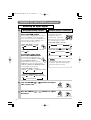
Make sure that the power cord is firmly and
correctly connected to the projector and outlet
3
UP
DOWN
2
LASER
BLANK
Turn on the projector's power
Set the power switch to [ | ] (ON). The STANDBY/ON
indicator will light to solid orange.
power switch
Control panel
RGB
INPUT
KEYSTONE
BNC
ONE TOUCH
DVI
FOCUS
VIDEO
STANDBY/ON indicator
ZOOM
RESET
S-VIDEO
COMPONENT
STANDBY/ON
MENU
TENP
LANP
3
• The projector begins warming up and the
STANDBY/ON indicator blinks green.
• The STANDBY/ON indicator stops blinking
and lights to solid green once the
projector's power is completely on.
NOTE Turn the
power on/off in
right order.
• Power on the
projector before the
computer or video
tape recorder.
• Power off the
projector after the
computer or video
tape recorder.
Press the STANDBY/ON button (control
panel or remote control)
4
STANDBY/ON
Remove the lens cap
The picture is projected.
15
01CP-X885W/Vol1/E-責 02.10.8 9:05 PM ページ16
TURNING ON THE POWER (continued)
Selecting an Input Signal
5
Using the remote control
If selecting RGB input
Press the RGB button
Turn the INPUT dial
Press this button to toggle between the devices
connected to RGB IN 1 and 2. As illustrated
below, each time you press the RGB button, the
projector switches between RGB IN 1 and 2.
Select the signal you wish to project.
• When BNC (RGB) is selected:
RGB
BNC(RGB)
Using the projector's control panel
RGB
Turning the dial cycles
through the inputs as
shown below. Select the
terminal to which the signal
you want to project is input.
GB
INPUT
• When BNC (RGB) is selected:
RGB
BNC(RGB)
DVI
DVI
COMPONENT VIDEO
S-VIDEO
VIDEO
• When BNC (COMPONENT) is selected:
• When BNC (COMPONENT) is selected:
RGB
RGB
DVI
If selecting video input
Press the VIDEO button
BNC(COMPONENT)
S-VIDEO
COMPONENT VIDEO
Press this button to toggle between the
VIDEO
devices connected to VIDEO IN, S-VIDEO
IN and COMPONENT VIDEO. As
illustrated below, each time you press the
VIDEO button, the projector switches between
VIDEO IN, S-VIDEO IN and COMPONENT VIDEO.
Select the signal you wish to project.
DVI
VIDEO
NOTE
Turn the INPUT dial and set it at the
click point, otherwise input signal
selection may be incorrect.
• When BNC (RGB) is selected:
VIDEO IN
S-VIDEO IN
COMPONENT VIDEO
• When BNC (COMPONENT) is selected:
VIDEO IN
S-VIDEO IN
COMPONENT VIDEO
BNC(COMPONENT)
6
Use the ZOOM
the screen size
/
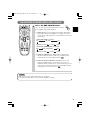
buttons to adjust
ZOOM
ZOOM
(Control panel)
7
Use the FOCUS
the focus
/
buttons to adjust
FOCUS
FOCUS
(Control panel)
16
(Remote control)
(Remote control)
01CP-X885W/Vol1/E-責 02.10.8 9:05 PM ページ17
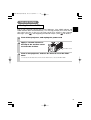
TURNING OFF THE POWER
1
LASER
INDICATOR
STANDBY/ON
VIDEO
RGB
The message "Power off?" will appear on the screen for
approximately 5 seconds.
UP
FOCUS
Press the STANDBY/ON button (control
panel or remote control)
STANDBY/ON
PAGE
ZOOM
DOWN
BLANK
LASER
2
Press the STANDBY/ON button again while the "Power off?"
message is visible. The projector lamp goes off and starts cooling
down. While cooling, the STANDBY/ON indicator flashes orange.
When in this state, pressing the STANDBY/ON button has no
effect.
When lamp cooling is complete, the STANDBY/ON indicator stops
flashing, and turning solid orange.
ASPECT
PUSH
ENTER
ESC
MENU
RESET
POSITION
AUTO
PinP
MAGNIFY
Press the STANDBY/ON button again
(control panel or remote control)
VOLUME
ON
FREEZE
MUTE
STANDBY/ON
OFF
WIRELESS
KEYSTONE ONE TOUCH
Control panel
RGB
INPUT
KEYSTONE
3
BNC
ONE TOUCH
DVI
FOCUS
VIDEO
ZOOM
RESET
S-VIDEO
COMPONENT
STANDBY/ON
MENU
TENP
LANP
Check that the STANDBY/ON indicator
stops blinking and lights to
power switch
solid orange.
Switch the power switch to
[O] (OFF).
STANDBY/ON indicator
NOTE
• Except in cases of
emergency, do not turn off
the power switch while the
STANDBY/ON indicator is
solid or flashing green.
Doing so could shorten
the lamp lifetime.
4
Confirm that the STANDBY/ON indicator has
gone off and then attach the lens cap.
When the projector has completed powering down, the
STANDBY/ON indicator will go off.
17
01CP-X885W/Vol1/E-責 02.10.8 9:05 PM ページ18
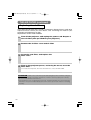
ADJUSTING THE VOLUME
LASER
INDICATOR
STANDBY/ON
VIDEO
RGB
FOCUS
ZOOM
PAGE
1
UP
Press the VOLUME button
VOLUME
As illustrated on the right, a dialog will
appear on the screen to aid you in adjusting
the volume.
VOLUME
DOWN
BLANK
LASER
16
2
ASPECT
Use the lever switch
volume
/
to adjust the
Press the VOLUME button again to close the dialog and
complete this operation. (Even if you don't do anything, the
dialog will automatically disappear after a few seconds.)
PUSH
ENTER
ESC
MENU
POSITION
AUTO
MAGNIFY
RESET
VOLUME
PinP
VOLUME
ON
FREEZE
Press this to increase the volume
MUTE
OFF
WIRELESS
Press this to decrease the volume
KEYSTONE ONE TOUCH
16
TEMPORARILY MUTING THE SOUND
DOWN
LASER
BLANK
ASPECT
1
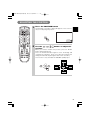
Press the MUTE button
As illustrated on the right, a dialog will appear on the
screen indicating that you have muted the sound. Press
the VOLUME button to close the dialog. (Even if you don't
do anything, the dialog will automatically disappear after
a few seconds.)
Press the MUTE button again to restore the sound.
VOLUME
PUSH
ENTER
ESC
MENU
RESET
POSITION
AUTO
PinP
MUTE
MAGNIFY
VOLUME
ON
FREEZE
MUTE
OFF
WIRELESS
18
KEYSTONE ONE TOUCH
16
01CP-X885W/Vol1/E-責 02.10.8 9:05 PM ページ19
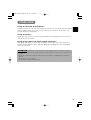
ADJUSTING THE POSITION
LASER
INDICATOR
STANDBY/ON
VIDEO
RGB
FOCUS
ZOOM
PAGE
1
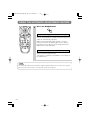
Press the POSITION button
As illustrated on the right, a dialog will appear on the screen to
aid you in adjusting the position.
UP
DOWN
BLANK
LASER
POSITION
POSITION
ASPECT
2
PUSH
ENTER
ESC
MENU
RESET
POSITION
AUTO
PinP
MAGNIFY
VOLUME
ON
FREEZE
MUTE
OFF
WIRELESS
KEYSTONE ONE TOUCH
Use the
position
,
,
,
buttons to adjust the
When you want to initialize the position, press the RESET
button during adjustment.
Press the POSITION button again to close the dialog and
complete this operation. (Even if you don't do anything, the
dialog will automatically disappear after a few seconds.)
This function is only available for RGB/BNC (RGB) input.
19
01CP-X885W/Vol1/E-責 02.10.8 9:05 PM ページ20
USING THE AUTOMATIC ADJUSTMENT FEATURE
BLANK
LASER
Press the AUTO button
AUTO
Automatic Adjustment for RGB Input
ASPECT
PUSH
ENTER
ESC
MENU
POSITION
AUTO
MAGNIFY
RESET
PinP
VOLUME
ON
FREEZE
MUTE
OFF
WIRELESS
1
Horizontal position (H. POSIT), vertical position (V.
POSIT), clock phase (H. PHASE) and horizontal size (H.
SIZE) are automatically adjusted.
Make sure that the application window is set to its
maximum size prior to attempting to use this feature.
Dark pictures may still be incorrectly adjusted. Use a
bright screen when adjusting.
KEYSTONE ONE TOUCH
Automatic Adjustment for Video Input
The signal type best suited for the respective input
signal is selected automatically.
This feature is available only if VIDEO is set to AUTO in
the INPUT menu.
NOTE
The automatic adjustment operation requires approximately 10 seconds. Also, please
note that it may not function correctly with some input signals.
20
01CP-X885W/Vol1/E-責 02.10.8 9:05 PM ページ21
CORRECTING KEYSTONE DISTORTIONS
1
ASPECT
Press the KEYSTONE button
As illustrated on the right, a dialog will appear
on the screen to aid you in correcting the
distortion.
KEYSTONE
KEYSTONE
PUSH
ENTER
ESC
MENU
POSITION
AUTO
MAGNIFY
PinP
VOLUME
ON
FREEZE
MUTE
OFF
WIRELESS
16
RESET
2
Use the
,
buttons to select the
direction of distortion to correct ( /
3
Use the lever switch
distortion
KEYSTONE ONE TOUCH
/
)
to correct
Press the KEYSTONE button again to close the dialog and
complete this operation. (Even if you don't do anything, the
dialog will automatically disappear after a few seconds.)
NOTE
• This function may not be work well with some types of input signals.
• The adjustable range for correcting keystone distortions will vary with the type of
input signal.
21
01CP-X885W/Vol1/E-責 02.10.8 9:05 PM ページ22
USING THE MAGNIFY FEATURE
DOWN
BLANK
1
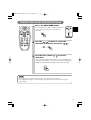
Press the MAGNIFY (ON) button
2
Press the POSITION button, then use the lever switch
/
, / to select the area to zoom. Press the
POSITION button again to finalize the zoom area.
The projector enters MAGNIFY mode.
MAGNIFY
ON
LASER
ASPECT
PUSH
ENTER
ESC
MENU
RESET
POSITION
AUTO
PinP
MAGNIFY
POSITION
POSITION
VOLUME
ON
FREEZE
MUTE
OFF
WIRELESS
KEYSTONE ONE TOUCH
3
Use the lever switch
zoom level
/
to adjust the
Press the MAGNIFY (OFF) button to exit MAGNIFY mode
and restore the screen to normal. (The projector will also
automatically exit MAGNIFY mode if there is a change in the
input signal's state.)
NOTE
The projector will automatically exit from MAGNIFY mode if either the INPUT SELECT,
AUTO, ASPECT or VIDEO feature is used, or, if there is a change in the input signal's state.
FREEZING THE SCREEN
1
PUSH
ENTER
MENU
POSITION
AUTO
MAGNIFY
RESET
PinP
VOLUME
ON
FREEZE
Press the FREEZE button
The [II] icon appears and the screen will freeze at
the current image. Press the FREEZE button again
and the [ ] appears as the projector exits FREEZE
mode.
FREEZE
▲
ESC
MUTE
OFF
WIRELESS
KEYSTONE ONE TOUCH
NOTE
• The projector will automatically exit from FREEZE mode if either the POSITION, VOLUME, MUTE, AUTO,
BLANK ON/OFF or MENU ON/OFF feature is used, or, if there is a change in the input signal's state.
• If the projector continues projecting the same image for a long time (i.e. you forget to exit FREEZE mode),
the image might possibly remain as an afterimage. Do not leave the projector in FREEZE mode for too long.
22
01CP-X885W/Vol1/E-責 02.10.8 9:05 PM ページ23
ADJUSTING SCREEN WITH ONE-TOUCH
FOCUS
ZOOM
PAGE
DOWN
BLANK
LASER
1
Press the ONE TOUCH button
ONE TOUCH
You can activate the following functions just by
pressing the ONE TOUCH button:
(1) Signal search: Cycle through input signals, displaying
the images of retrieved signals. If no signal is found,
returns to the signal that was selected before the search
was begun.
ASPECT
• When BNC (RGB) is selected:
PUSH
ENTER
RGB
ESC
MENU
RESET
POSITION
AUTO
PinP
BNC(RGB)
COMPONENT VIDEO
MAGNIFY
VOLUME
ON
FREEZE
VIDEO
• When BNC (COMPONENT) is selected:
MUTE
RGB
OFF
WIRELESS
S-VIDEO
DVI
BNC(COMPONENT)
DVI
KEYSTONE ONE TOUCH
COMPONENT VIDEO
S-VIDEO
VIDEO
(2) Automatic adjustment: In RGB mode, automatically
adjust the picture position and size; for VIDEO input,
automatically select the signal mode. ( 20 )
(3) Automatic keystone distortion correction: This is only
performed if ONE TOUCH of the AUTO menu is set to
TURN ON. When performed, the unit automatically corrects
vertical keystone distortion due to the (forward/backward)
setup angle of the main unit. (Vol.2 5 )
NOTES
• May not function properly with some input signals.
• This function takes about 10 seconds to display an image.
23
01CP-X885W/Vol1/E-責 02.10.8 9:05 PM ページ24
SELECTING THE ASPECT RATIO
DOWN
1
LASER
BLANK
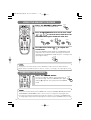
Press the ASPECT button
RGB, DVI, COMPONENT VIDEO
(HDTV signals : 1125i (1035i/1080i), 750p)
4:3
16:9
VIDEO IN, S-VIDEO IN, COMPONENT VIDEO
(Non-HDTV signals : 525i, 525p,625i)
4:3
ASPECT
16:9
ASPECT
SMALL
PUSH
ENTER
ESC
MENU
RESET
POSITION
AUTO
PinP
TEMPORARILY BLANKING THE SCREEN
UP
FOCUS
ZOOM
PAGE
DOWN
BLANK
1
LASER
ASPECT
Press the BLANK button
The input signal screen is shut off, and a blank screen
appears. You can set the blank screen using the menu
(from the SCREEN menu, select BLANK). Press the BLANK
button again to remove the blank screen, and return to the
input signal screen.
BLANK
PUSH
ENTER
ESC
MENU
RESET
DISPLAYING CHILD WINDOW (P. IN. P: Picture in Picture)
1
ASPECT
ESC
MENU
RESET
POSITION
AUTO
PinP
MAGNIFY
VOLUME
ON
FREEZE
MUTE
OFF
24
You can display the video input in a child window while
displaying RGB, BNC, or DVI input.
Display child window
(small)
PUSH
ENTER
WIRELESS
Press the P. in P. Button
KEYSTONE ONE TOUCH
Display child window
(large)
No display
You can select the video input to display in the child
window, and the position of the child window, from the
INPUT menu. (Vol.2 4 )
01CP-X885W/Vol1/E-責 02.10.8 9:05 PM ページ25
USING THE MENU FUNCTIONS
LASER
INDICATOR
STANDBY/ON
VIDEO
RGB
FOCUS
ZOOM
PAGE
1
Press the MENU button
2
Use the lever switch
UP
DOWN
BLANK
LASER
press the
/
to select a menu, then
or ENTER button
The display of the selected menu appears.
[ex. Adjusting SHARPNESS]
Use the lever switch / to select PICTURE-1, then press the
or ENTER button.
ASPECT
PUSH
ENTER
ESC
MENU
RESET
POSITION
AUTO
PinP
MAGNIFY
MENU
MAIN
PICTURE-1
PICTURE-2
INPUT
AUTO
SCREEN
OPTION
WIRELESS
: SELECT
VOLUME
ON
FREEZE
PUSH
MUTE
ENTER
OFF
WIRELESS
MENU
The menu display appears on the screen. The projector
has the following menus: MAIN, PICTURE-1, PICTURE-2,
INPUT, AUTO, SCREEN, and OPTION, WIRELESS. When
you select a menu name using the lever switch / , the
current settings of items that can be manipulated from that menu are displayed.
COLOR BAL R
COLOR BAL B
SHARPNESS
COLOR
TINT
–1
+1
–1
+1
–1
KEYSTONE ONE TOUCH
3
Use the lever switch / to select SHARPNESS,
then press the
or ENTER button
The operation display of the selected item appears. To
adjust a numerical value, press the
or ENTER button
again to switch to the single menu (small display showing
only the operation display area).
[ex. Adjusting SHARPNESS]
Use the lever switch / to select SHARPNESS, then
press the
or ENTER button.
MENU
MAIN
PICTURE-1
PICTURE-2
INPUT
AUTO
SCREEN
OPTION
WIRELESS
: SELECT
PUSH
ENTER
NOTE
• For details about menu
operations, see the
separate "MULTI
FUNCTIONAL
SETTINGS" (Vol. 2).
4
Use the lever switch
/
COLOR BAL R
COLOR BAL B
SHARPNESS
COLOR
TINT
0
to adjust the level
Press the MENU button to hide the menu and finish your
operation. Alternatively, press the
or ESC button to
return to the previous display.
[ex. Adjusting SHARPNESS]
Use the lever switch / to adjust the sharpness.
25
01CP-X885W/Vol1/E-責 02.10.8 9:05 PM ページ26
OPERATING THE PC SCREEN
You can use the remote control as a simplified mouse or keyboard.
CAUTION Caution: Mistaken use of the mouse/keyboard control could damage your equipment.
• Only connect to a PC.
• Before connecting, read the manuals of the device you will connect.
• Do not unplug the connector cables while the computer is operating.
LASER
INDICATOR
STANDBY/ON
VIDEO
RGB
FOCUS
ZOOM
PAGE
UP
DOWN
BLANK
LASER
PS/2, ADB, Serial Mouse Control
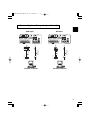
1. Turn off the projector and PC power, and connect the projector’s
CONTROL terminal to the computer via the mouse cable.
2. If a USB cable is connected, disconnect it. If a USB cable is connected, the USB control
function is given priority, and mouse control from the CONTROL terminal will not function.
3. Turn on the projector power, then the computer.
The functions in the table below can be controlled. If you have difficulty with control,
restart the computer (either from the software or by pressing the restart button).
Available Functions
ASPECT
Remote Control Operation
Move Pointer
Move using
Left click with mouse
Press the center
Right click with mouse
Press the right mouse button
on the disk pad
of the disk pad
PUSH
ENTER
ESC
MENU
RESET
POSITION
AUTO
PinP
MAGNIFY
VOLUME
ON
FREEZE
1. Connect the projector’s USB terminal to a PC using a USB cable.
The functions in the table below can be controlled.
MUTE
Available Functions
OFF
WIRELESS
USB Mouse/Keyboard Control
Remote Control Operation
KEYSTONE ONE TOUCH
Move Pointer
Move using
Left click with mouse
Press the center
Right click with mouse
Press the keyboard’s
on the disk pad
of the disk pad
Press the right mouse button
keys
Press
Press the keyboard’s ENTER key
Press the ENTER button
Press keyboard’s PAGE UP key
Press PAGE UP button
Press keyboard’s PAGE DOWN key
Press PAGE DOWN button
Press keyboard’s ESC key
Press ESC button
NOTES
• It may not be possible to control notebook PCs, and other computers with built-in pointing devices (e.g.
track balls), using this remote control. In this case, before connecting go into BIOS (system setup) and
select external mouse, and disable the pointing devices. In addition, the mouse may not function if the
computer does not have the needed utility program. See your computer’s hardware manual for details.
• The USB control can be used with Windows 95 OSR 2.1 or higher. It may not be possible to
use the remote control, depending on the computer’s configurations and mouse drivers.
• The USB control can only be used for the functions listed above. You cannot do things like press two buttons
at once (for instance, pressing two buttons at the same time to move the mouse pointer diagonally).
• This function is not available while the lamp is warming up (the POWER indicator flashes green), while adjusting the volume and
display, correcting for trapezoidal distortion, zooming in on the screen, using the BLANK function, or displaying the menu screen.
26
01CP-X885W/Vol1/E-責 02.10.8 9:05 PM ページ27
THE LAMP
HIGH VOLTAGE
HIGH TEMPERATURE
HIGH PRESSURE
To replace the lamp, check the model number of the replacement lamp (sold separately) and
contact your local dealer.
Replacement lamp model number: DT00531
If the projector is mounted on the ceiling, or if the lamp has broken, ask your dealer to replace the
lamp. Lamp replacement is hazardous and should not be attempted by the user.
Before replacing the lamp, make sure the power switch is off and the power cable is not plugged in,
then wait at least 45 minutes for the lamp to cool sufficiently. Handling the lamp while hot can cause
burns, as well as damaging the lamp.
The LCD projector uses a glass lamp bulb. It is a mercury lamp with high
internal pressure. High-pressure mercury lamps can break with a loud
bang, or burn out, if jolted or scratched, or through wear over time. Each lamp has a
different lifetime, and some may burst or burn out soon after you start using them. In
addition, when the bulb bursts, it is possible for shards of glass to fly into the lamp housing,
and for gas containing mercury to escape from the projector’s vent holes.
• Do not open the lamp cover while the projector is suspended from above. This is
dangerous, since if the lamp’s bulb has broken, the shards will fall out when the cover is
opened. In addition, working in high places is dangerous, so ask your local dealer to have
the lamp replaced even if the bulb is not broken.
• Handle with care: jolting or scratching could cause the lamp bulb to burst during use.
• If the replace lamp indicator (see "Related Messages" (Vol.2 8 ) and "Regarding the
indicator Lamps" (Vol.2 9 )) comes on, replace the lamp as soon as possible. Using the
lamp for long periods of time, or past the replacement date, could cause it to burst. Do
not use old (used) lamps; this is a cause of breakage.
• If the lamp breaks soon after the first time it is used, it is possible that there are electrical problems
elsewhere besides the lamp. If this happens, contact your local dealer or a service representative.
• If the lamp should break (it will make a loud bang when it does), ventilate the room well, and make
sure not to breathe the gas that comes out of the projector vents, or get it in your eyes or mouth.
• If the lamp should break (it will make a loud bang when it does), unplug the power cord from
the outlet, and make sure to request a replacement lamp from your local dealer. Note that
shards of glass could damage the projector’s internals, or cause injury during handling, so
please do not try to clean the projector or replace the lamp yourself.
• Obey local ordinances when disposing of used lamps. In most cases, it is possible to dispose of used
bulbs in the same manner as used glass bottles, but in some cases, bulbs are sorted separately.
• Do not use the projector with the lamp cover removed.
WARNING
27
01CP-X885W/Vol1/E-責 02.10.8 9:05 PM ページ28
THE LAMP (continued)
Replacing the lamp
All projector lamps will wear out eventually. If used for long periods of time, the image could become
darkened, and the color contrast could be impacted as well. We recommend that you replace your lamps
early. If the LAMP indicator turns red, or a message prompts you to replace the lamp when you power up
the projector, the lamp needs to be replaced. (See "Related Messages" (Vol.2 8 ) and "Regarding the
Indicator Lamps" (Vol.2 9 ) for details.)
1
Turn off the projector, and unplug the
power cord. Allow the lamp bulb to cool
for at least 45 minutes, and prepare a
new lamp (serial number: DT00531)
4
Insert the new lamp, and
tighten the 3 screws firmly to
lock it in place
2
After making sure that the projector has
cooled adequately, slide the knob of a
lamp cover lock as shown in the figure.
Then, one side of the lamp cover is
raised. Pull up the lamp cover and
remove it, as shown in the figure
5
Interlocking the 2 tabs of the
lamp cover to the projector,
put the lamp cover on the
projector.
Then push the point of the
lamp cover to fix it, as shown
in the figure.
Make sure that the lamp
cover does’t come up
Knob of Lamp
Cover Lock
Tabs
PC
CO LAMP
PC
CO LAMP
3
Unscrew the 3 screws, and slowly pull
out the lamp by the handle
Push
• Be careful not to touch the inside of the lamp case.
6
PC
CO LAMP
PC
CO LAMP
Turn on the projector power,
and reset the lamp timer
• To reset the lamp timer, from the
OPTION menu, select the LAMP
TIME. (Vol.2 7 )
ATTENTION • Make sure that the screws are screwed in firmly. Loose screws could result in damage or injury.
• Do not use with lamp cover removed.
• Do not reset the lamp timer without replacing the lamp. Reset the lamp timer always when replacing
the lamp. The message functions will not operate properly if the lamp timer is not reset correctly.
• When the lamp has been replaced after the message of “CHANGE THE LAMP .....THE POWER
WILL TURN OFF AFTER 0 hr.” is displayed, or the LAMP indicator is red, complete the following
operation within 10 minutes of switching power on.
NOTE • The LAMP indicator is also red when the lamp unit reaches high temperature.
Before replacing the lamp, switch power off, wait approximately 20 minutes, and switch power on
again. If the LAMP indicator is still red, replace the lamp.
28
01CP-X885W/Vol1/E-責 02.10.8 9:05 PM ページ29
THE AIR FILTER
Caring for the air filter
The air filter should be cleaned about every 100 hours. If the LAMP indicator and
TEMP indicator blink red simultaneously, or a message prompts you to clean the air
filter when you turn on the unit, the filter needs to be cleaned. (See "Related
Messages" (Vol.2 8 ) and "Regarding the Indicator Lamps" (Vol.2 9 ) for details.)
1
Turn off the projector, and unplug the power cord
2
Apply a vacuum cleaner to
the top of the air filter cover
to clean the air filter
Air Filter Cover
3
Turn on the projector, and use the menu to reset the filter
timer
• To reset the air filter timer, from the OPTION menu, select FILTER TIME.
29
01CP-X885W/Vol1/E-責 02.10.8 9:05 PM ページ30
THE AIR FILTER (continued)
Replacing the air filter
If the soiling will not come off the air filter, or it becomes damaged, then it needs to be
replaced. Please contact your local dealer, after confirming the model of your
separately sold replacement air filter.
Replacement air filter model: NJ07081
1
Turn off the projector, and unplug the power cord. Prepare a
new air filter (one specified for your projector)
2
Remove the air filter cover and air filter
3
Insert the new filter, and replace the
filter cover
4
Turn on the projector power, and using the menu, reset the
filter timer
• To reset the lamp timer, from the OPTION menu, select FILTER TIME.
ATTENTION • Make sure to turn off the power and unplug the power cord before caring for
the unit. Please carefully read "Safety Instructions", in order to care for your projector correctly.
• Do not use with air filter cover removed.
• If the air filter becomes clogged by dust or the like, internal temperature rises and could cause
malfunction. The power is automatically turned off in order to prevent the unit from overheating
internally.
30
01CP-X885W/Vol1/E-責 02.10.8 9:05 PM ページ31
OTHER CARE
Caring for the inside of the projector :
In order to ensure the safe use of your projector, please have it cleaned and inspected by
your local dealer about once every 2 years. Never try to care for the inside of the unit
yourself. Doing so is dangerous.
Caring for the lens :
Lightly wipe the lens with a commercially available lens-cleaning wipe. Do not touch the
lens directly with your hand.
Caring for the cabinet and remote control transmitter :
Wipe lightly with gauze or a soft cloth. If soiling is severe, dip a soft cloth in water or a
neutral cleanser diluted in water, and wipe lightly after wringing well. Then, wipe lightly
with a soft, dry cloth.
ATTENTION • Make sure to turn off the power and unplug the power cord before caring for
the unit. Please carefully read "Safety Instructions" in this manual, in order to care for your projector
correctly.
• Do not use cleaners or chemicals other than those listed above, including benzene and paint
thinner.
• Do not use aerosols or sprays.
• Do not polish or wipe with hard objects.
31