1
3
Get started
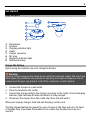
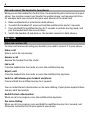
Keys and parts
8
1
2
3
4
5
6
7
8
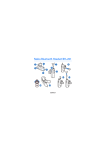
Microphone
Earpiece
Charging indicator light
Cradle
Charger connector
NFC area
Bluetooth indicator light
Multifunction key
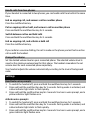
Charge the battery
Before using the headset, you must charge the battery.
Warning:
Use only chargers approved by Nokia for use with this particular model. The use of any
other types may invalidate any approval or warranty, and may be dangerous. Use of
unapproved chargers may present a risk of fire, explosion, or other hazard.
1
2
3
4
Connect the charger to a wall outlet.
Place the headset in the cradle.
Connect the charger cable to the charger connector in the cradle. The red charging
indicator light switches off when the battery is fully charged.
Disconnect the charger from the cradle, then from the wall outlet.
When you unplug a charger, hold and pull the plug, not the cord.
The fully charged battery has power for up to 2 hours of talk time and up to 35 hours
of standby time. If you keep the headset in the cradle, the standby time is up to 2
months.