1
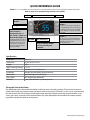
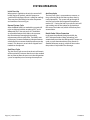
SET 1. Press the “Set” button once and it will display the Set Point. After approximately 5 seconds, the display will return to normal operation and display the Bottle Probe temperature.
2. Standard Controller - Press and hold the “Set” button for 3-5 seconds until the set point
is displayed and the °F symbol starts blinking. Next press the “UP or Down” arrows to
change the Set Point. Next press the “Set” button once and the Set Point Temperature
and the °F on the display will blink to confirm the new Set Point setting.
3. Press and hold the “Set” button during the display of the Hi/Low “Temperature Data History” (hold button unit “rst” blinks on display), and it will erase the past recorded data file
and start recording, from the current time and temperature.
4. Press the “Set” and the “Down Arrow” buttons simultaneously, for 10-15 seconds, and
you will access the “Customer Preference Selection Mode” (CPSM). The CPSM allows the
customer to “Fine Tune” the Control Operating System to their applicable choice.
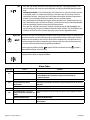
Anti-Frost The Anti-Frost Cycle is automatically activated when the evaporator temp has reached a low
temp of 26° and has sustained that temp for a period of five minutes. During this cycle the
compressor and condenser fans will turn off and the evaporator fans will continue to run.
Once the temperature of the evaporator gets back up to 40° the cycle will deactivate and
the system will revert back to normal operating conditions.
At the beginning of the cycle the
symbol will be illuminated and the
illuminated during the anti-frost cycle.
symbol is
Alarm The Alarm symbol is shown when the system encounters an issue that needs attention, the
displayed alarm codes are explained below.
Alarm Codes
Message
Cause
Solution
Bottle Probe is Unplugged
Attach Bottle Probe to Unit
Faulty Bottle Probe Connection
1. Check Bottle Probe attachment at circular connector
2. Check Bottle Probe connection at green terminal block on
back of controller
Defective Bottle Probe
Replace the Bottle Probe
Faulty Evaporator Probe
Connection
Check Evaporator Probe connection at green terminal block on back of
controller
Defective Evaporator Probe
Replace the Evaporator Probe
“HA”
Defective Bottle Probe
Replace the Bottle Probe
“LA”
The Bottle Probe is sensing a
temperature of 4° below the set
point
Allow the room to warm up which will increase the temperature of the
wine
Defective Bottle Probe
Replace the Bottle Probe
The keypad is locked
Hold “Up” and “Down” buttons for 3 to 5 seconds to disable, “PON”
should appear
“P1”
“P2”
“POF”
Page 16 | 1-855-235-5271
SL 060815