1
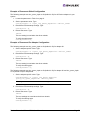
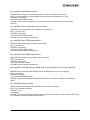
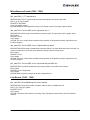
Example of Permanent Global Configuration
The following example sets lun_queue_depth to 20 (default is 30) for all Emulex adapters in your
system.
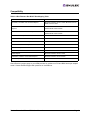
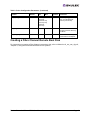
1. Locate the parameter in Table 3 on page 8.
2. Set the permanent value. Type:
esxcfg-module -s “lpfc_lun_queue_depth=20” <driver_name>
3. Rebuild the ESX bootstrap settings. Type:
esxcfg-boot -b
4. Reboot the server. Type:
reboot
The new setting is used when the driver reloads.
To verify the setting type:
esxcfg-module -q
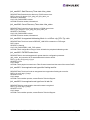
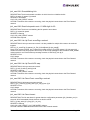
Example of Permanent Per Adapter Configuration
The following example sets lun_queue_depth to 20 (default is 30) for adapter #1.
1. Set the adapter-specific value. Type:
esxcfg-module -s “lpfc1_lun_queue_depth=20” <driver_name>
2. Rebuild the ESX bootstrap settings. Type:
esxcfg-boot -b
3. Reboot the server. Type:
reboot
The new setting is used when the driver reloads.
To verify the setting type:
esxcfg-module -q
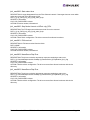
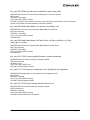
The following example sets lun_queue_depth to 20 (default is 30) for adapter #1 and lun_queue_depth
to 10 (default is 30) for adapter #2.
1. Set the adapter-specific value. Type:
esxcfg-module -s “lpfc1_lun_queue_depth=20
lpfc2_lun_queue_depth=10” <driver_name>
Note: Type command all on one line without a carriage return.
2. Rebuild the ESX bootstrap settings. Type:
esxcfg-boot -b
3. Reboot the server. Type:
reboot
The new settings are used when the driver reloads.
To verify the settings type:
esxcfg-module -q
Emulex Driver for VMware ESX - User Manual
Page 7