1
3Connect
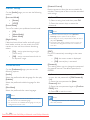
Place the unit
1
2
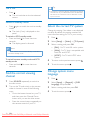
Hold down the socket flap.
Insert the stripped part of the wire
completely.
• Insert the right speaker wires to "R",
left speaker wires to "L".
• Insert the red wires to "+", black wires
to "-".
3
1
2
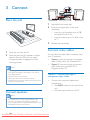
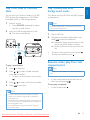
Place the unit near the TV.
Place the left and right speakers at equal
distance from the TV and at an angle
of approximately 45 degrees from the
listening position.
Connect video cables
You can select the best video connection that
your TV supports.
•
Option 1: Connect through a composite
video (CVBS) cable (for a standard TV).
•
Option 2: Connect through component
video cables (for a standard TV or
Progressive Scan TV).
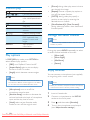
Note
•• To avoid magnetic interference or unwanted noise,
never place this apparatus and speakers too close to
any radiation devices.
•• Place this unit on top of a table.
•• Never place this unit in an enclosed cabinet.
•• Install this unit near the AC outlet where the AC power
plug can be easily reached.
Release the socket flap.
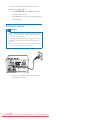
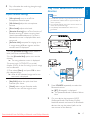
Option 1: Connect through a
composite video cable
•
Connect the composite video cable
(supplied) to:
• the VIDEO socket on the back of the
unit.
Connect speakers
Note
•• For optimal sound, use the supplied speakers only.
•• Connect only speakers with impedance that is the
same or higher than the supplied speakers. Refer to the
Specifications section of this manual.
8
EN
Downloaded From DvDPlayer-Manual.com Philips Manuals
• the video input socket on the TV.