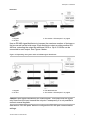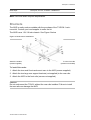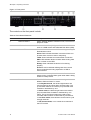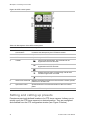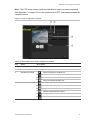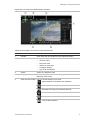
1
TruVision NVR 21 User Manual P/N 1072629A-EN • REV R1.0 • ISS 03MAY13 Copyright © 2013 UTC Fire & Security Americas Corporation, Inc. Interlogix is part of UTC Climate Controls & Security, a unit of United Technologies Corporation. All rights reserved. Trademarks and patents The TruVision NVR 21 and logo are trademarks of United Technologies. Other trade names used in this document may be trademarks or registered trademarks of the manufacturers or vendors of the respective products. Manufacturer UTC Fire & Security Americas Corporation, Inc. 2955 Red Hill Avenue, Costa Mesa, CA 92626-5923, USA Authorized EU manufacturing representative: UTC Fire & Security B.V. Kelvinstraat 7, 6003 DH Weert, The Netherlands Certification FCC compliance N4131 This device complies with part 15 of the FCC Rules. Operation is subject to the following two conditions: (1) This device may not cause harmful interference, and (2) this device must accept any interference received, including interference that may cause undesired operation. FCC compliance Class B: This equipment has been tested and found to comply with the limits for a Class B digital device, pursuant to part 15 of the FCC Rules. These limits are designed to provide reasonable protection against harmful interference in a residential installation. This equipment generates, uses, and can radiate radio frequency energy and, if not installed and used in accordance with the instructions, may cause harmful interference to radio communications. There is no guarantee that interference will not occur in a particular installation. If this equipment does cause harmful interference to radio or television reception, which can be determined by turning the equipment off and on, the user is encouraged to try to correct the interference by one or more of the following measures: • Reorient or relocate the receiving antenna. • Increase the separation between the equipment and receiver. • Connect the equipment into an outlet on a circuit different from that to which the receiver is connected. • ACMA compliance Consult the dealer or an experienced radio/TV technician for help. Notice! This is a Class A product. In a domestic environment this product may cause radio interference in which case the user may be required to take adequate measures. European Union directives 12004/108/EC (EMC directive): Hereby, UTC Fire & Security declares that this device is in compliance or with the essential requirements and other relevant provisions of Directive 2004/108/EC. 2002/96/EC (WEEE directive): Products marked with this symbol cannot be disposed of as unsorted municipal waste in the European Union. For proper recycling, return this product to your local supplier upon the purchase of equivalent new equipment, or dispose of it at designated collection points. For more information see: www.recyclethis.info. 2006/66/EC (battery directive): This product contains a battery that cannot be disposed of as unsorted municipal waste in the European Union. See the product documentation for specific battery information. The battery is marked with this symbol, which may include lettering to indicate cadmium (Cd), lead (Pb), or mercury (Hg). For proper recycling, return the battery to your supplier or to a designated collection point. For more information see: www.recyclethis.info. Contact information For contact information, see www.utcfireandsecurity.com or www.utcfssecurityproducts.eu. Content Chapter 1 Product introduction 1 Product overview 1 Chapter 2 Installation 3 Installation environment 3 Unpacking the TVN 21 and its accessories 3 Back panel 4 Wiring the keypad 5 RS-485 ports 8 RS-232 port 8 Monitor connections 8 Audio inputs and output 8 Brackets 9 Chapter 3 Getting started 11 Turning on and off the NVR 11 Using the setup wizard 12 Chapter 4 Operating instructions 17 Controlling the TVN 21 17 Using the front panel 17 Using the mouse 19 Using the IR remote control 20 Menu overview 23 Chapter 5 Live view 27 Description of live view 27 Video output 27 Audio output 28 Controlling live view mode 28 Multiview format 30 Sequencing cameras 31 Accessing frequently used commands 31 Configuring live view 33 General settings 36 Configuring time and date 37 Chapter 6 Controlling a PTZ camera 41 Calling up presets, tours and shadow tours 41 Setting and calling up presets 42 Setting and calling up preset tours 44 Setting and calling up a shadow tour 46 TruVision NVR 21 User Manual i Chapter 7 Playing back a recording 49 Overview of the playback window 49 Playback pop-up menu 51 Instant playback 52 All-day playback 53 Searching recorded video 54 Playing back recordings by time and video type 55 Playing back recordings by event 56 Creating and playing back bookmarked recordings 57 Slideshow of snapshots 58 Playing back recordings from the system log 59 Playing back frame-by-frame 60 Digital zoom in playback 60 Chapter 8 Archiving recorded files 63 Archiving files 63 Creating and archiving video clips 66 Archiving snapshots 66 Managing backup devices 67 Playing back archived files on a PC 67 Chapter 9 Using the web browser 69 Windows Vista and 7 users 69 Accessing the web browser 70 Web browser overview 70 Using the web browser to configure the device 72 Searching and playing back recorded video 75 Searching for event logs 77 Dual streaming 77 Controlling a PTZ dome camera in the web browser 78 Capturing text insertions 78 Text overlay 80 Using a network storage system 80 Chapter 10 Recording 81 Initializing recording settings 81 Using an external recording device 83 Defining a recording schedule 83 Daily schedules 84 Holiday schedules 85 Motion detection schedules 86 External alarm schedules 87 Protecting recorded files 87 Configuring redundant recording 89 Capturing text insertions 90 Chapter 11 Alarm settings 91 Description of alarm notification types 91 ii TruVision NVR 21 User Manual Setting up motion detection 91 Setting up external alarms 94 Triggering or clearing alarm outputs manually 96 Setting up system notifications 96 Detecting video loss 97 Detecting video tampering 97 Chapter 12 Network settings 99 Configuring general network settings 99 Configuring PPPoE 101 Configuring DDNS 101 Configuring an NTP server 102 Configuring e-mail 103 Configuring SNMP 104 Configuring the FTP server 104 Configuring a remote alarm host 104 Configuring multicast 105 Configuring the server and HTTP ports 105 Configuring the RTSP service port 105 Checking network status 106 Exporting network packet data 107 Port forwarding 107 Chapter 13 HDD management 109 Initializing HDDs 109 Controlling disk space on the HDD 110 Setting up HDD groups 110 Setting the HDD property 111 Checking HDD status 111 Configuring HDD alarms 112 Managing eSATA 112 Checking the S.M.A.R.T. information 113 Chapter 14 Camera settings 115 Adding/removing IP cameras 115 Configuring the camera OSD settings 117 Setting up privacy masking 118 Adjusting video image settings 118 Chapter 15 NVR management 121 Configuring the RS-232 port 121 Updating system firmware 122 Restoring default settings 123 Viewing system information 123 Searching system logs for events 125 Chapter 16 User management 127 Adding a new user 127 TruVision NVR 21 User Manual iii Customizing a user’s access privileges 128 Deleting a user 130 Modifying a user 130 Changing the Admin password 130 Chapter 17 iTVRmobile 131 Setup and login 131 Live view 132 Controlling a PTZ camera 133 Device management 135 Favorites 136 Local configuration 136 Change passwords 136 Snapshots 136 Appendix A Specifications 137 Appendix B PTZ protocols 139 Appendix C Port forwarding information 141 Appendix D KTD-405 keypad 143 Supported firmware 143 Wiring the keypad 143 Setting up the keypad to work with the TVN 21 144 Operating the keypad 146 Appendix E Maximum pre-recording times 151 Appendix F Supported PTZ commands 153 Appendix G Default menu settings 155 Glossary 165 Index 167 iv TruVision NVR 21 User Manual Chapter 1 Product introduction Product overview This is the TruVision NVR 21 (TVN 21) User Manual for the models listed below: Table 1: Product codes Americas TVN-2108-000 TruVision NVR 21, 8 channels, no storage TVN-2108-2T TruVision NVR 21, 8 channels, 2 TB storage TVN-2108-4T TruVision NVR 21, 8 channels, 4 TB storage TVN-2108-6T TruVision NVR 21, 8 channels, 6 TB storage TVN-2108-8T TruVision NVR 21, 8 channels, 8 TB storage TVN-2116-000 TruVision NVR 21, 16 channels, no storage TVN-2116-2T TruVision NVR 21, 16 channels, 2 TB storage TVN-2116-4T TruVision NVR 21, 16 channels, 4 TB storage TVN-2116-6T TruVision NVR 21, 16 channels, 6 TB storage TVN-2116-8T TruVision NVR 21, 16 channels, 8 TB storage EMEA TVN-2108-000EA TruVision NVR 21, 8 channels, no storage TVN-2108-2TEA TruVision NVR 21, 8 channels, 2 TB storage TVN-2108-4TEA TruVision NVR 21, 8 channels, 4 TB storage TVN-2108-6TEA TruVision NVR 21, 8 channels, 6 TB storage TVN-2108-8TEA TruVision NVR 21, 8 channels, 8 TB storage TVN-2116-000EA TruVision NVR 21, 16 channels, no storage TVN-2116-2TEA TruVision NVR 21, 16 channels, 2 TB storage TVN-2116-4TEA TruVision NVR 21, 16 channels, 4 TB storage TVN-2116-6TEA TruVision NVR 21, 16 channels, 6 TB storage TVN-2116-8TEA TruVision NVR 21, 16 channels, 8 TB storage TruVision NVR 21 User Manual 1 0BChapter 1: Product introduction ANZ TVN-2108-000AZ TruVision NVR 21, 8 channels, no storage TVN-2108-2TAZ TruVision NVR 21, 8 channels, 2 TB storage TVN-2108-4TAZ TruVision NVR 21, 8 channels, 4 TB storage TVN-2108-6TAZ TruVision NVR 21, 8 channels, 6 TB storage TVN-2108-8TAZ TruVision NVR 21, 8 channels, 8 TB storage TVN-2116-000AZ TruVision NVR 21, 16 channels, no storage TVN-2116-2TAZ TruVision NVR 21, 16 channels, 2 TB storage TVN-2116-4TAZ TruVision NVR 21, 16 channels, 4 TB storage TVN-2116-6TAZ TruVision NVR 21, 16 channels, 6 TB storage TVN-2116-8TAZ TruVision NVR 21, 16 channels, 8 TB storage China TVN-2108-000C TruVision NVR 21, 8 channels, no storage TVN-2108-2TC TruVision NVR 21, 8 channels, 2 TB storage TVN-2108-4TC TruVision NVR 21, 8 channels, 4 TB storage TVN-2108-6TC TruVision NVR 21, 8 channels, 6 TB storage TVN-2108-8TC TruVision NVR 21, 8 channels, 8 TB storage TVN-2116-000C TruVision NVR 21, 16 channels, no storage TVN-2116-2TC TruVision NVR 21, 16 channels, 2 TB storage TVN-2116-4TC TruVision NVR 21, 16 channels, 4 TB storage TVN-2116-6TC TruVision NVR 21, 16 channels, 6 TB storage TVN-2116-8TC TruVision NVR 21, 16 channels, 8 TB storage The TruVision™ NVR 21 is a versatile, user-friendly embedded network video recorder (NVR) allowing end-users to record up to 16 cameras with a maximum total input bandwidth of 40/80 Mbps, while providing integration with the UTC portfolio of security solutions, and offering a seamless product experience within the TruVision brand. Its dual streaming functionality allows the user to set up different settings for recording and streaming video in live view mode. The TruVision NVR 21 can fully integrate with the license-free TruVision Navigator software, which is ideal for most commercial applications. TVN 21’s easy and intuitive-to-use web browser interface enables remote configuration and secure viewing, searching, and playing back of video from computers connected via the Internet. 2 TruVision NVR 21 User Manual Chapter 2 Installation This section describes how to install the TVN 21 unit. Installation environment When installing your product, consider these factors: • Ventilation • Temperature • Moisture • Chassis load Ventilation: Do not block any ventilation openings. Install in accordance with the manufacturer’s instructions. Ensure that the location planned for the installation of the unit is well ventilated. Temperature: Consider the unit’s operating temperature (-10 to +55 ºC, 14 to 131 °F) and noncondensing humidity specifications (10 to 90%) before choosing an installation location. Extremes of heat or cold beyond the specified operating temperature limits may reduce the life expectancy of the NVR. Do not install the unit on top of other hot equipment. Leave 44 mm (1.75 in.) of space between rack-mounted TruVision NVR 21 units. Moisture: Do not use the unit near water. Moisture can damage the internal components. To reduce the risk of fire or electric shock, do not expose this unit to rain or moisture. Chassis: Equipment weighing less than 15.9 kg (35 lb.) may be placed on top of the unit. Unpacking the TVN 21 and its accessories When you receive the product, check the package and contents for damage, and verify that all items are included. There is an item list included in the package. If any of the items are damaged or missing, please contact your local supplier. TruVision NVR 21 User Manual 3 1BChapter 2: Installation Items shipped with the product include: • IR (infrared) remote control • Two AAA batteries for the remote control • AC power cords • USB mouse • NVR • CD with software and manuals • TruVision NVR 21 Quick Start Guide • TruVision NVR 21User Manual (on CD) Back panel Figure 1 on page 5 shows the back panel connections and describes each connector on a typical TVN 21 network video recorder. Details may vary for specific models. Before powering up the NVR, connect a main monitor for basic operation. 4 TruVision NVR 21 User Manual 1BChapter 2: Installation Figure 1: Back panel connections 1. Connect one CCTV monitor (BNC-type connectors). 2. Connect one audio input to RCA connectors. 3. Connect to a RS-232 device. 9. Connect to an HDTV. The HDMI connection supports both digital audio and video. 10. Connect to an optional USB device such as a mouse, CD/DVD burner or HDD. 4. Connect to a network. 11. Terminate the line to the dome cameras using this RS-485 switch. Default is Off. 5. Connect to an optional eSATA device such as SATA HDD, CD/DVD-RM. 12. Connect to a PTZ control. 6. Connect to a power cord. 7. Connect to speakers for audio output. 8. Connect to a VGA monitor. 13. Connect to a keyboard (KTD-405 shown). 14. Connect up to 16 alarm input cables to relay outputs. 15. Connect up to four alarm relay outputs. 16. Connect to ground. Wiring the keypad The keypad uses RS-485 simplex wiring. The signal is transferred by a single twisted pair line. A shielded STP CAT5 network cable is recommended. Ground one end of the cable, either the first or last device on the RS-485 line. The maximum number of devices that can be installed in one bus is 255, with a maximum cable length of 1200 m. The cable length can be expanded using a signal distributor. Both the first and the last device in series should be terminated with 120 Ohm resistance to minimize line reflections. See Figure 2 below. TruVision NVR 21 User Manual 5 1BChapter 2: Installation Figure 2: RS-485 bus serial wiring (KTD-405 keypad shown) 1. Keypad 2. I/O box 3. See section “RS-485 ports” on page 8 Use an RS-485 signal distributor for a star wiring configuration. See Figure 3 on page 6. Figure 3: Star wiring with RS-485 signal distributor Correct: 1. Keypad 2. I/O box 6 3. RS-485 distributor 4. See section “RS-485 ports” on page 8 TruVision NVR 21 User Manual 1BChapter 2: Installation Incorrect: 1. Keypad 2. I/O box 3. See section “RS-485 ports” on page 8 Use an RS-485 signal distributor to increase the maximum number of devices on the bus as well as the total range. Each distributor output provides another RS485 bus, extending the output an additional 1200 m. Up to 31 NVRs can be connected to each output. See Figure 4 below. Figure 4: Expanding the system with an RS-485 signal distributor 1. Keypad 2. I/O box 3. RS-485 distributor 4. See section “RS-485 ports” on page 8 Caution: Most signal distributors are unidirectional. This means that the signal only flows from the input towards the outputs. Consequently it is not possible to connect several keypads. See section “RS-485 ports” below to configure the RS-485 port communication settings. TruVision NVR 21 User Manual 7 1BChapter 2: Installation RS-485 ports There are two RS-485 ports on the rear panel of the NVR. See Figure 5 below for the serial pin outs. • Dome RS-485: A and B: Connect pan, tilt, zoom control of PTZ dome cameras. A = +, B = C and D: Not used G: Ground of dome camera G: Ground of keypad • Keyb: Connect the keypad. Figure 5: RS-485 pins RS-232 port Use the RS-232 port to connect CBR-PB3-POS (point-of-sale) and ATM devices to the NVR. Monitor connections Connect the unit to a monitor via a 75-ohm video coaxial cable with the BNC connector. The unit provides a 1 Vp-p CVBS signal. See Figure 1 on page 5 for connecting a monitor to a TVN 21. The TVN 21 supports up to 1920 × 1080 / 60 Hz resolution in VGA. The monitor resolution should be at least 800 × 600. Adjust your monitor accordingly to this resolution. Audio inputs and output The unit is equipped with 1 audio input and two audio outputs. Both the audio outputs and the audio inputs are line-level. 8 TruVision NVR 21 User Manual 1BChapter 2: Installation Audio input RCA jack, 315 mV, 40 kohms. Unbalanced Audio output RCA jack, 315mV, 600 ohms. Unbalanced Note: Line-level audio requires amplification. Brackets The NVR is easily rack-mountable with the purchase of the TVR-RK-1 rackmount kit. Contact your local supplier to order the kit. The NVR has a 1.5U 19-inch chassis. See Figure 6 below Figure 6: Rack-mount installation Attach the small front rack ears to the unit (screws supplied) Attach the NVR to the front rails (screws not included) To install the racks: 1. Attach the two small front-rack mount ears to the NVR (screws supplied). 2. Attach the two large rear support brackets (not supplied) to the rear rails. 3. Attach the NVR to the front rails (screws not supplied). Caution: Do not rack-mount the TVN 21 without the rear rails installed. Failure to install the rear rails can damage the NVR. TruVision NVR 21 User Manual 9 1BChapter 2: Installation 10 TruVision NVR 21 User Manual Chapter 3 Getting started Turning on and off the NVR Before starting the power up process, connect at least one monitor to the video out or the VGA interface. Otherwise, you will not be able to see the user interface and operate the device. The NVR auto-detects the video mode (PAL or NTSC) on startup. It is equipped with an universal power supply that will auto-sense 100/240 V, 60/50 Hz. Note: It is recommended that an uninterruptible power supply (UPS) is used in conjunction with the device. To turn on the NVR: Turn on the NVR using the power switch on the back panel. The power LED illuminates. A splash screen appears indicating that the NVR is starting up. The Start Up Wizard window will appear. To turn off the NVR: 1. In live view mode, right-click the mouse and click Menu. The main menu screen appears. 2. Select the Power Manager icon. 3. In the Shutdown popup menu, select Shutdown. Click Yes to confirm shutdown. To reboot the NVR: 1. In live view mode, right-click the mouse and click Menu. The main menu screen appears. 2. Select the Power Manager icon. 3. In the Shutdown popup menu, select Reboot. Click Yes to confirm reboot. TruVision NVR 21 User Manual 11 2BChapter 3: Getting started Using the setup wizard The NVR has an express installation wizard that lets you easily configure basic NVR settings when first used. It configures all cameras simultaneously. The configuration can then be customized as required. By default the setup wizard will start once the NVR has loaded. It will walk you through some of the more important settings of your NVR. Any changes you make to a setup configuration page are saved when you exit the page and return to the main wizard page. Note: If you want to set up the NVR with default settings only, click Next in each screen until the end. To quickly set up the TVN 21: 1. Connect all the devices required to the back panel of the NVR. See Figure 1 on page 5. 2. Turn on the unit using the power switch on the back panel. 3. Select the preferred language for the system from the dropdown list and then click Next. 4. Enable or disable the option to start the wizard automatically when the NVR is turned on. Click Next. 5. Administrator configuration: Navigate to the Admin Password edit box and click the edit box with the mouse, or press Enter on the front panel or remote control, to display the soft keyboard. Enter the default admin password, 1234. Note: You must enter an admin password. To change the Admin password, check New Admin password and enter the new password and confirm it. Caution: It is strongly recommended that you change the password of the administrator. Do not leave 1234 as the default password. Write it down in a safe place so that you do not forget it. If you should forget the password to your NVR, contact your supplier with the serial number of your NVR to obtain a secure code to reset your NVR. If you wish to limit the admin rights to only one computer, enter the MAC address of the user’s computer. Otherwise leave the MAC address unchanged. Click Next. 6. Time and date configuration: Select the desired time zone, date format, system time and system date. Note: Daylight saving time (DST) cannot be configured from the Wizard. See “Configuring time and date” on page 37 for more information on DST. 12 TruVision NVR 21 User Manual 2BChapter 3: Getting started Note: The system time and date are visible on screen. However, they do not appear in recordings. Click Next to move to the next page, or Previous to return to the previous page. 7. Network configuration: Configure your network settings such as the NIC type, Enable or Disable DNCP,IP address, subnet mask and default gateway. Enter the preferred DNS server address as well as the alternate one to use. Click Next to move to the next page, or Previous to return to the previous page. 8. HDD management: Configure your HDD settings as required. You can group HDDs and assign cameras to a group. See “Setting up HDD groups” on page 110 for further information. You can also set up a drive for redundant recording. See “Configuring redundant recording” on page 89. TruVision NVR 21 User Manual 13 2BChapter 3: Getting started After configuring your HDD settings, click Initialize and Next to move to the next page, or Previous to return to the previous page. 9. Adding IP Camera: Click Search to find any online cameras. Select the IP camera to be added, enter User name and Admin password, then click the Add button. Click, Next to move to the Recording Configuration screen. 10. Recording configuration: Configure your recording settings as required. The settings apply to all cameras connected to the NVR. Check the Constant Recording check box for the NVR to record continuously all day. If left unchecked, the NVR will not record. Check the desired time lapse check box, TL-Hi or TL-Lo. To record motion detection events, check Event (Motion). To record alarm events, check Alarm. 14 TruVision NVR 21 User Manual 2BChapter 3: Getting started 11. When all the required changes have been entered, a page appears showing all the settings. Click Finish to exit the Wizard. The NVR is now ready to use. TruVision NVR 21 User Manual 15 2BChapter 3: Getting started 16 TruVision NVR 21 User Manual Chapter 4 Operating instructions Controlling the TVN 21 There are several ways to control the NVR: • Front panel control • Mouse control • IR remote control • KTD-405 keypad control (see Appendix) • Web browser control You can use your preferred control method for any procedure, but in most cases we describe procedures using mouse terminology. Optional control methods are given only when they differ substantially from mouse control methods. Using the front panel The function buttons on the front panel control can be used to operate many, but not all, of the main functions of the NVR. The LED indicators light up or flash to alert you of various conditions. The functions available can be limited by setting passwords. See Figure 7 below for more information. TruVision NVR 21 User Manual 17 3BChapter 4: Operating instructions Figure 7: Front panel The controls on the front panel include: Table 2: Front Panel Elements Item Name Description 1. Numeric buttons Switch between different cameras in live, PTZ control or playback modes. 2. USB Interfaces Universal Serial Bus (USB) ports for additional devices such as a USB mouse and USB Hard Disk Drive (HDD). 3. Status LEDs Power: Green indicates the NVR is working correctly. Red indicates a fault. Alarm: Red indicates that there is a sensor Alarm In or another alarm such as motion or tampering. Tx/Rx: Green indicates a normal network connection. HDD: HDD indicator blinks red when data is being read from or written to the HDD. Ready: Green indicates the device is functioning properly. Archive: Archive indicator blinks green when record files or snapshots are being exported to a USB or eSATA device. 4. Archive button Press once to enter quick archive mode. Press twice to start archiving. Indicator blinks green when data is being written to backup device. 5. Direction The DIRECTION buttons are used to navigate between different fields and items in menus. In the Playback mode, the left and right buttons are used to speed up and slow down recorded video. The up and down buttons are used to jump recorded video forwards or backwards by 30 s. In Pause mode, the left and right buttons are used to jump recorded video forwards or backwards by one frame. The up and down buttons are used to jump recorded video forwards or backwards by one second. In Live View mode, these buttons can be used to cycle through channels. In PTZ Control mode, it can control the movement of the PTZ camera. 18 TruVision NVR 21 User Manual 3BChapter 4: Operating instructions Item Name Description Enter button The ENTER button is used to confirm selection in any of the menu modes. Show the PTZ control toolbar when in live view mode. In Playback mode, it can be used to play or pause the video. In single-frame Playback mode, pressing the button will advance the video by a single frame. 6. PTZ buttons Zoom: Use + and – for digital zoom. Preset: Call up preprogrammed preset positions. Tour: Call up preprogrammed shadow tours. 7. IR receiver Receiver for IR remote. 8. Menu and Search buttons Menu: Enter/exit the main menu. Search: Enter the advanced search menu. Playback buttons : Reverse: In live view, play the earliest video file of the current camera; In video playback mode, playback a camera in reverse direction; In picture playback mode, view pictures in reverse direction. : Pause: Pause playback. : Play: In live view, all-day playback of the current camera; In video playback mode, playback a camera in the forward direction; play a selected video and picture file; In picture playback mode, view pictures in the forward direction. Live: Switch to live view mode. Replay: Replay the current file in playback Starts at the beginning of the file. 9. Front panel lock You can lock or unlock the front panel with a key. 10. Display buttons Display: Toggles through the various multiviews: full, quad, 1+5, 1+7, 9, and 16. Sequence: Starts/stops sequencing in live view mode. A: Selects the main monitor in live view. B: Selects the event monitor in live view. F1: In all-day playback, click to start and stop video clipping. F2: In live view mode, click to display/hide the time bar. In all-day playback, click to hide/display the playback control toolbar. Using the mouse The USB mouse provided with the NVR can be used to operate all the functions of the NVR, unlike the front panel which has limited functionality. The USB mouse lets you navigate and make changes to settings in the user interface. TruVision NVR 21 User Manual 19 3BChapter 4: Operating instructions Connect the mouse to the NVR by plugging the mouse USB connector into the USB port on the front or back panel. The mouse is immediately operational and the pointer should appear. Note: Use a USB 1.1 or higher mouse. Move the pointer to a command, option, or button on a screen. Click the left mouse button to enter or confirm a selection. You can purchase a spare mouse by ordering part number TVR-MOUSE-1. See Table 3 below for a description of the mouse buttons. Table 3: Mouse buttons Item Description Left button Single-Click Live view: Select a camera to display the quick access toolbar (see “Accessing frequently used commands” on page 31). Menu: Select a component of a menu, such as a button or an input field. This is similar to pressing the Enter button on the remote/front panel controls. Double-Click Live view: Switch between single screen and multiscreen mode in live/ playback mode. Click and Drag Live view: Drag channel/time bar. PTZ control: Adjust pan, tilt and zoom. Tamperproof, privacy masking and motion detection functions: Select the target area. Digital zoom-in: Drag and select target area. Right button Single-Click Live view: Display menu. Menu: Exit the current menu and return to higher level. Scroll-wheel Scroll Up Live view: Return to the previous screen. Menu: Move the selection to the previous item. Scroll Down Live view: Move to the next screen. Menu: Move the selection to the next item. Using the IR remote control The NVR is supplied with an infra red (IR) remote control unit. Like the mouse, it can be used to operate all of the main functions of the TVN 21. The IR remote control can be programmed with a unique device ID address so that the controller will only be able to communicate with NVRs with that address. No programming is necessary if using a single TVN 21. The device ID address only applies when using a remote control and not when using a keypad. 20 TruVision NVR 21 User Manual 3BChapter 4: Operating instructions You can purchase a remote control by ordering part number TVR-REMOTE-1 TruVision™ DVR Model 5032 IR Remote Control. Figure 8: IR remote control Item Description 1. Alarm Acknowledge an alarm. 2. Device Enable/disable the IR remote control to control the TVN 21. 3. Numeric buttons Select a camera, and enter a number in a menu option. 4. Display Switch between the different multiviews. 5. Mon A and Mon B Switch between monitors A and B. 6. Live Return to live view mode. 7. Menu Activate the main menu. 8. Seq Start /stop sequencing. 9. , , , In Menu mode: Use left or right arrow buttons to select and up or down arrow buttons to edit entry. In PTZ mode: Use to control PTZ. In Playback mode: Use to control playback speed. 10. OK Confirm selection. 11. Zoom + and - Use to control zoom of camera lens. TruVision NVR 21 User Manual 21 3BChapter 4: Operating instructions Item Description 12. Preset Enter preprogrammed three-digit code to call up a preset. 13. Tour Enter preprogrammed three-digit code to call up shadow tour. 14. Focus + and - Use to control focus of camera lens. 15. Playback control Use to control playback (Rewind, Pause, Play, and Fast Forward). 16. Search Open the Search menu. 17. Replay Replay the selected file from the beginning. 18. Eject Eject the CD or DVD disk. 19. Archive Press once to enter quick archive mode. Press twice to start archiving. Aim the remote control at the IR receiver located at the front of the unit to test operation. To connect the remote control to the TVN 21: 1. Press the Menu button on the front panel or right-click the mouse and select the Menu button. The main menu screen appears. 2. Click Display Mode Settings > Monitor. 3. Check the device address value. The default value is 255. This device address is valid for all IR controls. 4. On the remote control press the Device button. 5. Enter the device address value. It must be the same as that on the TVN 21. 6. Press OK on the remote control. To place batteries into the IR remote control: 1. Remove the battery cover. 2. Insert the batteries. Make sure that the positive (+) and negative (−) poles are correctly placed. 3. Replace the battery cover. Troubleshooting the remote control: If the IR remote control is not functioning properly, perform the following tests: • Check the battery polarity. • Check the remaining charge in the batteries. • Check that the IR remote control sensor is not masked. If the problem still exists, please contact your administrator. 22 TruVision NVR 21 User Manual 3BChapter 4: Operating instructions Menu overview The TVN 21 has an icon-driven menu structure that allows you to configure the unit’s parameters. Each command icon displays a screen that lets you edit a group of settings. Most menus are available only to system administrators. The screen is divided into three sections. The currently selected command icon and submenu item are highlighted in green. See Figure 9 below. You must be in live view mode to access the main menu. Figure 9: Menu structure 1. Menu toolbar: Setup options available for the selected menu function. Move the mouse over a command icon and click to select it. See Table 4 below for a description of the icons. 2. Submenu panel: Submenus for the selected menu function are displayed. Click an item to select it. 3. Setup menu: All the details for the selected submenu are displayed. Click a field to make changes. Table 4: Description of the menu toolbar icons Icon Name Display mode settings TruVision NVR 21 User Manual Description Configures display settings including system date and time, audio output, device name, dwell time, schedule, language, and display formats. See “Configuring live view” on page 33 and “Holiday schedules” on page 85. 23 3BChapter 4: Operating instructions Icon Name Description Camera management Configures camera settings including OSD display, motion detection, privacy masking, video image adjustments, video loss, and copy settings to other cameras. See Chapter 14 “Camera settings” on page 115. Video schedule Configures recording settings including recording schedules, record quality, auto delete mode, and recording mode. See Chapter 10 “Recording” on page 81. Network settings Configures standard network settings including IP address, e-mail notifications, DDNS setup, and advanced network settings. See Chapter 12 “Network settings” on page 99. Alarm settings Configures alarm settings including alarm input, relay output, and remote alert. See Chapter 11 “Alarm settings” on page 91. PTZ settings Configures PTZ settings including RS-485 settings. See Chapter 6 “Controlling a PTZ camera” on page 41. User management Configures users, passwords, and access privileges. See Chapter 16 “User management” on page 127. System settings Configures system settings including RS-232 settings, firmware upgrade, hard drive settings, and boot log. See Chapter 13 “HDD management” on page 109 and Chapter 15 “NVR management” on page 121. Help information Provides reference information to the various toolbars, menus, and keys within the interface. Power manager Provides access to logout, reboot and shutdown options. See “Turning on and off the NVR” on page 11. To access the main menu: 1. In live view press the Menu button on the remote control or front panel. - Or Right-click the mouse and select Menu from the pop-up menu. The main menu screen appears. The Display screen appears by default. 2. Click the required menu icon to display its submenu options. Modify the configuration parameters as required. 3. Click Apply to save the settings. 4. Click Back to return to live view. Using the soft keyboard A keyboard will appear on-screen when you need to enter characters in a screen option. Click a key to input that character. 24 TruVision NVR 21 User Manual 3BChapter 4: Operating instructions Figure 10: The soft keyboard Description of the keys in the soft keyboard: Switch to lowercase/uppercase Space Exit the soft keyboard Alphanumeric characters Backspace Confirm selection Exiting the main menu Press the Menu button on the front panel to exit the current menu screen and return to live view or click Back in a main menu. TruVision NVR 21 User Manual 25 3BChapter 4: Operating instructions 26 TruVision NVR 21 User Manual Chapter 5 Live view Description of live view Live view mode is the normal operating mode of the unit where you watch live images from the cameras. The NVR automatically enters into live view mode once powered up. On the viewer, you can see the current date and time, camera name, and whether a recording is in progress. Status information Information on the system and camera status is displayed as icons on the main and spot monitors. The camera status icons are shown for each camera. Each icon represents information on a specific item. These icons include: Table 5: Description of the on-screen status icons Icon Description Indicates a sensor alarm. Indicates recording (such as manual recording, motion detection or alarmtriggered recording). Indicates a motion detection event. Indicates a video loss event. Indicates alarm and system notifications. Clicking the icon opens a screen that lists the alarms and notifications. More than one icon can be displayed at the same time. The system status is displayed on the front panel by the status LEDs. Video output The NVR can be connected to up to two monitors. However, only one monitor can be controlled at a time. TruVision NVR 21 User Manual 27 4BChapter 5: Live view The NVR automatically checks the monitor outputs used. If more than one monitor is connected, the system then defines which monitor is the main one and which is the event one. The event monitor is used to display detected events such as motion. It cannot be configured separately. The priority level for the main output is HDMI > VGA > CVBS. See Table 6 below. However, you can manually define your main monitor from the Layout menu. Table 6: Monitor output priority level Monitor output in use HDMI VGA Priority level CVBS Main monitor HDMI VGA CVBS HDMI To select the video output of the main monitor: 1. Click the Display Mode Settings icon in the menu toolbar. 2. Select Layout > General. 3. From Video Output Interface, select which monitor will be the main monitor: HDMI (depends on NVR model), VGA, or main CVBS. HDMI is default, if connected. To control a monitor: On the front panel press button A to select the main monitor. Press button B to select the event monitor. Audio output The HDMI monitor connector on the back panel outputs both video and audio signals. There is an audio output on the back panel for speakers. Controlling live view mode Many features of the live view mode can be quickly accessed by placing the cursor on a live image and clicking the right-button of the mouse. The mouse menu appears (see Figure 11 on page 29). 28 TruVision NVR 21 User Manual 4BChapter 5: Live view Figure 11: The mouse menu for the main monitor The list of commands available depends on which monitor is active; main or spot (monitor B). See Table 7 below. The default settings of these commands are provided in Appendix G, “Default menu settings” on page 153. Table 7: Mouse menu for monitor A (main monitor) Item Name Description 1. Menu Enter the Main menu. This option is not available from monitor B. 2. Single camera Switch to a full-screen view for the selected camera from the dropdown list. 3. Multi camera Switch between the different multiview options from the dropdown list. 4. Previous screen Displays the previous camera. 5. Next screen Displays the next camera. 6. Start auto-switch Turn on sequence mode. The screen automatically sequences between cameras. See “Viewing in multiview” on page 30. Go to Menu > Display Mode Settings > Layout > Dwell Time to set up. 7. All-day playback Playback the recorded video of the selected day from the selected camera. The current day is selected by default. See “All-day playback” on page 53 for more information. 8. Monitor B Switch between monitors A (main) and B (spot). 9. Advanced search Enter the advanced video search menu. See “Searching recorded video” on page 54 for more information. 10. Close timebar Open/close the time bar. Note: When the monitor B is active, the main monitor commands are unavailable. TruVision NVR 21 User Manual 29 4BChapter 5: Live view Table 8: Mouse menu for monitor B (spot monitor) Item Name Description 1. Single camera Switch to a full-screen view for the selected camera from the dropdown list. 2. Multi camera Switch between the different multiview options from the dropdown list. 3. Previous screen Displays the previous camera. 4. Next Screen Displays the next camera. 5. All-day playback Playback the recorded video of the selected day from selected cameras. See “All-day playback” on page 53 for more information. 6. Monitor A Switch between monitors A (main) and B (spot). Multiview format The NVR has full screen display format as well as five multiview formats. Viewing in full screen Press the numeric button on the front panel to switch to the corresponding camera display. For example, press button 10 to view camera 10. Right-click the mouse and select Single Camera from the menu. Select the camera required from the list. Viewing in multiview A video tile is any cell in a multiview display. A camera image can only be shown in one video tile at a time. The NVR has five multiview display formats available as well as full screen. See Figure 12 below. To change the multiview display that appears by default, go to the Display menu. See “Changing the camera sequence” on page 35 for more information. Figure 12: Multiview display formats 30 TruVision NVR 21 User Manual 4BChapter 5: Live view To select a multiview format: 1. Press the Display button on the front panel to cycle through different display formats. You can also right-click the mouse and select Multi Camera from the menu. Select the desired multiview display layout. Sequencing cameras The sequencing feature allows a camera to be displayed briefly on screen, before advancing to the next camera in the sequence list. The default sequence displays each camera in numerical order. However, each camera on the main and spot monitors can have a pre-programmed dwell time and sequence order. See “Changing the camera sequence” on page 35 for more information. Note: Dwell time must not be set to zero for sequencing to function. Sequencing live view mode using the front panel: 1. Select the camera where you want to start sequencing. 2. Press the Seq button on the front panel to start sequencing. 3. Press the Seq button again to stop the sequencing. Sequencing live view mode using the mouse: 1. Select the camera where you want to start sequencing. 2. Right-click the mouse and select Start auto-switch to start the sequencing. 3. Right-click the mouse and select Stop auto-switch to stop the sequencing. Accessing frequently used commands The quick access toolbar in live view lets you quickly access regularly used commands. Position the cursor over a video image and left-click the mouse. The toolbar appears (see Figure 13 on page 32). TruVision NVR 21 User Manual 31 4BChapter 5: Live view Figure 13: Quick access toolbar Table 9: Description of the quick access toolbar icons Icon Description Freeze: Freeze the live image of the selected camera. Although the image pauses, time and date information does not. The system clock continues to run. Instant playback: Playback the recorded video from the last five minutes (default time). If no recording is found, then there was no recording made. Click the icon and select the desired camera. Click OK. Audio: Enable/Disable audio output. The audio option must already have been setup in the Display menu. Quick snapshot: Capture a snapshot of a video image. The image is saved on the unit. PTZ control: Enter PTZ control mode. Digital zoom: Enter digital zoom. See “Digital zoom” below for further information. Image settings: Enter the image settings menu to modify the image lighting levels. There are three options: Customize: Modify brightness, contrast, saturation, and hue values. Restore: Restore image settings to previous values. These settings can also be modified from the Camera>Image menu (see page “Adjusting video image settings” on page 118. Close toolbar: Close the shortcut toolbar. Digital zoom You can easily zoom in or out of a camera image in live view mode and playback using the digital zoom command. The zoom command magnifies the camera image four times. See Figure 14 on page 33. 32 TruVision NVR 21 User Manual 4BChapter 5: Live view Figure 14: Digital zoom screen To quickly zoom in/out on a camera image: 1. Select the camera you wish to use. 2. Left-click the mouse and select the digital zoom icon, or on the front panel press the Zoom+ button. The digital view screen appears. 3. Left-click the mouse and drag the red square to the area of interest, or move the joystick on the front panel to position the red square. The selected area is magnified. 4. To exit digital zoom right-click the mouse or press the Zoom— button on the front panel. Configuring live view The setup of live view can be modified from the main menu to suit different needs, such as the different monitors, multiview layout, and dwell time options. You can also enable audio output. TruVision NVR 21 User Manual 33 4BChapter 5: Live view Figure 15: Layout screen Table 10: Description of the layout screen Submenu name Description General tab Video output interface Select which monitor will be the main monitor: HDMI (depends on NVR model), VGA, and main CVBS. Default is VGA, if connected. Live view mode Select which multiview layout will be default in live view mode. Default is 3x3 multiview layout for the 8-channel NVR and 4x4 for the 16channel NVR. Dwell time Set the length of time for which a camera image is displayed on the selected monitor before moving to the next camera during sequencing. Default is off (“No switch”). Enable audio out Check the box to enable/disable audio output. Default is disable. Event output Designates which monitor will be the output to show the event. Default is HDMI. Full screen monitoring dwell time Set the length of time for which an alarm event appears on the output monitor before moving to the next camera during sequencing. Default is 10 seconds. To set up the display options: 1. Click the Display Mode Settings icon in the menu toolbar. 2. Select Layout > General. 3. Specify the desired settings for each of the menu options. 34 TruVision NVR 21 User Manual 4BChapter 5: Live view 4. Click Apply to save the settings. 5. Click Back to return to live view. Changing the camera sequence The cameras are sequenced in numeric order by default. You can change the sequence order of the cameras for all monitors. You can switch the channel of a camera with that of another camera in the system. This lets you, for example, have the images of camera 1 appear on channel 10, and the images of camera 10 appear on channel 1. This feature is useful when you want to watch the sequence of images from specific cameras so that they are next to each other on-screen. See Figure 16 below. Each video tile displays both the order of the camera in the sequence and the camera number. Figure 16: Camera layout and sequence screen Multiview layout selection bar Camera order in the sequence Camera number selection To set the camera sequencing: 1. Click the Display Mode Settings icon in the menu toolbar. 2. Select Layout > View. 3. From Video Output Interface, select the desired monitor from the drop-down list. 4. From the multiview layout selection bar, select the desired multiview layout. 5. Select the video tile of the camera whose order you want to change. The selected tile is highlighted green. 6. In the selected tile, select the new camera sequence order by scrolling the through the list of available camera numbers. TruVision NVR 21 User Manual 35 4BChapter 5: Live view Note: “X” means that the camera is not displayed. 7. Click Apply to save the settings. 8. Click Back to return to live view. General settings Use this screen to configure the monitor image, GUI language, login password requirement, monitor resolution as well as to configure the NVR name and address. See Figure 17 below. The NVR can support NTSC or PAL video output. The video format is auto detected. The changes are immediately implemented once Apply is clicked to save the settings. Figure 17: Monitor setup screen: General Settings Table 11: Description of the Monitor setup screen: General Settings Option Description Language Change the language of the system. Select the desired language from the drop-down list and click Apply. The language displayed changes immediately. Device name Define the NVR name. The default name is TVN 21. Click the edit box and enter the new name from the soft keyboard. Device address The device number to use for the NVR when programming the remote control. The default value is 255. Zone ID Each NVR in a daisy chain must have a unique zone ID so that it can be controlled by a KTD-405 keypad. The default value is 1. VGA resolution Define the VGA resolution. Select one of the options from the drop-down list and click Apply. The selected resolution must be the same as that of the monitor. HDMI resolution Define the HDMI resolution. Select one of the options from the drop-down list and click Apply. The selected resolution must be the same as that of the monitor. 36 TruVision NVR 21 User Manual 4BChapter 5: Live view Option Description Password required Define whether a login password is required. Check the box to enable/disable and click Apply. Enable wizard Define whether the wizard tool starts when the NVR is turned on. Check the box to enable/disable and click Apply. Figure 18: Monitor setup screen: More Settings Table 12: Description of the Monitor setup screen: More Settings Option Description Monitor standard The video standard used is auto detected but can be manually changed. Modify the video standard used to PAL or NTSC and click Apply. Output mode Define the desired output mode. Select one of the options from the drop-down list: Standard, Bright, Soft, or Vivid. Monitor brightness Modify the video output brightness. Adjust the scroll bar point to the desired level and click Apply. Event hint Define whether the status icons appear on screen. See “Status information” on page 27 for more information. TimeBar transparent Modify the transparency of the menus on-screen relative to the background to make the menu screens easier to read or less prominent on-screen. Default is non-transparent. Select one of the options from the check box. Enable TimeBar Enable/Disable Time Bar in live view mode. Menu timeout Define the time in minutes after which the menu screen reverts to live view mode. Select a time from the drop-down list and click Apply. Mouse pointer speed Modify the speed of the mouse pointer. Adjust the scroll bar point to the desired level and click Apply. Configuring time and date You can set up the date and time that will appear on-screen. It is not included in recordings. This time and date display is separate from the embedded one that TruVision NVR 21 User Manual 37 4BChapter 5: Live view appears for each camera (see “Configuring the camera OSD settings” on page 117 for more information on embedded camera time and date). The start and end time of daylight saving time (DST) in the year can also be set. DST is deactivated by default. See Figure 19 below for the Time settings screen. Figure 19: Time and date settings screen Table 13: Description of the time and date settings screen Option Description Time zone Select the time zone of the NVR from the drop-down list. Date format Select the date format from the drop-down list. Default format is MM-DD-YYYY. Time format Select the time format from the drop-down list. Default format is 24hour format. Display week Display the day of the week in the monitor time bar. Check the box to enable/disable. Default format is Disable. System date Define the system date. Default date is the current date. System time Define the system time. Default time is the current time. Auto DST adjustment Define DST is automatically. It depends on the time zone selected. Default format is Disable 38 TruVision NVR 21 User Manual 4BChapter 5: Live view Option Description Enable DST Manually define DST. If this option is selected, the Auto DST adjustment option is disabled. Default format is Disable. Click the check box to enable or disable daylight savings time (DST). From Enter the start date and time for daylight savings. To Enter the end date and time for daylight savings. DST bias Set the amount of time to move DST forward from the standard time. Default is 60 minutes. To set up the system time and date: 1. Click the Display Mode Settings icon in the menu toolbar. 2. Select Time. Modify the settings to the desired values. 3. Click the Apply button to immediately implement the changes. TruVision NVR 21 User Manual 39 Chapter 6 Controlling a PTZ camera You can control PTZ dome cameras using the buttons on the front panel, the keypad, and IR remote control as well as using the PTZ control panel accessed with the mouse. Access to PTZ commands may require a password. A detailed list of the PTZ commands available for many different camera protocols is available in Appendix F on page 153. Calling up presets, tours and shadow tours When in live view you can quickly call up the list of existing presets, preset tours, and shadow tours by using the front panel, remote control, mouse, and keypad. Front panel Press Enter. PTZ control panel appears. Mouse Left-click the mouse on the desired camera image. The quick access toolbar appears. Click the PTZ control icon to enter PTZ mode. The PTZ control panel appears. Remote control Press the OK button. The PTZ control panel appears. Keypad Press the Enter button on the keypad. For further information, see Appendix D “KTD-405 keypad” on page 143. If the display is in multiview format, it changes to full screen format for the selected camera. See Figure 20 below for a description of the PTZ control panel. TruVision NVR 21 User Manual 41 5BChapter 6: Controlling a PTZ camera Figure 20: PTZ control panel Table 14: Description of the PTZ control panel Item Name Description 1. Directional pad/autoscan buttons Controls the movements and directions of the PTZ. Center button is used to start auto-pan by the PTZ dome camera. 2. Zoom, focus and iris Adjusts zoom, focus and iris. 3. PTZ movement Adjusts the speed of PTZ movement. 4. Toolbar Turns on/off camera light. This command is not supported on all PTZ cameras. Turns on/off camera wiper. This command is not supported on all PTZ cameras. Zoom area. Centers the PTZ dome camera image. Not all PTZ cameras support this command. Jumps to the home position. 5. Select PTZ command Displays the desired function from the scroll bar: camera, preset, preset tour or shadow tour. 6. Open/close menu Opens/closes the PTZ command section of the PTZ control panel. 7. Exit Exits the PTZ control panel. Setting and calling up presets Presets are previously defined locations of a PTZ dome camera. It allows you to quickly move the PTZ dome camera to a desired position. They are configured and modified from the PTZ configuration window (see Figure 21 below). 42 TruVision NVR 21 User Manual 5BChapter 6: Controlling a PTZ camera Note: The PTZ dome camera used must be able to support a preset command. See Appendix F on page 153 for the complete list of PTZ commands available by camera protocol. Figure 21: PTZ configuration window Table 15: Description of the PTZ configuration window Item Name Description 1. Save preset Saves preset. 2. Call preset Calls up pre-existing preset. 3. Shadow tour toolbar Starts recording the shadow tour. Saves the shadow tour. Starts the selected shadow tour. Stops the selected shadow tour. 4. Preset tour toolbar Adds a step to a selected preset tour. Starts the selected preset tour. Stops the selected preset tour. Deletes all the preset tour steps. Scrolls up the list. Scrolls down the list. TruVision NVR 21 User Manual 43 5BChapter 6: Controlling a PTZ camera To set up a preset: 1. Click the PTZ Settings icon on the menu toolbar and select More Settings. 2. Use the directional, zoom, focus and iris buttons to position the camera in the desired preset location. 3. Check Save Preset and enter a preset number. The preset is enabled and stored in the camera. If the desired preset number is larger than the 17 numbers listed, click […]. The Preset screen appears. Select a preset number from the dropdown list and click the OK button to save changes. Note: Presets can be overwritten. 4. Click Back to return to live view. To call up a preset: • PTZ control panel: 1. In live view left-click the mouse and select the PTZ control icon in the quick access toolbar. The PTZ control panel appears. Select the desired camera from the toolbar. – Or – On the front panel, select the desired camera and press Enter to call up the quick access toolbar. The PTZ control panel appears. 2. Scroll the toolbar to Preset and double-click the desired preset from the list. The camera immediately jumps to the preset position. • Menu toolbar: 1. Click the PTZ Settings icon on the menu toolbar and select More Settings. The PTZ configuration window appears. 2. Check Call Preset and enter the preset number to call up. The camera immediately moves to that preset position. 3. Click Back to return to live view. Setting and calling up preset tours Preset tours move a PTZ dome camera to different steps (called “Keypoint” in the interface). The camera stays at a step for a set dwell time before moving on to the next step. The steps are defined by presets (see “Setting and calling up presets” on page 42.) Each preset tour consists of steps. A step consists of a step number, a dwell time, and a speed. The step number is the order the camera will follow while cycling through the preset tour. The dwell time is the length of time for which a camera stays at a 44 TruVision NVR 21 User Manual 5BChapter 6: Controlling a PTZ camera step before moving to the next one. The speed is the rate at which the camera will move from one key point to the next. Note: The PTZ dome camera used must be able to support a preset tour command. See Appendix F on page 153 for the complete list of PTZ commands available by camera protocol. To set up a preset tour: 1. Click the PTZ Settings icon on the menu toolbar and select More Settings. 2. Select the preset tour number. 3. In the preset tour toolbar, click to add a step to the preset tour. The Keypoint window appears. Select the preset number, dwell time and speed of the step. Click OK to save the settings. Note: A preset tour should have at least two presets. 4. Repeat step 3 to configure other steps (“Keypoints”) in the preset tour. 5. Click Back to return to live view. To delete a preset tour: 1. Click the PTZ Settings icon on the menu toolbar and select More Settings. 2. From the preset list, select a tour number and click the preset tour. to delete the selected – Or – TruVision NVR 21 User Manual 45 5BChapter 6: Controlling a PTZ camera In the preset tour toolbar, click to delete all the preset tours. 3. Click Back to return to live view. To call up a preset tour: • PTZ control panel: 1. In live view left-click the mouse and select the PTZ control icon in the quick access toolbar. The PTZ control panel appears. Select the desired camera from the toolbar. – Or – On the front panel, select the desired camera and press Enter to call up the quick access toolbar. The PTZ control panel appears. 2. Scroll the toolbar to Tour and double-click the desired preset tour from the list. The camera immediately carries out the preset tour movement. • Menu toolbar: 1. Click the PTZ Settings icon on the menu toolbar and select More Settings. 2. Select the desired preset tour from the list and click to stop the preset tour. to start the tour. Click 3. Click Back to return to live view. Setting and calling up a shadow tour The shadow tour command remembers the manually-controlled PTZ dome camera movement track. One shadow tour can be set up. Note: The PTZ dome camera used must be able to support a shadow tour command. See Appendix F on page 153 for the complete list of PTZ commands available by camera protocol. To set up a shadow tour: 1. Click the PTZ Settings icon on the menu toolbar and select More Settings. 2. Select the shadow tour from the list. 3. To record a new shadow tour, click and use the directional buttons on the PTZ control panel to move the camera along the desired path. 4. Click to save the shadow tour. Note: The shadow tour can be overwritten. 5. Click Back to return to live view. To call up a shadow tour: • 46 PTZ control panel: TruVision NVR 21 User Manual 5BChapter 6: Controlling a PTZ camera 1. In live view left-click the mouse and select the PTZ Control icon in the quick access toolbar. The PTZ control panel appears. Select the desired camera from the toolbar. – Or – On the front panel, select the desired camera and press Enter on the joystick to call up the quick access toolbar. The PTZ control panel appears. 2. Scroll the toolbar to Shadow Tour and double-click the shadow tour from the list. The camera immediately carries out the shadow tour movement. • Menu toolbar: 1. Click the PTZ Settings icon on the menu toolbar and select More Settings. 2. Select the shadow tour from the list and click to stop the shadow tour. to start the tour. Click 3. Click Back to return to live view. TruVision NVR 21 User Manual 47 5BChapter 6: Controlling a PTZ camera 48 TruVision NVR 21 User Manual Chapter 7 Playing back a recording The NVR lets you to quickly locate and play back recorded video. There are four ways to play back video: Instant playback of the most recently recorded video All-day playback of the day’s recorded video Search the video archives by specific time, date, bookmark, snapshot or event Search the system log The NVR continues to record the live view from a camera while simultaneously playing back video on that camera display. You must have the access privilege to play back recordings (see “Customizing a user’s access privileges” on page 128 for more information). Cameras in multiview mode play back simultaneously. This means, for example, that it is easy to follow the path of an intruder who has passed in front of several cameras. Overview of the playback window It is easy to manage playback from the playback window. The playback video can be set up to display a time/date stamp for evidentiary purposes (see “Configuring the camera OSD settings” on page 117). TruVision NVR 21 User Manual 49 6BChapter 7: Playing back a recording Figure 22: Playback window 1. Playback viewer. 2. Camera panel. Select the cameras for playback. Move the mouse over the area to display the list of cameras available. 3. Calendar panel. Blue: Current date Green/Yellow/Red: Recordings available on the NVR. 4. Playback control toolbar. See Figure 23. The playback control toolbar It is easy to manually control playback using the playback control toolbar. See Figure 23 below. Note: The control toolbar does not appear for instant playback. Figure 23: Playback control toolbar (all-day playback example shown) Item Description 1. Audio and video control toolbar: / Audio on/off. / Start/stop a video clip during playback. Sections of a recording can be saved to an external storage device. Add default bookmark Add customized bookmark 50 TruVision NVR 21 User Manual 6BChapter 7: Playing back a recording Item Description Bookmark management. Click to see the list of bookmarks and their times. Archive files 2. Zoom control: Zoom in and out of the timeline to show the progress bar in greater or lesser detail. 3. Playback control toolbar: Reverse play the recording. Click again to pause. Stop playback. Timeline jumps back to 00:00 time (midnight). Play recording. Fast forward playback by 30 seconds. Reverse playback by 30 seconds. Decrease playback speed: Options available are: single frame, 1/8 speed, ¼ speed, ½ speed, normal, X2 speed, X4 speed, X8 speed, maximum speed. Increase playback speed. Options available are: single frame, 1/8 speed, ¼ speed, ½ speed, normal, X2 speed, X4 speed, X8 speed, maximum speed. Previous file/day/event recording. Play next file/day recording in the search result. 4. Timeline: Allows you to jump forwards or backwards in time. The timeline moves left (oldest video) to right (newest video). Click a location on it for where you want playback to start. In all-day playback the cursor shows the actual time. In search playback, the cursor is a ball. 5. Time bar: Time of actual playback. This is only displayed in all-day playback. 6. Playback progress bar: This bar displays how far playback of the recording has progressed. It also indicates the type of recording. 7. Recording type: Description of the color coding of recording types that appear in the playback progress bar. Green indicates continuous recording. Red indicates alarm/event recording. Yellow indicates motion recording. 8. Hide the playback control toolbar. 9. For all-day playback mode, quit playback and return to live view. For playback from search mode, quit playback and return to the search screen. Playback pop-up menu You can quickly access playback functions by placing the cursor on a playback image on screen and clicking the right-button of the mouse. The playback pop-up menu appears (see Figure 24 below). TruVision NVR 21 User Manual 51 6BChapter 7: Playing back a recording Figure 24: The all-day playback pop-up menu Item Name Description 1. Camera Select a camera for playback. Note: This option is not available if you play back a video file from the list of a search result. 2. Video search Call up the Search window to search for recorded video files. 3. Digital zoom Enter the digital zoom function for the selected camera. 4. Capture Capture a snapshot of the video playing back. 5. Control panel Hide the playback control toolbar. 6. Exit Return to live view. Instant playback Use the quick access toolbar to quickly replay recorded video from the last five minutes. This can be useful to review an event that has just happened. Only one camera at a time can be selected. The default playback period of 5 minutes cannot be changed. To instantly replay recorded video: 1. In live view mode left-click the mouse on the desired camera image. The quick access toolbar appears. Click Instant Playback . 2. Select the desired camera from the drop-down list and click OK. Playback starts immediately. The Instant Playback scroll bar appears under the selected camera. 52 TruVision NVR 21 User Manual 6BChapter 7: Playing back a recording 3. Click Pause Click Play Click Stop on the toolbar to pause playback. to restart playback. to stop playback and return to live view. All-day playback Use this option to play back recorded video from the last day. Playback starts at midnight and runs for the 24-hour period. All-day playback is shown in full screen view. See Figure 23 on page 50 for a description of the playback control toolbar. • Using the mouse: 1. In live view mode right-click the mouse on the desired camera image. In the mouse toolbar click All-day Playback. The playback screen appears. By default, the camera is in full-screen mode. 2. To select more than one camera for multiview playback or to select playback from a different day, move the mouse to the right edge of the screen. The camera list and calendar appear. Check the desired cameras and/or another day. Up to 32 cameras can be selected. Playback starts immediately. Note: A message appears if there are no recordings found during this period. 3. Use the playback control toolbar to manually control playback. 4. Click Exit to return to live view. – Or – Right-click the mouse and click Exit from the mouse menu to return to the previous screen. TruVision NVR 21 User Manual 53 6BChapter 7: Playing back a recording • Using the front panel: 1. Select the camera for playback and press the Play button. Playback from the selected camera starts immediately. Note: Multiview playback is only available using the mouse. If live view was showing multiview, only the camera in the top-left channel on screen will be played back. 2. To select a different camera for playback, press the numerical button of the desired camera. 3. Click Live to return to live view. Searching recorded video You can easily search and play back recorded videos by time, events, bookmarks, and picture. The Search window has four submenus that allow you to carry out different searches by theme: Search type Description Normal Search all recorded video by cameras, recording type, type of file protection (locked or unlocked) and time period. Event Search only event recorded files. Files can be searched by alarm inputs, motion detection, or POS/ATM text insertion. Note: Only motion detection and POS/ATM text insertion that have been recorded as events will be listed in this search. Motion and text insertion that is recorded as a non-event can be searched under the Normal menu. Bookmark Search only recorded files with bookmarks. Picture Search only recorded files with pictures. Search results A search will usually produce a list of files, which may extend to several pages. The files are listed by camera, and then for each camera by date and time. The latest file is listed first. See Figure 25 on page 55 for an example of a search. Only one file can be played back at a time. 54 TruVision NVR 21 User Manual 6BChapter 7: Playing back a recording Figure 25: Example of a search result list Playing back recordings by time and video type You can search recorded video by time and video type, such as continuous recordings, motion, text insertion, alarm and all recordings. Video can be played back simultaneously across several cameras. To play back search results: 1. In live view mode right-click the mouse and in the mouse menu select Advanced Search > Normal. 2. Select the desired cameras, record type, file type as well as start and end time of the recording. 3. Click Search. The list of search results appears. 4. Play back the search results: If there is only one camera in the search result, click its playback Playback starts. button. If there is more than one camera listed, click the playback button of one of the cameras. In the window that appears, select the cameras you want to play back simultaneously and click OK. Playback starts. 5. To hide the playback control toolbar during play back, right-click the mouse and select the Control Panel button in the playback control toolbar. Click again for the panel to reappear. 6. Use the playback control toolbar to manually control playback. TruVision NVR 21 User Manual 55 6BChapter 7: Playing back a recording 7. To play back another camera, move the cursor to the right edge of the screen to display the list of cameras and select the desired camera. 8. To do another search: Click Exit screen. in the playback control toolbar to return to the search results - Or Right-click the mouse and select Exit from the list to return to the search results screen. - Or Right-click the mouse and select Video Search from the list to return to the search screen. - Or Click Video Search in the playback control toolbar to return to the search results screen. Playing back recordings by event You can search recorded video by event type: motion, alarm input and POS/ATM text insertion. Video can be played back simultaneously across several cameras. To play back search results: 1. In live view mode right-click the mouse and in the mouse menu select Advanced Search > Event. 2. Select the desired event type as well as start and end time of the recording. 3. Select the desired alarm inputs. If you selected “Motion” or “Text insertion” as the event type, select the required IP cameras. If you selected “Text insertion”, also enter the desired keyword. 4. Click Search. The list of search results appears. 5. Play back the search results: If there is only one camera in the search result, click its playback Playback starts. button. If there is more than one camera listed, click the playback button of one of the cameras. In the window that appears, select the cameras you want to play back simultaneously and click OK. Playback starts. 6. To hide the playback control toolbar during playback, right-click the mouse and select the Control Panel button in the playback control toolbar. Click again for the panel to reappear. 7. Use the playback control toolbar to manually control playback. 56 TruVision NVR 21 User Manual 6BChapter 7: Playing back a recording 8. To play back another camera, move the cursor to the right edge of the screen to display the list of cameras and select the desired camera. 9. To do another search: Click Exit screen. in the playback control toolbar to return to the search results - Or Right-click the mouse and select Exit from the list to return to the search results screen. - Or Right-click the mouse and select Video Search from the list to return to the search screen. - Or Click Video Search in the playback control toolbar to return to the search results screen. Creating and playing back bookmarked recordings You can bookmark the important scenes in a recorded file for later reference. Bookmarks flag the start of a scene. Up to 64 bookmarks can be saved in a video file. There are two types of bookmarks: • Default bookmark “BOOKMARK”. • Customized bookmark : The bookmark is given a name for easy identification. The same name can be used for several bookmarks. : All default bookmarks have the same generic name, Both types can be searched. To create a bookmark: 1. Open an all-day playback screen or the playback screen from a search result. 2. In the all-day playback recording, click the timeline bar where you want the bookmark to be. The green time line jumps to this position. Click the button for the type of bookmark you want, and enter the bookmark name if required. In the playback recording from a search, click the scroll bar where you want the bookmark to be. The scroll bar ball jumps to this position. Click the button for the type of bookmark you want, and enter the bookmark name if required. The bookmark is saved. TruVision NVR 21 User Manual 57 6BChapter 7: Playing back a recording 3. Click the bookmark management button to see the list of bookmarks saved. The name of a bookmark can be edited. The bookmark can also be deleted. To play back a bookmark: 1. In live view mode right-click the mouse and select Advanced Search > Bookmark in the mouse menu. 2. Select the desired cameras as well as start and end time of the recording to be searched. Also select the type of bookmark to be searched. If searching for customized bookmarks, enter a keyword from the bookmark name. Click Search. The list of bookmarks appears. 3. Select a bookmark and do one of the following: Click the Edit button to edit a bookmark’s name. Click the Delete button to delete a bookmark. - Or Click the Play button to play back a bookmark. 4. When finished, click Exit. Slideshow of snapshots You can search video snapshots. See “Accessing frequently used commands” on page 31 on how to create snapshots. To play back search results: 1. In live view mode right-click the mouse and in the pop-up menu select Advanced Search > Picture Search. 2. Select the desired cameras as well as start and end time of the recording to be searched. 3. Click Search. The list of snapshots appears. 4. Select a snapshot to see it in the thumbnail window. Click its Play to see it in full-screen mode. button 5. When in full-screen mode, move the cursor to the right edge of the screen to see the complete list of snapshots found in the search. Click their Play buttons to see them in full-screen mode. 6. To see a slideshow of all the snapshots found, click the or buttons on the snapshot toolbar to sequence forwards or backwards through the shots. 7. To do another search: Click Exit 58 in the snapshot toolbar to return to the search results screen. TruVision NVR 21 User Manual 6BChapter 7: Playing back a recording - Or Right-click the mouse and select Exit from the list to return to the search results screen. - Or Right-click the mouse and select Picture from the list to return to the search screen. - Or Click Picture Search in the snapshot toolbar to return to the search results screen. Playing back recordings from the system log You can also playback recordings from the system log. The system log provides a much wider range of options for playback than Advanced Search, which deals with video detection and alarms only. Figure 26: View log screen To play back video from the system log: 1. Click System Settings > Log Search in the menu toolbar. 2. Select the search start and end times. 3. Under Major Type and Minor Type, select an option from the drop-down list. The minor type list of options available depends on the option selected under major type. 4. Click the Search button. A list of results appears. 5. Select a file and click: TruVision NVR 21 User Manual 59 6BChapter 7: Playing back a recording - Details: Displays information on the log or recording. For a recording, it lists such information as start time, type of information, camera number, and gives a description on the types of events recorded and when record time was stopped. - Play: Click to start playback of the selected recording. - Export: Click to archive the selected file to a USB device. The export screen appears. - Back: Click to return to the previous screen. Playing back frame-by-frame You can easily play back a selected video at different speeds. This allows you to carefully examine an event frame-by-frame as it happens. The current frame rate is shown on the right of the playback control toolbar. To play back frame-by-frame: • Using a mouse: 1. In playback mode click the Speed Down and Speed up buttons in the playback control toolbar until the speed changes to single frame. 2. Click the Pause button to advance the video frame by frame. • Using the front panel: 1. In playback mode move the joystick to left and right to scroll down and up through the speed changes until single frame. 2. Press Enter with the joystick to advance the video frame by frame. 3. Press the Play button to continue playback at normal speed. Digital zoom in playback You can easily zoom in on an image during playback to see it in greater detail. To digitally zoom-in during playback: 1. In playback mode right-click the mouse and click Digital Zoom in the pop-up menu. The playback control toolbar disappears. 2. Click the screen with the cursor. The image zooms in and the digital view screen appears. 3. Left-click the mouse and drag the red square to the area of interest, or move the joystick on the front panel to position the red square. The selected area is magnified. 60 TruVision NVR 21 User Manual 6BChapter 7: Playing back a recording 4. Right-click the mouse to quit the digital zoom mode and to return to fullscreen playback mode. The playback control toolbar reappears. TruVision NVR 21 User Manual 61 6BChapter 7: Playing back a recording 62 TruVision NVR 21 User Manual Chapter 8 Archiving recorded files Archive recorded files on an external device such as a USB flash drives, USB HDDs, eSATA HDD or a DVD writer. Before starting to archive files, ensure that you have the backup device connected to the NVR. It can be detected automatically by the NVR. It is important that the external storage device is set to the Export option in order to be able to archive. See ““Using an external recording device” on page 83. Note: The USB port on the rear panel does not support USB CD/DVD burners or USB HDDs. Archiving files There are two ways to archive files: Quick Archive: Quick archive lets you archive recorded files quickly by using the Archive button on the front panel. The NVR then downloads all the recorded files on the unit to fill the available memory space on the media. This option is not available via the mouse. Advanced Search screen: You can specify archiving settings such as a specific time and date period, recording type, start and end times, as well as cameras. Using Quick Archive To archive recorded video using Quick Archive: 1. Insert the backup device into the TVN 21. If using a USB memory drive, insert the device into the USB port on the front panel. If using a digital video disk (DVD) or eSATA drive, insert the disc into the DVD drive. If more than one media type is found in the TVN 21, the USB device takes precedence over the others. 2. Press Archive on the front panel or remote control to open the quick archive screen. TruVision NVR 21 User Manual 63 7BChapter 8: Archiving recorded files 3. Click Start. The unit starts to download all the files listed. Note: If there is a capacity limitation on the backup device, only the most recent files will be backed up. A message will appear to confirm when the download is complete. Exporting recorded files to a backup device You can insert a mini-USB hub to the USB port to attach a mouse for navigation or a USB drive for archiving. However, the unit may not support all types of USB hubs. The Archive options available may depend on the type of backup device selected. Figure 27: Example of an archive Item Function Description 1. Device name Select one of the storage media for archiving. If the backup device is not recognized: • Click the Refresh button • Reconnect device • Check for compatibility from vendor 2. Refresh Refresh the search results if any parameters have been modified. 3. Name Files found on the backup device are listed. 4. Delete Click to delete a selected file from the backup device. 5. Play Click to play selected file. 64 TruVision NVR 21 User Manual Chapter 9: Archiving recorded files Item Function Description 6. Free space Free space available on the backup device is displayed. 7. Seal disc Select to prevent other files being recorded onto the disc. 8. New folder Create a new folder on the backup device. Files from the NVR can be archived to a specific folder. 9. Format Format the USB/eSATA drive. 10. Archive Start downloading selected files onto the backup device. 11. Cancel Cancel archive and return to the previous menu. 12. Player Backup Select to include a backup player. To export recorded files to a backup device: 1. Connect the backup device to the NVR. If using a USB memory drive, insert the device into the USB port on the front panel. If using a digital video disk (DVD) or eSATA drive, insert the disc into the DVD drive. If both media are found in the TVN 21, the USB device takes precedence over the DVD. 2. In live view mode, press the Search button on the front panel or remote control. - Or Right-click the mouse and select Advanced Search. The Advanced Search screen appears. 3. Select the cameras and search parameters required. Record type: All, constant, motion, text insertion, or alarm. File type: All, locked, or unlocked. 4. Select the desired start and end times and dates for the recordings. 5. Click Search. The list of results appears. 6. Select the files to export. Note: You can click the Play button to verify that the selected files are the files to export. 7. Click Archive. The Archive screen appears. 8. Select the storage medium to export to from the drop-down list. 9. Click Archive to begin the backup process. 10. Click OK when archiving is completed. Click Cancel until you return to live view. TruVision NVR 21 User Manual 65 7BChapter 8: Archiving recorded files Creating and archiving video clips You can save important scenes in a recorded file for later reference by creating video clips of selected portions of the file during playback. When an intruder, for example, crosses in front of several cameras you can save the video clip of the intruder’s path across these cameras in a single file. Up to 30 video clips can be made from a recording. Note: This feature is only available using the mouse. To export video clips during playback: 1. Connect the backup device to the NVR. 2. Search for the required files to play back. See “Searching recorded video” on page 54. 3. Select the file or files to play back and click Play. Playback starts immediately. 4. Click the playback timeline where you want the video clip to start and click the Start Clip button. 5. Click the playback timeline where you want the video clip to stop and click the End Clip button. 6. Repeat for additional clips. 7. Exit playback mode. A message appears asking if you want to save the video clips. 8. Click Yes to archive the clips. The Export screen appears. Click No to exit and return to the previous screen. The clips are not saved. 9. In the Archive screen, select the backup device to be used from the dropdown list. 10. Click Start. File downloading starts. Note: You can create a new folder for the video clips. Press the New Folder button and enter the folder name. Archiving snapshots You can save all the video snapshots recorded to a backup device. To archive snapshots: 1. Connect the backup device to the NVR. 2. Search for the required snapshot files to play back. See “Slideshow of snapshots” on page 58. The list of snapshots appears. 3. Select the snapshots to backup. 66 TruVision NVR 21 User Manual Chapter 9: Archiving recorded files 4. Click Archive. Select the archiving device, if different from that listed. 5. Click Archive. Export starts immediately. 6. When completed, click OK. Click Cancel to return to the previous screen. Managing backup devices You can manage backup devices from the Export screen (see Figure 27 on page 64.) The Export screen allows you to: • Create New Folder: Create a new folder on the backup device. • Delete: Delete a file or folder from the backup device. • Play: Play the selected video file from the backup device. • Format: Format the backup device. • Erase: Erase files from a re-writable CD/DVD. Playing back archived files on a PC Use the standard file player software to play back the archived video on your PC. It is downloaded from the NVR when archiving files onto a backup device. TruVision NVR 21 User Manual 67 7BChapter 8: Archiving recorded files 68 TruVision NVR 21 User Manual Chapter 9 Using the web browser This chapter describes how you can use the web browser interface to configure the device, play back recorded video, search through event logs, and control a PTZ dome camera. You can also specify settings on the web browser interface to optimize video playback and recording performance when operating in a low or limited bandwidth environment. Windows Vista and 7 users Internet Explorer for Windows Vista and Windows 7 operating systems have increased security measures to protect your PC from any malicious software being installed. When using the NVR web browser interface, you can install ActiveX controls to connect and view video using Internet Explorer. To have complete functionality of the web browser interface and the NVR player with Windows Vista and Windows 7, do the following: • Run the Browser interface and the NVR player application as an administrator in your workstation • Add the NVR’s IP address to your browser’s list of trusted sites To add the NVR’s IP address to Internet Explorer’s list of trusted sites: 1. Open Internet Explorer. 2. Click Tools, and then Internet Options. 3. Click the Security tab, and then select the Trusted Sites icon. 4. Click Sites. 5. Clear the “Require server verification (https:) for all sites in this zone” box. 6. Enter the IP address or DDNS name in the “Add this website to the zone” field. 7. Click Add, and then click Close. 8. Click OK in the Internet Options dialog screen. 9. Connect to the TVN 21 for full browser functionality. TruVision NVR 21 User Manual 69 8BChapter 9: Using the web browser Accessing the web browser To access the TVN 21, open a web browser and enter the IP address assigned to the TVN 21, as a web address. On the logon screen, enter the default user ID and password. Note: Only one NVR can be viewed per browser. User ID: admin Password: 1234 The default values for TVN 21 network settings are: • IP address - 192.168.1.82 • Subnet mask - 255.255.255.0 • Gateway address - 192.168.1.1 • Ports: When using the browser: When using TruNav: RTSP port: 554 RTSP port: 554 HTTP port: 80 Server/Client software port: 8000 For more information on port forwarding, see Appendix C “Port forwarding information” on page 141. Web browser overview The NVR web browser lets you view, record, and play back videos as well as manage all aspects of the NVR from any PC with Internet access. The browser’s easy-to-use controls give you quick access to all TVN 21 functions. See Figure 28 below. 70 TruVision NVR 21 User Manual 8BChapter 9: Using the web browser Figure 28: Live view in the web browser interface Table 16: Description of live view in the web browser Item Name Description 1. Camera View video and record video from the selected camera. 2. Menu toolbar Lets you do the following: • View live video • Play back video • Search for event logs • Configure settings • Log out of the interface 3. Viewer View live or playback video. 4. Display format Define how you want video to be displayed in the viewer: Multiview or full screen. 5. Video function toolbar Lets you do the following in live view: Switch between mainstream and substream. Start/stop all streaming from selected cameras. Start/stop recording from selected cameras. Turn POS/ATM text insertion on/off. Zoom in/out. Take a video snapshot. TruVision NVR 21 User Manual 71 8BChapter 9: Using the web browser Item Name Description View previous and next camera respectively. If viewing in multiview format, live view moves to the next group of cameras for the selected number of video tiles. Turn audio on/off Turn microphone on/off 6. PTZ panel Hide/display the PTZ panel. Using the web browser to configure the device Click Configuration on the browser menu bar to display the configuration screen. There are two ways to configure the NVR: Local and Remote. Local configuration Local configuration lets you define communication and network parameters such as protocol type, maximum file size, stream type and network transmission settings. You can also specify the directory locations for saving recorded and playback video, captured images, and downloaded files. Remote configuration See Figure 29 below for an example of the Configuration screen. See Table 17 on page 73 for an overview of the different browser menu functions. Please refer to the specific sections on the OSD menu functions for more information on configuring these functions. Note: The configuration settings defined remotely are different from those that can be defined locally. 72 TruVision NVR 21 User Manual 8BChapter 9: Using the web browser Figure 29: Remote browser configuration screen (Display Settings shown) Table 17: Description of remote configuration menus Menu Function Device parameters Device information Camera settings Description Device name: Define the NVR name. The default name is TVN 21. Device number: The device number to use for the NVR when programming the remote control. The default value is 255. Zone ID: Each NVR in a daisy chain must have a unique zone ID so that it can be controlled by a KTD-405. The default value is 1. Overwrite: Enable or disable. Enabling this setting causes recorded files to be overwritten once the HDD is full. eSATA: Define how an external recording device saves records. See “Using an external recording device” on page 83 for more information. Event priority: Define the priority between text insertion event and motion alarm if both are triggered at the same time. Default is Motion alarm (Text In < Motion). Time settings Define time and date. See “Configuring time and date” on page 37 for more information. See “Configuring an NTP server” on page 102 for information on setting up NTP time settings. Holiday settings Define how recordings occur during holiday periods. See “Holiday schedules” on page 85 for more information. Display settings Define which information is displayed on-screen. See “Configuring the camera OSD settings” on page 117 for more information. Video settings Define general recording settings. See “Defining a recording schedule” on page 83 for more information. TruVision NVR 21 User Manual 73 8BChapter 9: Using the web browser Menu Network settings Function Description Recording schedule Define the recording schedules. See “Defining a recording schedule” on page 83 for more information. Motion detection Define motion detection parameters. See “Setting up motion detection” on page 91 for more information. Privacy mask Define the on-screen privacy mask areas. See “Setting up privacy masking” on page 118 for more information. Tamper-proof Define the video tampering detection settings. See “Detecting video tampering” on page 97 for more information. Video loss Define the video loss detection settings. See “Detecting video loss” on page 97 for more information. Text overlay Add extra lines of text on screen. See “Text overlay” on page 80 for more information. General Define the general network settings. See “Configuring general network settings” on page 99 for more information. PPPoE Define the PPPoE settings. See “Configuring PPPoE” on page 101 for more information. DDNS Define the DDNS settings. See “Configuring DDNS” on page 101 for more information. Email Define the settings to send an e-mail. See “Configuring e-mail” on page 103 for more information. NetHDD Define the remote storage system for NVR recordings. See “Using a network storage system” on page 80 for more information. SNMP Define the SNMP settings. See “Configuring SNMP” on page 104 for more information. More settings Define a remote alarm host, multicast IP as well as the server, HTTP, and RTSP ports. See page 104 for more information. Serial port settings 232 serial port Alarm settings 74 Define the RS-232 parameters. See “Configuring the RS-232 port” on page 121 for more information. 485 serial port Define the RS-485 parameters. Alarm input Define the alarm input parameters for when an external alarm is triggered. See “Setting up external alarms” on page 94 for more information. Alarm output Define the response when an external alarm is triggered. See “Setting up external alarms” on page 94 for more information. TruVision NVR 21 User Manual 8BChapter 9: Using the web browser Menu Function Description Notification Define the notification parameters when irregular events occur such as HDD full. See “Description of alarm notification types” on page 91 and “Setting up system notifications” on page 96. User management Define, modify, and delete users. See Chapter 16 “User management” on page 127 for more information. HDD management Basic settings Initialize the HDD. See “Initializing HDDs” on page 109 for more information. Storage mode Define the storage capacity of the HDD. See “Controlling disk space on the HDD” on page 110 for more information. Maintenance Remotely update the NVR firmware, restore default factory settings, restart the NVR, and import/export parameters remotely. See Chapter 15 “NVR management” on page 121 for more information. Text insertion Define access device, access mode, and start string. See “Capturing text insertions” on page 78. System information Camera, Record, Alarm, Network, and HDD Review the status of the cameras, recordings, alarms, network, and HDDs. See “Viewing system information” on page 123 for more information. Searching and playing back recorded video To search and play back recorded video, click Playback on the menu bar to display the Playback page shown in Figure 30 below. TruVision NVR 21 User Manual 75 8BChapter 9: Using the web browser Figure 30: Browser playback page Item Description 1. Selected camera. 2. Calendar: Selected day is highlighted. 3. Search: Click to start searching recorded files for the selected camera. 4. Timeline: The timeline moves left (oldest video) to right (newest video). Click a location on the timeline to move the cursor to where you want playback to start. 5. Playback control toolbar: Reverse: Click to reverse playback. Start/stop: Start or stop playback. Stop playback. Timeline jumps back to 00:00:00 time (midnight) of the previous day. Playback slow forward: Click to scroll through the different speeds available: single frame, 1/8 speed, ¼ speed, ½ speed, normal, X2 speed, X4 speed, X8 speed, maximum speed. Current speed is displayed under the camera name on top right of window. Playback fast forward: Click to scroll through the different speeds available: single frame, 1/8 speed, ¼ speed, ½ speed, normal, X2 speed, X4 speed, X8 speed, maximum speed. Current speed is displayed under the camera name on top right of window. Single frame: Click to play back one frame at a time. 6. Audio and video control toolbar: Text insertion: Click to enable/disable POS/ATM text display in playback. Snapshot: Capture a snapshot of the video. Video clips: Start/stop video clip during playback. Sections of a recording can be saved to an external storage device. Download: Download video clips. Backup: Click to make back up of recorded files to save locally on the NVR. A list of the recorded files appears 76 TruVision NVR 21 User Manual 8BChapter 9: Using the web browser Item Description Audio: Click to enable/disable audio. 7. Type of recording: Green: Indicates video recorded based on the recording schedule defined. Red: Indicates video recorded triggered by an alarm event. Yellow: Indicates video recorded triggered by motion detection. Blue: Indicates video recorded triggered by a POS/ATM text recording. 8. Jump start: Enter a precise time in the box and click the Go To button to jump start the playback at this selected time. Select a camera and a day to search from on the calendar displayed, and then click Search. The timeline below the page indicates video recorded for the specified day. The timeline also classifies by color the type of recording with each type. Click and drag the marker across the timeline on where you want video playback to begin, and then click Play on the playback control toolbar. You can capture a snapshot of a video image, save the video clips, or download the recorded video. Searching for event logs The NVR compiles a log of events, such as the start or end of video recording, NVR notifications, and alarms, through which you can easily search. Logs are categorized by the following types: • Alarm: Includes motion detection, tamper detection, and other alarm events • Notifications: Includes system notifications such as video loss, HDD failures, and other system-related events • Operations: Includes users access to the web interfaces and other operational events • Information: Includes general information on the NVR actions, such as the start and end of video recording, etc. To search for logs, click Log on the menu bar, select a log type, specify a date and time range, and then click Search. Dual streaming The NVR allows dual streaming if the camera supports it. However, dual streaming is only available for live mode. It cannot be recorded. TruVision NVR 21 User Manual 77 8BChapter 9: Using the web browser Controlling a PTZ dome camera in the web browser The web browser interface lets you control the PTZ functions of a dome camera. Click a PTZ dome camera and use the PTZ controls on the interface to control the PTZ functions. Figure 31: PTZ controls 1. Directional pad/auto-scan buttons: Controls the movements and directions of the PTZ. Center button is used to start auto-pan by the PTZ dome camera. 2. Adjust zoom, focus, and iris. 3. Adjust speed of PTZ dome camera. 4. Start selected preset. Capturing text insertions Text insertion lets you insert or display text from a point-of-sale (POS) system on the video display of the NVR. The text is saved and time‐stamped together with the video. You can then search the text for specific video clips. The text is displayed during playback. The NVR supports POS and ATM text insertion via the UTC ProBridge accessory connected to the RS-232 port on the NVR. This feature is currently only available using the browser. In both live view and playback, a camera set up for text insertion will display the video with the POS text overlay. See Figure 32 below for an example of a video image in live view with text insertion. 78 TruVision NVR 21 User Manual 8BChapter 9: Using the web browser Figure 32: Example of a video image with text insertion To set up text insertion: 1. Click the Configuration tab in the browser toolbar and then select 232 Serial Port. 2. Under Usage, select ProBridge. 3. In the submenu panel, select Text Insertion. 4. Check Enable Text Insertion. 5. Select the access device from the drop-down list. 6. Select the access mode. Only “ProBridge” is listed. 7. Under Start String, enter the desired transaction text, such as an ATM transaction number. 8. Click Save to save the settings. To search text insertion in recorded video: 1. In playback, check the By text check box. TruVision NVR 21 User Manual 79 8BChapter 9: Using the web browser 2. In the keyword text box that appears, enter the text for which you want to search. Text overlay You can add up to four lines of text on screen via the browser. This option can be used, for example, to display emergency contact details. By default these lines of text are positioned along the top of the screen. The strings follow each other consecutively. Note: This option is not available via the NVR. To add on-screen overlay text: 1. Click the Configuration tab in the browser toolbar and then select Camera Settings > Text Overlay. 2. Select the desired camera. 3. Check the string box 1 for the first line of text. 4. Enter the text for string 1 in the column alongside. Up to 44 alphanumeric characters can be used. 5. Repeat steps 3 and 4 for each extra line of text, selecting the next string number. 6. Click Save. Using a network storage system You can use a network storage system (NAS) or storage area network (SAN) to remotely store NVR recordings. To set up a network storage system: 1. Click the Configuration tab in the browser toolbar and then select Network Settings > NetHDD. 2. On the first line of HDD No., enter the IP address of the desired remote storage system. 3. Enter the file path name to define where on the remote storage system you want to store the files. 4. Under Type, select type of storage system to be used: NAS or SAN. Default is NAS. 5. Up to eight remote storage systems can be set up. 6. Click Save. 80 TruVision NVR 21 User Manual 9BChapter 10: Recording Chapter 10 Recording This chapter provides instructions on how to define the recording settings of your NVR. This chapter covers how you can configure your initial recording settings, schedule recordings, protect your recorded files, and set up your HDD for redundancy. Enter menu mode by pressing the Menu button on the front panel or use the mouse menu to select Menu (see “Controlling live view mode” on page 28). See “Menu overview” on page 23 for a list of the menu icons. Initializing recording settings Before you can set up your NVR to begin recording, you must first configure general recording settings for the IP cameras. Ensure that the HDD has been installed and initialized before configuring the recording settings. See Chapter 13 “HDD management” on page 109 for more information. To configure recording settings: 1. Click the Video Schedule icon in the menu toolbar. 2. Select Encoding > Record. 3. Select the camera you want to configure. TruVision NVR 21 User Manual 81 9BChapter 10: Recording 4. Configure the following recording settings: • Encoding parameters: Select one of the stream types: Mainstream (TLHi, Mainstream (TL-Lo), Mainstream (Event), Mainstream (Alarm), or Substream. • Stream type: Select the type of stream to record, either video or video and audio. • Resolution: Select the resolution of the recording. • Bitrate type: Select Constant or Variable. • Video quality: Select the quality at which to record. If “Constant” was selected as the bit rate type, this option is unavailable. • Frame rate: Select the recording frame rate. • Max bit rate mode: Select the general default or customized option. • Max bit rate (kbps): If the customized maximum bit rate mode was selected, enter the value here. It must be between 32 and 8192 kbps. It is calculated from the frame rate and time required. • Pre-record: This is the time the camera starts recording before the scheduled time or event. Select the time in seconds to start pre-recording before the scheduled time or event. The maximum pre-recording times available depend on the constant bit rate. See “Maximum pre-recording times” on page 141 for more information. • Post-record: This is the time the camera continues to record after the scheduled time or event. Select the time in seconds to stop post-recording after the scheduled time or event. • Auto-delete (day): Select the number of days after which recorded video from the specified camera is permanently deleted from the HDD. A “day” is defined as the 24-hour period from when the auto delete mode (ADM) was set. The maximum number of days that can be set is 60. However, the actual number of days permitted depends on the HDD capacity. If the value is set to ‘0’, the option is disabled. • Record audio: Select Yes to record sound with the images. 5. Click Apply to save the settings. 6. Click the Capture tab and configure the settings for captured video, such as snapshots. Click Apply to save the settings. 7. Click Back to return to live view. 82 TruVision NVR 21 User Manual 9BChapter 10: Recording Configuring overwrite You can select how the NVR responds when the HDDs become full and there is no longer sufficient space to save new data. To configure for overwrite when the HDDs are full: 1. Click the Video Schedule icon in the menu toolbar. 2. Select More Settings. 3. Under Overwrite, select Yes. Using an external recording device You can use an external storage device, such as an eSATA HDD, to backup video or to add its recording capacity to that of the NVR itself. If you change this option, you must reboot the NVR to implement the change. To define how the external recording device is used: 1. Click the Video Schedule icon in the menu toolbar. 2. Select More Settings. 3. Select one of the two options: Record and Capture: Extend the recording capacity of the NVR. Export: Backup data onto an eSATA backup device. Note: If the external storage device is part of the total internal capacity of the NVR, then it is no longer available for backing up video. 4. Click Apply. Defining a recording schedule Defining a recording schedule lets you specify when the NVR records video and under what circumstances. Each camera can be configured to have its own recording schedule. The schedules are visually presented on a map for easy reference. See Figure 33 below for an example. TruVision NVR 21 User Manual 83 9BChapter 10: Recording Figure 33: Description of the Schedule screen 1. Camera. Select a camera. 2. Schedule time. Represents the 24-hour cycle during which a schedule is selected. 3. Schedule day. There are seven days to select: Sunday (Sun), Monday (Mon), Tuesday (Tue), Wednesday (Wed), Thursday, (Thu), Friday (Fri), and Saturday (Sat). 4. Recording type. There are five recording types to select, which are color-coded: TL Time lapse (Green squares): Record of a specific day. Each green square in the timeline represents an hour in the 24-hour period. TL-Hi (Dark green): High quality time lapse. Records high quality video. TL-Lo (Bright green): Low quality time lapse. Records low quality video. This could be used, for example, for night recordings when few events or alarms are expected. Saving the video in low quality helps save resources on the HDD. Event (Yellow): Records only events, such as motion detection and POS/ATM text insertion. Alarm (Red): Records only alarms. None (Grey): No recording during this period. 5. Timeline. There is a 24-hour time line for each day. Up to eight recording periods can be scheduled during the 24-hour period. Daily schedules To set up a daily recording schedule: 1. Click the Video Schedule icon in the menu toolbar and select Schedule. 2. Select a camera. 84 TruVision NVR 21 User Manual 9BChapter 10: Recording 3. Check the Enable Schedule box. 4. Click Edit. The following screen is displayed (by default, All Day is selected): 5. Select the day of the week for which you want to set up the schedule. You can define a schedule for each day of the week. 6. Set the start and end time for recording. Define a time period by entering a start (left column) and end (right column) time. You can schedule up to eight time periods. Click All Day to record all day. Note: Time periods defined cannot overlap. 7. Select a recording type. This setting instructs the NVR to begin recording when an alarm is triggered. The recording type can be based on time and triggered by motion detection and/or an alarm. If set to TimeLapse (TL-Hi or TL-Lo), the NVR records continuously. 8. Click Apply to save settings 9. Repeat steps 3 to 8 for other days of the week or to copy the schedule settings to another day. To copy the current schedule settings to another day of the week, click Copy. Select the number of the day of the week to which to copy the schedule and click OK to save changes and return to the Edit screen. 10. Repeat steps 3 to 9 for other cameras. 11. Click Apply to save the settings and then OK to return to the schedule screen. Holiday schedules As well as being able to schedule when recordings occur during the week, you can also schedule them for specific holidays in the year such as the first of TruVision NVR 21 User Manual 85 9BChapter 10: Recording January, or the second Wednesday of every month. You can schedule up to 32 holiday periods. A holiday period can be scheduled for a particular day or as a block of days. To set up a holiday recording schedule: 1. Click the Display Mode Settings icon in the menu toolbar and select Holidays. 2. Select a holiday period from the list and click Edit to modify the settings. The Edit screen appears. 3. Enter the name of the holiday period and click Enable. 4. Select whether the holiday period will be categorized by date, week or month and then enter the start and end dates. 5. Click Apply to save the settings and then OK to return to the Edit screen. 6. Repeat steps 2 to 5 for other holiday periods. 7. Click Back to return to live view. Motion detection schedules For IP cameras you can configure from the NVR the schedule when the camera can be triggered by motion. However, you need to configure the area of the video display sensitive to motion from the camera itself. For information on scheduling motion detections, see “Motion detection set up” on page 92. 86 TruVision NVR 21 User Manual 9BChapter 10: Recording External alarm schedules The NVR can be scheduled to record when an alarm is triggered by an external alarm device such as a PIR detector or dry contacts. For information on scheduling external alarms, see “Triggering or clearing alarm outputs manually” on page 96. Protecting recorded files There are two methods to prevent recorded files from being inadvertently overwritten or deleted off the HDD. We highly recommend that important recorded events be protected from deletion. Recorded files can either be locked or the HDD that the files reside on can be set to read only. Locking and unlocking recorded files Lock files to protect them against being overwritten or deleted. To lock or unlock a recorded file: 1. In live view enter the video search screen by pressing the Search button on the front panel or remote control, and then enter Advanced Search. — Or — In live view right-click the mouse to display the pop-up menu and select Advanced Search. The Search screen appears. 2. Search for the desired recording by entering the search parameters, which include the camera number, record type, file type, and start time and end time. 3. Click Search. TruVision NVR 21 User Manual 87 9BChapter 10: Recording A list of recordings, similar to the figure below, matching the search parameters is displayed. 4. Select the file you want to lock/unlock. 5. Click to lock a file. Click again to unlock. The Locked column indicates whether a file is locked or not. Closed lock icons indicate locked files while opened lock icons indicate unlocked files. The Lock button toggles between Lock and Unlock, depending on the file. 6. Click Cancel to return to live view. Setting the HDD to read-only When you set an HDD to read-only, recorded video files cannot be written to the HDD. If multiple HDDs are used, the NVR automatically records to the next HDD not set to read-only To set a HDD to read-only: 1. Click the System Setting icon in the menu toolbar. 2. Click Hard Disk to set up the HDD parameters. 3. Select the HDD you want to set to read-only. 4. Check Read only. 5. Click Apply to save the settings. The HDD is now read-only. Note: In order to enable recordings on that particular HDD again, you must set the HDD status back to R/W (Read/ Write). 88 TruVision NVR 21 User Manual 9BChapter 10: Recording Configuring redundant recording Setting up HDD redundancy lets your NVR redundantly record a copy of the videos onto multiple drives as a safeguard against losing all your files in case of disk failures. This process is also known as mirroring. You must have more than one HDD in your NVR to set up HDD redundancy. Redundancy significantly reduces the storage capability of the HDDs. As a result you need to double your capacity to record video over a given time. Note: You must set the storage mode of the HDD to Group before configuring the redundancy. See “Setting up HDD groups” on page 110 for more information. To set up HDD redundancy: 1. Click the System Setting icon in the menu toolbar and select Hard Disk. 2. Click the HDD Information tab and select the HDD to be used for redundancy and click Edit. 3. In the Local HDD Settings screen, select Redundancy. Verify at least one other HDD is set to R/W (read/write). 4. Click Apply to save the settings and then OK return to the previous screen. 5. In the menu toolbar, click the Video Schedule > Encoding. 6. Select the camera to be used for redundancy. 7. Check Redundant Record/Capture. 8. Click Apply to save the settings. 9. Repeat steps 7 to 9 for other cameras whose files you would like to be redundantly recorded. 10. Click Back to return to live view. Note: The HDD set to redundancy stores an extra copy of the recording. When an HDD is set to redundancy, at least one other HDD must be set to the R/W status. TruVision NVR 21 User Manual 89 9BChapter 10: Recording Capturing text insertions The NVR supports Point-of-Sale (POS) and ATM text insertion via the UTC ProBridge accessory connected to the RS-232 port on the NVR. The feature is currently only available via the browser (see “Capturing text insertions” on page 78). 90 TruVision NVR 21 User Manual Chapter 11 Alarm settings This chapter describes setting up how the system will respond when an alarm is triggered. Description of alarm notification types When setting up the rules for alarm detection, you can specify how you want the NVR to notify you about an alarm or event. You can select more than one notification type. Not all notifications types are available for all types of alarms. The alarm notification types are: • Audible warning: Triggers an audible beep when a notification or alarm is detected by the system or a camera. • Notify surveillance center: Sends a signal to TruVision Navigator or other software applications when an alarm or notification is detected. • Send e-mail: Sends an e-mail when an alarm or notification is detected. See “Configuring e-mail” on page 103 for information on how to configure the NVR to send an e-mail. • Trigger alarm output: Triggers an alarm output when a notification is detected for an external alarm. See “Setting up external alarms” on page 94 for information on configuring an alarm output. Setting up motion detection Motion detection is one of the most important features of a NVR. With it there is no need to manually search through hours of video recordings to find an event. The NVR can be set up to trigger an alarm if it detects motion and to record it. You can then search these recorded motion activities for specific incidents. If enabled, motion detection recording can help increase the number of days your NVR can record. You can mask out any areas of motion on an IP camera display that you do not want to trigger a recording such as a flag on a pole or a moving tree. TruVision NVR 21 User Manual 91 10BChapter 11: Alarm settings Select the level of sensitivity to motion. You can set up the schedule from the NVR when the camera can be triggered by motion. However, you need to configure the area of the video display sensitive to motion from the IP camera itself. Motion detection set up To set up motion detection: 1. Click the Camera Management icon in the menu toolbar and select Motion. 2. Select the IP camera to detect motion. Each camera must be set up individually. 3. Check Enable Motion Detection. 4. Select the areas sensitive to motion. Click and drag the mouse cursor across the screen. The area selected appears as a red grid. Areas covered by the red grid are sensitive to motion detection. Click Full screen to activate the whole screen or Clear to clear the screen. Note: The motion grid is sensitive to motion during configuration. 5. Set the sensitivity level. Drag the Sensitivity scroll bar to the desired sensitivity level. The highest value is on the right of the bar. 6. Select the cameras that will record the motion detected. Click Rule. The Rule screen appears. Click the Trigger Channel tab and select the cameras that will record when a motion alarm is triggered. Click Apply to save the settings. 92 TruVision NVR 21 User Manual 10BChapter 11: Alarm settings 7. Select the recording schedules for motion detection. Click the Arming schedule tab and select the day of the week and the time periods during the day when motion can be recorded. You can schedule up to eight time periods in a day. Default is 24 hours. Click Apply to save the settings. Click Copy to copy the settings to other days of the week. Note: Time periods defined cannot overlap. 8. Select the response method to motion detection. Click the Rule tab to define the method by which you want the NVR to notify you of the alarm. Click Apply to save settings. 9. Click OK to return to the motion detection settings screen. 10. Click Back to return to live view. TruVision NVR 21 User Manual 93 10BChapter 11: Alarm settings Setting up external alarms The NVR can be configured to record when an alarm is triggered by an external alarm device (for example, PIR detector, dry contacts, etc.). To set up external alarms: 1. Click the Alarm settings icon in the menu toolbar and select Alarm Input. 2. Select the alarm input number of a camera and enter the name of the input, if required. 3. Select the alarm input type, NO or NC. 4. Check the Setting box to enable the function and click Rule to set up the rules for the cameras to be triggered, their alarm schedules, method of alarm notification and PTZ function. 5. Select the cameras to be triggered when an external alarm is detected. In the Rule window, click Trigger channel and select the cameras to be triggered for recording when an alarm is detected. Click Apply to save the settings. 6. Select the arming schedules for the external alarm. Click the Arming schedule tab and select the day of the week and the time periods during the day when an alarm input can be detected. You can schedule up to eight time periods in a day. Default is 24 hours. Click Apply to save the settings. Click Copy to copy the settings to other days of the week and holiday period. Note: The time periods defined cannot overlap. 94 TruVision NVR 21 User Manual 10BChapter 11: Alarm settings 7. Select the response method to an external alarm. Click the Rule tab to define the method by which you want the NVR to notify you of the alarm. Click Apply to save settings. 8. Select the PTZ camera function required in response to an external alarm. Select the PTZ camera and the preset, preset tour or shadow tour that is triggered when the alarm is detected. Click Apply to save the settings. Click Copy to copy the settings to other cameras, if required. 9. Click OK to return to the alarm input screen. 10. Click Back to return to live view. To set up an alarm output: Note: Not all IP cameras have an alarm output. 1. Click the Alarm Settings icon in the menu toolbar and select Alarm Output. 2. Select the alarm output. 3. Select a timeout option. The timeout setting lets you define how long a signal remains active after the alarm has ended. 4. Select the arming schedules for the alarm output. Click Rule and select the day of the week and the time periods during the day when alarm outputs can be detected. You can schedule up to eight time periods in a day. Default is 24 hours. Click Apply to save the settings. Click Copy to copy the settings to other days of the week and holiday period. Note: The time periods defined cannot overlap. 5. Click OK to return to the alarm output screen. TruVision NVR 21 User Manual 95 10BChapter 11: Alarm settings 6. Click Back to return to live view. Triggering or clearing alarm outputs manually When an alarm is activated, the NVR can be set up so that the alarm must be manually acknowledged in order to be silenced. See “Setting up external alarms” on page 94 for information on setting up an alarm to be manually cleared. All user levels (administrator, manager and operator) can manually acknowledge an alarm. To trigger or clear alarm outputs manually: 1. Click the Alarm settings icon in the menu toolbar and select Alarm Output. 2. Click the Manual Alarm tab. 3. Select the desired alarm output and click one of the following buttons: • • • • Clear: Clear to stop alarm output. Clear All: Stop all alarm outputs at once. Trigger: Trigger the selected alarm output manually. Trigger All: Trigger all alarm outputs at once. This action could be done, for example, when you need to test them. 4. Click Back to return to live view. The alarm is silenced. Setting up system notifications Setting up system notifications instructs the NVR to alert you when irregular events occur and how to alert you to the event. You can quickly check the system status by looking at the status LEDs on the front panel. When there is an irregular event with the system, an icon appears on screen to also alert you. See “Status information” on page 27 for further information. The system notifications include: • HDD Full: All installed HDDs are full (overwrite option is disabled). • HDD Error: Errors occurred while files were being written to the HDD, no HDD installed or HDD had failed to initialize. • Network Disconnected: Disconnected network cable. • IP Conflicted: Conflict in IP address setting. • Illegal Login: Wrong user ID or password used. • Abnormal Record: Recording failed due to encoder or HDD problems. 96 TruVision NVR 21 User Manual 10BChapter 11: Alarm settings See “Description of alarm notification types” on page 91 for information on the different alarm notification types available. To set up system notifications: 1. Click the Alarm settings icon in the menu toolbar and select Notification. 2. Select a notification type. See “Description of alarm notification types” on page 91 for more information. 3. Check one or more response options: Audible warning, notify surveillance center, send e-mail, trigger alarm output. 4. Click Apply to save the settings. Detecting video loss Video may be lost if the video cable or camera develop a fault or are damaged. You can set up the NVR to detect video loss and trigger a system notification. To setup video loss detection: 1. Click the Camera management icon in the menu toolbar and select Video Loss. 2. Select a camera to configure for video loss detection. 3. Check the Enable Video Loss Alarm box to enable the feature. 4. Click Rules next to the Video Loss Detection box to enter the Rules screen. 5. Click the Rule tab and select how you want the NVR to notify you of video loss. Click Apply to save the settings and then clock OK to return to the previous screen. 6. Click the Arming Schedule tab and select the schedule of when you want video loss detection to be enabled. Schedule can be set for all week or any day of the week with up to 8 time periods per day. 7. Click the Apply button to save settings. 8. Click Back to return to live view. Detecting video tampering Video tampering, such as moving a camera to a different position, can also be detected and set to trigger an action on the NVR. Only IP cameras can be selected. However, not all IP cameras may support this feature. Note: It is strongly recommended not to configure for video tampering when using PTZ dome cameras. TruVision NVR 21 User Manual 97 10BChapter 11: Alarm settings To set up video tampering detection: 1. Click the Camera management icon in the menu toolbar and select TamperProof to display the tamper-proof settings screen. 2. Select a camera to configure for tamper-proof. 3. Check the Enable Tamper-proof box to enable the feature. 4. Define a tampering area. The tamper detection area setup interface lets you define an area on screen where you want camera tampering to be detected. Click and drag the mouse across an area to mark that area for video tampering. You can only set one tampering area with the full screen being the maximum area. Click Clear to clear the screen. 5. Select the tamper detection sensitivity level by clicking the sensitivity scroll bar. Higher sensitivity is to the right of the bar. 6. Select the arming schedules for the tamper. Click Rule and then select the Arming schedule tab to select the day of the week and the time periods during the day when tamper can be detected. You can schedule up to eight time periods in a day. Default is 24 hours. Click Apply to save the settings. Click Copy to copy the settings to other days of the week and holiday period. Note: The time periods defined cannot overlap. 7. Select the response method to an external alarm. Click Rule and then select the Rule tab to select the method by which you want the NVR to notify you of the alarm. Click Apply to save settings and then OK to return to the previous screen. 8. Click Back to return to live view. 98 TruVision NVR 21 User Manual Chapter 12 Network settings You must configure your NVR’s network settings before using it over the network. The NVR must have access to the internet when configuring the network settings. Note: As every network configuration may differ, please contact your Network Administrator or ISP to see if your NVR requires specific IP addresses or port numbers. Configuring general network settings To configure general network settings: 1. Click the Network settings icon in the menu toolbar to display its screen. 2. Click General and enter the required settings: TruVision NVR 21 User Manual 99 11BChapter 12: Network settings Option Description Working mode The NVR has two 10M/100M/1000M NIC cards that support net fault tolerance, load balance, and multi-address modes. Select one of the options: Net fault tolerance: When one LAN port fails, the other one takes over. This is the default option. Load balance: The bandwidth is divided over the two LAN ports with one IP address. Multi-address: Each LAN port is separate with its own IP address. This allows one LAN port for the IOP cameras and the other for client PCs such as TruNav. Select NIC Select which LAN port is being defined. NIC type Network interface card (NIC) is a device used to connect the NVR to a network. Select the NIC type used from the drop-down list. Default value is 10M/100M/1000M self-adaptive. Enable DHCP Check this box if you have a DHCP server running and want your NVR to automatically obtain an IP address and other network settings from that server. Default value is Enable. IPv4 address Enter the IP address for the NVR. Default value is 192.168.1.82. IPv4 subnet mask Enter the subnet mask for your network so the NVR will be recognized within the network. Default value is 255.255.255.0 IPv4 default gateway Enter the IP address of your network gateway so the NVR will be recognized within the network. This is typically the IP address of your router. Default value is 192.168.1.1 IPv6 address 1 Enter the IPv6 address for the NVR. Default value is fe80::240:30ff:fe48:2975/64. IPv6 address 2 Enter the IPv6 address for the NVR. IPv6 default gateway Enter the IPv6 address of your network gateway so the NVR will be recognized within the network. This is typically the IP address of your router. MAC address Enter the MAC address. MTU (bytes) Enter a value between 500 and 9676. Default is 1500. Preferred DNS server Enter the preferred domain name server to use with the NVR. Alternate DNS server Enter the alternate domain name server to use with the NVR. Main NIC (or Default route) Select the main LAN port when net fault tolerance or load balance mode is selected. LAN I is default. Select which LAN is the main route when multi-address mode is selected. 3. Click Apply to save the settings. 100 TruVision NVR 21 User Manual 11BChapter 12: Network settings Configuring PPPoE You can connect the NVR directly to a DSL modem. To do this, you need to select the PPPoE option in the network settings. Contact your ISP to get the user name and password. To configure general network settings: 1. Click the Network settings icon in the menu toolbar to display its screen. 2. Click PPPoE and check the enable PPPoE box. 3. Enter your user name and password and confirm the password. 4. Click Apply to save the settings. Configuring DDNS If your NVR is set up to use PPPoE as its default network connection, you can set up Dynamic DNS (DDNS) to be used in conjunction. You need to register with your ISP before configuring your system for use with DDNS. There are two ways to set up a DDNS: • DynDNS: Manually create your own host name. You will first need to create a user account using the hosting web site, DynDDNS.org. • ezDDNS: Activate the DDNS auto-detection function to set up a dynamic IP address. The server is set up to assign an available host name to your NVR. Figure 34: ezDDNS setup window NAT translates the ports on the server. Consequently there is no need to remember the ports when connecting to the unit from the internet Internal ports External ports. These values can be modified to access several units over the internet Note: This option is not shown when using the browser. TruVision NVR 21 User Manual 101 11BChapter 12: Network settings To set up DDNS: 1. Click the Network settings icon in the menu toolbar. 2. Click DDNS to display its screen. 3. Check the Enable DDNS box to enable feature. 4. From DDNS type, select one of the DDNS types listed: • ezDDNS: Click the Get URL button. The URL address to access the unit is then displayed. If no host name is specified, the DDNS will allocate one automatically. Check the NAT box to enable this option and enter the NAT server port and NAT HTTP port values. • DynDNS: Enter the server address for DynDNS (i.e. members.dyndns.org). In the NVR domain name field, enter the domain obtained from the DynDNS web site. Then enter the user name and password registered in the DynDNS network. 5. Click Apply to save the settings. Configuring an NTP server A Network Time Protocol (NTP) server can also be configured on your NVR to keep the date and time current and accurate. Note: If the device is connected to a public network, you should use a NTP server that has a time synchronization function, such as the server at the National Time Center (IP Address: 210.72.145.44) or europe.ntp.pool.org. If the device is setup in a more customized network, NTP software can be used to establish a NTP server used for time synchronization. 102 TruVision NVR 21 User Manual 11BChapter 12: Network settings To set up an NTP server: 1. Click the Network settings icon in the menu toolbar. 2. Click NTP to display its screen. 3. Check the NTP box to enable feature. It is enabled by default. 4. Enter the NTP settings: • • • Interval: Time in minutes to synchronize with the NTP server. The value can be between 1 and 65535 minutes. Default is 60 minutes. NTP server: IP address of the NTP server. NTP port: Port of the NTP server. 5. Click Apply to save the settings. Configuring e-mail Your NVR can send e-mail notifications of alarms or notifications through the network. Note: Ensure that the DNS address has been set up correctly beforehand. To configure e-mail settings: 1. Click the Network Settings icon in the menu toolbar. 2. Click E-mail and enter the required settings. Option Description Enable server authentication Check the box if your mail server requires authentication and enter the login user name and password. SMTP server Enter the SMTP server’s IP address. SMTP port Enter the SMTP port. The default TCP/IP port for SMTP is 25. Enable SSL Check the box to enable SSL if it is required by the SMTP server. This feature is optional. Sender Enter the name of the sender of the e-mail. Sender’s address Enter the sender’s e-mail address. Select receivers Select an e-mail recipient. Up to three receivers can be selected. Receiver Enter the name of the receiver of the e-mail. Receiver’s address Enter the e-mail address of the receiver. Enable Attached Picture Check the Enable Attached Picture box if you want to send an email with attached alarm images. Interval Select an interval range in the Interval box. The interval range represents the time range between the alarm images being sent. For example, if you set the interval range at two seconds, the second alarm image will be sent two seconds after the first alarm image. TruVision NVR 21 User Manual 103 11BChapter 12: Network settings 3. Click Test to the test e-mail settings. Note: We recommend that you test the e-mail settings after entering values in the e-mail window. 4. Click Apply to save the settings. Configuring SNMP SNMP is a protocol for managing devices on networks. When you enable SNMP in the menu, network management systems can retrieve NVR status information from the NVR via SNMP. When you set the trap address and trap port in the NVR menu to the network management system’s IP address and port number, and set up the network management system as trap receiver, trap notifications (such as startup) are sent from the NVR to the network management system. Before configuring this function, you must first install the SNMP software. To configure SNMP protocol settings: 1. Click the Network settings icon in the menu toolbar. 2. Click SNMP and enter the required settings. 3. Click Apply to save the settings. Configuring the FTP server This function is currently unavailable. Configuring a remote alarm host If a remote alarm host is set, the NVR sends a signal to the host when an alarm is triggered. The remote alarm host must have the TruVision Navigator server software installed. To set up a remote alarm host: 1. Click the Network Settings icon in the menu toolbar. 2. Click More Settings. 3. Enter Alarm Host IP and Alarm Host Port. Alarm host IP represents the IP of the remote PC where the Network Video Surveillance software installed. The alarm host port value must be the same as software’s alarm monitor port. Default port is 0. 104 TruVision NVR 21 User Manual 11BChapter 12: Network settings Configuring multicast Setting up multicasting resolves limitation issues when streaming videos through a network access device. A multicast address spans the Class-D IP range of 224.0.0.0 to 239.255.255.255. We recommend that the IP address range of 239.252.0.0 to 239.255.255.255 be used. To set up multicasting: 1. Click Network Settings icon in the menu toolbar and then click More Settings. 2. Enter a Multicast IP address. Note: When adding a device to the Network Video Surveillance software, the multicast address must be the same as the NVR’s multicast IP. 3. Click Apply to save the settings. Configuring the server and HTTP ports You can change the server and HTTP ports from the default settings in the Network Settings screen. The default server port is 8000 while that of the default HTTP port is 80. Note: The server port has a port range of 1024 to 65535 and is used for remote client software access. The HTTP port is used for remote internet browser access. To change the default ports: 1. Click the Network Settings icon in the menu toolbar and then click More Settings. 2. Enter the new Server Port and HTTP Port values. Configuring the RTSP service port The RTSP (Real Time Streaming Protocol) is a network control protocol designed for use in entertainment and communications systems to control streaming media servers. To configure RTSP service port: 1. Click the Network Settings icon in the menu toolbar and then click More Settings. 2. Enter the RSTP port value. The default value 554. TruVision NVR 21 User Manual 105 11BChapter 12: Network settings Checking network status You can easily check network traffic in order to obtain information about the NVR such as its linking status, MTU, sending/receiving rate, MAC address, and NIC type. You can also check the network connection status by testing its delay and packet loss. To check network traffic: 1. Click the System Settings icon in the menu toolbar and then click Net detect to display the Traffic screen. The information displayed is refreshed once a second. To check network delay and packet loss: 1. Click the System Settings icon in the menu toolbar and then click Net detect. 2. Select the Network Detection tab. 3. Under the section “Network delay, Packet loss test”, enter the destination address and click Test. The test result appears in a pop-up screen. 4. If you need to check the current network parameters, click the Network button to get an overview. To check network statistics: 1. Click the System settings icon in the menu toolbar and then click Net detect. 2. Select the Network Stat. tab. 3. The latest information is displayed on the bandwidth used by remote live and playback as well by Net Receive Idle and Net Send Idle. Click Refresh to update the information. 106 TruVision NVR 21 User Manual 11BChapter 12: Network settings Exporting network packet data When the NVR is connected to a network, you can export the captured data packet to a USB-flash disk, SATA/eSATA CD-RW and other local backup devices. To export network packet data: 1. Click the System Settings icon in the menu toolbar and then click Net detect. 2. Select the Network Detection Status tab. 3. Under the section “Network packet export”, click Refresh to get a list of the local backup devices available. Select one from the list. 4. Click Export. Up to 1M of data can be exported at a time. Port forwarding When using an internet connection, make sure that ports are open or forwarded, as follows: • When using TruNav: Port 8000 and 554 • When using a web browser: Port 80 and 554 See “Accessing the web browser” on page 70 for more information. TruVision NVR 21 User Manual 107 11BChapter 12: Network settings 108 TruVision NVR 21 User Manual Chapter 13 HDD management Initializing HDDs The in-built HDD must be initialized before it can be used. You can also reinitialize the HDD. However, all data on the HDD will be destroyed. To initialize a HDD: 1. Click the System Settings icon in the menu toolbar and then click Hard Disk to display its screen. 2. Select the HDD to be initialized. 3. Click the Initialize button to begin initialization. After the HDD has been initialized, the status of the HDD changes from Abnormal to Normal. TruVision NVR 21 User Manual 109 12BChapter 13: HDD management Controlling disk space on the HDD You can allocate on a HDD the maximum permitted storage and snapshot capacities from each camera. 1. Click the System Settings icon in the menu toolbar and then click Hard Disk. 2. Click the Storage mode tab. 3. Under the Mode option, select Quota. 4. Select a camera whose storage capacity you want to change and enter the values in GB for maximum record capacity and maximum picture capacity. The maximum storage capacity of the HDD is listed. 5. Click Apply to save the settings. 6. If you want to copy these values to other cameras, click Copy and select the cameras. Click OK. Click Apply to save the settings. Setting up HDD groups Your NVR can organize multiple HDDs into groups. Videos from specified channels can be set to be recorded onto a particular HDD group. You could, for example, save the records from a couple of high priority cameras to one HDD, and save the recordings from all the other cameras to another HDD. To set up a HDD group: 1. Click the System Settings icon in the menu toolbar and then click Hard Disk. 2. Select the Storage Mode tab. 3. Under Mode, select Group. 110 TruVision NVR 21 User Manual 12BChapter 13: HDD management 4. Under Record on HDD Group, select the HDD group number. 5. Check the channels to be added to this group. Note: By default, all channels belong to HDD group 1. 6. Click Apply to save the settings. Setting the HDD property You can change the behavior of your HDD by changing its property. It can be set to redundancy, read-only or read/write (R/W). A HDD can be set to read-only to avoid important recorded files from being overwritten when the HDD becomes full. Before changing the HDD property to “Redundancy”, there must be at least two HDDs installed in the NVR, you need to set the storage mode to “Group” and one of the other HDDs must be set to R/W. See “Setting up HDD groups” on page 110 for more information. To change a HDD status property: 1. Click the System Settings icon in the menu toolbar and then click Hard Disk. 2. Click the HDD Information tab. 3. Select the HDD whose property you want to change. 4. Click the Edit icon . The Local HDD Settings screen appears. 5. Click the desired HDD property for the selected HDD. 6. Click the group number for this HDD. 7. Click Apply to save and exit the screen. Note: Once set to read-only, the HDD cannot be used to save recorded files until it is set back to read/write (R/W). If the HDD that is currently being written to is set to read-only, the data is then recorded to the next HDD. If there is only one HDD present, setting it to read-only means the NVR cannot record. Checking HDD status You can check the status of any of the installed HDDs on the NVR at anytime. To check the status of a HDD: 1. Click the System Settings icon in the menu toolbar and then click Hard Disk. 2. Note the status of the HDDs listed under the Status column. If the status is listed as Normal or Sleeping, the HDD is in working order. If it is listed as Abnormal and has already been initialized, the HDD needs to be TruVision NVR 21 User Manual 111 12BChapter 13: HDD management replaced. If the HDD is Uninitialized, you need to initialize it before it can be used in the NVR. Refer to “Initializing HDDs” on page 109 for more information. Note: This information is also available under System Settings > System Information > HDD screen. Configuring HDD alarms HDD alarms can be set to trigger when an HDD is uninitialized or in an abnormal state. To set HDD alarms: 1. Click the Alarm settings icon in the menu toolbar and select Notification. 2. Select the notification event to configure under Notification Type box. 3. Select HDD Full and check the desired notification method. See “Description of alarm notification types” on page 91 for more information. Select HDD Error and check the desired notification method. 4. Click Apply to save the settings. Managing eSATA If you are using an external e-SATA device connected to the NVR, you can configure the e-SATA to record/capture or export video. Select the Export option when using the eSATA as a backup. See “Using Quick Archive” on page 63 for further information. Select the Record/Capture option to record and capture video. Information on the eSATA for this purpose can be seen under System settings > Hard Disk > HDD Information. To set up the e-SATA device: 1. Click the Video Schedule icon in the menu toolbar and select More Settings. 2. Under eSATA, select the desired option: Record/Capture or Export. 3. Click Apply to save the settings. 112 TruVision NVR 21 User Manual 12BChapter 13: HDD management Checking the S.M.A.R.T. information S.M.A.R.T. (Self-Monitoring, Analysis and Reporting Technology) reports on a variety of hard drive attributes. It helps ensure that the HDD is functioning properly at all times while protecting video stored on the hard drive. To view the S.M.A.R.T. information of a HDD: 1. Click the System Settings icon in the menu toolbar and then click Hard Disk. 2. Select the S.M.A.R.T. tab to display its screen. 3. Select the HDD whose data you want to see. A detail listing of S.M.A.R.T. information is displayed. 4. If you want to continue to use a HDD when the S.M.A.R.T. test has failed, check the box Use when the disk has failed to self-evaluate. Click Apply to save the settings. TruVision NVR 21 User Manual 113 12BChapter 13: HDD management 114 TruVision NVR 21 User Manual Chapter 14 Camera settings This chapter describes how to configure the IP cameras. The TVN 21 can support up to 16 network cameras. The number of cameras supported depends on the NVR model and available bandwidth. Adding/removing IP cameras Before adding an IP camera to the NVR system, it is important that the network settings of the NVR are correctly set up. Figure 35: IP camera window Network parameter window List of IP cameras found on the network List of IP cameras added to the NVR 1. Quick Add: Add the selected cameras from the search results list to the NVR system without modifying the camera configuration. 2. Search: Search the network for available IP cameras. 3. Add: After entering the details of a camera in the configuration window, add it to NVR system. TruVision NVR 21 User Manual 4. Advanced Set: Modify the settings of a camera. 5. Refresh: Update the information displayed on a camera in the NVR device list. 6. Live view: View selected IP camera. 7. Delete: Delete selected IP camera. 115 13BChapter 14: Camera settings There are two ways to add a camera to the NVR system: • Automatic: Use this method if the IP cameras are located on the same LAN as the NVR. • Manual: Use this method if the IP cameras are located on a different LAN from the NVR or are located on the internet. You can also synchronize the IP camera and NVR network parameters (see Figure 36). Figure 36: Synchronize IP camera and NVR To automatically add an IP camera 1. Click the Camera Management settings icon in the menu toolbar and select Camera. 2. Click Search to locate any IP cameras located in the NVR LAN. When the search is complete, a list of the available cameras is shown. 3. Check the boxes of the desired cameras that you want to add to the NVR system. 4. Click Quick Add to add the selected cameras to the list of devices in the NVR system. The cameras are added to the end of the list of devices. 5. To test if a camera connection is operational, select the desired camera from the list of devices connected to the NVR and click Live. A pop-up screen should appear showing the camera’s live view. To manually add an IP camera 1. Click the Camera Management settings icon in the menu toolbar and select Camera. 2. There are two ways to configure the IP camera: Leave the Synchronize IP Camera check box unchecked. The IP camera’s parameters are automatically retrieved by the NVR and displayed. — Or — Click the Synchronize IP Camera check box. The NVR parameters are pushed to the IP camera. Note: If any of the values for the IP camera address, protocol, management port, user name, or camera admin password are incorrect, the NVR will not 116 TruVision NVR 21 User Manual 13BChapter 14: Camera settings be able to communicate with the camera. If there is a connection problem, please check these values. 3. Click Add to add the camera to the list of devices in the NVR system. The camera is added to the end of the list of devices. Note: Only one camera can be manually added at a time. Configuring the camera OSD settings The on-screen display (OSD) settings appear in live view mode and include the camera name, time and date. They also are included in recordings. You can also adjust the transparency of the OSD relative to the background so that it is easier to read or is less prominent on screen. To configure the OSD settings: 1. Click the Camera Management settings icon in the menu toolbar and select OSD. 2. Enter a name for the camera, if required. 3. Check the Display Name, Display Date, and Display Week boxes to display the camera name, date, and week. 4. Select a date format and a time format. 5. Select how you want the camera information displayed. Select one of the options from the drop-down list. Default is nontransparent&non-flashing. • • • • Transparent & flashing Transparent & not flashing Non-transparent & flashing Non-transparent & non-flashing 6. There are two text boxes in the camera view screen; one for the camera name (red box) and the other for the date/time (yellow box). Using the mouse, click and drag a text box to the desired position. 7. Click Apply to save the settings and then Back to return to live view. TruVision NVR 21 User Manual 117 13BChapter 14: Camera settings Setting up privacy masking You can define an area on screen to remain hidden from view. For example, you can choose to block the view of a camera when overlooking residential premises. This hidden area is referred to as privacy masking. Privacy masking cannot be viewed in live view or recorded mode, and appears as a blank area on the video image. However, although you can select the privacy masking option for IP cameras, you cannot set up an area where it applies on-screen. Areas are selected from the IP camera itself. Refer to the IP camera user manual for information on doing this. To setup a privacy mask: 1. Click the Camera Management icon in the menu toolbar and select Privacy mask. 2. Select the camera for which to set up privacy masking. 3. Check the Enable Privacy Mask box to enable the feature. 4. Set up the mask area. Up to four areas can be set. Using the mouse, click and drag a privacy-mask box in the camera view screen over the desired area. You can set up to four areas for privacy masking. Masked areas are dimmed and outlined in four different colors. Click Apply to save settings. To delete a mask, click Clear for that color mask. 5. Click Apply to save the settings and then click Back to return to live view. Adjusting video image settings You may need to adjust the camera image depending on the location background in order to get the best image quality. The system has four preset mode settings for frequently encountered lighting conditions; Standard, Indoor, Low light and Outdoor. However, you can also manually adjust the brightness, saturation, contrast, and hue values using the Customize option. Adjustments to the settings affect both live view and recorded images. 118 TruVision NVR 21 User Manual 13BChapter 14: Camera settings Note: These options can also be modified from the image settings button on the live view quick access toolbar (see “Accessing frequently used commands” on page 31.) To adjust display settings: 1. Click the Camera Management icon in the menu toolbar and select Image. 2. Select the camera for which to adjust the video image settings. 3. Select the desired mode value. Changes are seen immediately on screen. If “Customize” is selected, adjust the brightness, saturation, contrast, and hue values by dragging each scroll bar. 4. Click Apply to save the settings and then click Back to return to live view. TruVision NVR 21 User Manual 119 13BChapter 14: Camera settings 120 TruVision NVR 21 User Manual Chapter 15 NVR management This chapter describes: Configuring the RS-232 port Updating system firmware Restoring default settings Viewing system information Viewing system logs Configuring the RS-232 port Use the System Settings menu to configure the RS-232 parameters such as baud rate, data bit, stop bit, parity, flow control, and usage. Figure 37: RS-232 setup window There are three ways the RS-232 port can be used: ProBridge: POS and ATM text insertion supported via the ProBridge accessory connected to the RS-232 port. See “Capturing text insertions” on page 78 for more information. TruVision NVR 21 User Manual 121 14BChapter 15: NVR management ATS/Challenger: NTP time sync supported to foreign device over the RS-232 port. Technical support: Console mode. Updating system firmware The firmware on the NVR can be updated using four methods: Via an USB device Over the network via an FTP server Via the NVR web browser Using TruVision Navigator. For further information, refer to the TruVision Navigator user manual. The firmware upgrade file is labeled tvn21.dav. To update the system firmware using a USB device: 1. Download on to a USB the latest firmware from our web site at: http://www.interlogix.com/library - Or www.utcfssecurityproductspages.eu/videoupgrades 2. Connect the USB device to the NVR. 3. Click the System Settings icon in the menu toolbar. 4. Select Upgrade > Local Upgrade. The list of files on the USB is displayed. 5. Select the file and click Upgrade. Click Yes to begin the upgrade process. 6. When the upgrade process is completed, reboot the NVR. 122 TruVision NVR 21 User Manual 14BChapter 15: NVR management To update the system firmware via a FTP server: For engineering purposes only. Restoring default settings To restore the default factory settings of the NVR: 1. Click the System Settings icon in the menu toolbar and select Configuration. 2. Click the Default tab. Click OK to confirm you want to restore default settings. Note: Network information such as IP address, subnet mask, gateway, MTU, NIC working mode, server port and default route are not restored to factory default settings. Viewing system information To view system information: 1. Click the System Settings icon in the menu toolbar and select System Information. 2. To view device information, click the Device Info tab. 3. To view camera information, click the camera tab. TruVision NVR 21 User Manual 123 14BChapter 15: NVR management 4. To view record information, click the Record tab. 5. To view alarm information, click the Alarm tab. 124 TruVision NVR 21 User Manual 14BChapter 15: NVR management 6. To view network information, click the Network tab. 7. To view HDD information, click the HDD tab. 8. Click Back to return to live view. Searching system logs for events Many events of the NVR, such as operation, alarm and notification, are logged into the system logs. They can be viewed and exported at any time. Up to 2000 log files can be viewed at once. Log files can also be exported onto a USB device. The exported file is named according to the time it was exported. For example: 20120729124841logBack.txt. Note: Connect the backup device, such as a USB stick, to the NVR before commencing the log search. TruVision NVR 21 User Manual 125 14BChapter 15: NVR management To search and export log files: 1. Click the System Settings icon in the menu toolbar and select Log search. 2. Enter the search parameters and click Search to begin the search. The logs matching the search criteria are displayed. 3. To view more detail information about a particular log entry, select the entry and click or double-click the log entry. 5. If available, you can also view the associated video to the selected log entry by clicking its play button . 5. To export a log entry, select a log and click Export. 4. Click Back to return to live view. 126 TruVision NVR 21 User Manual Chapter 16 User management By default the NVR comes with three user accounts: an Administrator account, an Operator account and a Guest account. These accounts provide multiple levels of access and functionality. See Table 18 below for a description of the different user accounts. Table 18: User accounts User Description Administrator The administrator account includes extended menu with full access to all settings. The Administrator has the authority to add, delete or configure parameters for many of the system functions. There can only be one administrator. The user name is admin. The name cannot be modified. The default password is 1234. Operator The operator account includes reduced menu access to Video settings (inaccessible features are not visible). The default user name is “operator”. The default password is 4321. Guest The guest account includes menu access with no programming possibilities (inaccessible features are not visible). The default user name is “guest”. The default password is Empty. Note: The default passwords should be changed for security reasons. Adding a new user Only a system administrator can create a user. You can add up to 31 new users. The access privileges of Operator and Guest users are predefined and cannot be modified TruVision NVR 21 User Manual 127 15BChapter 16: User management To add new users: 1. Click the User Management icon in the menu toolbar to display its screen. 2. Click Add to enter the Add User screen. 3. Enter the new user’s name and password. Both the user name and password can have up to 16 alphanumeric characters. 4. Select the new user’s access level: Operator or Guest. 5. Enter the user’s MAC address to let the user access the NVR from a remote computer with this MAC address. 6. Click Apply to save the settings and OK to return to the previous screen. 7. Define the user’s permissions. Click the Permission button for the new user. In the Permissions pop-up screen check the required access privileges for local, remote and camera configuration. See “Customizing a user’s access privileges” below for the permission descriptions for each group. Click Apply to save the settings and OK to return to the previous screen. 8. Click Back to return to live view. Customizing a user’s access privileges Only an administrator can allocate access privileges to Operator and Guest users. The access privileges can be customized for each user’s needs. The administrator’s access privileges cannot be changed. There are three types of privilege settings: Local Configuration, Remote Configuration, and Camera Configuration. Note: Only the administrator can restore factory default settings. Local configuration settings: • Local Log Search: Search and view logs of the NVR. • Local Camera Management: Locally adding, deleting, and editing of IP cameras. • Local Advanced Operation: Access HDD management (including the initialization and modification of disk properties). Update system firmware as well as manually trigger and clear the I/O alarm output. • Local Shutdown/Reboot: Shutdown or reboot the NVR. 128 TruVision NVR 21 User Manual 15BChapter 16: User management Remote configuration settings: • Remote Log Search: Remotely view logs that are saved on the NVR. • Remote Parameter Settings: Delete and restore the factory defaults. • Remote Camera Management: Remotely adding, deleting, and editing of IP cameras. • Remote Serial Port Control: For future use. • Two-Way Audio: Use two-way audio between the remote client and the NVR. • Remote Alarm Control: Remotely trigger and clear the I/O alarm output. Alarm and notification settings must be configured properly to upload to host. • Remote Advanced Operation: Remotely manage HDDs (initializing and setting properties for HDDs) as well as remotely update system firmware. • Remote Shutdown/Reboot: Remotely shutdown or reboot the NVR. Camera configuration settings: By default, all IP cameras are enabled for operators for each of these settings and guests have Local Playback and Remote Playback privileges by default. • Remote Live View: Select and view live video over the network. • Local Manual Operation: Locally start/stop manual recording on any of the channels, snapshots, and video clips. • Local Playback: Locally play recorded files that are on the NVR. • Remote Playback: Remotely play and download recorded files that are on the NVR. • Local PTZ Control: Locally controlling PTZ dome cameras. • Remote PTZ Control: Remotely control PTZ dome cameras. • Local Video Export: Locally back up recorded files from any of the channels. To customize a user’s access privileges: 1. Click the User Management icon in the menu toolbar to display its screen. 2. Click the Permission button for the user whose access privileges need to be changed. The Permissions pop-up screen appears. 3. Click Apply to save the settings. 4. Click the OK button to return to the previous screen. 8. Click Back to return to live view. TruVision NVR 21 User Manual 129 15BChapter 16: User management Deleting a user Only a system administrator can delete a user. To delete a user from the NVR: 1. Click the User Management icon in the menu toolbar to display its screen. 2. Click the Delete button for the user to be deleted. 3. Click Yes in the pop-up screen to confirm deletion. The user is immediately deleted. 4. Click Back to return to live view. Modifying a user A user’s name, password, access level and MAC address can be changed. Only a system administrator can modify a user. To modify a user: 1. Click the User Management icon in the menu toolbar to display its screen. 2. Click the Edit button for the user whose access privileges need to be changed. The Edit User pop-up screen appears. 3. Edit the user information and click Apply to save the settings. . 4. Click the OK button to return to the previous screen. 5. Click Back to return to live view. Changing the Admin password The administrator’s password can be changed in the User Management menu. Click the Change Password tab and enter the new information. The administrator’s MAC address can be changed here too. Once completed, click Apply to save the settings. 130 TruVision NVR 21 User Manual Chapter 17 iTVRmobile You can easily log on to the TVN 21 using the TruVision iTVRmobile application. Once installed on your iPhone, it can be used over a wireless network to remotely view live video from NVRs, IP cameras, PTZ cameras and DVSs. It can also be used to control PTZ cameras. For detailed information on setting up and using the iTVRmobile application, please refer to the iTVRmobile user manual. Setup and login Download the TruVision TVRmobile application from the iTunes Store to your iPhone. The iTVRmobile appears on the iPhone home page: Figure 38: iTVRmobile application icon You need to register an administrator when using this application for the first time. Enter the user name and password in the register interface and click Register to complete user registration. The next time the application is used, the user name of the last user is displayed by default. When logging in, you also can enable Auto Login so that the application will automatically login next time. Once logged in, the iTVRmobile main menu appears. See Figure 39 below for further information. TruVision NVR 21 User Manual 131 16BChapter 17: iTVRmobile Figure 39: Main menu description Live Live view mode and PTZ control. Devices Manage devices such as add a new device, delete a device, display information about the device. Favorites Define specific cameras as your favorites so that you can quickly jump to them. Local Config Configure the speed of PTZ control and auto login setup. Account Setting Password modification. Help Help information. About Software version. Live view Tap the iTVRmobile icon on the iPhone home page to open the application. Enter your user password, if requested. See Figure 40 for a description of the live view interface. Figure 40: Live view and toolbar icons The selected video tile is highlighted by a green frame Button Description Tap to return to the main menu. Note: This option is only available when in the iPhone is held in portrait orientation. This icon appears when there is no camera connected. Tap the cross to obtain the Select Channel screen and select a camera for live view from the list of devices. Tap to change the camera in the selected video tile. If there are already four video tiles open in multiview, the next camera selected will replace the camera that was first opened. 132 TruVision NVR 21 User Manual 16BChapter 17: iTVRmobile Stop: Tap to stop live streaming of video from the selected camera. Bookmark: Tap to create bookmarks. Bookmarks are groups of cameras that can be accessed together. Snapshot: Tap to take a snapshot of the live view images. PTZ control: Tap to call up the PTZ control arrows on-screen for PTZ control. To access live view: 1. In the main menu, tap Live to access live view. Live view is in 2X2 multiview mode by default. The selected video tile has a green frame. 2. Double-tap or to open the list of devices, bookmarks, and favorites available and select the desired camera. 3. Tap the desired device, such as a NVR. All cameras listed under this device are shown. 4. Tap the desired camera in the list. The live view immediately appears onscreen. By default it occupies one of the four video tiles. 5. To display another camera in live view, double-tap or again and select the desired camera from the list. Repeat for the other two video tiles, if required. 6. To stop live view for a selected camera, select a camera. The selected camera has a green frame. Tap . A green cross appears in the video tile. 7. To return to the main menu, tap iTVRmobile. Live view from the camera is not disconnected when accessing the main menu. You can, for example, change configuration settings and then tap to return to live view of the selected camera. Controlling a PTZ camera The application supports main and substream in live view. Substream is default. When selecting the main stream option in live view, please refer to the table below for the recommended parameter settings: TruVision NVR 21 User Manual 133 16BChapter 17: iTVRmobile Table 19: Main stream recommended parameters Resolution Frame rate Bit rate XVGA 1 fps 320 Kbps HD900 1 fps 320 Kbps 720P 1 fps 320 Kbps UXGA 1 fps 320 Kbps 1080P 1 fps 320 Kbps SVGA 4 fps 320 Kbps VGA 4 fps 320 Kbps 4CIF 6 fps 512 Kbps CIF Max. 320 Kbps DCIF 15 fps 512 Kbps 2CIF Max. 512 Kbps QCIF Max. 320 Kbps To control a PTZ camera: 1. In the main menu, tap Live to access live view. 2. Tap to call up the PTZ toolbar and on-screen arrows. 3. Drag your finger across the on-screen arrows to carefully position the camera in the desired preset location. PTZ up PTZ down PTZ left PTZ right 4. To call up a preset position, tap to bring up the Call/Set screen. Enter a preset number and tap Call. The camera moves to the preprogrammed position. Tap again to exit the preset configuration screen. 5. To zoom in and out of the selected camera image, pinch the screen to zoom in or out. This option is only available for PTZ cameras. 6. To adjust the brightness of the camera image, tap the iris icon to open the iris scrubber bar. Drag the playhead along the scrubber bar to adjust the image brightness. 134 TruVision NVR 21 User Manual 16BChapter 17: iTVRmobile Device management The device list is empty by default. You must first add the required devices to the iTVRmobile device list before you can access them. Note: Up to 16 devices can be added to the application. To add a new device: 1. In the main menu, tap Devices. The Devices page appears. All devices already added to the app are listed. 2. Tap Add. The New Device page appears. 3. Enter the following information: Device name: Enter the name of the device to be linked, such as a TruVision NVR or TruVision IP cameras. The name can have up to 16 alphanumeric characters. Register mode: Select either IP or DDNS. Use DDNS when there is no fixed IP address available. Address: Enter the IP or dynamic name address of the device. Port: Enter the com port address of the device. For example, 8000 (default). User name: Enter the device’s user name. It can have up to 16 alphanumeric characters. Password: Enter the device’s password. Chan. no.: Enter the number of cameras to be linked. 4. Tap Save to save the settings. The device is added to the device list. 5. In the Device page, tap Add again to add another device to the application or tap iTVRmobile to exit and return to the main menu. To modify or delete a device: 1. In the main menu, tap Devices. The Devices page appears. All devices already added to the app are listed. 2. To modify the parameters of a device: Tap next to the selected device to be modified. The list of parameters that can be modified appears. Tap Edit. Tap the parameter to be modified and enter the new value using the keypad. Tap Done and then Save to save the changes or Cancel to abort and return to the Devices Detail screen. 3. To delete a device: Swipe your finger across the device to be deleted in the list. The Delete button appears. Tap Delete. 4. Tap iTVRmobile to exit and return to the main menu. TruVision NVR 21 User Manual 135 16BChapter 17: iTVRmobile Favorites Use the Favorites menu to manage frequently used cameras and bookmarks in live view. Tap and navigate to 'Channels'->'MENU'->'ADD' to go to the Favorites interface. Tap the device to display the cameras list. Select any camera to add to your favorites list by selecting it. To delete an item in Favorites, in the main menu tap and navigate to 'Bookmarks' or 'Channels'. The list of cameras or bookmarks appears. Tap the "Delete" button to delete it. Local configuration Use the Local Config menu to modify the speed of the pan and tilt movement of PTZ cameras as well as to enable/disable automatic login using the current user next time the application is used. Change passwords Use the Account Setting menu to modify your current password. Enter the old password, the new password and then confirm new password to complete the change. Snapshots Snapshots are automatically saved in the Photos application. 136 TruVision NVR 21 User Manual Appendix A Specifications TVN 2108 TVN 2116 Video & audio input Video compression H.264 Audio compression G729, G711, G726, G722, L16 IP video input 8-ch Audio input 16-ch 1-ch, BNC (2.0 Vp-p, 75 Ω) 1-ch, RCA (2.0 Vp-p, 1 kΩ) Bi-directional audio Video & audio output HDMI output 1-ch, Resolution: 1920 × 1080P / 60 Hz, 1920 × 1080P / 50 Hz,1600 × 1200 / 60 Hz, 1280 × 1024 / 60 Hz, 1280 × 720 / 60 Hz, 1024 × 768 / 60 Hz VGA output 1-ch, Resolution: 1920 × 1080P / 60 Hz, 1600 × 1200 / 60 Hz, 1280 × 1024 / 60 Hz, 1280 × 720 / 60 Hz, 1024 × 768 / 60 Hz CVBS output 1-ch, BNC (1.0 Vp-p, 75 Ω), Resolution: PAL: 704 × 576; NTSC: 704 × 480 Video event output 1-ch, BNC (1.0 Vp-p, 75 Ω), Resolution: PAL: 704 × 576; NTSC: 704 × 480 Recording resolution 5MP /3MP /1080P /UXGA /720P /VGA / 4CIF / DCIF / 2CIF / CIF / QCIF Playback resolution 5MP /3MP /1080P /UXGA /720P /VGA / 4CIF / DCIF / 2CIF / CIF / QCIF Frame rate 25 fps (PAL) / 30 fps (NTSC) Audio output 2-ch, RCA (Linear, 600 Ω) Audio bit rate 16 Kbps Dual-stream Support | (Sub-stream at CIF/QCIF: 25 fps (PAL) / 30 fps (NTSC)) Stream type Video, Video & Audio Synchronous playback TruVision NVR 21 User Manual 8-ch 16-ch 137 17BAppendix A: Specifications TVN 2108 TVN 2116 Hard disk SATA 4 SATA interfaces e-SATA 1 e-SATA interface Capacity Up to 2TB capacity for each HDD External interface Network interface 2 RJ45 10M / 100M / 1000M Ethernet interface Serial interface 1 RS-232 interface (for parameters configuration, maintenance, and transparent channel); 1 RS-485 interface (for PTZ control); 1 RS-485 keyboard interface (for KTD405 keyboard control) USB interface 3, USB 2.0 Alarm in 16 Alarm out 4 Miscellaneous Power supply Power consumption (without HDD) Operating temperature Relative humidity Chassis 100 to 240 VAC, 6.3 A, 50 to 60 Hz ≤ 45 W -10 to +55 ºC (14 to 131 °F) 10 to 90% 19-inch rack-mounted 1.5U chassis Dimensions (W x D x H) 442 × 371 × 74 mm (17.4 × 14.61 × 2.91 in.) Weight ≤ 8 kg (17.64 lb.) (without HDD or DVD-R/W) 138 TruVision NVR 21 User Manual Appendix B PTZ protocols Interlogix-485 PHILIPS Interlogix-422 PHILIPS-3 Kalatel SAE DSCP Samsung HIKVISION Siemens Honeywell SONY-EVI-D30/31 INFINOVA SONY-EVI-D70 KTD-348 SONY-EVI-D100/P LG MULTIX TECHWIN LILIN VICON PANASONIC_CS850 YOULI PELCO-D PELCO-P TruVision NVR 21 User Manual 139 18BAppendix B: PTZ protocols 140 TruVision NVR 21 User Manual Appendix C Port forwarding information A router is a device that lets you share your internet connection between multiple computers. Most routers will not allow incoming traffic to the device unless you have configured them to forward the necessary ports to that device. By default our software and devices (DVRs and NVRs) require the following ports to be forwarded: Note: Port forwarding may reduce the security of the computers on your network. Please contact your network administrator or a qualified network technician for further information. Table 20: Description of the ports Port Port name Description 80 HTTP protocol Used to connect via IE browser. 8000 Client Software Port Used to connect to video streams. 554 RTSP Port Real time streaming protocol. Used to record video remotely. 1024 RTSP Port for 3G/4G Use with mobile apps. Used for 3G/4G connection. Note: It is recommended that the RTSP port 1024 should only be used when experiencing connection issues over a 3G/4G connection. For example: If the client port is changed to 9000 then the +200 port will be 9200. Using the default client port 8000 then the +200 port will be 8200. Seeking further assistance Third-party assistance on configuring popular routers can be found at: http://www.portforward.com/ http://canyouseeme.org/ TruVision NVR 21 User Manual 141 Appendix C: Port forwarding information http://yougetsignal.com Note: These links are not affiliated with nor supported by Interlogix technical support. Many router manufacturers also offer guides on their websites as well as including documentation with the product. On most routers the brand and model number is located on or near the serial number sticker on the bottom of the device. If you cannot find any information for your particular router, please contact your router manufacturer or internet service provider for further assistance. 142 TruVision NVR 21 User Manual Appendix D KTD-405 keypad Supported firmware TVN 21XX-YYY firmware 1.i or higher KTD-405U (-2DU) keypad firmware: 1.4.00 Note: XX represents the number of video channels YYY represents the NVR storage configuration such as 1T = 1 TB, etc. Wiring the keypad Connect the RS-485 bus of the KTD-405 I/O box to the TVN 21 Keyb A/B terminal port. Table 21: Keypad and NVR connections KTD-405 I/O box TVN 21 connection RS-485 A Keyb A RS-485 B Keyb B TruVision NVR 21 User Manual 143 20BAppendix D: KTD-405 keypad Figure 41: Keypad and NVR connections I/O box Back panel of TVN 21 Setting up the keypad to work with the TVN 21 The keypad must be in zone mode to connect correctly with the TVN 21. Further information on connecting and programming the KTD-405 keypad can be found in the user manual. To set the keypad in zone mode: 1. Log into the keypad using the Admin password. Hold down the Enter button ( ) until a beep sounds and then enter the following code: 1 4 7 6. Push the seq button to confirm. 2. Scroll through the menus with the button until this menu appears: 3. Change Operating Mode to Zone by moving the joystick down. 4. Quit the menu by pressing the seq button. The display will show, for example: 144 TruVision NVR 21 User Manual 20BAppendix D: KTD-405 keypad 5. To connect it to the NVR, press the zone button and enter the ID number of the TVN 21. The default value is “1”. 6. To configure the NVR zone ID number, at the NVR enter the Monitor screen by selecting Display Mode Settings in the main menu and select Monitor. Under Zone ID, enter the zone ID value. The default value is “1”. Note: The zone ID value must be identical for the NVR and keypad. The TVN 21 is now connected to the KTD-405 keypad. TVN 21 and keypad functions The KTD-405U acts as a NVR control keypad when connected to the TVN 21. The keypad mimics many of the functions available from the front panel of the TVN 21. Unavailable TVN 21 functions The following TVN 21 functions are unavailable when using the keypad to control the TVN 21: Export video Shadow tour Select motion detection or tampering zones Archive records Capture video If these functions are required, it is recommended to use a mouse in conjunction with the keypad as all TVN 21 functions will then be available. Unavailable keypad functions The following keypad buttons are unavailable when using the keypad to control the TVN 21: TruVision NVR 21 User Manual 145 20BAppendix D: KTD-405 keypad Figure 42: Unavailable keypad buttons DSC/VCR Aux 1 Aux 2 Aux 3 Aux 4 Ist Autofocus Alarm Iris +/Focus +/- (Record mode) Store Fast forward Fast backward (Magnification) Operating the keypad You can navigate the NVR menus using the keypad buttons and joystick. However, not all maneuvers are available using the joystick. See Table 22 on page 147 for the description of the NVR keypad mapping when using the KTD-405 keypad series. See Figure 42 above for a list of the keypad functions that are unavailable when connected to the NVR. Example 1: To enter your password in the login screen using the keypad 1. In live view mode, press esc to activate the Login screen. 2. Press and hold esc and then press the arrow buttons ( down, up, left, right) to move the cursor to the Password edit box. Once in the password box, release esc. 3. Press Enter ( ) to activate the soft keyboard. 4. Press and hold esc and then press the arrow buttons to reach the first digit of the password. Release esc and press Enter ( ) to select the digit. Or move the joystick to the first digit of the password and press Enter ( ). 5. Repeat steps 2 to 4 for each digit of the password. 6. Move the cursor to the Enter button on the soft keyboard and press Enter ( on the KTD-405 keypad to quit the soft keyboard. ) 7. Press and hold esc and then press the arrow buttons to navigate the cursor to activate OK button on the Login screen. 146 TruVision NVR 21 User Manual 20BAppendix D: KTD-405 keypad 8. Press . The main menu appears. Example 2: To modify a menu option using the keypad 1. In the main menu press and hold esc and then press the arrow buttons to navigate to the desired menu icon (for example, Display Mode Settings). 2. Press esc and to go to setup menu. 3. Press Zoom + or Zoom - to scroll to the menu tab, More Settings. 4. When in the desired menu screen, press and hold esc and then press the arrow buttons to navigate the cursor to the option, Menu Timeout. 5. Press to activate the dropdown menu. 6. Press and hold esc and then press the up/down arrow buttons to navigate to the desired option. 7. Press to select the option. 8. Press and hold esc and then press the up/down arrow buttons to navigate to Apply. Press to select it. Then navigate to Back to return to live view. Instead of the arrow buttons, you can also use the joystick on the keyboard. TVN 21 mapping to the KTD-405 keypad Table 22: TVN 21 mapping to the KTD-405 keypad Task Keypad action Further information Call up or exit menu In live view, press esc. To exit the menu: go to the Power Manager menu and select Logout. Move through the menus Press and hold esc and then press the arrow buttons or use the joystick. Move between menu tabs Press Zoom + or Zoom - to switch between menu tabs. Navigate to a menu option Press and hold esc and then press the arrow buttons. Select a character or menu option Press Enter ( Select the zone ID Press zone to connect the keypad to the NVR and enter the Zone ID. Menu mode TruVision NVR 21 User Manual ). Down, Right Up, Left, Down, Right Up, Left, Note. If you press esc before pressing Enter, you quit the menu without saving any changes. It is the same as cancel. 147 20BAppendix D: KTD-405 keypad Task Keypad action Further information Call up a single camera Press 0 to 9 and then press Enter ( ). Using the numeric buttons 0 to 9, enter the number of the camera and then press Enter ( ). Call up multiview screens Press view and then press button 5 to scroll through the next available multiview screen. Sequence through cameras Press the seq button to scroll through the cameras in full screen. Switch to next/previous camera Move the joystick to the right (= next camera), or the left (= previous camera) Switch between monitor A and monitor B Press the mon button and button 1 to switch to monitor A. Press the mon button and button 2 to switch to monitor B. Manually acknowledge an alarm Press Alarm. Live view mode PTZ functions Enter PTZ mode In live view mode, press Enter ( ). It is possible that you first need to login before you can access the PTZ mode. PTZ functions (Up, Down, Left, Right, Zoom in, Zoom out) Move the joystick to move the dome up, down, left and right KTD-405U: Turn the knob on the joystick to zoom in/zoom out. KTD-405-2DU: Press the zoom+ and zoom- buttons. Press zoom+ and zoom-. Call-up presets Press Find + preset number. Store presets via the configuration menu on the webpage of the IP dome Call-up a preset tour Press Tour + tour number Store preset tours via the configuration menu on the webpage of the IP dome Leave PTZ mode Press esc. Playback functions Search for recorded video Press . All-day playback Press screen. Stop playback Press to stop playback and return to live view mode. 148 when in full Once password is entered, the Advanced Search menu appears. All-day playback of the currently selected camera. TruVision NVR 21 User Manual 20BAppendix D: KTD-405 keypad Task Keypad action Further information Pause playback Press to pause playback. Press to restart. Select one of the files in the search result screen Press enter ( ) and move with the joystick to the desired file. Press to start playback. Change playback speed Press and hold esc and then press the left/right arrow buttons or move the joystick to the left/right. Jump 30 seconds forwards or backwards during playback Press and hold esc and then press the up/down arrow buttons or move the joystick up/down. Controlling a camera When setting up and controlling your cameras in zone mode, refer to Table 23 below for the list of default PTZ addresses associated with a zone ID. This value is automatically populated in the system. You can modify the PTZ address in the PTZ menu to meet customer requirements. Table 23: Default PTZ camera addresses by zone ID Camera input Zone ID of TVN 21 1 2 3 4 5 1 0 32 64 96 128 160 192 224 256 288 320 352 384 416 448 480 2 1 33 65 97 129 161 193 225 257 289 321 353 385 417 449 481 3 2 34 66 98 130 162 194 226 258 290 322 354 386 418 450 482 4 3 35 67 99 131 163 195 227 259 291 323 355 387 419 451 483 5 4 36 68 100 132 164 196 228 260 292 324 356 388 420 452 484 6 5 37 69 101 133 165 197 229 261 293 325 357 389 421 453 485 7 6 38 70 102 134 166 198 230 262 294 326 358 390 422 454 486 8 7 39 71 103 135 167 199 231 263 295 327 359 391 423 455 487 9 8 40 72 104 136 168 200 232 264 296 328 360 392 424 456 488 10 9 41 73 105 137 169 201 233 265 297 329 361 393 425 457 489 11 10 42 74 106 138 170 202 234 266 298 330 362 394 426 458 490 12 11 43 75 107 139 171 203 235 267 299 331 363 395 427 459 491 13 12 44 76 108 140 172 204 236 268 300 332 364 396 428 460 492 14 13 45 77 109 141 173 205 237 269 301 333 365 397 429 461 493 15 14 46 78 110 142 174 206 238 270 302 334 366 398 430 462 494 16 15 447 79 111 143 175 207 239 271 303 335 367 399 431 463 495 TruVision NVR 21 User Manual 6 7 8 9 10 11 12 13 14 15 149 16 : KTD-405 keypad Camera input Zone ID of TVN 21 1 2 3 4 17 16 48 80 112 144 176 208 240 272 304 336 368 400 432 464 496 18 17 49 81 113 145 177 209 241 273 305 337 369 401 433 465 497 19 18 50 82 114 146 178 210 242 274 306 338 370 402 434 466 498 20 19 51 83 115 147 179 211 243 275 307 339 371 403 435 467 499 21 20 52 84 116 148 180 212 244 276 308 340 372 404 436 468 500 22 21 53 85 117 149 181 213 245 277 309 341 373 405 437 469 501 23 22 54 86 118 150 182 214 246 278 310 342 374 406 438 470 502 24 23 55 87 119 151 183 215 247 279 311 343 375 407 439 471 503 25 24 56 88 120 152 184 216 248 280 312 344 376 408 440 472 504 26 25 57 89 121 153 185 217 249 281 313 345 377 409 441 473 505 27 26 58 90 122 154 186 218 250 282 314 346 378 410 442 474 506 28 27 59 91 123 155 187 219 251 283 315 347 379 411 443 475 507 29 28 60 92 124 156 188 220 252 284 316 348 380 412 444 476 508 30 29 61 93 125 157 189 221 253 285 317 349 381 413 445 477 509 31 30 62 94 126 158 190 222 254 286 318 350 382 414 446 478 510 32 31 63 95 127 159 191 223 255 287 319 351 383 415 447 479 511 150 5 6 7 8 9 10 11 12 13 14 15 TruVision NVR 21 User Manual 16 Appendix E Maximum pre-recording times The maximum pre-recording time that can be selected depends on the bit rate. Frame rate, resolution and image quality do not impact time. Note: This information only applies when the bit rate is set to Constant (see “Initializing recording settings” on page 81 for more information). Constant bit rate Maximum pre-recording time (seconds) 32 30 48 30 64 30 80 30 96 30 128 30 160 30 192 30 224 30 256 30 320 30 384 30 448 30 512 30 640 30 768 30 896 30 1024 30 1280 25 1536 20 TruVision NVR 21 User Manual 151 21BAppendix E: Maximum pre-recording times 152 Constant bit rate Maximum pre-recording time (seconds) 1792 15 2048 15 3072 10 4096 5 TruVision NVR 21 User Manual Appendix F Supported PTZ commands Table 24: Supported PTZ commands by camera protocols (Part 1) PTZ command Protocol Tilt up Tilt down Pan left Pan right Left up Left down Right up Right down Auto pan Zoom + Zoom - Interlogix-485 Y Y Y Y N N N N N Y Y Y Y Interlogix-422 Y Y Y Y N N N N N Y Y Y Y KALATEL Y Y Y Y N N N N N Y Y Y Y DSCP Y Y Y Y N N N N N Y Y Y Y HIKVISION Y Y Y Y Y Y Y Y Y Y Y Y Y Honeywell Y Y Y Y N N N N N Y Y Y Y INFINOVA Y Y Y Y N N N N N Y Y Y Y KTD-348 Y Y Y Y N N N N N Y Y Y Y LG MULTIX Y Y Y Y N N N N N Y Y Y Y LILIN Y Y Y Y N N N N N Y Y Y Y Y Y Y Y N N N N N Y Y Y Y PELCO-D Y Y Y Y Y* Y* Y* Y* Y Y Y Y Y PELCO-P Y Y Y Y Y* Y* Y* Y* Y Y Y Y Y PHILIPS Y Y Y Y N N N N N Y Y Y Y PHILPS-3 Y Y Y Y N N N N N Y Y Y Y SAE Y Y Y Y N N N N N Y Y Y Y Samsung Y Y Y Y N N N N N Y Y Y Y Siemens Y Y Y Y N N N N N Y Y Y Y Y Y Y Y N N N N N N N N N Y Y Y Y N N N N N N N N N Y Y Y Y N N N N N N N N N TECHWIN Y Y Y Y N N N N N N N N N VICON Y Y Y Y N N N N N Y Y Y Y PANASONIC_ CS850 SONY-EVID30/31 SONY-EVI-D70 SONY-EVID100/P TruVision NVR 21 User Manual Focus Focus + - 153 22BAppendix F: Supported PTZ commands PTZ command Protocol YOULI Tilt up Tilt down Pan left Pan right Left up Left down Right up Right down Auto pan Zoom + Zoom - Y Y Y Y N N N N N Y Y Focus Focus + Y Y *: Hikvision only. Table 25: Supported PTZ commands by camera protocols (Part 2) PTZ command Protocol Iris+ Iris- Light Wiper Zoom area Center Menu Preset Tour Shadow tour Interlogix-485 Y Y N N N N N Y N Y Interlogix-422 Y Y N N N N N Y N Y KALATEL Y Y N N N N N Y N Y DSCP Y Y N N N N N Y N Y HIKVISION Y Y N N Y Y Y Y Y Y Honeywell Y Y N N N N N N N N INFINOVA Y Y N N N N N Y N Y KTD-348 Y Y N N N N N Y N Y LG MULTIX Y Y N N N N N Y Y Y LILIN Y Y N N N N N N N N Y Y N N N N N Y N Y PELCO-D Y Y Y** Y# N N N Y Y Y PELCO-P Y Y N N N N N Y Y Y PHILIPS Y Y N N N N N N N N PHILPS-3 Y Y N N N N N N N N SAE Y Y N N N N N Y Y Y Samsung Y Y N N N N N Y N Y Siemens Y Y N N N N N Y N Y N N N N N N N N N N N N N N N N N N N N N N N N N N N N N N TECHWIN Y Y N N N N N Y N N VICON Y Y N N N N N N N N YOULI Y Y N N N N N Y N N PANASONIC_ CS850 SONY-EVID30/31 SONY-EVI-D70 SONY-EVID100/P ** : Aux. 2 # : Aux. 1 154 TruVision NVR 21 User Manual Appendix G Default menu settings Display mode setting Monitor General Language: English Device name: TVN 21 Device address: 255 Zone ID: 1 VGA resolution: 1280*1024/60HZ HDMI resolution:1280*720/60HZ(720P) Password required : Yes Enable wizard: Yes More settings Monitor standard: NTSC/PAL. Auto detect at booting. Output mode: Standard Monitor brightness: 5 Event hint: Yes Time bar transparent: Yes Enable Time Bar: Enabled Menu timeout: 5 min Mouse pointer speed: Lower Layout General Video output interface: VGA Live view mode: 3*3 for 8-channel model; 4*4 for 16channel model Dwell time: No switch Enable audio output: No Event output: HDMI TruVision NVR 21 User Manual 155 23BAppendix G: Default menu settings Full screen monitoring dwell time: 10 s View Video output interface: VGA 16 chan: 4*4 -A1 to A16 8 chan: 3*3 - A1 to A8+1black screen Time Time setting Time Zone: GMT -8 Date Format: MM-DD-YYYY Time Format: 24-hour Display week: No System date: Current system date System time: Current system time Auto DST Adjustment: No Enable DST: No From: Apr 1st Sun 2:00 To: Oct last Sun 2:00 DST bias: 60 min Holiday Holiday setting Status: All disable; Start date: 1st. Jan; End date: 1st Jan Camera Management Camera IP Camera Synchronize IP camera: No IP camera no.: IP camera 1 IP camera address/domain: (Null) Protocol: TruVision Management port: 8000 TransMode: RTP over RTSP Channel no.: 1 User name: admin Admin password: (Null) OSD OSD setting Camera: Camera All Camera name: IPCamera 01 156 TruVision NVR 21 User Manual 23BAppendix G: Default menu settings Display name: Yes Display date: Yes Display week: Yes Date format: MM-DD-YYYY Time format: 24-hour or 12-hour AM/PM Display mode: Not transparent & not flashing Image Image setting Camera: Camera All Mode: Customize Motion Motion detection setting Camera: All Enable motion detection: No Rule: Trigger channel [camera-self]; Alarm schedule: All day for whole week; Rule: (Null) Sensitivity: Sensitivity 1 Zone: (Null) Privacy mask Privacy mask setting Camera: All Enable privacy mask: No Zone: (Null) Tamper proof Tamper-proof setting Camera: All Enable tamper proof: No Rule: Alarm schedule all day for whole week; Rule: (Null) Sensitivity: Low Zone: (Null) Video loss Video loss setting Camera: All Enable video loss Alarm: No Rule: Alarm schedule all day for whole week; Rule: (Null) TruVision NVR 21 User Manual 157 23BAppendix G: Default menu settings Video Schedule Schedule Record Camera: All Enable Schedule: Yes Schedule: All day for whole week TL-Hi Encoding Record Camera: All Encoding parameters: -> Stream type -> Resolution -> Bitrate type -> Video quality -> Frame rate -> Max. Bit rate mode -> Max. Bit rate -> Pre-record: 5 s Post-record: 5 s Auto delete: 0 Record audio: Yes Capture Camera: All Resolution: 4 CIF Picture quality: Medium More settings More settings Event priority: Text In < Motion Overwrite: Yes eSATA: Record/Capture Networking settings General General Working Mode: Net Fault Tolerance Select NIC: bond0 NIC Type: 10M/100M/1000M Self-adaptive Enable DHCP: Yes IPv4 address: 192.168.1.82 158 TruVision NVR 21 User Manual 23BAppendix G: Default menu settings IPv4 subnet mask: 255.255.255.0 IPv4 default gateway: 192.168.1.1 IPv6 address1: (It depends) IPv6 address2: (Null) IPv6 default gateway: (Null) Mac address: (It depends) MTU: 1500 Preferred DNS server: (Null) Alternate DNS server: (Null) Main NIC: LAN1 PPPoE PPPoE Enable PPPoE: No User name: (Null) Password: (Null) Confirm: (Null) DDNS DDNS DDNS: Enable DDNS DDNS type: ezDDNS Server address: www.tvr-ddns.net Host Name: (Null) NAT: No NAT server port: 8000 NAT HTTP port: 80 NAT RTSP Service Port: 554 NTP NTP Enable NTP: No Interval: 60 min NTP server: time.nist.gov NTP Port:123 Email Email Enable server authentication: No User name: (Null) Password: (Null) SMTP server: (Null) SMTP port: 25 TruVision NVR 21 User Manual 159 23BAppendix G: Default menu settings Enable SSL: No Sender: (Null) Sender’s address: (Null) Select receivers: Receiver 1 Receiver: (Null) Receiver’s address: (Null) Enable attached picture: No Interval: 2 s SNMP SNMP Enable SNMP: No SNMP version: V2 SNMP port: 161 Read community: Public Write Community: Private Trap address: (Null) Trap port: 162 More settings More settings Alarm host IP: (Null) Alarm host port: 0 Server port: 8000 HTTP port: 80 Multicast IP: (Null) RTSP server port: 554 Alarm settings Alarm list Alarm Inputs (A<-1 to A<-16) Alarm Outputs (A->1 to A->4) Alarm input Alarm Input Alarm input no.: All Alarm name: (Null) Type: No Enable alarm input setting: No Rule: Trigger channel: No; Arming schedule: All day 160 TruVision NVR 21 User Manual 23BAppendix G: Default menu settings for whole week; Rule: (Null); PTZ linking: (Null) Alarm Output Alarm Output Alarm output no.: All Alarm name: (Null) Time out: 5 s Rule: All day for whole week Manual Alarm Trigger none Notification Notification HDD full: (Null) HDD error: Audio warning Network disconnected: (Null) IP conflicted: (Null) Illegal login: (Null) Abnormal record: (Null) PTZ settings General General Camera: All Baud rate: 1200 Data bit: 8 Stop bit: 1 Parity: None Flow ctrl: None PTZ protocol: Interlogix-485 Address: 0 to 15 for camera 1 to 16 More settings (Null) User settings User User management admin:1234 operator: 4321 guest: (Null) Change password (Null) TruVision NVR 21 User Manual 161 23BAppendix G: Default menu settings System settings RS-232 RS-232 setting Baud rate: 115200 Date bit: 8 Stop bit: 1 Parity: None Flow ctrl: None Usage: ProBridge Hard disk (Null) Text Insertion Text insertion Enable text insertion: No Access device: ATM Access mode: Probridge Start string: (Null) Upgrade (Null) Configuration (Null) Log search Log search Current whole day, all types System information Device name: TVN 21 Model: (model number) Serial no.: (Model’s serial number) Firmware version: Encoding version: Panel version: Net detect Traffic: Network detection: Network delay, packet loss test Select NIC: bond0 Destination address: (Null) Network packet export Device name: (Null) 162 TruVision NVR 21 User Manual 23BAppendix G: Default menu settings TruVision NVR 21 User Manual 163 Glossary Term Definition Data redundancy Writing data to two or more locations for backup and data recovery. For example, data can be stored on two or more HDDs. DDNS Dynamic DNS is a method, protocol, or network service that provides the capability for a networked device, such as a router or computer system using the Internet Protocol Suite, to notify a domain name server to change, in real time (ad-hoc) the active DNS configuration of its configured hostnames, addresses or other information stored in DNS. DHCP Dynamic Host Configuration Protocol (DHCP) is a network application protocol used by devices (DHCP clients) to obtain configuration information for operation in an Internet Protocol network. Dual stream Dual stream is a technology used to record high resolution video locally while transmitting a lower resolution stream over the network. The two streams are generated by the NVR. DVR Acronym for Digital Video Recorder. A DVR is device that is able to accept video signals from analog cameras, compress the signal and store it on its hard drives. HDD Acronym for Hard Disk Drive. A storage medium which stores digitally encoded data on platters with magnetic surfaces. HTTP Acronym for Hypertext Transfer Protocol. A protocol to transfer hypertext request and information between servers and browsers over a network. Hybrid DVR A hybrid DVR is a combination of a DVR and NVR. NTP Acronym for Network Time Protocol. A protocol designed to synchronize the clocks of computers over a network. NTSC Acronym for National Television System Committee. NTSC is an analog television standard used in such countries as the United States and Japan. Each frame of an NTSC signal contains 525 scan lines at 60Hz. NVR Acronym for Network Video Recorder. An NVR can be a PC-based or embedded system used for centralized management and storage for IP cameras, IP Domes and other DVRs. PAL Acronym for Phase Alternating Line. PAL is also another video standard used in broadcast televisions systems in large parts of the world. PAL signal contains 625 scan lines at 50Hz. TruVision NVR 21 User Manual 165 Glossary Term Definition PPPoE Point-to-Point Protocol over Ethernet is a network protocol for encapsulating Point-to-Point Protocol (PPP) frames inside Ethernet frames. It is used mainly with ADSL services where individual users connect to the ADSL transceiver (modem) over Ethernet and in plain Metro Ethernet network. PTZ Acronym for Pan, Tilt, Zoom. PTZ dome cameras are motor driven systems that allow the camera to pan left and right, tilt up and down and zoom in and out. USB Acronym for Universal Serial Bus. USB is a plug-and-play serial bus standard to interface devices to a host computer. 166 TruVision NVR 21 User Manual Index A Active X, 69 Alarm notifications external alarms, 94 types, 91 video loss, 97 video tampering, 97 Alarm outputs manually acknowledging, 96 Archiving exporting files to a backup device, 64 quick archive, 63 snapshots, 66 video clips, 66 Audio connecting audio inputs and outputs, 8 enable/disable audio output, 31 B Back panel description, 4 Backup devices managing, 67 Bookmarks playback, 57 saving, 57 types, 57 Brightness, contrast and saturation modifying, 119 C Camera adding/deleting, 115 Cameras privacy masking, 118 setting up sequencing, 35 D Daily schedules recording, 84 Date configuring display, 37 DDNS settings, 101 Default menu settings, 155 TruVision NVR 21 User Manual Default settings restore, 123 Digital zoom description, 32 quick access, 31 quick access, 51 Digital zoom in playback, 60 DST set up, 37 E E-mail notifications set up, 103 eSATA, 112 Event logs searching remotely, 77 Export files, 67 External alarm setting up to record when triggered, 94 External alarm schedules recording, 87 F Factory default settings restore, 123 Firmware updating, 122 Frame-by-frame playback, 60 Freeze live view, 31 Front panel description, 18 Full screen viewing, 30 H HDD checking status, 111 grouping, 110 initializing, 109 properties, 111 redundancy, 89 set to read only, 88 setting up HDD alarms, 112 Holiday schedules recording, 85 HTTP port settings, 105 167 Index I Instant playback, 52 iTVRmobile device management, 135 favorites, 136 live view, 132 login, 131 PTZ camera control, 133 K Keypad connecting to RS-485 port, 8 wiring to the NVR, 5 KTD-405 keypad accessing NVR functions, 146 controlling a camera, 149 firmware supported, 143 set up in zone mode, 144 set up TVR 41 device address, 144 wiring, 143 L Language change GUI language, 36 Live view mode digital zoom, 32 full screen view, 30 multiview, 30 sequencing cameras, 31 switch monitors, 27 time and date display, 37 Lock/unlock recorded files, 87 Login password, 36 Logs view system log, 125 M Main menu accessing, 23 description, 23 icon descriptions, 23 Menu timeout change time, 36 Monitors change output mode, 36 connecting, 8 priority, 27 switch monitors, 27 Motion detection, 91 defining motion detection area, 91 setting the sensitivity level, 91 setting the target size, 91 Motion search toolbar quick access, 51 Mouse pointer speed change, 36 168 Mouse pop-up menu, 28 Multicast settings, 105 Multiview, 30 N NAS, 80 Network packet data exporting, 107 Network settings general set up, 99 Network status, 106 Network storage system set up, 80 Network traffic checking, 106 Notifications alarm types, 91 external alarms, 94 system event types, 96 NTP server settings, 103 NVR, 36 NVR address change, 36 O OSD settings, 117 Overwriting Protecting recorded files, 87 P Password changing user password, 130 default user passwords, 127 enable/disable login password, 36 Playback bookmarks, 57 changing playback speed, 60 instant playback, 52 interface overview, 49 pictures, 58 playing back archived files, 67 pop-up menu description, 51 search by event, 56 search by time, 55 search by video type, 55 search results, 54 snapshots, 58 system log, 59 using digital zoom, 60 using the web browser, 75 Playback control panel description, 50 Playback control toolbar quick access, 51 Player using for playback, 67 Power up and down NVR, 11 TruVision NVR 21 User Manual Index PPPoE settings, 101 Pre-recording times maximum times, 151 Preset tour calling up, 46 Preset tours quick access, 42 Presets calling up, 44 quick access, 42 selecting, setting up and deleting, 43 Privacy masking, 118 Protecting recorded files, 87 PTZ control panel description, 42 PTZ dome cameras connecting to RS-485 port, 8 controlling remotely, 78 PTZ protocols, 139 PTZ commands supported, 153 setting up, 46 Skip time quick access, 51 Snapshots archiving, 66 capture remotely, 75 playback, 58 quick snapshots, 31 SNMP protocol settings, 104 Soft keyboard, 24 Status icons enable/disable display, 36 System information view, 123 System logs playback, 59 view, 125 System notifications event types, 96 T Q Quick access toolbar, 31 Quick snapshot, 31 Quick snapshots, 31 R Recorded files lock/unlock, 87 Protect HDD, 88 Recording configuring settings, 81 protecting against overwriting, 87 recording schedules, 83 setting up HDD redundancy, 89 Recording schedules daily, 84, 85 defining, 83 external alarms, 87 Remote alarm host settings, 104 Remote control connect to the NVR, 22 description, 20 Resolution change monitor resolution setup, 36 RS-232 port configuring, 121 RTSP service port, 105 S S.M.A.R.T. information on a HDD, 113 SAN, 80 Sequencing cameras, 31, 35 Setup wizard using, 12 Shadow tours quick access, 42 TruVision NVR 21 User Manual Text insertion quick access to display, 51 search recorded video, 78 set up, 78 via local interface, 90 Text overlay browser, 80 Time configuring display, 37 U User privileges camera configuration, 129 descriptions, 128 local configuration, 128 remote configuration, 129 Users adding a new user, 127 customizing user privileges, 128 deleting a user, 130 managing, 127 modifying user information, 130 user levels, 127 V Video format PAL/NTSC, 11 Video loss setting up detection, 97 Video output change manually, 36 Video tampering setting up to detect, 97 View system log, 125 169 Index W Web browser accessing, 70 installing Active X, 69 local configuration of NVR, 72 remote configuration of NVR, 72 searching and playing back recorded video, 75 170 searching for event logs, 77 text insertion, 78 text overlay, 80 video snapshot, 75 Wizard enable/disable, 36 TruVision NVR 21 User Manual