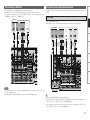
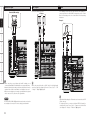
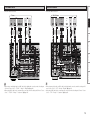
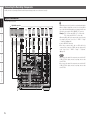
1
Graphical User Interface Use this manual in combination with the operating guide displayed on the GUI screen. GUI Menu Operation (vpage 23) GUI Menu Map (vpage 24) Language (vpage 40) Remote Control Unit Operations (vpage 64) AV SURROUND AMPLIFIER AVC-A1HD Owner’s Manual nSAFETY PRECAUTIONS • DECLARATION DE CONFORMITE CAUTION RISK OF ELECTRIC SHOCK DO NOT OPEN CAUTION: TO REDUCE THE RISK OF ELECTRIC SHOCK, DO NOT REMOVE COVER (OR BACK). NO USER-SERVICEABLE PARTS INSIDE. REFER SERVICING TO QUALIFIED SERVICE PERSONNEL. The lightning flash with arrowhead symbol, within an equilateral triangle, is intended to alert the user to the presence of uninsulated “dangerous voltage” within the product’s enclosure that may be of sufficient magnitude to constitute a risk of electric shock to persons. The exclamation point within an equilateral triangle is intended to alert the user to the presence of important operating and maintenance (servicing) instructions in the literature accompanying the appliance. • DICHIARAZIONE DI CONFORMITÀ Con la presente D&M Holdings Inc., Denon Brand Company dichiara che questo AVC-A1HD è con-forme ai requisiti essenziali ed alle altre disposizioni pertinenti stabilite dalla direttiva 1999/5/CE, e conforme alle seguenti normative: EN60065, EN55013, EN55020, EN55022, EN55024, EN61000-3-2, EN61000-3-3, EN300328, EN301489-01, EN301489-17 e EN50385. La dichiarazione di conformità può essere consultata presso il nostro rappresentante europeo, DENON Europe. QUESTO PRODOTTO E’ CONFORME AL D.M. 28/08/95 N. 548 • DECLARACIÓN DE CONFORMIDAD WARNING: TO REDUCE THE RISK OF FIRE OR ELECTRIC SHOCK, DO NOT EXPOSE THIS APPLIANCE TO RAIN OR MOISTURE. R&TTE Directive 1999/5/EC This product may be operated in the following countries; AT BE CZ DK FR DE GR HU IT NL PL PT ES SE GB NO FI IE SK CH • DECLARATION OF CONFORMITY Hereby, D&M Holdings Inc., Denon Brand Company declares that this product AVC-A1HD is in compliance with the essential requirements and other relevant provisions of Directive 1999/5/EC, in conformity with the following standards; EN60065, EN55013, EN55020, EN55022, EN55024, EN61000-3-2, EN61000-3-3, EN300328, EN301489-01, EN301489-17 and EN50385 The declaration of conformity may be consulted to our European representative, DENON Europe. • ÜBEREINSTIMMUNGSERKLÄRUNG Hiermit erklärt D&M Holdings Inc., Denon Brand Company, dass sich das Gerät AVC-A1HD in Übereinstimmung mit den grundlegenden Anforderungen und den übrigen einschlägigen Bestimmungen der Richtlinie 1999/5/EG befindet, den folgenden Standards entspricht: EN60065, EN55013, EN55020, EN55022, EN55024, EN61000-3-2, EN61000-3-3, EN300328, EN301489-01, EN301489-17 und EN50385 Wenden Sie sich bei Fragen zur Konformitätserklärung an unseren europäischen Vertreter, DENON Europe. I Par la présente, D&M Holdings Inc., Denon Brand Company déclare que l’appareil AVC-A1HD est conforme aux exigences essentielles et aux autres dispositions pertinentes de la directive 1999/5/CE, e conforme alle seguenti normative: EN60065, EN55013, EN55020, EN55022, EN55024, EN61000-3-2, EN61000-3-3, EN300328, EN301489-01, EN301489-17 e EN50385. La déclaration de conformité pourra être consultée auprès de notre représentant en Europe, DENON Europe. Por la presente, D&M Holdings Inc., Denon Brand Company, declara que este AVC-A1HD cumple con los requisitos esenciales y otras exigencias relevantes de la Directiva 1999/5/EC, esta conforme con los siguientes estandares: EN60065, EN55013, EN55020, EN55022, EN55024, EN61000-3-2, EN61000-3-3, EN300328, EN301489-01, EN301489-17 y EN50385. Puede consultar a nuestro representante europeo, DENON Europe, acerca de la declaración de conformidad. • EENVORMIGHEIDSVERKLARING Hierbij verklaart D&M Holdings Inc., Denon Brand Company dat het toestel AVC-A1HD in overeenstemming is met de essentiële eisen en de andere relevante bepalingen van richtlijn 1999/5/EG, in overeenstemming is met de volgende normen: EN60065, EN55013, EN55020, EN55022, EN55024, EN61000-3-2, EN61000-3-3, EN300328, EN301489-01, EN301489-17 en EN50385. De eenvormigheidsverklaring mag worden geconsulteerd aan onze Europese vertegenwoordiger, DENON Europe. • ÖVERENSSTÄMMELSESINTYG Denna utrustning är i överensstämmelse med de väsentliga kraven och andra relevanta bestämmelser i Direktiv 1999/5/EC, uppfyller foljande standarder: EN60065, EN55013, EN55020, EN55022, EN55024, EN61000-3-2, EN61000-3-3, EN300328, EN301489-01, EN301489-17 och EN50385. EU-konformitetsintyget kan på begäran fås från DENON Europe, vår representant i Europe. DENON EUROPE Division of D&M Germany GmbH An der Landwehr 19, Nettetal, D-41334 Germany CAUTION: To completely disconnect this product from the mains, disconnect the plug from the wall socket outlet. The mains plug is used to completely interrupt the power supply to the unit and must be within easy access by the user. VORSICHT: Um dieses Gerät vollständig von der Stromversorgung abzutrennen, ziehen Sie bitte den Stecker aus der Wandsteckdose. Der Netzstecker wird verwendet, um die Stromversorgung zum Gerät völlig zu unterbrechen; er muss für den Benutzer gut und einfach zu erreichen sein. PRECAUTION: Pour déconnecter complètement ce produit du courant secteur, débranchez la prise de la prise murale. La prise secteur est utilisée pour couper complètement l’alimentation de l’appareil et l’utilisateur doit pouvoir y accéder facilement. ATTENZIONE: Per scollegare completamente questo prodotto dalla rete di alimentazione elettrica, scollegare la spina dalla relativa presa a muro. La spina di rete viene utilizzata per interrompere completamente l’alimentazione all’unità e deve essere facilmente accessibile all’utente. PRECAUCIÓN: Para desconectar completamente este producto de la alimentación eléctrica, desconecte el enchufe del enchufe de la pared. El enchufe de la alimentación eléctrica se utiliza para interrumpir por completo el suministro de alimentación eléctrica a la unidad y debe de encontrarse en un lugar al que el usuario tenga fácil acceso. WAARSCHUWING: Om de voeding van dit product volledig te onderbreken moet de stekker uit het stopcontact worden getrokken. De netstekker wordt gebruikt om de stroomtoevoer naar het toestel volledig te onderbreken en moet voor de gebruiker gemakkelijk bereikbaar zijn. FÖRSIKTIHETSMÅTT: Koppla loss stickproppen från eluttaget för att helt skilja produkten från nätet. Stickproppen används för att helt bryta strömförsörjningen till apparaten, och den måste vara lättillgänglig för användaren. nNOTE ON USE / HINWEISE ZUM GEBRAUCH / OBSERVATIONS RELATIVES A L’UTILISATION / NOTE SULL’USO / NOTAS SOBRE EL USO / ALVORENS TE GEBRUIKEN / OBSERVERA ANGÅENDE ANVÄNDNINGEN CAUTION: •The ventilation should not be impeded by covering the ventilation openings with items, such as newspapers, tablecloths, curtains, etc. • No naked flame sources, such as lighted candles, should be placed on the unit. • Observe and follow local regulations regarding battery disposal. • Do not expose the unit to dripping or splashing fluids. • Do not place objects filled with liquids, such as vases, on the unit. ACHTUNG: • Do not let foreign objects into the unit. • Keep the unit free from moisture, water, and dust. • Lassen Sie keine fremden Gegenstände in das Gerät kommen. • Halten Sie das Gerät von Feuchtigkeit, Wasser und Staub • Ne pas laisser des objets étrangers dans l’appareil. • Avoid high temperatures. fern. • Non inserite corpi estranei all’interno dell’unità. Allow for sufficient heat dispersion when installed in a rack. • Protéger l’appareil contre l’humidité, l’eau et la poussière. • No deje objetos extraños dentro del equipo. • Vermeiden Sie hohe Temperaturen. Beachten Sie, dass eine ausreichende Belüftung gewährleistet • Tenete l’unità lontana dall’umidità, dall’acqua e dalla • Laat geen vreemde voorwerpen in dit apparaat vallen. polvere. • Se till att främmande föremål inte tränger in i apparaten. wird, wenn das Gerät auf ein Regal gestellt wird. • Mantenga el equipo libre de humedad, agua y polvo. • Eviter des températures élevées. Tenir compte d’une dispersion de chaleur suffisante lors de • Laat geen vochtigheid, water of stof in het apparaat binnendringen. l’installation sur une étagère. • Utsätt inte apparaten för fukt, vatten och damm. • Evitate di esporre l’unità a temperature elevate. Assicuratevi che vi sia un’adeguata dispersione del calore quando installate l’unità in un mobile per componenti audio. • Evite altas temperaturas. Permite la suficiente dispersión del calor cuando está instalado en la consola. • Vermijd hoge temperaturen. Zorg er bij installatie in een audiorack voor, dat de door • Do not let insecticides, benzene, and thinner come in het toestel geproduceerde warmte goed kan worden contact with the unit. afgevoerd. • Lassen Sie das Gerät nicht mit Insektiziden, Benzin oder • Unplug the power cord when not using the unit for long • Undvik höga temperaturer. Verdünnungsmitteln in Berührung kommen. periods of time. Se till att det finns möjlighet till god värmeavledning vid • Ne pas mettre en contact des insecticides, du benzène et • Wenn das Gerät längere Zeit nicht verwendet werden soll, montering i ett rack. un diluant avec l’appareil. trennen Sie das Netzkabel vom Netzstecker. • Assicuratevi che l’unità non entri in contatto con insetticidi, • Débrancher le cordon d’alimentation lorsque l’appareil n’est benzolo o solventi. pas utilisé pendant de longues périodes. • No permita el contacto de insecticidas, gasolina y diluyentes • Scollegate il cavo di alimentazione quando prevedete di non con el equipo. utilizzare l’unità per un lungo periodo di tempo. • Voorkom dat insecticiden, benzeen of verfverdunner met dit • Desconecte el cordón de energía cuando no utilice el equipo toestel in contact komen. por mucho tiempo. • Se till att inte insektsmedel på spraybruk, bensen och • Neem altijd het netsnoer uit het stopkontakt wanneer het thinner kommer i kontakt med apparatens hölje. apparaat gedurende een lange periode niet wordt gebruikt. • Koppla loss nätkabeln om apparaten inte kommer att användas i lång tid. • Handle the power cord carefully. Hold the plug when unplugging the cord. • Gehen Sie vorsichtig mit dem Netzkabel um. Halten Sie das Kabel am Stecker, wenn Sie den Stecker herausziehen. • Manipuler le cordon d’alimentation avec précaution. Tenir la prise lors du débranchement du cordon. • Manneggiate il cavo di alimentazione con attenzione. Tenete ferma la spina quando scollegate il cavo dalla presa. • Never disassemble or modify the unit in any way. * (For apparatuses with ventilation holes) • Maneje el cordón de energía con cuidado. • Versuchen Sie niemals das Gerät auseinander zu nehmen Sostenga el enchufe cuando desconecte el cordón de • Do not obstruct the ventilation holes. oder zu verändern. energía. • Ne jamais démonter ou modifier l’appareil d’une manière ou • Decken Sie den Lüftungsbereich nicht ab. • Hanteer het netsnoer voorzichtig. d’une autre. • Ne pas obstruer les trous d’aération. Houd het snoer bij de stekker vast wanneer deze moet • Non coprite i fori di ventilazione. • Non smontate né modificate l’unità in alcun modo. worden aan- of losgekoppeld. • Nunca desarme o modifique el equipo de ninguna manera. • No obstruya los orificios de ventilación. • Hantera nätkabeln varsamt. • Dit toestel mag niet gedemonteerd of aangepast worden. • De ventilatieopeningen mogen niet worden beblokkeerd. Håll i kabeln när den kopplas från el-uttaget. • Ta inte isär apparaten och försök inte bygga om den. • Täpp inte till ventilationsöppningarna. •Die Belüftung sollte auf keinen Fall durch das Abdecken der Belüftungsöffnungen durch Gegenstände wie beispielsweise Zeitungen, Tischtücher, Vorhänge o. Ä. behindert werden. •Auf dem Gerät sollten keinerlei direkte Feuerquellen wie beispielsweise angezündete Kerzen aufgestellt werden. •Bitte beachten Sie bei der Entsorgung der Batterien die örtlich geltenden Umweltbestimmungen. •Das Gerät sollte keiner tropfenden oder spritzenden Flüssigkeit ausgesetzt werden. •Auf dem Gerät sollten keine mit Flüssigkeit gefüllten Behälter wie beispielsweise Vasen aufgestellt werden. ATTENTION: •La ventilation ne doit pas être gênée en recouvrant les ouvertures de la ventilation avec des objets tels que journaux, rideaux, tissus, etc. • Aucune flamme nue, par exemple une bougie, ne doit être placée sur l’appareil. • Veillez à respecter les lois en vigueur lorsque vous jetez les piles usagées. • L’appareil ne doit pas être exposé à l’eau ou à l’humidité. • Ne pas poser d’objet contenant du liquide, par exemple un vase, sur l’appareil. ATTENZIONE: •Le aperture di ventilazione non devono essere ostruite coprendole con oggetti, quali giornali, tovaglie, tende e così via. • Non posizionate sull’unità fiamme libere, come ad esempio candele accese. •Prestate attenzione agli aspetti legati alla tutela dell’ambiente nello smaltimento delle batterie. • L’apparecchiatura non deve essere esposta a gocciolii o spruzzi. •Non posizionate sull’unità alcun oggetto contenente liquidi, come ad esempio i vasi. PRECAUCIÓN: •La ventilación no debe quedar obstruida por haberse cubierto las aperturas con objetos como periódicos, manteles, cortinas, etc. •No debe colocarse sobre el aparato ninguna fuente inflamable sin protección, como velas encendidas. •A la hora de deshacerse de las pilas, respete la normativa para el cuidado del medio ambiente. • No exponer el aparato al goteo o salpicaduras cuando se utilice. • No colocar sobre el aparato objetos llenos de líquido, como jarros. WAARSCHUWING: •De ventilatie mag niet worden belemmerd door de ventilatieopeningen af te dekken met bijvoorbeeld kranten, een tafelkleed, gordijnen, enz. • Plaats geen open vlammen, bijvoorbeeld een brandende kaars, op het apparaat. • Houd u steeds aan de milieuvoorschriften wanneer u gebruikte batterijen wegdoet. • Stel het apparaat niet bloot aan druppels of spatten. • Plaats geen voorwerpen gevuld met water, bijvoorbeeld een vaas, op het apparaat. OBSERVERA: •Ventilationen bör inte förhindras genom att täcka för ventilationsöppningarna med föremål såsom tidningar, bordsdukar, gardiner osv. • Inga blottade brandkällor, såsom tända ljus, får placeras på apparaten. • Tänk på miljöaspekterna när du bortskaffar batterier. • Apparaten får inte utsättas för vätska. • Placera inte föremål fyllda med vätska, t.ex. vaser, på apparaten. II A NOTE ABOUT RECYCLING: This product’s packaging materials are recyclable and can be reused. Please dispose of any materials in accordance with the local recycling regulations. When discarding the unit, comply with local rules or regulations. Batteries should never be thrown away or incinerated but disposed of in accordance with the local regulations concerning battery disposal. This product and the supplied accessories, excluding the batteries, constitute the applicable product according to the WEEE directive. HINWEIS ZUM RECYCLING: Das Verpackungsmaterial dieses Produktes ist zum Recyceln geeignet und kann wieder verwendet werden. Bitte entsorgen Sie alle Materialien entsprechend der örtlichen Recycling-Vorschriften. Beachten Sie bei der Entsorgung des Gerätes die örtlichen Vorschriften und Bestimmungen. Die Batterien dürfen nicht in den Hausmüll geworfen oder verbrannt werden; bitte entsorgen Sie die Batterien gemäß der örtlichen Vorschriften. Dieses Produkt und das im Lieferumfang enthaltene Zubehör (mit Ausnahme der Batterien!) entsprechen der WEEEDirektive. UNE REMARQUE CONCERNANT LE RECYCLAGE: Les matériaux d’emballage de ce produit sont recyclables et peuvent être réutilisés. Veuillez disposer des matériaux conformément aux lois sur le recyclage en vigueur. Lorsque vous mettez cet appareil au rebut, respectez les lois ou réglementations en vigueur. Les piles ne doivent jamais être jetées ou incinérées, mais mises au rebut conformément aux lois en vigueur sur la mise au rebut des piles. Ce produit et les accessoires inclus, à l’exception des piles, sont des produits conformes à la directive DEEE. NOTA RELATIVA AL RICICLAGGIO: I materiali di imballaggio di questo prodotto sono riutilizzabili e riciclabili. Smaltire i materiali conformemente alle normative locali sul riciclaggio. Per lo smaltimento dell’unità, osservare le normative o le leggi locali in vigore. Non gettare le batterie, né incenerirle, ma smaltirle conformemente alla normativa locale sui rifiuti chimici. Questo prodotto e gli accessori inclusi nell’imballaggio sono applicabili alla direttiva RAEE, ad eccezione delle batterie. ACERCA DEL RECICLAJE: Los materiales de embalaje de este producto son reciclables y se pueden volver a utilizar. Disponga de estos materiales siguiendo los reglamentos de reciclaje de su localidad. Cuando se deshaga de la unidad, cumpla con las reglas o reglamentos locales. Las pilas nunca deberán tirarse ni incinerarse. Deberá disponer de ellas siguiendo los reglamentos de su localidad relacionados con los desperdicios químicos. Este producto junto con los accesorios empaquetados es el producto aplicable a la directiva RAEE excepto pilas. EEN AANTEKENING MET BETREKKING TOT DE RECYCLING: Het inpakmateriaal van dit product is recycleerbaar en kan opnieuw gebruikt worden. Er wordt verzocht om zich van elk afvalmateriaal te ontdoen volgens de plaatselijke voorschriften. Volg voor het wegdoen van de speler de voorschriften voor de verwijdering van wit- en bruingoed op. Batterijen mogen nooit worden weggegooid of verbrand, maar moeten volgens de plaatselijke voorschriften betreffende chemisch afval worden verwijderd. Op dit product en de meegeleverde accessoires, m.u.v. de batterijen is de richtlijn voor afgedankte elektrische en elektronische apparaten (WEEE) van toepassing. OBSERVERA ANGÅENDE ÅTERVINNING: Produktens emballage är återvinningsbart och kan återanvändas. Kassera det enligt lokala återvinningsbestämmelser. När du kasserar enheten ska du göra det i överensstämmelse med lokala regler och bestämmelser. Batterier får absolut inte kastas i soporna eller brännas. Kassera dem enligt lokala bestämmelser för kemiskt avfall. Denna apparat och de tillbehör som levereras med den uppfyller gällande WEEE-direktiv, med undantag av batterierna. III 1. IMPORTANT NOTICE: DO NOT MODIFY THIS PRODUCT This product, when installed as indicated in the instructions contained in this manual, meets R&TTE directive requirements. Modification of the product could result in hazardous Radio and EMC radiation. 2. CAUTION •Separation distance of at least 20 cm must be maintained between the antenna of this product and all persons. •This product and its antenna must not be co-located or operating in conjunction with any other antenna or transmitter. 1. WICHTIGER HINWEIS: NEHMEN SIE KEINE VERÄNDERUNGEN AN DIESEM PRODUKT VOR Wenn dieses Produkt entsprechend dieser Bedienungsanleitung aufgebaut wird, entspricht es den Anforderungen der R&TTE-Richtlinie. Veränderungen am Produkt können zu gefährlicher Funk- und EMV-Strahlung führen. 2. VORSICHT •Zwischen der Antenne dieses Produkts und Personen muss ein Schutzabstand von 20 cm eingehalten werden. •Dieses Produkt und seine Antenne dürfen nicht neben anderen Antennen oder Sendern aufgestellt oder zusammen mit ihnen verwendet werden. 1. MISE EN GARDE IMPORTANTE : NE JAMAIS MODIFIER CE PRODUIT Si toutes les consignes indiquées dans ce mode ont été respectées pendant son installation, ce produit est conforme aux directives R&TTE. Toute modification du produit risquerait alors de générer des radiations radio et EMC dangereuses. 2. ATTENTION •L’antenne de l’appareil devra être située à une distance de 20 cm au moins des personnes. •Ce produit ainsi que son antenne ne devront en aucun cas être utilisés à proximité d’une autre antenne ou transmetteur. 1. AVVERTENZA IMPORTANTE: NON MODIFICARE QUESTO PRODOTTO Se installato come indicato nelle istruzioni del presente manuale, questo prodotto soddisfa i requisiti della direttiva R&TTE. Eventuali modifiche apportate al prodotto potrebbero causare pericolose radiazioni radio ed EMC. 2. ATTENZIONE •È necessario mantenere una distanza minima di 20 cm tra l’antenna di questo prodotto e le persone. •Questo prodotto e la relativa antenna non devono essere posizionati in prossimità di altre antenne o trasmettitori e non devono essere utilizzati congiuntamente a questi ultimi. 1. NOTA IMPORTANTE: NO MODIFIQUE ESTE PRODUCTO Este producto, si es instalado de acuerdo con las instrucciones contenidas en este manual, cumple los requisitos de la directiva R&TTE. La modificación del producto puede producir radiación de Radio y EMC peligrosa. 2. PRECAUCIÓN •Se debe mantener una separación de al menos 20 cm entre la antena del producto y las personas. •Este producto y su antena no debe instalarse ni utilizarse conjuntamente con otra antena o transmisor. 1. BELANGRIJKE MEDEDELING: BRENG AAN DIT PRODUCT GEEN AANPASSINGEN AAN Dit product, indien geïnstalleerd volgens de aanwijzingen in deze gebruiksaanwijzing, voldoet aan de vereisten van de R&TTE-richtlijn. Aanpassing van dit product kan gevaarlijke radio- en EMC-straling tot gevolg hebben. 2. LET OP •Houd tussen antenne en personen altijd een afstand van tenminste 20 cm aan. •Dit product en zijn antenne mogen niet in de buurt van een andere antenne of zender worden geplaatst of in combinatie daarmee worden gebruikt. 1. VIKTIGT: APPARATEN FÅR INTE MODIFIERAS Under förutsättning att apparaten installeras enligt anvisningarna i denna bruksanvisning, uppfyller denna kraven i R&TTE-direktivet. Ev. modifiering av apparaten kan resultera i farlig radio- och elektromagnetisk strålning. 2. FÖRSIKTIGT •Se till att det finns ett avstånd på minst 20 cm mellan apparatens antenn och personer i omgivningen. •Apparaten och dess antenn får inte placeras eller användas i närheten av andra antenner eller sändare. Contents Getting Started Accessories·······················································································3 Cautions on Handling······································································3 Cautions on Installation··································································3 About the Remote Control Unit·····················································3 Inserting the Batteries·································································3, 4 Operating Range of the Remote Control Unit·································4 Part Names and Functions······························································4 Front Panel··················································································4, 5 Display····························································································5 Rear Panel·······················································································6 Remote Control Unit·······································································7 Connections Preparations·····················································································8 Cables Used for Connections·························································8 Video Conversion Function······························································9 Speaker Installation······································································ 10 Speaker Layout ············································································ 10 Speaker Connections·······························································10, 11 Connecting Equipment with HDMI connectors·························· 12 Connecting the Monitor································································ 13 Connecting the Playback Components······································· 13 DVD Player···················································································· 13 Record Player················································································ 14 CD Player······················································································ 14 iPod®····························································································· 14 TV/CABLE Tuner············································································ 15 Satellite Receiver·········································································· 15 Connecting the Recording Components····································· 16 Digital Video Recorder··································································· 16 Video Cassette Recorder······························································ 17 CD Recorder / MD Recorder / Tape Deck······································ 17 Connections to Other Devices······················································ 18 Components Equipped with a DENON LINK connector··············· 18 Video Camera / Game Console····················································· 18 Component with Multi-channel Output connectors······················ 18 External Power Amplifier······························································· 19 USB Port······················································································· 19 Network Audio··············································································20 Multi Zone·····················································································21 External Controller········································································22 Connecting the Power Cord·························································22 Once Connections are Completed···············································22 GUI Menu Operations Example of the Display of the GUI Mark at a Title·····················23 Example of Display of Default Values··········································23 Examples of GUI Screen Displays················································23 Example: Browse Menu (Top Menu)············································23 Example: Menus with Illustrations (Auto Setup)···························23 Cursor Position Display·································································23 Operations······················································································23 GUI Menu Map···············································································24 Auto Setup Preparations···················································································25 Auto Setup·····················································································25 a Auto Setup·········································································25, 26 Error Messages········································································27 s Option······················································································27 d Parameter Check······································································27 Manual Setup Speaker Setup···············································································28 a Speaker Configuration······························································28 s Subwoofer Setup·····································································28 d Distance···················································································29 f Channel Level··········································································29 g Crossover Frequency·························································29, 30 h THX Audio Setup······································································30 j Surround Speaker····································································30 HDMI Setup····················································································31 a Color Space··············································································31 s RGB Range··············································································31 d Auto Lip Sync···········································································31 f Audio························································································31 g Monitor Out·············································································31 h HDMI Control···········································································31 Audio Setup···················································································32 a EXT. IN Setup···········································································32 s 2ch Direct/Stereo·····································································32 d Downmix Option······································································32 f Auto Surround Mode·······························································32 g Manual EQ···············································································33 Network Setup···············································································33 a Network Setup···································································33, 34 s Other························································································35 d Network Information································································35 Zone Setup·····················································································35 a ZONE2···············································································35, 36 s ZONE3···············································································35, 36 d OSD·························································································36 Option Setup··················································································36 a Amp Assign··············································································36 s Volume Control········································································36 d Source Delete··········································································37 f GUI···························································································37 g Quick Select Name··································································37 h Trigger Out 1·······································································37, 38 j Trigger Out 2·······································································37, 38 k Trigger Out 3·······································································37, 38 l Trigger Out 4·······································································37, 38 A0 Transducer Setup·····································································38 A1 Digital Out················································································38 A2 Remote ID················································································38 A3 2Way Remote··········································································38 A4 Dimmer····················································································38 A5 Setup Lock···············································································39 A6 Maintenance Mode··································································39 A7 Firmware Update·····································································39 A8 Add New Feature·····································································39 Language························································································40 Source Select Input Source Selection··································································40 Settings Related to Playing Input Sources··································41 a Play··························································································41 s Playback Mode (iPod)·······························································41 d Assign················································································41, 42 f Video··················································································42, 43 g Input Mode··············································································43 h Rename····················································································43 j Source Level············································································43 k Playback Mode·········································································44 l Still Picture···············································································44 Surround Mode HOME THX CINEMA······································································44 Surround Playback of 2-channel Sources······································44 Playing Multi-channel Sources (Dolby Digital, DTS, etc.)··············44 Standard Playback·········································································45 Surround Playback of 2-channel Sources······································45 Playing Multi-channel Sources (Dolby Digital, DTS, etc.)··············45 Dolby Headphone·········································································45 DSP Simulation Playback·······················································45, 46 Stereo Playback·············································································46 Direct Playback··············································································46 Playback in the PURE DIRECT Mode············································46 Parameter Audio······························································································46 a Surround Parameters·······················································46 ~ 48 s Tone·························································································48 d Room EQ·················································································49 f Dynamic EQ·············································································49 g RESTORER···············································································49 h Night Mode··············································································49 j Audio Delay··············································································50 Picture Adjust·················································································50 a Contrast···················································································50 s Brightness················································································50 d Chroma Level···········································································50 f Hue··························································································50 g DNR·························································································50 h Enhancer··················································································50 j Sharpness················································································50 Information Status·····························································································50 a MAIN ZONE·············································································50 s ZONE2/3/4···············································································50 Audio Input Signal·········································································51 HDMI Information··········································································51 a Signal Information····································································51 s Monitor1··················································································51 d Monitor2··················································································51 Auto Surround Mode·····································································51 Quick Select···················································································51 Preset Station················································································51 Playback Preparations···················································································52 Turning the Power On···································································52 Operations During Playback··························································52 Playing Video and Audio Equipment············································52 Basic Operation·············································································52 iPod® Playback··············································································53 Basic Operation·············································································53 Listening to Music··································································53, 54 Viewing Still Pictures or Videos on the iPod··································54 Playing Network Audio, USB Memory Devices·····························································54, 55 Basic Operation·············································································56 Listening to Internet Radio····························································57 Playing Files Stored on a Computer··············································58 Playing Files Stored on USB Memory Devices·······················58, 59 Operating the AVC-A1HD Using a Browser (Web control)············59 Other Operations and Functions Other Operations···········································································60 Playing Super Audio CD································································60 Recording on an External Device (REC OUT mode)················60, 61 Convenient Functions···································································61 HDMI Control Function···························································61, 62 Channel Level················································································63 Fader Function··············································································63 Quick Select Function···································································63 Personal Memory Plus Function···················································63 Last Function Memory··································································63 Backup Memory············································································63 Resetting the Microprocessor·······················································63 Remote Control Unit Operations Main Remote Control Unit···························································64 Operating DENON Audio Components·········································64 Presetting······················································································64 Operating Preset Components·············································64 ~ 66 Setting the Remote ID··································································67 Learning Function··········································································67 System Call Function·····································································68 Punch Through Function································································68 Setting the Time the Backlight Stays Lit········································69 Adjusting the Backlight’s Brightness·············································69 Resetting the Main Remote Control Unit······································69 Sub Remote Control Unit Operations···································70, 71 Switching Zones············································································72 Setting the Zone for Which the Sub Remote Control Unit is Used (ZONE SELECT LOCK Mode)························································72 Setting the Remote ID··································································72 Resetting the Settings···································································72 Amp Assign / Multi-Zone Connections and Operations Multi-Zone Settings with the Amp Assign Function··········73 ~ 76 Multi-Zone Connections··································································77 Multi-Zone Operations··································································78 Turning the Power On and Off······················································78 Selecting the Input Source····························································78 Adjusting the Volume····································································78 Turning off the Sound Temporarily·················································78 Other Information·································································79 ~ 93 Troubleshooting····································································94 ~ 97 Specifications··········································································· 97, 98 List of preset codes············································ End of this manual •Before turning the power switch on Check once again that all connections are correct and that there are no problems with the connection cables. Getting Started (RC-1067) (RC-1070) •Cautions on using mobile phones Using a mobile phone near this unit may result in noise. If so, move the mobile phone away from this unit when it is in use. •Moving the unit Turn off the power and unplug the power cord from the power outlet. Next, disconnect the connection cables to other system units before moving the unit. (RC-1067) (RC-1070) R03/AAA LR6/AA Information •Note that the illustrations in these instructions may differ from the actual unit for explanation purposes. w Load the two batteries properly as indicated by the marks in the battery compartment. Cautions on Installation o Q0 Note: For proper heat dispersal, do not install this unit in a confined space, such as a bookcase or similar enclosure. Troubleshooting u e Put the rear cover back on. bNote b Multi-Zone t q Lift the clasp and remove the rear lid. Remote Control r Inserting the Batteries Playback qOwner’s manual....................................................................... 1 wCD-ROM (Owner’s manual)...................................................... 1 eService station list.................................................................... 1 rPower cord (Cord length: Approx. 1.5 m).................................. 1 tMain remote control (RC-1067)................................................ 1 yLR6/AA batteries (for RC-1067)................................................. 2 uSub remote control (RC-1070).................................................. 1 iR03/AAA batteries (for RC-1070).............................................. 2 oRod antenna for wireless LAN connection............................... 1 Q0Setup microphone (Cord length: Approx. 7.6 m)....................... 1 •About condensation If there is a major difference in temperature between the inside of the unit and the surroundings, condensation (dew) may form on the operating parts inside the unit, causing the unit not to operate properly. If this happens, let the unit sit for an hour or two with the power turned off and wait until there is little difference in temperature before using the unit. Setup Accessories Check that the following parts are supplied with the product. •Power is supplied to some of the circuitry even when the unit is set to the standby mode. When traveling or leaving home for long periods of time, be sure to unplug the power cord from the power outlet. In addition to the AVC-A1HD, the included main remote control unit (RC-1067) can also be used to operate the equipment listed below. qDENON system components wNon-DENON system components •By setting the preset memory (vpage 64 ~ 66) •By using the learn function (vpage 67) Connections Thank you for purchasing this DENON product. To ensure proper operation, please read this owner’s manual carefully before using the product. After reading them, be sure to keep them for future reference. w About the Remote Control Unit Getting Started Cautions on Handling b b Wall Getting Started NOTE Connections Setup Playback Remote Control •Replace the batteries with new ones if the set does not operate even when the remote control unit is operated close to the unit. •The supplied batteries are only for verifying operation. •When inserting the batteries, be sure to do so in the proper direction, following the “q” and “w” marks in the battery compartment. •To prevent damage or leakage of battery fluid: •Do not use a new battery together with an old one. •Do not use two different types of batteries. •Do not attempt to charge dry batteries. •Do not short-circuit, disassemble, heat or dispose of batteries in flames. •If the battery fluid should leak, carefully wipe the fluid off the inside of the battery compartment and insert new batteries. •Remove the batteries from the remote control unit if it will not be in use for long periods. •When replacing the batteries, have the new batteries ready and insert them as quickly as possible. Operating Range of the Remote Control Unit Part Names and Functions For buttons not explained here, see the page indicated in parentheses ( ). Front Panel o i u y t Q0 Q1 Q2 Multi-Zone Point the remote control unit at the remote sensor when operating it. Information q w e Troubleshooting qPower operation button (ON/STANDBY)·········································································(52) (RC-1070) 30° 30° or Approx. 7 m (RC-1067) NOTE The set may function improperly or the remote control unit may not operate if the remote control sensor is exposed to direct sunlight, strong artificial light from an inverter type fluorescent lamp or infrared light. wPower indicator·········································································(52) ePower switch (hON jOFF)···················································(52) rQUICK SELECT buttons / indicators·······································(63) tMASTER VOLUME control knob··············································(52) yMaster volume indicator r uDisplay iRemote control sensor·······························································(4) oSOURCE SELECT knob····························································(40) Q0SOURCE button········································································(40) Q1ZONE2/3/4 / REC SELECT button·····································(60, 78) Q2VIDEO SELECT button·····························································(42) GWith the door openH W7 W6 W5 W4 W3 W2 W1 W0 Q9 Q8 Q7 Q6 Q5 Getting Started W9 W8 Display Q4 Q3 Q8 Q7 Q6 Q5 Q4 Q3 Q2 Q0 Q1 o i u y Connections Setup w er t y u Q0 Q1 q Q2 e r t qInput signal indicators wInput signal channel indicators Q1NIGHT indicator Q2Multi zone indicators These light when digital signals are input. eInformation display The input source name, surround mode, setting values and other information are displayed here. rOutput signal channel indicators tSurround speaker indicators These light according to the settings of the surround A and B speakers. uMaster volume indicator iAUDYSSEY DYNAMIC EQ indicator This lights when the room equalizer is selected. Q0Recording output source indicator Q3RESTORER indicator This lights when the RESTORER mode is selected. Q4ADVANCED AL24 indicator This lights when Advanced AL24 Processing is activated (vpage 83). Q5D.LINK indicator This lights when playing using DENON LINK connections. Q6Input mode indicators Q7HDMI indicator This lights when the Dynamic EQ is selected. oAUDYSSEY MULTEQ XT indicator These light when the power for the respective zone is turned on. This lights connections. when playing using HDMI Q8Decoder indicators These light when the respective decoders are operating. This lights when the REC OUT mode is selected. Troubleshooting These light according to the HDMI monitor output setting. When set to “Auto (Dual)”, the indicators light according to the connection status. This lights when the night mode is selected. Information yMonitor output indicators Multi-Zone Q6SCALE button·············································· (43) Q7USB port······················································· (19) Q8ZONE4 ON/OFF button······························· (78) Q9ZONE3 ON/OFF button······························· (78) W0ZONE2 ON/OFF button······························· (78) W1AUDIO DELAY button·································· (50) W2Cursor buttons (uio p)··························· (23) W3GAME button··············································· (45) W4INPUT MODE button··································· (43) W57CH STEREO button···································· (45) W6DSP SIMULATION button··························· (46) W7HOME THX CINEMA button························ (44) W8STANDARD button······································ (45) W9PURE DIRECT button··································· (46) w Remote Control qDIRECT/STEREO button····························· (46) wHeadphones jack (PHONES)················· (52, 61) eCINEMA button············································ (45) rRESTORER button······································· (49) tMUSIC button·············································· (45) yNIGHT button··············································· (49) uMENU button··············································· (23) iCH SEL / ENTER button························ (23, 63) oRETURN button··········································· (23) Q0V.AUX INPUT connectors···························· (18) Q1ROOM EQ button········································· (49) Q2SETUP MIC jack··········································· (25) Q3DYNAMIC EQ button··································· (49) Q4STATUS button············································ (51) Q5DIMMER button··········································· (38) i o Playback q Getting Started Rear Panel u Q6 Q5 Q4 Q3 Q2 Q1 Q0 u oi Connections Setup Playback Remote Control Multi-Zone Q7 Q8 Q9 Information r Troubleshooting q qRS-232C connector······································ (22) wAnalog audio connectors (AUDIO)············· (13) ePRE OUT connectors····························· (19, 21) rEXT. IN connectors······································ (18) tAC inlet (AC IN)············································ (22) yAC OUTLET·················································· (22) w e uSpeaker terminals (SPEAKERS)················· (10) iCOMPONENT VIDEO connectors··············· (13) oDigital audio connectors (OPTICAL / COAXIAL / BNC)················ (13, 21) Q0HDMI connectors········································· (12) Q1ETHERNET connector·································· (20) Q2USB port······················································· (19) w Q3WLAN ANTENNA terminal·························· (20) Q4DENON LINK connector······························ (18) Q5TRIGGER OUT jacks···································· (22) Q6REMOTE CONTROL jacks··························· (21) Q7DOCK CONTROL jack·································· (14) Q8SIGNAL GND terminal································ (14) Q9VIDEO / S-VIDEO connectors····················· (13) t y nMain remote control unit (RC-1067) Q5 Q6 Q7 o W2 W0 W1 Q3Channel buttons (CH)···························· (53, 65) Q4Input source select / Number buttons··· (40, 52) Q5Remote control signal transmitter··············· (4) Q6Device select indicators (DEV1 / DEV2)···· (64) Q7ZONE3 / ZONE4 select indicators Q1 Q3 W4 W5 W6 Q4 W7 Q8RESTORER button (RSTR)··························· (49) Q9Night button (NGT)····································· (49) W0Test tone button (TEST)······························ (29) W1Surround speaker select button (SPKR)···· (30) W2POWER buttons··········································· (52) W3Channel select (CH SEL) / ENTER button········································ (23, 63) W4Return button (RTN)···································· (23) W5Master volume control buttons (VOL)······· (52) W6Muting button (MUTE)·························· (52, 78) W7Main remote control unit setup button (ZONE ON / ZONE OFF)······························ (78) Q3Master volume control buttons r Q3 Q4 (DIRECT PLAY) button································ (70) Q9USB (DIRECT PLAY) button························ (70) t Q5 NOTE The AUX-1, AUX-2, AUX-3, SAT TU, DTU, SHIFT and OPTION buttons cannot be used. y u (VOLUME)··················································· (52) Q4Muting button (MUTE)·························· (52, 78) Q5ENTER button·············································· (23) Q6RETURN button··········································· (23) Q7System buttons····································· (70, 71) Q8ALL MUSIC/FAVORITES Q6 Q7 i o Q8 (RC SETUP)·················································· (64) Q9 The time for which the backlight stays on can be changed (vpage 69 “Setting the Time the Backlight Stays Lit”). NOTE The SAT TU, DTU, ZONE2 mode QUICK SELECT (1 ~ 3), A. DL, RSTR, NGT, INPUT, SPKR, TEST and surround mode buttons cannot be used. Troubleshooting Q2 W3 (Z3 / Z4)························································ (78) e Information Q0 HOME button········································· (31, 64) Multi-Zone Q8 Q9 Q2 w (PARA / SRCH)······································· (46, 54) Q2Monitor select (M. SEL) / t y u i Q1 Remote Control r q Playback e Q0 qZONE indicators·········································· (72) wAdvanced setup button······························· (72) eInput source select buttons························ (40) rCHANNEL buttons································· (53, 70) tMENU button··············································· (23) yCursor buttons (uio p)·························· (23) uSEARCH button··········································· (54) iREPEAT button············································· (53) oRANDOM button········································· (54) Q0Remote control signal transmitter··············· (4) Q1ZONE SELECT button·································· (72) Q2Zone power on/off buttons Setup w nSub remote control unit (RC-1070) Connections q qSignal transmission indicator···················· (64) wMode select buttons··································· (64) eQuick select / System call buttons······ (63, 68) rSurround mode buttons·····················(44 ~ 46) tSystem buttons····································· (65, 66) yAudio delay button (A. DL)························· (50) uTuner system buttons································· (66) iInput mode button (INPUT)························ (43) oMENU button··············································· (23) Q0Cursor buttons (uio p)·························· (23) Q1Parameter / Search button Getting Started Remote Control Unit Getting Started Preparations Connections Connections Setup Connections for all compatible audio and video signal formats are described in these operating instructions. Please select the types of connections suited for the equipment you are connecting. With some types of connections, certain settings must be made on the AVC-A1HD. For details, refer to the instructions for the respective connection items below. Cables Used for Connections Select the cables according to the equipment being connected. Audio cables Coaxial digital connections Component video connections (Green) (Orange) Playback Optical digital connections (Y) (Blue) Coaxial digital (75 Ω/ohms pin-plug) cable NOTE Remote Control •Do not plug in the power cord until all connections have been completed. •When making connections, also refer to the operating instructions of the other components. •Be sure to connect the left and right channels properly (left with left, right with right). •Do not bundle power cords together with connection cables. Doing so can result in humming or noise. Video cables (PB/CB) (Red) (PR/CR) Component video cable (Green) Optical cable (Y) (Blue) BNC digital connections (PB/CB) (Red) (PR/CR) BNC (75 Ω/ohms) cable BNC (75 Ω/ohms) cable S-Video connections Multi-Zone Analog connections (stereo) (White) L L (Red) R R Information Stereo pin-plug cable Analog connections (monaural, for subwoofer) S-Video cable Video connections (Yellow) 75 Ω/ohms pin-plug video cable Troubleshooting (Black) Pin-plug cable DENON LINK connections DENON LINK cable Audio and video cables HDMI connections 19-pin HDMI cable Speaker connections Signal direction Speaker cables Audio signal: Video signal: Output Input Output Input Network connections (wired LAN) Ethernet cable Input Output Input Output ZONE3 •This function automatically converts various formats of video signals input to the AVC-A1HD into the format used to output the video signals from the AVC-A1HD to a monitor. •The AVC-A1HD’s video input/output circuitry is compatible with the following four types of video signals: Digital video signals: HDMI Analog video signals:Component video, S-Video and Video High picture quality playback Video connector Video inputs Video outputs Setup HDMI connector Monitor NOTE Video connector Video connector Video inputs Video outputs : When 480i/576i signals are input in the MAIN ZONE High picture quality playback Component video connectors Component video connectors S-Video connector S-Video connector Video connector Video connector Video inputs Video outputs ZONE2 monitor Troubleshooting GFlow of video signals for ZONE2H ZONE2 Information S-Video connector Multi-Zone S-Video connector •For optimum video performance, THX recommends that you set the conversion mode to “OFF” to use video signals pass through system without up conversion. Example: View video input from a component video on the component video monitor. •HDMI signals cannot be converted into analog signals. •1080p component input video signals cannot be output to anything other than component video connectors. •480p/576p, 1080i and 720p component video input signals cannot be converted into S-Video or Video format. •When using the component video output connectors for connection to the ZONE2 monitor, the ZONE2’s on-screen display is not displayed. •When a non-standard video signal from a game machine or some other source is input, the video conversion function might not operate. Remote Control Component video connectors •When not using this function, connect a monitor output with the same type of connector as the video input connector. •The resolution of the HDMI input-compatible monitor connected to the AVC-A1HD can be checked at GUI menu “Information” – “HDMI Information” – “Monitor1” or “Monitor2” (vpage 51). Playback Component video connectors Video connector Connections MAIN ZONE HDMI connector ZONE3 monitor S-Video connector GFlow of video signals inside the AVC-A1HDH High picture quality playback Getting Started GFlow of video signals for ZONE3H Video Conversion Function Getting Started Speaker Installation Speaker Connections Example: 9.3-channels Speaker Layout Connections Front speaker (R) The illustration below shows a basic example of installation of the amplifier combined with 8 speakers and a monitor. Subwoofer Center speaker bL : Left R : Right Center speaker Subwoofer with built-in amplifier Surround back speakers Setup (R) w Front speaker (L) Subwoofer 1 w q q (L) w q */ Playback Remote Control Multi-Zone Front speakers Place the front speakers to the sides of the monitor or screen and as flush with the screen surface as possible. Surround speakers Information Troubleshooting Two surround back speakers are required to use the THX Ultra2 Cinema,THX Music mode and THX Games mode. Set the surround back speakers so that the distance to the listening position is the same for both the left and right speakers. It is also recommended that the deviations of the distance from the listening position to L and R channel speakers (front left (FL) and front right (FR), surround left (SL) and surround right (SR), surround back left (SBL) and surround back right (SBR)) is less than 60 cm. Subwoofer with built-in amplifier (R) The table below shows a typical speaker configuration for the AVC-A1HD. FRONT w SURROUND SURROUND SURROUND BACK SUBWOOFER A B CENTER (b) L R L R L R 1 only L R 9.1-channels S S S S S S S S S – S 7.1-channels S S S S S – – S S – S 6.1-channels S S S S S – – – – S S 5.1-channels S S S S S – – – – – S 3.1-channels S S S – – – – – – – S 2.1-channels S S – – – – – – – – S 2-channels S S – – – – – – – – – bThe AVC-A1HD can be connected to a maximum of 3 subwoofers. 10 (R) q Surround speaker-A (R) w (L) (R) q w Surround speaker-B (R) w q */ Subwoofer 3 Surround back speaker (R) */ Subwoofer 2 (L) (L) q w q Surround speaker-B (L) w q Surround speaker-A (L) Surround back speaker (L) •When using just one surround back speaker, connect it to the left channel (SBL). •When using Subwoofer 2 or 3, set GUI menu “Manual Setup” – “Speaker Setup” – “Subwoofer Setup” (vpage 28). Carefully check the left (L) and right (R) channels and + (red) and – (black) polarities on the speakers being connected to the AVC-A1HD, and be sure to interconnect the channels and polarities correctly. Peel off about 10 mm of sheathing from Turn the speaker terminal counterclockwise to loosen it. Playback Insert the speaker cable’s core wire to Setup the hilt into the speaker terminal. Remote Control 2 3 4 the tip of the speaker cable, then either twist the core wire tightly or terminate it. If speakers with an impedance lower than specified (for example 4 Ω/ohms speakers) are used for an extended period of time with the volume turned up high, the temperature may rise, activating the protection circuit. When the protection circuit is activated, the speaker output is shut off and the power indicator flashes red. If this happens, unplug the power cord, then check the speaker cable and input cable connections. If the set is extremely hot, wait for it to cool off and improve ventilation around it. Once this is done, plug the power cord back in and turn the set's power back on. If the protection circuit is activated again even though there are no problems in the ventilation around the set nor in the connections, the set may be damaged. Turn the power off, then contact a DENON service center. Connections 1 Protection circuit Getting Started Connecting the Speaker Cables Turn the speaker terminal clockwise to tighten it. NOTE Multi-Zone •Use speakers with an impedance of 6 to 16 Ω/ohms. When using surround A and B speakers simultaneously, use speakers with an impedance of 8 to 16 Ω/ohms. •Connect the speaker cables in such a way that they do not stick out of the speaker terminals. The protection circuit may be activated if the core wires touch the rear panel or if the + and – sides touch each other (v “Protection circuit”). •Never touch the speaker terminals while the power supply is connected. Doing so could result in electric shock. Information Troubleshooting 11 Getting Started Connecting Equipment with HDMI connectors With HDMI connections, the video and audio signals can be transferred with a single cable. Connections DVD player Monitor )%.* 065 )%.* */ bThe AVC-A1HD is supported to the feature of HDMI listed below. •30 and 36 bit Deep Color •xvYCC •Auto Lipsync Correction Compatible audio format Details Discs (examples) Setup Playback Remote Control 2-channel linear PCM 2ch 32-192 kHz 16/20/24 bits CD, DVD-Video, DVD-Audio Multi-channel linear PCM 8ch 32-192 kHz 16/20/24 bits DVD-Audio Dolby Digital, DTS Bitstream DVD-Video DSD 2/5.1ch 2.8224 MHz 1 bit SACD Dolby Digital Plus, Dolby TrueHD, DTS-HD Bitstream HD DVD, Blu-ray Disc Copyright protection system (HDCP) Multi-Zone In order to play the digital video and audio signals of a DVD- Video or DVD-Audio disc using HDMI/DVI connections, both the connected DVD player and monitor must be equipped for a copyright protection system called “HDCP” (High-bandwidth Digital Content Protection). HDCP is a copy protection technology consisting of data encoding and mutual identification of the devices. The AVC-A1HD is HDCP-compatible. For details on the DVD player or monitor you are using, refer to its operating instructions. Information Troubleshooting When connecting with an HDMI/DVI converter cable (adapter) •By default, the HDMI audio signals are output from the speakers connected to the AVC-A1HD. •To output the sound from the TV, make the settings at GUI menu “Manual Setup” – “HDMI Setup” – “Audio” – “TV” (vpage 31). 12 •HDMI video signals are theoretically compatible with the DVI format. When connecting to a monitor, etc., equipped with a DVI-D connector, connection is possible using an HDMI/DVI converter cable, but depending on the combination of components in some cases the video signals will not be output. •When connecting using an HDMI/DVI converter adapter, the video signals may not be output properly due to poor connections with the connected cable, etc. NOTE •Use a CPPM-compatible DVD player to play DVD-Audio discs that are copyright-protected by CPPM. •The audio signals output from the HDMI connector (sampling frequency, bit rate, etc.) may be restricted by the connected device. •Video signals are not output properly when using devices that are not HDCP-compatible. •Video signals are not output if the input video signals do not match the monitor’s resolution. In this case, switch the DVD player’s resolution to a resolution with which the monitor is compatible. •If the GUI menu “Manual Setup” – “HDMI Setup” – “Audio” setting (vpage 31) is set to “Amp”, the sound may be interrupted when the monitor’s power is turned off. •Use a cable on which the HDMI logo is indicated (a certified HDMI product) for connection to the HDMI connector. Normal playback may not be possible when using a cable other than one on which the HDMI logo is indicated (a non-HDMI-certified product). •If the monitor or DVD player does not support Deep Color, Deep Color signal transfer is not possible. •If the monitor or DVD player does not support xvYCC, xvYCC signal transfer is not possible. •If the monitor does not support “Auto Lipsync Correction” function, this function will not work. •The AVC-A1HD is compatible with the HDMI’s CEC (Consumer Electronics Control) function. Please note the following. •It may not work depending on the device it is connected to and its setup. • It does not operate with televisions or players that are not compatible with HDMI’s CEC. •When the AVC-A1HD and DVD player are connected using an HDMI cable, also connect the AVC-A1HD and monitor using an HDMI cable. •If the connected monitor or DVD player only has a DVI-D connector, use an HDMI/DVI converter cable. When using a DVI cable, no audio signals are transmitted. •Use a Deep Color compatible cable for connection to Deep Color compatible devices. Connecting the Playback Components •Connect the cables to be used (vpage 9 “Video Conversion Function”). •With HDMI connections, the video and audio signals can be transferred with a single cable. •To output the audio signals to the monitor with HDMI connections, set GUI menu “Manual Setup” – “HDMI Setup” – “Audio” to “TV” (vpage 31). 7*%&0 7*%&0 */ 47*%&0 */ $0.10/&/57*%&0 */ : 1# 13 )%.* */ DVD Player Connections Monitor Carefully check the left (L) and right (R) channels and the inputs and outputs, and be sure to interconnect correctly. •Connect the cables to be used. •With HDMI connections, the video and audio signals can be transferred with a single cable. 7*%&0 47*%&0 065 "6%*0 )%.* 065 $0"9*"065 "6%*0 065 3 R L R Remote Control L Playback $0.10/&/57*%&0 065 : 1# 13 Setup DVD player 7*%&0 065 Getting Started Connecting the Monitor Multi-Zone Information Troubleshooting NOTE •The component video connectors may be indicated differently on your monitor. For details, see the monitor’s operating instructions. •The audio signals output from the HDMI connectors are only the HDMI input signals. •Connect an HDP (High-Definition Player) in the same way. •When using an optical cable or a BNC cable for the digital audio connection, make the settings at GUI menu “Source Select” – “DVD” – “Assign” – “Digital” (vpage 42). •When using a BNC cable for the component video connection, make the settings at GUI menu “Source Select” – “DVD” – “Assign” – “Component” (vpage 42). 13 Getting Started Record Player CD Player Turntable (MM cartridge) iPod® Connect the cables to be used. CD player "6%*0 Connections "6%*0 065 3 $0"9*"065 Use a DENON Control Dock for iPod (ASD-1R, sold separately) to connect the iPod to the AVC-A1HD. For instructions on the Control Dock for iPod settings, refer to the Control Dock for iPod’s operating instructions. Example : iPod L Setup "6%*0 065 R (/% "4%3 Playback L R L R Remote Control R L R L Multi-Zone Information Troubleshooting •When connecting a record player with an MC cartridge, use a commercially available MC head amplifier or a step-up transformer. •Induction humming (a booming sound) may be produced from the speakers if the volume is raised with no record player connected. •With some record players, noise may be generated when the ground wire is connected. If so, disconnect the ground wire. NOTE The AVC-A1HD’s SIGNAL GND terminal is meant to reduce noise when a record player is connected. This is not a safety ground terminal. 14 When using an optical cable or a BNC cable for the digital audio connection, make the settings at GUI menu “Source Select” – “CD” – “Assign” – “Digital” (vpage 42). •With the default settings, the iPod can be used connected to the VCR (iPod) connector. •To assign the iPod to a connector other than VCR (iPod), make the settings at GUI menu “Source Select” – “(input source to which iPod dock assigned)” – “Assign” – “iPod dock” (vpage 42). Satellite Receiver Connect the cables to be used. Connect the cables to be used. TV tuner DBS / BS tuner 7*%&0 47*%&0 065 $0.10/&/57*%&0 065 : 1# 13 7*%&0 "6%*0 015*$"065 "6%*0 065 3 7*%&0 065 47*%&0 065 $0.10/&/57*%&0 065 : 1# 13 "6%*0 )%.* 065 $0"9*"065 Connections 7*%&0 065 Getting Started TV/CABLE Tuner "6%*0 065 3 L R L R L R Playback R Setup L Remote Control Multi-Zone Information Troubleshooting •When using a coaxial digital cable or a BNC cable for the digital audio connection, make the settings at GUI menu “Source Select” – “TV/CBL” – “Assign” – “Digital” (vpage 42). •When using a BNC cable for the component video connection, make the settings at GUI menu “Source Select” – “TV/CBL” – “Assign” – “Component” (vpage 42). •When using an optical cable or a BNC cable for the digital audio connection, make the settings at GUI menu “Source Select” – “SAT” – “Assign” – “Digital” (vpage 42). •When using a BNC cable for the component video connection, make the settings at GUI menu “Source Select” – “SAT” – “Assign” – “Component” (vpage 42). 15 Getting Started Connecting the Recording Components Carefully check the left (L) and right (R) channels and the inputs and outputs, and be sure to interconnect correctly. Connections Digital Video Recorder Connect the cables to be used. Digital video recorder Setup 7*%&0 7*%&0 065 47*%&0 065 "6%*0 $0.10/&/57*%&0 065 : 1# 13 )%.* 065 015*$"065 7*%&0 "6%*0 065 3 47*%&0 */ "6%*0 7*%&0 */ "6%*0 */ 3 Playback Remote Control L R L R L R L R 015*$"*/ •Make analog connections if you wish to record analog audio signals. •When recording to a digital video recorder, it is necessary that the type of cable used with the playback source equipment be the same type that is connected to the AVC-A1HD DVR-1 OUT connector. Example: TV IN → S-Video cable : DVR-1 OUT → S-Video cable TV IN → Video cable : DVR-1 OUT → Video cable •When using a BNC cable for the component video connection, make the settings at GUI menu “Source Select” – “DVR-1” – “Assign” – “Component” (vpage 42). •Connect a DVR-2 in the same way. •When using a component video cable or a BNC cable for the component video connection of DVR-2, make the settings at GUI menu “Source Select” – “DVR-2” – “Assign” – “Component” (vpage 42). Multi-Zone NOTE Information •Do not connect the output of the component connected to the AVCA1HD’s OPTICAL2 output connector to any input connector other than OPTICAL2. •Do not connect the output of the component connected to the AVCA1HD’s OPTICAL3 output connector to any input connector other than OPTICAL3. Troubleshooting 16 CD Recorder / MD Recorder / Tape Deck Connect the cables to be used. Make analog connections if you wish to record analog audio signals, or digital connections if you wish to record digital audio signals, depending on the types of connectors on the components being used. Video cassette recorder 7*%&0 "6%*0 7*%&0 065 "6%*0 065 3 R 47*%&0 */ CD recorder / MD recorder / Tape deck "6%*0 7*%&0 */ 015*$"*/ "6%*0 */ 3 L L "6%*0 "6%*0 065 3 015*$"065 "6%*0 */ 3 015*$"*/ R L R L R L R L R Playback L R 7*%&0 )%.* 065 Setup L 015*$"065 Connections 47*%&0 065 Getting Started Video Cassette Recorder R Remote Control Multi-Zone Information Troubleshooting •When recording to a VCR, it is necessary that the type of cable used with the playback source equipment be the same type that is connected to the AVC-A1HD VCR OUT connector. Example: TV IN → S-Video cable : VCR OUT → S-Video cable TV IN → Video cable : VCR OUT → Video cable •When using a component video cable or a BNC cable for the video connection, make the settings at GUI menu “Source Select” – “VCR” – “Assign” – “Component” (vpage 42). NOTE Do not connect the output of the component connected to the AVC-A1HD’s OPTICAL4 output connector to any input connector other than OPTICAL4. NOTE Do not connect the output of the component connected to the AVC-A1HD’s OPTICAL4 output connector to any input connector other than OPTICAL4. 17 Getting Started Connections to Other Devices Carefully check the left (L) and right (R) channels and the inputs and outputs, and be sure to interconnect correctly. Video Camera / Game Console Video camera / Game console 7*%&0 Connections 47*%&0 065 Components Equipped with a DENON LINK connector Setup Multi-channel playback is possible with DVD-Audio discs, Super Audio CD, etc. Playback DVD player "6%*0 7*%&0 065 "6%*0 065 3 015*$"065 Component with Multi-channel Output connectors DVD player / Super Audio CD player / External decoder "6%*0 46# 800'&3 '30/5 - L L 3 $&/5&3 463306/% - 3 463306/% #"$, - 3 R L R L R L R L R L R L R R "6%*0 %&/0/-*/, Remote Control Multi-Zone Information Troubleshooting To use with DENON LINK connections, make the settings at GUI menu “Source Select” – “(input source)” – “Assign” – “Digital” – “DENON LINK” (vpage 42). 18 •To play the analog input signals input to the EXT. IN connectors, press the INPUT MODE button on the main unit or INPUT button on the main remote control unit and select “EXT. IN” or make the settings at GUI menu “Source Select” – “(input source)” – “Input Mode” – “Input Mode” – “EXT. IN” (vpage 43). •The video signal can be connected in the same way as a DVD player (vpage 13). •To play copyright-protected discs, connect the AVC-A1HD’s EXT. IN connector with the DVD player’s analog multi-channel output connector. USB Port nFront panel Power amplifier Getting Started External Power Amplifier nRear panel "6%*0 '30/5 3 $&/5&3 463306/% " - 3 463306/% #"$, - 3 USB memory device 463306/% # - USB memory device Connections - 46# 800'&3 3 R L R L R L R L R L R L R L R Setup L Playback Remote Control Multi-Zone Information Troubleshooting •In the initial status, USB memory devices can be used by connecting them to the USB port on the front panel. •To change the port to be used, see “USB Select” on page 44. •For instructions on playing the files on a USB memory device, see page 58, 59. When using just one surround back speaker, connect it to the left channel (SBL). NOTE •Set to the USB port you want to use. •The AVC-A1HD is equipped with two USB ports, one each on the front and rear panels. It is not possible to use the set with USB memory devices connected to both the ports at the same time. Select the USB port you want to use at the GUI menu “Source Select” – “NET/USB” – “Playback Mode” – “USB Select”. •Do not use the extension cable for connecting the USB memory deveice to the AVC-A1HD’s USB port. Use of the extension cable may cause harmful interference. 19 Getting Started Required system Network Audio nBroadband Internet connection [Wired LAN] Computer A broadband line connection to the Internet is required in order to use the AVC-A1HD’s Internet radio function and firmware update. nModem Connections Modem This is a device that is connected to the broadband line to communicate with the Internet. Some are integrated with the router. Internet nRouter Setup To WAN side Playback To LAN port To LAN port Remote Control •When using the AVC-A1HD, we recommend you use a router equipped with the following functions: · Built-in DHCP (Dynamic Host Configuration Protocol) server This function automatically assigns IP addresses on the LAN. · Built-in 100BASE-TX switch LAN port/Ethernet When connecting multiple devices, we recommend a switching connector hub with a speed of 100 Mbps or greater. •When using with a wireless LAN, prepare a broadband router with built-in access point. nEthernet cable (CAT-5 or greater recommended) Router Multi-Zone Use for wired LAN. •The AVC-A1HD does not come with an Ethernet cable. •Some flat type Ethernet cables are easily affected by noise. We recommend using a normal type cable. •For the Ethernet cable, used a shielded twisted pair (STP) cable. Do not use an unshielded twisted pair (UTP) cable, as it may exceed noise standard limits. Information [Wireless LAN] Computer Troubleshooting Internet Modem To WAN side Rod antenna (supplied) Router with access point 20 Turn clockwise. nComputer A computer with the following specifications is required to use a media server: •OS Windows® XP Service Pack2, Windows Vista •Software (Prepare one of the following.) · .NET Framework 1.1 and Windows Media Connect (Windows XP) · Windows Media Player ver.11 · DLNA-compatible server software •Internet browser Microsoft Internet Explorer 5.01 or later •LAN port •300 MB or more free disk space bFree disk space is required to store music and video files. The following sizes are approximate. Format Bit rate 128kbps MP3 / WMA 192kbps MPEG-4 AAC 256kbps 392kbps WAV (LPCM) 1400kbps 1080kbps FLAC Per minute Approx. 1MB Approx.1.5MB Approx. 2MB Approx. 3MB Approx.10 MB Approx.7.7MB Per hour Approx. 60MB Approx. 90MB Approx.120MB Approx.180MB Approx.600MB Approx.464MB For connections to the Internet, contact an ISP (Internet Service Provider) or a computer shop. NOTE •A contract with an ISP is required to connect to the Internet. No additional contract is needed if you already have a broadband connection to the Internet. •The types of routers that can be used depend on the ISP. Contact an ISP or a computer shop for details. •Depending on the server, video files may be displayed, but they cannot be played on the AVC-A1HD. nOthers •If you have an Internet provider contract for a line on which network settings are made manually, make the settings at GUI menu “Manual Setup” – “Network Setup” (vpage 33, 34). •With the AVC-A1HD, it is possible to use the DHCP and Auto IP functions to make the network settings automatically. •When using a broadband router (DHCP function), the AVC-A1HD sets the IP address, etc., automatically. When using the AVC-A1HD connected to a network with no DHCP function, make the settings for the IP address, etc., at GUI menu “Manual Setup” – “Network Setup” (vpage 33, 34). •The AVC-A1HD is not compatible with PPPoE. A PPPoE-compatible router is required if you have a contract for a line of the type with which the PPPoE is set. •Depending on the ISP with which you have your contract, it may be necessary to make proxy server settings to use the Internet radio function. If you made proxy server settings on the computer to connect to the Internet, make the proxy server settings on the AVC-A1HD in the same way. ZONE2 or ZONE3 Pre-out Connections Power amplifier Monitor Monitor 7*%&0 "6%*0 7*%&0 */ 47*%&0 */ $0.10/&/57*%&0 */ : 1# 13 7*%&0 "6%*0 7*%&0 */ "6%*0 */ 3 R L R L R L R "6%*0 "6%*0 015*$"*/ 015*$"*/ Multi-Zone L AV amplifier (ZONE4) Remote Control "6%*0 */ 3 Power amplifier AV amplifier (ZONE2) Playback ZONE3 The AVC-A1HD is equipped with Optical output connectors for ZONE2 and ZONE4. If a bit-stream amp is rigged-up, these zones can also be used to enjoy home theater. Setup ZONE2 ZONE2 or ZONE4 Optical Connections Connections •If another power amplifier or pre-main (integrated) amplifier is connected, the ZONE2 or ZONE3 pre-out (variable or fixed level) connectors can be used to play a different program source in ZONE2 or ZONE3 the same time (vpage 73 ~ 78). •When using a component video cable to connect the AVC-A1HD and input device, connect the ZONE2 monitor output to the component video connectors. When using an S-Video cable, connect the cable to the S-Video or the video connectors. When using a video cable, connect the cable to the video connectors. •The ZONE2 (ZONE3) video out is only for ZONE2 (ZONE3). •For the audio output, use high quality pin-plug cords so that no induction humming or noise is produced. •For instructions on installing and operating separately sold devices, refer to the respective devices’ operating instructions. •To conduct multi-zone playback, see “Amp Assign / Multi-Zone Connections and Operations” (vpage 73 ~ 78). Getting Started NOTE Multi Zone Information Troubleshooting "69 065 Infrared retransmitter Input Output Infrared sensor Extension jack for future use. •Connect the monitor for ZONE2 the same as the “ZONE2 or ZONE3 Pre-out Connectors”. (vSee left column). •If the signal inputted to ZONE2 is analog, change to PCM(2-channel) signal, and output it from ZONE2 optical output connectors. 21 Getting Started Connecting the Power Cord External Controller Wait until all connections have been completed before connecting the power cord. Connections RS-232C connector Power cord (included) This connector is used for an external controller. Setup b If you wish to control the AVC-A1HD from an external controller using the RS-232C connector, perform the operation below beforehand. q Turn on the AVC-A1HD’s power. w Turn off the AVC-A1HD’s power from the external controller. e Check that the AVC-A1HD is in the standby mode. Playback Remote Control Multi-Zone Information Troubleshooting •When using in combination with an RF Remote Controller (RC-7000CI, sold separately) and RF Remote Receiver (RC-7001RCI, sold separately) two-way communication with an RF Remote Controller is possible. The AVC-A1HD’s status information as well as iPod and Internet audio music files can be browsed watching the RF Remote Controller’s display. For details, refer to the operating instructions of the respective devices. •When used in combination with an RF Remote Controller and RF Remote Receiver, make the settings at GUI menu “Manual Setup” – “Option Setup” – “2Way Remote” – “Used” (vpage 38). •When using the 2-way remote control unit, connect to the Port 1 RS-232C connector. •When the “2way Remote” is set to “Used”, the RS-232C connector cannot be used as the external controller. Trigger output jacks The power of an external device equipped with a trigger input jack can be turned on and off in association with operations on the AVC-A1HD. For details, see GUI menu “Manual Setup” – “Option Setup” – “Trigger Out 1”, “Trigger Out 2”, “Trigger Out 3” or “Trigger Out 4” (vpage 37, 38). •Output level: 250 mA/12 V Check the trigger input conditions of the connected device. 22 To household power outlet (AC 230 V, 50 Hz) Connection to the AC outlet •These outlets supply power to external audio devices. •The power supplied from this outlet turns on and off together with the set’s power switch. •Audio equipment with a total power consumption of 100 W (0.43 A) can be connected. NOTE •Insert the AC plugs securely. Incomplete connections could cause noise. •Only use the AC outlet to plug in audio devices. Do not use them as power supplies for hairdryers or anything other than audio equipment. Once Connections are Completed Turning the Power On (vpage 52) GUI Menu Operations Switch to the next item Selected item name Example: Menus with Illustrations (Auto Setup) Operation guidance text Operation step indicators 7.1 5.1 The same operation is possible on the main unit or remote control unit. STEP1 Speaker Detection Please place the microphone at ear height at main listening position. 1 2 3 4 5 Illustration 1 Press the MENU button. The GUI menu is displayed. b To operate from the main remote control unit, be sure to set the remote control unit to the AMP mode. Start Config. 9.1 SW 1SP Amp Assign Start Auto Setup Operations Enter Guidance text for item at cursor position RETURN Cancel Operation button guidance 2 Press the u i p button to select the menu to be set or operated. 3 4 Press the ENTER button to enter the setting. b To return to the previous item, press the o or RETURN button. Press the MENU button to finish. 23 Troubleshooting [Selectable items] 9.1 b Switch the selected item using ui. Information In lists of selectable items or adjustable ranges, the item surrounded by a border is the default value. Switch to the next item Multi-Zone Example of Display of Default Values Selected item Assign Video Input Mode Rename AUTO SETUP This is the GUI icon for this setting item or for the menu series to which this item belongs. n List Remote Control Optimize settings for speakers in use. Switch the selected item Playback Guidance text for item at cursor position Selected item Setup List of subsequent items Example of the Display of the GUI Mark at a Title Auto Setup Switch the selected item Example: Browse Menu (Top Menu) The GUI cannot be superimposed when xvYCC signals and component 1080p signal, computer’s resolution (e.g.VGA) are input. Items for which this mark is indicated at the title can be operated from the GUI. We recommend performing such operations from the GUI. n Icon Connections With the AVC-A1HD, settings and operations for most functions can be performed by operating while looking at the GUI menus displayed on the monitor screen. Some typical examples are described below. Cursor Position Display Getting Started Examples of GUI Screen Displays Getting Started GUI Menu Map Source Select (vpage 40 ~ 44) • Input Mode • Rename • Source Level Connections Setup nDVD, HDP, TV/CBL, SAT, VCR, DVR-1, DVR-2, V.AUX, CD, TUNER • Play (iPod) • Playback Mode (iPod) • Assign • Video ·Video Select ·Video Convert (Excluding CD and TUNER) ·i/p Scaler ·Resolution ·Progressive Mode (Excluding CD and TUNER) ·Aspect (Excluding CD and TUNER) Information (vpage 50, 51) nStatus • MAIN ZONE • ZONE2/3/4 nAudio Input Signal nHDMI Information nAuto Surround Mode nQuick Select nPreset Station Playback Parameter nNET/USB • Play • Playback Mode • Still Picture • Video ·Video Select ·i/p Scaler ·Resolution • Input Mode • Rename • Source Level nPHONO • Video ·Video Select ·i/p Scaler ·Resolution • Input Mode • Rename • Source Level (vpage 46 ~ 50) Remote Control Multi-Zone Information Troubleshooting nAudio • Surround Parameters ·Mode ·Decoder ·Cinema EQ ·DRC ·D.COMP ·LFE ·Center Image ·Panorama ·Dimension ·Center Width ·Delay Time ·Effect ·Effect Level ·Room Size ·AFDM ·SB CH Out ·Subwoofer Att. ·Subwoofer ·Default • Tone ·Tone Defeat ·Bass ·Treble ·Front ·Center ·Surround ·Surround Back ·Subwoofer • Room EQ • Dynamic EQ • RESTORER • Night Mode • Audio Delay nPicture Adjust • Contrast • Brightness • Chroma Level • Hue • DNR • Enhancer • Sharpness 24 Surround Mode (vpage 44 ~ 46) nSTEREO nDIRECT nSTANDARD nDOLBY HEADPHONE (When using headphones) nDOLBY PLIIx, DOLBY PLII or DOLBY PL nDTS NEO:6 nHOME THX CINEMA n7CH STEREO nWIDE SCREEN nSUPER STADIUM nROCK ARENA nJAZZ CLUB nCLASSIC CONCERT nMONO MOVIE nVIDEO GAME nMATRIX When “Screensaver” is set to “ON”, the screensaver is activated if no operation is performed for about 3 minutes. Auto Setup (vpage 25 ~ 27) nAuto Setup • STEP1: Speaker Detection • STEP2: Measurement • STEP3: Calculation • STEP4: Check • STEP5: Store nOption • Room EQ • Direct Mode • Mic Select nParameter Check • Speaker Configuration Check • Distance Check • Channel Level Check • Crossover Check • EQ Check • Restore Manual Setup (vpage 28 ~ 40) nSpeaker Setup (vpage 28 ~ 30) • Speaker Configuration • Subwoofer Setup • Distance • Channel Level • Crossover Frequency • THX Audio Setup • Surround Speaker nHDMI Setup (vpage 31) • Color Space • RGB Range • Auto Lip Sync • Audio • Monitor Out • HDMI Control nAudio Setup (vpage 32, 33) • EXT. IN Setup ·Surround Speaker ·Subwoofer Level • 2ch Direct/Stereo • Downmix Option • Auto Surround Mode • Manual EQ nNetwork Setup (vpage 33 ~ 35) • Network Setup • Other ·Power Saving ·Character ·PC Language • Network Information nZone Setup (vpage 35, 36) • ZONE2, ZONE3 ·Bass ·Treble ·HPF ·Lch Level ·Rch Level ·Channel ·Volume Level ·Volume Limit ·Power On Level ·Mute Level • OSD nOption Setup (vpage 36 ~ 39) • Amp Assign • Volume Control ·Volume Limit ·Power On Level ·Mute Level • Source Delete • GUI ·Screensaver ·Wall Paper ·Format ·Text ·Master Volume ·NET/USB / iPod • Quick Select Name • Trigger Out 1 • Trigger Out 2 • Trigger Out 3 • Trigger Out 4 • Transducer Setup • Digital Out • Remote ID • 2Way Remote • Dimmer • Setup Lock • Maintenance Mode • Firmware Update • Add New Feature nLanguage (vpage 40) Preparations 1 Auto Setup Connect the included calibrated setup microphone to Auto Setup Getting Started Optimize settings for speakers in use. the SETUP MIC jack on the main unit. The “Auto Setup” screen appears automatically. F Menu tree F a Auto Setup Sound receptor s Option d Parameter Check with the microphone pointing directly up towards the ceiling. aAuto Setup Playback 2 Place the microphone at ear height on a tripod or stand Setup The settings are performed automatically. GAuto setup flowH Remote Control Example q Connections Auto Setup •Audyssey MultEQ® XT automatically measures the acoustical problems in the listening environment to create the best audio experience for your home theater. •It optimizes a large listening area where one or more listeners are seated. Measurements are performed by placing the calibrated microphone (DM-A505Z) successively at multiple positions throughout the listening area as shown in Example q. For best results, it is strongly recommended to measure 6 or more positions so that the measurements have the proper spatial weighting. Even if the listening environment is small as shown in Example w, measuring at multiple points throughout the listening environment results in more effective correction. STEP1:Speaker Detection Example w STEP2:Measurement (2 to 8 positions) STEP3:Calculation ( :Measuring positions) *M bIt is not recommended to hold it in your hand. Be sure that the path from microphone to the speakers is not blocked by objects. Avoid placing the microphone close to a seat back or wall as sound reflections may give inaccurate results. Information *M Multi-Zone Setup microphone STEP4:Check Troubleshooting STEP5:Store About the main listening position (*M) The main listening position refers to the most central position where one would normally sit within the listening environment. MultEQ XT uses the measurements from this position to calculate speaker distance, level, polarity, and the optimum crossover value for the subwoofer. To make manual adjustments to the settings, see pages 28 ~ 30. When using a subwoofer, make the following settings before starting the auto setup procedure: •Defeat the volume and crossover controls if possible •If this is not possible then set • Volume: “12 o’clock” position • Crossover frequency: “Maximum/Highest Frequency” • Low pass filter: “Off” • Standby mode: “Off” NOTE •Do not disconnect the setup microphone until the auto setup procedure is completed. •When using headphones, unplug the headphones before starting the auto setup procedure. 25 Getting Started Start Amp Assign Connections Start Auto Setup. The Audyssey MultEQ XT Auto Setup process automatically calculates the size, level, distance, bass management crossover frequency, and optimal settings for each speaker and subwoofer. Audyssey MultEQ XT corrects acoustical distortions within the listening area. Before starting, connect and position all your speakers. Once started, MultEQ XT will play a series of test tones through each speaker. Setup Playback If an error message appears during the measurements, check “Error Messages” (vpage 27), take the advised action, then start the measurements again. Configuration Remote Control The speaker system to be measured can be selected ahead of time here. z1 z1 z1 [Selectable items] 9.1 9.2 9.3 7.1 z2 z3 7.2 7.3 5.1 z2 z3 5.2 5.3 z2 z3 Multi-Zone Information z1: This can be set when “Subwoofer” is set to “1SP”. z2: This can be set when “Subwoofer” is set to “2SP L/R” or “2SP MIX”. z3: This can be set when “Subwoofer” is set to “3SP L/R/LFE” or “3SP MIX”. Troubleshooting Setting the correct speaker configuration can reduce the time required to measure during the auto setup procedure as the system will not have to look for speakers that are not connected. Subwoofer The configuration of the measuring subwoofer can be selected beforehand. [Selectable items] 1SP 26 2SP L/R 2SP MIX 3SP L/R/LFE 3SP MIX Advanced setting : changes power amplifier assignment. NOTE The items selectable at “Configuration” differ according to the “Amp Assign” settings. STEP1 : Speaker Detection The speaker connection and polarity are detected at the first measurement position. The following attributes are also determined at this time: “Speaker Size”, “Speaker Distance”, “Channel Level”, “Crossover Frequency”. Once the measurements are completed, the results are displayed. NOTE •Loud test tone may be played during Audyssey MultEQ XT Automatic Speaker Setup. This is part of normal operation. If there is background noise in room, these test tones will increase in volume. •Do not stand between the speakers and setup microphone or allow obstacles in the path while the measurements are being made. This will cause inaccurate readings. •Quiet the listening environment before beginning measurements and refrain from talking. Turn off air conditioning units or other devices that emit noise if at all possible as measurements may be affected by these sounds. •Operating the MASTER VOLUME knob on the main unit or the VOL +/– buttons on the remote control unit during the measurements will cancel the measurements. •Do not change the speaker connections or subwoofer volume after “STEP1”. STEP2: Measurement After completing a measurement position, move the microphone to the next position. Measure at least 6 positions (main listening position and at least 5 other surrounding positions). For best results it is recommend measuring 6 or more positions (with a maximum of 8 positions). STEP3: Calculation When “Calculate” is selected at “STEP2”, the measurements taken are analyzed automatically to determine how the speaker system interacts with the room. The time required for this analysis depends on the number of speakers connected. The higher the number of speakers, the longer the time required for analysis. STEP4: Check Once the auto setup procedure is complete, a measuring result check screen appears. Select any item whose results you want to check to review the results. Values that are different from the actual distance may be set for speakers with built-in filters (subwoofers, etc.). This is because filters add electrical delay to the signal that should be compensated. STEP5: Store The auto setup measurement results are stored in the AVC-A1HD. NOTE Do not turn the power off while the settings are being stored. sOption If the auto setup procedure could not be completed due to speaker installation, the measuring environment, etc., an error message is displayed. If this happens, check the relevant items, be sure to take the necessary measures, then perform the auto setup procedure over again. Select settings for room EQ, mic, etc. Getting Started Error Messages Room EQ No microphone or speaker Cause •Included setup microphone is not connected. Measures •Connect the included setup microphone to the SETUP MIC jack on the main unit. •Check the speaker connections. Direct Mode Select room EQ use for DIRECT or PURE DIRECT mode. [Selectable items] ON OFF Mic Select Select the microphone type if not using supplied mic. The microphone connected to V.AUX Lch is used. [Selectable items] Mic V.AUX L Only a professionally certified installer should ever connect a professionally-calibrated microphone to the V.AUX L input on the front panel. Information dParameter Check Troubleshooting Check auto setup measurement results. This is displayed after the auto setup procedure is completed. [Selectable items] Spkr Config Check Crossover Check Distance Check Multi-Zone NOTE Be sure to turn the power off before checking the speaker connections. Assign Remote Control Select “Retry” to make the measurements again. [Selectable items] All Playback •Sometimes due to the electrical complexities of subwoofers and the interaction with the room, THX recommends setting the level and the distance of the subwoofer manually. •Sometimes due to interaction with the room, you may notice irregular results when setting the level and/or distance of the main speakers. If this happens, THX recommends setting them manually. •Please note that any THX main speakers should be set to Small (80 Hz). If you set up your speakers using Auto Setup, please make sure manually that any THX speakers are set to Small with 80 Hz crossover. Select room EQ setting method. Setup •Not all speakers could be detected. •The front L speaker was not properly detected. Ambient noise is too high •Too much noise in the room for accurate •Either turn off any device generating noise or move it or Level is too low measurements to be made. away. •Try again when the surroundings are quieter. •Speaker or subwoofer sound is too low for •Check the speaker installation and the direction in which accurate measurements to be made. the speakers are facing. •Adjust the subwoofer’s volume. None •Displayed speaker could not be detected. •Check the connections of the displayed speaker. · The front R speaker was not properly detected. · Only one channel of the surround (A) and surround (B) speakers was detected. · Sound was output from the R channel when only one surround back speaker was connected. · The surround back or the surround (B) speaker was detected, but the surround (A) speaker was not detected. · When the subwoofer configuration is set at “2SP L/R”, “2SP MIX”, “3SP L/R/LFE” or “3SP MIX”, the subwoofer could not be detected. Phase •Displayed speaker connected with the polarities •Check the polarities of the displayed speaker. reversed. •For some speakers, this error message may be displayed even if the speaker is properly connected. If you are sure that the wiring is correct, select “Skip”. Connections Error messages (examples) Ch. Level Check EQ Check Restore The auto setup results can be reset to what was originally calculated by MultEQ XT when “Restore” is selected. 27 Getting Started Subwoofer Manual Setup [Selectable items] Yes sSubwoofer Setup Select subwoofer use. Connections Make detailed settings for various parameters No Surround A Configuration Select surround speakers A use and size. Select number of subwoofers and configuration. [Selectable items] Large [Selectable items] Small None Use this procedure to set the speakers manually or if you wish to change the settings made with the auto setup procedure. Surround B Playback 1SP Setup Speaker Setup Select subwoofer output configuration and bass signal for playback. F Menu tree F [Selectable items] Large Select surround speakers B use and size. Small None Manual Setup Surround Back Remote Control Speaker Setup a Speaker Configuration Select surround back speaker use and size. s Subwoofer Setup [Selectable items] Large d Distance 2spkrs f Channel Level Multi-Zone g Crossover Frequency h THX Audio Setup Small None 1spkr Information Troubleshooting Select speaker configuration and size. (bass reproduction capability) Front Select front speaker size. Small Center Select center speaker use and size. 28 None When “2SP MIX” or “3SP MIX” is selected, “Subwoofer 1”, “Subwoofer 2” and “Subwoofer 3” are each displayed. Mode aSpeaker Configuration Small Subwoofer Connector SW1 SW1 SW2 SW1 SW2 SW1 SW2 SW3 SW1 SW2 SW3 reproduction. reproduction. [Selectable items] Large Subwoofer Configuration 1SP L 2SP L/R R 1 2SP MIX 2 L 3SP L/R/LFE R LFE 1 3SP MIX 2 3 Large :Select this for a large speaker with strong bass Small :Select this for a smaller speaker with weaker bass j Surround Speaker [Selectable items] Large 2SP L/R 2SP MIX 3SP L/R/LFE 3SP MIX •Select “Large” or “Small” not according to the physical size of the speaker but according to the low frequency reproduction capabilities based on the frequency set at “Crossover Frequency” (vpage 29, 30). •When “Front” is set to “Small”, “Subwoofer” is automatically set to “Yes”. •If “Subwoofer” is set to “No”, “Front” is automatically set to “Large”. •If “Surround A” is set to “None”, “Surround B” and “Surround Back” are automatically set to “None”. •When using just one surround back speaker, connect it to the left channel (SBL). •To take full advantage of the performance of the Home THX certified speaker systems, set the front, center and surround speaker size parameters to “Small” and the subwoofer to “Yes”. Select bass signal for playing with the subwoofer. [Selectable items] LFE–THX– LFE+Main •THX recommends LFE–THX– mode so that bass interference is less likely to occur in the room. •This can be set when the GUI menu “Speaker Configuration” – “Subwoofer” is set to “Yes”. •Play music or a movie source and select the mode offering the strongest bass. •Select “LFE+Main” if you want the bass signals to always be produced from the subwoofer. fChannel Level Set distance from listening position to speakers. Before making the settings, measure the distance from the listening position to the different speakers. Adjust channel levels to obtain equal volume from all speakers. Mode [Selectable items] Auto Step Surround Select step. (smallest distance) Select surround speaker from which test tone is output. [Selectable items] [Selectable items] 0.1m 1ft 0.01m : Can be selected when “Meters” is set. 0.1ft : Can be selected when “Feet” is set. Distance measurement Output test tone. [Variable range] : Display when “Feet” is set. NOTE z:“OFF” can be set by pressing o when the subwoofer’s volume is set to –12 dB. Default Resets the settings to the default values. gCrossover Frequency Select crossover frequency from which subwoofer handles low range signal. [Selectable items] FIXED–THX– : Operating from the main remote control unit Adjusting with the main remote control unit using the test tones is only possible in the “Auto” mode and only effective in the STANDARD (Dolby/DTS Surround) and HOME THX CINEMA modes. The adjusted levels for the different modes are automatically stored in the memory. GAdjusting using test tonesH q Press the TEST button. Test tones are output from the various speakers. w Use the o p button to adjust so that the volume is equal for all speakers. e When the adjustments are completed, press the TEST button again. Setup when using a THX-certified speaker. 40Hz 60Hz 200Hz 250Hz : 80Hz 90Hz 100Hz 110Hz 120Hz 150Hz Only the portion of the bass sound of the various speakers output from the subwoofer that has a frequency below the frequency set here is output. Set this according to the low frequency reproduction capabilities of the speakers you are using. Advanced : Specify crossover frequency for each speaker. Set the distance between the listening position and the various speakers to no more than 6.00 meters (20 ft). 29 Troubleshooting Two surround back speakers are required to use the THX Ultra2 Cinema, THX Music mode and THX Games mode. Set the surround back speakers so that the distance to the listening position is the same for both the left and right speakers. It is also recommended that the deviations of the distance from the listening position to L and R channel speakers (front left (FL) and front right (FR), surround left (SL) and surround right (SR), surround back left (SBL) and surround back right (SBR) is less than 60 cm (2 ft). ~ +12dB Information 0.00m ~ 18.00m : Display when “Meters” is set. OFF 0dB z Multi-Zone Select the speaker you want to set, then set the distance. Set the value closest to the measured distance. A+B Start [Variable range] –12dB ~ Resets the settings to the default values. 0.0ft ~ 60.0ft B Remote Control Default A Manual Playback Select unit for distance. Setup Select test tone playback method. Connections Meters / Feet •The level of each channel should be adjusted to 75 dB (Cweighted, slow meter mode) on a sound level meter at the listening position. If a sound level meter is not available adjust the channels by ear so the sound levels are the same. Because adjusting the subwoofer level test tone by ear is difficult, use a well known music selection and adjust for natural balance. •When the GUI menu “Speaker Configuration” – “Surround Back” setting (vpage 28) is set to “1spkr”, the surround back speaker display is set to “Surround Back”. •Speakers set to “None” in the “Speaker Configuration” settings are not displayed. •“Surround” can be set when GUI menu “Speaker Configuration” –“Surround B” is set to “Large” or “Small” (vpage 28). •When using surround speakers, be sure to adjust the volume of the different speakers. •When “Channel Level” is adjusted, the adjusted values are set for all the surround modes. To adjust the channel level separately for the different surround modes, use the operation see page 63. Getting Started dDistance Getting Started Connections Setup Playback •Please set all THX Certified speakers, set the “Speaker Configuration” for all speakers to “Small”. We recommend using with the crossover frequency set to “FIXED–THX–”, but depending on the speaker, setting it to a different frequency may improve frequency response near the crossover frequency. •The “Crossover Frequency” can be set when there are speakers that have been set to “Small” at GUI menu “Speaker Configuration” or when “Subwoofer” is set to “Yes” (vpage 28). •At the “Advanced” settings, if the “Subwoofer Setup” (vpage 28) setting is set to “LFE–THX–”, GUI menu speakers for which “Speaker Configuration” is set to “Small” can be set. If set to “LFE+Main”, the setting can be made regardless of the speaker size. •For speakers set to “Small”, sound below the crossover frequency is cut from the sound output. The cut bass sound is output from the subwoofer or front speakers. BGC (Boundary Gain Compensation) THX/DOLBY Game If bass sound feels big compensate by lowering volume. [Selectable items] [Selectable items] ON OFF Remote Control hTHX Audio Setup Set the speaker to play the optimal THX surround mode. Multi-Zone THX Ultra2 Subwoofer Information [Selectable items] Yes Set when using a subwoofer compatible with THX Ultra2 standards or a subwoofer that can be properly played at low range. [Selectable items] A+B A B A+B A B A+B A B A+B A B A+B 7CH STEREO [Selectable items] DSP SIMULATION [Selectable items] SB Speaker Position Set the distance between the left and right surround back speakers. 0.3m – 1.2m Over 1.2m •When two surround back speakers have been set in “Speaker Configuration” (vpage 28), set the distance of the speakers. This option is not available when “1spkr” is selected. •This setting is necessary to achieve the optimum effect in the THX Surround EX, THX Ultra2 Cinema, THX Music mode and THX Games mode. MULTI CH MODE [Selectable items] Operating from the main remote control unit Press the SPKR button. Surround A Surround B Surround A+B No jSurround Speaker Troubleshooting Make these settings when “Yes” is selected for the subwoofer in the “Speaker Configuration” settings. This option is not available when “No” is selected (vpage 28). Select surround speakers to use for each surround mode. THX/DOLBY/DTS Cinema [Selectable items] A B A+B [Selectable items] A •This can be set when GUI menu “Speaker Configuration” – “Surround A” and “Surround B” are used (vpage 28). •When using the pre-out connectors, select and use either “Surround A” or “Surround B”. •Make the surround speaker settings when the input mode is set to “EXT. IN” at GUI menu “Manual Setup” – “Audio Setup” – “EXT. IN Setup” (vpage 32). About Speaker Type Setting when Using Both Surround speakers A and B THX/DOLBY/DTS Music 30 B WIDE SCREEN •If the bass sound seems too strong: Set “BGC” to “ON”. This activates a filter that gently reduces very deep bass below 55 Hz to provide the flattest overall deep bass response. Select “ON” or “OFF” according to how strong you prefer the deep bass response to be. •This can be set when the “THX Ultra2 Subwoofer” setting is set to “Yes”. [Selectable items] Under 0.3m A B A+B If “Small” is set for either surround speakers A or B, the output is the same as when “Small” is set for both A and B. Make settings for HDMI video/audio output. fAudio hHDMI Control Select HDMI audio output device. Make settings for HDMI control function. [Selectable items] Amp F Menu tree F Control TV HDMI Setup GUI menu “HDMI Control”- “Control” is “ON”, the “Amp” and “TV” will switch with the operation of any television not related to this setting. a Color Space s RGB Range aColor Space Make settings for output color space. RGB Monitor 1 Select the interlocking monitor through the HDMI controls. Monitor 2 Operating from the main remote control unit Press the M.SEL button. Auto (Dual) Monitor 1 sRGB Range [Selectable items] Normal Enhanced When “YCbCr” is selected under “Color Space”, “RGB Range” will have no effect. Interlock with the power off function through the HDMI controls. [Selectable items] ON •When “Monitor Out” is set to “Auto (Dual)”, connections with the MONITOR 1 or MONITOR 2 connectors are recognized automatically. •If both the MONITOR 1 and 2 connectors are connected and “Resolution” is set to “Auto” (vpage 43), the signals are output with a resolution compatible with both monitors. •If “Resolution” is set to something other than “Auto”, check the resolutions with which your monitor is compatible at GUI menu “Information” – “HDMI Information” – “Monitor 1” and “Monitor 2” and set accordingly (vpage 51). OFF •This can be set when “Control“ is set to “ON“. •Please consult the operating instructions for each connected device to check the settings. NOTE •When the “Control” setting has been changed, always turn off the power to the connecting devices afterwards and then turn back on. •The HDMI control function does not work when the power to the equipment is off. •For details, see “HDMI Control Function” (vpage 61). dAuto Lip Sync Automatic compensation for timing shift in audio and video output. [Selectable items] ON OFF 31 Troubleshooting Make settings for RGB output range. Power Off Control Information When connected to a monitor with a DVI-D connector (HDCP compatible) using an HDMI/DVI converter cable, the signals are output in RGB format, regardless of this setting. This can be set when “Control“ is set to “ON“. Multi-Zone Monitor 2 [Selectable items] Monitor1 Monitor2 Remote Control [Selectable items] Auto (Dual) Playback h HDMI Control Control Monitor Make settings for HDMI monitor output. Setup gMonitor Out g Monitor Out OFF Set as “OFF” when connecting with devices incompatible with the HDMI control function. d Auto Lip Sync f Audio [Selectable items] ON Connections Set HDMI control function to ON/OFF. Manual Setup [Selectable items] YCbCr Getting Started HDMI Setup Getting Started Audio Setup Make settings for audio playback. s2ch Direct/Stereo dDownmix Option Make speaker settings for 2-channel mode playback. Set dynamic range for downmix playback of Dolby Digital sources. [Selectable items] ON Setting F Menu tree F Connections Manual Setup To change the settings, select “Custom”. z Audio Setup [Selectable items] Basic a EXT.IN Setup Setup d Downmix Option Front f Auto Surround Mode Select front speaker size. Playback g Manual EQ [Selectable items] Large Remote Control aEXT. IN Setup Setup playback method for analog signals inputted from external input connectors (EXT. IN). Select subwoofer use. Surround Speaker Multi-Zone B [Selectable items] LFE–THX– LFE+Main Information Crossover Select crossover frequency from which subwoofer handles low range signal. Troubleshooting [Selectable items] Subwoofer Level Set the subwoofer level for playback. Select according to the player in use. +5dB +10dB +15dB THX 40Hz 60Hz 150Hz 200Hz 250Hz 80Hz 90Hz 100Hz 110Hz Distance FL Set distance from listening position to front left speaker. We recommend setting to “+15 dB”. [Variable range] 0.00m ~ 18.00m Distance FR Set distance from listening position to front right speaker. [Variable range] 0.00m ~ 18.00m 32 OFF No Select low range signal to be reproduced by subwoofer. A+B This can be set when GUI menu “Speaker Setup“ – “Speaker Configuration“ – “Surround A“ and “Surround B“ are used (vpage 28). [Selectable items] 0dB [Selectable items] ON [Selectable items] Yes Subwoofer Mode Select the surround speakers to use. A fAuto Surround Mode Small Make setting for memorizing surround mode setting for each input signal type. Subwoofer [Selectable items] •Set this to “ON” if the sound from the front speakers seems distorted. •When not using the center speaker or surround speakers, the playback sound is down-mixed and output from the front speakers. Custom z: Use the same settings as in “Speaker Setup”. s 2ch Direct/Stereo OFF 120Hz •The auto surround mode function lets you store in the memory the surround mode last used for playing the four types of input signals listed below. qAnalog and PCM 2-channel signals wDolby Digital and DTS 2-channel signals eDolby Digital and DTS multi-channel signals rMulti-channel signals other than Dolby Digital and DTS (PCM, DSD, etc.) •When playing in the PURE DIRECT mode, the surround mode does not change even if the input signal is changed. aNetwork Setup Adjust tonal quality for each speaker using graphic equalizer. Make settings for wired or wireless LAN. Wired LAN settings Select speaker adjustment method. Make settings for wired LAN. [Selectable items] Each L/R All Turn on the AVC-A1HD’s power. Select the speaker and frequency band and adjust the level. If a Ethernet cable is connected 125Hz 250Hz 500Hz 1kHz 2kHz 4kHz 8kHz Setup [Selectable items] 63Hz Connections Adjust CH Getting Started gManual EQ The mode automatically switches to “Wired”. Playback 16kHz [Variable range] 0dB ~ To acquire the IP address automatically using the DHCP function +6dB To enter the IP address manually Remote Control –20dB ~ Curve Copy [Selectable items] Yes No Multi-Zone At the GUI menu “Manual Setup” – “Network Setup” – “Detail” setting, set “DHCP” to “OFF” and enter the IP address, subnet mask, default gateway, primary DNS and secondary DNS. Copy the Room EQ’s “Audyssey Flat” correction curve. To not pass through the proxy server Default To connect via proxy server Network Setup Make network settings. F Menu tree F At the GUI menu “Manual Setup” – “Network Setup” – “Detail” – “Proxy” setting, set “Proxy” to “ON” and enter the address or domain name and port numbers. Manual Setup Network Setup a Network Setup s Other d Network Information This completes the setting. Recheck the connections and settings if you cannot connect to the Internet (vpage 20). NOTE Knowledge about networks is required to make the IP address and proxy settings. For details, consult a network administrator. 33 Troubleshooting This setting is required when the network is established via proxy servers. Resets the settings to the default values. Information “Curve Copy” is displayed after the auto setup procedure has been performed. Getting Started Wireless LAN settings Make settings for wireless LAN. Turn on the AVC-A1HD’s power. Connection Connections The mode automatically switches to “Wireless”. Setup Display GUI menu “Manual Setup” – “Network Setup”. Playback If no Ethernet cable is connected Access point settings Remote Control To search for the network automatically To set manually Search Multi-Zone Information If searching is possible, the access points are displayed. Troubleshooting Select the access point to be set. To acquire the IP address automatically using the DHCP function To enter the IP address manually At the GUI menu “Manual Setup” – “Network Setup” – “Detail” setting, set “DHCP” to “OFF” and enter the IP address, subnet mask, default gateway, primary DNS and secondary DNS. z “Detail” setting If searching is not possible q Input the SSID. w If there is security, select the encryption method. e Input the encryption key. r If “WEP” was selected in step w, select the default key. Normally select “1”. To not pass through the proxy server To connect via proxy server This setting is required when the network is established via proxy servers. Make the SSID setting at “Manual”. At the GUI menu “Manual Setup” – “Network Setup” – “Detail” – “Proxy” setting, set “Proxy” to “ON” and enter the address or domain name and port numbers. Without security With security This completes the setting. Input the encryption key. For WEP, also input the default key. z: This is the flow for infrastructure type communications. For ad-hoc communications, set “Mode” at the “Detail” settings to “Ad-hoc”. NOTE Knowledge about networks is required to make the IP address and proxy settings. For details, consult a network administrator. Connection (continued on right page) 34 dNetwork Information Make setting for amp power save mode and computer language environment. Display network information. Make setting for power saving when not connected to network. MAC Address SSID DHCP= ON or OFF IP Address F Menu tree F Manual Setup Connections Wired or Wireless [Selectable items] ON Make settings for audio playback in a multi-zone system. [Items to be checked] Power Saving Zone Setup Getting Started sOther Zone Setup a ZONE2 OFF s ZONE3 Setup d OSD To use the web control function, set this setting to “OFF”. Make settings for audio playback in a ZONE2 system. [Selectable items] Auto sZONE3 Latin Japanese Remote Control aZONE2 Set the character code type of the MP3 ID3-Tag played by USB. Playback Character Make settings for audio playback in a ZONE3 system. If the characters are not properly displayed when set to “Auto”, set to “Latin” or “Japanese”. [Variable range] –10dB ~ Select computer environment language. 0dB Multi-Zone Adjust low frequency range (bass). PC Language ~ +10dB chi (smpl) chi (trad) fre ger por por (BR) heb rus cze hun spa dan ita swe dut jpn tur eng kor fin nor Adjust high frequency range (treble). pol [Variable range] –10dB ~ 0dB ~ +10dB HPF When using speakers that cannot satisfactorily play low frequencies, distortion of the bass sound can be reduced by setting “HPF” to “ON”. [Selectable items] ON OFF Lch Level Adjust the left channel output level. [Variable range] –12dB ~ 0dB ~ +12dB The “Lch Level“ and “Rch Level“ can be set when “Channel“ is set to “Stereo“. 35 Troubleshooting ara Information Treble [Selectable items] gre Bass Getting Started Rch Level Adjust the right channel output level. [Variable range] –12dB ~ 0dB dOSD aAmp Assign Set ZONE2 monitor as onscreen display Zone. Change the assignment for the power amps. ~ +12dB [Selectable items] Connections Channel ZONE2 Switch between stereo and mono output. [Selectable items] Stereo : Display only ZONE2 operations. ZONE2/ZONE3 : Display ZONE2 and ZONE3 operations. Mono NOTE Setup Playback When GUI menu “Manual Setup” – “Option Setup” – “Amp Assign” is set to “ZONE (MONO)”, “Bi & ZONE (MONO)” or “ZONE2/3 (MONO)”, the “Channel” setting is automatically set to “Mono”. •When connected to the component video output connectors, the on-screen display is not displayed. •On-screen display appears only on the ZONE2 monitor.It does not appear on the ZONE3 monitor. Remote Control Option Setup [Selectable items] Variable –40dB Make various other settings. 0dB F Menu tree F Multi-Zone “Variable” is set when a power amplifier is assigned to the ZONE2/ ZONE3 output channel at GUI menu “Manual Setup” – “Option Setup” – “Amp Assign”. Information [Selectable items] OFF –20dB –10dB 0dB Troubleshooting This can be set when “Volume Level“ is set to “Variable“. Power On Level Define the volume setting that is active when the power is turned on. [Selectable items] Last Option Setup a Amp Assign d Source Delete Make a setting for maximum volume. – – –dB –70dB ~ 18dB 2CH Bi-Wiring 2CH Bi-Amp Free Assign For details, see “Amp Assign / Multi-Zone Connections and Operations” (vpage 73 ~ 76). sVolume Control Set the MAIN ZONE volume setting. Make a setting for maximum volume. h Trigger Out 1 [Selectable items] OFF j Trigger Out 2 –20dB –10dB 0dB k Trigger Out 3 Power On Level l Trigger Out 4 This sets the volume set when the MAIN ZONE’s power is turned on. A0 Transducer Setup A1 Digital Out A2 Remote ID A4 Dimmer A5 Setup Lock Set the amount of attenuation when muting is on. A7 Firmware Update 36 ZONE2/3(MONO) g Quick Select Name A6 Maintenance Mode –40dB –20dB Bi & ZONE2 Bi & ZONE3 Bi & ZONE(MONO) Bi-Amp Volume Limit Mute Level [Selectable items] Full ZONE2 ZONE3 ZONE(MONO) Bi-Wiring f GUI A3 2Way Remote This can be set when “Volume Level“ is set to “Variable“. Normal Manual Setup s Volume Control Volume Limit [Selectable items] ZONE2/ZONE3 Volume Level Adjust the main volume level. The places where the surround amplifier and surround back amplifier are used can be set freely according to the usage environment. This makes it possible to output sound to rooms other than the room (the MAIN ZONE) where surround playback is performed (multi-zone playback) or play the sound with high quality using the front speakers (bi-wiring/bi-amp connections). A8 Add New Feature [Selectable items] Last – – –dB –80dB ~ 18dB Mute Level This sets the amount of attenuation of the volume when the mute mode is set in the MAIN ZONE. [Selectable items] Full –40dB –20dB Remove input sources that are not used from the display. [Selectable items] ON Delete Make screensaver settings. Use the screensaver to prevent burn-in on the monitor screen. When set to “ON”, the screensaver is activated if there is no activity for about 3 minutes. OFF [Selectable items] ON Master Volume Setting with Respect to the Zone [Selectable items] ON When the power of the zone turned on/off, the trigger out turns on. OFF Gray Blue Select the video output signal format to match the monitor. NTSC NOTE When a format other than the video format of the connected monitor is set, the picture will not be displayed properly. Use the procedure described below to change the video format. 30s 10s OFF gQuick Select Name Change “Quick Select” display name. Up to 16 characters can be input. Setting with Respect to the Input Source When the input source set to on is selected, the trigger out turns on. Associated with respect to the input source for zones set to “ON” at “Setting with Respect to the Zone”. [Input characters] A ~ Z a ~ z 0 ~ 9 ! “ # % & ’ ( ) * + , - . / : ; < = > ? @ [ \ ] (space) 37 Troubleshooting Format [Selectable items] Always Associated with the power supply of zones set to “ON”. Information Black ––– Master volume display during adjustment. This sets the time the on-screen display is displayed when an operation is performed. Change the GUI background. [Selectable items] PAL This sets the conditions to turn on the trigger out 4, in the same way as “Trigger Out 1” above. OFF NET/USB / iPod Wall Paper [Selectable items] Picture lTrigger Out 4 Multi-Zone [Selectable items] ON This sets the conditions to turn on the trigger out 3, in the same way as “Trigger Out 1” above. Remote Control [Selectable items] ON Screensaver This sets the conditions to turn on the trigger out 2, in the same way as “Trigger Out 1” above. Playback Text information display. Make GUI related settings. jTrigger Out 2 kTrigger Out 3 Text fGUI Select the conditions to turn on the trigger out 1 with respect to the zone, input source, surround mode, HDMI monitor, etc. For details about the trigger out function, see page 22. Setup •Input sources being used in the various zones cannot be deleted. •Input sources set to “Delete” cannot be selected from GUI menu “Source Select” or using the SOURCE SELECT knob on the main unit or SOURCE SELECT button on the remote control unit. q Press and hold the AUDIO DELAY and RETURN buttons for at least 3 seconds. “Video Format” appears on the display. w Use the o p button to make the setting. e Press the ENTER, MENU or RETURN button to complete the setting. hTrigger Out 1 Connections NOTE b The GUI menu is not displayed when performing this setting. Getting Started Operating from the main unit dSource Delete Getting Started Setting with Respect to the Surround Mode LPF When the surround mode set to on is selected, the trigger out turns on. Set the upper limit of the low frequency output to the transducer. Connections •Associated with respect to surround modes that are set to “ON”. •This can be set if the “MAIN ZONE” setting at “Setting with Respect to the Zone” is set to “ON”. •Associated when an input source for which “Setting with Respect to the Input Source” is set to “ON” is selected. Setup Setting with Respect to the Monitor Playback When the HDMI monitor set to on is selected, the trigger out turns on. [Selectable items] 40Hz 60Hz 80Hz 150Hz 200Hz 250Hz 90Hz 100Hz 110Hz 120Hz A32Way Remote Make setting for 2-way remote control unit. [Selectable items] Used Not Used When using a 2-way remote control unit (RC-7000CI and RC-7001RCI, sold separately), set this to “Used”. A1Digital Out NOTE Set usage of OPT4 OUT. [Selectable items] ZONE4 Select Rec Select •When using the 2-way remote control unit, connect to the Port 1 RS232C connector. •When the “2way Remote” is setup as “Used”, the RS-232C connector cannot be used as the external controller. NOTE Remote Control •Associated with respect to HDMI monitor that are set to “ON”. •This can be set if the “MAIN ZONE” setting at “Setting with Respect to the Zone” is set to “ON”. •Associated when an input source for which “Setting with Respect to the Input Source” is set to “ON” is selected. Multi-Zone A0Transducer Setup Set when using transducer. Information Troubleshooting The Transducer Setup can be accessed through GUI menu “Speaker Setup” - “Subwoofer Setup” is “1SP”, “2SP L/R” or “2SP MIX”. The transducer signal is outputted from “SW3”. Level [Variable range] –12dB ~ 0dB ~ +12dB : Set the transducer level. OFF : Turn the transducer output off. 38 The ZONE4 operations cannot be performed when set to “Rec Select”. A4Dimmer Adjust display brightness of the receiver. A2Remote ID [Selectable items] Bright Set remote control ID. Match the ID setting of the remote control unit and the receiver. [Selectable items] 1 2 3 4 •When changing the remote ID, also change the AMP, iPod and NET/DTU modes of the main remote control unit at the same time (vpage 67). •When changing the remote ID, also change the sub remote control unit at the same time (vpage 72). Dim Dark Operating from the main unit Press the DIMMER button. Bright OFF Dim Dark OFF A7Firmware Update A8Add New Feature Protect settings from inadvertent change. Update the firmware of the receiver. Display the new functions which can be purchased for downloading to the AVC-A1HD and upgrade. [Selectable items] ON OFF You can check for firmware updates. You can also check approximately how long it will take to complete an update. Start A6Maintenance Mode NOTE Only use this function if so instructed by a DENON serviceperson or installer. Notes concerning use of “Firmware Update” and “Add New Feature” 39 Troubleshooting •In order to use these functions, you must have the correct system requirements and settings for a broadband Internet connection. For details, see pages 33 ~ 35. •Do not turn off the power until updating or upgrating is completed. •Normally there is no need to use this function, aside from the cases described below. ⋅ Firmware Update : In the case of applying the latest firmware updates (free) ⋅ Add New Feature : In the case of future upgrades to add new functions to the receiver (payment required) ⋅ Information regarding the “Firmware Update” function and “Add New Feature” will be announced on the DENON web site each time related plans are defined. •Even with a broadband connection to the Internet, approximately 1 hour is required for the updating/upgrading procedure to be completed. Once updating/upgrading starts, normal operations on the AVC-A1HD cannot be performed until updating/upgrading is completed. Furthermore, updating/upgrading the firmware may reset the backup data for the parameters, etc., set for the AVC-A1HD. •When updating/upgrading the firmware, we recommend using wired connections (Ethernet cable). Information This function allows a DENON serviceperson or installer to check the AVC-A1HD’s status and make settings via the Internet. Updating failed. Failure to log into server. Server is busy. Wait a while then try again. Failure connecting to server. bIf the upgrade is not successful, an error message identical to those in “Firmware Update” will appear on the display. Multi-Zone This sets the function for maintenance by a DENON serviceperson or installer. (For professional use only.) Updating failed Login failed Server is busy Connection fail Description Remote Control Display Execute the upgrade process. When upgrading starts, the power indicator becomes red and the GUI screen is shut down. The amount of upgrade time which has elapsed is displayed during the upgrade process. When upgrading is complete the power indicator becomes green and normal status is resumed. Playback bIf the display reads as shown below, check the settings and network environment, then update again. Upgrade Setup Execute the update process. When updating starts, the power indicator becomes red and the GUI screen is shut down. The amount of update time which has elapsed is displayed during the update process. When updating is complete the power indicator becomes green and normal status is resumed. When you purchase a new function and register your user information, “Registerd” is displayed on this menu and you can proceed with the upgrade. Upon completion of the upgrade, you can start using the new function. Connections •When “Setup Lock” is set to “ON”, the settings listed below can no longer be changed. Also, “SETUP LOCKED!” is displayed if you attempt to operate related buttons. ⋅ GUI menu operations ⋅ RESTORER ⋅ Night Mode ⋅ Parameter ⋅ Room EQ ⋅ Channel Level ⋅ Audio Delay •To cancel the setting, press the MENU button to re-display the “Setup Lock” screen, then change the setting to “OFF”. Check for Update Getting Started A5Setup Lock Getting Started Language Select the language displayed on the GUI screen. Operating from the main unit or main remote control unit Source Select F Menu tree F Connections Manual Setup Use this procedure to select the input source and make the settings related to playing input sources. Language [Selectable items] Setup English Deutsch Nederlands Français Italiano Español Svenska Input Source Selection GOperation on the main unitH Turn the SOURCE SELECT knob. bIf “Rec Select” or “Video Select” is selected, press the SOURCE button before turning the SOURCE SELECT knob. GOperation on the main remote control unitH Press the SOURCE SELECT button. The desired input source can be selected directly. F Menu tree F Playback Source Select Operating from the main unit Remote Control Multi-Zone b The GUI menu is not displayed when performing this setting. q Press and hold the AUDIO DELAY and RETURN buttons for at least 3 seconds. “Video Format” appears on the display. w Use the ui button to set “GUI Language”. e Use the o p button to make the setting. r Press the ENTER, MENU or RETURN button to complete the setting. DVD HDP TV/CBL (Main unit) SAT VCR DVR-1 DVR-2 V.AUX NET/USB •To operate the AVC-A1HD using the main remote control unit, set the remote control unit to the AMP mode (vpage 64 “Remote Control Unit Operations”). •Pressing the DVD/HDP button and the VCR/DVR button on the main remote control will switch between the following. DVD/HDP : Information TUNER PHONO CD Troubleshooting 40 (Main remote control unit) DVD HDP VCR/DVR : VCR DVR-1 DVR-2 F Menu tree F Source Select aPlay dAssign The playback screen is displayed. Assign input sources to input connectors. [Input source] NET/USB ( iPod ) HDMI s Playback Mode (iPod)z sPlayback Mode (iPod) d Assign Make settings for iPod playback. g Input Mode j Source Level [Input source] l Still Picture f Video HDP TUNER TV/CBL SAT VCR [Selectable items] All Make settings for shuffle mode. j Source Level [Input source] h Rename TUNER V.AUX HDP TV/CBL SAT VCR OFF DVR-1 DVR-2 V.AUX CD [Selectable items] Songs Albums OFF 4 5 V.AUX 6 None Input source Default setting DVD HDMI1 HDP HDMI2 TV/CBL None SAT HDMI3 Input source Default setting VCR HDMI4 DVR-1 HDMI5 DVR-2 HDMI6 V.AUX None • With an HDMI connection, video and audio signals are transmitted simultaneously. To play the video signal assigned at “HDMI” combined with the audio signal assigned at “Digital”, select “Digital” at the GUI menu “Source Select“ – “Input Mode” (vpage 43). •When the AVC-A1HD and monitor are connected with an HDMI cable, if the monitor is not compatible with HDMI audio signal playback, only the video signals are output to the monitor. •The audio signals input from the analog, digital and EXT. IN connectors are not output to the monitor. NOTE This can be selected for input sources for which “Assign” is assigned at the “iPod dock” setting. 41 Troubleshooting This cannot be set for input sources for which “iPod dock” is assigned. j Source Level z : “Play” and “Playback Mode (iPod)” are displayed for input sources for which “iPod dock” is assigned. 3 DVR-2 Information g Input Mode DVR-2 2 DVR-1 Multi-Zone h Rename DVD DVR-1 One g Input Mode f Video [Selectable items] 1 VCR CD Shuffle PHONO SAT Remote Control k Playback Mode DVD TV/CBL Playback Make settings for repeat mode. a Play DVD HDP Repeat h Rename NET/USB [Input source] Setup f Video Connections Select HDMI connector to assign to this source. DVD, HDP, TV/CBL, SAT, VCR, DVR-1, DVR-2, V.AUX, TUNER, CD a Playz Getting Started Settings Related to Playing Input Sources Getting Started Digital iPod dock Video Convert Select digital input connector to assign to this source. Assign Control Dock for iPod to this source. Automatically convert video input signal to monitor output format. [Input source] [Input source] [Input source] DVD HDP VCR DVR-1 DVR-2 V.AUX DVD [Selectable items] z: When a DENON DVD player and the DENON LINK have been connected, be sure to make a setting to “DENON LINK”. Playback Input source Default setting Coaxial1 ~ 4 DENON LINK z BNC1/2 Remote Control DVR-1 DVR-2 V.AUX Optical 2 Optical 3 Optical 5 TUNER None VCR DVR-1 DVR-2 V.AUX CD None •With the default settings, the Control Dock for iPod can be used connected to the VCR (iPod) connector. •Even if “iPod dock” is set to “Assign”, if the set is not connected to a Control dock for iPod, the input source can be used as the normal input source. CD Coaxial 4 NOTE Multi-Zone Information •This cannot be set for input sources for which “iPod dock” is assigned. •When “DENON LINK” is assigned at the GUI menu “Assign” setting, the PCM signals, network audio signals (Internet radio, media server and USB), input from the digital input connectors cannot be output from the ZONE2 and ZONE3 audio output connectors and the analog REC OUT connectors. Select component video input to assign to this source. Troubleshooting TV/CBL SAT VCR [Selectable items] 1 ~ 5 – RCA DVR-1 6 – BNC DVR-2 V.AUX None Input source Default setting DVD 1-RCA HDP 2-RCA TV/CBL 3-RCA SAT 4-RCA Input source Default setting VCR None DVR-1 5-RCA DVR-2 None V.AUX None NOTE This cannot be set for input sources for which “iPod dock” is assigned. SAT VCR DVR-2 V.AUX NOTE •For optimum video performance, THX recommends that you set the conversion mode to “OFF” to use video signals pass through system without up conversion. Example: View video input from a component video on the component video monitor. •When a non-standard video signal from a game machine or some other source is input, the video conversion function might not operate. If this happens, please set the conversion mode to “OFF”. Setting the video source. Make settings for i/p scaler function. [Selectable items] A to H Video Select DVR-1 OFF i/p Scaler A to H & H to H OFF Switch video input source while listening to audio signal. [Selectable items] DVD HDP TV/CBL SAT VCR DVR-1 DVR-2 V.AUX Operating from the main unit [Input source] TV/CBL fVideo SOURCE Component DVD HDP [Selectable items] ON None Input source Default setting 42 TV/CBL SAT [Selectable items] Assign Optical1 ~ 5 DVD HDP TV/CBL SAT VCR Coaxial 1 Coaxial 2 Optical 1 Coaxial 3 Optical 4 DVD HDP HDP TUNER Setup CD Connections TUNER TV/CBL SAT Press the VIDEO SELECT button, then turn the SOURCE SELECT knob until the desired picture appears. bTo cancel, press the main unit’s VIDEO SELECT button, then turn the main unit’s SOURCE SELECT knob and select “SOURCE”. NOTE •It is not possible to select HDMI input signals. •When playing HDMI video input signals, the analog video signal of another input source cannot be selected for the HDMI video output. •Input sources for which “Delete” is selected at “Source Delete” cannot be selected. •This can not be set when “Video Convert“ is set to “OFF”. •The “A to H & H to H” can be set to the input source assigned to the HDMI input connector. •“A to H & H to H” setting: • Deep color (10 bit/12 bit) signals are converted into 8-bit signals. • The i/p scaler function does not work if xvYCC or computer’s resolution signals are input. Set resolution for video signal output to HDMI. [Selectable items] Auto 480p/576p 1080i 720p 1080p 480p / 576p 1080p Make input mode and decode mode settings for this source. The selectable input modes depend on the input source and “Assign” setting (vpage 41, 42). 720p Set the input mode for this source. PHONO [Input source] HDP TUNER TV/CBL SAT EXT. IN VCR Auto Normal This can be set when “i/p Scaler” is set to anything other than “OFF”. PCM DTS DVR-1 DVR-2 V.AUX CD Change the display name for this source. Names containing up to 8 characters can be input. [Characters that can be input] A ~ Z a ~ z 0 ~ 9 ! “ # % & ’ ( ) * + , - . / : ; < = > ? @ [ \ ] (space) HDMI Digital Analog EXT. IN jSource Level •When a digital signal is properly input, the “ ” indicator lights on the display. If the “ ” indicator does not light, check the digital input connector assignment and the connections. •The surround mode cannot be set if the input mode is set to “EXT. IN”. Operating from the main unit or main remote control unit Press the INPUT MODE button on the main unit or the INPUT button on the main remote control unit. HDMI z1 Auto EXT. IN Corrects the playback level of the selected input source’s audio input. [Variable range] –12dB ~ 0dB ~ +12dB For input sources for which “HDMI” or “Digital” are set at the GUI menu “Assign” setting, the analog input level and digital input level can be set separately. Digital z2 Analog z1:This can be selected for input sources for which the GUI menu “Assign” setting is set to “HDMI” (vpage 41). Excluding CD and TUNER. z2: This can be selected for input sources for which the GUI menu “Assign” setting is set to “Digital” (vpage 42). 43 Troubleshooting This sets the aspect ratio when outputting 480i/576i or 480p/576p input signals from the HDMI output connector. CD Information Aspect V.AUX hRename Video1 Video2 This can be set when “i/p Scaler” is set to anything other than “OFF”. DVR-2 •This can be selected for input sources for which the GUI menu “Assign” setting is set to “HDMI” or “Digital”. •Only set “PCM” and “DTS” when playing the respective signals. EXT. IN [Input source] DVD DVR-1 Multi-Zone Select optimum progressive mode for video material. [Selectable items] Full ) [Selectable items] Progressive Mode [Selectable items] Auto [Selectable items] Auto VCR [Selectable items] Auto NET/USB [Input source] TV/CBL SAT Remote Control •It is not possible to convert “1080i” signals into “720p” format. •It is not possible to convert “720p” signals into “1080i” format. iPod HDP Playback NOTE DVD Setup ( [Selectable items] Analog •This can be set when “i/p Scaler” is set to anything other than “OFF”. •When the “i/p Scaler” is set to “A to H & H to H”, the resolutions can be setup to the analog video input signal and HDMI input signal. [Input source] TUNER Input Mode 1080i Set the decode mode for this source. Connections Operating from the main unit Press the SCALE button. Auto Decode Mode gInput Mode Getting Started Resolution Getting Started kPlayback Mode Make settings for “NET/USB” playback. Input signal Dolby Digital Source Surround Mode [Input source] NET/USB Connections USB Select HOME THX CINEMA Select USB port to use. [Selectable items] Front THX surround sound mode to recreate the authentic sound of movie soundtracks. Rear Setup Playback Match the port to be used and the setting. Repeat Remote Control [Selectable items] All PLgx CINEMA One Pro Logic NEO:6 CINEMA Playing Multi-channel Sources (Dolby Digital, DTS, etc.) Make random mode settings. Multi-Zone [Selectable items] ON OFF [Selectable items] DVDAudio, SACD z1: This is displayed when the input signal is “DTS-ES Matrix 6.1” and the AVC-A1HD’s “AFDM” setting is set to “ON”. z2:This is displayed when the input signal is “DTS-ES Discrete 6.1”. HOME THX CINEMA : Direct Play Information Set the folder to be played using the DIRECT PLAY button on the sub remote control unit. [Selectable items] Favorites All Music Troubleshooting lStill Picture Make settings for still picture (JPEG) playback. [Input source] NET/USB Slide Show Make slideshow settings. [Selectable items] ON OFF Interval Set the playback time per image. 44 PLg CINEMA OFF Random [Variable range] Surround Playback of 2-channel Sources [Selectable items] Make settings for repeat mode. DTS Surround Source Display THX SURROUND EX DOLBY DIGITAL THX Ultra2 Cinema (other than 2ch) / THX Music Mode DOLBY DIGITAL EX THX Games Mode DOLBY DIGITAL Plus THX Cinema DOLBY TrueHD PLgx C + THX DTS (5.1ch) / ES MTRX6.1 + THX (z1) DTS-ES Discrete 6.1 / ES DSCRT6.1 + THX (z2) DTS-ES Matrix 6.1 / THX Ultra2 Cinema DTS 96/24 / THX Music Mode THX Games Mode DTS-HD High THX Cinema Resolution Audio DTS-HD Master Audio PLgx C + THX THX SURROUND EX THX Ultra2 Cinema THX Music Mode PCM (multi ch) / THX Games Mode DSD (multi ch) PLgx C + THX M CH 5.1 + THX M CH 7.1 + THX 5s ~ 60s This mode is for decoding the input signals according to their format and playing THX surround sound. The display when the HOME THX CINEMA mode is selected depends on the input signal and surround back output playback mode. For details, see page 86. Operating from the main unit or main remote control unit Press the HOME THX CINEMA button on the main unit or the THX button on the main remote control unit. This is the standard mode for enjoying surround sound according to the program source. Surround Playback of 2-channel Sources STANDARD : This mode is for decoding the input signals according to their format and playing surround sound. The display when the STANDARD mode is selected depends on the input signal and surround back output playback mode. Input signal [Selectable items] DOLBY PLgx DTS NEO:6 [Selectable items] DOLBY PLg Cinema :This mode is suited for movie sources. Music :This mode is suited for music sources. Game :This mode is suited for games. Pro Logic :This is the Pro Logic playback mode. This can DTS Surround Source DTS NEO:6 :The signals are decoded in DTS NEO:6 for playback. Cinema :This mode is suited for movie sources. Music :This mode is suited for music sources. Operating from the main unit The “Cinema” or “Music” modes can be directly selected with the CINEMA button or MUSIC button on the main unit. PCM (multi ch) / DSD (multi ch) The desired mode according to the program source and viewing situation can be selected from among 9 DENON original surround modes. The surround parameters can be adjusted (vpage 84, 85) to achieve an even more realistic, powerful sound field. [Selectable items] 7CH STEREO z1 :This mode is for enjoying stereo sound from all speakers. DTS-HD HI RES WIDE SCREEN DTS-HD MSTR :This mode is for enjoying the atmosphere of viewing a movie on a large screen. SUPER STADIUM :This mode is suited for viewing sports programs. ROCK ARENA :This mode is for enjoying the atmosphere of a live concert in an arena. JAZZ CLUB :This mode is for enjoying the atmosphere of a live concert in a jazz club. MULTI CH IN MULTI IN+PLgx CINEMA MULTI IN+PLgx MUSIC MULTI CH IN 7.1 z1: This is displayed when the input signal is “DTS-ES Matrix 6.1” and the AVC-A1HD’s “AFDM” setting is set to “ON”. z2:This is displayed when the input signal is “DTS-ES Discrete 6.1”. z3:This is displayed when the input signal is “DTS 96/24”. CLASSIC CONCERT :This mode is for appreciating classical concert programs. MONO MOVIE z2:This mode is for playing monaural movie sources with surround sound. For details, see page 86, 87. VIDEO GAME :This mode is suited for achieving surround sound with video games. MATRIX :This mode lets you add a sense of expansion to stereo music sources. z1:Can also be set by pressing the 7CH STEREO button on the main unit. However, the GUI menu is not displayed. z2:When playing sources recorded in monaural in the MONO MOVIE Select the “Cinema”, “Music”, “Game” and “Pro Logic” modes at GUI menu “Parameter” – “Audio” – “Surround Parameters” – “Mode” (vpage 46). mode, the sound will be off balance with a single channel (left or right), so input to both channels. 45 Troubleshooting The “Cinema”, “Music”, or “Game” modes can be directly selected with the CINEMA, MUSIC or GAME button on the main unit. DVDAudio, SACD DOLBY TrueHD DTS SURROUND DTS+PLgx CINEMA DTS+PLgx MUSIC DTS+NEO:6 DTS ES MTRX6.1 (z1) DTS ES DSCRT6.1 (z2) DTS 96/24 (z3) DSP Simulation Playback Information DTS-HD High Resolution Audio DTS-HD Master Audio be selected when playing with a DOLBY PLg decoder. When this mode is selected, “DOLBY PL” is displayed. Operating from the main unit DTS (5.1ch) / DTS-ES Discrete 6.1 / DTS-ES Matrix 6.1 / DTS 96/24 DOLBY DIGITAL + Multi-Zone :The signals are decoded in DOLBY PLgx or DOLBY PLg for playback. Dolby Digital Source When RECOUT mode is set to “SOURCE”, with this amplifier signals encoded in the Dolby Headphone mode can be output from the recording output terminals and recorded on another recorder (vpage 60). Remote Control DOLBY PLgx or DOLBY PLg DTS NEO:6 Display DOLBY DIGITAL DOLBY DIGITAL EX DOLBY DIGITAL+PLgx CINEMA DOLBY DIGITAL+PLgx MUSIC [Selectable items] DOLBY HEADPHONE Playback nWhen not using a surround back speaker DOLBY DIGITAL (other than 2ch) / DOLBY DIGITAL EX DOLBY DIGITAL Plus DOLBY TrueHD The Dolby Headphone mode is set when headphones are connected to the PHONES jack while in the STANDARD (DOLBY/ DTS SURROUND) mode. Setup nWhen using a surround back speaker [Selectable items] Dolby Headphone Connections To select these surround modes pressing the STANDARD button on the main unit or press the STD button on the main remote control unit. The mode switches each time the button is pressed. Playing Multi-channel Sources (Dolby Digital, DTS, etc.) Getting Started Standard Playback Getting Started Connections •Press the DSP SIMULATION button on the main unit or SIMU button on the main remote control unit to switch the surround mode. The mode switches each time the button is pressed. •Depending on the program source being played, it may not be possible to achieve a satisfactory surround effect. In this case, try other modes to achieve a sound field suited to your tastes. For details, see page 87. Playback in the PURE DIRECT Mode This is the mode that recreates the original sound most faithfully, providing extremely high quality sound. Press the PURE DIRECT button on the main unit or the PURE button on the main remote control unit. Stereo Playback Setup [Selectable items] Playback This is the mode for playing in stereo. The tone can be adjusted. Sound is output from the front left and right speakers and subwoofer. Parameter Parameters can be called out directly by pressing the PARA button on the main remote control unit. Audio Adjust various audio parameters. STEREO : Remote Control When the main unit’s DIRECT/STEREO button or the main remote control unit’s D/ST button is pressed, DIRECT mode can be switched to STEREO mode. •When in the PURE DIRECT mode, the GUI screen is not displayed and the display on the main unit is turned off. •If the HDMI input connector is selected, video outputs are output in the PURE DIRECT mode. •The channel level and surround parameters in the PURE DIRECT mode are the same as in the DIRECT mode. F Menu tree F Parameter Audio a Surround Parameters s Tone d Room EQ f Dynamic EQ Multi-Zone g RESTORER Direct Playback h Night Mode [Selectable items] j Audio Delay Information DIRECT : Troubleshooting In this mode the signals bypass the tone control circuitry for high quality sound. The display when the DIRECT mode is selected depends on the input signal. For multi-channel sources, the display depends on the surround back output’s play mode. Display Input signal Analog signal / PCM (2ch) / Dolby Digital source / DTS source / Other 2-channel digital signals DSD (2ch) PCM (multi ch) DSD (multi ch) DIRECT Adjust surround sound parameters. The adjustable parameters differ for the different surround modes (vpage 84, 85). Mode Select the mode according to the playback source. nIn the PLgx or PLg mode [Selectable items] Cinema Music Game Pro Logic z z: Can be selected in the PLg mode. DSD DIRECT (z) MULTI CH DIRECT M DIRECT + PLgx CINEMA M DIRECT + PLgx MUSIC M DIRECT 7.1 DSD MULTI DIRECT (z) z: When DSD signals are converted to PCM signals as set by the audio parameters and speaker settings, “DIRECT” or “MULTI CH DIRECT” is displayed. 46 aSurround Parameters nIn the DTS NEO:6 mode [Selectable items] Cinema Music The “Music” mode is also effective for movie sources including a lot of stereo music. [Selectable items] Surround Back ON Surround Back OFF THX Games Mode DRC Dimension Compress dynamic range (difference between loud and soft sounds). Shift sound image center to front or rear, to adjust playback balance. [Selectable items] Auto [Variable range] Low Middle High OFF nIn the THX mode (for Multi-channel sources) THX Music Mode Surround Back OFF This can be set in the Dolby TrueHD mode. D.COMP Compress dynamic range (difference between loud and soft sounds). [Variable range] [Selectable items] OFF Delay Time Low Middle High 0 ~ 3 ~ 7 Playback Adjust delay time to control sound stage size. When playing DTS sources, this is only displayed for compatible software. nIn the THX mode (for 2-channel sources) LFE [Selectable items] Pro Logic NEO:6 CINEMA [Variable range] –10dB ~ NEO:6 CINEMA Cinema EQ [Selectable items] ON OFF For proper playback of the different program sources, we recommend setting to the values below. •Dolby Digital sources: “0 dB” •DTS movie sources: “0 dB” •DTS music sources: “–10 dB” Adjust effect signal level. [Variable range] 1 ~ 10 ~ 15 Center Image Set to a lower level if the positioning and sense of phase of the surround signals seems unnatural. Assign center channel signal to front left and right channels for wider sound. Room Size [Variable range] 0.0 ~ 0.3 ~ 1.0 Troubleshooting Soften the treble range of movie soundtracks for better understanding. Effect Level Determine size of acoustic environment. [Selectable items] Panorama Small Assign front L/R signal also to surround channels, for wider sound. [Selectable items] ON OFF Medium small Medium Medium large Information OFF OFF Multi-Zone PLII MUSIC ~ 300 ms Switch effect signal for multi-surround speakers on and off. [Selectable items] ON 0dB nIn the DOLBY HEADPHONE mode [Selectable items] 30 ms Effect Adjust the low-frequency effects level (LFE). PLIIx CINEMA PLII CINEMA ~ [Variable range] 0 ms Remote Control Select this when playing analog, PCM or other 2 channel sources. The signals are converted into multichannel signals using the decoders shown below and played in the Dolby Headphone mode. NEO:6 MUSIC 6 Assign center channel signal to front left and right channels for wider sound. Decoder PLII CINEMA ~ Setup THX Games Mode THX Ultra2 Cinema 3 Connections ES DSCRT ES MTRX 7.1+THX PLIIx Cinema + THX ~ Center Width [Selectable items] THX Surr. EX 0 Getting Started nIn the THX mode (for 2-channel sources) Large NOTE “Room Size” does not indicate the size of the room in which sources are played. 47 Getting Started Connections AFDM Subwoofer Att. Front Auto-select surround mode by source. This function only works for software containing a special identification signal. If the software being played is recorded in Dolby Digital EX or DTS-ES, it is played in 6.1-channels. If not, it is played in 5.1-channels. Attenuate subwoofer level when using EXT. IN input. Adjust each front channel tone. [Selectable items] ON [Selectable items] Bass [Selectable items] ON OFF [Variable range] Set this to “ON” if the subwoofer channel level seems too high when playing Super Audio CD. OFF Example : Playing Dolby Digital software (with EX flag) Setup Playback •When “AFDM” is set to “ON”, the surround mode is automatically set to the DOLBY D + PLgx C mode. •To play in the DOLBY DIGITAL EX mode, set “AFDM” to “OFF” and “SB CH Out” to “MTRX ON”. Remote Control Some Dolby Digital EX sources do not include EX flags. If the playback mode does not switch automatically even when “AFDM” is set to “ON”, set “SB CH Out” to “MTRX ON” or “PLgx CINEMA”. Select playback mode for surround back channels. Turn subwoofer output on and off. OFF [Selectable items] Bass [Variable range] Treble –6dB ~ +6dB Surround Default Resets the settings to the default values. sTone Adjust the tonal quality of the sound. Information z1:This can be selected when “Surround Back” is set to “2spkrs” at the GUI menu “Manual Setup” – “Speaker Setup” – “Speaker Configuration” setting (vpage 28). z2:This can be selected when “Surround Back” is set to “2spkrs” or “1spkr” at the GUI menu “Manual Setup” – “Speaker Setup” –“Speaker Configuration” setting. z3:This can be selected when playing DTS sources. z4:This can be selected when playing DTS sources including a discrete 6.1-channel signal identification signal. [Selectable items] ON SB CH Out (for 2-channel sources) [Variable range] –6dB ~ +6dB Determine whether to use surround back speakers. Treble [Selectable items] ON Adjust treble for all channels together. Troubleshooting Multi-Zone [Selectable items] Adjust each surround channel tone. [Selectable items] Bass Treble –6dB ~ +6dB Surround Back Adjust each surround back channel tone. NON MTRX MTRX ON PLIIx CINEMA z1 PLIIx MUSIC z2 Tone Defeat ES MTRX z3 ES DSCRT z4 DSCRT ON Turn tone adjustments off. OFF OFF [Selectable items] Bass [Variable range] Treble –6dB ~ +6dB OFF Subwoofer The tone cannot be adjusted when in the DIRECT, PURE DIRECT and HOME THX CINEMA mode. Bass Adjust each subwoofer channel tone. [Selectable items] Bass [Variable range] –6dB ~ +6dB Adjust bass for all channels together. [Variable range] –6dB ~ +6dB “Bass” and “Treble” can be set when “Tone Defeat” is set to “OFF”. 48 Center [Variable range] SB CH Out (for Multi-channel sources) –6dB ~ +6dB Adjust each center channel tone. Subwoofer [Selectable items] ON Treble This can be set individually for the separate surround mode other than PURE DIRECT, DIRECT and Home THX Cinema mode. fDynamic EQ Select room equalizer for current environment. Make Dynamic EQ settings. [Selectable items] [Selectable items] ON Audyssey Byp. L/R :Optimize frequency response of speakers except front L and R speakers. Manual :Apply frequency response set with “Manual EQ” (vpage 33). :Turn equalizer off. Press the ROOM EQ button on the main unit or the EQ button on the main remote control. OFF OFF Audyssey Audyssey When “Audyssey” is selected, “ Audyssey Audyssey Flat Flat ” lights. Optimized setting for late-night listening. [Selectable items] OFF gRESTORER This function restores compressed audio signals to how they were before compression and corrects the sense of volume of the bass and treble to obtain richer playback sound. Low Middle High Operating from the main unit or main remote control unit Press the NIGHT button on the main unit or the NGT button on the main remote control unit. The “ ” indicator lights when “Low”, “Middle” or “High” is selected. [Selectable items] OFF Mode1 (RESTORER 64) OFF Mode2 (RESTORER 96) Low Middle High Mode3 (RESTORER HQ) Troubleshooting •“Audyssey”, “Audyssey Byp. L/R” and “Audyssey Flat” can be selected after the auto setup procedure has been performed. •If the settings of the speakers for which “None” has been determined at “Auto Setup” are changed, “Audyssey”, “Audyssey Byp. L/R” and “Audyssey Flat” cannot be selected and measurements have to be taken again to include the newly-added speakers. •When using headphones, “Room EQ” is always set to “OFF”. hNight Mode The default setting for “NET/USB” and “iPod” is “Mode3”. All others are set to “OFF”. Operating from the main unit or main remote control unit During playback, press the RESTORER button on the main unit or the RSTR button on the main remote control unit. When set to something other than “OFF”, “ ” is displayed. OFF Mode 1 (RESTORER 64) Information When “Audyssey Byp. L/R” or “Audyssey Flat” is selected, or when the auto setup measuring results have changed, “ ” lights. “ Multi-Zone Manual Manual Audyssey Byp. Byp. L/R L/R Audyssey •When the audio setup measuring results have changed, “ lights. Remote Control Operating from the main unit or main remote control unit •“Dynamic EQ” is displayed when selecting “Audyssey”, “Audyssey Flat” or “Audyssey Byp.L/R” in the “Room EQ” setup. When set to “ON”, the “ ” indicator is lit. Playback :Optimize frequency response of all speakers to flat response. Operating from the main unit Press the DYNAMIC EQ button. Setup Audyssey Flat OFF OFF :Optimize frequency response of all speakers. Connections Audyssey •Such compressed audio formats as MP3, WMA (Windows Media Audio) and MPEG-4 AAC reduce the amount of data by eliminating signal components that are hard for the human ear to hear. The RESTORER function generates the signals eliminated upon compression, restoring the sound to conditions near those of the original sound before compression. It also corrects the sense of volume of the bass to obtain richer sound with compressed audio signals. •This is displayed on the GUI menu and can be set when the input source is set to “NET/USB”, or when analog signals or PCM signals (fs = 44.1/48 kHz) are input. Getting Started About the RESTORER function dRoom EQ Mode 2 (RESTORER 96) Mode 3 (RESTORER HQ) 49 Getting Started jAudio Delay sBrightness Compensate for mismatched timing between video and audio. Adjust picture brightness. Delay audio. This sets the delay time for audio signals. [Variable range] 0 ~ Information +12 Connections ~ 200 ms [Variable range] 0 ms dChroma Level Setup Operating from the main unit or the main remote control unit bThe GUI menu is not displayed when carrying out this setting. Playback q Press the AUDIO DELAY button on the main unit or A. DL button on the main remote control unit. w Use the o p button to set. Status Adjust picture chroma level (saturation). [Variable range] –6 ~ 0 ~ Shows information about current settings. +6 F Menu tree F Information fHue Status a MAIN ZONE Adjust color hue. Remote Control Multi-Zone •This cannot be adjusted when playing in the EXT. IN, DIRECT or STEREO mode (with “Crossover Frequency” set to “FIXED–THX–”, “Front” set to “Large”, “Tone Defeat” to “ON” and “Room EQ” to “OFF”). •The adjustment range is 0 to 100 ms when the Auto Lipsync Correction function is activated. s ZONE2/3/4 [Variable range] –6 ~ 0 ~ +6 aMAIN ZONE gDNR Reduces the overall level of noise on the picture. Shows information about settings for MAIN ZONE. The items displayed differ according to the input source. [Items to be checked] [Selectable items] OFF Information Picture Adjust Low Mid High Select Source Dynamic EQ Adjust the picture quality. Rec Select hEnhancer Name Surround Mode Input Mode Video Select Night Mode i/p Scaler Source Level RESTORER etc. Emphasize picture contours. F Menu tree F Troubleshooting Parameter [Variable range] Picture Adjust 0 ~ +12 sZONE2/3/4 a Contrast Shows information about settings for multi-zone. s Brightness d Chroma Level jSharpness f Hue Adjust color definition. g DNR [Variable range] –6 h Enhancer [Items to be checked] Power ~ 0 ~ +6 j Sharpness aContrast Adjust picture contrast. [Variable range] –6 50 ~ 0 ~ +6 •When the input signal is 1080p the “Picture Adjust” setting will be ineffective. •Adjusting the “Contrast”, “Brightness”, “Chroma Level” and “Hue” settings does not affect the HDMI input signal. •“Hue” can be adjusted for composite video and S-Video signals. •The adjustment values are stored for the individual input sources. •“DNR”, “Enhancer”, and “Sharpness” are each effective with HDMI output. However, they are ineffective with 480i/576i output. Select Source Volume Level Room EQ HDMI Information Quick Select Shows information about audio input signals. Shows information about HDMI input/output signals and monitor. Shows information about “Quick Select” settings. F Menu tree F F Menu tree F F Menu tree F Information Quick Select 2 d Monitor2 Setup Quick Select 3 : The input signal type is displayed. : The input displayed. signal’s sampling frequency is : The dialogue normalization correction value is displayed. Flag : “MATRIX” is displayed if the input signal has undergone matrix processing, “DISCRETE” if the input signal has undergone discrete processing. Dialogue normalization function Input Mode Auto Surround Mode setting Room EQ Volume Level [Items to be checked] Resolution Color Space Pixel Depth For instructions on storing settings at Quick Select 1 to 3, see page 63. sMonitor1 The HDMI monitor 1 information is displayed. Preset Station dMonitor2 The HDMI monitor 2 information is displayed. [Items to be checked] Interface Shows information about preset stations. Supported resol. Information F Menu tree F Information Preset Station Auto Surround Mode A B Shows information about auto surround mode settings. The surround mode for which the last memory function was used for the different input signal types is displayed. C D E F F Menu tree F G Information Auto Surround Mode [Input source] [Items to be checked] Analog/PCM 2ch Troubleshooting Dialogue Normalization (Dial Norm) is a feature of Dolby Digital, which is used to keep the programs at the same average listening level so the user does not have to change the volume control between Dolby Digital programs. When playing back software which has been encoded in Dolby Digital, sometimes you may see a brief message in the front panel display which will read “Dial. Norm X dB” (X being a numeric value). The display is showing how the program level relates with THX calibration level. If you want to play the program at calibrated theatrical levels, you may wish to adjust the volume. For example, if you see the following message: “Dial. Norm + 4 dB” in the front panel display, to keep the overall output level at THX calibrated loudness, just turn down the volume control by 4 dB. However, unlike a movie theater where the playback loudness is preset, you can choose your preferred volume setting for best enjoyment. Select Source Multi-Zone Offset The HDMI input/output signal information is displayed. Digital 2ch Digital 5.1ch Multi ch Remote Control : The number of channels in the input signal (front, surround, LFE) is displayed. [Items to be checked] aSignal Information Playback Format Quick Select 1 s Monitor1 Surround Mode : The currently set surround mode is displayed. fs Quick Select a Signal Information [Items to be checked] Signal Information HDMI Information Audio Input Signal Connections Information Getting Started Audio Input Signal NET/USB [Items to be checked] A1 ~ G8 When the STATUS button on the main unit is pressed, the set’s status can be checked on the display. 51 Getting Started SOURCE SELECT <PHONES> MASTER VOLUME Turning Off the Sound Temporarily (Muting) Press [MUTE]. Playback Connections Preparations Turning the Power On Setup 1 Playback <ON/STANDBY> <POWER> ENTER uio p AMP] Remote Control [ iPod] ( Listening with Headphones Plug the headphones into <PHONES>. Press <POWER>. The sound from the speakers and pre-out connectors is automatically cut. The power indicator lights red and the power is set to the standby mode. 2 Press <ON/STANDBY> or [POWER ON]. [ To cancel, press [MUTE] again. Muting can also be canceled by adjusting the master volume. The power indicator flashes green and the power turns on. NOTE Be careful not to set the volume too high when using headphones. mode) Playing Video and Audio Equipment To operate the AVC-A1HD using the main remote control unit, set the Multi-Zone [8],[9], remote control unit to the AMP mode (vpage 64 “Remote Control [6],[7], Unit Operations”). [1],[2] [POWER OFF] ENTER uiop [POWER ON] [POWER OFF] Information MASTER VOLUME [MUTE] [CHANNEL –] [iPod] Troubleshooting SOURCE SELECT (AMP mode) (Main remote control unit) Turning the Power Off qPress <ON/STANDBY> or [POWER OFF]. The power is set to the standby mode. wPress <POWER>. The power indicator turns off, and so does the power. NOTE Power continues to be supplied to some of the circuitry even when the power is in the standby mode. When leaving home for long periods of time or when traveling, either press <POWER> to turn off the power, or unplug the power cord from the power outlet. Operations During Playback Basic Operation 1 Prepare the equipment. qLoad the DVD, CD or other software in the player. (vSee the operating instructions of the respective devices.) wTo play a video device, switch the monitor input. (vSee the monitor’s operating instructions.) 2 To operate using the main remote control unit, set the (Sub remote control unit) About the button names in these explanations < > : Buttons on the main unit [ ] : Buttons on the remote control unit Button name only: Buttons on the main unit and remote control unit 52 Either turn <MASTER VOLUME> or press [MASTER VOLUME]. (vpage 64 “Remote Control Unit Operations”) 3 Use SOURCE SELECT to select the input source. : “Source Select” (vpage 40) Adjusting the Master Volume [REPEAT] remote control unit to the AMP mode. 4 Start playback. (vSee the operating instructions of the respective devices.) The music on an iPod can be played by using the Control Dock for iPod (ASD-1R, sold separately). The operation can also be performed using the buttons on the main unit or remote control unit while watching the GUI menus. Make the necessary preparations. qSet the iPod in the DENON Control Dock for iPod. (vSee the Control Dock for iPod’s operating instructions.) wAssign the Control Dock for iPod’s input. : ”Source Select” – “(input source)” – “Assign”– mode) to select the input source assigned in step 1-w above. Stopping playback temporarily During playback, press ENTER or [1]. Press again to resume playback. Fast-forwarding or fast-reversing During playback, either press and hold u (to fast-reverse) or i (to fast-forward), or press [6] or [7]. To cue to the beginning of a track During playback, either press u (to cue to the previous track) or i (to cue to the next track), or press [8] or [9]. To stop During playback, either press and hold ENTER or press [2]. Playing repeatedly Press [CHANNEL –] or [REPEAT] on the sub remote control unit. [Selectable items] All One OFF : ”Source Select” – “(input source)” – Information 2 Either turn <SOURCE SELECT> or press [iPod] (AMP Playback starts. Multi-Zone ”iPod dock” (vpage 42) Press ENTER or p. ”Playback Mode (iPod)” – “Repeat” (vpage 41) Troubleshooting OK to disconnect (iPod screen) bIf the screens above are not displayed, the iPod may not be properly connected. Try connecting again. : ”Source Select” – “(input source)” – “Play” (vpage 41) 3 To operate using the main remote control unit, set the Remote Control 1 •Depending on the type of iPod and the software version, some functions may not operate. •DENON will accept no responsibility whatsoever for any loss of iPod data. ui to select the menu, then press ENTER or p to select the music file to be played. Use Playback Basic Operation NOTE 1 2 Setup bThe iPod may only be used to copy or play contents that are not copyrighted or contents for which copying or playback is legally permitted for your private use as an individual. Be sure to comply with applicable copyright legislation. Listening to Music Connections iPod is a trademark of Apple Inc., registered in the U.S. and other countries. •With the default settings, the iPod can be used connected to the VCR (iPod) connector. •Use the RESTORER mode to expand the low and high frequency components of compressed audio files and achieve a richer sound. The default setting is “Mode3”. •Press <ON/STANDBY> or [POWER OFF] and set the AVC-A1HD’s power to the standby mode before disconnecting the iPod. Also switch the input source to one to which the GUI menu “iPod dock” is not assigned before disconnecting the iPod. Getting Started iPod® Playback remote control unit to the iPod mode. (vpage 64 “Remote Control Unit Operations”) 53 Getting Started Shuffling playback Press [CHANNEL +] or [RANDOM] on the sub remote control unit. [Selectable items] Albums Songs uio p ENTER Playing Network Audio, USB Memory Devices <STATUS> OFF This procedure can be used to play Internet radio stations or music or still picture (JPEG) files stored on a computer or USB memory device. : ”Source Select” – “(input source)” – Connections Searching up or down pages Press [SEARCH], then press o (down) or p (up). To cancel, press ui or [SEARCH]. Setup ”Playback Mode (iPod)” – “Shuffle” (vpage 41) To switch between the Browse and Remote modes Either press and hold [SEARCH]. nAbout the Internet radio function Playback Remote Control •The title name, artist name and album name can be checked by pressing <STATUS> during playback. •On the AVC-A1HD, folder and file names can be displayed as titles. Any characters that cannot be displayed are replaced with “ . (period)”. •The time for which the GUI menus are displayed can be set at GUI menu “Manual Setup” – “Option Setup” – “GUI” – “iPod” (vpage 37). Multi-Zone Viewing Still Pictures or Videos on the iPod Information Photo and video data on the iPod can be viewed on the monitor. (Only for iPod equipped with slideshow or video functions.) Troubleshooting 1 2 3 Press and hold [SEARCH] to set the Remote mode. ENTER uiop [SEARCH] [CHANNEL +] nMedia server “Remote iPod” is displayed on the AVC-A1HD’s display. Watching the iPod’s screen, use ui to select “Photos” or “Videos”. Press (Main remote control unit) ENTER until the image you want to view is “TV Out” at the iPod’s “Slideshow Settings” or “Video Settings” must be set to “On” in order to display the iPod’s photo data or videos on the monitor. For details, see the iPod’s operating instructions. This function lets you play music files and playlists (m3u, wpl) stored on a computer (media server) connected to the AVC-A1HD via a network. With the AVC-A1HD’s network audio playback function, connection to the server is possible using one of the technologies below. · Windows Media Player Network Sharing Service · Windows Media DRM10 GAlbum art functionH displayed. [RAMDOM] (Sub remote control unit) About the button names in these explanations < > : Buttons on the main unit [ ] : Buttons on the remote control unit Button name only: Buttons on the main unit and remote control unit 54 •Internet radio refers to radio broadcasts distributed over the Internet. Internet radio stations from around the world can be tuned in. The AVC-A1HD is equipped with the following Internet radio functions: · Stations can be selected by genre and region. · Up to 56 Internet radio stations can be preset. · Internet radio stations in MP3 and WMA (Windows Media Audio) format can be listened to. · Your favorite radio stations can be registered by accessing an exclusive DENON Internet radio URL from a Web browser on a computer. bThe function is managed for individual users, so you must provide your MAC or e-mail address. Exclusive URL: http://www.radiodenon.com bThe radio station database service may be suspended without notice. •The AVC-A1HD’s Internet radio station list is created using a radio station database service (vTuner). This database service provides a list edited and created for the AVC-A1HD. When a WMA (Windows Media Audio), MP3 or MPEG-4 AAC file includes album art data, the album art can be displayed while the music files are playing. For music files in WMA (Windows Media Audio) format, the album art is only played when using Windows Media Player ver. 11. GSlide show functionH GSlide show functionH Still picture (JPEG) files stored on USB memory devices can be played as slide shows. The time for which each picture is displayed can be set. When still picture (JPEG) files are played on the AVC-A1HD, they are played in the direction in which they are stored in the folder, so store in them in the direction in which you want them to play. – – S Sz S S Sz – S S – S S A server or server software compatible with distribution in the corresponding formats is required to play music files via a network. z:Only files that are not protected by copyright can be played on the AVC-A1HD. Contents downloaded from pay sites on the Internet are copyright protected. Also, files encoded in WMA format when ripped from a CD, etc., on a computer may be copyright protected, depending on the computer’s settings. bMedia server and USB •The AVC-A1HD is compatible with MP3 ID3-Tag (Ver. 2) standards. •The AVC-A1HD is compatible with WMA META tags. [Playable formats] WMA (Windows Media Audio) MP3 (MPEG-1 Audio Layer-3) WAV MPEG-4 AAC FLAC (Free Lossless Audio Codec) Sampling frequency Bit rate Extension 32/44.1/48 kHz 48~192 kbps .wma 32/44.1/48 kHz 32~320 kbps .mp3 32/44.1/48 kHz 32/44.1/48 kHz – 16~320 kbps .wav .aac/.m4a/.mp4 32/44.1/48 kHz – .flac Troubleshooting When an MP3 music file includes album art data, the album art can be displayed while playing the file. S Sz Information GAlbum art functionH S Multi-Zone S Remote Control A USB memory device can be connected to the AVC-A1HD’s USB port to play music and still picture (JPEG) files stored on the USB memory device. · Only USB memory devices conforming to mass storage class and MTP (Media Transfer Protocol) standards can be played on the AVC-A1HD. · The AVC-A1HD is compatible with USB memory devices in “FAT16” or “FAT32” format. S USBb Playback nUSB memory devices Media serverb Setup Installing Windows Media Player ver. 11 qIf Windows XP Service Pack 2 has not yet been installed, either download it free of charge from Microsoft or install it via a Windows update installer. wDownload the latest version of Windows Media Player ver. 11, either directly from Microsoft or using a Windows update installer. b When using Windows Vista, there is no need to download a new version of Windows Media Player. WMA (Windows Media Audio) MP3 (MPEG-1 Audio Layer-3) WAV MPEG-4 AAC FLAC (Free Lossless Audio Codec) JPEG Internet radio Connections When still picture (JPEG) files are played on the AVC-A1HD, they are played in the direction in which they are stored in the folder, so store in them in the direction in which you want them to play. [Compatible formats] Getting Started Still picture (JPEG) files stored in folders on a media server can be played as slide shows. The time for which each picture is displayed can be set. WAV format Quantization bit rate: 16 bits. 55 Getting Started <SOURCE SELECT> ENTER uio p Stopping playback temporarily Basic Operation 1 During playback, press ENTER. Press again to resume playback. Make the necessary preparations. Connections q Check the network environment, then turn on the AVC-A1HD’s power. (vpage 20 “Network Audio”) w If settings are required, make the network settings. (vpage 33 ~ 35 “Network Setup”) e Prepare the computer. (vComputer’s operating instructions) Install “Windows Media Player ver. 11”. Setup 2 Either turn (AMP mode) to select “NET/USB”. Playback : “Source Select” –“NET/USB” –“Play” (vpage 41) Remote Control [ NET/DTU] ( <SOURCE SELECT> or press [NET/USB] 3 To operate using the main remote control unit, set the mode) [A ~ G] Multi-Zone [MEMO] ) mode. ENTER Use ui to select the menu, then press ENTER or p to select the file you want to play. Playback starts. Playing repeatedly Press [REPEAT] on the sub remote control unit. Troubleshooting [1 ~ 8] [NET/USB] (AMP mode) (Main remote control unit) [Selectable items] All One OFF : “Source Select” – “NET/USB” – “Playback Mode” – “Repeat” (vpage 44) Playing in random order Press [RANDOM] on the sub remote control unit. [REPEAT] [RAMDOM] [Selectable items] ON OFF : “Source Select” – “NET/USB” – “Playback Mode” – “Random” (vpage 44) (Sub remote control unit) About the button names in these explanations < > : Buttons on the main unit [ ] : Buttons on the remote control unit Button name only: Buttons on the main unit and remote control unit 56 During the play or pause mode, press and hold ENTER. Searching up or down pages Press [SEARCH], then press o (down) or p (up). To cancel, press ui or [SEARCH]. Searching by first letter (Character search) This operation is convenient for choosing items from the menu screens for Internet radio stations or files stored on the computer. q When the menu screen is displayed, press [SEARCH] twice. w Use o p to select the first letter you want to search for. If there are multiple items starting with the selected letter, they are displayed in alphabetical order. If it is not possible to search the list, “unsorted list.” is displayed. To cancel, press or ui or [SEARCH]. (vpage 64 “Remote Control Unit Operations”) Press ENTER or p. uiop [SEARCH] Information 4 5 remote control unit to the NET/DTU ( To stop The repeat mode and random mode can only be used when playing tracks recorded in USB/Media Server. •Use the RESTORER mode to expand the low and high frequency components of compressed audio files and achieve a richer sound. The default setting is “Mode3”. •The time for which the GUI menus are displayed can be set at GUI menu “Manual Setup” – “Option Setup” – “GUI” – “NET/USB” (vpage 37). •The display can be switched between the artist name, track name, album name. or p. ui to select the item you want to play, then press ENTER or p. Use The station list is displayed. . ui to select the station, then press ENTER or Playback starts once buffering reaches “100%”. Preset Internet radio stations can be selected directly. Favorites are listed at the top of the menu screen, so when a station is registered as a favorite it can be tuned in easily. 1 2 3 While the Internet radio station you want to preset is playing, press [MEMO]. Use ui to select “Preset”, then press ENTER. [A ~ G], then press [1 ~ 8] to select the desired preset number. Press The Internet radio station is now preset. 1 2 3 [MEMO] while the Internet radio station you want to register is playing. Press Use ui to select “Favorites”, then press ENTER. Press o to select “Yes”. Setup 3p Use Registering Internet Radio Stations as Your Favorites The Internet radio station is registered. If you do not want to register it, press p. nListening to Preset Internet Radio Stations Press [A ~ G], then press [1 ~ 8]. 1 2 Use ui to select “Favorites”, then press ENTER or p. ui to select the Internet radio station, then press ENTER or p. Use The AVC-A1HD automatically connects to the Internet and playback begins. nRecently Played Internet Radio Stations 1 2 ui to select “Recently Played”, then press ENTER or p. Use ui to select the item you want to play, then press ENTER or p. Use 1 2 3 Use ui to select “Favorites”, then press ENTER or p. Use ui to select the Internet radio station you want to clear, then press [MEMO]. Press o to select “Delete”. The selected Internet radio station is cleared. To cancel the operation without clearing the station, press p. NOTE Up to 20 stations stored in “Recently Played”. 57 Troubleshooting Recently played internet radio stations can be selected from “Recently Played” in top menu. Information n Clearing Internet Radio Stations from Your Favorites Multi-Zone The AVC-A1HD automatically connects to the Internet and playback begins. nListening to Internet Radio Stations Registered in Your Favorites Remote Control •There are many Internet radio stations on the Internet, and the quality of the programs they broadcast as well as the bit rate of the tracks varies widely. Generally, the higher the bit rate, the higher the sound quality, but depending on the communication lines and server traffic, the music or audio signals being streamed may be interrupted. Inversely, lower bit rates mean a lower sound quality but less tendency for the sound to be interrupted. •“Server Full” or “Connection Down” is displayed if the station is busy or not broadcasting. •On the AVC-A1HD, folder and file names can be displayed as titles. Any characters that cannot be displayed are replaced with “ . (period)”. Playback NOTE If registered at a number that has already been preset, the previously registered setting is cleared. Connections 1 2 Use ui to select “Internet Radio”, then press ENTER Presetting Internet Radio Stations Getting Started Listening to Internet Radio Getting Started Playing Files Stored on a Computer Use this procedure to play music files, image files or playlists. Connections 1 2 Use ui to select “Media Server”, then press ENTER or p. ui to select the host name of the computer on which the music file you want to play is located, then press ENTER or p. Use Setup 3 ENTER 4 ui Use ui to select the search item or folder, then press uio p ENTER or p. Playback Use to select the file, then press ENTER or p. Playback starts once buffering reaches “100%”. Remote Control [ NET/DTU] ( Selecting tracks Multi-Zone mode) During playback, either press u (previous track) or i (next track). [df] •When playing still picture (JPEG) files, files can also be selected using the operation described below. During playback, either press [d] (previous file) or [f] (next file). •Connections to the required system and specific settings must be made in order to play music files (vpage 20). •Before starting, you must launch the computer’s server software and set the files as server contents. For details, see the operating instructions of your server software. •Depending on the size of the still picture (JPEG) file, some time may be required for the file to be displayed. Information uio p ENTER Troubleshooting (Main remote control unit) Playing files that have been Preset or Registered in Your Favorites [USB] Files can be preset, registered in your favorites and played using the same operations as for Internet radio stations. NOTE (Sub remote control unit) About the button names in these explanations < > : Buttons on the main unit [ ] : Buttons on the remote control unit Button name only: Buttons on the main unit and remote control unit 58 •Presettings are erased by overwriting them. •When the operation described below is performed, the media server’s database is updated and it may no longer be possible to play preset or favorite music files. • When you quit the media server and then restart it. • When music files are deleted or added on the media server. Playing Files Stored on USB Memory Devices Only USB memory devices conforming to mass storage class and MTP (Media Transfer Protocol) standards can be played on the AVC-A1HD. Basic Operation 1 Make the necessary preparations. •Set the USB port to be used. : “Source Select” – “NET/USB” – “Playback Mode” – “USB Select” (vpage 44) •Connect the USB memory device to the set USB port. 2 ui 3 ENTERui 4 ui Use to select “USB”, then press ENTER or p. Use to select the search item or folder, then press or p. Use to select the file, then press ENTER or p. Playback starts once buffering reaches “100%”. •By default, the front panel’s USB port will be used. •Depending on the size of the still picture (JPEG) file, some time may be required for the file to be displayed. Selecting tracks During playback, either press u (previous track) or i (next track). 1 2 Check the AVC-A1HD’s IP address. : “Manual Setup” – “Network Setup” – “Network Information” (vpage 35) Setup Input the AVC-A1HD’s IP address in Internet Explorer. Playback Example : “http://192.168.x.x/“ (The “x“ is digits.) The AVC-A1HD can be operated in the same way as with regular Internet browsing. Remote Control To use the web control function, set the GUI menu “Manual Setup”– “Network Setup” – “Other” – “Power Saving” setting to “OFF” (vpage 35). Multi-Zone Information •The AVC-A1HD is equipped with two USB ports, one each on the front and rear panels. It is not possible to use the set with USB memory devices connected to both the ports at the same time. Select the USB port you want to use at the “Source Select” – “NET/ USB” – “Playback Mode” – “USB Select” menu. •DENON will accept no responsibility whatsoever for any loss or damage to data on USB memory devices when using the USB memory device connected to the AVC-A1HD. •USB memory devices will not work via a USB hub. •DENON does not guarantee that all USB memory devices will operate or receive power. When using a USB connection type portable hard disk of the type for which power can be supplied by connecting an AC adapter, we recommend using the AC adapter. •It is not possible to connect and use a computer via the AVC-A1HD’s USB port using a USB cable. •The AVC-A1HD is not compatible with the iPod shuffle. This function lets you operate the AVC-A1HD using Internet Explorer. Connections NOTE Operating the AVC-A1HD Using a Browser (Web control) Getting Started •When playing still picture (JPEG) files, tracks can also be selected using the operation described below. During playback, either press [d] (previous file) or [f] (next file). •If the USB memory device is divided into multiple partitions, only the top partition can be selected. •The AVC-A1HD is compatible with MP3 files conforming to “MPEG-1 Audio Layer-3” standards. •When [USB] is pressed, playback starts from the first track on the USB memory device. Troubleshooting 59 Getting Started SOURCE SELECT Surround mode INPUT MODE Other Operations and Functions Connections Other Operations Setup Playing Super Audio CD Playback 1 <ZONE2/3/4 / <PHONES> REC SELECT> Remote Control The “ 3 Use Multi-Zone Surround mode INPUT MODE Information 4 5 <SOURCE SELECT> or press [SOURCE to select the input source assigned in step 1. 43). ” or “ ” indicator lights on the display. INPUT MODE to select the input mode (vpage Select the input mode according to the program source to be played. Select the surround mode (vpage 44 ~ 46). We recommend playing in the DIRECT mode. Start playing the Super Audio CD. Troubleshooting SOURCE SELECT About the button names in these explanations < > : Buttons on the main unit [ ] : Buttons on the remote control unit Button name only: Buttons on the main unit and remote control unit 60 1 2 Press <ZONE2/3/4 / REC SELECT>. The “ ” indicator lights on the display. For operating instructions, refer to the respective equipment’s operating instructions. •When playing DSD signals in the DIRECT or PURE DIRECT mode, the DSD signals are converted as such into analog signals. When playing in other surround modes, the DSD signals are first converted into PCM format, then into analog signals. • “DSD DIRECT” is shown on the display when playing DSD 2-channel signals in the DIRECT mode. “DSD MULTI DIRECT” is shown on the display when playing DSD multi--channel signals in the DIRECT mode. •The DSD signal may not be output depending on the equipment that is connected.For further details, refer to the user manual for the equipment being used. “ZONE3 SOURCE” is shown on the display. Turn <SOURCE SELECT> until “RECOUT SOURCE” is displayed. The “ ” indicator lights. ZONE3 SOURCE assign “HDMI” with the “HDMI” setting (vpage 41, 42). 2 SELECT] AMP] You can listen to one program source while recording a different program source. Assign “DENON LINK” with the “Digital” setting or Either turn [ Recording on an External Device (REC OUT mode) ZONE3 TUNER RECOUT NET/USB 3 4 Turn ···· ···· ZONE3 NET/USB RECOUT SOURCE <SOURCE SELECT> to choose the input source to be recorded. Play the program source. 5 For operating instructions, refer to the respective equipment’s operating instructions. Start recording. For operating instructions, refer to the respective equipment’s operating instructions. •To cancel, press <ZONE2/3/4 / REC SELECT>, then turn <SOURCE SELECT> until “ZONE3 SOURCE” is displayed. • Make a test recording before starting the actual recording. • Signals are only output to the analog REC OUT connectors when the digital signals input to the digital input connectors (OPTICAL/ COAXIAL) are PCM (2-channel) signals. •Digital audio signals input to the DENON LINK or HDMI connectors are not output to the REC OUT connectors, so connect using the OPTICAL or COAXIAL connectors. •Sources selected with the REC OUT mode are output from ZONE3 as well. •In the REC OUT mode, the remote control unit’s ZONE3 mode buttons cannot be operated. •When the “Digital Out” setting is set to “ZONE4 Select”, the OPTICAL4 output connector becomes the ZONE4 output. When using for recording, set to “Rec Select”. • The network audio signals (Internet radio, media server, USB) are not output if they are copyright-protected. Convenient Functions HDMI Control Function Setup Dolby Headphone recording headphones are connected to <PHONES> during playback in the STANDARD (DOLBY/DTS Surround) mode. 2 Player compatible with HDMI control function )%.* 065 Television compatible with HDMI control function "6%*0 "6%*0 065 3 L R L R 015*$"065 )%.* */ Multi-Zone When this is done, signals encoded in the Dolby Headphone mode are automatically output from the recording output terminals (analog and digital) and can be recorded. Connections Remote Control 1 The Dolby Headphone play mode is set when When using these functions do not assign the “HDMI” to “TV/CBL”. Playback When REC OUT mode is set to “SOURCE”, with the AVC-A1HD it is possible to output signals encoded in the Dolby Headphone mode from the recording output terminal and record them on a separate recorder. Information Select the parameters and set the desired mode. Start recording. Refer to the “Dolby Headphone” (vpage 45). Connections When connecting the AVC-A1HD to a television or player compatible with the HDMI control function, the following operations are possible. • Turn power ON/OFF (Synchronize with television) • Switch to sound output equipment (TV and AVC-A1HD) • Adjust volume • Switch input source Getting Started NOTE •Recordings you make are for your personal enjoyment and should not be used for other purposes without permission of the copyright holder. •When “DENON LINK” is assigned at the GUI menu “Assign” setting, the PCM signals, network audio signals (Internet radio, media server and USB), input from the digital input connectors cannot be output from the analog REC OUT connectors. •Input sources for which “Delete” is selected at “Source Delete” cannot be selected. Troubleshooting NOTE Do not disconnect the headphones during recording. 61 Getting Started Operations <STANDARD> <HOME THX CINEMA>QUICK SELECT 1 2 3 Connect the HDMI to the AVC-A1HD with equipment compatible with the HDMI control function. Put the power on for all the equipment connected to Connections the HDMI. Check the settings for all the equipment connected to Setup Playback <POWER> CH SELECT uio p the HDMI and make HDMI available to them. bPlease consult the operating instructions for the connected equipment to check the settings. bOperations 1-3 do not have to be repeated once started. bCarryout Operations 2 and 3 should any of the equipment be plugged out. 4 5 6 Remote Control Switch the television input to the HDMI connected to the AVC-A1HD. Switch the AVC-A1HD input to the HDMI input Put the television power on standby and check if the Multi-Zone QUICK SELECT Information uio p Troubleshooting CH SELECT About the button names in these explanations < > : Buttons on the main unit [ ] : Buttons on the remote control unit Button name only: Buttons on the main unit and remote control unit 62 source and check if the picture from the player is ok. AVC-A1HD goes into standby. If the AVC-A1HD does not work please check the following. •Is the GUI menu “Manual Setup” – “HDMI Setup” – “HDMI Control” – “Control” (vpage 31) set to “ON”? •Is the GUI menu “Manual Setup” – “HDMI Setup” – “HDMI Control” – “Control Monitor” (vpage 31) set for the monitor output connected to television? •Is the GUI menu “Manual Setup” – “HDMI Setup” – “HDMI Control” – “Power Off Control” (vpage 31) set to “ON”? •Is the control function used for the television HDMI properly set? (Check the television operating instructions for details.) •Should any of the operations below be performed, the interlocking function may be reset, in which case, repeat Operation's 2 and 3. • GUI menu “Source Select” – “Assign” – “HDMI” (vpage 41) setting has changed • There is a change to the connection between the equipment and the HDMI, or an increase in equipment. • AVC-A1HD GUI menu “Manual Setup” – “HDMI Setup” – “Monitor Out” (vpage 31) is changed. Channel Level Quick Select Function Last Function Memory You can adjust the channel level either according to the playback sources or to suit your taste, as described below. With this function, the currently playing input source, input mode, surround mode, room EQ settings and volume can be stored in the memory. This stores the settings as they were directly before the standby mode was set. When the power is turned back on, the settings are restored to as they were directly before the standby mode was set. Getting Started Backup Memory Connections 1 2 Press CH SELECT. Use ui or CH SELECT to select the speaker. The speaker that can be set switches each time one of the buttons is pressed. Use o p to adjust the volume. room EQ settings and volume to the conditions you want to store. Press and hold the desired QUICK SELECT. Keep pressing the button until the quick select indicator lights. [Quick Select Defaults] Input Source DVD TV/CBL VCR Volume –40 dB –40 dB –40 dB Press CH SELECT. Press ui or CH SELECT to select “Fader”. Input sources stored with the quick select function cannot be selected if they have been deleted at GUI menu “Manual Setup” – “Option Setup” – “Source Delete” (vpage 37). In this case, store them again. •The fader function does not affect the subwoofer. •The fader can be adjusted until the volume of the speaker adjusted to the lowest value is –12 dB. Turn off the power using Press and . while simultaneously pressing . Once the display starts flashing at intervals of about 1 second, release the two buttons. If in step 3 the display does not flash at intervals of about 1 second, start over from step 1. This function sets the settings (input mode, surround mode, HDMI output mode, Picture Adjust, Audio Delay etc.) last selected for the individual input sources. When you switch to an input source, the settings are automatically set to the ones that were set the last time that input source was used. The surround parameters, tone control, room EQ settings and the volumes of the different speakers are stored for the individual surround modes. 63 Troubleshooting Personal Memory Plus Function <POWER> 1 <POWER> 2 <STANDARD> <HOME THX CINEMA> 3 Information Use o p to adjust the volume of the speakers. (o: front, p: rear) NOTE Perform this procedure if the display is abnormal or if operations cannot be performed. All settings are reset when the microcomputer is reset. Multi-Zone 1 2 3 •To call out the settings, press QUICK SELECT at which the desired settings were stored. • The Quick Select name can be changed (vpage 37). Resetting the Microprocessor Remote Control Quick Select 1 Quick Select 2 Quick Select 3 Fader Function This function lets you adjust (fade) the sound from all the front or rear speakers at once. The various settings are backed up for about 1 week, even if the power is turned off or the power cord is disconnected. Playback b”OFF” can be set by pressing o when the subwoofer’s volume is set to -12dB. 2 Set the input source, input mode, surround mode, Setup 3 1 Getting Started Operating DENON Audio Components Remote Control Unit Operations 1 Press operated. The indicator for the component to be operated flashes. Connections :AMP / ZONE2 / ZONE3 / ZONE4 / SYSTEM CALL Main Remote Control Unit Setup Playback •On the main remote control unit, the display switches according to the device being operated and the mode. •In modes other than iPod, the mode switches between“ ” and “ ” each time the [MODE SELECTOR] is pressed. •In the AMP, NET/DTU ( ) and iPod modes, when the remote ID is set, the AVC-A1HD can be used independently even in an environment containing multiple DENON amplifiers. [MODE SELECTOR] for the component to be :TUNER (FM/AM) : iPod : DVD player (recorder) / CD player (recorder) :NETWORK/USB / DIGITAL TUNER : VCR / TAPE :Satellite Receiver / Cable TV : TV Presetting The included main remote control unit can be preset to operate devices of various brands. 1 2 3 Press Press and hold in [RC SETUP] for at least 3 seconds. GAMP modeH GZONE2 modeH GZONE3 modeH Remote Control AMP] brand of the component to be preset. The numbers are shown in the Preset Code Table (vEnd of the this manual). When the code is registered, the signal transmission indicator flashes twice. When the preset code is transmitted, the mode indicator for the component to which that code belongs flashes. Signal transmission indicator [ The signal transmission indicator flashes twice. Press [NUMBER] and input the 5-digit number of the bThe mode switches each time [AMP] is pressed. [MODE SELECTOR] for the device you want to preset. bThe input mode is canceled if no button is operated for 10 seconds. [MODE SELECTOR] Multi-Zone Some brands have more than one preset code. If the component does not operate, try inputting a different code. Information GSYSTEM CALL modeH GZONE4 modeH Operating Preset Components Troubleshooting [HOME] 1 [NUMBER] 2 Press [MODE SELECTOR] for the component to be operated. The mode indicator of the device to be operated flashes. Operate the component. [RC SETUP] 2 bFor details, refer to the component’s operating instructions. Operate the component. bFor details, refer to the component’s operating instructions. Depending on the model and year of manufacture of your equipment, some buttons may not operate. NOTE The device mode (“ setting is being made. 64 ” or “ ”) cannot be changed while the [HOME] is used to return to the AMP mode (AMP, ZONE2, ZONE3, ZONE4 or SYSTEM CALL) when in any mode other than AMP. Getting Started Functions of Buttons by Component EL Display EL Display Device operated 1 8 9 6 7 DVD (Default setting) Playback Auto search (cue) Manual search (fast-reverse/ fast-forward) CD Recorder VCR TAPE iPod Playback Auto search (cue) Manual search (fast-reverse/ fast-forward) CD (Default setting) Playback Auto search (cue) Manual search (fast-reverse/ fast-forward) Playback Auto search (cue) Manual search (fast-reverse/ fast-forward) Playback Auto search (cue) Manual search (fast-reverse/ fast-forward) Playback Auto search (cue) Manual search (fast-reverse/ fast-forward) Playback/Pause Auto search (cue) Manual search (fast-reverse/ fast-forward) DVD Recorder Pause Pause Pause Pause – Stop Power on Power off Stop – – Stop – – Stop Power on Power off Stop – – Stop – – MENU u i o p ENTER Menu/guide Cursor Enter setting Menu/guide Cursor Enter setting – – – – – – Menu/guide Cursor Enter setting – – – SETUP/SEARCH Set up Set up – – Set up – RETURN Return Return – – Cancel – CH + / SHUFFLE – – – – Switch channels – CH - / REPEAT – – – – Switch channels – 0 ~ 9, +10 Special Remarks Select track Select track Select track Select track – q – q Menu Cursor Enter Page forward screen / Browse/ Remote mode switching (Press and hold) Return 1-track/album shuffle play 1-track/all-track repeat play – – Buttons [0 ~ 9, +10] q, w q GSpecial RemarksH qOnly one component can be preset for each mode. If a new code is preset, the previous code is automatically cleared. wThe names of the functions for the DVD remote control buttons differ from brand to brand. Check beforehand. NOTE •Preset a DVD player or DVD recorder for the “DVD” ( ) mode. Preset a CD player or CD recorder for the “DVD” ( •Preset a VCR for the “VCR” ( ) mode. Preset a tape deck for the “VCR” ( ) mode. ) mode. 65 Troubleshooting Pause Stop Power on Power off Information Pause Multi-Zone 3 2 SOURCE ON SOURCE OFF Remote Control Buttons iPod Playback [SETUP/ SEARCH] [CH + / SHUFFLE], [CH – / REPEAT] [ENTER] [uiop] [RETURN] VCR Device Mode Setup [MENU] [1], [8 9], [6 7], [3], [2], [SOURCE ON], [SOURCE OFF] DVD Connections [MODE SELECTOR] MODE SELECTOR Getting Started EL Display EL Display [MODE SELECTOR] Connections Setup [MENU] Playback [SETUP] MODE SELECTOR [1], [8 9], [6 7], [3], [2], [SOURCE ON], [SOURCE OFF] [ENTER] [uiop] [DISPLAY] Remote Control [CH +/–] [0 ~ 9, +10] [TV/VCR] Multi-Zone Buttons Information [MODE SELECTOR] Device operated 1 8 9 6 7 3 2 SOURCE ON SOURCE OFF TV (HITACHI) TV (SONY) SAT SAT Punch through Punch through Punch through Punch through Power on Power off Power on Power off Power on Power off MENU u i o p ENTER SETUP DISPLAY CH + / – 0 ~ 9, +10 TV/VCR Special Remarks Menu/guide Cursor Enter setting Set up Display Switch channels Channel selection Switch inputs q, e Power on Power off Buttons Menu/guide Cursor Enter setting Set up Display Switch channels Channel selection Switch inputs q, e Menu/guide Cursor Enter setting Set up Display Switch channels Channel selection – q, e Menu/guide Cursor Enter setting Set up Display Switch channels Channel selection – q, e EL Display Troubleshooting [A ~ G], [d f], [BAND], [MODE], [MEMO] [ENTER] [uiop] [SEARCH] MODE SELECTOR [0 ~ 9] NET / DTU Analog tuner NET / USB Preset memory block selection Preset memory block selection Tuning + / – – AM/FM switching – Switch search modes – Preset memory registration Preset memory registration Buttons – Cursor – Enter, Playback/Pause DAB – Channel selection – Switch search modes – – – SEARCH RDS search Search Station order selection CH + / – Preset channel selection Preset channel selection (1 ~ 8) Switch memory block Preset channel selection Preset channel selection (1 ~ 8) – Preset channel selection Preset channel selection (1 ~ 8) Switch memory block 0~9 SHIFT 66 TU Device Mode Device operated A~G d f BAND MODE MEMO u i o p ENTER [CH +/–] Buttons Satellite Receiver / Cable TV Device Mode GSpecial RemarksH qOnly one component can be preset for each mode. If a new code is preset, the previous code is automatically cleared. eThe CD, VCR or DVD buttons (one only set) can be assigned to the TV, satellite receiver and cable TV mode (vpage 68 “Punch Through Function”). EL Display [SHIFT] TV [ NET/DTU] NET/DTU AMP (MAIN) [MODE SELECTOR] iPod Point the main remote control units directly at each other and press and hold the button on the other device’s remote control unit that you want to learn. (Net Audio) Remote ID [ iPod] 5 1 (Default) 81001 72815 62865 2 82001 72816 62837 3 83001 72817 62838 4 84001 72818 62839 Once learning is completed normally, the display lights and the signal transmission indicator flashes twice. Other device’s remote control unit Setup NOTE AMP mode. Press and hold in [RC SETUP] for at least 3 seconds. The signal transmission indicator flashes twice. [NUMBER] to input the 5-digit number corresponding to the remote ID to be changed. Refer to the table at the right, and use Press set. [MODE SELECTOR] for the device you want to Press and hold in [RC SETUP] for at least 3 seconds. The signal transmission indicator flashes twice. Press [9], [7] and [5], in that order. 4 The signal transmission indicator flashes twice and the learning mode is set. Press the button to be set. The main remote control unit’s display turns off. Press and hold in [RC SETUP] for at least 3 seconds. The signal transmission indicator flashes twice and the setting is completed. •With some remote control units, the signals cannot be learned or the device will not operate properly even when the signals have been learned. In this case, use the device’s own remote control unit. •Learned buttons have priority over the preset memory. If you no longer need the learned setting, reset the learning function (vpage 69). NOTE •[HOME] cannot be learned. •Do not learn any remote control signals at [RC SETUP]. •The AMP, ZONE2, ZONE3, ZONE4 and SYSTEM CALL modes cannot be learned. bIf a button that cannot be learned is pressed, the signal transmission indicator lights but the signal is not learned. The signal transmission indicator flashes twice. 4 5 Press set. [iPod] or [NET/DTU] to select the mode to be Repeat steps 2 to 4 to set the remote IDs for all modes. 67 Troubleshooting 1 2 3 Press [AMP] to set the main remote control unit to the 1 2 3 6 Information When using multiple DENON AV receivers in the same room, make this setting so that only the desired AV receiver operates. If your AV devices are of a brand other than DENON or if they cannot be operated with the preset memory function, their remote control signals can be transfered to stored in the AVCA1HD’s main remote control unit. Multi-Zone Setting the Remote ID Learning Function bIf you want to learn other buttons, repeat steps 4 and 5. bThe mode can be switched by pressing [MODE SELECTOR]. bThe signal transmission indicator lights once for a long time if learning was not possible Remote Control [RC SETUP] AVC-A1HD’s main remote control unit (RC-1067) Playback •When changing a setting, be sure to set the same remote ID as the AVC-A1HD’s (vpage 38). •When changing the AMP mode’s remote ID, also change the “iPod” and “NET/DTU” remote ID at the same time. [NUMBER] Connections [ AMP] MODE SELECTOR Getting Started Signal transmission indicator System Call Function Getting Started Signal transmission indicator [ AMP] Connections [MODE SELECTOR] [SYSTEM CALL] This function lets you register a series of operations at a single button. For example, the amplifier can be turned on, the input source selected, the monitor’s power turned on, the source device’s power turned on and the play mode set all by pressing a single button. Up to 32 signals each can be registered at [SYSTEM CALL] (1, 2 or 3). Setup Registering [POWER ON] Playback 1 2 3 Press [MODE SELECTOR] for the device you want to register. Press and hold in [RC SETUP] for at least 3 seconds. Remote Control [CHANNEL+/–] The signal transmission indicator flashes twice. Press [9], [7] and [8], in that order. [NUMBER] Multi-Zone [RC SETUP] 4 5 The signal transmission indicator flashes twice and the system call registration mode is set. Press [SYSTEM CALL] (1, 2 or 3) at which you want to register the signals. Press the buttons you want to register in the same Information Troubleshooting [8], [9], [1], [6], [7], [3], [2] 68 sequence as the operations you want to perform. The signal transmission indicator lights when a button is pressed. Example :Press [POWER ON]. ↓ Press [MODE SELECTOR] – [DVD]. ↓ Press [1]. bThe mode can be switched by pressing [MODE SELECTOR]. bPerform the registration procedure for all the buttons you want to register. 6 Press and hold in [RC SETUP] for at least 3 seconds. The signal transmission indicator flashes twice and the setting is completed. Calling out 1 2 Press [AMP], to select “SYSTEM CALL”. Press [SYSTEM CALL] (1, 2 or 3) at which the signals were registered. The registered signals are transmitted in the registered sequence. Punch Through Function CD, DVD or VCR mode buttons can be stored at unused TV or SAT/CBL mode buttons. For example, when DVD mode buttons are assigned to the TV mode, the DVD mode operations can be performed while in the TV mode. 1 2 3 [MODE SELECTOR] for the device you want to punch through (CD, DVD or VCR). Press Press and hold in [RC SETUP] for at least 3 seconds. The signal transmission indicator flashes twice. Press [9], [8] and [4], in that order. The signal transmission indicator flashes twice and the punch through setting mode is set. 4 5 6 Press the button you want to punch through (1, 2, 6, 7, 8, 9 or 3). [MODE SELECTOR] for the device you want to punch through (TV or SAT/CBL). Press Press and hold in [RC SETUP] for at least 3 seconds. The signal transmission indicator flashes twice and the setting is completed. Press and hold in [RC SETUP] for at least 3 seconds. The signal transmission indicator flashes twice. Press [9], [7] and [3], in that order. Set the light on time. The signal transmission indicator flashes twice. 1 2 3 4 Press reset. [MODE SELECTOR] for the device you want to Press and hold in [RC SETUP] for at least 3 seconds. The signal transmission indicator flashes twice. Press [9], [7] and [6], in that order. The signal transmission indicator flashes twice. Press the button you want to reset twice. The signal transmission indicator flashes twice. Adjusting the Backlight’s Brightness The display’s brightness can be adjusted in 5 steps. (Default: Step 3) The signal transmission indicator flashes twice. Press [RC SETUP] to complete the setting. Press and hold in [RC SETUP] for at least 3 seconds. The signal transmission indicator flashes twice. All settings Press and hold in [RC SETUP] for at least 3 seconds. 1 2 The signal transmission indicator flashes twice. Press [9], [8] and [1], in that order. The signal transmission indicator flashes 4 times. All the settings are restored to their defaults. Press and hold in [RC SETUP] for at least 3 seconds. The signal transmission indicator flashes twice. Press [9], [7] and [6], in that order. The signal transmission indicator flashes twice. Press [MODE SELECTOR] for the device you want to reset twice. The signal transmission indicator flashes twice. Troubleshooting 3 The signal transmission indicator flashes twice. Information Press [CHANNEL +] or [CHANNEL –]. The display gets one step brighter when [+] is pressed. The display gets one step darker when [–] is pressed. reset. [MODE SELECTOR] for the device you want to Press [9], [8] and [4], in that order. Multi-Zone 1 2 Press and hold in [RC SETUP] for at least 3 seconds. 1 2 3 4 Press The signal transmission indicator flashes twice. Remote Control GResetting by device modeH Press and hold in [RC SETUP] for at least 3 seconds. System call function Press and hold in [RC SETUP] for at least 3 seconds. 1 2 3 4 Playback [Settable times] : [1] : 5 sec. [2] : 10 sec. (Default) [3] : 15 sec. [4] : 20 sec. [5] : 25 sec. GResetting button by buttonH 1 2 3 4 Setup 3 The signal transmission indicator flashes twice and the backlight on time setting mode is set. Learning Function Punch-through function Press [MODE SELECTOR] for the device you want to reset (TV or SAT/CBL). Connections 1 2 Resetting the Main Remote Control Unit Getting Started Setting the Time the Backlight Stays Lit The signal transmission indicator flashes twice. Press [9], [7] and [8], in that order. The signal transmission indicator flashes twice. Press [SYSTEM CALL] (1, 2 or 3) you want to reset. Press and hold in [RC SETUP] for at least 3 seconds. The signal transmission indicator flashes twice. 69 Getting Started Sub Remote Control Unit Operations Connections Setup Playback •The sub remote control unit is equipped with frequently used buttons, so it can be used for simple remote control unit operations. •The sub remote control unit can also be used for multi-zone, so you can use it to control the AVC-A1HD from other rooms. •The operations listed below can be performed with the sub remote control unit. •Switching the input source •Adjusting the volume •iPod operations •NET/USB direct play •GUI menu and ZONE2 on-screen display operations •Zone power on/off •It is not possible to operate devices other than the amplifier. Remote Control [ZONE OFF] [ZONE SELECT] [ZONE ON] Multi-Zone [SOURCE SELECT] Functions of Buttons by Component Device operated Zone selection ZONE SELECT ZONE OFF ZONE ON SOURCE SELECT VOLUME + / – MUTE MENU USB ALL MUSIC * (Media server only) FAVORITES * DVD, HDP, TV / CBL, DVR-1, DVR-2, VCR, V.AUX, SAT, TUNER, CD, PHONO M Z2 Z3 Z4 Zone operation mode selection Power turned off (b1) Power turned on (b1) Input source selection (b2) – Adjustment of volume (b1) – Muting (b1) Selected zone menu – b3 – b4 – b5 – b1:Affects the currently selected zone. b2:In ZONE4, it is not possible to select sources with no digital input signals (“PHONO”, “iPod”, etc.). Network audio signals (Internet radio, media server, USB) can be played as long as they are not copyright-protected. b3:The input source switches to “NET/USB” and the files on the USB memory device are played. b4:The input source switches to “NET/USB” and the files in “All Music” on the media server are played. b5:The input source switches to “NET/USB” and the files in “Favorites” are played. *: Whether “All Music” or “Favorites” is selected depends on the “Direct Play” setting (vpage 44). DIRECT PLAY button •Playback is possible in the mode selected at GUI menu “Source Select” – “NET/USB” – “Playback Mode” – “Direct Play”. FAVORITES: Playback starts from the first track registered in the favorites. ALL MUSIC: Playback starts from the first track registered in the “All Music” folder. •When [USB] is pressed, playback starts from the first track on the USB memory device. NOTE When the media server is stopped or restarted, it may no longer be possible to play tracks stored in the favorites. Information Troubleshooting [CHANNEL +/–] [MUTE] [MENU] [uiop] [SEARCH] [REPEAT] [RANDOM] 70 [VOLUME +/–] [SHIFT] [ENTER] [RETURN] [8 9], [2], [1/3], [TUNING d f] [ALL MUSIC], [FAVORITES] [USB] – – – – – – – – – – – – – – – Stop Play/pause 1-track/all-track repeat play (USB / Media server) Random play (USB / Media server) b3 Stop Play/pause 1-track/all-track repeat play Song/album shuffle play b3 – – – – – b4 b4 – b5 b5 – Information Track search Multi-Zone Track search Remote Control File operations Z4 Playback Page forward screen / Character search iPod Z2 Z3 Zone operation mode selection Power turned off (b1) Power turned on (b1) Input source selection – Adjustment of volume (b1) Muting (b1) Selected zone menu File operations File operations Page forward screen / Browse/Remote mode switching (press and hold) File operations M Setup RETURN 8 9, TUNING d f 2 1/3 REPEAT RANDOM USB ALL MUSIC * (Media server only) FAVORITES * Z4 Connections SEARCH NET / USB Z2 Z3 Zone operation mode selection Power turned off (b1) Power turned on (b1) Input source selection (b2) Preset channel selection Adjustment of volume (b1) Muting (b1) Selected zone menu File operations File operations M Getting Started Device operated Zone selection ZONE SELECT ZONE OFF ZONE ON SOURCE SELECT CHANNEL + / – VOLUME + / – MUTE MENU u i o p ENTER Troubleshooting b1:Affects the currently selected zone. b2:In ZONE4, it is not possible to select sources with no digital input signals (“PHONO”, “iPod”, etc.). Network audio signals (Internet radio, media server, USB) can be played as long as they are not copyright-protected. b3:The input source switches to “NET/USB” and the files on the USB memory device are played. b4:The input source switches to “NET/USB” and the files in “All Music” on the media server are played. b5:The input source switches to “NET/USB” and the files in “Favorites” are played. *: Whether “All Music” or “Favorites” is selected depends on the “Direct Play” setting (vpage 44). 71 Getting Started Multi-zone indicator Connections [ZONE OFF] [ZONE SELECT] [ADVANCED SETUP] Setting the Zone for Which the Sub Remote Control Unit is Used (ZONE SELECT LOCK Mode) We recommend always using the sub remote control unit for the same room. When this is done, the unit can be set so that the zone does not switch when buttons are operated. Setup 1 2 Use the tip of a pen to press [ADVANCED SETUP]. The selected multi-zone indicator lights. Playback qTo set to “MAIN ZONE”: Press [REPEAT]. wTo set to “ZONE2” : Press [RANDOM]. eTo set to “ZONE3” : Press [USB]. rTo set to “ZONE4” : Press [ALL MUSIC/FAVORITES]. Remote Control 3 Use the tip of a pen to press [ADVANCED SETUP]. [RANDOM] [REPEAT] Multi-Zone [ALL MUSIC/ FAVORITES] [USB] The multi-zone indicator turns off. To Cancel Information Troubleshooting 1 2 3 Use the tip of a pen to press [ADVANCED SETUP]. The currently selected multi-zone indicator lights. Press [ZONE SELECT]. Switching Zones Use this procedure to select the zone to be operated by the sub remote control unit. 1 2 SELECT] Press [ZONE SELECT]. The currently selected multi-zone indicator lights. While the multi-zone indicator is light, press to select the zone to be operated. The currently selected multi-zone indicator lights. 72 [ZONE When using multiple DENON AV receivers in the same room, make this setting so that no AV receiver other than the desired one operates. 1 All the multi-zone indicators light. Select the multi-zone to be set. [MENU] Setting the Remote ID All the multi-zone indicators light. While pressing [MENU], press [ADVANCED SETUP] with the tip of a pen. The multi-zone indicator corresponding to the currently selected remote ID flashes. 2 Select the remote ID to be set. qTo set to 1: Press [REPEAT]. The “M” indicator flashes. wTo set to 2: Press [RANDOM]. The “Z2” indicator flashes. eTo set to 3: Press [USB]. The “Z3” indicator flashes. rTo set to 4: Press [ALL MUSIC/FAVORITES]. The “Z4” indicator flashes. 3 While pressing [MENU], press [ADVANCED SETUP] with the tip of a pen. The multi-zone indicator turns off. NOTE When changing a setting, be sure to set the same remote ID as the AVC-A1HD’s (vpage 38). Use the tip of a pen to press [ADVANCED SETUP]. The multi-zone indicator turns off. Resetting the Settings While pressing [ZONE OFF], press [ADVANCED SETUP] with the tip of a pen. All the multi-zone indicators flash 4 times, then all the settings are restored to their defaults. Amp Assign / Multi Zone Connections and Operations FR 9.1ch SR Amp Assign mode: SL A A B B SBL Normal (Default) SBR nAmp Assign mode setting and speakers connected to the various speaker terminals Speaker terminal Amp Assign mode Normal FRONT R L FR FL CENTER C SURR-A SURR. BACK R R L L SR-A SL-A SBR SBL SURR-B/ AMP ASSIGN AMP ASSIGN 2 R L R L SR-B SL-B – – Remote Control Multi-Zone The amp assign function lets you assign the amplifiers for the different channels built into the AVC-A1HD to the speaker outputs for the different zones. Select the desired playback environment from among “Setting 1” to “Setting 8”, then set the corresponding “Amp Assign” mode at GUI menu “Manual Setup” – “Option Setup” – “Amp Assign” (vpage 36). Connect the speakers as described at “Amp Assign mode settings and speakers connected to the various speaker terminals”. C Playback Multi-Zone Settings with the Amp Assign Function MAIN ZONE FL SW Setup NOTE •For bi-amp and bi-wiring playback, use speakers compatible with that type of connection. •When conducting bi-amp or bi-wiring playback, remove the short-circuiting boards (or wires) from the speaker terminals. playback Connections The AVC-A1HD is compatible with the following types of playback: •Multi-zone playback (ZONE2 & ZONE3) •Bi-amp playback (front speaker) •Bi-wiring playback (front speaker) F9.1-channel Getting Started Setting 1: Information With “Setting 5” to “Setting 7”, it is possible to switch the Amp Assign mode between the 7.1 / 9.1-channel mode and the multi-zone mode without changing the speaker connections. Troubleshooting 73 Getting Started Setting 2: With this setting it is possible to switch between the following two playback modes. F7.1-channel playback FSwitching between bi-amp Setting 3: Connections bi-amp connections for the FL and FR channels in the MAIN ZONE and conducting 7.1channel playback and bi-wiring playback using speakers exclusively for 2-channel playback Switching·················Surround Mode switching MAIN ZONE FL L C R FL Surround Mode Setup SW SL-A SR-A Playback SBL SW DIRECT / STEREO 7.1ch Multi Channel / Surround SL-A L C Amp Assign mode: FR 2ch Bi-Amp or 2ch Bi-Wiring SBL SBR R For 2-channel bi-amp playback Remote Control Multi-Zone Amp Assign mode Normal FRONT CENTER SURR-A R L SR-A SURR. BACK R L L 2ch Bi-Wiring FR FL C SR-A SL-A SBR SBL FR FL C SR-A SL-A SBR SBL Information 2ch Bi-Amp 2ch Bi-Wiring Troubleshooting 74 A B SURR-B/ AMP ASSIGN R (switching with other modes not possible) MAIN ZONE FL SW SL For 2-channel bi-wiring playback SBR R bi-wiring connections for the FL and FR channels in the MAIN ZONE and conducting 9.1channel playback C MAIN ZONE FL SW FR C FR 2ch Bi-Amp nAmp Assign mode setting and speakers connected to the various speaker terminals Speaker terminal FMaking (switching with other modes not possible) MAIN ZONE FR Setting 4: FMaking L AMP ASSIGN -2 R 7.1ch FL/FR Bi-Amp Amp Assign mode: SR Bi-Amp A B Both A and B can be installed for SR and SL. 9.1ch FL/FR Bi-Wiring A A B B SBL Amp Assign mode: SR SBR Bi-Wiring Both A and B can be installed for SR and SL. nAmp Assign mode setting and speakers connected to the various speaker terminals Speaker terminal FRONT L – – – – R L R L 2ch L/R Bi-Amp connection R L R L 2ch L/R Bi-Wiring connection SL Amp Assign mode R CENTER L SURR-A SURR. BACK R R L R L – – SR-B SL-B SR-B SL-B L Bi-Amp FR Bi-Wiring FL C SURR-B/ AMP ASSIGN SR-A SL-A SBR SBL AMP ASSIGN -2 R FR L FL FL/FR Bi-Amp connection FR FL FL/FR Bi-Wiring connection MAIN ZONE FL SW FL SW FR + ZONE2 & 3 POWER SR-A “ON” ZONE2 FR SL-A 5.1ch FL/FR Bi-Wiring SR-A + Z2L SBR Z3R Z2L Z3L Z3R Bi & ZONE3 Stereo Z2 Z3 Mono Mono MAIN ZONE Bi & ZONE (MONO) SR A A B B ZONE2 FR 7.1ch SL “ON” C + ZONE2 & 3 POWER 9.1ch SBL FL SW FR Bi & ZONE2 SL Z2R C “OFF” SR A A B B + + SBR Z2L Amp Assign mode: ZONE2 ZONE3 Z2R Z3L Z3R Z3L Z3R Stereo Z2L Z2R ZONE3 Stereo Z2 Z3 Mono Mono ZONE (MONO) Both A and B can be installed for SR and SL. Both A and B can be installed for SR and SL. Speaker terminal FR L FL C SURR-A R R L L SR-A SL-A SBR SBL Bi & ZONE2 Bi & ZONE3 Bi & ZONE (MONO) FR FL C SR-A SL-A – – R L FR FL FL/FR Bi-Wiring connection FR FL FL/FR Bi-Wiring connection R L Speaker terminal Amp Assign mode Normal FRONT R L FR FL CENTER C SURR-A SURR. BACK R R L L SR-A SL-A SBR SBL SURR-B/ AMP ASSIGN-2 AMP ASSIGN R L SR-B SL-B ZONE2 – – Z2R Z2L Z3R Z3L ZONE3 ZONE (MONO) FR FL C SR-A SL-A – – SR-B SL-B R L – – Z2R Z2L Z3R Z3L Z3 Z2 (MONO) (MONO) Z3 Z2 (MONO) (MONO) 75 Troubleshooting Bi-Wiring R CENTER SURR-B/ AMP ASSIGN-2 AMP ASSIGN Information Amp Assign mode FRONT SURR. BACK nAmp Assign mode setting and speakers connected to the various speaker terminals Multi-Zone nAmp Assign mode setting and speakers connected to the various speaker terminals Remote Control SBL Z3L Stereo “OFF” + ZONE3 Z2R MAIN ZONE FL SW Playback 7.1ch FL/FR Bi-Wiring C Amp Assign mode: F9.1-channel playback FMulti-zone playback •7.1-channel playback + ZONE2 or ZONE3 stereo playback •7.1-channel playback + ZONE2 monaural playback + ZONE3 monaural playback Switching················· ZONE2 ON/OFF button, ZONE3 ON/OFF button Setup SL-A C MAIN ZONE Setting 6: With this setting it is possible to switch between the following two playback modes. Connections F7.1-channel playback FMulti-zone playback •5.1-channel playback + ZONE2 or ZONE3 stereo playback with bi-wiring connections •5.1-channel playback + ZONE2 monaural playback + ZONE3 monaural playback with bi-wiring connections Switching················· ZONE2 ON/OFF button, ZONE3 ON/OFF button Getting Started Setting 5: With this setting it is possible to switch between the following two playback modes. Getting Started Setting 7: With this setting it is possible to switch between the following two playback modes. Connections F7.1-channel playback FMulti-zone playback •3.1-channel playback + ZONE2 stereo playback + ZONE3 stereo playback •3.1-channel playback + ZONE2 monaural playback + ZONE3 monaural playback Switching················· ZONE2 ON/OFF button, ZONE3 ON/OFF button MAIN ZONE FL SW C MAIN ZONE FL SW FR Setup Playback SR-A 3.1ch “ON” + “OFF” Remote Control SBL ZONE2 FR + ZONE2 & 3 POWER 7.1ch SL-A C Z2L Z3L Z3R Stereo Stereo Z2 Z3 Mono FFree assign nAmp Assign mode setting and speakers connected to the various speaker terminals Speaker terminal Amp Assign mode: ZONE3 Z2R Setting 8: Amp Assign mode ZONE2/ ZONE3 ZONE2/3 (MONO) Mono SBR Free Assign Multi-Zone •When the ZONE2 ON/OFF button is set to “ON” and the ZONE3 ON/OFF button is set to “OFF”, the MAIN ZONE is set to 5.1-channel playback. •When the ZONE3 ON/OFF button is set to “ON”, the MAIN ZONE is set to 3.1-channel playback. nAmp Assign mode setting and speakers connected to the various speaker terminals Information Speaker terminal Amp Assign mode Troubleshooting Normal ZONE2/ZONE3 ZONE2/3(MONO) 76 FRONT R L FR FL FR FL CENTER C C SURR-A SURR. BACK R R L L SR-A SL-A SBR SBL – – – – SURR-B/ AMP ASSIGN-2 AMP ASSIGN R L R L – – – – Z3R Z3L Z2R Z2L Z3 (MONO) Z2 (MONO) FRONT CENTER SURR-A SURR. BACK SURR-B AMP ASSIGN AMP ASSIGN-2 R L R L R L R L R L R L FL FL FL FL FL FL FL FL FL – – – – FR FR FR FR FR FR FR FR FR – – – – C C C C C C C C C – – – – SL-A SL-A SL-A SL-A SL-A SL-A SL-A SL-A SL-A – – – – SR-A SR-A SR-A SR-A SR-A SR-A SR-A SR-A SR-A – – – – SL-B SL-B SL-B SL-B SL-B SL-B SL-B SL-B SL-B – – – – SR-B SR-B SR-B SR-B SR-B SR-B SR-B SR-B SR-B – – – – SBL SBL SBL SBL SBL SBL SBL SBL SBL – – – – SBR SBR SBR SBR SBR SBR SBR SBR SBR – – – – Z2L Z2L Z2L Z2L Z2L Z2L Z2L Z2L Z2L – – – – Z2R Z2R Z2R Z2R Z2R Z2R Z2R Z2R Z2R – – – – Z3L Z3L Z3L Z3L Z3L Z3L Z3L Z3L Z3L – – – – Z3R Z3R Z3R Z3R Z3R Z3R Z3R Z3R Z3R – – – – bThe above is an example of the selectable channels when “Stereo“ is set for the ZONE2 and ZONE3 channel setting. If “Mono” is selected, “Z2 (MONO)” and “Z3 (MONO)” are displayed. Getting Started Multi-Zone Connections •For ZONE2, it is necessary to set in sequence with the signal connected to either the power amplifier or bit stream amps. The amp should be the power amplifier in the case of ZONE3, and the bit-stream for ZONE4. •If the signal inputted to ZONE2 is analog, change to PCM(2-channel) signal, and output it from ZONE2 optical output connectors. Audio signals Connectors for video output ZONE2 PRE OUT Stereo ZONE2 OPTICAL OUT Bit-stream ZONE2 VIDEO OUT, ZONE2 S-VIDEO OUT, ZONE2 COMPONENT VIDEO OUT ZONE2 ZONE3 PRE OUT Stereo ZONE3 VIDEO OUT ZONE4 ZONE4 OPTICAL4 OUT Bit-stream – Setup ZONE3 Connections Connectors for audio output Playback ZONE2 MAIN ZONE (7.1-channel system) Remote Control Monitor ZONE4 Monitor '48 '3 AVC-A1HD ZONE2 video output Input ZONE3 video output 4- 48 $ '3 AV amplifier 43 ZONE2 digital output ZONE3 43 4- Monitor Troubleshooting 43 4- Remote control unit ZONE2 audio output '- Information DVD player '3 AV amplifier or Power amplifier $ $ Multi-Zone '- 48 4# - 4# 3 Power amplifier ZONE3 audio output ZONE4 digital output : Multi-zone video cable : Multi-zone audio cable •When only using one speaker for ZONE2 or ZONE3, set to “Mono”. In this case, the ZONE2 (ZONE3) monaural output is output from the ZONE2 (ZONE3) pre-out L and R connectors, so connect as desired. •Separate power amplifiers are needed for ZONE2 and ZONE3. 77 Getting Started SOURCE SELECT <ZONE2/3/4/ REC SELECT> VOLUME Multi-Zone Operations Turning the Power On and Off GOperation on the main unitH Connections Press <ZONE2 ON/OFF>, <ZONE3 ON/OFF> or <ZONE4 ON/OFF> for the zone to be operated. When the power turns on, the multi-zone indicator lights on the display. GOperation on the remote control unitH Setup In the zone mode you want to operate, press [ON] or [OFF]. <ZONE2 ON/OFF> <ZONE3 ON/OFF> <ZONE4 ON/OFF> Playback [ Selecting the Input Source AMP] Remote Control GOperation on the main unitH [Z2 ON] [ON] [OFF] [OFF] Multi-Zone (ZONE3 or ZONE4 mode) VOLUME [MUTE] [MENU] Information SOURCE SELECT GOperation on the remote control unitH In the zone mode you want to operate, press [SOURCE SELECT]. Adjusting the Volume GOperation on the main unitH (Main remote control unit) Troubleshooting Multi-zone indicator [OFF] [ZONE SELECT] [ON] SOURCE SELECT VOLUME [MUTE] [MENU] (Sub remote control unit) About the button names in these explanations < > : Buttons on the main unit [ ] : Buttons on the remote control unit Button name only: Buttons on the main unit and remote control unit 78 q Press <ZONE2/3/4 / REC SELECT> and select the zone to be adjusted. w Turn <SOURCE SELECT>. q Press <ZONE2/3/4 / REC SELECT> and select the zone to be adjusted. w Turn <VOLUME> to adjust. GOperation on the remote control unitH In the zone mode whose volume you want to adjust, press [VOLUME]. [Variable range] – – – –70dB ~ –40dB ~ 18dB •The volume can be adjusted when GUI menu “Manual Setup” – “Zone Setup” – “(select the zone)” – “Volume Level” is set to “Variable”. The volume can be increased up to the value set at GUI menu “Manual Setup” – “Zone Setup” – “(select the zone)” – “Volume Limit” (vpage 36). •The volume for ZONE2 and ZONE3 can be adjusted with the remote control unit. Turning off the Sound Temporarily In the zone mode for which you want to mute the sound, press [MUTE]. The sound is reduced to the level set at GUI menu “Manual Setup” – “Zone Setup” – “(select the zone)” – “Mute Level” (vpage 36). To cancel, either adjust the volume or press [MUTE] again. The setting is canceled when the zone’s power is turned off. •The source selected for ZONE3 is also output from the recording output connectors. •When the [MENU] is selected, it is possible to carryout “Zone Setup” looking at the on-screen display in ZONE2. Also, when the “OSD” is set as “ZONE2/ZONE3”, the on-screen display comes on the ZONE2 monitor when ZONE3 has been operated so it is possible to operate it looking at this. ZONE2 MENU ZONE2 MENU INPUT :DVD SIGNAL:ANALOG VOL. :-40dB >Bass Treble HPF Lch Lev. Rch Lev. 0dB 0dB OFF 0dB 0dB >Channel Vol.Lev. Vol.Limit P.On Lev. Mute Lev. STEREO VAR OFF LAST FULL NOTE •When connected to the component video output connectors, the on-screen display is not displayed. •The digital signal from the digital input connectors (OPTICAL/ COAXIAL) are output to the analog audio connectors in ZONE2 and ZONE3 in the case of PCM (2-channel) signals only. •Digital audio signals input from the DENON LINK or HDMI connectors cannot be played in multi-zone. •The digital output (OPTICAL) from ZONE2 and ZONE4 cannot be copyrighted network signals (internet radio, media server, and USB). •When certain digital signals are being input, noise may be output from the ZONE2 and ZONE3 audio output connectors. •When “DENON LINK” is assigned at the GUI menu “Assign” setting, the PCM signals, network audio signals (Internet radio, media server and USB), input from the digital input connectors cannot be output from the ZONE2 and ZONE3 analog audio output connectors. '- Other Information $ 4-DI '3 43DI Surround back speakers $ '3 Number of surround back speakers 43DI Movement of acoustic image from SR to SL With THX Surround EX, the surround back channel consists of one channel of playback signals, but we recommend using two speakers. The modes that use the new ASA technology from THX (vpage 82) are most effective when using two monopole type surround back speakers placed close together. Using two speakers results in a smoother blend with the sound of the surround channels and better sound positioning of the surround back channel when listening from a position other than the center. Below we introduce examples of speaker layouts. Refer to these to arrange your speakers according to their type and how you want to use them. G1H For THX surround EX systems (Using surround back speakers) qWhen mainly playing movies Recommended when your surround speakers are single or 2-way speakers. Front speakers Center speaker Troubleshooting 4-DI Examples of speaker layouts Monitor Subwoofer 60° Surround speaker Surround speakers Surround back speaker Front speaker 60 to 90 cm Point slightly downwards 60° Surround back speakers GAs seen from aboveH Information Speaker(s) for one or two channels are required in order to achieve a THX Surround EX system with the AVC-A1HD. Adding these, however, allows you to achieve stronger surround effects not only with sources recorded in THX Surround EX, but also with conventional 2- to 5.1 channel sources. The WIDE SCREEN mode is a mode for achieving surround sound with up to 7.1 channels using surround back speakers, for sources recorded in conventional Dolby Surround as well as Dolby Digital 5.1 channel and DTS Surround 5.1 channel sources. Furthermore, all the DENON original surround modes (vpage 45 “DSP Simulation Playback”) are compatible with 7.1 channel playback, so you can enjoy 7.1 channel sound with any signal source. Multi-Zone 48 In addition to sources recorded in 6.1-channels, the surround effect of conventional 2- to 5.1-channel sources can also be enhanced. Remote Control '- Movement of acoustic image from SR to SB to SL Playback Change of positioning and acoustic image with 5.1-channel systems 4#DI Setup The THX Surround EX format adds new “Surround Back” (SB) channels to the conventional 5.1 channel system. This makes it easy to achieve sound positioned directly behind the listener, something that was previously difficult with sources designed for conventional multi surround speakers. In addition, the acoustic image extending between the sides and the rear is narrowed, thus greatly improving the expression of the surround signals for sounds moving from the sides to the back and from the front to the point directly behind the listening position. Using surround back speakers greatly improves the positioning of the sound at the rear. Because of this, the surround left and right channels play an important role in achieving a smooth transition of the acoustic image from the front to the back. As shown on the diagram above, in a movie theater the surround signals are also produced from diagonally in front of the listeners, creating an acoustic image as if the sound were floating in space. To achieve these effects, we recommend placing the speakers for the surround left and right channels slightly more towards the front than with conventional surround systems. Doing so sometimes increases the surround effect when playing conventional 5.1 channel sources in the THX Surround EX mode. Check the surround effects of the various modes before selecting the surround mode. Connections About Speaker Installation 48 Placement of the surround left and right channels when using surround back speakers Getting Started Change of positioning and acoustic image with 6.1-channel systems GAs seen from the sideH 79 Getting Started Connections wSetting for primarily watching movies using diffusion type speakers for the surround speakers For the greatest sense of surround sound envelopment, diffuse radiation speakers such as bipolar (THX) types, or dipolar types, provide a wider dispersion than is possible to obtain from a direct radiating speaker (monopolar). Place these speakers at either side of the prime listening position, mounted above ear level. Front speakers Center speaker The AVC-A1HD is equipped with a digital signal processing circuit that lets you play program sources in the surround mode to achieve the same sense of presence as in a movie theater. Monitor Subwoofer 45° ~ 60° Surround speaker A Surround speaker A Path of the surround sound from the speakers to the listening position Surround 120° Surround back speaker Front speaker 60 to 90 cm Setup Point slightly downwards Surround speaker B Playback Surround speaker Surround speakers Surround back speaker Remote Control Front speaker 60 to 90 cm Surround back speaker Surround speaker B GAs seen from aboveH Point slightly downwards GAs seen from the sideH G2H When not using surround back speakers Front speakers Center speaker 60° Multi-Zone GAs seen from the sideH Information Troubleshooting eWhen playing movies and music To activate the appropriate speakers for movies and music, we suggest that during setup, choose Dolby Digital/DTS with THX and Surround Speakers A (the bipolar or dipolar speakers mounted at the sides of the listening position). Choose Dolby Digital/DTS without THX and Surround Speakers B (the direct radiating speakers mounted at the rear corners of the listening room). Then, by simply activating the THX function (used during movie playback, the Surround A speakers are automatically activated. For multi-channel music listening (Dolby Digital or DTS music programs), turn off the THX enhancements by touching the THX button on the remote control, and the Surround B speakers will be automatically activated. Example: Movie sources (Dolby, DTS Surround, etc.) “THX” or “THX Cinema” mode … Speakers A Music sources (DVD video, DTS CD, etc.) “Dolby/DTS Surround” … Speakers B The speakers can be switched at the touch of a button by turning HOME THX CINEMA on when playing movies and off when playing multi-channel music. 80 Dolby Digital Dolby Digital is a multichannel digital signal format developed by Dolby Laboratories. A total of 5.1-channels are played: 3 front channels (“FL” , “FR” and “C”), 2 surround channels (“SL” and “SR”) and the “LFE” channel for low frequencies. Because of this, there is no crosstalk between channels and a realistic sound field with a “three-dimensional” feeling (sense of distance, movement and positioning) is achieved. A real, overpowering sense of presence is achieved when playing movie sources in AV rooms as well. Dolby Digital Plus Surround back speakers GAs seen from aboveH Dolby Surround Monitor Subwoofer 60° Surround speaker Front speaker 60 to 90 cm 120° Surround speakers GAs seen from aboveH GAs seen from the sideH Dolby Digital Plus is an improved Dolby Digital signal format that is compatible with up to 7.1-channels of discrete digital sound and also improves sound quality thanks to extra data bit rate performance. It is upwardly compatible with conventional Dolby Digital, so it offers greater flexibility in response to the source signal and the conditions of the playback equipment. Dolby TrueHD Dolby TrueHD is a high definition audio technology developed by Dolby Laboratories, using lossless coding technology to faithfully reproduce the sound of the studio master. This format is compatible with a maximum sampling frequency of 96 kHz and up to 7.1-channels, so it is used for applications particularly prioritizing sound quality. Manufactured under license from Dolby Laboratories. “Dolby”, “Pro Logic” and the double-D symbol are trademarks of Dolby Laboratories. DTS-ES™ Discrete 6.1 DTS-ES™ Discrete 6.1 is a 6.1-channel discrete digital audio format adding a surround back (SB) channel to the DTS digital surround sound. Decoding of conventional 5.1-channel audio signals is also possible according to the decoder. DTS-ES™ Matrix 6.1 DTS-ES™ Matrix 6.1 is a 6.1-channel discrete digital audio format inserting a surround back (SB) channel to the DTS digital surround sound through matrix encoding. Decoding of conventional 5.1-channel audio signals is also possible according to the decoder. DTS NEO:6™ Surround DTS NEO:6™ is a matrix decoding technology for achieving 6.1channel surround playback with 2-channel sources. It includes “DTS NEO:6 CINEMA” suited for playing movies and “DTS NEO:6 MUSIC” suited for playing music. Re-EQ™ (Re-Equalization) The tonal balance of a film soundtrack will be excessively bright and harsh when played back over audio equipment in the home because film soundtracks are designed to be played back in large movie theaters using very different professional equipment. Re-Equalization restores the correct tonal balance for listening to a movie soundtrack in a normal home environment. 81 Troubleshooting Sources recorded in Dolby Surround are indicated with the following logo marks. Dolby Surround support mark : DTS-HD Master Audio is DTS, Inc’s lossless audio format compatible with up to 96 kHz/7.1-channels. The lossless audio coding technology faithfully reproduces the sound of the studio master. It is fully compatible with conventional products, including conventional DTS digital surround 5.1-channel data. THX is an exclusive set of standards and technologies established by the world-renowned film production company, Lucasfilm Ltd. THX grew from George Lucas’ personal desire to make your experience of the film soundtrack, in both movie theaters and in your home theater, as faithful as possible to what the director intended. Movie soundtracks are mixed in special movie theaters called dubbing stages and are designed to be played back in movie theaters with similar equipment and conditions. The soundtrack created for movie theaters is then transferred directly onto Laserdisc, VHS tape, DVD, etc., and is not changed for playback in a small home theater environment. THX engineers developed patented technologies to accurately translate the sound from the movie theater environment into the home, correcting the tonal and spatial errors that occur. On the AVCA1HD, when the Home THX Cinema mode is on, THX post-processing is automatically added after the Dolby Pro Logic, Dolby Digital or DTS decoder: Information bSources recorded in Dolby Surround DTS-HD Master Audio Home THX Cinema Surround Multi-Zone This is a three-dimensional sound technology developed jointly by Dolby Laboratories and Lake Technology Ltd. of Australia for achieving surround sound using regular headphones. Previously, when using headphones all the sounds resonated inside the head and it was uncomfortable to listen with headphones for long periods of time. Dolby Headphone simulates speaker playback in a room and places the sound at the front or the sides, outside the head, to achieve a powerful sound like the sound of movie or home theaters. This technology is mainly for multichannel audio/video equipment with Dolby Digital or Dolby Pro Logic Surround decoding functions and works with a high performance digital signal processing (DSP) chip. Dolby Headphone is effective not only for multichannel sources but also for stereo programs. On the AVC-A1HD, it is possible to output signals encoded in the Dolby Headphone mode from the recording output terminal and record them on a separate recorder. DTS-HD High Resolution Audio is an improved version of the conventional DTS, DTS-ES and DTS 96/24 signals formats, compatible with sampling frequencies of 96 or 48 kHz and up to 7.1-channels of discrete digital sound. High data bit rate performance provides high quality sound. This format is fully compatible with conventional products, including conventional DTS digital surround 5.1-channel data. Remote Control Dolby Headphone DTS-HD High Resolution Audio Manufactured under license under U.S. Patent #’s: 5,451,942; 5,956,674; 5,974,380; 5,978,762; 6,226,616; 6,487,535 & other U.S. and worldwide patents issued & pending. DTS is a registered trademark and the DTS logos, Symbol, DTS-HD and DTS-HD Master Audio are trademarks of DTS, Inc.© 1996-2007 DTS, Inc. All Rights Reserved. Playback Dolby Pro Logic gx is a further improved version of the Dolby Pro Logic g matrix decoding technology. Audio signals recorded in 2-channels are decoded to achieve a natural sound with up to 7.1-channels. There are 3 modes: “Music” suited for playing music, “Cinema” suited for playing movies, and “Game” which is optimized for playing games. DTS Digital Surround is the standard digital surround format of DTS, Inc., compatible with a sampling frequency of 44.1 or 48 kHz and up to 5.1-channels of digital discrete surround sound. DTS 96/24 is a digital audio format enabling high sound quality playback in 5.1-channels with a sampling frequency of 96 kHz and 24 bit quantization on DVD-Video. Setup Dolby Pro Logic gx DTS Digital Surround DTS 96/24 Connections Dolby Pro Logic g is a matrix decoding technology developed by Dolby Laboratories. Regular music such as that on CDs is encoded into 5-channels to achieve an excellent surround effect. The surround channel signals are converted into stereo and full band signals (with a frequency response of 20 Hz to 20 kHz or greater) to create a “three-dimensional” sound image offering a rich sense of presence for all stereo sources. DTS Surround Getting Started Dolby Pro Logic g Getting Started Connections Setup Playback Timbre Matching™ THX Ultra2 Cinema Boundary Gain Compensation The human ear changes our perception of a sound depending on the direction from which the sound is coming. In a movie theater, there is an array of surround speakers so that the surround information is all around you. In a home theater, only two speakers located to the side of your head are used. The Timbre Matching feature filters the information going to the surround speakers so that they more closely match the tonal characteristics of the sound coming from the front speakers. This ensures seamless panning between the front and surround speakers. THX Ultra2 Cinema mode plays 5.1 movies using all 8 speakers giving you the best possible movie watching experience. In this mode, new THX processing blends the side surround speakers and back surround speakers providing the optimal mix of ambient and directional surround sounds. DTS-ES (Matrix and 6.1 Discrete) and Dolby Digital Surround EX encoded soundtracks will be automatically detected in Ultra2 Cinema mode if the appropriate flag has been encoded. Some Dolby Digital Surround EX soundtracks are missing the digital flag that allows automatic switching. If you know that the movie that you are watching is encoded in Surround EX, you can manually select the THX Surround EX playback mode, otherwise THX Ultra2 Cinema mode will apply processing to provide optimum replay. If your chosen listening room layout (for practical or aesthetic reasons) results in the most of the listeners being close to the rear wall, the resulting bass level can be sufficiently reinforced by the boundary that the overall sound quality becomes “boomy”. THX Ultra2 receivers and controllers contain the BGC (Boundary Gain Compensation) feature to provide an improved bass balance. BGC can be selected by choosing “THX Ultra2 Subwoofer–Yes” from the “Boundary Gain Compensation” section of the THX Audio setup menu. Adaptive Decorrelation™ Remote Control In a movie theater, a large number of surround speakers help create an enveloping surround sound experience, while in a home theater there are usually only two speakers. This can make the surround speakers sound like headphones that lack spaciousness and envelopment. The surround sounds will also collapse into the closest speaker as you move away from the middle seating position. Adaptive Decorrelation slightly changes one surround channel’s time and phase relationship with respect to the other surround channel. This expands the listening position and creates—with only two speakers—the same spacious surround experience as in a movie theater. Multi-Zone THX Ultra2™ Information Troubleshooting Before any home theater component can be THX Ultra2 certified, it must incorporate all the features above and also pass a rigorous series of quality and performance tests. Only then can a product feature the THX Ultra2 logo, which is your guarantee that the Home Theater products you purchase will give you superb performance for many years to come. THX Ultra2 requirements cover every aspect of the product including power amplifier performance, pre-amplifier performance and operation, as well as hundreds of other parameters in both the digital and analog domain. In addition to improvements to the power amplifier with respect to previous THX Ultra standards, three surround modes have been added: the THX Ultra2 Cinema mode, THX Music Mode and THX Games Mode. 82 THX Music Mode For the replay of 5.1 multi-channel music the THX Music Mode should be selected. In this mode new THX processing is applied to the surround channels of all 5.1 encoded music sources such as DTS and Dolby Digital to provide a wide stable rear soundstage. THX Games Mode For the replay of stereo and multi-channel game audio the THX Games Mode should be selected. In this mode THX ASA processing is applied to the surround channels of all 5.1 and 2.0 encoded game sources such as analog, PCM, DTS and Dolby Digital. This accurately places all game audio surround information, providing a full 360 degree playback environment. THX Games Mode is unique as it gives you a smooth transition of audio in all points of the surround field. ASA (Advanced Speaker Array) ASA is a proprietary THX technology which processes the sound fed to 2 side and 2 back surround speakers to provide the optimal surround sound experience. When you set up your home theater system using all eight speaker outputs (Left, Center, Right, Surround Right, Surround Back Right, Surround Back Left, Surround Left and Subwoofer) placing the two Surround Back speakers close together facing the front of the room as shown in the diagram will provide the largest sweet spot. If for practical reasons you have to place the Surround Back speakers apart, you will need to go THX Audio Set-up screen and choose the setting that most closely corresponds to the speaker spacing, which will re-optimize the surround sound-field. ASA is used in three new modes; THX Ultra2 Cinema, THX Music Mode and THX Games Mode. THX and Re-EQ, THX Timbre Matching, THX Adaptive Decorrelation, and THX Advanced Speaker Array are trademarks of THX Ltd. THX may be registered in some jurisdictions. All rights reserved. THX™ Surround EX™ In 1999, a new surround system was launched simultaneously with the release of the movie “Star Wars Episode I”. “Dolby Digital Surround EX” is a new movie sound track that greatly enhances the sense of spatial expression and the positioning of the surround channel sound. The result is 360 degrees of movement and moving sound effects that seem to pass right over the listener’s head. This system was developed jointly by THX and Dolby Laboratories, fusing THX’s idea of improving spatial expression and achieving a uniform 360 degree sound positioning with Dolby Laboratories’ matrix encoding technology. Emphasis was placed on compatibility with the existing system Dolby Digital 5.1 channel, and the new “surround back (SB) channel” was added to achieve improvements over the conventional 5.1 channel system in terms of the positioning of the sound at the rear, the acoustic image of sound moving from the two sides to the back as well as sound moving from the front to the center rear with the multi surround speaker systems used in movie theaters, thereby enabling various types of surround sound. The surround back channel signal is a matrix-encoded signal inserted into both the Dolby Digital SL (surround left) and SR (surround right) channels. Upon playback, the signals are decoded by a high precision digital matrix decoder within the Dolby Digital decoder into the SL, SR and SB channels and output as 6.1 channels of signals. With the AVC-A1HD, the signals further undergo Home THX Cinema processing to achieve a THX Surround EX system. Even without the proper environment for playing the SB channel, Dolby Digital Surround EX signals are 100% compatible with existing 5.1 channel playback systems, so they can be played as such. In this case, the SB channel signal is produced as a monaural signal from both the SL and SR channels, so none of the signal components are missing. The effects specific to THX Surround EX (the sense of spatial expression and the positioning of the sound), however, are the same as with conventional 5.1 channel surround systems. Audyssey MultEQ® XT 83 Troubleshooting For more information, visit www.audyssey.com. Information Manufactured under license from Audyssey Laboratories. U.S. and foreign patents pending. Audyssey MultEQ® XT is a registered trademark of Audyssey Laboratories. Dynamic EQ™ is a trademark of Audyssey Laboratories. Multi-Zone Equipped with “Advanced AL24 Processing” time axis region information volume expansion In addition to the existing “AL24 Processing Plus” bit expansion technology, DENON has also developed “Advanced AL24 Processing” that dramatically improves information volume in the time axis region using high-speed signal detection and processing technology. In addition to expanding original 16-bit digital data to 24 bits, “Advanced AL24 Processing” uses data interpolation along the time axis or upconverted sampling to achieve natural interpolation without losing the original data. A digital filter is used to further expand adaptability and perform optimum filtering calculations for ringing-free pulse response, pulsive music data and attack sounds. This results in the reproduction of such spatial information as the delicate nuances in the music, the positions of the performers, and the breadth, height, and depth of the concert hall. “Advanced AL24 Processing” is conducted for all channels and modes other than DSD DIRECT. Remote Control Audyssey Dynamic EQ solves the problem of deteriorating sound quality as volume is decreased by taking into account human perception and room acoustics. Dynamic EQ selects the best possible frequency response and surround levels moment-by-moment as volume is changed. The result is bass response, tonal balance and surround impression that remain constant despite changes in volume. This is the first technology to combine information from incoming source levels with actual output sound levels in the room, a pre-requisite for delivering a loudness correction solution. Audyssey Dynamic EQ works in tandem with Audyssey MultEQ to provide well-balanced sound for every listener at any volume level. Advanced AL24 Processing Multi channel Playback Audyssey Dynamic EQ™ ®, HDCD®, High Definition Compatible Digital® and Microsoft® are either registered trademarks or trademarks of Microsoft Corporation, Inc. in the United States and/or other countries. HDCD system manufactured under license from Microsoft Corporation, Inc. This product is covered by one or more of the following: In the USA: 5,479,168, 5,638,074, 5,640,161, 5,808,574, 5,838,274, 5,854,600, 5,864,311, 5,872,531, and in Australia: 669114. Other patents pending. DENON LINK is a unique digital, balanced transfer type interface developed by DENON. It offers high speed, high quality transfer of digital audio data with low signal loss. It can be used together with DENON DVD players equipped with a special DENON LINK connector using a single cable to enable playback with high sound quality. It allows digital transfer of the 192 kHz/24 bit 2-channel digital signals of DVD-Audio discs, PCM multi-channel signals, etc. Full-spec digital transfer of the audio contents of Super Audio CD is possible by connecting a player equipped for DENON LINK 3rd Edition. Setup Audyssey MultEQ® XT is the first technology to properly measure sound information throughout a listening area, then combine this information to accurately represent the acoustical problems in the room. Based on these measurements, MultEQ XT calculates an equalization solution that corrects for both time and frequency response problems in every seat. Audyssey MultEQ XT not only corrects frequency response problem in a large listening area but also performs a fully automated surround system setup. For a detailed description, see page 25. HDCD® is an encoding/decoding technology that greatly reduces the distortion that occurs upon digital recording while maintaining compatibility with the conventional CD format, thus expanding the dynamic range and achieving a high resolution. Conventional CDs and HDCD compatible CDs are identified automatically to select the optimum digital processing. DENON LINK Connections Audyssey HDCD® (High Definition Compatible Digital®) Getting Started THX and Ultra2 are trademarks of THX Ltd. THX may be registered in some jurisdictions. All rights reserved. Surround EX is a trademark of Dolby Laboratories. Used with permission. Getting Started HDMI (High-Definition Multimedia Interface) Connections Setup HDMI is a digital interface standard for next generation TVs based on DVI (Digital Visual Interface) standards and optimized for use in consumer equipment. Non-compressed digital video and multi-channel audio signals are transmitted with a single connection. HDMI is also compatible with HDCP (High-bandwidth Digital Contents Protection), a technology for protecting copyrights that encrypts digital video signals in the same was as with DVI. Surround Modes and Parameters Signals and adjustability in the different modes Channel output Surround Mode Parameter (default values are shown in parentheses) Playback Remote Control Front L/R Center Surround L/R Multi-Zone Information Troubleshooting SB CH Out Cinema EQ. PURE DIRECT, DIRECT S A A A D S (OFF) S (Auto) S (0 dB) DSD DIRECT S A A A A A A A A A A A A DSD MULTI DIRECT S D D D D A A A S (0 dB) A S MULTI CH DIRECT S D D D D A A A S (0 dB) S (ON) S STEREO S A A A D A S (OFF) S (Auto) S (0 dB) A A Deep Color EXT. IN S D D D A D A A A A A S D D Eliminates on-screen color banding, for smooth tonal transitions and subtle gradations between colors. Enables increased contrast ratio. Can represent many times more shades of gray between black and white. At 30-bit pixel depth, a four times improvement would be the minimum, and the typical improvement would be eight times or more. MULTI CH IN A D D A A S (0 dB) S (ON) S WIDE SCREEN S D A D D D S (OFF) S (Auto) S (0 dB) A S S (OFF) HOME THX CINEMA (2ch) S HOME THX CINEMA (5.1ch) D D D D A A A A S A DOLBY PRO LOGIC gx S D D D D A A S (0 dB) S (ON) S A S D D D D S (OFF) S (Auto) A A S S (NOTE1) DOLBY PRO LOGIC g S D D A D S (OFF) S (Auto) A A S S (NOTE2) DTS NEO:6 S D D D D S (OFF) S (Auto) A A S S (NOTE1) DOLBY DIGITAL S D D D D S (OFF) S (Auto) S (0 dB) S (ON) S S (OFF) Next-generation “xvYCC” color space supports 1.8 times as many colors as existing HDTV signals. Lets HDTVs display colors more accurately. Enables displays with natural, vivid colors. DTS SURROUND S D D D D S (OFF) S (Auto) S (0 dB) S (ON) S S (OFF) 7CH STEREO S D D D D S (OFF) S (Auto) S (0 dB) A S A SUPER STADIUM S D D D D S (OFF) S (Auto) S (0 dB) A S A ROCK ARENA S D D D D S (OFF) S (Auto) S (0 dB) A S A Lip Sync JAZZ CLUB S D D D D S (OFF) S (Auto) S (0 dB) A S A S D D D D S (OFF) S (Auto) S (0 dB) A S A Because consumer electronics devices are using increasingly complex digital signal processing to enhance the clarity and detail of the content, synchronization of video and audio in user devices has become a greater challenge and could potentially require complex enduser adjustments. HDMI 1.3 incorporates an automatic video/audio synching capability that allows devices to perform this synchronization automatically with total accuracy. CLASSIC CONCERT MONO MOVIE S D D D D S (OFF) S (Auto) S (0 dB) A S A VIDEO GAME S D D D D S (OFF) S (Auto) S (0 dB) A S A MATRIX S D D D D S (OFF) S (Auto) S (0 dB) A S A DOLBY HEADPHONE S A A A A A A A A A A xvYCC “HDMI”, “HDMI logo” and “High-Definition Multimedia Interface” are trademarks or registered trademarks of HDMI Licensing LLC. 84 Surround Back L/R Subwoofer D. COMP z1 DRC LFE z2 AFDM z3 z1 S: Signal / Adjustable A : No signal / Not adjustable D:Turned on or off by speaker configuration setting NOTE1 :This parameter is availabe when the GUI menu “Parameter” – “Audio” – “Surround Parameters” – “Mode” is set to “Cinema” (vpage 46). NOTE2 :This parameter is availabe when the GUI menu “Parameter” – “Audio” – “Surround Parameters” – “Mode” is set to “Cinema” or “Pro Logic” (vpage 46). NOTE: z1 :When playing Dolby Digital and DTS signals. z2 :When playing Dolby True HD signal. z3 :When playing Dolby Digital, DTS, DVD-Audio and Super Audio CD. Surround Mode PRO LOGIC g/gx MUSIC mode only Mode Decoder Room Size Effect Level Delay Time Subwoofer Dimension EXT. IN only Center Image Subwoofer Att. Tone Night Mode Room EQ Dynamic EQz RESTORER PURE DIRECT, DIRECT A A A A A S A A A A A A S (OFF) DSD DIRECT A A A A A S A A A A A A A A A A DSD MULTI DIRECT A A A A A A A A A A A A A A A A MULTI CH DIRECT A A A A A A A A A A A A S (OFF) STEREO A A A A A A A A A A A S (0 dB) S (OFF) EXT. IN A A A A A A A A A A S A A MULTI CH IN A A A A A A A A A A A S (0 dB) S (OFF) WIDE SCREEN A A A S (ON, 10) A A A A A A A S (0 dB) S (OFF) HOME THX CINEMA (2ch) S (PLIIx C) S A A A A A A A A A A HOME THX CINEMA (5.1ch) A A A A A A A A A A A DOLBY PRO LOGIC gx S (Cinema) A A A A A S (OFF) S (3) S (3) A DOLBY PRO LOGIC g S (Cinema) A A A A A S (OFF) S (3) S (3) A DTS NEO:6 S (Cinema) A A A A A A A A DOLBY DIGITAL A A A A A A A A DTS SURROUND A A A A A A A 7CH STEREO A A A A A A SUPER STADIUM A A S (Medium) S (10) A ROCK ARENA A A S (Medium) S (10) A JAZZ CLUB A A S (Medium) S (10) CLASSIC CONCERT A A S (Medium) MONO MOVIE A A VIDEO GAME A MATRIX DOLBY HEADPHONE S (NOTE5) S (NOTE5) S (OFF) S A A S (OFF) S (OFF) S S (OFF) S (OFF) S (OFF) S A S (OFF) S (OFF) S (OFF) A A S (0 dB) S (OFF) S (OFF) S (OFF) S A S (0 dB) S (OFF) S (OFF) S (OFF) S S (0.3) A S (0 dB) S (OFF) S (OFF) S (OFF) S A A A S (0 dB) S (OFF) S (OFF) S (OFF) A A A A A S (0 dB) S (OFF) S (OFF) S (OFF) A A A A A A S (0 dB) S (OFF) S (OFF) S (OFF) S A A A A A A S (NOTE3) S (OFF) S (OFF) S (OFF) S A A A A A A S (NOTE4) S (OFF) S (OFF) S (OFF) S A A A A A A A S (0 dB) S (OFF) S (OFF) S (OFF) S S (10) A A A A A A A S (0 dB) S (OFF) S (OFF) S (OFF) S S (Medium) S (10) A A A A A A A S (0 dB) S (OFF) S (OFF) S (OFF) S A S (Medium) S (10) A A A A A A A S (0 dB) S (OFF) S (OFF) S (OFF) S A A A A S (30 ms) A A A A A A S (0 dB) S (OFF) S (OFF) S (OFF) S A S A A A A A A A A A S (0 dB) S (OFF) S (OFF) S (OFF) S Troubleshooting A Information A S (OFF) Multi-Zone A S (OFF) Remote Control S Playback S (OFF) Setup S (NOTE5) S (NOTE5) Connections Panorama Center Width NEO:6 MUSIC mode only Getting Started Signals and adjustability in the different modes Parameter (default values are shown in parentheses) S: Signal / Adjustable A : No signal / Not adjustable NOTE3 :BASS +6 dB, TREBLE 0 dB NOTE4 :BASS +6 dB, TREBLE +4 dB NOTE5 : Can be used according to the “Direct Mode” setting. z : Can be set when GUI menu “Parameter” – “Audio” – “Room EQ” (vpage 49) is set to “Audyssey”, “Audyssey Flat”, “Audyssey Byp.L/R”. 85 Getting Started Differences in Surround Mode Names Depending on the Input Signals Input signals Button Surround mode Note Connections WMA (Windows LINEAR Media Audio) ANALOG PCM / / MP3 / WAV MPEG-4 AAC / FLAC DTS DTS ES DSCRT (With Flag) DTS ES MTRX (With Flag) DOLBY DIGITAL DTS (5.1ch) DTS 96/24 DOLBY DIGITAL EX (With Flag) DVD-AUDIO DOLBY DOLBY DOLBY DOLBY DVDDIGITAL EX DIGITAL DIGITAL DIGITAL Audio (With no (5.1/5/4ch) (4/3ch) (2ch) (multi ch) Flag) Super Audio CD DVDAudio (2ch) DSD (multi ch) DSD (2ch) HOME THX CINEMA z1 A A A D A A A A A A A A A A A A ES MTRX6.1 + THX z1 A A A A D S S A A A A A A A A A THX SURROUND EX z1 A A A A A A A D S S S A S A S A THX Ultra2 Cinema z2 A A A S S S S S S S S A S A S A THX Music Mode z2 A A A S S S S S S S S A S A S A THX Games Mode z2 S S S S S S S S S S S S S S S S A A A S S S S S S S S A S A S A Remote Control PLgx C + THX z3 S S S S S S S S S S S S S S S S PLg C + THX S S S A A A A A A A A S A S A S DOLBY PL + THX S S S A A A A A A A A S A S A S NEO:6 + THX S S S A A A A A A A A S A S A S MULTI CH 7.1 + THX A A A A A A A A A A A A S (7.1) A A A Multi-Zone MULTI CH 5.1 + THX A A A A A A A A A A A A S A S A Setup ES DSCRT6.1 + THX Playback THX Cinema STANDARD DTS SURROUND A A A F D A A A A A A A A A A A A z1 A A A A F D A A A A A A A A A A A DTS SURROUND A A A S S F A A A A A A A A A A DTS 96/24 A A A A A A F A A A A A A A A A DTS ES MTRX6.1 DTS + PLgx CINEMA z2 A A A S S S S A A A A A A A A A Troubleshooting z1 Information DTS ES DSCRT6.1 DTS + PLgx MUSIC z1 A A A S S S S A A A A A A A A A DTS + NEO:6 z1 A A A A S S S A A A A A A A A A S S S A A A A A A A A S A S A S S S S A A A A A A A A S A S A S DTS NEO:6 CINEMA DTS NEO:6 MUSIC NOTE: z1: This mode is not available when the surround back speaker setup is set to “None” . z2: This mode is not available when the surround back speaker setup is set to “1spkr” or “None” . z3: For input signals other than 2 channel signals, this mode cannot be selected when surround back speaker is set to “1spkr” or “None”. 86 F : Mode selectable in initial status D : Mode fixed when “AFDM” is “ON” S : Selectable mode A : Non-selectable mode Surround mode Note DTS DOLBY DIGITAL DTS ES DSCRT (With Flag) DTS ES MTRX (With Flag) DTS (5.1ch) DTS 96/24 DOLBY DIGITAL EX (With Flag) DVD-AUDIO DOLBY DOLBY DOLBY DOLBY DVDDIGITAL EX DIGITAL DIGITAL DIGITAL Audio (With no (5.1/5/4ch) (4/3ch) (2ch) (multi ch) Flag) Super Audio CD DVDAudio (2ch) DSD (multi ch) DSD (2ch) STANDARD DOLBY SURROUND DOLBY DIGITAL EX z1 A A A A A A A S S S S A A A A A A A A A A A A S F F F A A A A A A A A A A A A A F D S S S A A A A DOLBY DIGITAL + PLgx MUSIC z1 A A A A A A A S S S S A A A A A DOLBY PRO LOGIC gx CINEMA S S S A A A A A A A A F A S A S DOLBY PRO LOGIC gx MUSIC S S S A A A A A A A A S A S A S DOLBY PRO LOGIC gx GAME S S S A A A A A A A A S A S A S DOLBY PRO LOGIC g CINEMA S S S A A A A A A A A S A S A S DOLBY PRO LOGIC g MUSIC S S S A A A A A A A A S A S A S DOLBY PRO LOGIC g GAME S S S A A A A A A A A S A S A S DOLBY PRO LOGIC S S S A A A A A A A A S A S A S S S S S S S S S S S S S S S S S DOLBY HEADPHONE z4 MULTI CH IN A A A A A A A A A A F A F A A A A A A A A A A A A A S A S A MULTI IN + PLgx MUSIC z1 A A A A A A A A A A A A S A S A MULTI CH IN 7.1 A A A A A A A A A A A A F D (7.1) A A A DIRECT S S S S S S S S S S S S A S A S DSD DIRECT A A A A A A A A A A A A A A A S DSD MULTI DIRECT A A A A A A A A A A A A A A S A MULTI CH DIRECT A A A A A A A A A A A A S A S A DIRECT M DIRECT + PLgx CINEMA z2 A A A A A A A A A A A A S A S A M DIRECT + PLgx MUSIC z1 A A A A A A A A A A A A S A S A A A A A A A A A A A A A S A A A M DIRECT 7.1 NOTE: z1: This mode is not available when the surround back speaker setup is set to “None” . z2: This mode is not available when the surround back speaker setup is set to “1spkr” or “None” . z4: You can select this when the headphone plug is inserted into the headphone jack. F : Mode selectable in initial status D : Mode fixed when “AFDM” is “ON” S : Selectable mode A : Non-selectable mode 87 Troubleshooting A z2 Information A MULTI IN + PLgx CINEMA Multi-Zone MULTI CH IN Remote Control z2 Playback DOLBY DIGITAL + PLgx CINEMA Setup DOLBY DIGITAL Connections WMA (Windows LINEAR Media Audio) ANALOG PCM / / MP3 / WAV MPEG-4 AAC / FLAC Getting Started Input signals Button Input signals Getting Started Button Surround mode Note LINEAR ANALOG PCM / WAV Connections WMA (Windows Media Audio) / MP3 / MPEG-4 AAC / FLAC DTS DOLBY DIGITAL DTS ES DSCRT (With Flag) DTS ES MTRX (With Flag) DTS (5.1ch) DTS 96/24 DVD-AUDIO DOLBY DOLBY DOLBY DOLBY DOLBY DVDDIGITAL EX DIGITAL EX DIGITAL DIGITAL DIGITAL Audio (With Flag) (With no Flag) (5.1/5/4ch) (4/3ch) (2ch) (multi ch) Super Audio CD DVDAudio (2ch) DSD (multi ch) DSD (2ch) PURE DIRECT Setup PURE DIRECT S S S S S S S S S S S S A S A S DSD PURE DIRECT A A A A A A A A A A A A A A A S DSD MULTI PURE A A A A A A A A A A A A A A S A MULTI CH PURE DIRECT A A A A A A A A A A A A S A S A Playback M PURE D + PLgx CINEMA z2 A A A A A A A A A A A A S A S A M PURE D + PLgx MUSIC z1 A A A A A A A A A A A A S A S A A A A A A A A A A A A A S A A A M CH PURE DIRECT 7.1 DSP SIMULATION Remote Control 7CH STEREO z5 Multi-Zone S S S S S S S S S S S S S S S S WIDE SCREEN S S S S S S S S S S S S S S S S SUPER STADIUM S S S S S S S S S S S S S S S S ROCK ARENA S S S S S S S S S S S S S S S S JAZZ CLUB S S S S S S S S S S S S S S S S CLASSIC CONCERT S S S S S S S S S S S S S S S S MONO MOVIE S S S S S S S S S S S S S S S S VIDEO GAME S S S S S S S S S S S S S S S S MATRIX S S S S S S S S S S S S S S S S F F F S S S S S S S S S S F S F Information STEREO STEREO Troubleshooting NOTE : z1: This mode is not available when the surround back speaker setup is set to “None” . z2: This mode is not available when the surround back speaker setup is set to “1spkr” or “None” . z5:If the surround back speaker setup is set to “None” and when using headphones, then “5CH STEREO” is displayed. “9CH STEREO” is displayed when surround (A+B) and the surround back speaker are used. 88 F : Mode selectable in initial status S : Selectable mode A : Non-selectable mode Windows Media Player Ver.11 Wi-Fi® IEEE 802.11b This is one wireless LAN standard set by the 802 working group that establishes LAN technology standards at the IEEE (Institute of Electrical and Electronics Engineers) of the United States. It uses the 2.4 GHz band usable freely without a radio frequency license (ISM band), enabling communications at a maximum speed of 11 Mbps. “Infrastructure Communications” refers to networks using wireless LAN access points. This function can be used to connect to the Internet or a wired LAN via a wireless LAN access point. Wireless LAN access points include wireless broadband routers. Ad-hoc Communications Signal transfer through wireless interconnection of computers is referred to as “ad hoc communications”. With such ad hoc communications there is no connection to the Internet. Ad hoc communications are suited for establishing simple temporary networks. Network Names (SSID: Security Set Identifier) When forming wireless LAN networks, groups are formed to prevent interference, data theft, etc. This grouping is done by “SSID” or “Security Set Identifiers”. For further security, a WEP key is set and signal transfer is not possible unless the SSID and WEP key match. WEP Key (Network Key) This is key information used for encrypting data when conducting data transfer. On the AVC-A1HD, the same WEP key is used for data encryption and decryption, so the same WEP key must be set on both devices in order for communications to be established between them. The value indicated above is the maximum theoretical value for the wireless LAN standard, and does not indicate the actual data transfer rate. 89 Troubleshooting Wi-Fi Certification assures tested and proven interoperability by the Wi-Fi Alliance, a group certifying interoperability among wireless LAN devices. Infrastructure Communications Information •DLNA and DLNA CERTIFIED are trademarks and/or service marks of Digital Living Network Alliance. •Some contents may not be compatible with other DLNA CERTIFIED™ products. About Wireless LAN The value indicated above is the maximum theoretical value for the wireless LAN standard, and does not indicate the actual data transfer rate. Multi-Zone DLNA •Content providers are using the digital rights management technology for Windows Media contained in this device (WM-DRM) to protect the integrity of their content (Secure Content) so that their intellectual property, including copyright, in such content is not misappropriated. This device uses WM-DRM software to play Secure Content (WMDRM Software). If the security of the WM-DRM Software in this device has been compromised, owners of Secure Content (Secure Content Owners) may request that Microsoft revoke the WM-DRM Software’s right to acquire new licenses to copy, display and/or play Secure Content. Revocation does not alter the WM-DRM Software’s ability to play unprotected content. A list of revoked WM-DRM Software is sent to your device whenever you download a license for Secure Content from the Internet or from a PC. Microsoft may, in conjunction with such license, also download revocation list onto your device on behalf of Secure Content Owners. Remote Control This product is protected by certain intellectual property rights of Nothing Else Matters Software and BridgeCo. Use or distribution of such technology outside of this product is prohibited without a license from Nothing Else Matters Software and BridgeCo or an authorized subsidiary. •The PlaysForSure logo, Windows Media and the Windows logo are trademarks or registered trademarks of Microsoft Corporation in the United States and/or other countries. Playback This is a free online contents server for Internet radio. Note that usage fees are included in upgrade costs. For inquiries about this service, visit the vTuner site below. vTuner website: http://www.radiodenon.com •Windows Vista and the Windows logo are trademarks of the Microsoft group of companies. This is another wireless LAN standard set by the 802 working group that establishes LAN technology standards at the IEEE (Institute of Electrical and Electronics Engineers) of the United States, and is compatible with IEEE 802.11b. It also uses the 2.4 GHz band, but enables communications at a maximum speed of 54 Mbps. Setup vTuner A copyright-protected technology developed by Microsoft. IEEE 802.11g Connections This is a media player distributed free of charge by Microsoft Corporation. It can be used to play playlists created with Windows Media Player Ver. 11 as well as files in such formats as WMA, DRM WMA, MP3 and WAV. Windows Media DRM Getting Started About Networks Getting Started WPA (Wi-Fi Protected Access) This is a security standard established by the Wi-Fi Alliance. In addition to the conventional SSID (network name) and WEP key (network key), it also uses a user identification function and encrypting protocol for stronger security. Connections WPA2 (Wi-Fi Protected Access 2) This is a new version of the WPA established by the Wi-Fi Alliance, compatible with more secure AES encryption. Setup WPA-PSK/WPA2-PSK (Pre-shared Key) Playback This is a simple authentication system for mutual authentication when a preset character string matches on the wireless LAN access point and client. Remote Control Passphrase This refers to the code key used for WPA-PSK/WPA2-PSK authentication, a WPA authentication method. TKIP (Temporal Key Integrity Protocol) Multi-Zone This is a network key used for WPA. The encryption algorithm is RC4, the same as for WEP, but the security level is increased by changing the network key used for encryption for each packet. AES (Advanced Encryption Standard) Information Troubleshooting This is a next generation standard encryption method replacing the current DES and 3DES, and because of its high security it is expected to be applied widely to wireless LANs in the future. It uses the “Rijndael” algorithm developed by two Belgian cryptographers to divide the data into blocks of fixed lengths and encrypt each block. It supports data lengths of 128, 192 and 256 bits and key lengths of 128, 192 and 256 bits as well, offering extremely high encryption security. 90 nMAIN ZONE Video Convert Monitor output COMPONENT S-VIDEO VIDEO VIDEOz1 S-VIDEOz1 S-VIDEOz1 COMPONENT COMPONENTz1 COMPONENTz1 COMPONENT COMPONENTz1 COMPONENTz1 COMPONENT COMPONENTz1 COMPONENTz1 COMPONENT COMPONENTz1 COMPONENTz1 VIDEOz1 z5 S-VIDEOz1 S-VIDEOz1 A A COMPONENTz1 VIDEOz1 z5 A COMPONENTz1 S-VIDEOz1 S-VIDEO COMPONENTz1 S-VIDEOz1 S-VIDEO COMPONENTz1 VIDEOz1 z5 S-VIDEOz1 S-VIDEOz1 A A COMPONENTz1 VIDEO z1 z5 VIDEO COMPONENTz1 S-VIDEOz1 S-VIDEO COMPONENTz1 S-VIDEOz1 S-VIDEO COMPONENTz1 A : No output b : Output according to “Resolution” setting (i/p Scaler : When “A to H” is set) z1: The “Picture Adjust” setting can be made (“Contrast” , “Brightness”, (vpage 42). “Chroma Level”, “Hue”). : Wallpaper or set background color displayed z2: The “Picture Adjust” setting can be made (“DNR” , “Enhancer”, : Output according to “Resolution” setting (i/p Scaler : When “H to H” is “Sharpness”). set) (vpage 42). z3: Superimposed over video signal : GUI menu not displayed z4:Only displayed when the MENU button is pressed z5: If the input signal is in SECAM format, it is converted to PAL for output •The MAIN ZONE video conversion function is compatible with the following formats: NTSC, PAL, SECAM, NTSC4,43, PAL -N, PAL -M and PAL -60. •When SECAM signals of video input are up-converted, the signals are output in PAL format from the S-Video connector. •If the input signal is a component 1080p signal, up-converting to HDMI is not possible. •The GUI menu display cannot be superimposed when xvYCC signals and component 1080p signal, computer’s resolution (e.g. VGA) are input. 91 Troubleshooting VIDEOz1 z5 S-VIDEOz1 S-VIDEOz1 A A COMPONENTz1 VIDEO z1 z5 VIDEO COMPONENTz1 S-VIDEOz1 S-VIDEO COMPONENTz1 S-VIDEOz1 S-VIDEO COMPONENTz1 A VIDEO z1 z5 S-VIDEOz1 S-VIDEOz1 A A COMPONENTz1 VIDEO z1 z5 VIDEO COMPONENTz1 S-VIDEOz1 S-VIDEO COMPONENTz1 S-VIDEOz1 S-VIDEO COMPONENTz1 Information VIDEOz1 z5 S-VIDEOz1 S-VIDEOz1 A A COMPONENTz1 VIDEO z1 z5 A COMPONENTz1 S-VIDEOz1 S-VIDEO COMPONENTz1 S-VIDEOz1 S-VIDEO COMPONENTz1 A VIDEO z1 z5 S-VIDEOz1 S-VIDEOz1 A A COMPONENTz1 VIDEO z1 z5 A COMPONENTz1 S-VIDEOz1 S-VIDEO COMPONENTz1 S-VIDEOz1 S-VIDEO COMPONENTz1 Multi-Zone VIDEOz1 S-VIDEOz1 S-VIDEOz1 COMPONENT COMPONENTz1 COMPONENTz1 COMPONENT COMPONENTz1 COMPONENTz1 COMPONENT COMPONENTz1 COMPONENTz1 COMPONENT COMPONENTz1 COMPONENTz1 A VIDEOz1 S-VIDEOz1 S-VIDEOz1 COMPONENT COMPONENTz1 COMPONENTz1 COMPONENT COMPONENTz1 COMPONENTz1 COMPONENT COMPONENTz1 COMPONENTz1 COMPONENT COMPONENTz1 COMPONENTz1 Monitor output (when GUI menu displayed) HDMI COMPONENT S-VIDEO VIDEO z4 z4 z4 b z4 z z z b VIDEO 3 VIDEO 3 VIDEO 3 VIDEOz3 z z z b S-VIDEO 3 S-VIDEO 3 S-VIDEO 3 S-VIDEOz3 b S-VIDEOz3 S-VIDEOz3 S-VIDEOz3 S-VIDEOz3 z4 z4 z4 b z4 b COMPONENTz3 COMPONENTz3 A A z z z b COMPONENT 3 COMPONENT 3 COMPONENT 3 COMPONENTz3 z z b VIDEOz3 VIDEO 3 VIDEO 3 VIDEOz3 b COMPONENTz3 COMPONENTz3 VIDEO A b COMPONENTz3 COMPONENTz3 COMPONENTz3 COMPONENTz3 z z z b S-VIDEO 3 S-VIDEO 3 S-VIDEO 3 S-VIDEOz3 b COMPONENTz3 COMPONENTz3 S-VIDEO S-VIDEO b COMPONENTz3 COMPONENTz3 COMPONENTz3 COMPONENTz3 b S-VIDEO*3 S-VIDEOz3 S-VIDEOz3 S-VIDEOz3 b COMPONENTz3 COMPONENTz3 S-VIDEO S-VIDEO b COMPONENTz3 COMPONENTz3 COMPONENTz3 COMPONENTz3 z HDMI 3 A A A HDMIz3 VIDEO VIDEO VIDEO HDMIz3 S-VIDEO S-VIDEO S-VIDEO HDMIz3 S-VIDEO S-VIDEO S-VIDEO HDMIz3 COMPONENT A A z HDMI 3 COMPONENT A A HDMIz3 COMPONENT COMPONENT COMPONENT HDMIz3 COMPONENT VIDEO VIDEO HDMIz3 COMPONENT VIDEO A HDMIz3 COMPONENT COMPONENT COMPONENT z HDMI 3 COMPONENT S-VIDEO S-VIDEO HDMIz3 COMPONENT S-VIDEO S-VIDEO HDMIz3 COMPONENT COMPONENT COMPONENT z HDMI 3 COMPONENT S-VIDEO S-VIDEO HDMIz3 COMPONENT S-VIDEO S-VIDEO HDMIz3 COMPONENT COMPONENT COMPONENT z4 z4 z4 A VIDEOz3 VIDEOz3 VIDEOz3 A S-VIDEOz3 S-VIDEOz3 S-VIDEOz3 A S-VIDEOz3 S-VIDEOz3 S-VIDEOz3 A z z z4 4 4 A COMPONENTz3 A A A COMPONENTz3 COMPONENTz3 COMPONENTz3 A z z VIDEO 3 VIDEO 3 VIDEOz3 A COMPONENTz3 VIDEO A A COMPONENTz3 COMPONENTz3 COMPONENTz3 A S-VIDEOz3 S-VIDEOz3 S-VIDEOz3 A COMPONENTz3 S-VIDEO S-VIDEO A COMPONENTz3 COMPONENTz3 COMPONENTz3 A z z S-VIDEO 3 S-VIDEO 3 S-VIDEOz3 A COMPONENTz3 S-VIDEO S-VIDEO A COMPONENTz3 COMPONENTz3 COMPONENTz3 A Remote Control S: Signal present A : No signal 480p ~ 720p : 480p / 576p / 1080i / 720p HDMI b b VIDEOz1 b S-VIDEOz1 b S-VIDEOz1 A b COMPONENTz1 b COMPONENTz1 b VIDEOz1 b COMPONENTz1 b COMPONENTz1 b S-VIDEOz1 b COMPONENTz1 b COMPONENTz1 b S-VIDEOz1 b COMPONENTz1 b COMPONENTz1 HDMIz2 HDMIz2 HDMIz2 HDMIz2 HDMIz2 HDMIz2 HDMIz2 HDMIz2 HDMIz2 HDMIz2 HDMIz2 HDMIz2 HDMIz2 HDMIz2 HDMIz2 HDMIz2 A A A A A A A A A A A A A A A A Playback Without HDMI monitor or with HDMI monitor off VIDEO A S A S A A A S S S A A A S S S A S A S A A A S S S A A A S S S A S A S A A A S S S A A A S S S Setup With HDMI monitor Input signal COMPONENT S-VIDEO A A A A A S A S S (1080p) A S (480p ~ 720p) A S (480i/576i) A S (1080p) A S (480p ~ 720p) A S (480i/576i) A S (1080p) S S (480p ~ 720p) S S (480i/576i) S S (1080p) S S (480p ~ 720p) S S (480i/576i) S A A A A A S A S S (1080p) A S (480p ~ 720p) A S (480i/576i) A S (1080p) A S (480p ~ 720p) A S (480i/576i) A S (1080p) S S (480p ~ 720p) S S (480i/576i) S S (1080p) S S (480p ~ 720p) S S (480i/576i) S A A A A A S A S S (1080p) A S (480p ~ 720p) A S (480i/576i) A S (1080p) A S (480p ~ 720p) A S (480i/576i) A S (1080p) S S (480p ~ 720p) S S (480i/576i) S S (1080p) S S (480p ~ 720p) S S (480i/576i) S Connections ON HDMI A A A A A A A A A A A A A A A A S S S S S S S S S S S S S S S S S S S S S S S S S S S S S S S S Getting Started Relationship Between Video Signals and Monitor Output Getting Started Input signal Video Convert Connections Setup OFF Monitor output (Normally) Monitor output (when GUI menu displayed) Playback Remote Control HDMI COMPONENT S-VIDEO VIDEO HDMI COMPONENT S-VIDEO VIDEO HDMI COMPONENT S-VIDEO VIDEO A A A A A A A A S S S S A A A S A A A S (VIDEO) S S S S A A S A A A S (S-VIDEO) A S S S S A A S S A A S (S-VIDEO) S (VIDEO) S S S S A S A A A S (COMPONENT) A A S S S S A S A S A S (COMPONENT) A S (VIDEO) S S S S A S S A A S (COMPONENT) S (S-VIDEO) A S S S S A S S S A S (COMPONENT) S (S-VIDEO) S (VIDEO) S S S S S A A A S (HDMI) A A A S (HDMI)z A A A S A A S S (HDMI) A A S (VIDEO) S (HDMI)z A A A S A S A S (HDMI) A S (S-VIDEO) A S (HDMI)z A A A S A S S S (HDMI) A S (S-VIDEO) S (VIDEO) S (HDMI)z A A A S S A A S (HDMI) S (COMPONENT) A A S (HDMI)z A A A S S A S S (HDMI) S (COMPONENT) A S (VIDEO) S (HDMI)z A A A S S S A S (HDMI) S (COMPONENT) S (S-VIDEO) A S (HDMI)z A A A S S S S S (HDMI) S (COMPONENT) S (S-VIDEO) S (VIDEO) S (HDMI)z A A A S: Signal present A : No signal S: Output present A : No output z: Superimposed over video signal Multi-Zone To display the GUI menu on an HDMI monitor, output with a resolution of 480p/576p. nZONE2 / ZONE3 Information Input signal VIDEO S-VIDEO (ZONE2 only) Troubleshooting COMPONENT S-VIDEO A A A A A A A S A A A S A A S (S-VIDEO) S (S-VIDEO) A S S A S (S-VIDEO) S (S-VIDEO) S A A S (COMPONENT) A S A S S (COMPONENT) A S S A S (COMPONENT) S (S-VIDEO) S (S-VIDEO) S S S S (COMPONENT) S (S-VIDEO) S (S-VIDEO) S: Signal present A: No signal 92 Monitor output COMPONENT (ZONE2 only) S : Output present A : No output : On-screen display not displayed VIDEO A S (VIDEO) A S (VIDEO) Getting Started Relationship Between Amp Assign Setting and Speaker Output STEREO or DIRECT (2ch) Mode 2ch Bi-Wiring Surround mode SURROUND A STEREO/DIRECT Other STEREO/DIRECT Other – SLA/SRA – SLA/SRA Speaker terminal SURROUND B/ SURROUND BACK ASSIGN – FL/FR SBL/SBR – – FL/FR SBL/SBR – ASSIGN-2 FL/FR – FL/FR – Setup 2ch Bi-Amp Status Connections Setting Playback Multi-Zone Power On/Off ZONE2 ZONE2 ON OFF Bi & ZONE3 Bi & ZONE (MONO) ZONE2/ ZONE3 ZONE2/3 (MONO) ON OFF ON OFF ON OFF ON OFF ON OFF ON OFF SLA/SRA SLA/SRA SLA/SRA SLA/SRA SLA/SRA SLA/SRA SLA/SRA SLA/SRA SLA/SRA SLA/SRA SLA/SRA SLA/SRA SLA/SRA SLA/SRA SLA/SRA SLA/SRA SLA/SRA SLA/SRA SLA/SRA SLA/SRA SLA/SRA SLA/SRA SLA/SRA SLA/SRA – SLA/SRA – SLA/SRA – SLA/SRA – SLA/SRA Z2 L/R Z2 L/R – – Z3 L/R – Z3 L/R – Z2/Z3 Z2 Z3 – Z2 L/R Z2 L/R – – Z3 L/R – Z3 L/R – Z2/Z3 Z2 Z3 – Z2 L/R Z2 L/R – – Z2(MONO) Z2(MONO) – – Troubleshooting Bi & ZONE2 OFF ON OFF ON OFF ON OFF ON OFF ON OFF ON OFF ON OFF ON OFF ON OFF ON OFF ON OFF ON OFF ON OFF ON OFF ON OFF ON OFF ASSIGN-2 Information ZONE (MONO) ON SURROUND A Multi-Zone ZONE3 ZONE3 Speaker terminal SURROUND SURROUND B/ BACK ASSIGN – SLB/SRB – SLB/SRB SBL/SBR SLB/SRB SBL/SBR SLB/SRB – SLB/SRB SBL/SBR SLB/SRB – SLB/SRB SBL/SBR SLB/SRB – SLB/SRB – SLB/SRB – SLB/SRB SBL/SBR SLB/SRB – FL/FR – FL/FR SBL/SBR FL/FR SBL/SBR FL/FR – FL/FR SBL/SBR FL/FR – FL/FR SBL/SBR FL/FR – FL/FR – FL/FR – FL/FR SBL/SBR FL/FR – Z3 L/R – SLB/SRB – Z3 L/R SBL/SBR SLB/SRB – Z3(MONO) – SLB/SRB – Z3(MONO) SBL/SBR SLB/SRB Remote Control Status Setting 93 Getting Started Symptom Power turns off suddenly and power indicator flashes red. Troubleshooting Connections Setup If a problem should arise, first check the following: 1. Are the connections correct? 2. Is the set being operated as described in the owner’s manual? 3. Are the other components operating properly? If this unit does not operate properly, check the items listed in the table below. Should the problem persist, there may be a malfunction. In this case, disconnect the power immediately and contact your store of purchase. Playback GGeneralH Remote Control Symptom Power does not turn on, or turns off directly after it was turned on. No sound is produced from speakers. Multi-Zone Information Troubleshooting Cause Countermeasure •Connection of the power cord is •Check that the power plugs are faulty. securely inserted into the AVCA1HD’s AC inlet and the wall power outlet. •Connection with the input •Check the connections. devices or connection of the speaker cables is faulty. •Device you want to play and set •Select an appropriate input input source do not match. source. •Master volume is turned too •Adjust the master volume to an low. appropriate level. •Mute mode is set. •Cancel the mute mode. •Headphones are connected. •Disconnect the headphones. •No digital signals are being •Select an input source for which input. the digital input setting has been made. •The connectors to which the •Set the input mode. digital inputs are assigned and the settable input modes do not match. Display is off. •The “Dimmer” setting is set to •Set to something other than “OFF”. “OFF”. •The PURE DIRECT mode is set. •Set a surround mode other than the PURE DIRECT mode. “DOLBY DIGITAL” •DVD player’s digital audio output •Check the DVD player’s audio indicator does not setting is not proper. output setting. For details, read appear on display. the DVD player’s operating instructions. 94 Page 22 Cause Countermeasure •Protection circuit activated due •Turn off the power, wait for the to rise of internal temperature. set to fully cool down, then turn the power back on. •Place the set in a well-ventilated place. •Core wires of two speakers are •First unplug the power cord, touching each other or a core then twist the core wires tightly wire is sticking out of the terminal or terminate the speaker cables, and touching the set’s rear panel, then reconnect. activating the protection circuit. •Speakers with an impedance •Use speakers with the specified other than specified are being impedance. used. •Set is damaged. •Turn off the power and contact a DENON service center. Page 11 11 11 11 – GRemote Control UnitH 10 40 52 52 52 40 ~ 42 43 38 46 – Symptom Cause Set does not work •Batteries are worn. properly when •You are operating outside of the remote control specified range. unit operated. •Obstacle between main unit and remote control unit. •The batteries are not inserted in the proper direction, as indicated by the polarity marks in the battery compartment. •The set’s remote control sensor is exposed to strong light (direct sunlight, inverter type fluorescent bulb light, etc.). •The remote ID of the main unit and remote control unit do not match. Countermeasure •Replace with new batteries. •Operate within the specified range. •Remove the obstacle. Page 3, 4 4 •Insert the batteries in the proper direction, following the polarity marks in the battery compartment. •Move the set to a place in which the remote control sensor will not be exposed to strong light. 3, 4 •Set the same remote IDs for the main unit and remote control unit. 38, 67, 72 – 4 Symptom No sound is produced from center speaker. Page 44, 45 •Set to a surround playback mode. 44 ~ 46 •Check the setting and change it 36, 73 ~ 76 as necessary. 44 ~ 46 – No picture appears with HDMI connections. 44, 45 – – 43 31 •Check the connections. 12, 13 •Cancel the PURE DIRECT mode. •High definition (1080i/720p) and progressive (480p/576p) video signals are not down-converted. Set the player to interlace (480i/576i) signals. 46 – •The connections to the HDMI connectors are faulty. •HDMI input setting is improper. •The monitor is not compatible with copyright protection (HDCP). •The HDMI format of the player and monitor do not match. •Input source does not match recorder’s video connection connector (video or S-Video). •Check the connections. 12 •Check the HDMI input setting. •Connect a monitor that is compatible with copyright protection (HDCP). •Match the HDMI format of the player and monitor. •The video conversion function does not work for the REC OUT connectors. Match the input source and recorder connections. •This is not a malfunction. Most movie software includes copy prevention signals and cannot be copied. 41 12 Picture cannot be recorded. DVDs cannot be copied on a VCR. – •Set properly. – 12 16, 17 – 95 Troubleshooting •Adjust the subwoofer’s volume to an appropriate level. •Set to the “STANDARD” (Dolby/ DTS Surround) or “HOME THX CINEMA” mode. •The connections between the AVC-A1HD and monitor are faulty. •The monitor’s input setting is wrong. •PURE DIRECT mode is set. •The player is connected using the component input connectors, the monitor is connected using the video (yellow) or S-Video output connectors. Information 10 Page 37 Multi-Zone •Check the connections. •Set the DVD player. For details, refer to the DVD player’s operating instructions. •DVD player is not compatible •Use a DTS-compatible player. with DTS sound playback. •The AVC-A1HD’s “Decode •Set to the “Auto” or “DTS” Mode” setting is set to “PCM”. mode. •The “Manual Setup” – “HDMI •Set to “Amp”. Setup” – “Audio” setting is set to “TV”. Symptom The on-screen display does not appear. No picture appears. – 28 Cause Countermeasure •The format of the GUI and TV •Match the format of the GUI and (NTSC or PAL) do not match. TV. GVideoH 36 •Set to “Yes”. Page 31 Remote Control •Turn on the subwoofer’s power. 28 Cause Countermeasure •The “Manual Setup” – “HDMI • Set to “TV”. Setup” – “Audio” setting is set to “Amp”. Playback •Set to something other than “None”. •Select a surround playback mode. •Check the setting and change it as necessary. Symptom No sound is output from the monitor connected with HDMI connections. Setup HDMI audio signals are not output from speakers. Countermeasure •The mode is set to something other than “STANDARD” (Dolby/ DTS Surround) or “HOME THX CINEMA” . Connections Cause •You are playing a monaural source (TV, AM radio broadcast, etc.) in the “STANDARD” (Dolby/ DTS Surround) or “HOME THX CINEMA” mode. No sound •The surround mode is set to is produced “STEREO”, “DIRECT” or “PURE from surround DIRECT”. speakers. •The surround speaker’s power amplifier is assigned to a different channel. No sound is •Surround back speaker setting is produced from set to “None”. surround back •Surround mode not set to a mode speaker. for 6.1- or 7.1-channel playback. •The surround back speaker’s power amplifier is assigned to a different channel. No sound is •Subwoofer’s power not turned produced from on. subwoofer. •The “Subwoofer” setting at “Speaker configuration” is set to “No”. •The subwoofer is not properly connected. •The subwoofer’s volume is turned off. No test tones are •Surround mode not set produced when to “STANDARD” (Dolby/DTS main remote Surround) or “HOME THX control unit’s TEST CINEMA” mode. button is pressed. DTS sound is not •DVD player’s audio output setting output. is not set to bitstream. Getting Started GAudioH Getting Started GiPodH Symptom iPod cannot be played. Cause Countermeasure Connections •The input source assigned to •Switch to the input source “iPod dock” is not selected. assigned at “iPod dock”. •Cable is not properly connected. •Reconnect. •Control Dock for iPod’s AC •Plug the Control Dock for iPod’s adapter is not connected to AC adapter into a power outlet. power outlet. Page 42 14 – GNET/USBH Setup Playback Remote Control Symptom When a USB memory device is connected, “USB” is not displayed on the GUI menu. Multi-Zone Information Files on a USB memory device cannot be played. Cause •The set cannot recognize a USB memory device. •A USB memory device not conforming to mass storage class or MTP standards is connected. •The set port and the connected port do not match. •A USB memory device that the set cannot recognize is connected. •USB memory device is connected via USB hub. •USB memory device is in format other than FAT16 or FAT32. •USB memory device is divided into multiple partitions. Troubleshooting The file names are not displayed properly (“...”, etc.). 96 •Files are stored in a noncompatible format. •You are attempting to play a file that is copyright protected. •Characters that cannot be displayed are used. Countermeasure •Check the connection. •Connect a USB memory device conforming to mass storage class or MTP standards. •Connect to the port set at “USB Select”. •This is not a malfunction. DENON does not guarantee that all USB memory devices will operate or receive power. •Connect the USB memory device directly to the USB port. •Set the format to FAT16 or FAT32. For details, refer to the USB memory device’s operating instructions. •When divided into multiple partitions, only files stored in the top partition can be played. •Record the files in a compatible format. •Files that are copyright protected cannot be played on this set. •This is not a malfunction. On this set, characters that cannot be displayed are replaced with a “ . (period)”. Page 19 – 44 – – – – 55 55 – Symptom Internet radio cannot be played. Cause Countermeasure •Ethernet cable is not properly •Check the connection status. connected or network is disconnected. •Program is being broadcast in •Only Internet radio programs in non-compatible format. MP3 and WMA can be played on this set. •The computer’s or router’s •Check the computer’s or router’s firewall is activated. firewall settings. •Radio station is not currently •Choose a radio station that is broadcasting. currently broadcasting. •IP address is wrong. •Check the set’s IP address. Files stored on a •Files are stored in a non- •Record in a compatible format. computer cannot compatible format. be played. •You are attempting to play a file •Files that are copyright protected that is copyright protected. cannot be played on this set. •Set and computer are connected •The set’s USB port cannot by USB cable. be used for connection to a computer. Server is not •The computer’s or router’s •Check the computer’s or router’s found, or it is firewall is activated. firewall settings. not possible to •Computer’s power is not turned •Turn on the power. connect to the on. server. •Server is not running. •Launch the server. •Set’s IP address is wrong. •Check the set’s IP address. Cannot connect to •Radio station is not currently •Wait a while before trying again. preset or favorite broadcasting. radio stations. •Radio station is not currently in •It is not possible to connect to service. radio stations that are no longer in service. For some •Station is congested or not •Wait a while before trying again. radio stations, currently broadcasting. “Server Full” or “Connection Down” is displayed and station cannot be connected to. Sound is broken •Network’s signal transfer speed •This is not a malfunction. When during playback. is slow or communications lines playing broadcast data with a or radio station is congested. high bit rate, the sound may be broken, depending on the communications conditions. Sound quality is •File being played has a low bit •This is not a malfunction. poor or played rate. sound is noisy. Page 20 54, 55 – 57 35 54, 55 54, 55 – – – – 35 – – – – – Symptom Cannot connect to network. Page 34, 35 – • Power amplifier Front: Rated output: 150 W + 150 W (8 Ω/ohms, 20 Hz ~ 20 kHz with 0.05 % T.H.D.) 170 W + 170 W (6 Ω/ohms, 1 kHz with 0.7 % T.H.D.) Center: 150 W (8 Ω/ohms, 20 Hz ~ 20 kHz with 0.05 % T.H.D.) 170 W (6 Ω/ohms, 1 kHz with 0.7 % T.H.D.) Surround (A + B): 150 W + 150 W (8 Ω/ohms, 20 Hz ~ 20 kHz with 0.05 % T.H.D.) 170 W + 170 W (6 Ω/ohms, 1 kHz with 0.7 % T.H.D.) Surround back: 150 W + 150 W (8 Ω/ohms, 20 Hz ~ 20 kHz with 0.05 % T.H.D.) 170 W + 170 W (6 Ω/ohms, 1 kHz with 0.7 % T.H.D.) 200 W x 2ch (8 Ω/ohms) Dynamic power: 340 W x 2ch (4 Ω/ohms) Front, Center, Surround back 6 ~ 16 Ω/ohms Output connectors: 6 ~ 16 Ω/ohms Surround: A or B 8 ~ 16 Ω/ohms A + B • Analog Input sensitivity / Input impedance: 200 mV / 47 kΩ/kohms 10 Hz ~ 100 kHz +1, –3 dB (DIRECT mode) Frequency response: 102 dB (IHF–A weighted, DIRECT mode) S/N: 0.005 % (20 Hz ~ 20 kHz) (DIRECT mode) Distortion: 1.2 V Rated output: • Digital Rated output — 2 V (at 0 dB playback) D/A output: Total harmonic distortion — 0.005 % (1 kHz, at 0 dB) Dynamic range — 110 dB Format — Digital audio interface Digital input: • Phono equalizer (PHONO input — REC OUT) 2.5 mV Input sensitivity: ±1 dB (20 Hz to 20 kHz) RIAA deviation: 74 dB (A weighting, with 5 mV input) S/N: 150 mV Rated output: 0.03 % (1 kHz, 3 V) Distortion factor: Playback Remote Control – nAudio section Setup – Specifications Connections Played sound is interrupted or sound cannot be played. Cause Countermeasure •The settings of the SSID •Match the network settings with and network key (WEP) are the AVC-A1HD’s settings. incorrect. •The reception is poor and the •Shorten the distance from the signals cannot be received. wireless LAN’s access point, remove any obstacles and otherwise improve visibility, then try reconnecting. Also install away from microwave ovens and the access points of other networks. •There are multiple networks and •Set the access point’s channel the usable channels overlap. settings away from the channels used for other networks. Alternatively, connect using a network cable. •There are multiple networks and •Set the access point’s channel the usable channels overlap. settings away from the channels used for other networks. Alternatively, connect using a network cable. Getting Started GWireless LANH Multi-Zone Information Troubleshooting 97 Getting Started nVideo section Connections Setup • Standard video connectors Input / output level and impedance: Frequency response: • S-Video connectors Input / output level and impedance: Frequency response: • Color component video connector Input / output level and impedance: Frequency response: 1 Vp-p, 75 Ω/ohms 5 Hz ~ 10 MHz — +0, –3 dB (when video convert set to “OFF”) Y (brightness) signal — 1 Vp-p, 75 Ω/ohms C (color) signal — 0.3 (PAL) / 0.286 (NTSC) Vp-p, 75 Ω/ohms 5 Hz ~ 10 MHz — +0, –3 dB (when video convert set to “OFF”) Y (brightness) signal — 1 Vp-p, 75 Ω/ohms PB / CB signal — 0.7 Vp-p, 75 Ω/ohms PR / CR signal — 0.7 Vp-p, 75 Ω/ohms 5 Hz ~ 100 MHz — +0, –3 dB (when video convert set to “OFF”) nWireless LAN Playback Remote Control Multi-Zone Network type (wireless LAN standards) :Conforming to IEEE 802.11b Conforming to IEEE 802.11g (Conforming to Wi-Fi®)z Transfer rate: DS-SS: 11 / 5.5 / 2 / 1 Mbps (Automatic switching) OFDM: 54 / 48 / 36 / 24 / 18 / 12 / 9 / 6 Mbps (Automatic switching) SSID (Network name) Security: WEP key (network key) (64/128 bits) WPA-PSK (TKIP/AES) WPA2-PSK (TKIP/AES) 2,412 MHz ~ 2,472 MHz Used frequency range: Conforming to IEEE 802.11b : 13ch (DS-SS) (Of which 1 channel used) No. of channels: Conforming to IEEE 802.11g : 13ch (OFDM) (Of which 1 channel used) nGeneral Information Power supply: Power consumption: Maximum external dimensions: Weight: AC 230 V, 50 Hz 630 W 0.3 W (Standby) 434 (W) x 217 (H) x 500 (D) mm 29 kg nMain remote control unit (RC-1067) Troubleshooting Batteries: Maximum external dimensions: Weight: LR6/AA Type (two batteries) 63 (W) x 238 (H) x 31 (D) mm 190 g (including batteries) nSub remote control unit (RC-1070) Batteries: Maximum external dimensions: Weight: R03/AAA Type (two batteries) 49 (W) x 220 (H) x 24.5 (D) mm 114 g (including batteries) z:Wi-Fi® conformity indicates tested and proven interoperability by the “Wi-Fi Alliance”, a group certifying interoperability among wireless LAN devices. bFor purposes of improvement, specifications and design are subject to change without notice. 98 List of preset codes / Liste von voreingestellten Codes / Liste de codes préréglés / Lista dei codici pre-regolati / Lista de códigos pre-ajustados / Lijst van vooringestelde codes / Förteckning över förinställda koder G Denon Amp D Denon 81001, 82001, 83001, 84001 Denon Tuner D Denon (Analog) 52863, 52795, 52800, 52805 Denon Digital Tuner D Denon (NET) 62865, 62837, 62838, 62839 I J Denon iPod D Denon 72815, 72816, 72817, 72818 Cable A B C D E F A-Mark ABC Accuphase Acorn Action Active ADB Aichi Denshi Americast Amstrad Archer Auna Austar BCC Bell South Bestlink Birmingham Cable Communications British Telecom Cable & Wireless Century Coship Daehan Daeryung Digeo Director DX Antenna Emerson Encon Fosgate Foxtel France Telecom Freebox Fujitsu H 00008, 00144 00237, 00003, 00008 00003 00237 00237 00237 01230 01512 00899 01222 00237 01230 00276 00276 00899 00303 00276 00003 01068 00008 01462 00778 01877, 00877, 00477, 00008 01187 00476 01500 00303 00008 00276 01222 00817 01482 01497 K L M Galaxi GE Gehua General Instrument Gibralter GNI GoldStar Hitachi Hongtian Jiangsu Hwalin Insight Jerrold Jiuzhou KNC LG Macab Madritel Maspro Matav Memorex Mitsubishi Motorola N O P MS NEC Noos Nova Vision Novaplex NTL Oak Ono Optus Pace Panasonic Paragon Penney Philips Pioneer Q R S Pulsar PVP Stereo Visual Matrix Quasar RadioShack Regal Runco Sagem Salora Samsung Scientific Atlanta 00008 00237, 00144 00476 00476, 00810, 00276, 00003 00003 01466 00144 00003, 00008 01462 00303 00476, 00810 00476, 00810, 00276, 00003 01445 00008 00144 00817 01230 01510 01082 00000 00003 01376, 00476, 00810, 00276, 01187 00303 01496 00817 00008 00008 00276, 00003, 01060, 01068 00303 01068 00276, 01060 01877, 00877, 00237, 00008, 01060, 01068, 01577 00000, 00008, 00144, 01488 00000, 00008, 00525 00000 01305, 00317, 00817 01877, 00877, 00144, 00533, 01500 00000 00003 00000 00303 00276 00000 00817 00000 00003, 00000, 00144, 00778, 00840, 01060, 01666 01877, 00877, 00477, 00237, 00003, 00000, 00008, 01510 T U V Z Skyworth Sony Sprucer Starcom StarHub Sumitomo Supercable Taihan TCL Telewest Time Warner cable TongKook Torx Toshiba Trans PX TS United Cable US Electronics Videoway Visiopass Zenith 01464 01006, 01460 00144 00003 00276 01500, 01504 00276 00778 01445 01068 01877 00840 00003 00000, 01509 00276, 00303 00003, 00303 00276, 00003 00276, 00003, 00008 00000 00817 00000, 00525, 00899 C D F G Cable/PVR Combination b1 A D F G J M P S T Z Americast Digeo Freebox General Instrument Jerrold Motorola Pace Pioneer Scientific Atlanta Sony Supercable Time Warner cable Zenith 00899 01187 01482 00810 00810 01376, 00810, 01187 01877, 00237 01877, 00877 01877, 00877 01006 00276 01877 00899 H I J K L CD Player A B Acoustic Research Advantage Aiwa Arcam Audio Research Audiolab Audiomeca Audioton AVI Balanced Audio Technology 40420 40032 40157 40157 40157 40157 40157 40157 40157 40157 M Burmester Bush Cairn California Audio Labs Cambridge Cambridge Audio Cambridge Soundworks Carver CDC CEC Copland Curtis Mathes Cyrus Denon DKK DMX Electronics Dual Dynaco Dynamic Bass Fisher Garrard Genexxa Goldmund Grundig Hafler Harman/Kardon Hitachi Inkel Integra Jerrold JVC Kenwood KLH Krell Linn Loewe Luxman LXI Magnavox Marantz Matsui MCS Memorex Meridian Micromega Miro Mission 40420 40388 40157 40029, 40303 40157 40157 Modulaire N 40157 40157, 40179 40420 40420 40393 40032 40157 40873, 40003, 40766, [42867]z, 42868 40000 40157 40003 40157 40179 40000, 40179 40393, 40420 40000, 40032, 40037, 40179 40157 40157 40173 40100, 40157, 40173 40032 40157 40101 40003 40032, 40072 40681, 40000, 40029, 40157, 40028, 40037, 40036, 40190 41318 40157 40157 40157 40393 40179 40157 40029, 40157 40157 40029 40000, 40032, 40179, 40420, 40468 40157 40157 40000 40157 O MTC Musical Fidelity Myryad NAD Naim NSM Onkyo Optimus P Q R Orion Panasonic Parasound Penney Philips Pioneer Polk Audio Proceed Proton QED Quad Quasar Radiola RadioShack RCA Realistic S Restek Revox Roksan Rotel Royal SAE Saisho Sansui Sanyo SAST Sears Sharp Siemens Silsonic Simaudio Sonic Frontiers Sony T Sugden Sylvania TAG McLaren Tandy 40000, 40032, 40087, 40179, 40420, 40468 40420 40393 40157 40000, 40721 40157 40157 40868, 40101 40000, 40032, 40037, 40087, 40179, 40393, 40420, 40468 40393 40029, 40303, 40388, 40752 40420 40029 40157 40032, 40101, 40468 40157 40420 40157 40157 40157 40029 40157 40000, 40032, 40179, 40420, 40468 40032, 40053, 40179, 40420, 40468 40000, 40032, 40087, 40179, 40420, 40468 40157 40157 40420 40157, 40420 40420 40157 40000 40000, 40157 40000, 40087, 40179 40157 40179 40037 40157 40036 40157 40157 40490, 40000, 40100, 41364, 40185 40157 40157 40157 40032 PRESET CODE 1 U V W Tascam Teac Technics Techwood Thomson Thorens Thule Audio Tokai Universum Victor Wadia Wards Y Yamaha Yorx 40393, 40420 40490, 40393, 40420 40029, 40303 40303 40053 40157 40157 40420 40157, 40053 40072 40393 40000, 40032, 40157, 40053, 40087, 40179 40490, 40868, 40032, 40036 40000 CD Recorder D J R S T Denon JVC RCA Sony Teac Thomson C D F G H I J K L M O 2 Aiwa Akai Arcam Audiolab Carver Denon Fisher Garrard Genexxa GoldStar Grundig Harman/Kardon Inkel JVC Kenwood LG Luxman Magnavox Marantz Memorex Mitsubishi Myryad Onkyo Optimus Orion Palladium Panasonic Philips Phonotrend Pioneer R S Polk Audio Radiola RCA Revox Sansui Sanyo Sharp Sherwood Sonic Sony 40766, 42868 40072 40053, 40420 40000, 40100, 41364 40420 40053 Tape Deck A P 20029, 20197, 20200, 21315 20283, 20439 20076 20029 20029 20076, 20371, 21311, [22471]z 20074 20308, 20309, 20375, 20439 20439 20375 20029, 20375 20182, 20029, 21314 20070, 20071, 20337 20244, 20273, 20274, 20303, 20304, 20310, 21309 20070, 20071, 20092, 20233, 20234, 21364 20375 20308, 20309 20029 20029, 20009 20099 20283, 20439 20029 20135, 20136, 20282 20027, 20220, 20337, 20439 PRESET CODE T TaeKwang Tandberg Teac U V W Y Technics Technovox Thorens Universum Victor Wards Wharfedale Yamaha 20308, 20309 20375 20229 20029, 20229 20337 20027, 20220, 20099, 20109, 21306, 21312 20029 20029 20027, 20220 20029 20029, 20009 20074 20231, 20371 20337 20375 20243, 20170, 20291, 20234, 21313 20439 20109 20280, 20283, 20289, 20308, 20309 20229 20229 20029 20375, 20439 20244, 20273, 20274 20027, 20029 20439 20097, 20094 HDTV Tuner b1 A C D E G H I L M N ABS Accurian Alienware CyberPower D-Link Dgtec Epson Gateway Hewlett Packard Howard Computers HP Hush iBUYPOWER LG Linksys Media Center PC Microsoft Mind Motorola Niveus Media 01272 01653 01272 01272 01554 01363 01563 01272 01272, 01267 01272 01272, 01267 01272 01272 01415 01272, 01365 01272 01272, 01805 01272 01363 01272 P R S T V X Z Northgate Packard Bell Panasonic Pioneer Ricavision Samsung Sensory Science Sharp SMC Sony Stack 9 Sylvania Systemax Tagar Systems Toshiba Touch Viewsonic Vizio Voodoo Xbox ZT Group 01272 01272 01120 01010 01272 01190, 01490 01126 01010 01456 01272, 01324, 01364 01272 01563 01272 01272 01272 01272 01272, 01329 01126 01272 01805 01272 Astacom Aston Astra Astratec Astro Atlantic Telephone Atsat AtSky Audioline Aurora Austar B Satellite Receiver A @sat @Sky A-Mark ABsat ADB AGS Aiwa Akai Alba Allsat Alltech Allvision AlphaStar Amitronica Amstrad Anglo Ankaro AntSat Apollo Arcon Armstrong Arnion Asat ASCI ASLF AssCom 01300 01334 00345 00123, 00713 00642, 01259, 01367, 01418, 01473, 01491 00710 01514 00200 00455, 00713, 01284, 01659, 01811 00200, 01043 00713 01232, 01334, 01412 00772 00713 00345, 00713, 00795, 00847, 00863, 00882, 01113, 01175, 01693, 01801 00713 00713 01083 00455 01043, 01075 00200 01300 00200 01334 00713 00853 Axiel Axil Axis B@ytronic Beko Bell ExpressVu Big Sat Black Diamond Blaupunkt Blue Sky Boca Boston Brainwave British Sky Broadcasting Broco BskyB BT Bubu Sat Bush C Canal Canal Digital Canal Satellite Canal+ Centrex CGV Chaparral Cherokee Chess Chili CityCom Classic Clatronic CNS Comag Condor Conia Contec Continental Edison 00710 00142 00713 01743 00173, 00658, 01099, 01100, 01113 01333 01300 01334 01672 00642, 00879, 01333, 01433 00497, 00642, 00863, 00879, 01176, 01259 00710 01457, 01659 01111 01412 00455 00775 01457 01284 00173 00713 00713, 01232, 01366 00710, 01251 00658, 01672 D 00847, 01175, 01662, 01847 00713 00847, 01175, 01662 00710, 01296 00713 01284, 01645, 01672, 01743, 01811 00853 00853, 01622 00853, 01339, 01853 00853 01457 01413, 01567 00216 00123, 00710 00713, 01085, 01334, 01626 01718 00299, 00394, 00818, 01075, 01176, 01232 01672 01413 01367 01232, 01366, 01412, 01413 01700 01695 00394 01695 E Coship Crossdigital Crown Cryptovision Cyfra+ Cyrus D-box Daewoo Delfa Deltasat Dgtec Digenius Digiality Digifusion DigiLogic DigiQuest DigiSat Digisky DigitAll World Digiturk Digiwave Dijam DiPro 01457 01109 01284 00455, 00795 01076 00200 00723, 00873, 01114 00713, 01111, 01296, 01743 00863 01075 01542, 01631, 01242 00299 01685 01645, 01743 01284 00863, 01300, 01457, 01473 01232 01457 01227 01076 01631 01296 01367, 01543 01377, 00392, 00566, 00639, 01639, 01142, 00247, 00749, 01749, 00724, 00819, 01856, DirecTV 01076, 01108, 00099, 01109, 01414, 01442, 01609, 01392, 01640 Discovery 00710 Dish Network System 01505, 01005, 00775, 01775 Dishpro 01505, 01005, 00775, 01775 Distratel 01283, 01704 DMT 01075 DNT 00200 Dream Multimedia 01237 DSE 01375 DSTV 00642, 00879, 01433 Durabrand 01284 DX Antenna 01530 01505, 01005, 00775, 00455, 00610, 00713, 00853, 00871, Echostar 01086, 01200, 01323, 01409, 01418, 01473, 01775 Einhell 00713 Elap 00713, 01567 Elsat 00713 Elta 00200, 01659 Emme Esse 00871 Energy Sistem 01631 Engel 00713, 01251 EP Sat 00455 Esat 00879 Eurieult 00882 F G H Eurocrypt EuroLine Europa Europhon Eurosky Eurostar Eutelsat Expressvu Fenner Ferguson Finlandia Finlux Flair Mate FMD Force Fortec Star 00455 01251 00863 00299 00262, 00299 00818 00713 00775, 01775 00713 00455, 01291, 01743 00455 00455 00713 01251, 01413, 01457 01101 01083 00455, 00497, 00795, 00879, Foxtel 01162, 01176, 01356 Fracapro Planet 00871 Fracarro 00125, 00871 France Telecom 00871 Freesat 00882 FTE 00863 FTEmaximal 00713, 00863 00173, 00262, 00299, 00394, Fuba 01214, 01251, 01801 Fugionkyo 00125 Funai 01377 00853, 00863, 01101, 01111, Galaxis 01557 Gardiner 00818 Garnet 01075 GbSAT 01214 GE 00392, 00566 Gecco 01412 General Instrument 00869 General Satellite 01176 GF Good Friends 01043 GF Star 01043 01251, 01334, 01412, 01429, Globo 01626 GOD Digital 00200 GOI 00775, 01775 Gold Box 00853 Gold Vision 01631 Golden Interstar 01283 GoldStar 00394 Goodmans 00455, 01284, 01291 Gradiente 00887 Granada 00455 00173, 00345, 00847, 00853, Grundig 00879, 01291 Handan 01622 Hanseatic 01099, 01100 Hauppauge HB HDT Hills Hirschmann Hisense Hitachi Homecast Hornet Houston HTS Hughes Network Systems Humax I J K Huth Hyundai iCan ID Digital ILLUSION sat iLo Imperial Indovision Ingelen Innova Interstar InVideo ISkyB Italtel ITT Nokia Jadeworld Jaeger Jerrold Jiuzhou JOK JVC K-SAT Kamm Kaon KaTelco Kathrein Kennex Kenwood Klap Kocmoc TB Koscom Kosmos Kreiling 01672 01214, 01801 01159 01232 00125, 00173, 00299, 00710, 00882, 01085, 01111, 01232, 01412 01535 00749, 00819, 00455, 01250, 01284, 01518, 01523, 01525 01214, 01680, 01700 01300 00775 00775, 01775 L 01142, 00749, 01749, 01442 00863, 01176, 01225, 01406, 01427, 01675, 01743, 01790, 01915 01075 01075, 01159 01367 01176 01557, 01631 01535 01334, 01429, 01672 00887 00882 00099 01214 00871 00887 00871 00455, 00723, 00873 00642 01334 00869 01450 00710 00775, 01507, 01531, 01775 00713 00713 01300 01111 00123, 00173, 00200, 00249, 00394, 00442, 00480, 00504, 00658, 00713, 00818, 01221, 01416, 01561, 01567 00125 00853 00710 01333 01043 00442, 01333 00249, 00658 M Kreiselmeyer Kross L&S Electronic Labgear LaSAT Lava Legend Legrand Lemon Lenco Lenoxx LG Lifesat Lodos Logik Logix Lorenzen Luxor M Electronic M vision Magnavox Manata Manhattan Marantz Maspro Master’s Matsui Maximum McIntosh MDS Mediabox Mediacom MediaSa Medion Medison Mega Memorex Metronic Metz MiCO Micro Micro Elektronic Micro Technology Micromaxx Microstar Microtec Mitsubishi Morgan’s Motorola MTEC Muller 00173 01695 01043, 01334 01296 00173, 00299 01631 01718 01718 01334 00713 01611 01075, 01414 00299, 00713, 01043 01284 01284 01075 00299 00345, 00873 00818 01557 00724, 00722 00710, 00713 00455, 00710, 01083 00200 00173, 00713, 01530 00394 00173, 00710, 01284, 01743 01075, 01334, 01685 00869 01225 00853 01206 00853 00299, 00713, 01043, 01075, 01232, 01334, 01412, 01626 00713 00200 00724 00713, 00818, 01283, 01334, 01375, 01704 00173 01811 00713 00713 00713 00299 01075 00713 00749, 00455 00200, 00713, 01232, 01412 00869, 00856, 01473 01214 01695 Multibroadcast Multichoice N Mx Onda Myryad Mysat MySky NEC NEOTION Netgem Netsat Neuf TV Neuhaus Neuling Neusat Nevir Next Level Nikko Noda Electronic Nokia O Nordmende OctalTV Okano Omega Opentel Optex P Optimus Optus Orbis Orbitech Origo OSAT P/Sat Pace Pacific Packard Bell Packsat Palcom Panarex Panasat Panasonic Panda Pansat Patriot Paysat peeKTon 00642, 00879 00642, 00879, 01333, 01433, 01559, 01560 01659 00200 00713 01693, 01848, 01850 01519 01334 01322 00099, 00887 01322 00713 01232 00713 01659 00869 00200, 00713, 00723 01704 00455, 00723, 00751, 00853, 00873, 01023, 01223, 01723 00455, 01611 01505 00442 00887 01232, 01412 00394, 00713, 01043, 01283, 01611 00724 00879 01232, 01334, 01412 01099, 01100 00497 00345 01232 00200, 00329, 00455, 00497, 00795, 00847, 00853, 00887, 01175, 01323, 01356, 01423, 01693, 01717, 01848, 01850 01284, 01375 01111 00710 00299, 01409 01159 00615, 00879, 01333, 01433 00247, 00701, 00455, 00847, 01304, 01404, 01508, 01526, 01527 00173, 00455 01159 00710 00724 01457 Philips Phonotrend Pilotime Pino Pioneer Q R Planet Plasmatic PMB Polytron Portland Preisner Premier Prima Primacom Primestar Profile Promax Proscan Proton QNS Quadral Quelle Radiola RadioShack Radix RCA S Rebox Regal RFT Roadstar Rollmaster Rover Rownsonic SAB Saba Sabre Sagem Samsung Sat Control Sat Team SAT+ Satec Satelco Satplus 01142, 00749, 01749, 00775, 00724, 00819, 01076, 00722, 00099, 00710, 00455, 00818, 00200, 00847, 00853, 00173, 01114, 00133, 01442, 01543, 01672 00863, 01200 01339 01334 01142, 00329, 00853, 01308, 01442 00871 00442 00713, 01611 00394 01296 00262, 01101, 01113, 01366 00723, 00853, 00873, 01429 00795 01111 00869 00710 00455 00392, 00566 01535 01367, 01402, 01404 00710 00299 00200 00566, 00775, 00869 00394, 00882, 01113, 01317 00392, 00566, 01142, 00775, 00855, 00143, 01291, 01392, 01442 01214 01251 00200 00713, 00853 01413 00713 01567 01251 00710, 00820 00455 00820, 01114, 01253, 01307, 01690 01377, 01142, 01276, 01108, 01109, 00853, 00863, 01206, 01442, 01458, 01570, 01609, 01700, 01916 01300 00713 01409 00713 01232 01100 PRESET CODE 3 Satstation Schaub Lorenz Schneider 01083 01214 00710, 01206, 01251 00394, 00504, 00863, 01075, Schwaiger 01083, 01111, 01317, 01334, 01412, 01457 SCS 00299 Sedea Electronique 00125, 01206, 01283, 01626 SEG 01075, 01087, 01251, 01626 Seleco 00871 Septimo 01375 Serd 01412 Serino 00610 Servimat 01611 ServiSat 00713, 01251 Sharp 01517 Siemens 00173, 01334, 01429 Silva 00299 Skantin 00713 SKR 00713 00856, 00099, 00847, 00887, SKY 01014, 01175, 01662, 01693, 01847, 01848, 01850 SKY Italia 00853, 01693, 01847, 01848 Sky Television 01014 Sky XL 01251, 01412 Sky+ 01175 00713, 01075, 01085, 01200, Skymaster 01334, 01409, 01567, 01611 Skymax 00200 Skyplus 01232, 01334, 01412 SkySat 00713 Skyvision 01334 SL 00299, 01672 SM Electronic 00713, 01200, 01409 00713, 00882, 01101, 01113, Smart 01232, 01404, 01413 00639, 01639, 00455, 00847, Sony 00853, 01524, 01558, 01640 Star 00887 Star Choice 00869 Star Trak 00772, 00869 Starland 00713 Starlite 00200 Stream 01847, 01848 00125, 00713, 00820, 00853, Strong 00879, 01159, 01284, 01300, 01409, 01626 Sunkai 00123 Sunny 01300 Sunsat 00713 Sunstar 00642 Supernova 00887 SVA 01455 Systec 01334 4 PRESET CODE T Tantec Tarbs Tatung TBoston Teac Tecatel TechniSat Technomate Technosonic Technotrend Techwood Tele System Electronic Teleciel TeleClub Telefunken Teleka Telestar Telesystem Televes Televisa Telewire Tevion Thomson Thorn Tiny Tioko Tivo Tokai Tonna Topfield Toshiba TPS Triax U Trio TT-micro Turnsat Twinner UEC UltimateTV Uniden Unisat United Universum US Digital USDTV 00455 01225 00455 01659 01225, 01227, 01251, 01322 01200 00262, 00455, 00863, 01099, 01100, 01195, 01197, 01322 01283, 01610 01672 01429 01284, 01626 V Visiosat 01251, 01409, 01611, 01801 01043 01367 00710 00262, 00442 01099, 01100, 01251, 01334, 01610, 01626 01801 00455, 01214, 01300, 01334 00887 01232 00713, 01409, 01622, 01672 00392, 00566, 00455, 00710, 00713, 00820, 00847, 00853, 01046, 01175, 01291, 01534, 01543, 01662 00455 01672 00394 01142, 01442 00200 00455, 00713, 01611 01206, 01208, 01545, 01783 00749, 01749, 00790, 00819, 00455, 01285, 01501, 01516, 01530 00820, 01253, 01307 00200, 00713, 00853, 01113, 01227, 01251, 01291, 01296, 01626 01075 01429 00713 00713, 01611 00879, 01162, 01333, 01356 01392, 01640 00724, 00722 00200 01251 00173, 00299, 01087, 01099, 01251 01535 01535 Variosat Ventana Vestel VH Sat Viasat ViewSat Visionic VisionNet W Viva Vivid Voom VTech Wavelength Wewa Wharfedale Winbox Wintel Wisi Worldsat X Xcom XMS Xsat Y Z Xtreme Yakumo Yamada Yes Zehnder Zenith Zeta Technology Zodiac 00173 00200 01251 00299 01682 01232 00125, 01283 01557 00142, 00710, 00713, 01413, 01457, 01718 00856 01162 00869 00818 01232, 01413 00455 01284 01801 00299 00173, 00299, 00455 00123, 00710, 01214, 01251, 01543 00123 01075 00123, 00713, 00847, 01214, 01323 01300 01413 01718 00887 00394, 00504, 00818, 01075, 01232, 01251, 01334, 01412, 01413 00856, 01856 00200 01801 Satellite Receiver/ PVR Combination b1, b3 E F G H K L M N O P b1 A B C D @sat Allvision Amstrad Atsat B@ytronic British Sky Broadcasting BskyB Bush Canal Satellite Comag Digifusion DigiQuest Digiturk 01300 01412 01175 01300 01412 R 01175 S 01175, 01662 01645 01339 01412 01645 01300 01076 01377, 00392, 00639, 01142, 01076, 00099, 01392, 01442, 01640 Dish Network System 01505, 00775 Dishpro 01505, 00775 DMT 01075 Dream Multimedia 01237 Echostar 01505, 00775, 00610 Expressvu 00775 Foxtel 01356 GbSAT 01214 Gecco 01412 Globo 01412 HDT 01159 Hirschmann 01412 Homecast 01680 Hughes Network 01142, 01442 Systems Humax 01176, 01427, 01675 Huth 01075 Hyundai 01075, 01159 Kaon 01300 Kathrein 00249, 00658, 01221, 01561 LG 01075 Maximum 01334 Mediacom 01206 Medion 01412 Microstar 01075 Morgan’s 01412 Motorola 00869 MTEC 01214 Multichoice 01333, 01559, 01560 MySky 01693, 01848, 01850 NEOTION 01334 Nokia 01023 Opentel 01412 Orbis 01412 Pace 01175, 01356, 01423, 01850 Panasonic 01304 Philips 01142, 00099, 01442 Pilotime 01339 Proscan 00392 Radix 01317 RCA 01392 Rebox 01214 Sagem 01253, 01307 Samsung 01206, 01442, 01570, 01609 Sat Control 01300 Schneider 01206 Schwaiger 01075, 01412 Sedea Electronique 01206 Serd 01412 SKY 01175, 01693, 01848, 01850 DirecTV T X Z SKY Italia Sky XL Skymaster Skyplus Sony Star Choice Strong Sunny TechniSat Thomson Topfield TPS Xtreme Zehnder 01848 01412 01075 01412 00639, 01640 00869 01300 01300 01195, 01197 01175, 01534, 01662 01206, 01545, 01783 01253, 01307 01300 01075, 01412 Hughes Network Systems Philips Samsung 20739 b3 H P S 20739 20739 Television 1 A 888 A-Mark A.R. Systems Accent Accuscan Accuscreen Acoustic Research Action Acura Addison ADL Admiral Advent Adventuri Adyson AEG Agashi Agna Aiko Aim Aiwa Akai 10264 10047, 10054, 10009 10037, 10352, 10374, 10455, 10556 10009, 10037 10047 10001 11269 10030, 10650 10009 10092, 10108, 10653 11217 10047, 10054, 10017, 10051, 10093, 10463, 10180, 10163, 10264, 10418 10761, 10783, 10815, 10817, 10842, 10876, 11933 10000 10217 11163, 11556 10217, 10264 10150 10092, 10009, 10035, 10037, 10217, 10264, 10361, 10371, 10433 10706, 10037, 10455, 10805 10264, 10701, 11904, 11911 10000, 10060, 10812, 10702, 10178, 10030, 10145, 10602, 10606, 10631, 10648, 10672, 10714, 10715, 11207, 11537, 11675, 11676, 11903, 10556, 10548, 10480, 10433, 10371, 10361, 10264, 10218, 10217, 10208, 10163, 10037, 10035, 10009 Akashi Akiba Akira Akito Akura Alaron Alba Albatron Alfide All-Tel Alleron Allorgan Allstar Ambassador America Action American High Amplivision Amstrad Amtron Anam Anam National Andersson Anglo Anhua Anitech Ansonic AOC Aolinpike Apex Digital AR Arc En Ciel Arcam Ardem Aristocrat Aristona ART Arthur Martin ASA Asberg Asora Astra Asuka ATD Atlantic 10009, 10860 10037, 10218, 10455 10418 10037 10171, 10009, 10037, 10163, 10218, 10264, 10668, 10714, 11037, 11498, 11556, 11982 10170 10009, 10036, 10037, 10073, 10163, 10218, 10352, 10370, 10371, 10418, 10443, 10487, 10668, 10714, 11037 10700, 10843 10672 10865, 11269 10030, 10170 10217 10037 10150 10180 10000, 10060 10217, 10370 10000, 10171, 10009, 10011, 10037, 10163, 10218, 10264, 10362, 10371, 10433, 10648, 11037, 11982 10000, 10180 10250, 10180, 10009, 10037, 10700, 10861 10250, 10037, 10650 11149, 11163 10009, 10264 10051 10009, 10037, 10264 10009, 10037, 10163, 10370, 10374, 10668 10451, 10093, 10180, 10060, 10178, 10030, 10092, 10009, 10108 10264 10156, 10748, 10879, 10765, 10767, 11217, 11943 10352, 10556 10109 10217 10037, 10714 10163 10037, 10556 11037 10163 10070 10037 10009 10037 10217, 10218, 10264 10698 10001, 10037 Atori Auchan Audinac Audiosonic Audioton Audiovox Audioworld Aumark Autovox Aventura AVP Awa B Axion Axxent Baier Baihe Baile Baird Bang & Olufsen Baohuashi Baosheng Barco Basic Line Bastide Bauer Baur Baysonic Bazin Beaumark Beijing Beko Belcor Bell & Howell Belson Belstar BenQ Beon Berthen Best Bestar Bestar-Daewoo Binatone Black Diamond 10009 10163 10180 10009, 10037, 10109, 10217, 10218, 10264, 10370, 10374, 10486, 10714, 10715, 10820 10217, 10264, 10370, 10486 10451, 10180, 10092, 10623, 10802, 10875, 11937, 11951, 11952 10698 10060 10217 10171 10000 10451, 10009, 10011, 10036, 10108, 10217, 10264, 10374, 10606 11937, 11958 10009 10876 10009, 10264 10001, 10009, 10374, 10661 10037, 10073, 10109, 10208, 10217, 10343, 11196 10565 10264 10009, 10817 10163, 10556 10009, 10037, 10163, 10217, 10218, 10374, 10455, 10556, 10668, 11037, 11163 10217 10805 10037, 10195, 10361, 10455, 10512 10180 10217 10017, 10178, 10030 10812, 10001, 10009, 10208, 10226, 10264, 10374, 10661, 10817, 10821 10037, 10195, 10370, 10418, 10486, 10606, 10714, 10715, 10808, 11037 10030 10054, 10017, 10154, 10093 10698, 11191 11037 11032, 11756 10037, 10163, 10218, 10418 10668 10370 10037, 10370, 10374 10374 10217 10614, 10820, 10821, 11037, 11163, 11909 Blackway Blaupunkt Blue Sky Boots BPL Bradford Brandt Brinkmann Brionvega Britannia Brockwood Broksonic Brother BSR BTC Bush C Caihong Cailing Candle Canton Capehart Capetronic Capsonic Carad Carena Carnivale Carrefour Carver Cascade Casio Cathay CCE Celebrity Celera Celestial Centrex Centrum Centurion CGE Changcheng Changfei Changfeng Changhai 10218 10036, 10170, 10195, 10200, 10327, 10455 10037, 10218, 10455, 10487, 10499, 10556, 10668, 10714, 10715, 11037, 11191, 11363 10009, 10217 10037, 10208 10180 10109, 10287, 10335, 10560, 10625, 10714 10037, 10418, 10486, 10668 10037, 10362 10217 10178, 10030 10236, 10463, 10180, 11911, 11938 10264 10163 10218 11900, 11556, 11037, 10778, 10714, 10698, 10668, 10661, 10614, 10556, 10487, 10374, 10371, 10361, 10335, 10264, 10218, 10217, 10208, 10163, 10037, 10036, 10009 10009, 10817 10748 10030 10218 10017, 10178, 10030, 10092, 10036 10030 10264 10610, 10668, 11037 10037, 10455 10030 10036, 10037, 10070 10054, 10170 10009, 10037 10037 10037, 10218 10037, 10217 10000 10765 10767, 10819, 10820, 10821 10780 11037 10037 10074, 10163, 10370, 10418 10051, 10001, 10009, 10264, 10374, 10661, 10817 10009, 10374, 10817 10264, 10817 10009, 10817 10156, 10765, 10009, 10264, 10508, 10767, 10783, 10817, 10819, 10820, 10821, 11008, 11156 Chengdu 10009, 10817 Ching Tai 10092, 10009 10000, 10180, 10092, 10009, Chun Yun 10700, 10843 Chunfeng 10009, 10264 Chung Hsin 10180, 10053, 10036, 10108 Chunsun 10009, 10817 Cimline 10009, 10218 Cinema 10672 Cineral 10451, 10092 Cinex 10648, 11556 Citek 10047 10054, 10000, 10451, 10463, Citizen 10180, 10060, 10030, 10171, 10092, 10001, 10035 City 10009 Clarion 10180 Clarivox 10037, 10070, 10418 Classic 10030, 10092, 10499 10009, 10037, 10217, 10218, Clatronic 10264, 10370, 10371, 10714 Clayton 11037 CMS Hightec 10217 10047, 10054, 10017, 10060, Colortyme 10178, 10030 Commercial Solutions 11447, 10047 Concorde 10009 10009, 10037, 10264, 10370, Condor 10418 Conia 10820, 10821, 11498 Conic 10178 Conrac 10808 10156, 10145, 10009, 10264, Conrowa 10698, 11156, 11170 Contec 10180, 10009, 10036, 10037 Continental Edison 10109, 10287, 10487 Cosmel 10009, 10037 Craig 10180, 10171 10054, 10000, 10180, 10030, Crosley 10171, 10074, 10163, 10370 10093, 10180, 10053, 10009, 10037, 10208, 10370, 10418, Crown 10486, 10487, 10606, 10672, 10712, 10714, 10715, 11037 Crown Mustang 10672 CS Electronics 10218 CTX 11756 10047, 10054, 10154, 10000, 10051, 10451, 10093, 10180, Curtis Mathes 10060, 10702, 10178, 10030, 10145, 10166, 10037, 10035, 11147, 11347 CXC 10180 Cybertron 10218 Cytronix 11298 D-Vision 10037, 10556, 11982 Changhong D Daewoo Dainichi Dansai Dantax Datsura Dawa Daytek Dayton Daytron Dayu De Graaf Decca Degraff Deitron Dell Denko Denon Denver Desmet Diamant Diamond Digatron Digiline Digital Life Digitex Digitor Digix Media Dixi DL Domeos Domland Dongda Donghai Dream Vision DSE DTS Dual Dual Tec Dumont Durabrand Dux Dwin Dynatech Dynatron 10154, 10451, 10180, 10178, 10030, 10092, 11661, 10634, 10661, 10672, 10700, 10860, 10865, 10876, 10880, 11755, 11756, 11909, 10623, 10556, 10499, 10374, 10264, 10218, 10217, 10170, 10109, 10108, 10037, 10036, 10009 10218 10009, 10035, 10036, 10037, 10208, 10217 10370, 10486, 10714, 10715 10208 10009, 10037 10672, 11207 10092, 10009, 11207 10180, 10178, 10030, 10092, 10009, 10036, 10037, 10374 10374, 10661 10163, 10208, 10548 10037, 10217 10163, 10208 10374 11080, 11178 10264 10145, 10511 10037, 10587 10009, 10037 10037 10706, 10009, 10371, 10672, 10698, 10820, 10860 10037 10037, 10668 10872 10820 10037 10880 10009, 10037, 10217 10587, 10780, 10872 10668 10394 10009 10009 11164, 11704 10698, 10820, 11556 10009 10037, 10217, 10343, 10352, 10394, 11037, 11137 10217 10017, 10180, 10178, 10070, 10217 10463, 10180, 10178, 10171, 11034, 11463 10037 10093 10217 10037 PRESET CODE 5 E F 6 Easy Living Eaton Ecco ECE Edison-Minerva 11248 10060 10773 10037 10487 10037, 10217, 10218, 10362, Elbe 10610 Elcit 10163 Electroband 10000 Electrograph 11755 10154, 10000, 10463, 10150, Electrohome 10178, 10030, 10073 Elekta 10009, 10264 Elfunk 11037, 11208 ELG 10037 Elin 10009, 10037, 10361, 10548 Elite 10037, 10218 Elta 10009, 10264 Emerald 10178 10047, 10017, 10154, 10451, 10236, 10463, 10180, 10150, 10178, 10171, 11944, 11911, Emerson 11909, 10714, 10668, 10623, 10486, 10036, 10371, 10370, 10361, 10037, 10195, 10170, 10070, 10073 Envision 10030, 10813 Enzer 10860 Erae 11371 Erres 10037 ESA 10812, 10171, 11944 ESC 10037, 10217 Ether 10030, 10009 Etron 10001, 10009, 10163, 10820 Eurofeel 10217, 10264 Euroman 10037, 10217, 10264, 10370 Europa 10037 Europhon 10037, 10109, 10217 Evesham Technology 11248 Evolution 11756 Expert 10163 Exquisit 10037 Feilang 10009 Feilu 10009, 10817 Feiyan 10264 Feiyue 10009, 10817 Fenner 10009, 10374 Fer0 10335 10053, 10037, 10073, 10109, 10195, 10287, 10335, 10343, Ferguson 10443, 10548, 10560, 10625, 11037 10171, 10037, 10163, 10217, Fidelity 10264, 10361, 10371, 10512 Filsai 10217 10163, 10208, 10346, 10361, Finlandia 10548 PRESET CODE Finlux Firstar Firstline Fisher Flint Force Formenti Fortress Fraba Friac Frontech Fujimaro Fujitsu Fujitsu General Fujitsu Siemens Funai G Furi Furichi Futronic Futuretech Galaxi Galaxis Ganxin Gateway GBC GE GEC Geloso Gemini General General Technic Genesis Genexxa Gericom Gevalt Giant Gibralter Go Video Go Vision Goldfunk GoldStar 10037, 10070, 10163, 10217, 10346, 10480, 10556, 10631, 10714, 10715, 10808, 11556 10236, 10009 10009, 10037, 10208, 10217, 10361, 10374, 10556, 10668, 10714, 10808, 11037, 11191, 11363, 11371 10047, 10054, 10154, 10000, 10036, 10208, 10217, 10361, 10370 10037, 10218, 10264, 10455, 10610 11149 10037, 10163 10093 10037, 10370 10009, 10037, 10370, 10499, 10610 10009, 10163, 10217, 10264 10865, 11498 10009, 10217, 10352, 10683, 10809, 10853 10009, 10217, 10683 10808, 10809, 11163, 11298 10000, 10180, 10171, 10264, 10668, 11271, 11904 10145, 10264, 10817 10860 10264, 10860 10180 10037 10037, 10370 10817 11755, 11756 10009, 10163, 10218, 10374 11447, 10047, 11454, 10000, 10051, 10451, 10093, 10180, 10060, 10178, 10030, 10092, 11922, 11917, 11347, 11147, 10625, 10560, 10335, 10035 10037, 10163, 10217, 10361 10009, 10163, 10374 10047 10109, 10287 10009 10009, 10037 10009, 10037, 10163, 10218 10808, 10865, 10880, 11217, 11298 11371 10009, 10217 10017, 10000, 10030 10060, 10886 11937 10668 10047, 10054, 10154, 10178, 10030, 10715, 10714, 10606, 10455, 10361, 10217, 10163, 10109, 10073, 10037, 10036, 10009, 10001 Gooding Goodmans Gorenje GPM Gradiente Graetz Gran Prix Granada Grandin Gronic Grundig H Grundy Grunkel Grunpy H&B Haaz Haier Haihong Haiyan Halifax Hallmark Hampton Hanimex Hankook Hanseatic Hantarex Hantor Harley Davidson Harman/Kardon Harsper Harvard Harwa Harwood Hauppauge Havermy HCM Heathkit Helios Hello Kitty 10487 10000, 11909, 11900, 11163, 11037, 10880, 10808, 10714, 10668, 10661, 10634, 10625, 10587, 10560, 10556, 10499, 10487, 10480, 10374, 10371, 10343, 10335, 10264, 10218, 10217, 10037, 10036, 10035, 10011, 10009 10370 10218 10053, 10037, 10170 10163, 10361, 10371, 10487, 10714, 11163 10648 10036, 10037, 10108, 10163, 10208, 10217, 10226, 10343, 10548, 10560 10009, 10037, 10163, 10218, 10374, 10455, 10610, 10668, 10714, 10715, 10865, 10880, 11037, 11191 10217 10706, 10009, 10036, 10037, 10070, 10163, 10195, 10443, 10487, 10556, 10587, 10672, 10683, 11371 10180, 10195 11163 10180 10808 10706 11034, 10037, 10508, 10587, 10698, 11017 10009 10264, 10817 10217, 10264 10236, 10180, 10178 10217 10218 10180, 10178, 10030 10009, 10037, 10217, 10361, 10370, 10394, 10499, 10556, 10634, 10661, 10714, 10808 10009, 10037, 10865 10037 10000, 10180, 10060, 10178, 10030, 11904 10054 10865 10180 10773, 11196, 11269 10009, 10037, 10487 10037 10093 10009, 10037, 10217, 10218, 10264, 10418 10017 10865 10451 Hema Hewlett Packard Hifivox Highline Hikona Hikone Hinari Hisawa Hisense Hitachi Hitachi Fujian Hitec Hitsu Hoeher Home Electronics Hongmei Hongyan Hornyphon Hoshai HP Hua Tun Huafa Huanghaimei Huanghe Huanglong Huangshan Huanyu Huaqiang Huari Hugoson Huodateji Hygashi Hyper Hypersonic Hypson Hyundai I Iberia ICE ICeS Iiyama 10009, 10217 11494, 11502 10109 10037, 10264 10218 10218 10009, 10036, 10037, 10163, 10208, 10218, 10264, 10352, 10443 10218, 10455, 10610, 10714 10156, 10748, 10145, 10009, 10208, 10508, 10556, 10780, 10821, 10860, 11022, 11156, 11170, 11208, 11363 10047, 10054, 10017, 10000, 11256, 10156, 10051, 10150, 10178, 10030, 11145, 10145, 10092, 10744, 10877, 10634, 11037, 11137, 11149, 11156, 11170, 11225, 11576, 11904, 11960, 10578, 10548, 10508, 10499, 10481, 10480, 10343, 10217, 10163, 10109, 10108, 10037, 10036, 10035, 10009 10150, 10108, 10860 10698 10009, 10218, 10455, 10610 10714, 10865, 11163, 11556 10606 10093, 10009, 10264, 10817 10264, 10817 10037 10218, 10455 11494, 11502 10009 10145, 10009 10009 10009, 10817 10009 10009, 10264, 10817 10217, 10264, 10374, 10817 10264 10145, 10264 11217 10051 10217 10009, 10217 10361 10037, 10217, 10264, 10455, 10486, 10556, 10668, 10714, 10715, 11037 10849, 10860, 10865, 10876, 11556 10037 10037, 10217, 10218, 10264, 10371 10218 10877, 11217 Ima Imperial Imperial Crown Indiana Infinity InFocus Ingelen Ingersol Inno Hit Innova Innowert Inotech Insignia Inteq Interbuy Interfunk Internal Intervision Irradio Isukai ITC ITS ITT ITT Nokia J ITV IX JBL JCB JDV Jean JEC Jensen Jiahua JiaLiCai JIL Jinfeng Jinque Jinta Jinxing JMB JNC Jocel Johnson Jubilee Juhua Jutan 10236, 10180, 10178 10037, 10074, 10370, 10418 10001, 10009, 10264, 10374, 10661 10037 10054 11164 10163, 10487, 10610, 10714 10009 10009, 10217, 10218, 11163 10037 10865, 11298 10773, 10820 10171, 11517 10017, 10145 10009, 10037, 10264 10037, 10109, 10163, 10200, 10327, 10361, 10512 10037, 11909 10009, 10037, 10217, 10218, 10264, 10394, 10455, 10486, 10487 10009, 10037, 10218, 10371 10037, 10218, 10455 10217 10037, 10218, 10264, 10371 10163, 10208, 10346, 10361, 10480, 10548, 10610 10070, 10163, 10195, 10208, 10346, 10361, 10480, 10548, 10606, 10610 10037, 10264, 10374 10877 10054 10000 11982 10156, 10051, 10236, 10092, 10009, 10036 10035 10761, 10815, 10817, 11933 10051 10009, 10264 10030 10051, 10208, 10226, 10817 10009, 10264, 10817 10009, 10264 10054, 10156, 10145, 10009, 10037, 10264, 10556, 10698, 10817, 10821, 11011 10443, 10499, 10556, 10634 10876 10712 10455 10556 10264, 10817 10030 JVC K Kaige Kaisui Kambrook Kamp Kangli Kangyi Kapsch Karcher Kathrein Kawa Kawasho KB Aristocrat KDS KEC Kendo Kennedy Kennex Kenwood Khind KIC Kiota Kioto Kiton KLH KLL Kloss Kneissel Kolin Kolster Kongque Konichi Konig Konka Kontakt Korpel Korting Kosmos Koyoda Kreisen KTV Kuaile Kulun Kunlun 10054, 10093, 10463, 10053, 10030, 10070, 10036, 10218, 10371, 10418, 10508, 10606, 10650, 10653, 10683, 10731, 11253, 11923 10009, 10264, 10817 10009, 10037, 10217, 10218, 10455 10217 10017, 10180, 10217 10001, 10009, 10264, 10374, 10661, 10817 10009, 10264 10163, 10361 10264, 10370, 10606, 10610, 10714, 10778, 11556 10556 10371 10030 10163 11498 10180, 10060 10037, 10362, 10370, 10610, 10648, 11037 10163 10668, 11037 10180, 10030 10706 10217 10001, 10371, 10455 10706, 10556 10037, 10668 10156, 10180, 10765, 10767, 11962 10037 10030 10037, 10362, 10370, 10374, 10499, 10556, 10610 10180, 10150, 10053, 10036, 10108, 11331 10037, 10218 10009, 10264, 10817 10009 10037 10180, 10037, 10218, 10371, 10418, 10587, 10641, 10714, 10817, 11084 10487 10037 10370 10037 10009 10876 10463, 10180, 10030, 10217 10009, 10264 10009 10051, 10208, 10226, 10264, 10374, 10661, 10817 L Kyoshu Kyoto L&S Electronic Lark LaSAT Lavis Leader Lecson Legend Lenco Lenoir Lexsor Leyco LG Liesenk & Tter Liesenkotter Lifetec Lihua Lloyd’s Local India TV Local Malaysia TV Lodos Loewe Logik Logix Longjiang Luker Luma Lumatron Lux May Luxor LXI M M Electronic Madison MAG Magnadyne Magnafon Magnasonic 10418 10163, 10217 10714, 10808, 10865 10154 10486 11037 10009 10037 10009 10037, 10374, 10587 10009 11196 10037, 10264 10054, 11265, 10060, 10178, 10030, 11758, 11637, 11191, 11178, 10856, 10715, 10714, 10700, 10698, 10556, 10370, 10361, 10217, 10163, 10109, 10108, 10037, 10009, 10001 10037 10037, 10327 10009, 10037, 10218, 10374, 10668, 10683, 10714, 11037, 11137 10817 10236, 10180, 10030, 10001, 10009, 11904 10009, 10208, 10602 10698 11037 10037, 10370, 10512, 10633, 10790 10236, 10180, 10060, 10001, 10009, 10011, 10371, 10698, 10773, 10880, 11037, 11217 10668 10264, 10817 11982 10009, 10163, 10362, 10374, 11037 10037, 10073, 10163, 10217, 10264, 10361, 10556 10009, 10037 10163, 10208, 10217, 10346, 10361, 10480, 10548, 10631, 11037, 11163 10047, 10054, 10017, 10154, 10000, 10156, 10051, 10093, 10060, 10053, 10178, 10030, 10171, 10166, 10037, 10036, 10035, 10001, 10208 10009, 10037, 10109, 10163, 10195, 10217, 10287, 10343, 10346, 10374, 10480, 10512, 10634, 10661, 10714 10037 11498 10054, 10163 10073 10054, 10000, 10156, 10093, 10030, 10092, 10109 Magnavox Magnum Majestic Mandor Manesth Manhattan Marantz Mark Master’s Mastro Masuda Matsui Matsushita Maxdorf Maxent Maxim MCE Meck Mediator Medion Megapower Megas Megatron MEI Meile Memorex Memphis Mercury Mermaid Metronic Metz MGA MGN Technology Micro Genius Micromaxx Microstar MicroTEK Midland Mikomi 10047, 11454, 10054, 10154, 10000, 10250, 10051, 10180, 10060, 10030, 10171, 10092, 10706, 11944, 11904, 11755, 11254, 10802, 10780, 10011, 10035, 10037, 10036 10037, 10648, 10714, 10715 10017 10264 10035, 10037, 10217, 10264 10037, 10668, 10778, 10876, 11037, 11267 11454, 10054, 10030, 10037, 10556, 10704, 10855 10009, 10037, 10217, 10374, 10714, 10715 10499 10053, 10706, 10698, 10780 10009, 10037, 10217, 10218, 10264, 10371 11037, 10744, 10714, 10556, 10487, 10455, 10443, 10433, 10371, 10352, 10335, 10217, 10208, 10195, 10163, 10037, 10036, 10035, 10011, 10009 10250, 10051, 10650 10773 11755, 11756 11556, 11982 10009 10698 10037, 10556 10037, 10512, 10556, 10668, 10698, 10714, 10808, 10880, 11037, 11137, 11248, 11900 10700 10610 10047, 10178, 10145, 10009 11037 10264, 10817 10154, 10250, 10463, 10180, 10150, 10060, 10178, 10030, 10009, 10035, 10037, 10195, 10877, 11037, 11911 10009 10060, 10001, 10009, 10037 10037 10625 10037, 10195, 10367, 10388, 10447, 10587, 10668, 10746, 11163 10150, 10178, 10030, 10218, 10374 10178 10150 10037, 10668, 10714, 10808, 11037 10808 10820, 10860 10047, 10017, 10051 11037, 11149 Minato Minerva Minoka Mirror Mitsubishi Mivar Monaco Monivision Morgan’s Motorola MTC MTlogic Mudan Multitec Multitech Murphy Musikland Mx Onda Myryad N NAD Naiko Nakimura Nanbao Nansheng Narita NAT National NEC Neckermann NEI Neovia Netsat NetTV Neufunk New Tech New World Newave Nikkai Nikkei Nikko Nikkodo 10037, 10556 10070, 10108, 10195, 10487 10037 11900 10154, 10250, 10093, 10236, 10180, 11250, 10150, 10178, 10030, 11917, 11037, 10836, 10817, 10556, 10512, 10195, 10108, 10037, 10036, 10011 10217 10009 10700, 10843 10037 10054, 10051, 10093, 10150 10180, 10060, 10030, 10092, 10011, 10370, 10512 10714 10051, 10009, 10208, 10226, 10264, 10817 10037, 10486, 10668, 11037, 11556 10180, 10009, 10037, 10217, 10264, 10370, 10486 10163 10218 11498 10556 10156, 10178, 10166, 10037, 10361, 10866, 11156 10037, 10606, 11982 10037, 10374 10009, 10264 10264, 10817 11982 10226 10051, 10208, 10226, 10508 10047, 10154, 10156, 10051, 10053, 10178, 10030, 11704, 11270, 11170, 10817, 10704, 10661, 10653, 10508, 10499, 10455, 10374, 10264, 10217, 10170, 10036, 10011, 10009 10037, 10200, 10327, 10370, 10418, 10556 10037, 10163, 10371 10865, 10876, 11371 10037 11755 10009, 10037, 10218, 10556, 10610, 10714 10009, 10037, 10217, 10343, 10556 10218 10093, 10178, 10092, 10009 10009, 10035, 10036, 10037, 10163, 10217, 10218, 10264 10714 10178, 10030, 10092 10178, 10030, 10092 Nishi Nobliko Nogamatic Nokia Norcent Nordic Nordmende O Normerel Novatronic NTC Nu-Tec Nyon Oceanic Odeon Okano Olevia Omega Omni Onida Onimax Onwa Opera Optimus Optoma Optonica Orbit Orcom Orion Orline Ormond Osaki Osio Oso Osume Otic Otto Versand P Pace Pacific Palladium Palsonic Panama Panashiba 10030 10070 10109 10163, 10208, 10346, 10361, 10374, 10480, 10548, 10606, 10610, 10631 10748, 10824 10217 10037, 10109, 10195, 10287, 10343, 10560, 10714 10037 10037, 10374 10092 10455, 10698, 10820 10000 10163, 10208, 10361, 10548 10264 10009, 10037, 10264, 10370 11144, 11240, 11331, 11610 10264 10748, 10698, 10780, 10872 10053, 11253 10714 10180, 10218, 10371, 10433, 10602 10037 10154, 10250, 10093, 10180, 10150, 10178, 10030, 10166, 10650 10887 10093 10037 11504 10017, 10236, 10463, 10180, 10178, 11463, 10011, 10037, 10264, 10443, 10556, 10714, 10880, 11196, 11911 10037, 10218 10668, 11037 10037, 10217, 10218, 10264, 10374, 10556 10037 10218 10036, 10037, 10218 11498 10093, 10036, 10037, 10109, 10195, 10217, 10226, 10343, 10361, 10512, 10556 10092 10037, 10443, 10556, 10714, 11037, 11137 10037, 10163, 10200, 10217, 10327, 10370, 10418, 10556, 10714, 11137 10001, 10037, 10217, 10218, 10264, 10418, 10698, 10773, 10778, 11196, 11269, 11904 10009, 10037, 10217, 10264 10001 PRESET CODE 7 Panasonic Panavision Panda Pathe Cinema Pathe Marconi Pausa Paxonic PCE Penney Perdio Perfekt Petters Philco Philharmonic Philips Phocus Phoenix Phonola Pilot Pioneer Pionier Plantron Playsonic Polaroid Poppy Portland Powerpoint Prandoni-Prince Precision Premier President Prima Princeton Prinston Prinz Prism 8 10054, 10000, 10156, 10250, 10051, 10236, 10030, 11947, 11946, 11941, 11480, 11310, 11291, 11271, 10853, 10650, 10548, 10508, 10367, 10361, 10226, 10208, 10163, 10108, 10037, 10035 10037 10051, 10706, 10009, 10208, 10226, 10264, 10508, 10698, 10780, 10817, 10821 10163 10109 10009 10060, 10030 Profex Profi Profilo Profitronic 10156, 10060 10047, 10000, 10156, 10250, 10051, 10060, 10178, 10030, 10035, 10036, 10037, 10070, 10108, 11347 10037, 10163 10037 11523 10054, 10451, 10463, 10180, 10178, 10030, 10145, 11661, 10037, 10074, 10163, 10370, 10418 10217 11454, 10054, 10017, 10000, 10051, 10178, 10030, 10171, 10092, 11961, 11756, 11254, 10690, 10556, 10512, 10374, 10361, 10343, 10200, 10108, 10037, 10009 10714 10037, 10163, 10370, 10486 10037, 10556 10051, 10060, 10178, 10030, 10706, 10011 10166, 10011, 10037, 10109, 10163, 10170, 10287, 10361, 10370, 10486, 10512, 10679, 10760, 10866, 11260 10370, 10486, 11556 10009, 10037, 10264 10037, 10217, 10714, 10715 10765, 10865, 11276, 11316, 11341, 11498, 11523 10009 10451, 10092, 10374 10037, 10487, 10698 10361 10236, 10180, 10217 10009, 10264 10860 10761, 10009, 10264, 10783, 10815, 10817, 11269, 11933 10700 11037 10361 10250, 10051 Proton 10009, 10163, 10361 10009 11556 10037 10037, 10073, 10625, 10634, 11037 11447, 10047, 11347, 11922 10156 10037, 10217, 10370, 10371, 10374, 10668, 10714 10009, 10037, 10217, 10264 10009, 10037, 10217, 10264, 10418, 10486, 10668, 11037 10178, 10030, 10001, 10009 Proview 11498 ProVision Pulsar Pulser Pvision Pye Pymi 10037, 10556, 10714, 11037 10017, 10092 10178, 10092 10876, 11191 10037, 10374, 10556 10009 10051, 10208, 10226, 10264, 10817 10051, 10218 10150, 10178 10250, 10051, 10009, 10035, 10650, 10865 10011, 10037, 10070, 10074, 10109, 10195, 10200, 10327, 10361, 10512, 10668, 11037 10036 10036 10037 10047 10163, 10218 10037, 10217, 10556 10037 10047, 10154, 10180, 10150, 10178, 10030, 10037, 11904 10009, 10037, 10264, 10370, 10418, 10648, 10668, 11037 10070 10036, 10602 10070 11447, 10047, 11454, 10054, 10000, 10051, 10093, 10178, 10030, 10092, 11958, 11953, 11948, 11922, 11917, 11547, 11347, 11247, 11147, 11047, 10679, 10625, 10560, 10090 10047, 10154, 10180, 10150, 10178, 10030 10037, 10418 10037 10036, 10163, 10346, 10361, 10548 10037 10037, 10668, 11037 10865, 10876, 10877, 11207, 11298 PRESET CODE Proline Proscan Prosco Prosonic Protec Protech Q Qingdao Quadral Quartz Quasar Quelle R Questa Questar R-Line Rabbit Radialva Radiola Radiomarelli RadioShack Radiotone Rank Rank Arena RBM RCA Realistic Recor Rectiligne Rediffusion Redstar Reflex Relisys Remotec Reoc Revox Rex RFT Rinex Roadstar Rolson Rover Rowa Royal Lux Runco Ruyi S Saba Sagem Saige Saisho Saivod Sakai Sakyno Salora Salsa Sampo Samsung Sandra Sanjian Sanky Sansui Santon Sanyo Sanyong Sanyuan Saville 10250, 10093, 10145, 10171, 10037 10714 10037 10163, 10264 10037, 10264 10773 10009, 10037, 10218, 10264, 10418, 10668, 10714, 11037, 11900 11371 10036, 10877 10748, 10009, 10037, 10264, 10587, 10698, 10712, 10817 10335, 10370 10017, 10060, 10030 10817 10250, 10109, 10163, 10287, 10335, 10343, 10361, 10498, 10548, 10560, 10625, 10714 10455, 10610, 10618 10009, 10817 10009, 10011, 10163, 10217, 10264 10037, 10668, 10712, 11037, 11163, 11556, 11982 10163 10455 10163, 10208, 10361, 10480, 10548, 10631 10335 10047, 10154, 10093, 10178, 10030, 10171, 10092, 10009, 10036, 10650, 10700, 11755, 11756 10047, 10054, 10017, 10154, 10156, 10093, 10060, 10812, 10702, 10178, 10030, 10092, 10814, 10766, 10718, 10618, 10587, 10817, 10821, 11060, 11249, 11312, 11903, 11959, 10556, 10371, 10370, 10362, 10264, 10226, 10217, 10208, 10163, 10090, 10037, 10036, 10035, 10009 10217 10264 10060, 10030 10463, 10060, 10030, 10706, 10037, 10371, 10455, 10602, 10714, 10861, 11371, 11537, 11904, 11911 10009 10047, 10054, 10154, 10000, 10156, 10463, 10180, 10145, 10171, 11755, 11208, 10704, 10508, 10370, 10264, 10217, 10208, 10170, 10163, 10108, 10088, 10037, 10036, 10011, 10009 10037 10093, 10009, 10817 10060 SBR Sceptre Schaub Lorenz Schneider Scotch Scotland Scott Sears Seaway Seelver SEG SEI Sei-Sinudyne Seleco Semivox Semp Sencora Sentra Serino Shancha Shanghai Shaofeng Sharp Shen Ying Shencai Sheng Chia Shenyang Sherwood Shintoshi Shivaki Show Siarem Siemens Siera Siesta Signature Silva Silva Schneider Silvano Silver SilverCrest 10037, 10556 11217 10361, 10374, 10486, 10548, 10606, 10714, 11191 11982, 11904, 11137, 11037, 10714, 10668, 10648, 10556, 10394, 10371, 10361, 10352, 10343, 10218, 10217, 10163, 10070, 10037 10178 10163 10236, 10180, 10178, 10030 10047, 10054, 10017, 10154, 10000, 10156, 10051, 10093, 10060, 10053, 10178, 10030, 10171, 10166, 10035, 10036, 10037, 10001, 10208, 11904 10634 11037 10009, 10036, 10037, 10217, 10218, 10264, 10362, 10487, 10668, 11037, 11163 10037, 10163 10037 10163, 10264, 10346, 10362, 10371 10180 10156 10009 10035 10093, 10455, 10610 10264, 10817 10009, 10208, 10226, 10264, 10817 10145, 10817 10054, 10093, 10180, 10053, 10030, 10009, 10036, 10200, 10650, 10653, 10668, 11193, 11393, 11917 10092, 10009 10145, 10009, 10264 10093, 10236, 10009 10009, 10264, 10817 10009 10037 10178, 10037, 10374, 10443, 10556 10009, 10418 10163 10145, 10037, 10195, 10200, 10327 10037, 10556 10370 10047, 10093, 10030 10037, 10361, 10648 10037, 11556 10587 10036, 10361, 10455, 10715 11037 Simpson 10178, 10030, 10011 10060, 10092, 10009, 10037, Singer 10335, 10371, 10433, 11537 Sinotec 10773 Sinudyne 10037, 10163, 10361 Skantic 10163 SKY 10037, 10880, 11504 Sky Brazil 10880 Sky-North 10037 Skygiant 10180 10748, 10009, 10037, 10264, Skyworth 10698, 10805, 10817, 11115 Sliding 10865, 10880 SLX 10668 Smaragd 10487 Soemtron 10865, 11298 Solar Drape 10000 Solavox 10037, 10163, 10361, 10548 Sole 10813 Sonawa 10218 Songba 10009 Soniko 10037 Sonitron 10208, 10217, 10370 Sonneclair 10037 Sonoko 10009, 10037, 10217, 10264 Sonolor 10163, 10208, 10361, 10548 Sontec 10009, 10037, 10370 10017, 10154, 11100, 10000, 10150, 10053, 10011, 10036, Sony 10037, 10074, 10353, 10650, 11505, 11651, 11751, 11904 Sound & Vision 10218, 10374 Soundesign 10180, 10178 Soundwave 10037, 10418, 10715 Sova 11952 10156, 10051, 10060, 10178, Sowa 10092, 10036, 10226 Soyea 10773 Spectra 10009 Spectravision 10156, 10178 Spectroniq 11498 Squareview 10171 SR2000 10154, 10171 Ssangyong 10009 SSS 10180 Staksonic 10009 10009, 10037, 10217, 10218, Standard 10374, 11037 Standard Components 10009, 10218 10236, 10180, 10009, 10037, Starlite 10163, 10264 Stenway 10218 Stern 10163, 10264 Stevison 11982 Strato 10009, 10037, 10264 Strong Studio Experience Stylandia Sunkai Sunstar Sunwatt Sunwood Superla Superscan Supersonic SuperTech Supra Supreme Susumu Sutron SV2000 SVA Svasa Swisstec Sydney Sylvania Symphonic Synco T Syntax Sysline T+A Tacico Tai Yi Taishan Tandberg Tandy Targa Tashiko Tatung TCL TCM Teac Tec Tech Line Techica Technica 11149, 11163 10843 10217 10218, 10455, 10487, 10610, 10865 10009, 10037, 10264, 10371 10455 10037 10217 10093, 10864, 11944 10009, 10208, 10455, 10805 10009, 10037, 10218, 10556 10178, 10009, 10374 10000 10218, 10287, 10335 10009 10054 10748, 10587, 10865, 10870, 10871, 10872 10455 10880, 11504 10217 10047, 10054, 10154, 10000, 10051, 10178, 10030, 10171, 10092, 10036, 10037, 10876, 11271, 11904, 11944 10000, 10180, 10178, 10171, 11904, 11944 10000, 10451, 10093, 10060, 10178, 10092, 10036 11144, 11240, 11331 10037 10447 10178, 10092, 10009 10009 10009, 10374, 10817 10109, 10361, 10367 10093, 10163, 10217, 10218 11371 10092, 10036, 10163, 10170, 10217, 10650 10054, 10154, 10000, 10156, 10051, 10060, 10037, 10036, 10011, 10009, 10217, 11156, 11191, 11248, 11254, 11371, 11556, 11756 10706, 10698, 11027, 11537 10714, 10808 10154, 10178, 10171, 10706, 11755, 11149, 11037, 10714, 10712, 10698, 10668, 10512, 10455, 10418, 10264, 10217, 10170, 10037, 10009 10009, 10037, 10163, 10217, 10335 10037, 10668, 11163 10218 11982 Technics TechniSat Technisson Technosonic Technovox Techview Techwood Tecnimagen Teco Tedelex Teiron Tek Teknika Tele System Electronic Teleavia Telecolor Telecor Telefunken Telefusion Telegazi Telemeister Telesonic Telestar Teletech Teleton Televideon Teleview Tempest Tennessee Tensai Tenson Tera Tevion Texet Texla ThemeScene Thomas Thomson Thorn Thorn-Ferguson 10054, 10250, 10051, 10226, 10556, 10650 10556, 11267 10714 10499, 10556 10030, 10217 10847 10250, 10051, 10060, 11163 10556 10051, 10093, 10178, 10092, 10009, 10036, 10218, 10264, 10653, 11040 10009, 10208, 10217, 10418, 10606, 10698, 11537 10009 10820 10054, 10463, 10180, 10150, 10060, 10178, 10092 Tiane Tiny TMK TML TNCi Tobishi Tobo Tocom Tokai Tokaido Tokyo Tomashi Tongguang Tongtel Topline 10876 10287, 10343 10017 10037, 10163, 10217, 10218, 10394 10702, 11504, 10821, 10820, 10819, 10714, 10712, 10698, 10625, 10587, 10560, 10498, 10486, 10346, 10343, 10335, 10287, 10109, 10074, 10073, 10037 10037 10037, 10163, 10218, 10264 10037 10037 10009, 10037, 10556 10009, 10037, 10668, 11037 10036, 10217 10163 10037 10009, 10264, 10455 10037 10009, 10037, 10217, 10218, 10371, 10374, 10715, 11037 10009 10030, 10092 10037, 10556, 10648, 10668, 10714, 10808, 11037, 11137, 11248, 11298, 11498, 11556 10009, 10217, 10218, 10374 10780 10887 10047, 10178, 10001, 11904 11447, 10047, 10037, 10109, 10287, 10335, 10343, 10560, 10625 10035, 10036, 10037, 10073, 10074, 10109, 10163, 10264, 10335, 10343, 10361, 10499, 10512 10073, 10335, 10343, 10499 Toshiba Totevision Towada Toyoda Toyomenka Trakton Trans Continens TRANS-continents Transonic Triad Trident Trio Tristar Triumph Truetone Tuntex TVS TVTEXT 95 U Uher Ultra Ultravox Unic Line United Universal Universum 10093, 10817 11269 10236, 10180, 10178 11756 10017 10218 10748, 10009, 10264 10156 10009, 10037, 10163, 10217, 10374, 10668, 11037 11037 10035 10218 10264 10587, 10780 10668, 11037 10154, 11256, 10156, 10150, 11265, 10060, 11145, 10145, 10166, 11037, 11156, 11163, 11164, 11356, 11508, 11556, 11656, 11704, 11945, 11971, 10845, 10821, 10718, 10650, 10618, 10508, 10264, 10217, 10195, 10109, 10070, 10036, 10035, 10011, 10009 10051 10217 10009, 10264, 10371 10178 10217, 10264 10037, 10217, 10668, 11037 10556, 10865 10009, 10037, 10264, 10418, 10455, 10512, 10587, 10698, 10712, 10780 10218, 10556 10217 11498 10218, 10264 10037, 10346, 10556 10250, 10051 10030, 10092, 10009 10463 10556 10037, 10370, 10374, 10418, 10480, 10486 10092 10037, 10163, 10374 10037, 10455 10037, 10587, 10714, 10715, 11037, 11982 10047, 10037 11163, 11037, 10668, 10631, 10618, 10512, 10480, 10418, 10370, 10362, 10361, 10346, 10327, 10264, 10217, 10200, 10195, 10170, 10109, 10074, 10070, 10037, 10036, 10011, 10009 V Univox V V2max V7 Videoseven Vector Research Vestel Vexa Victor Videocon Videologic Videologique Videomac VideoSystem Videotechnic Videoton Vidikron Vidtech Viewpia Viewsonic Viking Viore Vision Vizio Vortec Voxson W Waltham Wards Warumaia Watson Watt Radio Waycon Wega Wegavox Weipai Welltech Weltblick Welton Weltstar Westinghouse Wharfedale White Westinghouse Windsor Windy Sam Wintel World 10037, 10163 10864, 10885, 11755, 11756 10865 10880, 11217, 11755 10030 10037, 10217, 10668, 11037, 11163 10009, 10037 10250, 10053, 10036, 10650, 10653 10508 10218 10217, 10218 10009 10037 10217, 10374 10163 10054 10178, 10036 10876 10857, 10864, 10885, 11330, 11578, 11627, 11755 10060 11207 10037, 10217, 10264 10864, 10885, 11755, 11756, 11758 10037 10178, 10037, 10163, 10418 10037, 10109, 10217, 10418, 10443, 10668, 11037 10047, 10054, 10017, 10154, 10000, 10156, 10051, 10093, 10236, 10180, 10060, 10178, 10030, 10166, 11347, 11156, 11147, 10866, 10195, 10001, 10037, 10035 10374, 10661 10009, 10037, 10163, 10218, 10394, 10668, 10714, 11037 10163 10156 10036, 10037 10009 10009 10714 10217 10178 11037 10000, 10451, 10885, 10889, 11282, 11577 10037, 10556, 10860, 11556 10451, 10236, 10463, 10037, 10623, 10889, 11909 10668, 11037 10556 10714 10451, 10236, 10463, 10180 World-of-Vision X Worldview X-View Xenius Xiahua Y Xianghai Xiangyang Xiangyu Xihu Xingfu Xinghai XLogic Xoceco Xoro XR-1000 Xrypton Yamaha Yamishi Yapshe Yingge Yokan Yoko Z Yonggu Yorx Youlanasi Yousida Yuhang Zanussi Zenith ZhuHai 10865, 10877, 10880, 11217, 11298 10455 11191 10634, 10661 10009, 10264, 10698, 10773, 10817 10009 10264 10009 10264, 10817 10009 10264 10698, 10860 11064 11196, 11217 10154, 10180, 10171 10037 10030, 10650, 11576 10037, 10217, 10218, 10455 10250 10009 10037 10009, 10037, 10217, 10218, 10264, 10370 10009 10030, 10218 10817 10009 10009 10163, 10217, 10264 10047, 10017, 10000, 10093, 10463, 11265, 10812, 10178, 10030, 11145, 10145, 10171, 10092, 10037, 11904, 11909, 11911 10009, 10374 TV/DVD Combination b2, b4 b2 A B C D Advent Akai Akura Alba Amstrad Apex Digital Audiovox Axion Black Diamond Bush Centrum Crown D-Vision Denver 11933 11675 11982 11037 11982 11943 11937, 11951, 11952 11937, 11958 11037 10698, 11037, 11900 11037 11037 11982 10587 PRESET CODE 9 E F G H J K L M N P R S T U V Elfunk Ferguson Finlux Goodmans Hitachi JDV Jensen KLH Lenco Logik Luker Luxor Matsui Maxim Medion Mirror Naiko Narita Panasonic Philips Powerpoint Prima RCA Roadstar Saivod Samsung Schneider SEG Sova Stevison Sylvania Teac Technica Telefunken Thomson Transonic United Vestel 11037 11037 11556 10587, 11037, 11900 11960 11982 11933 11962 10587 11037 11982 11037 11037 11982 11900 11900 11982 11982 11941 11454, 10556, 11961 10698 11933 11948, 11958 11900 11982 11903 11982 11037 11952 11982 10171 10698 11982 10698 10625 10587 10587, 11037, 11982 11037 Akai Akura Alba Amstrad Apex Digital Black Diamond Broksonic Bush Centrum Citizen Crown D-Vision 30695 31367 30695, 30884 31367 30830 30713, 30884 30695 30713, 30884 30713 30695 30713 31367 b4 A B C D 10 PRESET CODE E F G H I J K L M N O P R S T U V DMTech Elfunk Emerson ESA Ferguson Funai Goodmans Grandin Grundig Hitachi Insignia JDV JNC Konka Logik Luker Luxor Magnavox Matsui Maxim Naiko Narita Neovia Orion Pacific Panasonic Philips RCA Saivod Samsung Sansui Schneider SEG Sliding Stevison Sylvania Technica Thomson Toshiba United Universum Vestel 31271 30713, 30884 30675, 31268 31268 30695, 30713, 30884 31268 30713 30713 30539, 30695 31247 31268 31367 31271 31192 30713, 30884 31367 30713 31268 30713, 30884 31367 31367 31367 31271 30695 30695 31490 30539, 30854, 31260 31022 31367 30899 30695 31367 30713, 30884 31115 31367 30630, 30675, 31268 31367 30551 30695 30713, 30884, 31367 30713 30884 C D E F Broksonic Bush Curtis Mathes Daewoo Emerson Ferguson Fidelity Funai G GE H I J L M O P Q R RCA S T TV/VCR Combination b2, b3, b4 b2 A B Aiwa America Action Amstrad Audiovox Beko Black Diamond 11904, 11911 10180 10171 10180 10486 11909 GoldStar Goodmans Grundig Harley Davidson Hinari Hitachi Internal JVC LG Lloyd’s Magnavox Memorex Mitsubishi Orion Palsonic Panasonic Penney Philips Quasar Radiola RadioShack W Z Saba Samsung Sansui Schneider Sears Sharp Siemens Sony Sylvania Symphonic Teac Technics Thomas Thomson Toshiba White Westinghouse Zenith 10463, 11911 11556 10051 11909 10236, 10463, 11909, 11911 10073, 10625 10171 11904 10047, 10051, 10093, 11917, 11922 10037 10374, 11909 10037, 10195, 10556 11904 10036 11904 11909 11923 10178 11904 10054, 11904 10250 10093, 10556, 11917 10463, 11911 11904 10250, 10051 10051 10037, 10556 10250, 10051 10556 11904 10047, 10051, 10093, 11917, 11922 10625 11959 10463, 11904, 11911 10037, 10556, 11904 11904 10093, 11917 10037 10000, 11505, 11904 10054 11904 10178, 10171 10556 11904 10625 11971 11909 11904, 11909, 11911 b3 A Aiwa 20000, 20352, 20479, 20742, 21137 B C D Akai Alba America Action Amstrad Audiovox Beko Bestar Blue Sky BPL Broksonic Bush Citizen Curtis Mathes Daewoo Dantax E F Emerson G GE H I J K L M Ferguson Fidelity Firstline Funai GoldStar Goodmans Grandin Grundig Hanimex Harley Davidson Hinari Hitachi Hypson Internal JBL JMB Kambrook Kneissel LG Lloyd’s Loewe Magnasonic Magnavox Magnin Matsui Medion Memorex O MGA Mitsubishi Optimus Orion P Pace Pacific 20352 20352 20278 20000 20278 20104 20278 20278, 20352, 20742 20046 20002, 20479, 21479 20352, 20742 20278, 21278 20035, 21035 20278, 20637, 21278 20352 20002, 20278, 20479, 20637, 21278, 21479 20000, 20278 20000 20278 20000 20060, 20035, 20048, 20240, 20807, 21035, 21060 20037, 20480, 21237 20278, 20352, 20637 20278, 20742 20081, 20347, 20352, 20742 20352 20000 20352 20000 20037 20278, 20637 20278 20352 20037 20278, 20352 20037, 20480, 21237 20000 20037 20278, 21278 20081, 20000, 21781 20240 20352, 20742 20352 20162, 20037, 21162, 21237, 21262 20240 20048, 20081, 20043, 20807 20162, 21162, 21262 20002, 20352, 20479, 20742, 21479 20352 20742 Palsonic Panasonic Penney Q R Philips Portland Quasar Radiola RadioShack RCA S T U W Z Saba Samsung Sansui Sanyo Saville Schneider Sears SEG Sharp Shivaki Siemens Sinudyne Sony Supra Sylvania Symphonic Tatung Teac Technics Technosonic Telefunken Thomas Thomson Toshiba United White Westinghouse Zenith 20000 20035, 20162, 21035, 21162, 21262 20035, 20037, 20240, 21035, 21237 20081 20637 20035, 20162, 21035, 21162 20081 20000 20060, 20035, 20048, 20240, 20807, 21035, 21060 20320 20240, 20432, 21014 20000, 20479, 21479 20240 20352 20081, 20000 20037, 20000, 21237 20637 20037, 20048, 20807 20037 20081 20352 20032, 20000, 21232 20348 20081, 21781 20000 20352 20037, 20000, 20637, 20642 20081 20352 20278 20000 20278 20352, 20432, 20845, 21145 20742 20278, 20637 20000, 20479, 20637, 21479 b4 T Thomson 30551 TV/VCR/DVD Combination b2, b3, b4 b2 A B E M P R Akai Broksonic Emerson ESA Magnavox Panasonic RCA 11903 11938 11944 11944 11944 11946, 11947 11953 S T Sharp Sylvania Symphonic Toshiba 11917 11944 11944 11945 b3 S Sharp 20807 Akai Emerson ESA Magnavox Panasonic RCA Sharp Superscan Sylvania Symphonic Toshiba 30899 30821 30821 30821 31362, 31462 31132 30630 30821 30821 30821 31045 b4 A E M P R S T B VCR A A-Mark ABS Admiral Adventura Aiko Aim Aiwa Akai Akura Alba Alienware Allegro Allorgan Allstar America Action American High Amoisonic Amstrad Anam Anam National Ansonic Aristona ASA Asha Astra Asuka 20037, 20240, 20000, 20278, 20046 21972 20060, 20048, 20039, 20047, 20104, 20121, 20209, 20479 20037, 20240, 20000 20278 20278, 20348, 20642 20037, 20032, 20000, 20209, 20041, 20348, 20352, 20479, 20742, 21137 20037, 20240, 20041, 20106, 20315, 20348, 20352, 20642 20041 20081, 20000, 20209, 20278, 20315, 20348, 20352 21972 20039, 21137 20240 20081 20278 20035, 20081 20479 20000, 20278 20162, 20037, 20240, 20278, 20226, 20480 20162, 20226, 21162, 21562 20000 20081 20037, 20081 20240 20035, 20240 20037, 20081, 20000, 20038 C 20081 20278 20037, 20278, 20038 20000 20000, 20352 20037, 20043, 20278, 20642 20000, 20104, 20041, 20278, Baird 20046, 20106 Basic Line 20104, 20278, 20046 Beaumark 20240 Beko 20104 20035, 20048, 20039, 20000, Bell & Howell 20104, 20046, 20479 Bestar 20278 Black Diamond 20642 Black Panther 20278 Blaupunkt 20162, 20081, 20226 20037, 20209, 20278, 20348, Blue Sky 20352, 20480, 20642, 20742, 21137 BPL 20046 Brandt 20041, 20320 Brandt Electronique 20041 Brinkmann 20209, 20348 20184, 20121, 20209, 20002, Broksonic 20348, 20479, 21479 20081, 20000, 20209, 20278, Bush 20315, 20348, 20352, 20642, 20742 Calix 20037 Candle 20037, 20038 Canon 20035 Capehart 20002 Carena 20081, 20209 Carrefour 20045 Carrera 20240 Carver 20035, 20081 Casio 20000 Cathay 20278 CCE 20278 CGE 20000, 20041 Changhong 20048, 20081 Cimline 20209 Cineral 20278 CineVision 21137 20035, 20037, 20240, 20000, Citizen 20209, 20278, 20479, 21278 Classic 20037 Clatronic 20000, 21593 Colortyme 20060, 20035, 20045, 20278 Colt 20000 Combitech 20352 Condor 20278 Craig 20037, 20047, 20240 Criterion 20000 Crosley Crown Audiolab Audiosonic Audiovox Avis AVP Awa Curtis Mathes Cybernex CyberPower Cyrus D Daewoo Dansai Dantax Daytron De Graaf Decca Degraff Deitron Dell Denon Derwent Diamant Diamond Digitor DirecTV Domland DSE Dual E Dumont Durabrand Dynatech Elbe Electrohome Electrophonic Elin Elta Emerald Emerex Emerson ESA ESC EuroLine F Ferguson Fidelity Finlandia Finlux 20035, 20081, 20000 20037, 20278, 20480 20060, 20035, 20162, 20240, 20000, 20041, 20278, 20432, 21035 20240 21972 20081 20037, 20045, 20104, 20209, 20278, 20046, 20352, 20637, 20642, 21137, 21278 20278 20352 20037, 20278 20048, 20081, 20042, 20104, 20046 20081, 20000, 20067, 20209, 20041, 20352 20048, 20081, 20042, 20104 20278 21972 20081, 20042 20041 20037 20348 20642 20739 20209 20642 20081, 20000, 20041, 20278, 20348 20081, 20000, 20104 20039, 20038, 20642 20240, 20000 20278, 20038 20060, 20037, 20240, 20000, 20043, 20209 20037 20240 20278 20184, 20121 20032 20035, 20037, 20184, 20039, 20240, 20045, 20000, 20121, 20043, 20209, 20002, 20278, 20348, 20479, 20637, 21278, 21479, 21593 21137 20240, 20278 21593 20000, 20041, 20278, 20320, 20348 20240, 20000, 20352, 20432 20037, 20048, 20081, 20000, 20042, 20104, 20043, 20046, 20106, 20226 20081, 20000, 20042, 20104 Firstline Fisher G Flint Fuji Fujitsu Fujitsu General Funai Galaxi Galaxis Garrard Gateway GE GEC Gemini General General Technic Genexxa Go Video GoldStar Goodmans GPX Gradiente Graetz Granada Grandin Grundig H Haaz Hanimex Hanseatic Haojie Harley Davidson Harman/Kardon Headquarter Hewlett Packard HI-Q Hinari Hisawa Hischito Hitachi Hoeher Hornyphon Howard Computers HP 20037, 20045, 20042, 20043, 20209, 20278, 20348, 20480, 21137 20039, 20047, 20000, 20104, 20046 20209, 20348 20035, 20033 20037, 20045, 20000 20037 20037, 20000, 20278, 21593 20000 20278 20000 21972 20060, 20035, 20048, 20240, 20000, 20226, 20320, 20807, 21035, 21060 20081 20060 20045 20348 20037, 20000, 20104, 20278 20240, 20432, 20614, 21137 20035, 20037, 20039, 20000, 20209, 20278, 20038, 20225, 20226, 20480, 21137, 21237 20037, 20081, 20240, 20000, 20209, 20278, 20348, 20352, 20637, 20642, 20742 20037 20000 20240, 20104, 20041 20035, 20037, 20048, 20081, 20240, 20000, 20042, 20104, 20046, 20226 20037, 20000, 20209, 20278, 20742 20081, 20226, 20320, 20347, 20348, 20352, 20742 20348 20352 20037, 20081, 20209, 20038 20240 20000 20081, 20038 20046 21972 20035, 20047, 20000 20240, 20209, 20041, 20278, 20352 20209, 2035 20045 20035, 20037, 20081, 20240, 20045, 20000, 20042, 20041, 20046, 20089 20278, 20642 20081 21972 21972 Hughes Network Systems Humax Hush Hypson I Hytek iBUYPOWER Imperial Ingersol Interbuy Interfunk Internal International Intervision Irradio ITT J ITT Nokia ITV Janeil JBL Jensen JMB Joyce JVC K Kambrook Karcher KEC Kendo Kenwood KIC Kimari Kneissel L Kodak Kolin Kolster KTV Kuba Kuba Electronic Lenco LG Lifetec Linksys Lloyd’s Loewe Logik Lumatron Lunatron 20042, 20739 20739 21972 20037, 20000, 20209, 20278, 20352, 20480 20047, 20000 21972 20000 20240, 20209 20037 20081, 20104 20278, 20637 20037, 20278, 20642 20037, 20000, 20209, 20278, 20348 20037, 20081, 21137 20240, 20104, 20041, 20046, 20106 20240, 20104, 20041, 20106 20037, 20278 20240 20278 20067, 20041 20209, 20348, 20352, 20742 20000 20184, 20081, 20045, 20067, 20041, 21162 20037 20081, 20278, 20642 20037, 20278 20037, 20209, 20278, 20106, 20315, 20348, 20642 20067, 20041, 20038, 20046 20000 20047 20037, 20209, 20278, 20348, 20352 20035, 20037 20043, 20041 20209 20000 20047 20047 20278 20037, 20240, 20045, 20000, 20042, 20209, 20278, 20038, 20225, 20480, 21137, 21237 20209, 20348 21972 20240, 20000, 20038 21062, 20162, 20037, 20081, 21262, 21562 20240, 20000, 20209, 20106 20278, 21137 21137 PRESET CODE 11 Luxor M LXI M Electronic Magnadyne Magnasonic Magnavox Magnin Magnum Manesth Marantz Mark Marta Mastec Master’s Matsui Matsushita Media Center PC Mediator Medion MEI Memorex Metronic Metz MGA MGN Technology Micormay Micromaxx Microsoft Midland Migros Mind Minolta Mitsubishi N 12 Motorola MTC MTX Multitec Multitech Murphy Myryad NAD Naiko NAP National 20048, 20047, 20104, 20043, 20046, 20106, 20315 20037, 20000, 20042, 20067 20037, 20240, 20000, 20038 20081 20037, 20240, 20000, 20278, 21278 20035, 20037, 20048, 20039, 20081, 20240, 20000, 20226, 20618, 20642, 21593, 21781 20240 20642 20081, 20045, 20209 20035, 20081, 20209, 20038 20000, 20278 20037 20642 20278 20037, 20240, 20209, 20278, 20348, 20352, 20742 20035, 20162, 20081, 20226, 21162 21972 20081 20209, 20348, 20352, 20642 20035 20035, 20162, 20037, 20048, 20039, 20047, 20240, 20000, 20104, 20209, 20278, 20046, 20348, 20479, 21162, 21237, 21262 20081 21062, 20162, 20037, 20081, 20226, 20347, 20836, 21162, 21262, 21562 20060, 20240, 20043 20240 20348 20209 21972 20240 20000 21972 20042 20060, 20048, 20047, 20081, 20000, 20042, 20067, 20043, 20041, 20480, 20642, 20807 20035, 20048 20240, 20000 20000 20037 20039, 20000 20000 20081 20240, 20104 20348, 20642 20039 20226 PRESET CODE Nebula Electronics NEC Neckermann Nesco Neufunk Newave Nikkai Nikko Nikkodo Nishi Niveus Media Noblex Nokia Nordmende Northgate Nu-Tec O Oceanic Okano Olympus Onimax Onkyo Optimus Orion P Orson Osaki Otake Otto Versand Pace Pacific Packard Bell Palladium Palsonic Panama Panasonic Pathe Cinema Pathe Marconi Penney Pentax Perdio Philco 20033 20035, 20037, 20048, 20104, 20067, 20041, 20278, 20038, 21137 20081, 20041 20000 20209 20037 20278 20037, 20278 20037, 20278 20240 21972 20240 20048, 20081, 20240, 20042, 20104, 20041, 20278, 20046, 20106, 20315 20067, 20041, 20320 21972 20209 20048, 20081, 20000, 20104, 20041, 20046, 20106 20209, 20278, 20315, 20348 20035, 20162, 20104, 20226 20642 20222 21062, 20035, 20162, 20037, 20048, 20047, 20240, 20000, 20104, 20432, 21162, 21262 20184, 20240, 20000, 20104, 20121, 20209, 20002, 20278, 20348, 20352, 20479, 20742, 21479 20000 20037, 20000 20209 20081 20352 20000, 20348, 20642, 20742 21972 20037, 20209, 20041, 20348 20000, 20642 20035 21062, 20035, 20162, 20000, 20225, 20226, 20614, 20616, 20836, 21035, 21162, 21262, 21562 20043 20041 20035, 20162, 20037, 20047, 20081, 20240, 20000, 20042, 20067, 20038, 21035, 21237 20042 20000, 20209 20035, 20081, 20000, 20209, 20038, 20226, 20479 Philips Q Phoenix Phonola Pilot Pioneer Polk Audio Portland Presidian Prinz Profitronic Proline Proscan Prosco Prosonic Protec Protech ProVision Pulsar Pulser Pye Qisheng Quarter Quartz Quasar R Quelle Radialva Radiola Radionette RadioShack Radix Randex Rank Rank Arena RCA Realistic Reoc ReplayTV Rex Ricavision Rio Roadstar S Runco Saba Saisho Salora 20035, 20162, 20048, 20081, 20045, 20000, 20209, 20226, 20616, 20618, 20739, 21081, 21181 20278 20081 20037 20162, 20081, 20042, 20067 20081 20278, 20637 21593 20000 20081, 20240 20000, 20278, 20320, 20642 20060, 21060 20278 20209, 20278 20000 20081 20278 20039, 20240, 20278 20240 20081, 20000 20060 20046 20035, 20047, 20046 20035, 20162, 20002, 20278, 20226, 21035, 21162 20081 20037, 20048, 20081 20081 20037, 21137 20035, 20162, 20037, 20048, 20047, 20240, 20000, 20104, 20046, 21162 20037 20037 20041 20041 20060, 20035, 20048, 20240, 20045, 20000, 20042, 20106, 20226, 20320, 20807, 20880, 21035, 21060 20035, 20162, 20037, 20048, 20047, 20240, 20000, 20104, 20121, 20278, 20046, 21162 20348 20614, 20616 20041 21972 21137 20037, 20081, 20240, 20278, 20038, 20742 20039 20041, 20278, 20320 20209, 20348 20104, 20043, 20046, 20106 Sampo Samsung Samtron Sanky Sansei Sansui Sanyo Saville SBR ScanSonic Schaub Lorenz Schneider Scott Sears Seaway SEG SEI Sei-Sinudyne Seleco Semp Sentra Sharp Shinco Shintom Shivaki Shogun Siemens Siera Signature Silva Silver SilverCrest Singer Sinudyne Smaragd Sonic Blue Sonographe Sonolor Sontec Sonwa Sony 20037, 20048 20060, 20240, 20045, 20000, 20038, 20432, 20739, 21014 20240 20048, 20039 20048 20240, 20000, 20067, 20209, 20041, 20002, 20106, 20348, 20479, 21479 20048, 20047, 20240, 20000, 20104, 20067, 20209, 20046, 20348, 20479, 21137 20240, 20278, 20352 20081 20240 20000, 20104, 20041, 20106, 20315, 20348 20037, 20081, 20240, 20000, 20042, 20278, 20348, 20352, 20642, 21137 20184, 20045, 20121, 20043 20060, 20035, 20162, 20037, 20048, 20039, 20047, 20033, 20045, 20000, 20042, 20104, 20067, 20043, 20209, 20041, 21237, 20046 20278 20081, 20240, 20278, 20637, 20642 20081 20081 20037, 20041 20045 20278 20037, 20048, 20047, 20032, 20000, 20209, 20807 20000 20039, 20240, 20000, 20104 20037 20240 20037, 20081, 20104, 20046, 20320, 20347 20081 20060, 20035, 20037, 20048, 20000, 20046, 20479 20037 20278 20642 20037, 20240, 20045, 20348 20081, 20209, 20352 20348 20614, 20616, 21137 20046 20048, 20046 20037, 20278 20642 20035, 20048, 20047, 20032, 20033, 20000, 20067, 20046, 20106, 20226, 20636, 21232, 21972 Soundmaster Soundwave Stack 9 Standard Stern STS Sunkai Sunstar Suntronic Supra Susumu SV2000 SVA Sylvania T Symphonic Systemax T+A Tagar Systems Taisho Tandberg Tandy Tashiko Tatung Tchibo TCM Teac Technics TechniSat Technosonic Teco Tedelex Teknika Teleavia Telecorder Telefunken Telerent Telestar Teletech Tensai Tevion Texet Thomas Thomson Thorn Tisonic Tivo TMK 20000 20037, 20209, 20348 21972 20278 20278 20042 20209, 20278, 20348 20000 20000 20037, 20278, 20348 20037 20000 20000 20035, 20081, 20000, 20043, 21593, 21781 20240, 20000, 20002, 21593 21972 20162 21972 20209 20278 20000, 20104 20037, 20048, 20081, 20240, 20000 20048, 20081, 20045, 20000, 20067, 20043, 20209, 20041, 20348, 20352 20348 20348 20037, 20000, 20067, 20041, 20278, 20637, 20642, 21593 20035, 20162, 20037, 20081, 20000, 20226, 21162 20348 20352 20035, 20037, 20048, 20041, 20038 20037, 20209, 20348, 20642 20035, 20037, 20000 20041 20240 20209, 20041, 20278, 20320, 20642 20226 20037 20000, 20278 20037, 20000, 20278 20209, 20348, 20479, 20642 20278 20000, 20002 20060, 20067, 20041, 20278, 20320 20037, 20104, 20041, 20320 20278 20618, 20636, 20739, 21996 20240, 20000 TNIX Tocom Tokai Topline Toshiba U Tosonic Totevision Touch Toyoda Tradex Triad Trix Uher Ultra Ultravox Unitech United Universum V W X Y Z Vector Vector Research Victor Video Concepts Video Technic Videomagic Videosonic Viewsonic Villain Voodoo Wards Watson Weltblick Wharfedale White Westinghouse World XR-1000 Yamaha Yamishi Yoko Zenith ZT Group ZX 20037 20240 20037, 20104, 20041 20348 20081, 20240, 20045, 20000, 20042, 20067, 20043, 20209, 20041, 20352, 20432, 20742, 20845, 21008, 21145, 21972, 21996 20278 20037, 20240 21972 20278 20081 20278 20037 20240 20045, 20278 20278 20240 20348, 20742, 21593 20037, 20081, 20240, 20000, 20104, 20209, 20106, 20348, 21137 20045 20184, 20038 20067, 20041 20045 20000 20037 20240, 20000 21972 20000 21972 20060, 20035, 20037, 20048, 20039, 20047, 20081, 20033, 20240, 20045, 20000, 20042, 20043, 20041, 20038, 20046, 20479 20081, 20352, 20642 20037 20642 20000, 20209, 20278, 20479, 20637 20209, 20002, 20348, 20479 20035, 20240, 20000 20041, 20038 20278 20037, 20240 20037, 20039, 20033, 20000, 20209, 20041, 20278, 20479, 20637, 21137, 21479 21972 20209, 20348, 20352 PVR b3 A C D G H I L M N P R S T V Z ABS Alienware CyberPower Dell DirecTV Gateway Go Video Hewlett Packard Howard Computers HP Hughes Network Systems Humax Hush iBUYPOWER Linksys Media Center PC Microsoft Mind Niveus Media Northgate Panasonic Philips RCA ReplayTV Samsung Sonic Blue Sony Stack 9 Systemax Tagar Systems Tivo Toshiba Touch Viewsonic Voodoo ZT Group 21972 21972 21972 21972 20739 21972 20614 21972 21972 21972 A 3D LAB 4Kus A-Trend Acoustic Solutions AEG AFK Aim Airis Aiwa Akashi AKI Akira Akura Alba Alco Alize All-Tel Allegro Altacom Amitech Amoi Amphion Media Works Amstrad AMW Anam Ansonic 20739 20739 21972 21972 21972 21972 21972 21972 21972 21972 20614, 20616 20618, 20739 20880 20614, 20616 20739 20614, 20616 20636, 21972 21972 21972 21972 20618, 20636, 20739 21008, 21972, 21996 21972 21972 21972 21972 DVD Player 1 Akai 30503, 30539 31158 30714 30713, 30730, 31228 30770, 30788, 30790, 31923 31051, 31152, 31923 30672, 30699, 30833 30672, 31005, 31224, 31250, 31321, 31345 30533, 30641 Apex Digital B Aristona Arrgo ASCOMTEC Asono Aspire Digital Atacom Audiosonic Audiovox Audioworld Autovox Auvio Awa Axion Base Basic Line Baze BBK Beep Bellagio Belson Binatone Black Diamond Blaupunkt Blu:sens Blue Nova International Blue Parade 30690, 30695, 30705, 30770, 30788, 30790, 30884, 30898, 30899, 31115, 31205, 31233, 31695 30838 31005 30699, 31321 30898, 31051, 31140, 31233, 31367 30672, 30539, 30717, 30695, 30699, 30713, 30730, 30783, 30884, 31140, 31530, 31695 30790 31151 31451 30869 31224 30784, 30770, 30850 30852 C 30872 30713, 30770, 31151, 31367 30872 31913 30759, 30774, 30831 30533, 30672, 30717, 30755, 30794, 30796, 30797, 30830, 31004, 31020, 31056, 31061 30539, 30646 31023 31923 31224 31168 31224 30690, 31923 30717, 30790 30790 30713 30843 30730, 30872 30730 31451 30713 30898 30862, 31224 31163 31004 31086, 31923 31923 30713, 30833, 30884 30717 31233, 31321 31321 30571 30672, 30651, 30695, 30699, 30713, 30790, 30843, 31423 Boghe 31004 Boman 30783, 30898, 31005 Bose 32023 Brainwave 30770, 31115 Brandt 30503, 30651, 30551 Broksonic 30695 30672, 30717, 30690, 30699, 30713, 30723, 30730, 30831, Bush 30833, 30884, 31051, 31140, 31483, 31695, 31832 Byd:sign 30872 C-Tech 30798, 31152 California Audio Labs 30490 Cambridge Audio 30751, 31109 Cambridge 30690 Soundworks Campomatic Digital 31051 Cat 30699, 30789, 31421, 31923 CCE 30730 Celestial 31020 cello 31730 Centrex 30672, 31004 30713, 30789, 31005, 31227, Centrum 31923 CGV 30751, 31115 Changhong 30627, 31061 Cinea 30831, 30841 Cinetec 30713, 30872 cineULTRA 30699 CineVision 30833, 30869, 31483 Citizen 30695 Clairtone 30571 Classic 30730, 31730 Clatronic 30672, 30675, 30788, 31233 Clayton 30713 30730, 30852, 31086, 31321, Coby 31923 Codex 31233 Commax 31321 Conia 30672, 30852, 31321 Contel 30788 Continental Edison 30831, 30872 Craig 30831 Creative 30503, 30539 Crown 30690, 30713, 30770, 31115 Crypto 31228 Curtis Mathes 31087 Cybercom 30831 30714, 30816, 30874, 31023, CyberHome 31024, 31117, 31129, 31502 Cytron 30651, 30705, 30774, 31347 D-Vision 31115, 31367 Daenyx 30872 Blue Sky D Daewoo Dalton Dansai Dantax Daytek Dayton DCE Decca Denon Denver Denzel Desay Dgtec Diamond Digihome DigiLogic digiRED Digitech Digitor Digitrex DiK Dinamic Disney DiViDo DK Digital DMTech Dragon DreamX DSE Dual E Durabrand DVD2000 DVX E:max EagleTec eBench ECC Eclipse Elfunk Elin Elite Ellion Elta Eltax Emerson Enterprise 30490, 30784, 30705, 30714, 30770, 30833, 30869, 30872, 31172, 31483, 31906 31036 30770, 30783, 31115, 31695 30539, 30713, 30723, 30790 30872, 31005 30872 30831 30770, 31115 30490, 30634, 31634, [32134]z 30672, 30699, 30788, 30898, 31056, 31104, 31321, 31923 30665 30843, 31212 30672 30651, 30751, 30768, 30790 30713 30713 30717 31832 30651, 30690, 30833, 31005, 31423 30672, 31004, 31056 30831 30788 30675, 30831, 31270 30705 30831 30783, 31271 30831 31151 30833, 31152, 31730 30651, 30665, 30675, 30713, 30730, 30783, 30790, 30831, 31023 30713, 30831, 31023, 31502 30521 30768 31233, 31321 30714 31152 30730 30723, 30751 30713, 30850, 30884 30770 31152 30850, 31421 30672, 30690, 30770, 30788, 30850, 31051, 31115, 31151, 31233 31233, 31321 30591, 30675, 30705, 30821, 31268 30591 PRESET CODE 13 F Entivo Enzer ESA EuroLine Fenner Ferguson Finlux Firstline G Fisher Funai Fusion Gateway GE General Electric Germatic Global Link Global Solutions Global Sphere Go Video GoldStar Goodmans GP Audio GPX Gradiente Graetz Gran Prix Grandin Greenhill Grundig Grunkel H H&B Haaz Haier Hanseatic Harman/Kardon HCM HDT HE Henss HiMAX Hitachi Hiteker Hoeher 14 30503, 30539 30784, 30770, 31228 30821, 31268 30675, 30788, 31115, 31233 30651 30651, 30695, 30713, 30884, 30898, 31695, 31730 30672, 30591, 30741, 30751, 30770, 30783 30651, 30713, 30843, 30869, 31530 30670 30675, 30695, 31268 30862 31158 30522, 30815, 30717 30717 31051 31224 30768 31152 30573, 30744, 30717, 30715, 30741, 30783, 30833, 30869, 31044, 31075, 31099, 31158, 31483, 31730 30591, 30741, 30869 30651, 30690, 30713, 30723, 30730, 30783, 30790, 30833, 31004, 31140, 31423, 31530, 31730, 31923 31140 30699, 30741 30490, 30651 30665 30831, 30898 30713, 31233 30717 30539, 30651, 30551, 30670, 30686, 30695, 30705, 30713, 30775, 30790, 31004, 31036, 31695, 31730, 31832, 31920 30770, 30790, 30831 30713, 30841, 30850, 31233, 31421 30751, 31152 30843 30741, 30783, 30790 30582, 30702 30788 30705 30730, 31163, 31923 30713 30843 30573, 30664, 30665, 30713, 31247, 31920 30672, 31923 30651, 30713, 30831, 31004, 31224 PRESET CODE I J K L Home Electronics Home Tech Industries Hoyo Humax Hyundai iLo Ingelen Ingersol Initial Inno Hit Insignia Integra Irradio IRT ISP Jamo Jaton JBL JDB JDV Jeken Jepssen JMB JNC JSI 30730, 30770 31224 30665 30646 30783, 30850, 31061, 31228 31348 30788 31023 30839, 30717 30713 31268 30571, 30627, 31634 30869, 31115, 31224, 31233 30783 30695 31036 30665 30702 30730 31367 30699 31250 30695 30672, 31271 31423 30503, 30539, 30558, 30623, JVC 30867, 31164, 31597, 31860 jWin 31051 Kansas Technologies 31233, 31530 Karcher 30783 Kawasaki 30790 Kendo 30672, 30699, 30713, 30831 Kennex 30713, 30770, 30898 Kenwood 30490, 30534 Kiiro 30770 Kiss 30665, 30841, 31523 KLH 30815, 30717, 30790, 31020 Kloss 30533 Koda 31230 Konka 31192 Koss 30651, 31061, 31423 Kreisen 31421 KXD 31321, 31923 Lasonic 30627, 30798, 30789 Lawson 30768 Lecson 31533 Leiker 30872 30651, 30699, 30713, 30770, Lenco 30774 Lenoir 31228 Lenoxx 30690, 30838 Lexia 30699, 30768 LG Lifetec Limit LiteOn Lodos Loewe Logik Logix Luker Lumatron M Lunatron Luxman Luxor Magnasonic Magnat Magnavox Magnex Majestic Manhattan Marantz Mark Marquant Matsui Maxdorf Maxent Maxim Maya MBO McIntosh MDS Mecotek Medion MEI Memorex Metronic Metz MiCO Micromaxx Micromedia Micromega Microsoft Microstar Minato Minax Minerva Minoka Mintek Mirror 30591, 30741, 30790, 30869, 31906 30651, 30831, 31347 30768, 31104 31058, 31158 30713 30539, 30511, 30741, 30885 30713, 30884 30705, 30783 31367 30695, 30705, 30713, 30741, 30833, 31115, 31321, 31832 30741 30573 30713, 31004, 31695, 31730 30651, 30675 31923 30503, 30539, 30646, 30675, 30713, 30821, 30885, 31140, 31268 30723 31345 30705, 30713 30503, 30539, 30675 30713 30770 30672, 30651, 30695, 30713, 30884, 31004, 31695, 31730 30788 31347 30713, 30872, 31367 31345 30690, 30730, 31730 31533 30713 30770 30651, 30630, 30774, 30783, 30831, 31006, 31270, 31345, 31347, 31423 30790 30690, 30695, 30831, 31270 30690 30525, 30571, 30713 30723, 30751, 31223 31695 30503, 30539 30539, 31005 30522, 31708 30831 30752 30713 30705 30770, 31115 30839, 30717 30752 N O Mitsubishi Mizuda Monyka MPX Mustek Mx Onda Mystral NAD Naiko Narita NEC Neovia Nesa Neufunk Nevir NexxTech Nikkai Nintaus Niro Norcent Nordmende Noriko Nova Nowa Nu-Tec Okano Olidata Omni P Onix Onkyo Oopla Oppo Optim Optimus Orbit Orion Oritron Ormond P&B Pacific Packard Bell Palladium Palsonic Panasonic Panda peeKTon Philco Philips 31521, 30521, 30713, 31403 30770, 31451 30665 30843 30730, 31730 30651, 30751, 31223 30831 30741 30770, 31004, 31367 31367 30741, 30869, 31404 31271 30717 30665 30770, 30831, 31197 31402 31923 31051, 31202 32024 30872, 31923 30774, 30831 30752 31923 30843 31228 30752 30672 30690, 30833, 30838, 30862, 31104, 31832 30838 30503, 30627 31158 31224 30843 30525, 30571 30872 30695, 31233, 31695 30651 30713 31451 30695, 30713, 30759, 30768, 30790, 30831 30831 30695, 30713, 31906, 31920 30672, 30852, 31056, 31321 30503, 30490, 30571, 30703, 31362, 31462, 31490, 31579, 31762, 31834, 31905, 31908 30717, 30789, 31203 30898, 31224 30690, 30862 30503, 30539, 30646, 30675, 30854, 30885, 31158, 31260, 31267, 31340, 31354 Philo Phonotrend PianoDisc Pioneer Plu2 Pointer Polaroid Polk Audio Portland Powerpoint Presidian Prima Prinz Prism Pro2 ProCaster Proceed Proline Proscan Proson Prosonic ProVision Q R Pye QONIX Qwestar Radionette RadioShack Raite RCA Realistic REC Redstar Relisys Reoc Revoy Rex Richmond Rio Roadstar S Rocksonic Ronin Rotel Rowa Rownsonic Saba Sabaki Saivod 31345 30699 31024 30490, 30525, 30571, 30631, 31965 30850 30784 31020, 31061, 31086 30539 30770 30872, 31005 30675 31228 30831 30705, 30831 31345 31004 30672 30672, 30651, 30686, 30833, 31004, 31483 30522 30713 30699, 30752 30699, 30730, 31163, 31321, 31923 30539, 30646 31051 30651 30741, 30869, 31906, 32024 30571 30665 30522, 30571, 30717, 30790, 30822, 31022, 31132, 31769, 31913, 31965 30571 30490 30759, 30763, 30770, 30788, 30898, 31345, 31923 31347 30752, 30768 30699, 30841 30838 31233 30869 30672, 30690, 30699, 30713, 30730, 30833, 30898, 31051, 31227 30789 30872 30558, 30623 30717, 30759, 30872, 31004 30789 30651, 3055 30798 30759, 30831, 31367 Salora Sampo Samsung Sansui Sanyo Scan ScanMagic ScanSonic Schaub Lorenz Schneider Schwaiger Scientific Labs Scott Seeltech SEG Sensory Science Shanghai Sharp Sharper Image Sherwood Shinco Shinsonic Siemssen Sigmatek Siltex Silva Silva Schneider SilverCrest Simaudio Singer Sistemas Skantic Skymaster Skyworth Sliding Slim Art SM Electronic Smart Sonai Sonashi Sonic Blue Sony Sound Color Soundmaster 30741 30752, 31321, 31347 30490, 30573, 30744, 30199, 30820, 30899, 31044, 31075, 31635, 31932 30784, 30695, 30751, 30763, 30768, 31051, 31228, 31230, 31695, 31832 30670, 30675, 30695, 30713, 30873, 31228 30705, 30850 30730, 31730 31695 30770, 30788, 31115, 31151 30539, 30646, 30651, 30705, 30713, 30774, 30783, 30788, 30790, 30831, 30869, 31367 30752 30768 30672, 30651, 31005, 31036, 31233, 31423 31224, 31451 30798, 30665, 30713, 30763, 30872, 30884, 31483, 31530 31158 30672 30630, 30675, 30713, 30752, 31256, 32015, 32024 31117 30717, 30741, 30770 30717 30533, 30839 31382 31005, 31224 31224 30788, 30898 30831, 30898 31152 30885 30690, 30751, 30768 30672 30539, 30713 30730, 30768 30898 31115 30784 30690, 30730, 30768, 31152 30705, 30713 30755 30831 30573, 30715, 30783, 30869, 31099 30533, 31533, 30864, 30573, 30630, 30772, 31033, 31070, 31431, 31433, 31536, 31633, 31769, 31981, 32043 31233 30768 Soundmax Soundwave Spectra Standard T Star Clusters Starlogic Starmedia Stevison Strong Sunkai Sunstech Sunwood Superscan Supervision SVA Sylvania Symphonic Synn Tandberg Tangent Targa Tatung Tchibo TCL TCM Teac Tec Technica Technics Technika Technisson Technosonic Techwood Tedelex Telefunken Teletech Tensai Tevion Theta Digital Thomson Tivo Tokai Tom-Tec Top Suxess Toshiba TRANS-continents Transonic 30768 30783 30872 30651, 30768, 30788, 30831, 30898 31152, 31227 31005 31005, 31224 31367 30713 30770, 30850 30831 30788, 30898 30821 30768, 31152 30672, 30717, 30752, 31105 30630, 30675, 30821, 31268 30675, 30821, 31268 30768 30713, 31695 31321 31227 30770, 31695 30741 31180 30741, 30790 30571, 30717, 30675, 30741, 30759, 30768, 30790, 30833, 31006, 31197, 31227 30898 31367, 31695 30490, 30703, 31905 30770, 30831, 31115, 31695 31115 30730, 31051, 31115 30713, 31530 30690, 30768, 31004, 31228 30789, 30790, 30833, 31483, 31832, 31923 30713, 30768 30651, 30690, 30770 30651, 30798, 30768, 30833, 30898, 31036, 31227, 31347, 31382, 31483, 31730, 31923 30571 30522, 30511, 30551 31503 30784, 30665, 30788, 30790, 30898 30789 31224 30503, 30573, 30539, 30695, 31045, 31154, 31503, 31510, 31769 30831, 30872, 31321, 31327 30730 U Tredex TruVision Tsinghua Tongfang TSM Umax Unimax United Universum V W Uptek upXus Urban Concepts US Logic Venturer Vestel Victor Vieta Viewmaster Voxson Vtrek Waitec Walkvision Waltham Welkin Wellington Weltstar Wesder Wharfedale X Y Wilson Windsor Windy Sam WIZE Woxter Xbox Xenius XLogic XMS Xoro Yakumo Yamada Yamaha Yamakawa Yukai Z Zenith Zeus 30843 31451 31205 31224 30690, 31151 30770 30675, 30695, 30699, 30713, 30730, 30788, 30884, 31115, 31152, 31228, 31367, 31832 30591, 30713, 30741, 30790, 30869, 31227, 31530, 31913 30763 31345 30503, 30539 30839 30790 30713, 30884, 31530 31597 30705 30862, 31224 30690, 30730, 30774, 30831 31228 31151, 31224, 31233 30717 31530 30831 30713 30713 30699 30686, 30751, 30752, 30790, 31832 30831, 31233 30713 30573 31115 31005, 31151, 31224 30522, 31708 30790 30768, 31152, 31228 30770, 30788 31183, 31250 31004, 31056 30872, 31004, 31056, 31151, 31158 30490, 30539, 30646, 30545, 31354 30665, 30872, 31104 30730, 31730 30503, 30591, 30741, 30869, 31906 30784 DVD Recorder 1 4Kus 31158 A B C D E F G H I J K L M Airis Akira Alba Apex Digital Aristona Aspire Digital Belson Cat cello Centrum Classic Coby Commax Conia CyberHome Cytron Denon Denver Digitrex DSE Durabrand E:max Ellion Eltax Emerson Ferguson Firstline Funai Gateway Go Video Goodmans GPX Grundig H&B Humax iLo JVC Kansas Technologies Kreisen KXD LG Lifetec LiteOn Loewe Lumatron Luxor Magnavox Matsui Maxent MBO Medion MiCO 31321 31321 31530 31056 30646 31168 31086 31421 31730 31227 31730 31086 31321 31321 31129, 31502 31347 30490 31056 31056 31730 31502 31321 31421 31321 30675 31730 31530 30675 31158 30741, 31158, 31730 31530, 31730 30741 31730 31421 30646 31348 31164, 31597 31530 31421 31321 30741 31347 31158 30741 31321 31730 30646, 30675 31730 31347 31730 31347 30751 N O P R S Mitsubishi Mustek NEC Oopla Palsonic Panasonic Philips Pioneer Polaroid ProVision Pye RCA Relisys Roadstar Sampo Samsung ScanMagic Schneider SEG Sensory Science Sharp Sony T U V W Y Z Star Clusters Sylvania Tangent Targa Teac Techwood Tevion Thomson Toshiba Universum Vestel Victor Waltham Yakumo Yamada Yamaha Yukai Zenith 31403 31730 31404 31158 31056, 31321 30490, 31579 30646, 31158 30631 31086 31321 30646 30522 31347 31227 31347 30490, 31635 31730 30646 31530 31158 30630, 30675 31033, 31070, 31431, 31433, 31536 31227 30675 31321 31227 31227 31530 31227, 31347, 31730 30551 31510 31227, 31530 31530 31597 31530 31056 31056, 31158 30646 31730 30741 PRESET CODE 15 DVD preset codes DVD-Voreinstellungscodes Codes préréglés DVD Codici di preselezione DVD Códigos de preajuste de DVD DVD-voorkeuzecodes Förinställda DVD-koder e Model No. Modellnr Modéle numéro Modello No Nº de modelo Modelnr Modellnr [ [ [ [ [ [ [ ]z: ]z: ]z: ]z: ]z: ]z: ]z: 16 32134 DVD-550 DVD-700 DVD-900 DVD-1000 DVD-1400 DVD-1500 DVD-1710 DVD-1910 DVD-1930 DVD-2200 DVD-2800 DVD-2800g DVD-2900 DVD-2910 DVD-2930 DVD-3800 DVD-3910 DVD-3930 DVD-A11 DVD-A1 DVD-A1XV 30490 DVD-800 DVD-1600 DVD-2000 DVD-2500 DVD-3000 DVD-3300 Preset codes set upon shipment from the factory. Sie Voreinstellungscodes wurden vor der Auslieferung werkseitig eingestellt. Les codes préréglés diffèrent en fonctiom des livraison de l’usine. I codici di presettaggio sono impostati in fabbrica prima della consegna. Los códigos vienen preprogramados de fábrica. Vooringestelde codes bij hey verlaten van de fabriek. Förinställda koder har ställts in vid transporten från fabriken. PRESET CODE b1 :These preset codes can be recorded in the SAT/CBL mode. b1 :Diese voreingestellten Codes können im SAT/CBL-Modus aufgenommen werden. b1 :Ces codes de présélection peuvent être enregistrés en mode SAT/CBL. b1 :I codici preimpostati possono essere registrati nel modo SAT/CBL. b1 :Es posible guardar estos códigos preajustados en el modo SAT/CBL. b1 :Deze voorkeuzecodes kunnen worden opgenomen in de SAT/CBL-modus. b1 :Dessa förinställningskoder kan lagras i SAT/CBL-läget. b2 :These preset codes can be recorded in the TV mode. b1 :Diese voreingestellten Codes können im TV-Modus aufgenommen werden. b1 :Ces codes de présélection peuvent être enregistrés en mode TV. b1 :I codici preimpostati possono essere registrati nel modo TV. b1 :Es posible guardar estos códigos preajustados en el modo TV. b1 :Deze voorkeuzecodes kunnen worden opgenomen in de TV-modus. b1 :Dessa förinställningskoder kan lagras i TV-läget. b3 :These preset codes can be recorded in the VCR mode. b1 :Diese voreingestellten Codes können im VCR-Modus aufgenommen werden. b1 :Ces codes de présélection peuvent être enregistrés en mode VCR. b1 :I codici preimpostati possono essere registrati nel modo VCR. b1 :Es posible guardar estos códigos preajustados en el modo VCR. b1 :Deze voorkeuzecodes kunnen worden opgenomen in de VCR-modus. b1 :Dessa förinställningskoder kan lagras i VCR-läget. b4 :These preset codes can be recorded in the DVD mode. b1 :Diese voreingestellten Codes können im DVD-Modus aufgenommen werden. b1 :Ces codes de présélection peuvent être enregistrés en mode DVD. b1 :I codici preimpostati possono essere registrati nel modo DVD. b1 :Es posible guardar estos códigos preajustados en el modo DVD. b1 :Deze voorkeuzecodes kunnen worden opgenomen in de DVD-modus. b1 :Dessa förinställningskoder kan lagras i DVD-läget. www.denon.com Denon Brand Company, D&M Holdings Inc. 00D 511 4289 068