1
REJ10J1350-0100
E8 Emulator
Additional Document for User's Manual
R0E000080KCE00EP21
Renesas Microcomputer Development Environment System
M16C Family / M16C/60 Series
Notes on Connecting the M16C/6S
Rev.1.00
Aug. 01, 2007
Contents
Section 1 Inside the E8 Emulator User’s Manual.....................................................................................................1
Section 2 E8 Emulator Specifications ......................................................................................................................3
Section 3 Connecting the E8 Emulator to the User System ....................................................................................5
Section 4 E8 Connecting Connector Pin Assignments............................................................................................7
Section 5 Examples of E8 Connections...................................................................................................................9
Section 6 Notes on Using the E8 Emulator............................................................................................................13
Section 7 Debugger Setting ...................................................................................................................................21
Section 8 Applicable Tool Chain and Third-party Products ...................................................................................25
This user’s manual is applicable to the E8 emulator software V.2.10 Release 00 or later.
E8 Emulator
Section 1 Inside the E8 Emulator User’s Manual
Section 1 Inside the E8 Emulator User’s Manual
The E8 emulator manual consists of two documents: the E8 User’s Manual and the E8 Additional Document for User’s
Manual (this document). Be sure to read BOTH documents before using the E8 emulator.
(1) E8 Emulator User’s Manual
The E8 Emulator User’s Manual describes the hardware specifications and how to use the emulator debugger.
- E8 emulator hardware specifications
- Connecting the E8 emulator to the host computer or user system
- Operating the E8 emulator debugger
- Tutorial: From starting up the E8 emulator debugger to debugging
(2) E8 Additional Document for User’s Manual
The E8 Additional Document for User’s Manual describes content dependent on the MCUs and precautionary
notes.
- MCU resources used by the E8 emulator
- Example of the E8 emulator connection or interface circuit necessary for designing hardware
- Notes on using the E8 emulator
- Setting the E8 emulator debugger during startup
REJ10J1350-0100 Rev.1.00 Aug. 01, 2007
Page 1 of 26
E8 Emulator
REJ10J1350-0100 Rev.1.00 Aug. 01, 2007
Page 2 of 26
Section 1 Inside the E8 Emulator User’s Manual
E8 Emulator
Section 2 E8 Emulator Specifications
Section 2 E8 Emulator Specifications
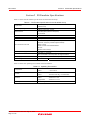
Table 2.1 shows the E8 emulator specifications for the M16C/6S Group.
Table 2.1 E8 Emulator Specifications for the M16C/6S Group
M16C Family M16C/60 Series
Target MCUs
M16C/6S Group
Available operating modes
Single-chip mode
- Address match break, 8 points
Break functions
- PC break points (maximum 255 points)
Trace functions
None
Flash memory programming function
Available
User interface
Clock-synchronized serial (communication via P64/P65/P66/P67)
- Forced break
- ROM size: 2 KB (variable assigned address)
- RAM size: 128 bytes (variable assigned address)
- Stack 14 bytes
MCU resources to be used
- UART1 function and P64/P65/P66/P67
- Pin P15
- Address match interrupt
Emulator power supply
Unnecessary (USB bus powered, power supplied from the PC)
USB (USB 1.1, full speed)
Interface with host machine
* Also connectable to host computers that support USB 2.0
Power supply function
Can supply 3.3 V or 5.0 V to the user system (maximum 300 mA)
Power voltage
M16C/6S
3.0 - 3.6 V
Table 2.2 shows the operating environment of the E8 emulator.
Table 2.2 Operating Environment
Temperatures
Humidity
Vibrations
Ambient gases
REJ10J1350-0100 Rev.1.00 Aug. 01, 2007
Page 3 of 26
Active
: 10°C to 35°C
Inactive
: –10°C to 50°C
Active
: 35% RH to 80% RH, no condensation
Inactive
: 35% RH to 80% RH, no condensation
Active
: maximum 2.45 m/s
Inactive
: maximum 4.9 m/s
Transportation
: maximum 14.7 m/s
No corrosive gases
2
2
2
E8 Emulator
REJ10J1350-0100 Rev.1.00 Aug. 01, 2007
Page 4 of 26
Section 2 E8 Emulator Specifications
E8 Emulator
Section 3 Connecting the E8 Emulator to the User System
Section 3 Connecting the E8 Emulator to the User System
Before connecting the E8 emulator to the user system, a connector must be installed in the user system so a user system
interface cable can be connected. When designing the user system, refer to Figure 4.1 “E8 Connecting Connector Pin
Assignments” and Figure 5.1 “Example of an E8 Connection”.
Before designing the user system, be sure to read the E8 Emulator User’s Manual and related device hardware manuals.
Table 3.1 shows the recommended connector for the emulator.
Table 3.1 Recommended Connector
14-pin connector
Type Number
2514-6002
Manufacturer
3M Limited
Specification
14-pin straight type
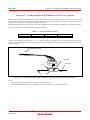
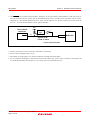
Connect E8 connecting connector pins 2, 6, 10, 12 and 14 firmly to the GND on the user system board. These pins are
used as an electric GND and monitor the connection of the user system connector. Note the pin assignments for the user
system connector.
User system interface cable
Connector
User system
Pin 2
Pin 1
Figure 3.1 Connecting the User System Interface Cable with an E8 Connecting Connector
Notes:
1. Do not place any components within 3 mm area of the connector.
2. When using the E8 emulator as a programmer, connect it to the user system in the same way.
REJ10J1350-0100 Rev.1.00 Aug. 01, 2007
Page 5 of 26
E8 Emulator
REJ10J1350-0100 Rev.1.00 Aug. 01, 2007
Page 6 of 26
Section 3 Connecting the E8 Emulator to the User System
E8 Emulator
Section 4 E8 Connecting Connector Pin Assignments
Section 4 E8 Connecting Connector Pin Assignments
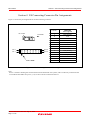
Figure 4.1 shows the pin assignments for the E8 connecting connector.
Pin 1 mark
Connector
Pin 2
Pin 14
Pin 1
Pin 13
Pin 1 mark
Pin No.
M16C/6S
MCU signals
1
P65 (SCLK)
2
Vss
3
CNVss
4
N.C.
5
P67 (TxD)
6
Vss
7
P15 (CE)
8
Vcc
9
P64 (BUSY)
10
Vss
11
P66 (RxD)
12
Vss
13
RESET
14
Vss
Figure 4.1 E8 Connecting Connector Pin Assignments
Note:
Pin 14 is used for checking the connection between the E8 and the user system, and is not directly connected to the
Vss inside the E8. Make sure pins 2, 6, 10, 12 and 14 are all connected to the Vss.
REJ10J1350-0100 Rev.1.00 Aug. 01, 2007
Page 7 of 26
E8 Emulator
REJ10J1350-0100 Rev.1.00 Aug. 01, 2007
Page 8 of 26
Section 4 E8 Connecting Connector Pin Assignments
E8 Emulator
Section 5 Examples of E8 Connections
Section 5 Examples of E8 Connections
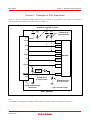
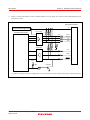
Figure 5.1 shows a connection example. When using the emulator as a programmer, the connection specification
between the E8 and the MCUs is the same as shown in Figure 5.1.
Pulled up at 4.7kΩ or more
Vcc
Vcc
Vcc
Vcc
Pulled up at
4.7kΩ or more
Vcc
SCLK
P65
RxD
P66
TxD
P67
BUSY
P64 [*1]
CE
P15 [*1]
M16C/6S
CNVss
CNVss
Vcc
User
logic
*
RESET
RESET
Vss
Pulled up at
4.7kΩ or more
14-pin 2.54mm pitch
connector
Pulled down at
4.7kΩ or more
* : Open-collector buffer
User System
Figure 5.1 Example of an E8 Connection
Note:
1. For details on setting pins P15 and P64, refer to numbers 1 and 2 of “Points to Remember” on page 10.
REJ10J1350-0100 Rev.1.00 Aug. 01, 2007
Page 9 of 26
E8 Emulator
Section 5 Examples of E8 Connections
Points to Remember
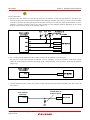
1. Pins P64, P65, P66 and P67 are used exclusively by the E8 emulator. Connect the E8 emulator to the MCU pins.
Connect pins P65, P66 and P67 to the E8 emulator after pulling up the MCU pins. Pull up or down on P64 according
to the MCU pin state after disconnecting the E8 emulator. P64 may be in a Hiz state while the E8 emulator is active.
Therefore, set the pin resistance value so the voltage cannot be at the midpoint potential, depending on the voltage
dividing of the resistance inside the E8 emulator (Figure 5.6).
Figure 5.2 E8 Emulator and MCU Connection
2. P15 is used by the E8 emulator for MCU control. Connect the E8 emulator to the MCU pins.
P15 may be in a Hiz state while the E8 emulator is active. Therefore, set the pin resistance value so the voltage
cannot be at the midpoint potential, depending on the voltage dividing of the resistance inside the E8 emulator
(Figure 5.6).
Figure 5.3 Connection of E8 Emulator and Pin P15
3. The E8 emulator uses the CNVss pin for MCU control. Pull down the E8 emulator and MCU pins and connect the
E8 emulator.
Pulled down at
4.7kΩ or more
User system
connector
CNVss
3
CNVss
Figure 5.4 E8 Emulator and CNVss Pin Connection
REJ10J1350-0100 Rev.1.00 Aug. 01, 2007
Page 10 of 26
M 16C/6S
E8 Emulator
Section 5 Examples of E8 Connections
4. The RESET pin is used by the E8 emulator. Therefore, use an open-collector output buffer or a CR reset circuit as
the reset circuit for the user system. The recommended pull-up value is 4.7 kΩ or more. The MCU can be reset by
outputting “L” from the E8 emulator. However, if the reset IC output is “H”, the user system reset circuit cannot be
set to “L”. As such, the E8 emulator will not operate normally.
Vcc
User system
connector
RESET
*
User
logic
13
RESET
M 16C/ 6S
Pulled up at
4.7kΩ or more
*: Open- collector buffer
Figure 5.5 Example of a Reset Circuit
5. Connect Vss and Vcc to the Vss and Vcc of the MCU, respectively.
6. Do not connect anything to the N.C. pin.
7. The amount of voltage input to Vcc must be within the specified range of the MCU.
8. Pin 14 is used for checking the connection between the E8 and the user system, and is not directly connected to the
Vss inside the E8. Make sure that pins 2, 6, 10, 12 and 14 are all connected to the Vss.
REJ10J1350-0100 Rev.1.00 Aug. 01, 2007
Page 11 of 26
E8 Emulator
9.
Section 5 Examples of E8 Connections
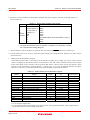
Figure 5.6 shows the interface circuit in the E8 emulator. Use this figure as a reference when determining the pullup resistance value.
User system connector
Vcc
Power supply circuit
(use only with power supply mode)
8
74LVC125A
Emulator control circuit
[*1]
22Ω
SCLK
1
22Ω
CNVss
3
22Ω
CE
7
22Ω
RxD
11
74LVC125A
22Ω
TxD
22Ω
BUSY
22Ω
RESET
5
9
13
3.3V
10kΩ
2SC2462
10kΩ
[*1] Power for the upper 74LVC125A is supplied from Vcc in the user system connector or power supply circuit (in power supply mode).
Figure 5.6 Interface Circuit Inside the E8 Emulator (For Reference)
REJ10J1350-0100 Rev.1.00 Aug. 01, 2007
Page 12 of 26
E8 Emulator
Section 6 Notes on Using the E8 Emulator
Section 6 Notes on Using the E8 Emulator
1.
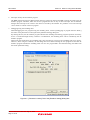
Program area for the E8 emulator
Table 6.1 lists the program areas allotted for the E8 emulator. Do not change this area allocation, otherwise the E8
emulator will not control the MCU. If settings were changed, disconnect the debugger and then reconnect it.
Table 6.1 Program Area for the E8 Emulator
ROM Size
Group
Part No.
Programming
Area
Program Area for E8 Emulator
RAM Size
Data Area
Vector Area
ROM Area
RAM Area
FFFE4h - FFFE7h,
M306S0FAGP
M16C/6S
M306S0FA
FFFE8h - FFFEBh,
96 KB
-
-XXXGP
24 KB
FFFECh - FFFEFh,
FFFF4h - FFFF7h,
2 KB of the
programming
area [*1]
128 bytes
[*1]
FFFFCh - FFFFFh
Note:
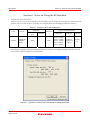
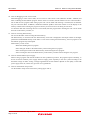
1. When starting the debugger, the [Emulator Setting] dialog box shown in Figure 6.1 is displayed. Specify the area which will not be
used in the user system. The data area cannot be specified.
Figure 6.1 [Firmware Location] Tab of the [Emulator Setting] Dialog Box
REJ10J1350-0100 Rev.1.00 Aug. 01, 2007
Page 13 of 26
E8 Emulator
Section 6 Notes on Using the E8 Emulator
2. When the system is launched, the E8 emulator initializes the general registers and some of the flag registers as
shown in Table 6.2.
Table 6.2 E8 Emulator Register Initial Values
Status
Register
PC
R0 to R3 (bank 0, 1)
A0, A1 (bank 0, 1)
FB (bank 0, 1)
E8
Emulator INTB
Activation USP
ISP
SB
FLG
Initial Value
Reset vector value in the vector address table
0000h
0000h
0000h
0000h
0000h
Work RAM Address for the E8 emulator + 80h [*1]
0000h
0000h
Note:
1. The Work RAM address for the E8 emulator is specified in the [Firmware Location]
tab of the [Emulator Setting] dialog box.
3. The E8 emulator controls the MCUs by using the P64, P65, P66, P67, RESET and CNVss, and P15 pin.
4. The E8 emulator uses up to 14 bytes of the stack pointer during a user program break. Therefore, set aside 14 bytes
for the stack area.
5.
SFRs used by the E8 emulator program
As the SFRs listed in Table 6.3 are used by the E8 emulator program, do not change any of these values. If these
values are changed, the E8 emulator cannot control the MCU. Note that UART1 transmit interrupt control register
S1TIC and UART1 receive interrupt control register S1RIC always read out values used by the emulator. These
registers are not initialized by selecting [Debug] -> [Reset CPU] or by using the RESET command. If register
contents are referred to, a value that has been set in the E8 emulator program will be read out.
Table 6.3 SFRs Used by the E8 Emulator Program
Address
Register
0009h
Address match interrupt enable register
0010h - 0012h
Address match interrupt register 0
Symbol
Bit
Notes on using
the E8 emulator
AIER
All bits
[*1]
RMAD0
All bits
[*1]
0014h - 0016h
Address match interrupt register 1
RMAD1
All bits
[*1]
01B8h - 01BAh
Address match interrupt register 2
RMAD2
All bits
[*1]
01BBh
Address match interrupt enable register 2
AIER2
All bits
[*1]
01BCh - 01BEh
03A8h
Address match interrupt register 3
UART1 transmit/receive mode register
RMAD3
U1MR
All bits
All bits
[*1]
[*1]
03AAh, 03ABh
UART1 transmit buffer register
U1TB
All bits
[*1]
03ACh
UART1 transmit/receive control register 0
U1C0
All bits
[*1]
03ADh
UART1 transmit/receive control register 1
U1C1
All bits
[*1]
03AEh, 03AFh
UART1 receive buffer register
U1RB
All bits
[*1]
03B0h
UART transmit/receive control register 2
UCON
Bits 1, 3, 4, 5 and 6
[*2]
03ECh
Port P6 register
P6
Bits 4, 5, 6 and 7
[*2]
03EEh
Port P6 direction register
PD6
Bits 4, 5, 6 and 7
[*2]
Notes:
1. Do not change this register value.
2. Do not change the value of the bits listed in the column to the left. When operating this register, make changes using the
bit operation instructions to avoid changing the bit values.
REJ10J1350-0100 Rev.1.00 Aug. 01, 2007
Page 14 of 26
E8 Emulator
Section 6 Notes on Using the E8 Emulator
6.
Interrupts used by the E8 emulator program
The BRK instruction interrupt, address match interrupt, single-step interrupt and DBC interrupt are used by the E8
emulator program. Therefore, make sure the user program does not use any of these interrupts. The E8 emulator
changes these interrupt vector values to the values to be used by the emulator. No problems occur if the interrupt
vector values are written in the user program.
7.
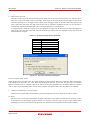
Debugging using the watchdog timer
When debugging the user program using the watchdog timer, click the [Debugging of program that uses WDT.]
check box in the [Firmware Location] tab of the [Emulator Setting] dialog box.
By clicking this box, the E8 emulator program refreshes the watchdog timer during program operation. If memory
access is executed through memory reference or modification, the watchdog timer will be refreshed by the E8
emulator program.
When using the actual MCU, the watchdog timer starts operating by writing to the watchdog timer start register.
However, when using this emulator, the watchdog timer starts after initiating the user program because the E8
emulator program refreshes the watchdog timer even if a user program halts. Note that this timing will differ from
the actual operational timing.
Figure 6.2 [Firmware Location] Tab of the [Emulator Setting] Dialog Box
REJ10J1350-0100 Rev.1.00 Aug. 01, 2007
Page 15 of 26
E8 Emulator
8.
Section 6 Notes on Using the E8 Emulator
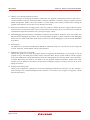
Flash memory ID code
This MCU function prevents the Flash memory from being read out by anyone other than the user. The ID code in
Table 6.4 written to the flash memory of the MCU must match the ID code displayed in the Figure 6.3 [ID Code
verification] dialog box at debugger startup, otherwise the debugger cannot be launched. Note that when the ID
code is FFh, FFh, FFh, FFh, FFh, FFh, FFh, the ID code is regarded as undefined. In this case, the ID code is
automatically authenticated and the [ID Code verification] dialog box is not displayed.
In ‘Program Flash’ mode, the contents of the user program are input into the ID code area. When debugging in
other modes, FFh, FFh, FFh, FFh, FFh, FFh, FFh is written into the ID code area regardless of the contents of the
downloaded user program.
Table 6.4 ID Code Storage Area of M16C/6S
Address
FFFDFh
FFFE3h
FFFEBh
FFFEFh
FFFF3h
FFFF7h
FFFFBh
Description
First byte of ID code
Second byte of ID code
Third byte of ID code
Fourth byte of ID code
Fifth byte of ID code
Sixth byte of ID code
Seventh byte of ID code
Figure 6.3 [ID Code verification] Dialog Box
Note on ‘Program Flash’ mode:
When the ID code is specified by the -ID option of the lmc30, download the MOT file or HEX file. When the X30 file
is downloaded, the ID code is not valid. When downloading the X30 file, specify the ID code using an assembler
directive command such as “.BYTE”. The file to which the ID code specified by the assembler directive command
“.ID” is output varies depending on the version of the assembler. For details, refer to the Assembler User’s Manual.
9.
Operation clock during a user program halt
While the user program halts, the E8 emulator program changes the main clock divide-by-N value to operate.
10. Reset
The reset vector is used by the E8 emulator program. If the MCU is reset while executing the user program, control
is transferred to the E8 emulator program and the user program is forced to stop. Do not use the software reset,
watchdog timer reset and oscillation stop detection reset, otherwise the E8 emulator will not operate normally.
REJ10J1350-0100 Rev.1.00 Aug. 01, 2007
Page 16 of 26
E8 Emulator
Section 6 Notes on Using the E8 Emulator
11. Memory access during emulation execution
When referring to or modifying the memory contents, the user program is temporarily halted. For this reason, a
real-time emulation cannot be performed. When a real-time emulation is necessary during a program execution,
disable the automatic update in the watch window or fix the display in the memory window before running the
program so that memory accesses do not occur during an execution.
12. When the E8 emulator does not supply power to the user system, it consumes the power voltage of the user system
from several mA to more than 10 mA. This is because the user power supply drives one 74LVC125A to make the
communication signal level match the user system power supply voltage.
13. When debugging, the Flash memory is frequently rewritten by the E8 emulator. Therefore, do not use an MCU that
has been used for debugging in products. Also, as the E8 emulator program is written to the MCU while debugging,
do not save the contents of the MCU Flash memory which were used for debugging nor use them as the ROM data
for products.
14. Reserved area
The addresses not specified in the Hardware Manual for M16C/6S Group are reserved area. Do not change the
contents. Otherwise, the E8 emulator cannot control the MCU.
15. Debugging in stop mode or wait mode
When in stop mode or wait mode, the program cannot be stopped by the E8 emulator. If you attempt to stop the
program in stop or wait mode, the emulator will not control the MCU. Do not operate windows until the program
stops at the breakpoint by setting the breakpoint at the line of the program where the stop mode or the wait mode is
cancelled. When using stop mode or wait mode in the user program, disable the automatic update in the watch
window or fix the display in the memory window before running the program so memory accesses do not occur
during an execution.
16. Peripheral I/Os during a halt
During a user program halt, interrupts are not accepted although peripheral I/Os continue to run. For example, a
timer interrupt is not accepted although the timer continues to count when a user program is stopped by a break
after the timer started.
REJ10J1350-0100 Rev.1.00 Aug. 01, 2007
Page 17 of 26
E8 Emulator
Section 6 Notes on Using the E8 Emulator
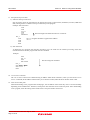
17. Exceptional step execution
a) Software interrupt instruction
Step execution cannot be performed in the internal processing of instructions (undefined, overflow, BRK and
INT) which generate a software interrupt continuously in the program.
Example: INT instruction
NOP
NOP
INT #3
NOP
JMP MAIN
INT_3:
NOP
NOP
NOP
REIT
Passes through if the STEP execution is carried out.
Program should be stopped at this address.
b) INT instruction
To debug the user program with the INT instruction, set a PC break for the internal processing of the INT
instruction and execute the program with the GO command.
Example:
NOP
INT #3
NOP
JMP MAIN
Execute using GO command.
INT_3:
NOP Break
NOP
REIT
18. “Go to cursor” function
The “Go to cursor” function is actualized using an address match break. Therefore, when you execute the “Go to
cursor” command, all the address match breaks you set become invalid, while all the PC breaks remain valid.
19. Note on PC break point
When downloading a user program after modifying it, the set address of PC break may not be corrected normally
depending on the modification. Therefore, break points other than the set PC breaks may shift. After downloading
a user program, check the setting of PC breaks in the event point window and reset it.
REJ10J1350-0100 Rev.1.00 Aug. 01, 2007
Page 18 of 26
E8 Emulator
Section 6 Notes on Using the E8 Emulator
20. Note on debugging in CPU rewrite mode
When debugging in CPU rewrite mode, do not rewrite in CPU block 0 area (addresses FF000h - FFFFFh) and
block containing the E8 emulator program. If these areas are rewritten, the E8 emulator will not control the MCU.
Do not halt the user program while setting up the CPU rewrite mode and releasing it. If halted, the E8 emulator
may not control the MCU. In addition, disable the automatic update in the watch window or fix the display in the
memory window before running the program so memory accesses do not occur during an execution.
To check the data after executing the CPU rewrite mode, halt the program after releasing the CPU rewrite mode
and refer to the memory window, etc.
21. Notes on rewriting Flash memory
Do not reset the MCU when rewriting the Flash memory.
The Flash memory is rewritten when the “Flash memory write end” is displayed in the output window of the Highperformance Embedded Workshop. If the MCU is reset when rewriting the Flash memory, the user program or the
E8 emulator program may be disrupted.
Flash memory rewrite occurs:
- When downloading the user program
- After setting PC breaks in the Flash memory and executing the user program
- After canceling PC breaks in the Flash memory and executing the user program
- After rewriting the value of the Flash memory in the memory window and executing the user program
22. Notes on the E8 emulator power supply
When writing a program with the E8 emulator for mass production processes, the program requires reliability, so
do not use the E8 emulator power supply function. Supply power separately to the user system according to the
allowable voltage for MCU writing. Voltage supplied from the E8 emulator depends on the quality of the USB
power supply of the PC, and as such, precision is not guaranteed.
23. Notes on the emulator setup switch
Use the emulator setup switch at the factory setting (upper side 1).
REJ10J1350-0100 Rev.1.00 Aug. 01, 2007
Page 19 of 26
E8 Emulator
REJ10J1350-0100 Rev.1.00 Aug. 01, 2007
Page 20 of 26
Section 6 Notes on Using the E8 Emulator
E8 Emulator
Section 7 Debugger Setting
Section 7 Debugger Setting
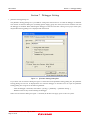
1. [Emulator Setting] dialog box
The [Emulator Setting] dialog box is provided for setting items that need to be set when the debugger is launched.
The contents set from this dialog box (excluding [Power Supply] group box items) also become valid the next time
the debugger is launched. When launching the debugger for the first time after creating a new project work space,
the [Emulator Setting] dialog box is displayed with the Wizard.
Figure 7.1 [Emulator Setting] Dialog Box
If you check “Do not show this dialog box again.” at the bottom of the [Emulator Setting] dialog box, the [Emulator
Setting] dialog box will not be displayed the next time the debugger is launched. You can open the [Emulator
Setting] dialog box using one of the following methods:
- After the debugger is launched, select Menu -> [Setup] -> [Emulator] -> [Emulator Setting...].
- Hold down the Ctrl key while launching the debugger.
When “Do not show this dialog box again.” is checked, the E8 does not supply power to the user system.
REJ10J1350-0100 Rev.1.00 Aug. 01, 2007
Page 21 of 26
E8 Emulator
Section 7 Debugger Setting
2. [Emulator mode] tab
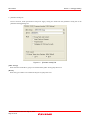
Device selection, mode specification and power supply setting are made from the [Emulator mode] tab of the
[Emulator Setting] dialog box.
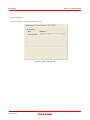
Figure 7.2
[Emulator mode] Tab
[MCU Group]
Select the name of the MCU group to be used from the [MCU Group] drop-down list.
[Device]
Select the type of MCU to be used from the [Device] drop-down list.
REJ10J1350-0100 Rev.1.00 Aug. 01, 2007
Page 22 of 26
E8 Emulator
Section 7 Debugger Setting
[Mode]
- Erase Flash and Connect
When starting the debugger, the E8 emulator erases the Flash memory data for the MCUs and simultaneously
writes the E8 emulator program.
- Keep Flash and Connect
When launching the debugger, the E8 emulator retains the Flash memory data for the MCUs. Note that the area
for the E8 emulator program and the vector area used by the E8 emulator will change.
- Program Flash
The E8 emulator starts as a simple programmer. When downloaded, the E8 writes only the user program (E8
emulator program is not written). Therefore, the program cannot be debugged in this mode.
- Debugging of CPU rewrite mode
Select this setting when debugging the program which rewrites the CPU. In this mode, the following debug
operation which rewrites the Flash memory cannot be executed.
- Setting the PC break points
- Changing the memory contents in the Flash memory area
In this mode, when starting the debugger, the E8 emulator erases the Flash memory data for the MCUs and
simultaneously writes the E8 emulator program.
[Power supply]
When supplying power to the user system from the E8, click the [Power Target from Emulator. (MAX 300mA)]
check box.
3. [Firmware Location] tab
For details, see “1. Program area for the E8 emulator” and “7. Debugging using the watchdog timer” in “Section 6.
Notes on Using the E8 Emulator”.
REJ10J1350-0100 Rev.1.00 Aug. 01, 2007
Page 23 of 26
E8 Emulator
Section 7 Debugger Setting
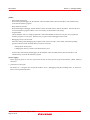
4. [MCU Setting] Tab
There are no items to be setup for M16C/6S Group.
Figure 7.3 [MCU Setting] Tab
REJ10J1350-0100 Rev.1.00 Aug. 01, 2007
Page 24 of 26
E8 Emulator
Section 8 Applicable Tool Chain and Third-party Products
Section 8 Applicable Tool Chain and Third-party Products
With the M16C/6S Group E8 emulator, you can debug modules created by the inhouse tool chain and third-party tools
listed in Table 8.1 below.
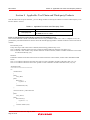
Table 8.1 Applicable Tool Chain and Third-party Tools
Tool chain
Third-party tools
M3T-NC30WA V.5.20 Release 01 or later
TASKING M16C C/C++/EC++ Compiler V.2.3r1 or later
IAR EWM16C V.2.12 or later
Notes on debugging the load modules created in ELF/DWARF2 format:
If the load module was created in ELF/DWARF2 format using TASKING M16C C/C++/EC++ compiler V3.0r1, the
precautionary note described below must be observed when displaying member variables of the base class in the watch
window.
Precautionary Note:
If any class object with a base class is defined, the following problems may occur:
Case 1: Member variables of the base class cannot be referenced directly from the class object (*1).
Case 2: If the PC value resides in any member function of a derived class, member variables of the base class cannot
be referenced directly (*4).
Solution:
If member variables of the base class need to be referenced in the watch window, follow either method described
below:
Case 1: Use indirect references from the class object to refer to member variables of the base class (*2) (*3).
Case 2: Use indirect references from “this” pointer to refer to member variables of the base class (*5) (*6).
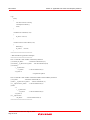
<Example code>
/////////////////////////////////////////////////////////
*.h
class BaseClass
{
public:
int m_iBase;
public:
BaseClass() {
m_iBase = 0;
}
void BaseFunc(void);
};
class DerivedClass : public BaseClass
{
public:
int m_iDerive;
public:
DerivedClass() {
m_iDerive = 0;
}
void DerivedFunc(void);
};
REJ10J1350-0100 Rev.1.00 Aug. 01, 2007
Page 25 of 26
E8 Emulator
Section 8 Applicable Tool Chain and Third-party Products
*.cpp
main()
{
class DerivedClass ClassObj;
ClassObj.DerivedFunc();
return;
}
void BaseClass::BaseFunc(void)
{
m_iBase = 0x1234;
}
void DerivedClass::DerivedFunc(void)
{
BaseFunc();
m_iDerive = 0x1234;
}
/////////////////////////////////////////////////////////
< Watch window registration example>
/////////////////////////////////////////////////////////
Case 1: If the PC value resides in the main() function
(1)"ClassObj.m_iBase"
: Cannot be referenced (*1)
(2)"ClassObj.__b_BaseClass.m_iBase" : Can be referenced (*2)
(3)"ClassObj"
-"__b_BaseClass"
-"m_iBase"
: Can be referenced (*3)
-"m_iDerive"
-: Expansion symbol
Case 2: If the PC value resides in the DerivedClass::DerivedFunc() function
(1)"m_iBase"
: Cannot be referenced (*4)
(2)"this->__b_BaseClass.m_iBase" : Can be referenced (*5)
(3)"__b_BaseClass.m_iBase"
: Can be referenced (*5)
(4)"this"
-"*"
-"__b_BaseClass"
-"m_iBase"
: Can be referenced (*6)
-"m_iDerive"
(5)"__b_BaseClass"
-"m_iBase"
: Can be referenced (*6)
/////////////////////////////////////////////////////////
REJ10J1350-0100 Rev.1.00 Aug. 01, 2007
Page 26 of 26
E8 Emulator
Additional Document for User's Manual
Notes on Connecting the M16C/6S
Publication Date:
Aug. 01, 2007
Rev.1.00
Published by:
Sales Strategic Planning Div.
Renesas Technology Corp.
Edited by:
Microcomputer Tool Development Department
Renesas Solutions Corp.
© 2007. Renesas Technology Corp. and Renesas Solutions Corp., All rights reserved. Printed in Japan.
E8 Emulator
Additional Document for User's Manual