1
Working With the Right Media
Working With the Right Media
Mini DV Cassettes
This camcorder is designed to work exclusively
with digital video cassettes. Only cassettes marked
with a Mini DV logo can be used with this unit.
Also keep in mind that this camcorder is not
compatible with other digital media formats.
Note: For details on loading and
unloading cassettes into the digital
camcorder, see page 6 in this manual.
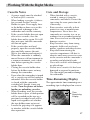
Erase
Protection Tab
Erase Protection Tab
You can use your videocassettes over
and over again. To erase a previous
recording, make sure that the Erase
Protection Tab is set to REC. To protect
a cassette from being recorded over,
move the Erase Protection Tab to SAVE.
Recording and Playback
Speeds and Times
The camcorder records and plays back
in Standard Play (SP) or Long Play
(LP) mode. Select the recording speed
using the on-screen menus (see page
38 for details).
The selected speed is displayed on
screen but not in the recording. The
maximum SP and LP recording times
for popular Mini DV cassettes are
shown.
• SP Provides the best picture
(less picture noise), but the
shortest recording time (as few as
30 minutes).
• LP Provides the longest
recording times (up to 120
minutes with an 80-minute tape)
but has more potential picture
noise than SP in normal playback.
16
Slide tab to SAVE
to protect contents,
or REC to use.
Cassette
30 min.
60 min.
80 min.
Recording Time
SP
LP
30 min. 45 min.
60 min. 90 min.
80 min. 120 min.