1
HOW TO USE A WEIGHT LOSS WORKOUT
1.
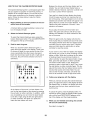
As you exercise,
you will be prompted to keep your
pedaling pace near
the target rpm setRPM
ting for the current
segment. When an
upward-pointing arrow appears in the display,
increase your pace. When a downward-pointing
arrow appears in the display, decrease your pace.
When no arrows appear, maintain your current
pace.
Begin pedaling or press any button on the console to turn on the console.
÷
A moment after you begin pedaling or press a button, the display will light.
2.
Select a weight loss workout.
To select one of
the four weight
loss workouts,
press the Weight
Loss Workouts but-
Profile
IMPORTANT: The target rpm settings are
intended only to provide motivation. Your actual pace may be slower than the target rpm settings. Make sure to pedal at a pace that is comfortable for you.
ton repeatedly until
the name of the
desired workout
appears in the display. The workout time and a
profile of the resistance levels for the workout will
also appear in the display.
3.
If the resistance level for the current segment is
too high or too low, you can manually override the
setting by pressing the Resistance buttons.
IMPORTANT: When the current segment of the
workout ends, the pedals will automatically
adjust to the resistance level programmed for
the next segment.
Begin pedaling or press the Start button to
start the workout.
Each workout is divided into 20, 30, or 45 oneminute segments. One resistance level and one
target rpm (pace) setting are programmed for each
segment. Note: The same resistance and/or target
rpm setting may be programmed for consecutive
segments.
The workout will continue in this way until the last
segment ends. To stop the workout at any time,
stop pedaling. A tone will sound and the time will
begin to flash in the display. To restart the workout,
simply resume pedaling.
The resistance level and the target rpm for the first
segment will appear in the center of the display for
a few seconds. During the workout, the workout
profile will show your progress (see the drawing
above). The flashing segment of the profile represents the current segment of the workout. The
height of the flashing segment indicates the resistance level for the current segment. At the end of
each segment of the workout, a series of tones will
sound and the next segment of the profile will
begin to flash. If a different resistance level and/or
target rpm is programmed for the next segment,
the resistance level and/or the target rpm will flash
in the display for a few seconds to alert you. The
resistance of the pedals will then change.
4.
Follow your progress with the display.
See step 4 on page 14.
5.
Measure your heart rate if desired.
See step 5 on page !5.
6.
When you are finished exercising, the console
will turn off automatically.
See step 6 on page 15.
16