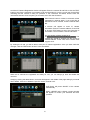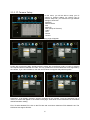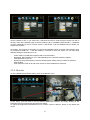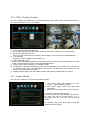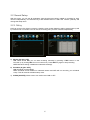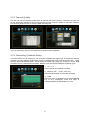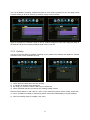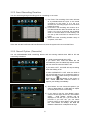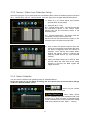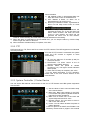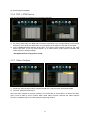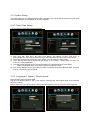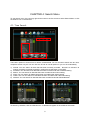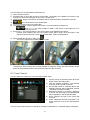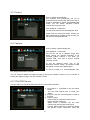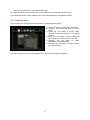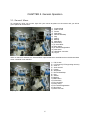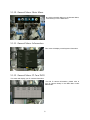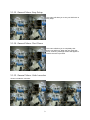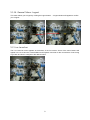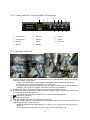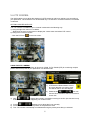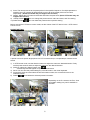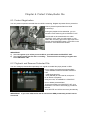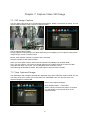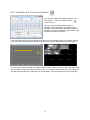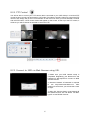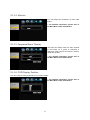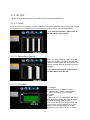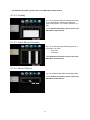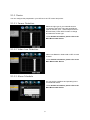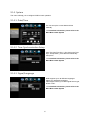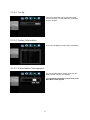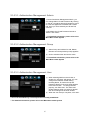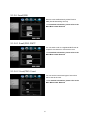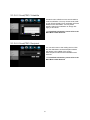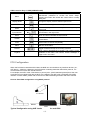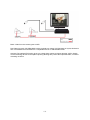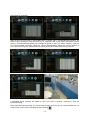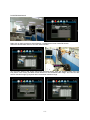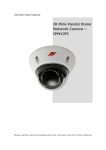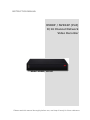
1
INSTRUCTION MANUAL NVR8P / NVR16P (PoE) 8/16 Channel Network Video Recorder Model : NVR8P / NVR16P Please read this manual thoroughly before use, and keep it handy for future reference. WARNING TO REDUCE THE RISK OF FIRE OR ELECTRIC SHOCK, DO NOT EXPOSE THIS PROCUCT TO RAIN OR MOISTURE. DO NOT INSERT ANY METALLIC OBJECT THROUGH THE VENTILATION GRILLS OR OTHER OPENNINGS ON THE EQUIPMENT. CAUTION EXPLANATION OF GRAPHICAL SYMBOLS The lightning flash with arrowhead symbol, within an equilateral triangle, is intended to alert the user to the presence of uninsulated "dangerous voltage" within the product’s enclosure that may be of sufficient magnitude to constitute a risk of electric shock. The exclamation point within an equilateral triangle is intended to alert the user to the presence of important operating and maintenance (servicing) instructions in the literature accompanying the appliance. PRECAUTIONS Safety -------------------------------------- Installation ------------------------------Should any liquid or solid object fall into the cabinet, unplug the unit and have it checked by the qualified personnel before operating it any further. Do not install the unit in an extremely hot or humid place or in a place subject to excessive dust, mechanical vibration. The unit is not designed to be waterproof. Exposure to rain or water may damage the unit. Unplug the unit from the wall outlet if it is not going to be used for several days or more. To disconnect the cord, pull it out by the plug. Never pull the cord itself. Cleaning --------------------------------- Allow adequate air circulation to prevent internal heat build-up. Do not place the unit on surfaces (rugs, blankets, etc.) or near materials (curtains, draperies) that may block the ventilation holes. Clean the unit with a slightly damp soft cloth. Use a mild household detergent. Never use strong solvents such as thinner or benzene as they might damage the finish of the unit. Height and vertical linearity controls located at the rear panel are for special adjustments by qualified personnel only. Retain the original carton and packing materials for safe transport of this unit in the future. 2 FCC COMPLIANCE STATEMENT INFORMATION TO THE USER: THIS EQUIPMENT HAS BEEN TESTED AND FOUND TO COMPLY WITH THE LIMITS FOR A CLASS A DIGITAL DEVICE, PURSUANT TO PART 15 OF THE FCC RULES. THESE LIMITS ARE DESIGNED TO PROVIDE REASONABLE PROTECTION AGAINST HARMFUL INTERFERENCE WHEN THE EQUIPMENT IS OPERATED IN A COMMERCIAL ENVIRONMENT. THIS EQUIPMENT GENERATES, USES, AND CAN RADIATE RADIO FREQUENCY ENERGY AND IF NOT INSTALLED AND USED IN ACCORDANCE WITH THE INSTRUCTION MANUAL, MAY CAUSE HARMFUL INTERFERENCE TO RADIO COMMUNICATIONS. CAUTION: CHANGES OR MODIFICATIONS NOT EXPRESSLY APPROVED BY THE PARTY RESPONSIBLE FOR COMPLIANCE COULD VOID THE USER'S AUTHORITY TO OPERATE THE EQUIPMENT. THIS CLASS A DIGITAL APPARATUS COMPLIES WITH CANADIAN ICES-003. CET APPAREIL NUMÉRIQUE DE LA CLASSE A EST CONFORME À LA NORME NMB-003 DU CANADA. CE COMPLIANCE STATEMENT WARNING: This is a Class A product. In a domestic environment this product may cause radio interference in which case the user may be required to take adequate measures. 3 IMPORTANT SAFETY INSTRUCTIONS 1. 2. 3. 4. 5. 6. 7. 8. 9. 10. 11. 12. 13. 14. Read these instructions. Keep these instructions. Heed all warnings. Follow all instructions. Do not use this apparatus near water. Clean only with dry cloth. Do not block any ventilation openings. Install in accordance with the manufacturer’s instructions. Do not install near any heat sources such as radiators, heat registers, stoves, or other apparatus (including amplifiers) that produce heat. Do not defeat the safety purpose of the polarized or grounding-type plug. A polarized plug has two blades with one wider than the other. A grounding type plug has two blades and a third grounding prong. The wide blade or the third prong is provided for your safety. If the provided plug does not fit into your outlet, consult an electrician for replacement of the obsolete outlet. Protect the power cord from being walked on or pinched particularly at plugs, convenience receptacles, and the point where they exit from the apparatus. Only use attachments/accessories specified by the manufacturer. Use only with the cart, stand, tripod, bracket, or table specified by the manufacturer, or sold with the apparatus. When a cart is used, use caution when moving the cart/apparatus combination to avoid injury from tip-over. Unplug this apparatus during lightning storms or when unused for long periods of time. Refer all servicing to qualified service personnel. Servicing is required when the apparatus has been damaged in any way, such as powersupply cord or plug is damaged, liquid has been moisture, does not operate normally, or has been dropped. 15. CAUTION – THESE SERVICING INSTRUCTIONS ARE FOR USE BY QUALIFIED SERVICE PERSONNEL ONLY. TO REDUCE THE RISK OF ELECTRIC SHOCK DO NOT PERFORM ANY SERVICING OTHER THAN THAT CONTAINED IN THE OPERATING INSTRUCTIONS UNLESS YOU ARE QUALIFIED TO DO SO. 16. Use power source that satisfies clause 2.5 of IEC60950-1/UL60950-1 or Certified/Listed Class 2. 17. ITE is to be connected only to PoE networks without routing to the outside plant. 4 Contents Chapter 1. Introduction.............................................................................................................9 1.1. Description ........................................................................................................................9 1.2. Components ......................................................................................................................9 1.3. Key Features .....................................................................................................................9 1.4. Basic Security System Configuration .............................................................................. 11 1.5. Front Panel View .............................................................................................................12 1.6. Rear Panel View..............................................................................................................13 1.7. IR Remote Control...........................................................................................................14 Chapter 2. Installation ............................................................................................................15 2.1. HDD Installation ..............................................................................................................15 2.2. Network Connection Setup..............................................................................................15 2.2.1. Using a Static IP Address .............................................................................................15 2.2.2. Using a Dynamic IP Address........................................................................................16 2.2.3. Router Configuration ....................................................................................................16 2.2.3.1. WAN Setting ..............................................................................................................16 2.2.3.2. DHCP & IP Address Setting ......................................................................................17 2.2.3.3. Virtual Server Setting ................................................................................................17 STARTING THE SYSTEM......................................................................................................18 Live Menu Description............................................................................................................21 System Information ................................................................................................................22 Live Menu navigating using the mouse ..................................................................................23 Navigating to the different channels by using the mouse.......................................................23 Navigating to different channels by using the remote control.................................................24 Chapter 3. Main Menu Setup .................................................................................................25 3.1. Video/Audio Setup...........................................................................................................26 3.1.1. Camera.........................................................................................................................26 3.1.2. IP Camera Registration ................................................................................................27 3.1.3. IP Camera Setup..........................................................................................................30 3.1.4. Monitor .........................................................................................................................32 3.1.5. Sequence / Event Display ............................................................................................33 3.1.6. OSD / Display Position .................................................................................................34 3.1.7. Screen Mode ................................................................................................................34 3.2. Record Setup ..................................................................................................................35 3.2.1. Policy............................................................................................................................35 3.2.2. Record Quality..............................................................................................................36 3.2.3. Recording Schedule Setup...........................................................................................36 3.2.4. Holiday .........................................................................................................................37 3.2.5. Event Recording Duration ............................................................................................38 3.2.6. Record Option (Overwrite) ...........................................................................................38 3.3. Device Setup ...................................................................................................................39 3.3.1. Storage .........................................................................................................................39 3.3.2. Sensor / Video Loss Detection Setup...........................................................................41 3.3.3. Alarm Schedule ............................................................................................................41 3.3.4. PTZ...............................................................................................................................42 3.3.5. System Controller / Printer Device ...............................................................................42 5 3.3.6. POS / ATM Device........................................................................................................43 3.3.7. Video Analysis ..............................................................................................................43 3.4. System Setup ..................................................................................................................44 3.4.1. Date/Time Setup ..........................................................................................................44 3.4.2. Language / Signal / Device name ................................................................................44 3.4.3. Config ...........................................................................................................................45 3.4.4. Log Information ............................................................................................................45 3.4.5. Authorization Management...........................................................................................46 3.4.5.1. Admin ........................................................................................................................46 3.4.5.2. Group ........................................................................................................................46 3.4.5.3. User...........................................................................................................................47 3.4.5.4. Setup .........................................................................................................................48 3.5. Network Setup.................................................................................................................48 3.5.1. Connection ...................................................................................................................48 3.5.2. Port / Connection Test ..................................................................................................50 3.5.3. ID, Password ................................................................................................................51 3.5.3.1. DDVRLS Registration................................................................................................51 3.5.4. Dashboard Setup .........................................................................................................52 3.5.4.1. Setup/Registration.....................................................................................................52 3.5.4.2. Dashboard Starting....................................................................................................53 3.5.4.3. Dashboard Login .......................................................................................................53 3.5.4.4. DVR/NVR Search......................................................................................................54 3.5.4.5. Remote Login ............................................................................................................54 3.5.5. DDNS ...........................................................................................................................56 3.5.6. NAT Traversal...............................................................................................................57 3.5.7. FTP File Transfer..........................................................................................................57 3.5.8. Email / SNS (Social Network Service)..........................................................................58 3.5.8.1. Email /SNS: SMTP ....................................................................................................58 3.5.8.2. Email/SNS: Event......................................................................................................58 3.5.8.3. Email / SNS: Schedule ..............................................................................................59 3.5.8.4 Email /SNS: Recipient ................................................................................................59 3.6. Backup Setup ..................................................................................................................60 CHAPTER 4: Search Menu....................................................................................................61 4.1. Time Search ....................................................................................................................61 4.2. Event Search...................................................................................................................62 4.3. Protect .............................................................................................................................63 4.4. Capture............................................................................................................................63 4.5. POS/ATM Device ............................................................................................................63 4.6. Video Analysis .................................................................................................................64 CHAPTER 5. GENERAL OPERATION ..................................................................................65 5.1. General Menu..................................................................................................................65 5.1 .1 .General Menu: Screen Mode ......................................................................................66 Auto Sequence.......................................................................................................................66 PIP (Picture in Picture) ...........................................................................................................66 5.1.2. General Menu: Audio OFF ...........................................................................................67 5.1.3. General Menu: Zoom In ...............................................................................................67 5.1.4. General Menu: Freeze .................................................................................................68 5.1.5. General Menu: Stop Alarm ...........................................................................................68 5.1.6. General Menu: Record Start/Stop ................................................................................68 5.1.7. General Menu: Play......................................................................................................69 5.1.8. General Menu: Search .................................................................................................69 5.1.9. General Menu: Backup.................................................................................................69 5.1.10. General Menu: Main Menu.........................................................................................70 6 5.1.11. General Menu: Information.........................................................................................70 5.1.12. General Menu: IP Cam INFO .....................................................................................70 5.1.13. General Menu: Easy Setup ........................................................................................71 5.1.14. General Menu: Shut Down .........................................................................................71 5.1.15. General Menu: Hide Launcher ...................................................................................71 5.1.16. General Menu: Logout................................................................................................72 5.2. Live Launcher..................................................................................................................72 5.2.1. Live Launcher Control Button Description....................................................................73 5.3. Playback Launcher..........................................................................................................73 5.3.1. Play Launcher Control Button Description ...................................................................74 5.3.2. Playback (P) and Trap Mode (Pause / FF/ REW / Frame Advance) ............................74 5.4. PTZ CONTROL ...............................................................................................................75 Chapter 6. Protect Video/Audio File .......................................................................................78 6.1. Protect Registration.........................................................................................................78 6.2. Playback and Remove Protected File .............................................................................78 6.3. Protected File Backup .....................................................................................................79 Chapter 7. Capture Video Still Image .....................................................................................80 7.1. Still Image Capture ..........................................................................................................80 7.2. View Captured Image......................................................................................................80 7.3. Remove Captured Image ................................................................................................81 7.4. Backup Captured Image..................................................................................................81 Chapter 8. Web Viewer – Connection via Internet Explorer ...................................................82 8.1. System Requirement.......................................................................................................82 8.1.1. Network Environment ...................................................................................................82 8.2. Web Viewer – Getting Started .........................................................................................82 8.2.1. Connect NVR via Web Browser using Direct IP. ..........................................................82 8.2.2. General Web Viewer Operation....................................................................................83 8.2.3. Calendar and Time Search Button: ..............................................................................84 8.2.4. PTZ Control ..................................................................................................................85 8.2.5. Connect to NVR via Web Browser using URL .............................................................85 Chapter 9. Web Viewer – Setup/Web Configuration ..............................................................86 9.1. Web Configuration...........................................................................................................86 9.1.1. Video/Audio ..................................................................................................................86 9.1.1.1. Camera......................................................................................................................86 9.1.1.2. IP Camera Registration .............................................................................................87 9.1.1.3. IP Camera Setup.......................................................................................................87 9.1.1.4. Monitor ......................................................................................................................88 9.1.1.5. Sequence/Event Display ...........................................................................................88 9.1.1.6. OSD/Display Position ................................................................................................88 9.1.2. RECORD......................................................................................................................89 9.1.2.1. Policy.........................................................................................................................89 9.1.2.2. Recording Quality......................................................................................................89 9.1.2.3. Schedule ...................................................................................................................89 9.1.2.4. Holiday ......................................................................................................................90 9.1.2.5. Event Record Duration ..............................................................................................90 9.1.2.6. Record Option ...........................................................................................................90 9.1.3. Device ..........................................................................................................................91 9.1.3.1. Sensor Detection.......................................................................................................91 9.1.3.2. Video Loss Detection ................................................................................................91 9.1.3.3. Alarm Schedule .........................................................................................................91 9.1.3.4. PTZ............................................................................................................................92 9.1.3.5. System Controller......................................................................................................92 7 9.1.3.6. Storage ......................................................................................................................92 9.1.4. System .........................................................................................................................93 9.1.4.1. Date/Time ..................................................................................................................93 9.1.4.2. Time Synchronization Setup......................................................................................93 9.1.4.3. Signal/Language .......................................................................................................93 9.1.4.4. Config ........................................................................................................................94 9.1.4.4. System Information ...................................................................................................94 9.1.4.5. Authorization Management........................................................................................94 9.1.4.5.1. Authorization Management: Admin.........................................................................95 9.1.4.5.2. Authorization Management: Group.........................................................................95 9.1.4.5.3. Authorization Management: User ...........................................................................95 9.1.4.4.4. Authorization Management: Setup .........................................................................96 9.1.5. Network ........................................................................................................................96 9.1.5.1. Connection ................................................................................................................96 9.1.5.2. Port............................................................................................................................96 9.1.5.3. ID & Password...........................................................................................................97 9.1.5.4. DDNS ........................................................................................................................97 9.1.5.5. FTP File Transfer.......................................................................................................97 9.1.5.6. Email/SNS .................................................................................................................98 9.1.5.6.1 Email/SNS: SMTP ...................................................................................................98 9.1.5.6.2. Email/SNS: Event...................................................................................................98 9.1.5.6.3. Email/SNS: Schedule .............................................................................................99 9.1.5.6.4. Email/SNS: Recipient .............................................................................................99 PRODUCT SPECIFICATIONS .............................................................................................100 INSTALLING SYSTEM KEYBOARD WITH STANDALONE NVR SERIES..........................102 POS Configuration ...............................................................................................................105 ATM Configuration................................................................................................................108 NETWORK TROUBLESHOOTING ...................................................................................... 111 TERMS / ICONS GLOSSARY.............................................................................................. 113 NVR Icon Reference ............................................................................................................ 114 8 Chapter 1. Introduction 1.1. Description This manual applies to the 8/16 channel network video recorder models NVR8P and NVR16P. The network video recorders support up to 8/16 network cameras. It can record high quality Full HD images onto its maximum capacity of hard disk drives. The NVRs are extremely straightforward to install and setup, as it detects network cameras and defines the parameters of each through a dedicated configuration wizard. You can start monitoring instantly, as the images are automatically assigned to a layout menu. Based on embedded Linux and high performance, the NVRs are fully featured for security surveillance and remote monitoring needs. 1.2. Components The system comes with the following components: Network Video Recorder unit IR Remote Control DC Power Adapter Power Cable AAA Battery HDD Brackets Screw Packet Wireless Antenna (specific model) Installation CD including Client Software, Installation Guide and User Manual Note: Check your package to make sure that you received the complete system, including all components shown above. 1.3. Key Features The PoE NVRs are the most competitive NVRs developed for all industrial applications. In addition to its sleek professional design, it is very reliable and cost effective. Most of all, its real time and crystal clear picture quality with small recording file size and powerful remote control function will become the standard to which other security systems are judged. Also, its VCA (video content analysis) function will offer you the advanced security environment. Major features include: ► 8/16 channels input for IP cameras by embedded 8/16port PoE switch ► Full HD Real Time recording of all channels ► Full HD (1920 x 1080P) display on HDMI and VGA ► PENTAPLEX: simultaneous Live, Recording, Playback, Backup, Network ► Extremely small recording file size using H.264 compression technology ► Adjustable recording frame rate, resolution and picture quality ► Video / Audio data backup via USB 2.0 or CMS ► Support Authentic Video Image Player 9 ► High speed network transmission ► Dynamic / Static IP address support, Own Client (ATVision IP or CMS Software) support ► Remote recording, still image capturing and printing ► Multiple NVRs and multiple clients support for CMS application ► PTZ camera control by RS-485 and via network ► Independent color adjustment for each camera input and VGA output ► USB Mouse and IR remote control unit for user interface ► Self-diagnosis system and Hardware Watchdog: error checking and restoring functions ► Powerful event search function (Search by manual, schedule, motion, sensor, network or all) ► Pre-Alarm Recording for motions and sensors ► Protect Video/Audio files from HDD Overwrite ► Still image capturing and printing during live or playback ► System & Event Log files management ► Configuration data copy to other channels for easy setup ► Configuration file Export / Import for easy installation of multiple NVRs ► Control of minimum recording dates by channel ► Mobile (I-Phone, Android, Black Berry, Symbian and Windows mobile) phone support ► E-Map support ► POS/ATM support ► Video Analysis support ► Wifi optional Notice: The information in this manual was current when published. The manufacturer reserves the right to revise and improve its products. All specifications are therefore subject to change without notice. 10 1.4. Basic Security System Configuration IP Cameras Smartphone Sensor Inputs Alarm Out • NC/NO Devices scalable • NO Devices • TTL Level Input • DC 30V 1A max • AC 125V 0.5A max LOCAL NETWORK OR INTERNET Power Switch Amplified VGA Monitor Speaker PC AVE VSI Pro Max DC Power Adapter External HDD Keyboard‐Controller Client Software Web Browser WebViewer HDMI Monitor Note: The configuration example above is based on the 16Channel embedded PoE switch models. 11 1.5. Front Panel View 1 2 3 4 5 6 1. POWER LED: NVR power indicator. 2. REC LED: Recording indicator. 3. PLAYBACK LED: Playback mode indicator. A green light will be on when you play a recorded file back. 4. NET LED: Network connection indicator. A green light will be on when the NVR is connected to the network. 5. USB 2.0 Port: Connect USB mouse or USB memory device for file backup or firmware upgrade. 6. IR REMOTE CONTROL SENSOR: Receives all incoming signals from the remote control. 12 1.6. Rear Panel View NVR8P 1 ○ 3 ○ 4 ○ 5 ○ 6 ○ 7 ○ 8 ○ 2 ○ 9 ○ 10 ○ 11 ○ 12 ○ NVR16P 1 ○ 3 ○ 4 ○ 5 ○ 6 ○ 7 ○ 8 ○ 9 ○ 10 ○ 2 ○ 11 ○ 12 ○ 1 IP camera input 5 HDMI 9 Alarm/sensor input 2 Power adapter input 6 eSATA 10 Alarm out 3 Network port 7 Audio out 11 RS485 port 4 VGA out 8 Serial port 12 Power switch 13 1.7. IR Remote Control 1. Audio: ON/ OFF function. 2. REC (Record): Start/stop manual recording. 3. Number Buttons: Select camera (channel) number. 4. ID SEL: Allows you to select ID setting. 5. ID: Displays current ID. 6. Info: It will display system information. 7. Print: Allows you to Print image either in Live or Playback Mode. 8. Navigate Buttons: ◀ Left ▲ Up ▶ Right ▼ Down : : To select and save the menu and parameter change. 9. Enter 10. Menu: Enter or exit the menu. 11. Return: Directs you back to the previous menu. In Live Mode, this button will log you out. 12. Mode: Change the display mode to different split screen. 13. Freeze: Freezes images. (Only in Live Mode). 14. Zoom: Zoom in/out the video when the channel is single display mode. 15. Bookmark: It will list all the files that was bookmarked. 16. EZ Setup: You’ll be able to setup your system with simple pages. 17. K-Lock: Locks any keys from functioning. 18. Alarm: Turns the Alarm off. 19. Backup: Backups up desired data. 20. PTZ: Control PTZ camera(s) connected to your DVR/NVR. 21. Preset: A preset is a set of specific target points of a PTZ camera. 22.Tele: Zooms in on a specific area when using the PTZ function. 23. Wide: Zooms out of that specific area when using the PTZ function. 24. Search: Go to recorded file search menu. : Pause a video during playback mode. 25. Pause 26. Protect: You can protect recorded data from HDD overwriting. 27. Capture: You can capture video image either in Playback Mode or Live Mode. 28. REW: Rewind (select speeds from 2x4x8x16x32x64 for faster rewind). 29. ▶ Play: Play a recorded file. 30. ■ Stop: Stop playback. 31. FF: Fast forward (select speeds from 2x4x8x16x32x64). ID Setting Instruction: 1) Press down ID SEL button for 2 seconds to start the ID Setting Mode 2) Input any 2 digits to set ID. 3) Once the 2 digits are selected, press enter. * If no action is taken within the 2 second allowed time period, it will automatically exit you from the ID Setting. Installing batteries 1. Remove the battery cover by sliding in the direction of the arrow. 2. Insert two AAA batteries according to directions provided. 3. Replace the battery cover by sliding in the direction of the arrow. 14 Chapter 2. Installation 2.1. HDD Installation Before Installation We recommend setting the current time on your NVR before HDD Installation. Please make sure that the power of NVR is switched off before starting installation. Step 1. Make sure the NVR power is switched OFF Step 2. Open the top cover of NVR using a cross screw driver. Step 3. Take out the HDD mounting plate from NVR. Step 4. Place HDD(s) on the mounting plate and mount it with screws. Step 5. Replace the mounting plate into the NVR and fix it with screws. Step 6. Attach the data and power cable to HDD(s) correctly. Step 7. Replace the top cover of NVR and fix it with screws. After HDD installation Step 8. Turn the NVR power ON. Step 9. NVR will detect HDD(s) during the booting and will format HDD(s). Step 10. After HDD formatting, NVR will be automatically rebooted and will be ready to work with HDD(s). 2.2. Network Connection Setup 2.2.1. Using a Static IP Address You can use the Static IP address, Subnet Mask and Gateway address provided by your ISP (Internet Service Provider) for your NVR. The Gateway address is the IP address of your broadband modem. Internet 15 2.2.2. Using a Dynamic IP Address You can use a router with your Dynamic IP broadband modem. In this case, you should set the configuration of a router properly for network connection between NVR and Net/Web Viewer. Please follow the instructions in next section to configure your router correctly. Home/Office Network Internet If your Broadband Modem does not support internal loop back (port forwarding) function and you want to monitor NVR using a PC located in same Intranet, you should use Direct IP instead of DDVRLS in the connection menu of NetViewer. If your PC is located outside of Intranet, you can use both DDVRLS and Direct IP to connect to NVR even though your Broadband Modem has limited features. 2.2.3. Router Configuration If your NVR is connected to the network through a router, you should configure router properly. There are 3 steps as follows. 1. WAN Setting 2. DHCP Setting 3. Virtual Server Setting 2.2.3.1. WAN Setting When you connect to your Router, you can find menu for WAN setting. Please confirm the WAN setting. If you are using DSL service, you should select PPPoE, and you will be directed to a sub-menu to type in DSL user name and password. 16 2.2.3.2. DHCP & IP Address Setting To assign a unique private IP address to NVR in your intranet environment automatically, you can enable DHCP option in the Network Setup menu of your NVR and your Router. In this case, you can skip the procedures described on this page. We recommend assigning IP address to NVR manually to prevent unexpected change of IP address. *A router from D-Link is quoted as an example in this manual. The images of setup menu above may not always match another router’s setup menu. If you have any problem with DHCP function or want to assign the private IP address, please disable DHCP option in the Network Setup menu of your NVR and check the starting and ending IP used by DHCP server of the Router. You can assign any private IP address to your NVR even if it is out of the DHCP range, but the IP address should match with the one entered in the Network Setup menu of your NVR. 2.2.3.3. Virtual Server Setting You should register your NVR as a virtual server. Please enter the information into IP address field of the router (e.g. 192.168.0.110). Protocol Type should be TCP. Private/Public Port numbers should be the same with the Port numbers assigned in NVR. You can change port numbers in Network Setup menu to avoid conflict with other network servers. Your NVR uses 3 port numbers and the default Port numbers are 9350~1 and 80. 9350~1 are for controlling the video, audio and commands of Net Viewer, and 80 is for Web Viewer. You need to register 3 port numbers into the router as network servers. Please make sure that your router does not block those port numbers to/from the NVR with filter and firewall features. The image is only for your reference. Depending on the Router manufacturer, the setting can vary. 17 STARTING THE SYSTEM When power is turned on, you will see the initializing screen and it may take up to one minute to complete. After initializing is complete, an Easy Setup screen will appear. EASY SETUP An Easy Setup screen of 5 steps will appear. If you don’t like to setup all at this point and like to skip the steps, please click the Exit button. Then the system will exit to main live screen. However, you can setup the system at anytime you want by click the Easy Setup Menu or Main Menu. [1/5] Signal / Language / Device Name The user can set the OSD language, signal and device name. [2/5] Date/Time Setup In this step, the user can set the date and time of the system, and Time zone as well. 18 [3/5] Connection Mode setup The user can set the Network and IP camera connection mode properly according to the network connection. ** For detailed information, please refer to the 3.5. Network Setup page of this manual [4/5] IP Camera Registration The user can check the IP camera listing and register the desired IP cameras automatically or manually by click the Auto/Manual button. . Quick search: the user can search the IP cameras connected to the network and system quickly. In this case, the user must enter the camera ID and Password one by one. Detail search: if the user selects the Detail search, it will take more time to search all the cameras comparing to quick search. The system checks all IP camera IDs and Passwords automatically. The user needs not to enter the IP camera ID and password separately. The registered camera can be detected automatically from the NVR, so the user needs not to enter the ID and PW of IP camera separately. Manual add: if the user wants to add the remote cameras manually, firstly the user check the IP camera address to register to the system. The IP camera must support Onvif and enter the full Onvif IP camera address. Ex. http://192.168.10.110/onvif/device_service. * For detailed information, please refer to the IP camera registration page of this manual 19 [5/5] Schedule recording The user can set the schedule recording as continuous, event and both (continuous and event) by drag the desired date and time. After Easy Setup is completed or exited from Easy Setup menu, a live screen will appear. When the user does not log-in the system and click to any menu, it will prompt you to the login dialog. Enter ID and Password by using the virtual keyboard and click OK. By default, the ID is set at “admin” and the Password is set at “admin” 20 Live Menu Description 1 Screen Mode Can select how you would like to view screen 2 PTZ control Can activate PTZ window to control the PTZ function. 3 Zoom In Can zoom in for the desired area. 4 Audio On/Off Option to have the audio on or off 5 Freeze Can freeze Playback or Live scene 6 Stop Alarm Stops the alarm output and the event monitoring. 7 Record Start/Stop Starts/stops the manual recording 8 Play Plays the search result (for 30sec. 1min, 5min, 10min and all) 9 Search Can search for recorded data (by time, event, capture, etc) 10 Backup Can backup data via USB drive 11 Main Menu Access the main menu. 12 Information This menu will display system information 13 IP Cam INFO It will display you IP camera information 14 Easy Setup You’ll be able to setup your system with simple. 15 IP Camera Registration You can search the registered cameras and add the cameras. 16 Shutdown Will allow you to completely shut down the unit 17 Hide Launcher Hides the launcher. 18 Logout You can log out. 21 System Information When the user clicks the right click menu on the live screen and select Information menu, the system information will appear with overall system info. When there’s an exclamation , this indicates that the NVR has not been registered in our DDVRLS server Password will only show half of the registered password. You can enter up to 8 characters max. If four characters are used in the password, it will show as 12**, six characters will show as 123*** and eight character, 1234**** Network Map: By clicking the Network Map button, it will display a page with all your IP camera status. If the IP camera is connected, then a blue line will be shown. If the camera is disconnected, then a blue line with a red X mark will be shown. If there is a connection error, a solid red line will be shown. By using you mouse, you can navigate to each IP camera to see the camera information. 22 Live Menu navigating using the mouse Navigating to the different channels by using the mouse. By using the mouse, move the mouse to the far right in the middle of the screen and an arrow button will appear on the screen to navigate to different channels. You can only navigate from one channel to another when viewing in a single screen/channel. If you are viewing from a 4-split screen, you will NOT be able to navigate using the arrow. This feature will only work when viewing from a single screen When viewing from a 4-split screen, you can use your mouse to navigate from channels to channels. When a channel is selected, a yellow border will show indicating the channel selected. By using your mouse, you may go to desired channel. 23 Navigating to different channels by using the remote control. To navigate from one channel to another channel, you must first select the channel and it must be on a single full screen view. By pressing the direction button on the remote control ▶, it will take you to the next channel in sequential order. If a channel is selected (has yellow border), you can use the remote control by using the arrow buttons to navigate to individual channels. To select a channel using the remote control, press the enter button and a yellow border will appear on that channel, (see above picture). After the channel has been selected and by using the arrow buttons on the remote control, you can navigate to desired channels. 24 Chapter 3. Main Menu Setup • Go to Main Menu Window using: Remote control – Press MENU, Mouse – Right click and click Main MENU. • To go to desired sub menu: Use direction keys and press ENTER (remote control) or click on sub menu with the mouse. • To go to the higher level menu: Remote control – Press MENU, Mouse – click the desired higher menu or OK / Cancel button Main Menu Tree VIDEO/AUDIO RECORD DEVICE Camera Policy Storage IP Camera Registration Record Quality Sensor / Video Loss Detection IP Camera Setup Schedule Alarm Schedule Monitor Holiday PTZ Sequence / Event Display Event Record Duration System controller / Printer Device OSD / Display Position Record Option POS/ATM Device Screen Mode Video Analysis SYSTEM NETWORK Date/Time Connection Signal / Language / Device Name Port / Connection Test Config ID, Password Log Information DDNS Authorization Management NAT Traversal BACKUP Backup FTP File Transfer Email / SNS 25 3.1. Video/Audio Setup There are 5 sub menus under Video/Audio. To exit to main menu, press MENU key again (or right click on the mouse). 3.1.1. Camera In the Camera menu, you will be able to set up your camera to a desired setting. Click the Camera menu and it will route you to a Camera setup page 1) VIDEO: You may select the video ON, OFF, COVERT 1 or COVERT 2. ON: Pictures/Images and icons will appear on screen as normal. OFF: When the video is switched to OFF, there is no action taken, (no images / pictures, recordings icon, etc.) but only camera title will be displayed on the screen. COVERT 1: Video/pictures will not appear and will be blank/black, but icons and camera title will appear. Despite being in covert, the NVR will continue to record. COVERT 2: In this mode, the screen will be completely blank including icon, camera names, etc. but will continue to record. 2) AUDIO: You may select the audio ON or OFF position. If you want to activate the Audio function, firstly you should select Audio On for the desired cameras in the Camera Menu and then go to IP Camera Setup menu to set the Audio section of the camera as G.711 position. 3) TITLE: Create your own title for each camera connected to the NVR by using the virtual keyboard (up to 15 characters). If you skip this setup, camera # will be displayed on the screen. 26 Screen Input: You can configure your camera image to your preference by adjusting the channel. 1) Brightness 2) Contrast 3) Saturation 4) Click the <Init> to initialize settings back to the default 50. 5) When the desired setting is entered, click <OK>. Depending on the IP cameras, the image setting can be limited. 3.1.2. IP Camera Registration For desired IP camera use, you must first register the IP cameras in the IP Camera Registration menu. ** For IP cameras supporting zero configuration, you do not need to register. It will automatically register when the cameras are directly connected to the IP CAM port. For all other branded IP cameras, you must perform these two tasks, time sync and then register. In the IP Camera Registration menu, a list of IP cameras will appear that have been detected automatically. This will be your default setting. If you wish to manually add the IP cameras, click the Auto/Manual button. For the details, please refer to the descriptions of “Auto/Manual” setting below. 27 Camera search: - Quick search: the user can quickly search the IP cameras connected to the NVR. In this case, the user should enter each ID and Password for connecting camera. Check the “Quick” box to click the “Search” button. - Detail search: if the user selects the Detail search, it will take more search time comparing to quick search, however the system checks all IP camera’s ID and Password automatically, and the user need not to enter the IP camera ID and password separately. Check the “Detail” box to click the “Search” button. Auto/Manual: By clicking this button, you will be able to select which channel(s) to register automatically. If unselected/un-checked (mark V), then that channel will not register automatically. You can select all channels or specific channel(s). **Only IP cameras that support Zero Config. will be able to connect automatically. Once you have clicked the ADD button to click the “Search” button, a list of IP cameras will appear on the screen that has been detected automatically. To select the desired IP camera, simply click the “Registration” tab. 28 And then IP Camera Registration window will appear. Enter the camera ID and PW to click the TEST button to see if the connection is successful. If all the information is correct, you will see “SUCCESS” indicating that the camera is ready for operation. If the connection has failed, double check the information entered. Once everything is successful, then click the OK button. When Search button is clicked, it will search all the registered IP cameras again. If you would like to add remote site IP camera, click the “Manual Add” tab. A window will appear to enter IP camera information. Enter the camera Address, ID and PW to click the TEST button to see if the connection is successful. If it’s successful, click the OK button. For the camera Address should be as: Ex)http://192.168.10.110/onvif/device_service. The colored part should be entered with the correct IP camera Address. In this case, the IP camera must support Onvif. By clicking the IP tab, you will be able to edit your IP camera registration. Once you have made the changes, click the TEST button to see if it was successful. When all IP cameras are registered and ready for use, you can always go back and delete the cameras. Simply by clicking the delete button, a window will appear in the middle of the page asking if you would like to delete. Click OK to delete the specific camera channel or all. PoE Reset: will power ON/OFF of the camera automatically. When a RESET tab is clicked, a popup window will appear to confirm your selection and then proceed. 29 3.1.3. IP Camera Setup In this menu, you will be able to setup your IP camera to desired setting. By clicking the IP Camera Setup tab, you will have five (5) different settings to work with. -PROFILE -RESOLTUION -FPS -QUALITY -GOP (Group of Pictures) - Audio - KHz - Motion - Sensor Click on the desired channel and then IP camera setup page will appear. Profile: We recommend “Main” profile because it allows the most efficient coding of video. It reduces the required network bandwidth for video. The only profiles that can be enabled are ones supported by the camera. If you cannot enable it, then the camera does not support that particular profile. Resolution: It will display resolution options supported by the camera. Once the Resolution tab is clicked, a window will appear in the middle of the page. Scroll down on the Resolution bar and select desired resolution setting. FPS: To select desired FPS, click on the FPS bar and scroll down. Maximum FPS allowed is 30. The NVR does not support FPS 60. 30 Quality: For desired quality setting, click on the bar next to Quality. Once the bar has been clicked, a virtual keyboard will appear in the middle of the screen. By using the keyboard, enter the desired quality setting. Keep in mind that maximum Kbps is 6000. GOP: Once you have clicked the GOP tab, click the GOP bar and scroll down to desired GOP setting. Keep in mind the maximum GOP is 30 and the recommendation GOP size is a half of FPS. (Example; if the FPS is 30, then the GOP of 15 is recommended) Audio: Only support G.711. If the IP camera does not support G.711, then it will display as OFF. KHz: Only support 8KHz (this is audio sampling rate). If the IP camera does not support 8KHz, then it will display as OFF Motion: Default is OFF. If you select ON, it will allow the NVR to receive motion events from the IP camera. Also, when it’s in ON position, the NVR will allow the user to use event recording. **If you would like to use MOTION recording, you MUST have the EVENT in ON position at all times. The NVR will automatically set the motion area (whole screen) but if the user wants to set their own motion area, they will need to set the area from the IP camera. To learn how to setup own personal motion area; please refer to camera user manual. 31 Sensor: Default is OFF. If you select ON, it will allow the NVR to receive sensor events from the IP camera. There are 2 different types of sensor positions: (N.O = NORMAL OPEN and N.C. = NORMAL CLOSE). Depending on the IP camera, Sensor 1 and Sensor 2 can be enabled if the IP camera can support two sensors. Secondary: The purpose of secondary is to send low bandwidth stream to remote client software such as smartphone, tablet, etc. It will also display in real-time to multi view mode. You can also setup different settings in secondary such as: - Profile: Select a profile that’s desired. Main is recommended. Resolution: Max resolution is 704 x 480 depending on IP camera’s resolution support. FPS: Maximum FPS is 30. Quality: By using the keyboard, enter the desired quality setting. Keep in mind that maximum Kbps is 6000. GOP: Maximum GOP is 30 and a half of FPS is recommended as a GOP size. 3.1.4. Monitor To select HDMI/VGA resolution setting, click on the Monitor menu. In this menu, you’ll be able to set the desired HDMI/VGA resolution by simply clicking on the Resolution tap to scroll down bar and select the setting. To adjust the brightness/contrast/hue/color for monitor, click the “Monitor” button on the bottom left corner. 32 3.1.5. Sequence / Event Display The NVR can display each live video channel in full screen (or a group of channels) in sequence mode. Select the interval, Channel Setup and Duration. SEQUENCE: 1) Interval: You may select OFF position or 30 sec maximum. 2) Single Mode: By clicking the Channel Setup, you can select individual channel or all. If the user wants to use Auto Sequence mode, click the right-click to select the Auto Sequence under the Screen mode. EVENT DISPLAY: When viewing live and an event occurs, an event window will pop up showing all channels that are set in event setting. 1) Duration: You may select OFF or time interval setting. 33 3.1.6. OSD / Display Position You can configure each parameter for on-screen-display using direction keys and ENTER button. To save and exit from this menu, press MENU. 1) Camera ID Mode [OFF/Title/Number] You can display a number or title of your camera on the screen. Select OFF not to display any. 2) Border Color [WHITE / BLACK] Select the color of border line on multiple channel display mode. Choose from WHITE/BLACK. 3) Icon [ON/OFF] Select ON or OFF to display or not display Icon 4) Date / Time [ON / OFF] Select On/Off of date/time displayed on the screen. OFF will not display current date/time on the live screen. But the NVR will record the video with time/date stamp. 5) Tooltip: Select On/Off to display or not display Tooltip. 6) Transparency: Select the transparency rate of menu displaying on the screen. The user can set the rate from 50 to 100. The advantage of this function can allow the user to monitor the live screen even while setting the system. 7) Display Position Setup: Click the Display Position Setup button to adjust the icon position. 3.1.7. Screen Mode The user can configure the Live screen and Split Screens. 1) Live Screen: Select split modes for the Live screen. 4-split screens by default. 2) Play Screen: single screen and 4 split mode are default. 3) When the screen mode setup is done, click OK. Live Screen: Use Secondary Stream. If the user checks the Use Secondary Stream box, the multi view will be second stream. If it is unchecked, then the multi view will be primary stream. For channels, single, PIP and 4-split channel will always be primary stream. 34 3.2. Record Setup With this menu, you can set all parameters (see the picture as below) related to recording for each camera independently. Use direction keys and ENTER button to select the camera (channel) and change the setup value. 3.2.1. Policy NVR can record a live video by manual, schedule, event (motion detection and/or external sensor) and by network user’s command. You can set the recording policy for each camera independently. 1) Manual (R) [ON / OFF] ON: When turned ON, you can start recording manually by pressing a REC button on the launcher (or by clicking REC icon on mouse menu). Press REC key again to stop recording. OFF: Manual recording is disabled on selected camera(s). 2) Schedule (S) [ON / OFF] ON: Schedule record enabled OFF: Schedule record disabled on selected camera and NVR will not record by your schedule setup. This will override schedule setup menu. 3) AUDIO [ON/OFF]: Allows user to turn audio record ON or OFF. 35 3.2.2. Record Quality The user can set the recording quality each for Normal and Event condition. Therefore, the user can set the “Secondary” Stream for the normal condition and with “Primary” Stream for the event condition. This function allows the user to save the HDD recording size. If you click the Setup Tab, the IP Camera Setup window will be appeared. 3.2.3. Recording Schedule Setup This menu allows you to create your own recording schedule and trigger type. To enable this feature, schedule recording feature at RECORD->POLICY->SCHEDULE menu must be turned “ON”. Using direction keys and ENTER button, choose preferred record types (such as Continuous, Event, Both (Cont&Evnt) on the selected time and date. Different color will represent different recording types. 1) CH : 1 ~ 4 Select channel for schedule recording. 2) SELECT DAY [SUN – SAT, Hol] Select the desired day for schedule recording. 3) TIME Move the cursor to desired time and press ENTER key to set it highlighted. Press click again to change schedule recording option by color. 36 You can set different recording schedule and type for each camera (channel) or you can apply current schedule setting to all other cameras by pressing “Apply to All CH” button. Apply To All Channel: If selected, “Apply to All CH” window will appear. Press OK to apply the setup to all channels. When the recording schedule setup is done, click OK. 3.2.4. Holiday You can set specific dates to Holidays according to your preferences. Holidays are applied to <Record Schedule> and < Alarm Schedule> as well. 1) 2) 3) 4) Select Record in Main Menu and click Holiday. A calendar for Holiday setup will appear. By using your mouse or buttons, select year or month and. Select a desired date and you will see the “Setting Holiday” screen. Example: Select March 27 and check on <3/27> only to make every March 27th a holiday. Check both on <3/27> and March 3rd Wed> to make every March 27th and 3rd Wednesday of August holidays. 5) When the Holiday setup is complete, click <OK>. 37 3.2.5. Event Recording Duration You can set the beginning and ending point of a recording on an event. 1) Pre Event: The recording of an event will start at a pre-determined time prior to the actual occurrence of the event. If it is set to 5 seconds, the recording begins from 5 seconds before the event. 2) Post Event: The recording will continue for a pre-determined time after the actual end of an event. If it is set to 5 seconds, the recording ends in 5 seconds after an event ending. You can set up the Post Event to maximum of 6 hours. 3) When the event recording duration setup is complete, click <OK>. If the user sets the Pre-Event and Post-Event as Off, then the system will not record the Event. 3.2.6. Record Option (Overwrite) You can enable/disable HDD overwriting feature and set warning method when HDD is full and overwriting is disabled. 1) HDD Overwrite Mode [ON / OFF] If you select “ON”, NVR will delete the old recorded files (from the oldest file) and will record the new video file when the HDD is full. If you select “OFF”, the NVR will stop recording when the HDD(s) is full. If HDD OVERWRITE is OFF when the HDD is full, the NVR will warn you to change the setup or replace the HDD. If disk warning is activated, a will appear on the screen. If Disk Full Icon then, enable the HDD overwrite feature or replace your HDD(s) immediately. 2) Auto Delete. You can choose this option if you want to delete data on a HDD after an elapse of certain period of time of recording. 3) If you want to use the “Auto Delete” option, click on the box right next to the “Auto Delete” option. “Auto Delete” window will be displayed. It will ask you if you would like to proceed. If you click OK, you can select number of days to auto delete. If the user set the “Auto Delete” as 60days, the NVR will delete the data which is elapsed of 60 days. 38 3.3. Device Setup In this Device menu, you can configure the peripherals in your NVR such as storage, PTZ control, printer, sensor and POS/ATM 3.3.1. Storage HDD: HDD size and percentage used will be shown. 2nd HDD: 2nd HDD size and percentage used will be shown (if installed). You can have up to 2 internal HDDs. Flash: If the flash capacity exceeds 2TB or more, it will appear as INVALID USB DEVICE. A pop-up window will appear with a message stating: Does not support USB devices that are larger than 2 TB. HDD Map: shows the HDD connecting port #. The highlighted port image (gray color) shows the available HDD installing ports numbers. 39 FORMAT: You can format each HDD if necessary. Select <Format> and a window formatting the HDD will appear. The window will ask you if you want to proceed with formatting. Click OK. The selected HDD will be formatted. If another USB device is used, it will display that particular device and you can format it if so desired. ! Formatting will delete all recordings/data! If the USB device exceeds 2TB capacity, it will not allow you to select the check box to format HDD Info: HDD will use the S.M.A.R.T function to display HDD status. If there are many bad blocks, the HDD may be compromised therefore you may need to change the HDD. 40 3.3.2. Sensor / Video Loss Detection Setup Select the right type of your external sensors connected to NVR. There are 2 different types of sensors. (N.O.- Normal Open and N.C.- Normal Close). Click the “Type” tap to change and select the sensor. 1) Sensor # (1~4): means sensor input number (terminal block of rear panel) 2) Type [Off / N.O. / N.C.] N.O.: “Normal mode- Open”. Two sensor lines are not connected (=open) in the normal mode. Sensor lines will be connected (=close) in the activation mode. N.C.: “Normal mode-Close”. Two sensor lines are connected (=close) in the normal mode. Sensor lines will be disconnected (=open) in the activation mode. Click OK to save and exit. 3) Cam: means the camera channel which the sensor is synchronized (connected) with when the alarm is triggered. Once the camera is selected, “Cam channel and Preset Setup” window will appear. Select a channel and setup the preset number. (ex, PTZ functional camera). 4) Video Loss State: Select ON or OFF for each channel. When the video loss on the certain channel is occurred, the NVR system will trigger the event. 3.3.3. Alarm Schedule You can set the conditions and operating hours for scheduled alarms. IF the user wants to set the Alarm recording, the user should first set all the Alarm settings under the “Alarm Schedule” menu. Alarm out port number of terminal block of rear panel. When Beep (Event Sync) is selected, and alarm schedule mode is set as Event sync. When the alarm is triggered, Beep sound is activated only for the period of the setting dwell time (continuous, 5sec, 20sec ~ 3 hours). 41 Alarm Schedule: 1) ON: Marked in Blue, it will generate alarm out when the event occurs on scheduled time. 2) OFF: Marked in Black, no alarm out is generated even if an event occurs. 3) Event Sync: Marked in Green, it generates an alarm out and beep sound when an event occurs. 4) Channel Setup: Only selected channel will generate the Alarm out. If the user does not select certain channel, and when the event occurs in that channel, the NVR will not generate the Alarm Out for that channel. However, event recording and other beep will not be affected from this setting. 5) When the alarm is generated on the scheduled time, you can stop the alarm by click the Stop Alarm in right click menu or launcher. 6) When the Alarm Schedule setup is complete, click <OK>. 3.3.4. PTZ NVR supports Pan, Tilt, Zoom and Focus control for PTZ cameras. The NVR supports most industrial common protocols. Once the IP PTZ camera is connected, the system scans the PTZ camera to register to them automatically. 1) ID: You can select an ID number (0-255) for each PTZ camera. 2) PROTOCOL: For direct control of the IP camera, select ONVIF protocol. 3) SPEED: Select the speed of camera movement (1-5). The higher number indicates faster speed. 4) When the PTZ setup is complete, click <OK> * For the detail information of PTZ operation, please refer to the PTZ Control Section of this manual herein. 3.3.5. System Controller / Printer Device You can set the RS-485/232 communicator for the use of PTZ Camera and UBS system keyboards with the NVR. 1) Set the values of each communication setup of the remote device. 2) Baud rate: Baud rate settings of the NVR, PTZ camera and system keyboard should be matched for proper operations. 3) Make sure to match IDs of the NVR and System Keyboard and click <OK>. 4) Remote Control: You can select to have it ON or OFF and enter ID 5) Printer: You can select whether the printer is USB or Network. *If the PTZ protocol is ONVIF, then RS485 is not necessary. Please refer to pages in this manual 42 for System Keyboard details 3.3.6. POS / ATM Device You can set properties of POS devices connected to the NVR. 1) By clicking POS USE, your NVR and POS will be connected. If you change settings for the device and press <OK> while the <POS USE> is not checked, the changes for POS will not be saved. 2) POS COMMUNICATION SETUP WITH NVR: This allows communication setups for the POS device and NVR. To set up communication, go to Device Menu under System Controller and select RS-232 to change settings. *See Appendix POS configuration setup* 3.3.7. Video Analysis 1) Mode ON: Video Analysis will be activated. Mode OFF: Video Analysis will be deactivated. 2) Protocol: Select device/Protocol. Once the Video Analysis is set and complete, you will be able to view events if an action has taken place. You’ll be able to view in Search Menu under Video Analysis. However the Video Analysis function is available only for the video analysis supporting camera. 43 3.4. System Setup This menu helps you to configure NVR for basic operation. You can set the current time for your area, network parameters, and password for security purposes. 3.4.1. Date/Time Setup You can set the current date and time manually. 1) Auto Time Set: Time Sync. By using Time Server. The default of Auto Time Sync. Is time1.google.com. For using the Auto time sync, the NVR should be connected to the internet. 2) Date: Sets the date that will appear on the screen. You can select the date format. 2) Time: Sets the time and its format that will appear on the Screen. Select either one from <24 Hours or 12 Hours (AM/PM)> 3) Time Zone: Sets the time zone of your area based on the Greenwich Mean Time (GMT) - GMT is a standard World Time and the basis of world time zones. 4) DST: Set up Daylight Saving Time with its period to make the time earlier than the GMT of its time zone by 1hour during the set period. 3.4.2. Language / Signal / Device name NVR supports multi- languages OSD. Signal: It will display NTSC or PAL of the System. Changing the video signal setup of the NVR will cause it to reboot. Device name: the user can change the Device name as preferred one by using the virtual keyboard. 44 3.4.3. Config In this menu, you can upgrade, Import, Export and Factory Reset of the NVR. 1) Upgrade: Upgrade NVR firmware with USB memory stick at local USB. How to upgrade firmware with USB memory stick: - Check the current firmware version before starting upgrade. - Have a higher/newer version of firmware software in a USB memory stick. - Insert a USB memory stick to the USB port on the NVR. - Available firmware file will be shown on the screen. Select the right firmware file. - Click Upgrade button. - NVR will reboot automatically after update. Please wait until NVR has rebooted automatically. 2) Import Configuration: Import and copy the NVR configuration file from a USB memory stick. If the “Include Network Setting (IP Camera)” is selected, all IP configurations can be also copied to the other NVR. 3) Export Configuration: Export current NVR configuration to USB memory stick. You can import this file from other NVR(s) and clone the configuration from other NVR(s). 4) Reset: You can restore all configurations including the IP camera and network settings to factory default values by check-marking “Include Network Settings (IP Camera)” in the box. (Except current time) 3.4.4. Log Information You can browse system and events logs. System Log shows log and timestamp on every system start, system shutdown and any changes on system settings. Event log will show all events that occurred on the log list. You can select by type or channel. You can retrieve log information by calendar by clicking the calendar icon. For those dates that have data, there will be a small checkmark next to the date. 45 3.4.5. Authorization Management You can set permissions of each user for the NVR’s specific function and settings. 3.4.5.1. Admin 1) Under Authorization Management Admin, you can change Admin’s ID and Password. By clicking on the ID, a virtual keyboard will appear to type in ID. This also applies to Password and Confirm PW. Once you have entered your ID and PW, click OK. 2) By default, the ID and Password are set to “admin” and “admin” 3.4.5.2. Group 1) If you select Group Menu, window for Add, Delete, Rename and Group Authority setup appears. 2) Click to a desired item and set the value. - Add, Delete, Rename: You can add, delete, rename a group or modify permissions given to the group. A virtual keyboard will appear when Add or Rename is selected. You can have up to 10 groups. - Add: Select “Add” to display the virtual keyboard. Enter a group name. You can add up to 10 groups. - Delete: Deletes a user group that is already registered. Selecting Delete will delete all user accounts belonging to that group. - Rename: Renames a group that is already registered. Select Rename to display the virtual keyboard. - Group Authority: Sets permissions to access menu items of each group. Users of a group can access only the checked functions. 3) When the group setup is complete, press OK. 46 You can create user groups and setup permissions for those user groups. You can also register a user group <User> You can set the permissions of the group “users” to access the menu according to the channel. Select a menu to which the group permission is assigned. The menu where the group permission is assigned will be displayed in the Live menu when a group user logs in. You can set Live View / Search / Backup / Menu. Select <OK>. Select and assign a group user so that the user can access the specified menu. 3.4.5.3. User ! Users can be added only if a Group has already been established. 1) When selecting “Add” from the window, a window for “Add User” will appear. You can configure the Network Viewer setting including Name, ID, Select Group and Password (include Confirm PW). Result of the user setup appears in the User window. To change the user property, use the “Edit User” setting window. The “Edit User” window appears when you select a desired item to be changed in the User window. 2) When the user setup is complete, click <OK>. 47 3.4.5.4. Setup You can set restricted access for all general users. Items with restrictions will require logging in for use. 1) The “Restricted Access”, “Manual Input of ID” and “Auto Log out” setup screen will appear. 2) Click to a desired item and set the value. A) Restricted Access: All menu items allowed for a user can be set with the value. - Checked Box = Restricted/Not Accessible - Unchecked Box = Accessible * If box is checked in Restricted Access, a user can access the item only if the user has permission in Group Authority setting. B) Auto Log Out: A user will be automatically logged out if there is no operation on NVR for over set period of time. 3.5. Network Setup With this menu, you can setup the network for the NVR. Before starting this setup, the NVR must be connected to the router by LAN cable. Also, please make sure that the internet is working properly. Important: If you are not familiar with network configuration and find any difficulties during this setup, please consult with your IT specialist. You should complete your network setup to control and manage the NVR through the internet or local network just like you are next to the NVR. 3.5.1. Connection LAN Port: There are two selections in LAN port, Network and IP camera. * You can set the network connection route and protocol. 1) Connection Mode: Sets the network connection mode. 2) Bandwidth: Sets the maximum data flow to be transferred (Upload speed). Options will vary depending on the selected connection mode. ‐ For Static IP, Dynamic IP: Select one from 50 kbps-2Mbps and unlimited. 3) IP, Gateway, Subnet Mask and DNS ‐ For Static IP: You can directly input IP address, Gateway, Subnet Mask and DNS. ‐ For Dynamic IP: IP Address, Gateway and Subnet Mask are set automatically. ‐ For ADSL: Bandwidth, DNS, and User IP and PW should be set properly. 4) When the connection setup is complete, click <OK>. 48 ** Hardware Network Port (on the rear panel of NVR) aligned with LAN Port Menu description: Network (marked on the rear panel): is for NVR connection and controlling from external remote site. Information of the “Information” Menu (mouse right-click menu on Live screen) is related to the Network Port. * Network Port: When No Router Is Used There are three connection mode: Static IP, Dynamic IP and ADSL mode. 1) Static IP Mode: - Internet Connection: set the <Connection Mode> to <Static IP>. It will allow connection between the NVR and the remote user. - For using Static IP, the user should set the IP, Gateway, Subnet Mask and DNS. 2) Dynamic IP (DHCP) Mode: - Internet Connection: set the <Connection Mode> to <Dynamic IP>. It will allow connection between the NVR and the remote user. For use Dynamic IP, the NVR should be directly connected to a cable modem, DHCP ADSL Modem or FTTH network. IP, Gateway, Subnet Mask and DNS will be set automatically. * Network Port: When A Router Is Used: 1) Setting the NVR with a Static IP: ‐ Internet Connection: You can connect the NVR to a router which is connected to a cable modem or a router in a LAN environment. 2) Setting the NVR Network: ‐ Set the <Connection Mode> to <Static IP>. ‐ Check whether the set IP address is in the Static IP range provided by the IP router. 3) Make sure the Gateway address and Subnet Mask are equal to those set in the IP router. 4) Setting the DHCP IP Address of the IP router: ‐ To access the IP router’s configurations, open a web browser on the local PC that is connected to the IP router and enter the router’s address (ex. http://192.68.1.1). ‐ At this stage, make the local PC’s windows network configurations to the below example: EX.) IP:192.168.1.2 Subnet Mask: 255.255.255.0 Gateway: 192.168.1.1 ‐ Once connected to the IP router, it prompts with password. While entering nothing to the User Name field, enter, “admin” into the password field and press <OK> to access the router configuration ‐ Access the router’s DHCP configuration menu and its DHCP server activation and provide the start and end address. Set the start address (192.168.0.2) and end address (192.168.0.100). ‐ Depending on the router maker, the router setting method can vary. Setting Router’s Port Forwarding: To remotely access/view your camera, it is required to perform port forwarding. It is essential to access the NVR connected to the router from outside of the router’s network. 1) External Port Range: Enter the TCP Port number in the <Port (TCP)> in <Port / Connection Test> menu of the connected NVR. If more than one NVRs are connected to the router, the TCP port should be different each other. 2) Internal Port Range: Set same range as External Port Range. 3) Depending on the router maker, the router setting method can vary. 49 IP Camera Port: You can change IP address for IP camera port. It will set the IP address range of the cameras automatically when DHCP sever USE is selected. The Default is 192.168.30.1. If the user change the IP address range, then the information message will be shown as below; If camera is added manually, the user will need to reboot the camera. It is recommended that the IP address setting is not to be changed without any necessary, and use the default set. 3.5.2. Port / Connection Test 1) Port (TCP): Initially, 9350-9351 is set. It can increase/decrease by TCP: It has better stability and lower speed when compared to UDP and recommended for internet environments. 2) WebViewer Port: Enter the port number for the Web Viewer. Initially, it is set to 80. It can increase/decrease as well. 3) When the port setup is complete, click OK. 4) UPnP: This function will automatically perform port forwarding to your router. By check-marking the box, it will automatically do port forwarding. If your router does not support UPnP, a FAIL message will appear. If the router can support UPnP, then a SUCCESS message will appear. If the Port is already in use message appears, this indicates that particular port is already in use therefore you must change to a different port. Connection Test IP Address/URL: When the user wants to check if a certain NVR address is connected to the network environment, enter the NVR address into the IP Address/URL to click the TEST button. If the NVR address is connected successfully, then the Test result will be as “Connected successfully”. 50 3.5.3. ID, Password You must enter your Network ID and Password to gain network access. By using the virtual keyboard, you may enter your ID and Password. This Exclamation icon indicates that the NVR has not been registered to our DDVRLS server. The Network Default ID and Password are: IDadmin / PW-admin. The Network ID and Password is for access to the NVR via web browser. 3.5.3.1. DDVRLS Registration DDVRLS Register: To use the manufacturer’s Net-Viewer service the NVR must be registered to the manufacturer’s DDVRLS server. By registering the NVR with this service it will allow connection to the NVR via the secure h264viewer.com web site. From this web site the primary and secondary stream from the NVR can be selected to be decoded and viewed. The registration of the NVR to the manufacturer’s DDVRLS server is not necessary to use a web browser or the supplied ATVision IP software to connect to the NVR. If this service is desired, a unique ID and Admin/user password must be entered and accepted by the DDVRLS server. ID: enter a unique ID by using virtual keyboard. Admin password: enter PW and confirm PW by using virtual keyboard. Admin password will allow the user to control for (Live, Playback, Setup). User password: enter PW and confirm PW by virtual keyboard. User password will allow the user to control for (Live and Playback). Then, click DDVRLS Register button. If all information is correct, then DDVRLS Registration: Success will be marked. And ID Approved message will be shown. When the network setting is not correct, a window message of “Cannot connect server” is shown. If the ID is already in use, you will see a registration window stating that it’s an invalid ID. You will need to click ok and re-enter ID. Even when NVR is not registered to the DDVRLS, the user can access the NVR by web browser to monitor and control the NVR. By entering the NVR IP address into the internet address window, the 51 user can enter into the web viewer of NVR. 3.5.4. Dashboard Setup Dashboard allows you to access, manage and monitor the multiple NVR with single ID from anywhere in the world where you can access the internet. Once you login with your ID, the Dashboard shows the registered NVR list on the web and enables you to access the NVR for real-time monitoring and playback. As free internet service, for using the Dashboard, you should setup the NVR on the Dashboard by registering your ID and Password. 3.5.4.1. Setup/Registration Dashboard Setup by New Account: For Dashboard setup, you’ll first need to enter important information and register. Scroll down and select New Account. Once you have selected the New Account, you’ll need to enter your ID and Password. To enter your ID and Password, use the virtual keyboard that’s provided. After you have selected and entered your ID and Password, click on to the “Register/Add a new device” tab to register. If the entered ID and Password are approved, you will receive “ID Approved” popup window in the middle of the screen. It will also indicate at the bottom of page, Dashboard Registration: SUCCESS. If the ID and Password is not accepted, then it will show as “FAIL” and you will have to re-enter your ID and Password. Dashboard Setup by Existing Account: The user can manag and control the mutiful NVRs with single ID and Password by web browser. If the user wants to control more than 2 NVRs with single ID and PW by web browser, the Dashboard ID and PW for the NVRs should be same. 52 3.5.4.2. Dashboard Starting To start your Dashboard, you will need to type in: http://h264viewer.com/dashbord in the browser address bar. After entering , click the enter button and Welcome To Dashboard page will appear. To gain access, enter your Username and Password. Your username/ID and Password will be same as the one that you entered when you first registered on Dashboard Setup page. After it has been entered, click the Login button for full access. 3.5.4.3. Dashboard Login Once you have logged on, the Dashboard will appear and from here, you’ll be able to view your NVR information. Click the REMOTE WATCH tab and you’ll be able to access your NVR and monitor. ① ② ③ 1 Refresh: Updates the list of cameras. ○ ② Remote Watch: Access remote viewing from your desired NVR. A Web Viewer will appear and you can monitor LIVE or do Playback. ③ Video Loss Status: This will show you the camera status and determine whether there is connection to the NVR. 53 3.5.4.4. DVR/NVR Search In your Dashboard, type in the Network ID of your desired NVR and it directly connect to your NVR’s webpage. Network ID: Once you have entered the Network ID for desired NVR, click the GO button. After clicking the GO button, it will route you to the web page login. Once you have entered the Login page, you will then need to enter your ID and Password. Once you have entered your ID and Password, you will then be able to access your NVR’s setting page. 3.5.4.5. Remote Login Using your Web Viewer, you will be able to Live Monitor and perform playback from your NVR. 54 To access your Web Viewer for Live monitoring and Playback, you will need to enter your ID and Password 55 3.5.5. DDNS You can set the DDNS site for a remote user’s network connection 1) A virtual keyboard will appear for user input. 2) Once the DDNS setup is complete, click OK. DDNS Setting: DDNS is a short form of Dynamic Domain Naming Systems. DNS (Domain Name System) is a service that routes a Domain name consisting of user friendly characters to an IP consisting of numbers (64.233.189.104). DDNS (Dynamic DNS) is a service that registers a domain name and the floating IP address with the DDNS server so that the domain name can be routed to the IP address even if the IP is changed in a dynamic IP system. Setting DDNS in the NVR Set <Port> in the <Port Connection Test> menu of the connected NVR to the following: Ex) Port: Port (TCP): 9350-9351 DDNS Site: no-ip.com DDNS Settings of the Router Select the corresponding menu for the network transfer protocol of the router. See the page on the Port / Connection Test for setting the TCP Port. For example, if the user wants to use no-ip.com DDNS site, the user register important information (Host name, user name, user password, etc.) to get an approval from the no-ip.com web site. 56 3.5.6. NAT Traversal This function will allow your NVR and PC to communicate by your router. With NAT Traversal, the setting of your router will be done automatically. Keep in mind that your router must support NAT Traversal. For the router to be set automatically, enter the information by using the keyboard. 3.5.7. FTP File Transfer This menu allows the user to transfer the FTP file to a specific server when event is triggered. For the detail information, please refer to the description by click the Help button. The Help description is as follows; FTP Server IP Address/URL – Enter the FTP server IP address or host name. Port – Enter the port number used by the FTP server. The Default number is 21. User Name/Password – Provide your log-in information to the desired FTP Server. Upload Path – Specify the path to the directory where the uploaded files will be stored. Create Folder – Create a designated folder to save all files. Base File Name – This name will be used for all of the files saved. Ex. File name will be “Base File Name_Ch#_yymmdd_hrmmsec.avi” FTP Transfer Settings Max File Time Limit – If recording time exceeds POST EVENT time, files will be sent in slice. Channel – Press the Channel Setup button to select channel(s). Event – Select between Motion and Sensor. Warning 57 * You MUST set your NVR recording to ON position for FTP file transfer to work. ** Files are uploaded in AVI format. 3.5.8. Email / SNS (Social Network Service) You can send Email / SNS to registered NVR users. There are four sub-menus under Email / SNS: SMTP, Event, Schedule & Recipient. 3.5.8.1. Email /SNS: SMTP SMTP mail server: 1) Server Type: Displays the connected server type. 2) Server: Enters a server to connect to. 3) Port: Sets the communication port. 4) User Authentication: Click the check box next to User Authentication if the SMTP server requires user authentication. The account input box will be activated. 5) User: Enter a user to use authentication when connecting to the SMTP server. 6) Password: Enter the password of the SMTP server user. 7) Secure Transfer: you can select Never or TSL/SSL. 8) Sender: Use the virtual keyboard to enter the sender’s email address. 9) TEST: Conducts the test on the server settings. 10) When the SMTP setting is complete, click OK. 3.5.8.2. Email/SNS: Event You can set the interval and type of event that will be sent to the user. You may select Periodic Notification and/or Scheduled Notification. Periodic Notification: 1) Summary Interval: Enable/Check mark the Summary box to set the event summary interval time (5 min – 24 hr.) A summary of events will be sent out on specified interval time set and one can enable or check mark the box (Picture Transfer) to receive JPG attachment of picture. 2) Use Event Transfer: Select an event type to send if an event occurs. If the selected event occurs, an e-mail will be sent to the group that has the recipient authority. 3) Channel Setup: By clicking the Channel Setup button, you can select desired channels for 58 Event. 3.5.8.3. Email / SNS: Schedule Schedule menu will allow one to set schedule to receive notification. You may choose email, SNS or both (Email & SNS). Each notification will have different color association. You may select specific channel for notification or simply click Apply to All CH tab. 3.5.8.4 Email /SNS: Recipient You can add recipients to the email/SNS service. You can add up 100 recipients maximum. Click on the ADD button and an Add Recipient window will appear. Select Type, Email or Twitter. If email is selected, proceed to Name and Email. By using the virtual keyboard, enter name and email information and click OK. If Twitter is selected, you will need to type in the Email by using the virtual keyboard and click the SEND button. After you have sent the email, you will receive a PIN from Twitter which will allow you access Twitter. 59 3.6. Backup Setup You can check the backup device and set the backup schedule by channel or by time. You can only backup your data with either a USB Drive or external CD/DVD Writer. 1) Backup Range: Sets the Start and End time for the backup. 2) Overlap: Shows a list of overlapping data on a same time according to the number data. This will appear when one channel has multiple data on a certain time point due to changing of time or time zone. 3) Channel: Sets the channel to back up. You can select more than one channel to backup. 4) Device: Select a backup device from the recognized device. Only USB Drive or external CD/DVD can be used for backup since there is no internal CD/DVD Writer. 5) Type: Sets the backup data format: ‐ AVI: Saves the CODEC information provided by the NVR with the recording data and saved data can be played back by using external viewers such as Windows Media Player on a PC. In this case, the user can playback by one channel. - H4V: You can backup your file with this format. A self player is included with the backup recording. In this case, the user can playback with split screen. 6) Folder name: it will be be named as yy/mm/dd automatically. 7) Check Capacity: Shows that size of the selected back up data used and available capacity of the selected back up device. 8) Remove USB Drive: By clicking this button, a popup window will appear to confirm removal of USB device. ‐ When the backup is done, click OK. If no available device is recognized for backup, OK button is not activated. 60 CHAPTER 4: Search Menu To use search menu, the user may right-click mouse on the live screen to select Search Menu or click the Search icon on the launcher. 4.1. Time Search There are 6 options to choose from to retrieve recorded data. You can choose to search one at a time, multiple at a time or by all. You can click the “All” tab to view all options or you can click individually. 1) Normal: You can search for data that has been manually recorded. Normal is a reference to when a recording is manually entered by clicking the record button on the NVR. 2) Schedule: You can search for data that has been recorded under the scheduled setting. 3) Motion: You can search for data that has been recorded under motion setting. 4) Alarm: You can search for data that has been recorded under sensor setting. 5) Video Loss: You can search for data that has been recorded under video loss setting. 6) Network: You can search for data that has been recorded under Net Viewer/Network. To search by calendar, click the calendar icon. A calendar will appear in the middle of the screen. 61 You can search for recorded data of a desired time. 1) Select a date to search. 2) Recorded data on that date and time will be listed. The display bar is different according to the data type so check the data type for the color in the left pane. 3) Using mouse, drag the time bar to the desired search criteria and select the desired channels. Go to First: Moves to the earliest date. 4) 5) Go to Last: Moves to the most recent date. 6) Time Search: Enter a time to perform the search or use the up/down to select one. Zoom In ( +): The map enlarges in detail. It will switch in the sequence of 24 hours-18 hours-8 hour-4 hour. 7) Zoom Out (-): The map will switch in the reverse order of the detailed mode above. ‐ Preview: when selecting the time, the preview image will be shown as a still image. If the selected channel does not contain any recorded data, it will be marked black. ‐ . 8) Select a data item and click <Play> icon ‐ The screen switches to the data playback mode. 9) Bookmark: It will list all of the data that was bookmarked which will allow user to find data with convenience. When viewing the recorded file/data in playback, simply click the bookmark button and it will automatically add it to the bookmark page with date and time. 4.2. Event Search You can search for events by the channel and playback them. 1) 2) 3) 4) 5) 6) Use the mouse or direction buttons to set the search criteria and Play button. Click the desired channel(s). The selected channels will be colored as yellows. All recorded events on a specific date for the selected channels will be displayed (Normal / Schedule recording included) Date/Time Preview: If you select a data item in the list, the still image of the selected data will be displayed in the left preview pane. Event: Displays the type of the event that occurred. Select a data item and click Play button. The screen switches to the event data playback mode. You can choose event search by calendar by clicking the Calendar icon. Calendar display will appear. 62 4.3. Protect How to retrieve Protected files: Any recorded files (video/audio) you set as protected will be stored under this list and will no longer be available by regular CALENDAR/TIME search. You can search, playback, backup, remove files using this menu. Click SEARCH -> PROTECT. You will see the file list with recording start Time. Select a file and click PLAY button. Protect icon will be displayed on playback screen to notify you that this is a protected video file. 4.4. Capture How to retrieve captured image files Click SEARCH -> CAPTURE. You will see the list of captured image files. When clicking the desired channel(s) to be activated (yellow colored), it will show you captured date, time and a source channel (camera) number. To see the captured image, click on the Date/Time Preview section. The desired image will appear on the preview display pane. To view the image in a normal/enlarged view, click [Play] at the bottom of screen. You can choose to delete the captured image by clicking the <Delete> button or if you would like to backup the captured image, click the <Backup> button. 4.5. POS/ATM Device You can search for data in the POS device that is connected to the NVR. 1) Click Search -> POS/ATM to set the search criteria. ‐ You can enter specific text to refine your search. 2) Keyword: Use the virtual keyboard to enter a keyword. 3) Search Criteria: ‐ Case Sensitive: If selected, search will be performed case-sensitively. ‐ Whole Word: If selected, only the exact matches with the keyword will be found. ‐ Preview: Select a data item in the list to display the preview image. Information about the 63 image will be displayed on the bottom of the screen. 4) Select a data item and click Play. The screen switches to the POS data playback mode. The POS/ATM function can be available only to the POS/ATM devices compatible with NVR. 4.6. Video Analysis You can search for data as a preferred function in a specified preset position. 1) Motion: An object in motion will be detected. 2) Tracking: The camera will track a moving object. 3) Cross: You can detect a moving object crossing a specified virtual line in a preset position. 4) Enter: You can detect a moving object that newly enters in a specified area, (enter box) 5) Abandon: You can detect an object abandoned in a specified area. 6) Removal: You can detect an object removed in a specified area. The Video Analysis function is only available for IP camera supporting video analysis. 64 CHAPTER 5. General Operation 5.1. General Menu To navigate by using your mouse, right click your mouse anywhere on the screen and you will be given options to choose from. 1) 2) 3) 4) 5) 6) 7) 8) 9) 10) 11) 12) 13) 14) 15) 16) Screen Mode Audio On/Off Freeze Stop Alarm Record Start/Stop Play Search Backup Main Menu Information IP Cam INFO Easy Setup IP Camera Registration Shut Down Hide/Show Launcher Logout When a channel is selected, the General Menu options/selections are different than the Mouse Menu when a channel is not selected. 1) 2) 3) 4) 5) 6) 7) 8) 9) 10) 11) 12) 13) 14) 15) 16) 17) 18) Logout 65 Full Screen PTZ Control (PTZ supporting camera) Zoom In Audio On/Off Freeze Stop Alarm Record Start/Stop Play Search Backup Main Menu Information IP Cam INFO Easy Setup IP Camera Registration Shut Down Hide Launcher 5.1 .1 .General Menu: Screen Mode When selecting Scene Mode, you will be given three (3) options: 4-Slpit, PIP and Auto. Auto Sequence If you activate Auto Display Mode (Sequence Display Mode), live channels (cameras) will be displayed on the monitor screen in accordance with your sequence setup. When Auto Sequence is activated, an auto mode icon will be shown on the upper right corner of the screen until you stop this mode. PIP (Picture in Picture) To activate PIP Display Mode, select PIP mode. Main channel is displayed on the full monitor screen at the same time as one two or three other channels are displayed in inset window. To exit from this mode, select the desired screen mode. To exchange the two images of PIP screen each other with a mouse, simply drag full screen to the inset screen, then the two screens will be exchanged. 66 5.1.2. Genral Menu: Audio OFF You can turn the sound on/off corresponding to the channel in Live Mode. 5.1.3. Gereral Menu: Zoom In Select Zoom-in and click the selected portion (as yellow colored) to enlarge. You can use the direction keys or the mouse to enlarge desired area. Click enter or double click once the desired area is confirmed. ! Zoom is only available in Single-Screen Display Live Mode. In Single Live Mode, grip the yellow box to move to a desired area and click the box to enlarge. It will enlarge the area x2, x4, x6 and x8 by using mouse wheeling. 67 5.1.4. General Menu: Freeze This is only available in Live Mode and will temporarily pause Live feeds. 5.1.5. General Menu: Stop Alarm Stops the alarm output and the event monitoring. 5.1.6. General Menu: Record Start/Stop Will start and stop Manual recording. However, if the schedule or event recording is set, even the user clicks the Record Stop menu, it will not be applied to the Schedule recording or Event recording. 68 5.1.7. General Menu: Play You can playback data stored in the HDD. Also you can playback with quick play for 30sec ~ 10min, which is very critical time search. 5.1.8. General Menu: Search You can perform search for recorded data by Time, Event, Protect, Capture, POS/ATM and Video Analysis. Once you click Search from the General Menu, it will direct you to the Search Menu. 5.1.9. General Menu: Backup You can back up the desired data to a connected device. By clicking the Backup tab from the General Menu, it will direct you to the Main Backup Menu. 69 5.1.10. General Menu: Main Menu By clicking the Main Menu on the General Menu, it will direct you to the Main Menu. 5.1.11. General Menu: Information This menu will display overall system information. 5.1.12. General Menu: IP Cam INFO This menu will display your IP camera information. ! For full IP camera information, please refer to your IP Camera Setup in the Main Menu under Video Audio. 70 5.1.13. General Menu: Easy Setup This menu will allow you to set your NVR with 10 easy steps. 5.1.14. General Menu: Shut Down This menu will allow you to completely shut down your NVR unit. When the user clicks this menu, a warning message window will appear to confirm the user to proceed. 5.1.15. General Menu: Hide Launcher Shows or hides the Launcher 71 5.1.16. General Menu: Logout This menu allows you to logout by clicking the Logout button. A logout window will appear to confirm you to logout. 5.2. Live Launcher The Live Launcher menu appears at the bottom of the live screen. Some of the menu buttons will appear in the Live Launcher, General Menu and Playback Launcher for the convenience of not having to go back and forth to navigate to the desired action. 72 5.2.1. Live Launcher Control Button Description 1 ○ 2 ○ 3 ○ 4 ○ 8 ○ 5 ○ 9 ○ 6 ○ 10 ○ 1 ○ Scene Mode 5 ○ Zoom In 9 ○ Printer 2 ○ Resume Play 6 ○ Capture 10 ○ Freeze 3 ○ Record 7 ○ Audio 11 ○ Alarm Off 4 ○ Search 8 ○ Backup 7 ○ 11 ○ 5.3. Playback Launcher 1) Click <Play> Menu in General Menu or on Live launcher. You can select 30sec. 1 min, 5 min, 10 min and critical time playback. Once you select the time, the selected data is played and the play launcher appears on the screen. ‐ If there is an existing data, <Play> will start immediately without performing the search ‐ You can play up to 4 channels in real time on a 4 CH NVR. ‐ In a split mode, the real time playback may not be supported, depending on the record quality, resolution and number of channels. Some frame rates may be supported. 2) Playback Information: Displays the date and time of the current data in the top. 3) Mode Switch: Select a desired play mode or press the [MODE] button to switch the screen mode to 4-split and Single in that sequence. ‐ The default channel of the Live Mode is CH1, which can be changed later. Switches to Live Mode. 4) 5) Records all channels. 6) Play Time: Displays the time and date of the current video. 7) Play Bar: Displays the time of recorded data in the selected channel for the past 24 hours; the red gridline indicates the current play time. ‐ Speed: Supports various speed options of x1, x2(-2), x4 (-4), x8(-8), x16(-16), x32(-32) and x64(-64). ‐ Slow: Supports slow speed options of x1/2(-1/2), x1/4(-1/4) and x1/8(-1/8) 73 5.3.1. Play Launcher Control Button Description 1 ○ 2 ○ 7 ○ 1 ○ 2 ○ 3 ○ 4 ○ 11 ○ Playbar: Displays the time of recorded data in the selected channel for the past 24 hours Playback display mode: Allows user to playback of desired mode. Return button: Redirects to Search Menu Record: Records all channels in Live Mode. 5 ○ Audio: Turns off all sound/ Audio off 6 ○ Printer: Allows you to Print image either in Live or Playback Mode 3 ○ 7 ○ 8 ○ 9 ○ 10 ○ 11 ○ 4 ○ 8 ○ 5 ○ 9 ○ 6 ○ 10 ○ Playback control button: Allows user to control playback of desired function. Capture: You can capture video image either in Playback Mode or Live Mode Protect: You can protect recorded data from HDD overwriting. Backup: Backup your data by using USB Drive or External HDD Menu expansion button: Open or hide menu buttons 5.3.2. Playback (P) and Trap Mode (Pause / FF/ REW / Frame Advance) Playback Icon: To playback any recorded files, click ▶ in the Playback control button. ‘▶’. Icon will be displayed on the right-top of the screen during the playback. Recorded time will be displayed in white under current time. To stop playback and go to live view, Click “Stop” button. Playback Audio Icon: This icon indicates an audio for the file being playback. You can FF, REW and pause during the playback mode. FF and REW have 6 different speeds. During the playback, you can watch pictures in frame by frame mode. To view next or previous I- Frame video still image, press PAUSE button and or in pause mode. press To watch a certain channel in full screen mode, press a channel number from a remote controller. To go back to the original playback mode, press the current channel number again. If you use a mouse, click the selected channel screen to display in full screen. Click the screen again to go back to original split display mode. 74 5.4. PTZ CONTROL The NVR enables you to adjust the settings of a PTZ camera as well as an ordinary one according to your preference. The PTZ device can be activated only if a channel in connection with the PTZ camera is selected. GETTING STARTED WITH PTZ The PTZ camera is available only if a channel is selected in the following way: 1) Using the right-click menu in Live Mode - Right-click any area on the screen to display the context menu and select PTZ control. 2) Using icons on the live screen - Click the PTZ icon on the live screen. USING THE PTZ CAMERA1 You can use one camera to perform all functions of PAN, TILT & ZOOM (PTZ) for monitoring multiple places and set the preset to your preference in a desired mode. 1) PTZ Direction Button/Wheel: Click to any given direction you wish to view. You will be able to view 360 degree. : You can 2) ZOOM In/Out use the Zoom function of the PTZ camera for closer view. : Adjusts the intensity of radiation incoming to the iris. (this function is only 3) IRIS available for the cameras supporting iris control function. : Enables you to adjust the focus manually. 4) FOCUS 5) Preset: the camera can set the position of the preference area. 6) Tour: The camera automatically runs between/among the preset points that you selected. 75 7) Scan: The camera moves to the preset points in the specified sequence. If multiple presets are specified, the PTZ camera will automatically move to all of the preset points one at a time sequentially. ( Some PTZ model may not support this function) 8) Pattern: Makes the PTZ camera remember and follow the past route. (Some PTZ model may not support this function) : You can change the preset numeric value and name, and Tour setting. 9) <Setup-Preset> 10) Delete Preset> : You can delete the preset and tour position setting. Before entering the PTZ device control mode, set the Values of the PTZ device in the < PTZ Control Cam #> menu. PRESET SETTING A preset is a set of specific target points of a PTZ camera and up to 128 presets per camera can be stored. 1) In PTZ Control mode, use the direction buttons to adjust the camera to desired direction. Firstly set the preset number and then adjust the camera to the desired direction. . 2) And then, select the <Setup-Preset> key ‐ A virtual keyboard will appear to input the desired name. 3) Save: You can save the preset settings by click OK button in the virtual keyboard. 4) Preset Call: when the users select the stored location number, the camera will move to the selected location. : It will delete the selected preset information. 5) Delete> Depending on the IP cameras, the Tour, Scan and Pattern setting may not be available in the NVR. 76 TOUR SETTING Firstly select the Tour menu and click Setup-Preset button , the Tour setting window will appear. Tour Number: you can set 1 ~ 8. Dwell Time: Dwell time of one Preset. (0 ~ 99 sec). Tour program setting: max. 50 tour set per tour number can be set. When the user enters the Tour Setting window, the user can find the stored Preset information. And then select the desired Preset to click Save button, the tour setting will be completed. If the user wants to call the desired Tour, Select the stored number to call. For stop the tour, click any direction key or Zoom in / out button. When the user deletes any preset which is stored in any Tour, that preset will be deleted from preset list group of Tour but the Tour will run with the remaining presets. And when the user deletes the Preset #1, and stores the Preset #1 again, the Preset #1 will not be stored automatically. In this case, the user will set the Tour again. After selecting the Tour number and click the Delete button, the stored Tour will be deleted. Pattern/Scan function is not available from the NVR unit. 77 Chapter 6. Protect Video/Audio File 6.1. Protect Registration You can protect important recorded files from HDD overwriting. Register important files to protect list. How to protect important files from HDD overwriting? During the playback of recorded file, you can transfer current retrieving file to PROTECT LIST. This file will not be erased while it is under PROTECT LIST, which is a safe space on your HDD. With a mouse, right click to pop main menu window. Click PROTECT button. Click YES on the PROTECT LIST REGISTER window. IMPORTANT: 1) You can register up to 5 files per each HDD in your NVR under the PROTECT LIST 2) You cannot register the file still in recording. You must finish recording to register this file to PROTECT LIST. 6.2. Playback and Remove Protected File You can manage protected files separately from regular recorded files (clips) stored in HDD. How to search and playback protected files? - Press SEARCH button and select PROTECT LIST. - It will show start time. - Click (ENTER) to select the file, and press - PLAY button to playback. Using a mouse, click SEARCH ->PROTECT. How to delete protected files? To remove old files from PROTECT LIST, go to PROTECT LIST menu. Select file(s) you want to remove. Click DELETE and YES to remove it permanently. IMPORTANT: If you click YES, the file will be erased from HDD permanently and will not be recovered. 78 6.3. Protected File Backup Protected files are very important and are valuable evidences for any incidents. You can make a copy of protected files on to USB memory same as the ordinary backup function of your NVR. How to backup protected files? 1) Go to PROTECT LIST menu. 2) Select a file to backup 3) Press Backup button. Then, choose External HDD or USB backup. 4) Insert a USB memory stick to USB port 5) You DO NOT have to select the starting/ending time for backup. It will be automatically detected when you select a file for a backup. 6) Select the channel(s), format type, and press OK. You will see the file size for which to be backed up. 79 Chapter 7. Capture Video Still Image 7.1. Still Image Capture You can capture and save up to 100 still images and retrieve, delete, or back them up easily. You can capture videos instantly using a mouse or remote control. How to capture video images? During playback mode (including FF, REW and Pause) or live display, you can capture current video image using a mouse or remote control. Mouse: Click Capture (camera icon) button at the Launcher. Remote controller: Press Capture button. When you click capture button, NVR stores all channels immediately into temporal buffer. Once you click capture, you will see a channel select menu to select channels to save into HDD. Using direction keys or a mouse, you can designate which channels to save. After selecting all desirable channels, press OK button to store pictures into HDD. 7.2. View Captured Image The NVR keeps and manages captured files separately from other video files stored in HDD. You can view them at any time unless you remove them from CAPTURE LIST. You can store up to 100 captured images in master HDD. How to view captured images? Click SEARCH Menu -> CAPTURE Select a file and click the Play button. A Capture icon will appear on the top left corner in the playback screen. 80 7.3. Remove Captured Image You can save up to 100 captured images into our HDD. You should erase some saved images to save new captured images. How to remove captured image files? IMPORTANT: If there are 100 captured images in your HDD and you try to capture new video images, the oldest image will be erased automatically to save new images. To protect your captured images, please maintain your captured images not to exceed 100 images. To erase image files from CAPTURE LIST, press SEARCH -> CAPTURE. Select a file to remove. Press DELETE button at the bottom. 7.4. Backup Captured Image Captured image files are very important and are valuable evidences for any incidents. You can make a copy of captured files into a USB memory stick. How to backup captured image files? Press SEARCH -> CAPTURE LIST menu. Select a file to backup from captured file list. Insert a USB memory stick to a USB port of NVR. Press BACKUP button. When the backup is completed, BACKUP COMPLETED message will be appeared on the screen. 81 Chapter 8. Web Viewer – Connection via Internet Explorer 8.1. System Requirement - Pentium 4 or above recommended - O/S: Microsoft Windows XP, Vista, Windows 7 - 2GB RAM or above recommended - Super VGA 512M or above (1GB recommended) - 10/100 Base T network card for LAN operation 8.1.1. Network Environment Recommend Client PC More than 3 Mbps NVR More than 3 Mbps 8.2. Web Viewer – Getting Started 8.2.1. Connect NVR via Web Browser using Direct IP. 1) Open your internet browser. 2) Type your NVR’s IP address in your internet browser (ex: http://192.168.0.30). You will be directed to screen as left. 3) At the log in page, type your network ID and password and click Login button. Then you will be directed to the Web Viewer main screen. Default setting is ID: admin / PASSWORD: admin 4) After you have entered your ID and Password, there will be JAVA initializing stage 1. Before running your Web viewer, JAVA will need to initialize. Following a brief initializing, a Security Warning window will appear 82 2. Security Warning will ask you if you accept to run the application. Click on the box indicating that you accept the risk and want to run this application and click the RUN button. 8.2.2. General Web Viewer Operation When you connect to your NVR, you will see a screen as below. 1 2 3 4 5 6 7 8 9 10 11 12 13 Connect/Disconnect Button: Connect to NVR which is designated in Login pop-up window. To disconnect or connect to other NVRs please click this button again. Search Button: You will be able to search for data by calendar search. Setup Button: Will allow you to setup you own personal NVR configuration Channel Selection Button: You can choose any channel to display in full screen display mode Multi Screen Button: You can set display mode in Full (1CH), 4CH(or 8CH or 16CH for specific model) Print Button: You will be able to print selected channel. Previous Button: It will allow you to go back to previous channel or set of split mode channels/multi screen mode. Next Button: It will take you to the next channel or set of split mode channels/multi screen mode. Zoom Button: It will allow you to Zoom IN once a channel is selected. You many select how much and where to Zoom IN. Resolution Button: Able to select resolution and adjustments can only be done in single channel mode. Record Button: Allows you to enable recording on your NVR. Press it again and will disable recording. PTZ Control Button: You will be able to control your PTZ camera that’s connected to the NVR. Playback Control Buttons: Rewind, Play, Fast Forward & Stop 83 8.2.3. Calendar and Time Search Button: You can search data from Calendar Search or by Time Search. Click on the Search button at the menu bar. Once you have clicked the Search button, a Calendar Search will appear. The dates that are marked in red color indicates that there are data on that date. To search for data on a specific date, click the date and click the OK button. A time chart with camera (CH) will appear. It will show you all the data recorded on a specific channel in the 24 hour period. Double click the desired time for the channel. Remote live screen will appear. If you choose to search for data on a specific date and time, simple click the date (in red) and enable the Time Search located at bottom left corner. After it is enabled, select a time that you would like to view the data. After the time is selected, click the OK button. Then the remote live screen will appear. 84 8.2.4. PTZ Control You will be able to control your PTZ camera that’s connected to your NVR. Keep in mind that PTZ control function can only be performed in LIVE mode. First select a specific channel to control the PTZ camera, then simply click on the PTZ icon/button on the menu bar. Once you have selected a channel and the PTZ button, a PTZ control window will appear on the screen. At the top of the PTZ control, it will show you which channel is selected to control the PTZ. 8.2.5. Connect to NVR via Web Browser using URL 1) Make sure your NVR network setup is completed. Registering your Network ID and Password is not required to connect to NVR via web browser. 2) However Network & Password is required to use http://www.h264viewer.com. After entering ID & PW then you will see the screen as right. 3) After click Connect button, type Network ID and Password then click OK button. DO NOT type IP to use DDVRLS server. 85 Chapter 9. Web Viewer – Setup/Web Configuration 9.1. Web Configuration You can remotely control and manage the NVR from your Internet. We strongly recommend not using this function in normal operation. If you change the configuration of the NVR to a wrong value, the NVR may not work properly and can cause unexpected problems. This feature is for professional administrator who manages it from remote site. To control the NVR remotely, simply type in the NVR IP address in the Internet browser. Once you have entered the IP address, a Login window will appear. To gain access, you will need your ID and Password. You will be given two options/functions under Connect Mode: Web Viewer and Setup. To view, simply click the LOGIN button. To configure the NVR, click the down arrow button in the Connect Mode to Setup (See two images above). 9.1.1. Video/Audio 9.1.1.1. Camera 1) VIDEO: You may select the video ON, OFF, COVERT 1 or COVERT 2. 2) AUDIO: You may select the audio ON or OFF position. 3) TITLE/CH NAME: Create your own name/title for each camera. If you skip this setup, camera # will be displayed on the screen. ** For detailed information, please refer to the Main Menu under Video/Audio 86 9.1.1.2. IP Camera Registration You may register/add IP Cameras. Simply by clicking the ADD button, it will automatically add the IP Camera. ** For detailed information, please refer to the Main Menu under Video/Audio 9.1.1.3. IP Camera Setup You will be able to setup your IP camera and select from six different setup menus. 1. Profile 2. Resolution 3. FPS 4. Quality 5. GOP 6. Web Page (Link) ** For detailed information, please refer to the Main Menu under Video/Audio To setup your IP camera, click the Link button. Then you can access to the camera web page. When using router, the user should set the network setting properly including portforwarding for the NVR. (Ex. Starting Port # is 50000.) 87 9.1.1.4. Monitor You may adjust the resolution of main video output. ** For detailed information, please refer to the Main Menu under Video/Audio 9.1.1.5. Sequence/Event Display The NVR can display each live video channel in full screen (or a group of channels) in sequence mode. Select the interval, channel, setup and duration. ** For detailed information, please refer to the Main Menu under Video/Audio 9.1.1.6. OSD/Display Position You can configure each parameter for on-screen-display. ** For detailed information, please refer to the Main Menu under Video/Audio 88 9.1.2. RECORD You can set all parameters related to recording for each camera independently. 9.1.2.1. Policy NVR can record a live video by manual, schedule, event (motion detection and/or external sensor) and by network user’s command. You can set the recording policy for each camera independently. ** For detailed information, please refer to the Main Menu under Record 9.1.2.2. Recording Quality NVR can set the recording quality for normal and event condition. Therefore, the user can set the recording quality with low resolution for normal condition and high resolution for event condition. ** For detailed information, please refer to the Main Menu under Record 9.1.2.3. Schedule 1) CAMERA Select channel for schedule recording. 2) SELECT DAY [SUN – SAT/Holiday] Select the desired day for schedule recording. 3) TIME Move the cursor to desired time and click to set it highlighted. Press click again to change schedule recording option by color. You can set different recording schedule and type for each camera (channel) or you can apply current schedule setting to all other cameras by click APPLY TO ALL CH button. 89 ** For detailed information, please refer to the Main Menu under Record 9.1.2.4. Holiday You can set specific dates to Holidays according to your preferences. Holidays are applied to <Record Schedule> and < Alarm Schedule> as well. ** For detailed information, please refer to the Main Menu under Record. 9.1.2.5. Event Record Duration You can set the beginning and ending point of a recording on an event. - Pre Event - Post Event ** For detailed information, please refer to the Main Menu under Record 9.1.2.6. Record Option You can enable/disable HDD overwriting feature. ** For detailed information, please refer to the Main Menu under Record 90 9.1.3. Device You can configure the peripherals in your NVR such as PTZ control and printer 9.1.3.1. Sensor Detection Select the right type of your external sensors connected to the NVR. There are two different types of sensors, (N.O. - Normal Open and N.C. Normal Close). Press APPLY button to change and select the sensor type. ** For detailed information, please refer to the Main Menu under Device 9.1.3.2. Video Loss Detection Video Loss Detection: Select ON or OFF for each channel. ** For detailed information, please refer to the Main Menu under Device 9.1.3.3. Alarm Schedule You can set the conditions and operating hours for scheduled alarms. ** For detailed information, please refer to the Main Menu under Device 91 9.1.3.4. PTZ NVR supports PAN, TILT, ZOOM and FOCUS control for PTZF cameras or servers. It has RS485 port to connect to PTZ camera and supports most industrial common protocols. ** For detailed information, please refer to the Main Menu under Device 9.1.3.5. System Controller You can set the RS-485 communicator for use of PTZ with the NVR. You can set the values of each communication setup of the remote device. ** For detailed information, please refer to the Main Menu under Device 9.1.3.6. Storage This feature will display your storage (HDD) status. ** For detailed information, please refer to the Main Menu under Device 92 9.1.4. System The menu will help you to configure DVR for basic operation. 9.1.4.1. Date/Time You can set up the current date and time manually. ** For detailed information, please refer to the Main Menu under System 9.1.4.2. Time Synchronization Setup Auto Time Set (Time Sync.): By clicking the Time Sync. Setup button, you’ll able to automatically set up time. ** For detailed information, please refer to the Main Menu under System 9.1.4.3. Signal/Language NVR supports up to 48 different languages. Select your preferred languages. Video Signal: Select your video signal format type, NTSC or PAL. ** For detailed information, please refer to the Main Menu under System 93 9.1.4.4. Config This menu allows the user to reboot the NVR system remotely. For NVR rebooting, it will take about 2 minutes. 9.1.4.4. System Information This menu will display overall system information 9.1.4.5. Authorization Management You can set permissions of each user over the NVR’s specific function and settings. ** For detailed information, please refer to the Main Menu under System 94 9.1.4.5.1. Authorization Management: Admin 1) Under Permission Management Admin, you can change Admin ID and Password. By clicking on the ID, a virtual keyboard will appear to type in ID. This also applies to Password and Confirm PW. Once you have entered your ID and PW, click OK. 2) By default, the ID and Password are set to “admin” and “admin” ** For detailed information, please refer to the Main Menu under System 9.1.4.5.2. Authorization Management: Group 1) Select Group and window for Add, Delete, Rename and Group Authority setup appears. 2) Click to a desired item and set the value. ** For detailed information, please refer to the Main Menu under System 9.1.4.5.3. Authorization Management: User 1) When selecting Add from the window, a window for “Add User” will appear. You can configure the Network Viewer setting including Name, ID, Select Group and Password. Result of the user setup appears in the User window. To change the use property, use “Edit User”. The “Edit User” window appears when you select a desired item to be changed in the User window. 2) When the user setup is complete, click <OK>. ! Users can be added only if a Group has been already established. ** For detailed information, please refer to the Main Menu under System 95 9.1.4.4.4. Authorization Management: Setup You can set restricted access for all general users. Items with restrictions will require logging in for use ** For detailed information, please refer to the Main Menu under System 9.1.5. Network With this menu, you can setup the network for NVR. Before starting this setup, the NVR must be connected to the router by LAN cable. Also, please make sure that internet is working properly. 9.1.5.1. Connection You can set the network connection route and protocol. ** For detailed information, please refer to the Main Menu under Network 9.1.5.2. Port 1) Port (TCP): Initially, 9350-9351 is set. TCP: It has better stability and lower speed when compared to UDP and recommended for internet environments. 2) Web Viewer Port: Enter the port number for the Web Viewer. Initially, it is set to 80. 3) When the protocol setup is complete, click OK. ** For detailed information, please refer to the Main Menu under Network. 96 9.1.5.3. ID & Password You can set the network ID and Password for DDVRLS access, and for Dashboard connection. ** For detailed information, please refer to the Main Menu under Network 9.1.5.4. DDNS You can set the DDNS site for a remote user’s network connection. ** For detailed information, please refer to the Main Menu under Network 9.1.5.5. FTP File Transfer You can set and transfer the FTP File to a specific server. ** For detailed information, please refer to the Main Menu under Network 97 9.1.5.6. Email/SNS Receive event notifications by either Email or SNS (Social Networking Service) ** For detailed information, please refer to the Main Menu under Network 9.1.5.6.1 Email/SNS: SMTP You can send e-mail to a registered NVR user at a specific time interval or if an event occurs. ** For detailed information, please refer to the Main Menu under Network 9.1.5.6.2. Email/SNS: Event You can set the interval and type of event that will be sent to the user. ** For detailed information, please refer to the Main Menu under Network 98 9.1.5.6.3. Email/SNS: Schedule Schedule menu will allow one to set schedule to receive notification. You may choose email, SNS or both (Email & SNS). Each notification will have different color association. You may select specific channel for notification or simply click Apply to All CH tab. ** For detailed information, please refer to the Main Menu under Network 9.1.5.6.4. Email/SNS: Recipient You can add a user to the mailing service. Click the User Add button and Add recipient window will appear in the middle of the screen. Enter recipient’s name and email address and click OK. ** For detailed information, please refer to the Main Menu under Network 99 PRODUCT SPECIFICATIONS 8 CH (NVR8P) CATEGORY IP Camera Input Monitor Output Input 8 x RJ45 Embedded PoE Switch IEEE 802.3af/at Resolution VGA/720p/960p/1080p/1536p ONVIF Support Specification 2.3 HD Video Output VGA, HDMI Main Video Resolution Up to 1920x1080p Screen Split Mode 1/4/6/8/9 PIP and Zoom Yes Audio Output 1 x RCA 16 CH (NVR16P) 16 x RJ45 1/4/6/8/9/13/16 Mode Simultaneous Live, Recording, Playback, Backup, Network Mobile phone support App for Android and iOS Recording Frame Rate Adjustable frame rate for each camera Recording Ways Manual, Schedule, Event (motion, sensor), Network driven Recording FPS Max 240 FPS Protect Video / Audio File Protect Video / Audio from HDD Overwrite Still Image Capture Live or Playback Image Local Capture and Backup for legal evidence Internal Hard Drive SATA, Up to 5 x HDDs External Hard Drive E-Sata Max 480 FPS Remote View and Control via Gigabit Ethernet Dynamic / Static / Zero Config Support Remote Monitoring / Control Web Viewer and ATVision IP NAT Traversal Support Dual Streaming for Live and Recording E-Map support Playback Screen Mode 1/4/9/13 Search Mode Date/Time, Calendar, Event, Motion, Protect, Capture, VCA, Text External Sensor Input 8CH NC / NO Alarm Output Buzzer, OSD, 4 x Relay Playback Alarm Control 1/4/9/13/16 16CH NC / NO 2x USB 2.0 Flash Memory Data Backup Others AVI Format for Easy Viewing, Authentication Private Format for Image Video Content Analysis Yes (with specific cameras) POS / ATM Yes (with VSI/VSSI-Pro) NTP Server / Client Yes System Keyboard Support Printer USB or Network Printer Control Buttons, IR Remote Control, USB Mouse, Client software 100 CATEGORY Event Log & Pre-Alarm Record 8 CH (NVR8P) System/Event Log Motion/Sensor management, 16 CH (NVR16P) Pre-recording Auto Deletion Setup Recording Duration Per Channel Languages 48 Languages Support Power Source 100 ~ 240 V AC ±10%, 50/60 Hz, Auto ranging Power Adapter DC 48V / 3.1A Power Consumption Max. 140W Operating Temperature 0°C ~ +45°C (+36°F ~ +114°F) Operating Humidity 0%RH ~ 90%RH Weight(Main unit) 5.5kg without HDD Weight(Packing) 7kg without HDD Dimensions (Main unit) 435 x 350 x 85 mm (17 x 14 x 3.5 inch) Dimensions (Packing) 550 x 420 x 210mm(21.6 x 16.5 x 8.3 inch) Certification FCC, CE, NOM Notice: The information in this manual was current when published. The manufacturer reserves the right to revise and improve its products. All specifications are therefore subject to change without notice. 101 for INSTALLING SYSTEM KEYBOARD WITH STANDALONE NVR SERIES When user wants to connect with NVR, proceed as the following order. 1. Connect RS232 cable between RS-232 Port of NVR and RS232 of the Keyboard. (This connection enables NVR control remotely from KBD controller) 2. How to setup the KBD controller. A. Turn the Keyboard ON B. Input password (Factory setting is 9999) C. Open the menu of the KBD controller by pressing CTRL + MENU Key. D. Set as below in Network menu. Set Baud Rate RS232 Com Ports : 9600(2400~38400) RS232 : DVR1 3. How to setup NVR RS232 Baud Rate Parity Data Stop 9600(2400~38400) None 8 1 102 KBD controller Keys for NVR [DVR1] Function Key Label Descriptions Id Selection DVR ID Selection. (e.g.:1 or 2 + DVR). MENU Enter the Quick Setup screen. You will need to enter the administrator password to access the Quick Setup. Pressing the button also closes the current menu or setup dialog box. MACRO Record Record on and off. Rewind Play video backward at high speed. Pressing the button again toggles the playback speed from x2 and x64 Reverse Play No operation Play/Pause Live : Search PB : toggles Play / Pause playing Fast Forward Play video forward at high speed. Pressing the button again toggles the playback speed from x2 and x64 STOP During Playback mode, this returns the NVR to the Live mode. Pause No operation Full Screen Spot output No. + Spot No. + + Displays selected camera in the full-Screen Mode and enter the numbers in the login menu. Toggle on and off sequence mode of the selected spot output. Displays selected camera as spot output of the current NVR Display Mode Toggle between different display formats Sequence When in the live mode, pressing the SEQUENCE button displays another full live channel sequentially. Freeze Freeze the current live screen. Zoom PTZ ZOOM PTZ Zoom the selected live channel.. Enter PTZ control mode the selected live channel.. Alarm First, it will reset the DVR’s outputs including the internal buzzer during an alarm. Second, it will release the live monitoring mode unless there is an active alarm. Enter Select a highlighted item or completes an entry that you have made. Cursor movement Up / Down / Left / Right control in the digital zoom and SET UP mode. + Joystick 103 Shuttle The Shuttle Ring operates in the Playback mode only. Turning the ring clockwise plays video forward. Turning the ring counterclockwise plays video backward. Jog The Jog Dial operates only when playback video has been paused. By turning the jog dial clockwise, you can play video forward image-by-image. Keyboard Setup- For USB To setup the keyboard controllers, the user needs to setup the network, passwords and perform special tasks such as Uploading and Downloading programmed data from the dome cameras. To enter the Keyboard menu, press and hold CTRL and press MENU expressed as CTRL + MENU in the manual. You will see the following menu. Please select 2. Network from the Main Menu Network 1. Baud Rate 2. Com Ports 3. USB 4. MUX Config 5. Set Slave KBD Save and exit Enters the Baud Rate setup submenu. Enters the Communications Ports setup submenu. USB Mode Enable/Disable Set the multiplexer configuration. Select to use the slave keyboard or not. Save the changed settings and return to the previous menu Then select 3. USB and then select the USB to ON position USB Menu Status ON USB OFF Configuration Client Keyboard : Only USB Port(The other ports and slave keyboards are not supported) General Keyboard : Dome1/Dome2/RS232(The USB port is not supported) 104 KBD Controller Keys in USB (DVR/NVR-LIVE) Key Label Descriptions Function Enter the Quick Setup screen. You will need to enter the Macro administrator password to access the Quick Setup. Menu Pressing the button also closes the current menu or setup dialog box. Display Mode Change the display mode to different split screen. PTZ Control PTZ camera(s) connected to your DVR/NVR. Select a highlighted item or completes an entry that you have made Displays selected camera in the full-Screen Mode and enter the numbers in the login menu. From Live display, select the desired channel and click the Zoom In button to activate the Zoom Mode. From Live Display, click the FRE button to activate the Freeze Mode. When in the Live Mode, clicking the SEQ button will display another full live channel sequentially. Enter Full Screen and Input Number No.+ Zoom Freeze Auto Sequence Mode Alarm Will turn off the alarm Record Toggle will start and stop the recording operation Joystick Zoom control (proportional to position). Tilt control, Cursor Up/Down in the menu, Pan control, Cursor Left/Right or Page scroll in the menu. POS Configuration When the POS device transmits ASCII data, the NVR can record without any interface devices. (ex., AVE device – VSSI Pro) However if the POS device is sending data other than ASCII protocol, it is recommended to use the AVE interface device. For example, the AVE’s VSSI –PRO device is point to point, (ASCII standard protocol) but if the user would like to use multiple POS with the NVR, it is needed to use AVE’s VSI –PRO Max (VSI-ADD) interface. Further details, please refer to the VSI-Pro Max Networking as below and AVE’s manual. Point to Point POS configuration using ASCII protocol IP camera RS232 NVR Typical Configuration using AVE interface device for multi-POS 105 Monitor Black: Video from the camera goes to NVR. Red: Data from each VSI-PRO-MAX is daisy chained to a master VSI-PRO-MAX or Hydra, this data is then consolidated and transmitted to a compatible NVR in an addressable format. Optional: The optional EX function gives you 2 hard alarm outputs to trigger alarming VCR’s, Quads, or other alarming devices for Exception reporting allowing easy review of exceptional sales, or Instant reviewing on NVR’s. 106 VSI-Pro Max Networking The VSI-Pro Max as a slave allows the connection of multiple cash register terminals to a master unit for the purpose of transaction logging. You can connect the NVR with POS or Keyboard through the RS232. With POS systems, the NVR can communicate through RS232 and network. For the POS system, the NVR can integrate the text content and even search the record through the info. The series NVR also support network keyboard operation. You can operate the NVR from the keyboard controls instead of using the control pad on the front of the unit. To connect a Network Keyboard to the NVR: 1. Assemble the keyboard according to the instructions in its accompanying installation manual. 2. Connect the keyboard into the RS232 ports on the NVR or through network. 107 ATM Configuration Typical configuration with AVE interface device This is a basic system drawing for the ATM to video interface using AVE device. 108 NVR Setup for POS/ATM Right click on the live screen to select Main Menu > Device menu > POS/ATM Device section. For point to point connection, click the check box of POS/ATM USE at the bottom and select VSI-Pro (ASCII). “All POS/ATM data will be lost” message will appear to ask if you wish to continue. Click OK. For multi-POS/ATM connection, select the VSI-Pro Max(VSI-ADD). Select the camera channel on which the text coming from POS/ATM will be overlay and click the Video Text overlay. Click OK. A POS/ATM popup message will appear to ask if you wish to continue. Click OK to finish the POS/ATM setting. When POS/ATM sends the data, you can find data overlay on the live screen. The POS/ATM text icon is also shown on the screen indicating the text recording. 109 POS/ATM Data Search Right click on the live screen to select Search > POS/ATM and enter POS/ATM Search. Select the desired date and time and click Search button. Text recording data list will appear along with thumbnail image. Click the desired number and click Play button. The overlay text data will be retrieved on the recorded video image. The user can also search data and image by keyword within the desired date/time range. 110 NETWORK TROUBLESHOOTING You must set your network environment properly to use remote control software (Net Viewer or Web Viewer). 1.Ping Test through your Router Ping is a command-line tool used to check whether another computer is reachable from your own. You can use the command either from the Windows Command Prompt or from a Linux terminal. The following shows the sample output under Windows: Type “ping NVR IP address” (e.g. ping 192.168.0.26). If NVR and your computer are in same intranet (LAN) and are connected each other through router, you will see successful ping test. If you get time out message at ping test, you should fix this problem before going to next step. • Check if NVR and computer are in same intranet. • Check if there are other computers or devices that have same IP address in same intranet. • Check if IP address, subnet mask and gateway address are correct. 2. Direct ping test without Router You can do ping test simply with direct connection between PC and NVR. If it fails, please check your intranet (LAN) configuration. • Connect PC and NVR using Crossover LAN cable (usually orange color). 111 Set IP address, Subnet mask, and Gateway address of your PC - Open Network Connections - Select Properties of Local Area Connection - Select Internet Protocol (TCP/IP) - Select Properties - Click on Use the following IP address - Type in Subnet mask and Gateway address of NVR into these fields. - Type in IP address like example. • Do ping test again. With the test result, you can figure out whether the setup has been successful or not. 112 TERMS / ICONS GLOSSARY Composite Video - A format of an analog television (picture only) signal before it is combined with a sound signal. DHCP - Dynamic Host Configuration Protocol. A network application protocol used by devices to obtain configuration into for operation in an internet protocol network. Also a source of IP addresses. DSL - Internet connection that can be used at the same time and on the same telephone line with a regular telephone. Dynamic IP Address - IP address used when a computer's IP address is assigned automatically and can change. Fps - Frames per second. H.264 - The latest block-oriented motion-compensation-based codec standard for video compression. IP- Internet Protocol. A set of rules used for communicating data across a packet-switched internetwork) for communication between its nodes IP Address - Internet Protocol Address. A numerical identification and logical address that is assigned to devices participating in a computer network utilizing Internet Protocol (IP). LAN - Local area network. A computer area that is limited to a particular space or area. NTSC - The analog television system that is used in most of the Americas, Japan, South Korea, Taiwan, Burma, and some Pacific island nations and territories. Also the name of U.S. standardization body that adopted the National Television System Committee broadcast standard. PAL - Phase Alternating Line. An analogue television encoding system set in broadcast television systems in large parts of the world.. PIP - Picture in Picture. PPP - Point-to-Point Protocol. A data link protocol commonly used to establish a direct connection between two networking nodes. It can provide connection authentication, transmission encryption privacy, and compression. PPPoE - Point-to-Point Protocol over Ethernet. A network protocol for encapsulating Point-to-Point Protocol frames inside Ethernet frames. PTZF - Pan, tilt, zoom, focus. S-Video - Analog video signal that carries the video data as two separate signals: luminance & chroma. S-Video carries standard definition video but does not carry audio on the same cable. Spot Monitor - Allows putting of cameras' views in sequence of however order. Static IP Address - IP address used when a computer is configured to use the same IP address each time it powers up. VGA - Video Graphics Array. The lowest common denominator that all PC graphics hardware supports. Allows the computer to project onto the monitor WAN - Wide area network. A computer area that covers a broad area. 113 NVR Icon Reference REGULAR RECORDING Icon indicates manual recording is set PTZ SET - Icon indicates PTZ function is available SCHEDULE RECORDING Icon indicates recording is set to record according to schedule EVENT RECORDING Icon indicates that Event Recording has been activated SENSOR EVENT (ALARM IN)-Icon indicates Sensor Event (Alarm In) has been activated AUTO SEQUENCE-Displays channels in sequential order LOG ON- Indicates you are already logged on NO DISK-There are no HDDs installed AUDIO ONcurrently on Indicates audio is DISK FULL-HDD storage is full and will not record AUDIO OFF- Indicates currently turned off audio is DISK ERROR- There is an error on HDDs. FREEZE-Icon indicates Live image is in freeze mode PTZ- Icon indicates that PTZ function has been activated EVENT MONITORING- When an event has occurred, the icon will display on the screen TWO WAY AUDIO-Allows two way communication from your PC to camera. RECORDING- DVR/NVR is in recording mode POS TEXT ON ZOOM-IN- Allows user to enlarge specific area of the video CAPTURE-Allows to capture image in Live or Playback mode MOTION EVENT- Icon indicates that an event has taken place and is recording PROCESSING BACKUPcurrently being backed up PROTECT-It protects recorded data from HDD overwriting. 114 Data is 8 /16 Channel (PoE) Network Video Recorder 115