Transcript
Constant Voltage LED RGB Controller
Constant Voltage LED RGB Controller
Constant Voltage LED RGB Controller
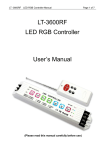
User Manual
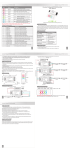
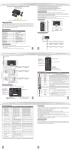
The keys on the remote are:ON/OFF,PAUSE,MODE+,MODE-,SPEED+,SPEED ,-BRT+,BRT-.
Sign
Button
Description
ON/OFF
PAUSE
ON/OFF:Turn on/off the controller
Any button can start the controller at off status
Pause:Press this button will rest at current
color, press it again, will continue to change.
MODE+
Mode+:Press this button to select next mode
MODE-
Mode-:Press this button & back to previous mode
SPEED
Speed:Press this button to select 1-8 speed changing
levels. Press this button over 3 seconds if LED flickers
twice, it means it has restored to Default status successfully.
Brightness:Press this button to select 1-8 brightness
adjustment levels. Press this button over 3 seconds,
if LED flickers twice, it means it has restored to Default
status successfully.
Press it a second, enter Cycle mode;Press this button over
3 seconds,if LED flickers twice, it means it has restored to
Default status successfully.
BRT
Reset
2. Tables of changing modes
Sequence Modes
Description
1
Static red
Static red, brightness adjustable
2
Static green
Static green, brightness adjustable
3
Static blue
Static blue, brightness adjustable
4
Static yellow
Static yellow, brightness adjustable
(Please read through this manual carefully before use)
1、Brief Introduction
Multi-functional LED controller is a universal RGB controller with high-performance,
adopted the most advanced PWM control technology. It’s dedicated to control overall RGB
color changes of LED lights with 4-pin wires (common anode), such as RGB LED module,
LED strip, LED tape, LED wall washer, floodlight, LED under water lamp and other LED
lights.
2、Specifications
Model
No RF remote
With RF remote
Input voltage
DC12V-DC24V
DC12V-DC24V
5
Static purple
Static purple, brightness adjustable
6
Static cyan
Static cyan, brightness adjustable
Max current load
6A/CH×3
6A/CH×3
7
Static white
Static white, brightness adjustable
Max output power
220W(12V)/450W(24V)
220W(12V)/450W(24V)
8
3 color skipping
Red, green and blue 3-color skipping
Scale levels
4096 LEVEL /CH×3
4096 LEVEL /CH×3
9
7 color skipping
Red, green, blue, yellow, purple, cyan, white 7-color skipping
10
White color strobe
White(with all red, green and blue on)strobe
Product
Dimension(mm)
L211xW40xH30(mm)
L211xW40xH30(mm)
11
3 color smooth
Red, green and blue 3-color gradual changes
12
Full color smooth
All 7-color gradual changes
13
RG color smooth
Red, green 2-color gradual changes
14
R B color smooth
15
GB color smooth
Red, blue 2-color gradual changes
Green, blue 2-color gradual changes
16
White color fade & change white(with red, green & blue on)gradual bright & fade
17
Great cycle
Weight (G.W)
Remote control distance
Control type
180g
195g
No
30m with obstacles;
60m without obstacles
Common anode
Common anode
3、Basic Features
All changing modes overlap cycle
4
1.Automatically adapt to LED light which works for DC12V-24V.
2.ON-OFF controller function.
3.3 channels RGB full color control, each channel maximum output to 6A, total 18A.
Constant Voltage LED RGB Controller
Constant Voltage LED RGB Controller
4.17 fantastic modes such as color smooth, color skipping, horserace, strobe, etc.
5.Can choose a changing speed and brightness in a certain mode independently.
6.Can stop at static single color, speed & brightness adjustable at pause status.
7.Factory default is available.
8.Working with power repeater to expand power output unlimitedly.
9.Power loss memory function.
2) Conjunction diagram, working with our power repeater(connected to LED
strip as an example)
CONSTANT VOLTAGE
POWER SUPPLY
+
-
4、Safety warnings
211mm
+
-
+
Synchronous line
Please don’t install this controller in lightening, intense magnetic and high-voltage fields.
1.To reduce the risk of component damage and fire caused by short circuit, make su re correct
connection.
2.Always be sure to mount this unit in an area that will allow proper ventilation to ensure a
fitting temperature.
3.Check if the voltage and power adapter suit the controller.
(please select DC12-24V power supply with constant voltage)
4.Don’t connect cables with power on; make sure a correct connection and no short circuit
checked with instrument before power on.
5.Please don’t open controller cover and operate if problems occur.
The manual is only suitable for this model; any update is subject to change without prior notice.
5. Dimensions
1
-
DC5V-24V
8A x 3CH
+
CONSTANT VOLTAGE
POWER SUPPLY
+
-
+
40mm
-
DC5V-24V
8A x 3CH
+
CONSTANT VOLTAGE
POWER SUPPLY
7、Operating instructions
16mm
30mm
10mm
10mm
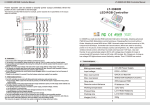
1. On the controller, there are 6 function keys:
ON/OFF、PAUSE、MODE+、MODE-、SPEED、BRT
10mm
6. Conjunction Diagram
1) Connected to LED strip as an example
CONSTANT VOLTAGE
POWER SUPPLY
The 6 keys on the controllers are: ON/OFF、PAUSE、MODE+、MODE-、SPEED、BRT、RESET.
2
LED Strip
LED Strip
Constant Voltage LED RGB Controller
8、After-Sales
From the day you purchase our products within 3 years, if being used properly in
accordance with the instruction, and quality problems occur, we provide free repair or
replacement services except the following cases:
1.Any defects caused by wrong operations.
2.Any damages caused by inappropriate power supply or abnormal voltage.
3.Any damages caused by unauthorized removal, maintenance, modifying circuit,
incorrect connections and replacing chips.
4.Any damages due to transportation, breaking, flooded water after the purchase.
5.Any damages caused by earthquake, fire, flood, lightning strike etc force majeure of
natural disasters.
6.Any damages caused by negligence, inappropriate storing at high temperature and
humidity environment or near harmful chemicals.
7.Product has been updated.
9、Kindly Reminder
1.Power Source Selection
Power source must be DC constant voltage type of power supply. Due to the efficient output
in some power supplies are only 80% of total, so please select at least 20% higher output
power supply than the consumption of LED lights.
5
SPEED
BRT
SPEED
BRT
LED CONTROLLER
MODE
PAUSE
-
MODE
+
The remote control ID learning guide: Press ON/OFF button on the controller,
and press any of the button on the remote, when the light flashes, the ID is set.
3