1
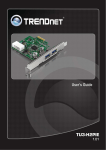
User’s Manual USB 3.0 PCI Express Card ABOUT THIS MANUAL This manual is designed for use with the External USB 3.0 PCI Express Card. Information in this document has been carefully checked for accuracy; however, no guarantee is given to the correctness of the contents. The information in this document is subject to change without notice. The manufacturer does not make any representations or warranties (implied or otherwise) regarding the accuracy and completeness of this document and shall in no event be liable for any loss of profit or any commercial damage, including but not limited to special, incidental, consequential, or other damage. SAFETY INSTRUCTIONS Always read the safety instructions carefully: Keep this User’s Manual for future reference. Keep this equipment away from humidity. If any of the following situations arises, get the equipment checked by a service technician: The equipment has been exposed to moisture. The equipment has been dropped and damaged. The equipment has obvious sign of breakage. The equipment has not been working well or you cannot get it to work according to the User’s Manual. COPYRIGHT This document contains proprietary information protected by copyright. All right are reserved. No part of this manual may be reproduced by any mechanical, electronic or other means, in any form, without prior written permission of the manufacturer. 1 Table of Contents 1. Introduction ................................................................................................................... 3 Features........................................................................................................................... 4 Package Contents ........................................................................................................... 4 System Requirements...................................................................................................... 4 2. Installation ..................................................................................................................... 5 Window XP ...................................................................................................................... 5 Windows Vista/ Window 7................................................................................................ 9 3. Hardware Installation .................................................................................................. 13 4. Installation Verification ............................................................................................... 15 5. Specifications .............................................................................................................. 17 6. Regulatory Compliance .............................................................................................. 18 FCC Conditions ............................................................................................................. 18 CE.................................................................................................................................. 18 WEEE Information ......................................................................................................... 18 2 1. Introduction The USB 3.0 PCI Express Card is compliant to USB 3.0 Standards and backward compatible with USB 2.0 devices. It also allows you to connect multiple peripherals to your PC at the same time. The USB 3.0 2-port PCI Express Card enhances the performance of transmission that excessively faster than existing USB 2.0 device. It is the ideal interface for transferring extremely large amounts of data from USB 2.0/3.0 compliant products such as real-time video cameras, portable devices and others. 3 Features Add 2 ports to USB 3.0 devices. Install easily into any PCI Express slot. Supports USB 3.0 transfer rate. Plug and play. Package Contents USB 3.0 PCI Express Card x1 CD (Driver and User’s Manual) x1 Quick Installation Guide x1 System Requirements Windows -based (WindowsXP, WindowsVista, Windows7) computer with available PCI express slot. Windows -based server. Notice: Mac systems do not support this USB 3.0 2/4-port PCI Host Card 4 2. Installation You will need to install the driver for your USB 3.0 PCI Express Card first. Please follow the procedures as below. A. Window XP To Install the Driver 1. Insert the provided Driver into CD-Rom. The following screen will show up and please click Next. 5 2. After reading End-User License Agreement, please choose “I accept the terms in the License Agreement” and click Next. 3. Please click Browse to choose the Destination Folder. After that, please click Next. 6 4. Click Install to install NEC Electronics USB 3.0 Host Controller Driver. 5. It will take a while to install the Driver. Notice: The Software Installation may pop-up during installation. Please click Continue Anyway to complete the installation. 7 6. Please click Finish to complete the NEC Electronics USB 3.0 Host Controller Driver. *Actual strings depend on your operation system. These screen shots are from Windows XP and might vary slightly for each operation system. Note: Please refer to next chapter to get more information about installing PCI Express Card. 8 B. Window Vista/ Windows 7 To Install the Driver 1. Insert the provided CD into CD-Rom and double click locate and double-click the Setup.exe file. 2. When the following screen show up, please click Next to install the Driver. 9 3. After reading End-User License Agreement, please choose “I accept the terms in the License Agreement” and click Next. 4. Please click Browse to choose the Destination Folder. After that, please click Next. 10 5. Click Install to install NEC Electronics USB 3.0 Host Controller Driver. 6. It will take a while to install the driver. Note: The Windows Security may show up, please click Install to continue the installation. 11 7. Please click Finish to complete the NEC Electronics USB 3.0 Host Controller Driver. *Actual strings depend on your operation system. These screen shots are from Windows Vista 32-bit and might vary slightly for each operation system. Note: Please refer to next chapter to get more information about installing PCI Express Card. 12 3. Hardware Installation A. Turn off you computer and remove the cover of the computer. B. Plug the PCI host card into the PCI slot of your computer. C. Replace the cover and turn on your computer. For Window XP: A. When inserting USB 3.0 2 Ports ExpressCard into the port, the following screen will show up. Please choose “Yes, this time only” and click Next. 13 B. Please choose “Install the software automatically” and click Next. Notice: The sign of Hardware Installation may show up, please click Continue Anyway. C. Please click Finish to complete the Found New Hardware Wizard. *Actual strings depend on your operation system. These screen shots are from Windows XP and might vary slightly for each operation system. Notice: The Installation of Found New Hardware Wizard will show up twice, please follow the above steps to complete the installation. 14 4. Installation Verification After finishing driver installation and plugging this PCI Express Card to PC, the system will detect the device. You can go to Device Manager to verify the entire installation. Window XP 15 Window Vista/ Windows 7 16 5. Specification Compliant with Universal Serial Bus 3.0 Specification Revision 1.0 Supports the following speed data rate as follows; Low-speed (1.5 Mbps)/ Full-speed (12 Mbps)/ High-speed (480 Mbps)/ Super-speed (5 Gbps). Supports 2 downstream ports for all levels of speed. Supports all USB compliant data transfer type; Control/ Bulk/ Interrupt/ Isochronous transfer. Compliant with PCI Express Base Specification 2.0. Supports PCI ExpressCard Electromechanical Specification Revision 2.0. Supports PCI Bus Power Management Interface Specification Revision 1.2. Supports power each port up to 500 mA. 17 6. Regulatory Compliance FCC Conditions This equipment has been tested and found to comply with Part 15 of the FCC Rules. Operation is subject to the following two conditions: (1) This device may not cause harmful interference (2) This device must accept any interference received. Including interference that may cause undesired operation. Important! Changes or modifications not expressly approved by the manufacturer responsible for compliance could void the user’s authority to operate the equipment. Use an approved phone set. CE This equipment is in compliance with the requirements of the following regulations: EN 55 022: CLASS B 18