1
Embargo Date:
Sales Start Date:
Target Market:
1st February 2012
April 2012
Home Office
Key Features
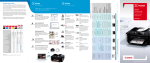
The Wi-Fi All-In-One that handles
everything with ease
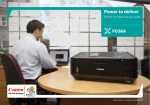
PIXMA MX435 with built-in Wi-Fi and ADF,
this stylish All-in-One fits perfectly in the
home office with it’s quick print speeds.
Compact design with FastFront
• Print, copy, scan, and fax from anywhere in the
home or office with built-in Wi-Fi and supports Apple
AirPrint
• Sleek and stylish all-black design with FastFront
• Superior-quality prints with up to 4800dpi, min. 2pl
droplets
The PIXMA MX435 is part of the A4 Office
All-In-One range.
• Fully integrated 30 sheet Auto Document Feeder for
fast scan, copy, and fax of large documents
The Canon A4 PIXMA Office All-In-One
Range consists of: PIXMA MX885, PIXMA
MX515, PIXMA MX435, PIXMA MX375
• Efficient ISO ESAT 9.7 ipm mono / 5.5 ipm colour
print speed plus Quick Start
• ISO A4 Copy: 21 seconds
• Scan PDFs and JPEGs straight to USB memory –
without a PC
• Precise control of web printing with Easy-WebPrint
EX
• Print quality photos from movies captured on select
Canon cameras with Full HD Movie Print
Product Name
Mercury Code
EAN Code
Recommended Retail Price
PIXMA MX435
5783B008AA
4960999813875
£79.00
What’s in the box: PIXMA MX435 All-In-One, Power cord, Telephone cable and connector, FINE Ink Cartridges PG-540 and CL541, USB lead, Multilingual set up guides, Setup software and User’s manual CD including MP Navigator EX, Easy-Photo Print
EX and Easy-WebPrint EX. Warranty sheet
Consumables
Mercury Code
EAN Code
Recommended Retail Price
IJ Cartridge PG-540
5225B004AA
8714574572529
£14.99
IJ Cartridge PG-540XL
5222B004AA
8714574572543
£22.99
IJ Cartridge CL-541
5227B004AA
8714574572574
£20.99
IJ Cartridge CL-541XL
5226B004AA
8714574572598
£22.99
Note: Blister packs with and without security are available for each of the inks listed above, this does not include multipack and twin packs.
Technical Specifications
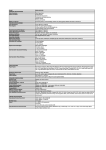
TYPE
Available Functions
PRINTER FUNCTIONS
Print Resolution
Print Engine
Photo Lab Quality Speed
Mono Print Speed
Colour Print Speed
Ink Cartridge
Configuration
Black Ink Tank Life
Colour Ink Tank Life
Media Type
Media Input
Media Size
Media Weight
Two Sided Printing
Borderless Printing
Compatible Memory Cards
Card Direct Print Functions
Card Direct Print
Enhancements
FAX FUNCTIONS
Standalone fax
PC Fax
Colour Fax
Transmission Speed
Mono/colour
Modem Speed
Compression Method
Mono/colour
Memory transmission
Fax Resolution
Greyscale / Colour
Gradation
Fax Memory
Dual Access
Coded Dials
Group Dial
Redial
FAX/TEL Auto Switch
Answering Machine Hookup
Remote Reception
Sequential broadcast
Error correction mode
(ECM)
Telephone handset
Reports
SCANNER FUNCTIONS
Scanner Type
Scanner Resolution Optical
A4 Scan Speed (reflective)
Colour Scanning Depth
Halftone/Greyscale
Compatibility
Effective Scanning Width
OCR Bundle
Scan Methods &
Enhancements
Print, Scan, Copy, Fax & 30 page ADF. Camera and Mobile
phone direct printing. Wi-Fi connectivity.
Up to 4800[1] x 1200 dpi
Inkjet, 2 FINE Cartridges, 4-colour system with minimum 2
pl droplet size, ChromaLife100 system
Borderless 10 x 15cm: Approx. 46 seconds (Standard)[2]
ESAT: Approx. 9.7 ipm[3]
ESAT: Approx. 5.5 ipm [3]
FINE Cartridge - PG-540, CL-541 (Optional - PG-540XL, CL
541XL)
Black: 180 pages (PG-540), 600 pages (optional PG
540XL) [4]
Black: 1420 photos* (PG-540), 4340 photos* (optional PG540XL) [5]
* Estimated supplemental yield
Colour: 180 pages (CL-541), 400 pages (optional CL
541XL) [4]
Colour: 67 photos (CL-541), 135 photos (optional CL541XL) [5]
Plain Paper, Photo Paper Pro Platinum (PT-101), Photo
Paper Plus Glossy II (PP-201), Photo Paper Plus semi-gloss
(SG-201), Glossy Photo Paper "Everyday Use" (GP-501),
Matte Photo Paper(MP-101)
Max. 100 sheets
A4, B5, A5, Letter, Legal, Envelopes (DL, COM10), 10 x
15cm, 13 x 18cm, 20 x 25cm
Plain paper 64 to 105 g/m² and Canon special media up to
approx. 300 g/m² (PT-101)
Available by manual operation using plain paper in A4, B5,
A5, Letter & 13 x 18cm sizes (Windows only)
Yes (A4, Letter, 20 x 25cm, 13 x 18cm, 10 x 15cm)
N/a
N/a
N/a
Yes
Win: Via Fax modem (in MFP)*,
Mac: n/a
*1 location, B/W transmission only
Yes
Mono: Approx. 3 sec./page (33.6kbps)
(based on default setting using ITU-T No.1 chart) [6]
Colour: Approx. 1 min/page (33.6kbps)
(based on default setting using Canon Colour Fax Test
Sheet) [6]
Maximum 33.6kbps (Automatic fall back)
Mono: MH, MR, MMR,
Colour: JPEG
Yes
Mono: 8pels/mm x 3.85 lines/mm (Standard), 8pels/mm
x 7.7 lines/mm (Fine), 300dpi x 300dpi (Extra Fine)
Colour:200 x 200 dpi (Photo)
Mono: 256 levels,
Colour: 24 bit (full colour) (RGB each 8 bit)
Up to 50 pages (page count is based on ITU-T No.1 chart
or Canon Fax Standard Chart No.1) and save files directly
to USB flash memory
Yes
max 20 locations
max 19 locations
Yes
No
Yes
Yes
Yes
Yes, ITU-T T.30 compatible
No
Activity report, User's data list, Telephone number list,
Memory list, Rejected number list, Caller history list,
Flatbed and ADF, CIS colour scanner
Up to 1200 x 2400 dpi (Platen) [7]
Approx. 15 seconds [8]
48 bit input / 24 bit output (RGB each 16 / 8 bit)
16 bit input / 8 bit output
TWAIN / WIA
Flatbed: A4/Letter
ADF: A4/Letter/Legal
Yes (MP Navigator EX)
Scan jpeg, compact PDF or normal PDF to USB memory,
Push-scan, Auto Scan Mode, Auto Document Fix, PDF file
creation/editing/password security*, Stitch Assist*, Text
(OCR)*, Multi-page PDF
* Function with MP Navigator EX
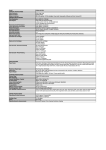
COPIER FUNCTIONS
Colour/Photo Copy
Copy Speed Colour
Document
Multiple Copy
Zoom
Copy functions &
enhancements
INTERFACE AND
SOFTWARE
Display Type & Size
Interface Type - PC / Mac
Interface Type - Non PC
Supported Operating
System
Operating System
Requirements
Software Included
GENERAL FEATURES
Automatic Document
Feeder (ADF)
Dimensions (W x D x H)
Display languages
Temperature Range
Humidity
Acoustic Noise Levels
Weight
Power Source
Power Consumption
Yes
sFCOT: Approx. 21 sec [9]
Document (ADF) sESAT: Approx. 4.3ipm [9]
1 to 99 copies
25 – 400%, preset ratios, fit-to-page
Borderless copy, 2-on-1 and 4-on-1 copy, collated copy,
frame erase copy
Full dot LCD display
Hi-Speed USB (B Port),
Bluetooth Ver2.0 maximum speed 1.44Mbps (Option,
HCRP) (with optional Bluetooth Unit BU-30)
Wi-Fi: IEEE802.11b/g/n Set-up: WCN, WPS (Push-Button
Configuration, PIN code method), Security: WPA-PSK,
WPA2-PSK, WEP64/128bit, Administration password
Over Wi-Fi: Android devices [10], iPhone[11], iPod touch[11],
iPad[11], Sony Playstation 3
Bluetooth Ver2.0 maximum speed 1.44Mbps (Option, JPEG
only, OPP, BIP) (with optional Bluetooth unit BU-30)
Photo printing via PictBridge
Apple AirPrint
Windows 7 (32 and 64bit), Windows 7 SP1 , Windows Vista
(32 and 64bit), Windows XP SP2, SP3 (32-bit only)
Mac OS X v.10.5.8 - 10.7
Windows 7: 1 GHz or faster cpu, 1 GB RAM (64 bit requires 2
GB RAM)
Windows Vista (32/ 64 bit): 1 GHz or faster cpu, 512MB
RAM
Windows XP SP2,3: 300 MHz or faster cpu, 128 MB RAM
Browser: Internet Explorer 6 or higher
CD-ROM Drive
Display: 1024 x 768 or better
Mac OS X Lion 10.7: Intel Core 2 Duo, Core i3, Core i5, Core
i7, or Xeon processor, 2GB RAM
Mac OS 10.6: Intel Processor, 1 GB RAM
Mac OS 10.5.8: Intel or PowerPC Processor (G4, G5, 867 MHz
or faster)
Browser: Safari 3 or higher
CD-ROM Drive
Display: 1024 x 768 or better
Canon MP Navigator EX, Canon Easy-PhotoPrint EX [12], Easy
WebPrint EX [13], Canon Speed Dial Utility, Canon Solution
Menu EX
up to 30 pages
approx. 458 x 385 x 200 mm
22 Languages selectable: Japanese, English, German,
French, Italian, Spanish, Dutch, Portuguese, Norwegian,
Swedish, Danish, Finnish, Russian, Czech, Hungarian,
Polish, Slovenian, Turkish, Simplified Chinese, Greek,
Traditional Chinese, Korean
Operating environment: 5° - 35° C
Operating humidity: 10 - 90%RH (no condensation)
Approx. 42.5 dB(A)
When printing ISO/JIS-SCID N2 pattern on 10x15cm Photo
Paper Plus Glossy II using default settings.
Approx. 8.5 kg
AC 100-240V, 50/60Hz
Standby: Approx. 1.7 W (USB connection to PC, scanning
lamp off),
Off: Approx. 0.4 W (USB connected to PC),
Copying: Approx 18 W [14]
Technical Specifications
Standard disclaimers
All specifications subject to change without notice.
Borderless 10x15cm photo lab quality print speed based on default driver setting using ISO/JIS-SCID N2 on Canon
Photo Paper Plus Glossy II media
Document print speed (ipm) on plain paper is measured based on the office category test of ISO/IEC 24734.
Print speed may vary depending on system configuration, interface, software, document complexity, print mode,
page coverage, type of paper used and does not take into account data processing time on host computer.
Ink yield may vary depending on texts/photos printed, applications software used, print mode and type of paper
used. For yield information see www.canon-europe.com/ink/yield
Copy speed may vary depending on a number of factors and does not take into account warming up time.
All brand and product names are trademarks of their respective companies.
Microsoft, Windows and the Windows logo are trademarks, or registered trademarks of Microsoft Corporation in
the United States and/or other countries.
For more information on ChromaLife100+ please visit www.canon-europe.com/chromalife100
Footnotes
[1]Ink droplets can be placed with a minimum pitch of 1/4800 inch
[2]Photo print speed is based on default driver setting using ISO/JIS-SCID N2 standard on Canon Photo Paper Plus
Glossy II and does not take into account data processing time on host computer.
[3]Document print speed on plain paper is measured based on average of ESAT in Office Category Test of ISO/IEC
24734 standard.
[4]Declared yield value in accordance with ISO/IEC 24711 & ISO/IEC 24712 standards. Values obtained by
continuous printing.
[5]When printing Canon standard patterns continuously with the default settings on 10x15cm Photo Paper Plus
Glossy II using Windows 7 printer driver in borderless printing mode and Windows 7 Home Premium's Windows
Photo Viewer. Declared yield value determined based on Canon standard method referring to ISO/IEC 24711.
[6]Actual transmission speed may vary depending on document complexity, fax settings at receiving end, and line
conditions.
[7]Optical resolution is a measure of maximum hardware sampling resolution based on ISO 14473 standard.
When scanning in high resolution, the scan size is restricted (maximum optical resolution for A4 scan is 600dpi).
[8]Color document scan speed is measured with ISO/IEC 24735 Annex C Test Chart A.Scan speed indicates the
time measured between pressing the scan button of the scanner driver and the on-screen status display turns off.
Scan speed may vary depending on system configuration, interface, software, scan mode settings and document
size etc.
[9]Colour document copy speed is measured based on average of sFCOT and sESAT in Performance Test of ISO/IEC
29183 standard.
[10]When connected to a device running Android 1.6 or higher OS over an existing infrastructure mode Wi-Fi
network
[11]When connected over an existing infrastructure mode Wi-Fi network. Canon iEPP
application available as free download from Apple App Store. Compatible with iPhone OS 2.2.1 or higher
[12]HD Movie Print for Windows requires 2.6 GHz or faster processor, 1GB RAM and
Canon ZoomBrowser EX 6.5 or laterHD Movie Print for Mac OS requires Intel processor and Canon ImageBrowser
6.5 or later software
[13]Easy-WebPrint EX for Windows requires 32 bit version of Internet Explorer 7 or 8
Easy WebPrint EX for Mac requires Safari 4 or 5
[14]When copying ISO/JIS-SCID N2 (printed by inkjet printer) on A4 size plain paper
using default settings.