1
pure indoor living
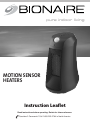
MOTION SENSOR
HEATERS
Instruction Leaflet
Read instructions before operating. Retain for future reference.
Questions? Comments? Call 1-800-253-2764 in North America.
P L E A S E R E A D A N D S AV E T H E S E
I M P O R TA N T S A F E T Y I N S T R U C T I O N S
When using electrical appliances, basic safety precautions
should always be followed to reduce the risk of fire,
electric shock, and injury to persons, including the
following:
1. Read all instructions before using this heater.
2. This heater is hot when in use. To avoid burns, do not
let bare skin touch hot surfaces. If provided, use
handles when moving this heater. Keep combustible
materials, such as furniture, pillows, bedding, papers,
clothes, and curtains at least 3 feet (0.9 m) from the
front of the heater and keep them away from the
sides and rear.
3. Extreme caution is necessary when any heater is
used by or near children or invalids and whenever
the heater is left operating and unattended.
4. Always unplug heater when not in use.
5. Do not operate any heater with a damaged cord or
plug or after the heater malfunctions, has been
dropped or damaged in any manner. Discard heater,
or return to authorized service facility for
examinationand/orrepair.
6. Do not use outdoors.
7. This heater is not intended for use in bathrooms,
laundry areas and similar indoor locations. Never
locate heater where it may fall into a bathtub or
other water container.
8. Do not run cord under carpeting. Do not cover cord
with throw rugs, runners, or similar coverings. Do not
route cord under furniture or appliances. Arrange
cord away from traffic area and where it will not be
tripped over.
9. To disconnect heater, turn controls to off, then
remove plug from outlet.
10. Do not insert or allow foreign objects to enter any
ventilation or exhaust opening as this may cause an
electric shock or fire, or damage the heater.
11. To prevent a possible fire, do not block air intakes or
exhaust in any manner. Do not use on soft surfaces,
like a bed, where openings may become blocked.
12. A heater has hot and arcing or sparking parts inside.
Do not use it in areas where gasoline, paint, or
flammable liquids are used or stored.
13. Use this heater only as described in this manual. Any
other use not recommended by the manufacturer
may cause fire, electric shock, or injury to persons.
14.Alwaysplugheatersdirectlyintoawalloutlet/
receptacle. Never use with an extension cord or
relocatablepowertap(outlet/powerstrip).
15. When unplugging, be sure to pull by the plug and
not the cord.
16. If the heater will not operate, see specific instructions
on Auto Safety Shut-off.
17. DO NOT attempt to repair or adjust any electrical or
mechanical functions on this unit. Doing so will void
your warranty. The inside of the unit contains no user
serviceable parts. All servicing should be performed
by qualified personnel only.
18. Discontinue use if plug or outlet is hot. It is
recommended that the outlet be replaced if plug or
outlet is hot to touch.
19. The heater must not be located immediately below a
socket-outlet. Do not use this heater in the immediate
surroundings of a bath, a shower or a swimming
pool.
SAVE THESE
INSTRUCTIONS
THIS APPLIANCE HAS A POLARIZED PLUG (one blade is wider than the
other). To reduce the risk of electric shock, this plug is intended to fit in a
polarized outlet only one way. If the plug does not fit fully in the outlet,
reverse the plug. If it still does not fit, contact a qualified electrician to
install the proper outlet.
DO NOT ATTEMPT TO MODIFY THIS PLUG OR DEFEAT THIS
SAFETY FEATURE IN ANY WAY.
F E AT U R E S - O P E R AT I O N S
TECHNICAL SPECIFICATIONS
Power Mode
• Amps:6.7
• Wattage:800W(+5%–10%)
• Workingvoltage:120VAC/60Hz
Press the Power Button ( ) to select the desired heat
settings. Each press of the button will cycle through the
below settings and the corresponding indicator light will
illuminate:
OPERATING INSTRUCTIONS
1. Carefully remove your heater from the box. Please
save the carton for off-season storage.
2. Place heater on a firm, level surface.
3. Plug heater into a standard outlet. Once plugged in,
the Power Light will illuminate.
4. There is a cord wrap at the bottom of the heater to
hide extra cord or wrap the cord for storage.
NOTE: Avoid overloading your circuit by not using other
high wattage appliances in the same outlet. At 800 watts,
this unit draws 6.7 Amps.
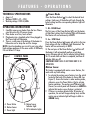
Figure 1
CONTROL PANEL
E
D
1. Hi - HIGH Heat
The first press of the Power Button ( ) sets the heater
at High Heat setting, the Hi indicator light will illuminate.
The heater will run continuously at 800W.
2. Lo - LOW Heat
Press the Power Button ( ) again will switch to the Low
Heat setting with the Lo indicator light illuminated. The
heater will run continuously at 400W.
3. The next press of the Power Button ( ) will turn off
the heater, it will automatically perform a cool down
process (blowing cold air), the Lo indicator light will blink
for 15 seconds until cool down is completed, and then all
indicator lights are off.
CAUTION: FRONT GRILL IS HOT WHEN UNIT IS IN
OPERATION.
Motion Sensor
A
B
A. Power Button
B. Motion Sensor
C. Power Light
C
D. Motion Sensor
Indicator Light
E. Hi/LoIndicatorLights
This heater is equipped with motion sensor feature, this
works with any heat setting.
1. To activate the motion sensor feature, turn the switch
located at the back of the heater to Sensor ON (see
Figure 2). Ensure the heater is under working mode,
otherwise, press the Power Button ( ) to activate
heater operations. The motion sensor indicator light
(Sensor) on control panel will illuminate in GREEN to
indicate that motion sensor feature is activated.
2. If there is no motion detected after 30 minutes of
operation, the unit will stop producing heat, and the
motion sensor indicator light will begin to blink in
GREEN slowly.
CLEANING / MAINTENANCE
TROUBLESHOOTING
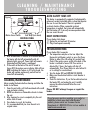
Figure 2
REAR VIEW
Motion Sensor Switch
Cord Wrap (not shown)
CONTROL PANEL
AUTO SAFETY SHUT-OFF
This heater is equipped with a patented, technologicallyadvanced, ceramic controlled safety system that requires
the user to reset the heater if there is a potential
overheat situation. When a potential overheat
temperature is reached, the system will automatically
shut the heater off. It can only resume operation when
the user resets the unit.
RESET INSTRUCTIONS
If your heater shuts down:
1) Unplug the unit and wait 30 minutes.
2) Plug in and operate normally.
TROUBLESHOOTING
If your heater fails to operate:
• Thetemperaturemaybesettoolow.Adjustthe
3. After an additional 90 minutes of no motion detected,
thermostat until heater restarts or press the Power
the heater will shut off automatically with all
Button to either HI or LO setting for constant heat.
indicator lights going off. Power Light will remain
• Checkifthemotionsensorswitchatthebackofthe
illuminated until the heater is unplugged.
heater is switched to Sensor ON. If no motion is
4. If the switch at the back of the unit is turned to
detected for 2 hours, the heater will shut off
Sensor OFF, the motion sensor indicator light will turn
automatically. Press Power Button to select either Hi
RED, indicating this feature is off. In this mode, the
or Lo settings for constant heat.
heater will operate continuously, and will not be
• TurntheheaterOFFandUNPLUGTHEHEATER.
turned off automatically.
• Makesuretheelectricaloutletorcircuitbreakeris
working.
• Checkforobstructions.Ifyoufindanobstructionturn
CLEANING/MAINTENANCE
the heater OFF, and unplug the unit. Carefully
Always unplug the heater before cleaning and allow the
remove the obstruction and follow the reset
heater to cool down.
instructions.
1. Clean the unit with a soft cloth moistened with a mild Please DO NOT attempt to open or repair the
soap and water solution.
heater.
2. NEVER use abrasive or flammable solvents to clean
the unit.
3. After cleaning, be sure to completely dry the unit
If you have any questions regarding your product or
with a cloth or towel.
would like to learn more about other Bionaire®
4. Store heater in a cool, dry location.
products, please contact our Consumer Service
5. It is recommended that you store the unit in its
Department at 1-800-253-2764 or visit our website at
original carton.
www.bionairecanada.com.
WA R R A N T Y I N F O R M AT I O N
1 YEAR LIMITED WARRANTY
Sunbeam Products, Inc. doing business as Jarden Consumer Solutions or if in Canada, Sunbeam Corporation (Canada)
Limited doing business as Jarden Consumer Solutions (collectively “JCS”) warrants that for a period of one year from
the date of purchase, this product will be free from defects in material and workmanship. JCS, at its option, will repair
or replace this product or any component of the product found to be defective during the warranty period.
Replacement will be made with a new or remanufactured product or component. If the product is no longer available,
replacement may be made with a similar product of equal or greater value. This is your exclusive warranty. Do NOT
attempt to repair or adjust any electrical or mechanical functions on this product. Doing so will void this warranty.
This warranty is valid for the original retail purchaser from the date of initial retail purchase and is not transferable.
Keep the original sales receipt. Proof of purchase is required to obtain warranty performance. JCS dealers, service
centers, or retail stores selling JCS products do not have the right to alter, modify or any way change the terms and
conditions of this warranty.
This warranty does not cover normal wear of parts or damage resulting from any of the following: negligent use or
misuse of the product, use on improper voltage or current, use contrary to the operating instructions, disassembly,
repair or alteration by anyone other than JCS or an authorized JCS service center. Further, the warranty does not
cover: Acts of God, such as fire, flood, hurricanes and tornadoes.
What are the limits on JCS’s Liability?
JCS shall not be liable for any incidental or consequential damages caused by the breach of any express, implied or
statutory warranty or condition.
Except to the extent prohibited by applicable law, any implied warranty or condition of merchantability or fitness for
a particular purpose is limited in duration to the duration of the above warranty.
JCS disclaims all other warranties, conditions or representations, express, implied, statutory or otherwise.
JCS shall not be liable for any damages of any kind resulting from the purchase, use or misuse of, or inability to use
the product including incidental, special, consequential or similar damages or loss of profits, or for any breach of
contract, fundamental or otherwise, or for any claim brought against purchaser by any other party.
Some provinces, states or jurisdictions do not allow the exclusion or limitation of incidental or consequential damages
or limitations on how long an implied warranty lasts, so the above limitations or exclusion may not apply to you.
This warranty gives you specific legal rights, and you may also have other rights that vary from province to province,
state to state or jurisdiction to jurisdiction.
How to Obtain Warranty Service
In the U.S.A.
If you have any question regarding this warranty or would like to obtain warranty service, please call
1-800-253-2764 and a convenient service center address will be provided to you.
In Canada
If you have any question regarding this warranty or would like to obtain warranty service, please call
1-800-253-2764 and a convenient service center address will be provided to you.
WA R R A N T Y I N F O R M AT I O N
In the U.S.A., this warranty is offered by Sunbeam Products, Inc. doing business as Jarden Consumer Solutions located
in Boca Raton, Florida 33431. In Canada, this warranty is offered by Sunbeam Corporation (Canada) Limited doing
business as Jarden Consumer Solutions, located at 20 B Hereford Street, Brampton, Ontario L6Y 0M1. If you have any
other problem or claim in connection with this product, please write our Consumer Service Department. PLEASE DO
NOT RETURN THIS PRODUCT TO ANY OF THESE ADDRESSES OR TO THE PLACE OF PURCHASE.
© 2013 Sunbeam Products, Inc. doing business as Jarden Consumer Solutions. All rights reserved. Imported and
distributed by Sunbeam Corporation (Canada) Limited doing business as Jarden Consumer Solutions, 20 B Hereford
Street, Brampton, Ontario L6Y 0M1.
Printed In China