1
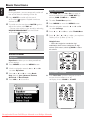
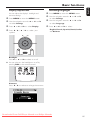
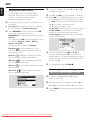
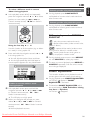
Wireless Music
Center + Station
User manual
Manuel d'utilisation
Manual del usuario
Benutzerhandbuch
Downloaded From DvDPlayer-Manual.com Philips Manuals
WACS700
Important notes for users in the
U.K.
Mains plug
This apparatus is fitted with an approved 13
Amp plug. To change a fuse in this type of plug
proceed as follows:
1
2
Remove fuse cover and fuse.
3
Refit the fuse cover.
Fix new fuse which should be a BS1362 5 Amp,
A.S.T.A. or BSI approved type.
Norge
Typeskilt finnes på apparatens underside.
Observer: Nettbryteren er sekundert
innkoplet. Den innebygde netdelen er
derfor ikke frakoplet nettet så lenge
apparatet er tilsluttet nettkontakten.
For å redusere faren for brann eller elektrisk
støt, skal apparatet ikke utsettes for regn eller
fuktighet.
If the fitted plug is not suitable for your socket
outlets, it should be cut off and an appropriate
plug fitted in its place.
If the mains plug contains a fuse, this should
have a value of 5 Amp. If a plug without a fuse
is used, the fuse at the distribution board
should not be greater than 5 Amp.
Note: The severed plug must be disposed of to
avoid a possible shock hazard should it be
inserted into a 13 Amp socket elsewhere.
How to connect a plug
The wires in the mains lead are coloured with
the following code: blue = neutral (N),
brown = live (L).
¶ As these colours may not correspond with the
colour markings identifying the terminals in
your plug, proceed as follows:0
– Connect the blue wire to the terminal
marked N or coloured black.
– Connect the brown wire to the terminal
marked L or coloured red.
– Do not connect either wire to the earth
terminal in the plug, marked E (or e) or
coloured green (or green and yellow).
Before replacing the plug cover, make certain
that the cord grip is clamped over the sheath
of the lead - not simply over the two wires.
Copyright in the U.K.
Recording and playback of material may
require consent. See Copyright Act 1956 and
The Performer’s Protection Acts 1958 to 1972.
Downloaded From DvDPlayer-Manual.com Philips Manuals
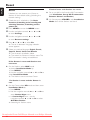
2
1
2
9
8
34 5
7 6
SAME ARTIST
SAME GENRE
SMART
EQUALIZER
0 !@# $ %^ &
Downloaded From DvDPlayer-Manual.com Philips Manuals
3
1
2
34
8
7 65
SAME ARTIST
SAME GENRE
SMART
EQUALIZER
! 09
Downloaded From DvDPlayer-Manual.com Philips Manuals
4
Downloaded From DvDPlayer-Manual.com Philips Manuals
5
End-User License Agreement USE OF THIS PRODUCT IMPLIES ACCEPTANCE OF
THE TERMS BELOW.
This product contains technology and data from Gracenote of Emeryville, California (“Gracenote”). The
technology from Gracenote (the “Gracenote Embedded Software”) enables this product to do disc
identification and obtain music-related information, including name, artist, track, and title information
(“Gracenote Data”), which is included on the Gracenote Database (the “Gracenote Database”).
You agree that you will use Gracenote Data, the Gracenote Database, and Embedded Software for your
own personal non-commercial use only. You agree that you will access Gracenote Data only by means of
the standard end user functions and features of this product. You agree not to assign, copy, transfer or
transmit the Embedded Software or any Gracenote Data to any third party. YOU AGREE NOT TO USE
OR EXPLOIT GRACENOTE DATA, THE GRACENOTE DATABASE, OR GRACENOTE COMPONENT,
EXCEPT AS EXPRESSLY PERMITTED HEREIN.
You agree that your non-exclusive license to use the Gracenote Data, the Gracenote Database, and
Embedded Software will terminate if you violate these restrictions. If your license terminates, you agree to
cease any and all use of the Gracenote Data, the Gracenote Database, and Gracenote Embedded
Software. Gracenote reserves all rights in the Gracenote Data, Gracenote Database, and Gracenote
Embedded Software, including all ownership rights. You agree that Gracenote may enforce its rights under
this Agreement against you directly in its own name.
The Embedded Software and each item of Gracenote Data are licensed to you “AS IS.” Gracenote makes
no representations or warranties, express or implied, regarding the accuracy of any Gracenote Data.
Gracenote reserves the right to delete data or to change data categories in any Data updates and for any
cause that Gracenote deems sufficient. No warranty is made that the Embedded Software is error-free or
that functioning of the Embedded Software will be uninterrupted. Gracenote is not obligated to provide
you with any new enhanced or additional data types or categories that Gracenote may choose to provide
in the future.
GRACENOTE DISCLAIMS ALL WARRANTIES EXPRESS OR IMPLIED, INCLUDING, BUT NOT
LIMITED TO, IMPLIED WARRANTIES OF MERCHANTABILITY, FITNESS FOR A PARTICULAR
PURPOSE, TITLE, AND NON-INFRINGEMENT. GRACENOTE DOES NOT WARRANT THE RESULTS
THAT WILL BE OBTAINED BY YOUR USE OF THE GRACENOTE COMPONENT OR ANY
GRACENOTE SERVER. IN NO CASE WILL GRACENOTE BE LIABLE FOR ANY CONSEQUENTIAL
OR INCIDENTAL DAMAGES OR FOR ANY LOST PROFITS OR LOST REVENUES.
Rev 2.1
Downloaded From DvDPlayer-Manual.com Philips Manuals
6
Please contact:
Mr. Bin Li
BLC Audio PDCC Development
5/F., Philips Electronics Building
5 Science Park East Avenue
Hong Kong Science Park
Shatin Hong Kong
Français
Français -------------------------------------------- 49
Español
Philips Electronics Hong Kong Ltd. hereby offers to
deliver or make available, upon request, for a charge
no more than the cost of physically performing
source distribution, a complete machine-readable
copy of the corresponding source code of the
Library on a medium customarily used for software
interchange.
English ------------------------------------------------ 8
Español --------------------------------------------- 91
Deutsch
LGPL Library written offer
This product contains Linux 2.4.27-vrsl, that is made
available under the GNU LGPL license version 2.1
(hereafter called "the Library").
English
Index
Deutsch ------------------------------------------- 133
This offer is valid for a period of three years after
the date of purchase of this product.
GPL Package written offer
This product contains Linux 2.4.27-vrsl, that is made
available under the GNU GPL license version 2
(hereafter called "the Program").
Philips Electronics Hong Kong Ltd. hereby offers to
deliver or make available, upon request, for a charge
no more than the cost of physically performing
source distribution, a complete machine-readable
copy of the corresponding source code of the
Program on a medium customarily used for
software interchange.
Please contact:
Mr. Bin Li
BLC Audio PDCC Development
5/F., Philips Electronics Building
5 Science Park East Avenue
Hong Kong Science Park
Shatin Hong Kong
This offer is valid for a period of three years after
the date of purchase of this product.
Downloaded From DvDPlayer-Manual.com Philips Manuals
7
Contents
English
General Information
HD
About WACS700 ............................................... 10
Supplied accessories .......................................... 10
Philips on-line support ...................................... 11
Environmental information .............................. 12
Maintenance ........................................................ 12
Safety information .............................................. 12
Playing Harddisk(HD) ........................................ 28
Selecting and searching ............................... 28-29
Controls
Controls on the Center ................................... 13
Controls on the Station .................................... 14
Center’s 2-way remote control ................ 15-16
Station’s remote control ............................. 16-17
Installation
Placing Center and Station ............................... 19
Rear connections ......................................... 19-21
Antennas connection
Connecting to your PC
Connecting an additional appliance
Connecting to an additional appliance with
powerful speakers
Using AC power ................................................. 21
Setting up Wi-Fi connection
between Center and Station ..................... 21-22
Selecting a different album or track
Finding a passage within a track during playback
Selecting tracks of a particular artist
Selecting tracks of a particular genre
Different play modes: REPEAT, SHUFFLE ...... 29
SMART EQUALIZER ......................................... 29
Creating Playlist: custom collection of your
favorite music ...................................................... 30
Deleting a playlist, album or track ............ 31-32
Building music library on Center .............. 31-32
Ripping CDs
Importing from PC
Recording from Radio or External source
Display track information ................................. 32
Moving between Center and Station ....... 33-34
MUSIC FOLLOWS ME
MUSIC BROADCAST
Station management .................................... 34-35
Adding a station
Deleting a station
Viewing station status
Information about your WACS700 ................ 35
Firmware .............................................................. 35
Upgrading firmware
Restoring previous firmware
Re-establishing Wi-Fi connection
Preparation
Using the remote control .......................... 22-23
Using Center’s remote control
To replace the remote controls’ batteries
Using the navigation controls .......................... 24
Basic Functions
Switching to standby/on and
selecting functions .............................................. 25
Switching to power-saving mode .................... 25
Auto-standby ....................................................... 25
Volume control ................................................... 25
MUTE .................................................................... 26
Sound control ..................................................... 26
CD (on center only)
Discs for playback .............................................. 36
Playing discs ................................................... 36-37
Selecting and searching ..................................... 37
Selecting a different album/track
Finding a passage within a track during playback
Different play modes: REPEAT, SHUFFLE ...... 38
Display track information ................................. 38
Equalizer
Bass adjustment
Incredible surround
Display adjustment ............................................. 27
Selecting languages ............................................. 27
Downloaded From DvDPlayer-Manual.com Philips Manuals
8
English
Contents
FM radio
Tuning to radio stations .................................... 39
Storing preset radio stations ........................... 39
Autostore: automatic programming
Manual programming
To listen to a preset station
RDS ....................................................................... 40
NEWS ................................................................... 40
Activating NEWS
Deactivating NEWS
AUX/SLEEP
AUX (Listening to an external source) ......... 41
SLEEP .................................................................... 41
Reset
Reset ..................................................................... 42
Specifications ........................................... 43
Troubleshooting .............................. 44-46
Appendix
How to mount your Center and Station onto
walls ................................................................. 47-48
Downloaded From DvDPlayer-Manual.com Philips Manuals
9
General Information
English
About WACS700
WACS700 comprise a WAC700 Center and
a WAS700 Station. Up to 5 WAS700 Stations
can be connected to a WAC700 Center.
On WAC700’s 40GB* hard disk, you can
centrally store up to 750 audio CDs. All the
stored music can be wirelessly streamed, via
Wi-Fi**, from Center to connected Stations. No
need to be bound to your CD player or PC etc.,
or be troubled by the wiring. With WACS700,
you can easily listen to your favourite music
around your home.
This set complies with the radio interference
requirements of the European Community.
Hereby Philips Consumer Electronics, BG
Audio Video Entertainment, declares that
this product WACS700 is in compliance with
the essential requirements and other
relevant provisions of Directive 1999/5/
EC.
CAUTION
Use of controls or adjustments or
performance of procedures other than
herein may result in hazardous radiation
exposure or other unsafe operation.
* Available storage capacity is based on 4 minutes per
song, 10 songs per CD on average, 128 kbps MP3
encoding and given the fact that operational software is
part of the product's memory.
Actual free space is 33GB or less, due to the buffer
partition for MP3 compression, firmware, music CD
database and demo tracks stored.
The making of unauthorized copies of
copy-protected material, including
computer programs, files, broadcasts and
sound recordings, may be an infringement
of copyrights and constitute a criminal
offence. This equipment should not be used
for such purposes.
** Wi-Fi, or IEEE802.11 b/g, is the international leading
industry standard for wireless broadband networking. It
transfers digital data with wider range and bandwidth.
Supplied accessories
– Center’s remote control with
4 x AAA batteries
– Station’s remote control with
1 x CR2025 battery
– 1 x Ethernet cable
– PC installer CD
– 2 x FM wire antenna
– 2 x Mounting kit (for Center and Station)
Downloaded From DvDPlayer-Manual.com Philips Manuals
10
English
General Information
Philips on-line support
Philips products have been designed and manufactured to the highest quality
standards. If your Philips Connected Planet product is not working correctly, we
recommend you check your User Manual to verify that your product is properly
connected and configured.
The web site for Connected Planet support: www.philips.com/support offers
you all information you need to optimally enjoy your product, and about new
additions to this exciting range, to make your home entertainment experience even
more enjoyable.
Please visit: www.philips.com/support and enter your product name
(WACS700) to view:
● FAQ (Frequently Asked Questions)
● Latest user manuals and PC software manuals
● Firmware upgrade files for WACS700
● Latest PC software downloads
● Interactive troubleshooting
Since it is possible for you to upgrade your product, we recommend that you
register your product on www.philips.com/register so we can inform you as
soon as new free upgrades become available.
Enjoy your WACS700!
The model number is on the rear of the set.
Downloaded From DvDPlayer-Manual.com Philips Manuals
11
General Information
English
Environmental information
All unnecessary packaging has been omitted.
We have tried to make the packaging easy to
separate into three materials: cardboard (box),
polystyrene foam (buffer) and polyethylene (bags,
protective foam sheet).
Your system consists of materials which can be
recycled and reused if disassembled by a
specialized company. Please observe the local
regulations regarding the disposal of packaging
materials, exhausted batteries and old
equipment.
Disposal of your old product
Maintenance
Cleaning the Sets
● Use a soft cloth slightly moistened with a mild
detergent solution. Do not use a solution
containing alcohol, spirits, ammonia or abrasives.
Do not press the speakers hard..
Cleaning Discs
● When a disc becomes dirty,
clean it with a cleaning cloth.
Wipe the disc from the center
out.
● Do not use solvents such as
benzene, thinner, commercially available cleaners,
or antistatic spray intended for analog records.
Safety information
Your product is designed and
manufactured with high quality materials
and components, which can be recycled
and reused.
● Place the sets on a flat, hard and stable surface.
When this crossed-out
wheeled bin symbol is
attached to a product it
means the product is
covered by the European
Directive 2002/96/EC
● Place the sets in a location with adequate
ventilation to prevent internal heat build-up in
your system. Allow at least 10 cm (4 inches)
clearance from the rear and the top of the unit
and 5 cm (2 inches) from each side.
Please inform yourself about the local
separate collection system for electrical
and electronic products.
Please act according to your local rules
and do not dispose of your old products
with your normal household waste.The
correct disposal of your old product will
help prevent potential negative
consequences for the environment and
human health.
● Do not expose the system, batteries or discs to
excessive moisture, rain, sand or heat sources
caused by heating equipment or direct sunlight.
● The ventilation should not be impeded by
covering the ventilation openings with items,
such as newspapers table-cloths, curtains, etc.
● The apparatus shall not be exposed to dripping
or splashing.
● No objects filled with liquids, such as vases, shall
be placed on the apparatus.
● No naked flame sources, such as lighted candles,
should be placed on the apparatus.
● The mechanical parts of the set contain selflubricating bearings and must not be oiled or
lubricated.
Downloaded From DvDPlayer-Manual.com Philips Manuals
12
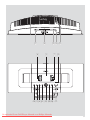
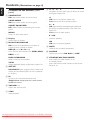
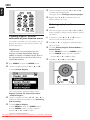
Controls on the Center (Top and
front panels)
–
1 STANDBY-ON/ ECO POWER
–
–
press briefly to switch Center on or
to standby mode ;
press and hold to switch Center to
Eco Power mode or on
2 CD slot loader
–
ejects a disc from the slot loader
–
–
lights up green during CD ripping /MP3
conversion
MENU
enters or exits setup menu.
selects sound source HD, CD, Radio or AUX
In standby mode: switches Center on and
selects sound source HD, CD, Radio or AUX
! RECORD
–
4 ACTIVE
–
SMART EQUALIZER
HD: selects match sound setting for current
Genre
0 SOURCE
3 EJECT
–
CD/Radio/AUX: starts the recording to hard
disk
@ INCR. SURROUND
–
selects surround sound effect
5n
# MUTE
–
–
3.5 mm headphone socket
Helpful hints:
– Adjust the volume to a moderate level
before you plug in the headphones.
– Connecting headphones will switch off the
speakers.
6 IR
–
sensor for the infrared remote control
Helpful hints: Always point the remote control
towards this sensor.
–
–
–
–
–
–
/ 2 / 3 / 4
navigation controls (left, right, up, down) to scroll
through the option list
1
HD/CD: returns to previous option lists
Radio: enters the list of preset stations
HD: moves music playback from Center to
Station, or from Station to Center
–
3 / 4
HD/CD: skips/searches tracks/passage
backward/forward (in playback screen); fast
scrolls the option list
Radio: tunes to radio stations
MUSIC BROADCAST
HD: broadcast music from Center to Station
–
2 / OK
confirms selection
–
OK
HD/CD: starts or pauses playback
DBB (Dynamic Bass Boost)
turns the bass enhancement on (DBB1, DBB2,
DBB3) or off.
VIEW
toggles playback display and previous option list
8 Display
–
switches the sound off temporarily
$1
–
7 MUSIC FOLLOWS ME
–
shows status of Center
9 SAME ARTIST
–
HD: plays all the tracks of current Artist
–
SAME GENRE
HD: plays all the tracks of current Genre
English
Controls (illustrations on page 3)
%
–
STOP
stops playback or recording
^ MARK•UNMARK
–
CD: selects or deselects tracks to be recorded
on hard disk
&
VOLUME -, +
adjusts the volume level
–
Downloaded From DvDPlayer-Manual.com Philips Manuals
13
Controls (illustrations on page 4)
English
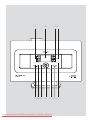
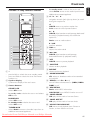
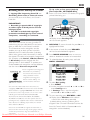
Controls on the Station ( front
panel)
81
–
1 SAME ARTIST
–
–
–
–
HD: plays all the tracks of current artist
SAME GENRE
HD: plays all the tracks of current genre
–
MENU
enters or exits setup menu
–
3 / 4
HD: skips/searches tracks/passage backward/
forward (in playback screen); fast scrolls the
option list
Radio: tunes to radio stations
–
2 / OK
confirms selection
–
OK
HD: starts or pauses playback
shows status of Station
3 MUSIC FOLLOWS ME
–
–
HD: moves music playback from Station to
Center, or from Center to Station
9 MUTE
DBB (Dynamic Bass Boost)
turns the bass enhancement on (DBB1, DBB2,
DBB3) or off
0 SOURCE
–
INCR. SURROUND
selects surround sound effect
–
VIEW
toggles playback display and previous option list
4 ACTIVE
–
1
HD: returns to previous option lists
Radio: enters the list of preset stations
SMART EQUALIZER
HD: selects match sound setting for current
genre
2 Display
–
–
–
/ 2 / 3 / 4
navigation controls (left, right, up, down) to scroll
through the option list
–
–
switches the sound off temporarily
selects sound source HD, Radio or AUX
! STANDBY-ON/ ECO POWER
–
–
press briefly to switch Station on or
to standby mode;
press and hold to switch Station to Eco Power
mode or on
HD/CD/AUX: lights up green when Center and
Station are connected (after you have switched
on Station)
5 IR
–
sensor for the infrared remote control
Helpful hints: Always point the remote control
towards this sensor.
6 VOLUME -, +
–
adjusts the volume level
7 STOP
–
stops playback
Downloaded From DvDPlayer-Manual.com Philips Manuals
14
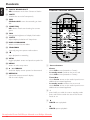
Center’s 2-way remote control
–
In standby mode: switches the set on and
selects Radio source or the audio input from an
additional connected appliance
41
•
1
2
3
4
–
–
–
–
–
–
/ 2 / 3 / 4
navigation controls (left, right, up, down) to scroll
through the option list
1
HD/CD: returns to previous option lists
Radio: enters the list of preset stations
3 / 4
HD/CD: skips/searches tracks/passage backward/
forward (in playback screen); fast scrolls the
option list
Radio: tunes to radio stations
2 / OK
confirms selection
VOL +, adjusts the volume level
≥
5
§
6
∞
≤
6
–
7
6 4/¢
£
™
¡
)
(
SMART EQ
SAME ARTIST
*
&
8
9
0
!
@
#
$
%
^
5
–
HD/CD: skips/searches tracks/passage
backward/forward (in playback screen)
7 ÉÅ
–
HD/CD: starts or pauses playback
8
SHUFFLE
selects random playback
–
9 REPEAT
1y
–
–
press briefly to switch the set to standby mode
press and hold to switch the set to Eco Power
mode or on
–
selects continuous playback
0
MARK/UNMARK
CD: selects or deselects tracks to be recorded
on hard disk
–
2 Synchro display
!
–
–
synchronous display of the set’s status
3 Source buttons
–
–
–
–
–
CD/MP3-CD
selects CD source
In standby mode: switches the set on and selects
CD source.
HARDDISK
selects HD source
In standby mode: switches the set on and
selects HD source
TUNER/AUX
selects Radio source or the audio input from an
additional connected appliance
@
–
–
#
–
$
–
%
–
DBB(Dynamic Bass Boost)
turns the bass enhancement on (DBB1, DBB2,
DBB3) or off
RDS/NEWS
Radio: selects RDS information
HD/CD/AUX: turns NEWS function on or off
SAME GENRE
HD: plays all the tracks of current Genre
SAME ARTIST
HD: plays all the tracks of current Artist
MUSIC FOLLOWS ME
HD: moves music playback from Center to
Station, or from Station to Center
Downloaded From DvDPlayer-Manual.com Philips Manuals
15
English
Controls
Controls
English
^
–
&
–
*
–
(
–
)
–
¡
–
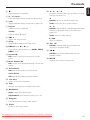
MUSIC BROADCAST
HD: broadcasts music from Center to Station
Station’s remote control
MUTE
switches the sound off temporarily
REC
CD/Radio/AUX: starts the recording to hard
disk
™
SMART EQ
HD: selects match sound setting for current
genre
)
1
2
¡
3
4
(
DIM
changes the brightness of display illumination
5
*
SLEEP
adjusts/displays/switches off sleep timer
6
7
&
™ INCR. SURROUND
–
selects surround sound effect
£
PROGRAM
manually programs preset radio stations
–
≤
–
8
^
%
$
#
Same Artist Same Genre
0
Smart EQ
@
Ç
stops playback or recording
9
!
∞ VIEW
–
toggles playback screen and previous option list
§ MENU
–
enters or exits setup menu
1
Source buttons
–
–
Center
selects HD source (located on Center)
In standby mode: switches the set on and
selects HD source (located on Center)
≥3
–
/ 4 SCROLL
scroll the display screen upward or downward
• REFRESH
–
sychronize remote control’s display
with the set’s display
–
–
2
–
–
3
Tuner/Aux
selects Radio source or the audio input from an
additional connected appliance
In standby mode: switches the set on and
selects Radio source or the audio input from an
additional connected appliance
y
press briefly to switch the set to standby mode
press and hold to switch the set to Eco Power
mode or on
2
–
HD/CD: starts playback
–
Å
HD/CD: pauses playback
Downloaded From DvDPlayer-Manual.com Philips Manuals
16
4Ç
(
–
–
stops playback or recording
53
–
/ 4 Scroll
scroll the display screen upward or downward
6 View
–
toggles playback display and previous option list
–
–
7 Repeat
–
selects continuous playback
selects random playback
–
–
2 / OK
confirms selection
8 VOL +, –
adjusts the volume level
9 Sleep
–
ajusts/displays/switches off sleep timer
0 DBB(Dynamic Bass Boost)
–
turns the bass enhancement on (DBB1, DBB2,
DBB3) or off
! Smart EQ
–
HD: selects match sound setting for current
genre
@ Music Follows Me
–
HD: moves music playback between Center and
Station
#
Same Artist
HD: plays all the tracks of current Artist
–
1
HD/CD: returns to previous option lists
Radio: enters the list of preset stations
3 / 4
HD/CD: skips/searches tracks/passage backward/
forward (in playback screen); fast scrolls the
option list
Radio: tunes to radio stations
–
Shuffle
–
1 / 2 / 3 / 4
navigation controls (left, right, up, down) to scroll
through the option list
)à/
–
¡
–
á
HD/CD: searches track passage backward/
forward (in playback screen)
O, P
HD/CD: skips tracks backward/forward (in
playback screen)
™ MUTE
–
switches the sound off temporarily
Same Genre
–
HD: plays all the tracks of current Genre
$
Incr. Surr.
selects surround sound effect
–
%
Dim
–
changes the brightness of display illumination
^
RDS/News
–
Radio: selects RDS information
–
HD/CD/AUX: turns NEWS function on or off
&
Program
–
manually programs preset radio stations
*
Menu
enters or exits setup menu
–
Downloaded From DvDPlayer-Manual.com Philips Manuals
17
English
Controls
Installation
English
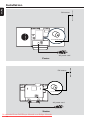
FM antenna
ETHERNET
R
L
R
L
AUX
IN
75
LINE
OUT
FM ANTENNA
75 Ω FM ANTENNA
VOLTAGE
SELECTOR
NOT FOR ALL
VERSIONS
AC power cord
Center
FM antenna
75 Ω FM ANTENNA
AC power cord
Station
Downloaded From DvDPlayer-Manual.com Philips Manuals
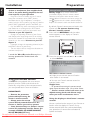
18
Placing Center and Station
Rear connections
With the detachable stands and by-packed wall
mounting kits, WACS700 Center and Station
allow you to place them in two ways: on
desktops with stands or on walls without
stands.
Warning:
Never make or change connections with
the mains supply switched on.
English
Installation
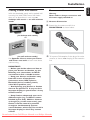
A Antenna Connection
1
Extend the wire antenna and fit it to
FM ANTENNA as shown below.
(on desktops with stands)
or
(on walls without stands)
See Appendix: How to mount your Center
and Station onto walls to learn more about
wall mounting
2
To improve FM reception, fit the plug of the wire
antenna, as shown, into the plug of the extension
line
IMPORTANT!
– Before you decide where and how to
place your Center and Station, try the
following rear connections and Wi-Fi
connection to find a suitable location.
– Keep your Center and Station away
from the source of interference
(microwave ovens, DECT phones,
bluetooth devices, cordless phones,
other Wi-Fi products, etc.)
– Avoid placing your Center or Station
close to the plasma TV. It may result in
improper display on your Center’s 2-way
remote control.
– Keep Stations adequately apart or in
different angles (e.g. in different rooms
blocked by one wall). Within a distance
and angle (e.g. in the same room), your
Center’s remote control is powerful
enough to simultaneously operate
several Stations, which may also result in
improper display on the 2-way remote
control.
Downloaded From DvDPlayer-Manual.com Philips Manuals
19
Installation
English
3
4
Extend the extension line and move it in
different positions for optimal reception (as far
away as possible from the TV, VCR or other
radiation sources)
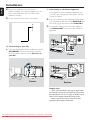
C Connecting an additional appliance
Fix the extension line’s end to the ceiling
1
It is possible to use an additional appliance, e.g.
TV, VCR, Laser Disc player, DVD player with the
Center or Station.
2
Insert the red plug of the red/white audio cables
(not supplied) to the red socket AUX IN R and
the white plug to the white socket AUX IN L.
Connect the other end of the audio cables to
the AUDIO OUT terminals of the additional
appliance
ETHERNET
R
L
R
L
AUX
IN
75
LINE
OUT
FM ANTENNA
VOLTAGE
SELECTOR
R
NOT FOR ALL
VERSIONS
L
AUX
IN
B
Connecting to your PC
● Connect the supplied Ethernet cable to Center’s
ETHERNET and your computer’s Ethernet
port. For details, see the manual Connect to
your PC
R
L
R
L
Center
AUX
IN
LINE
OUT
R
L
AUX
IN
R
L
R
L
AUX
IN
LINE
OUT
Center
Station
Helpful hints:
– If the connected device has only a single audio
out terminal, connect it to the AUX IN left terminal.
Alternatively, you can use a “single to double” cinch
cable, but the output sound still remain mono.
– Always refer to the owner’s manual of other
equipment for complete connection.
Downloaded From DvDPlayer-Manual.com Philips Manuals
20
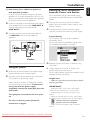
D Connecting to an additional appliance
Setting up Wi-Fi connection
between Center and Station
with powerful speakers
To enjoy the sound effect brought by powerful
speakers on an external appliance, e.g. a hi-fi mini
system, use red/white audio cables (not supplied)
to connect Center with the appliance.
1
2
Insert the red plug of the red/white audio cables
(not supplied) to the red socket LINE OUT R
and the white plug to the white socket
LINE OUT L
Wi-Fi connection starts automatically when
you power up WAC700 Center and WAS700
Station
1
2
Connect the other end of the audio cables to
the AUX IN terminals of the additional
appliance
R
L
R
L
The first time you set up Wi-Fi connection,
place Center and Station side by side on a flat
and firm surface
First, connect the Center to power supply,
and then, connect the Station to power supply
Center/Station:
➜ The screen lights up. Auto installation/
connection starts
➜ You will enter HD (Harddisk) mode when
the installation/connection is finished
ETHERNET
AUX IN
English
Installation
AUX
IN
75
LINE
OUT
FM ANTENNA
VOLTAGE
SELECTOR
R
NOT FOR ALL
VERSIONS
L
LINE
OUT
Center
3
Using AC power
1
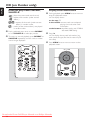
2
Make sure all the connections have been made
before switching on the power supply
Connect the AC power cord to the wall socket.
This switches on the power supply
When Center or Station is switched to standby,
it is still consuming some power. To disconnect
the system from the power supply
completely, remove the power plug from the
wall socket.
The type plate is located on the rear of the
set.
For users in the U.K.: please follow the
instructions on page 2.
Relocate Center and Station as desired: plug
and stream
● Simply unplug your Center or Station and
power them up in other rooms.
➜ You will be able to stream the harddisk music
between Center and Station
Helpful hints:
– Make sure you have powered up Center before
powering up Station.
IMPORTANT!
– Avoid thick walls. Your Center and Station
should never be blocked by 2 or more walls.
– Avoid placing the sets close to large metal
objects.
– Adjust the location of your Center and Station
according to the reception status of Wi-Fi signals.
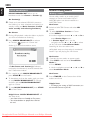
– indicates maximum reception
– indicates minmum reception
– WACS700 do not support range expander
devices.
Downloaded From DvDPlayer-Manual.com Philips Manuals
21
Installation
English
If there is interference from neighborhood,
such as the pause during playback, the sets’
slow response to your operation
– Keep the Center or Station at least 3 meters
away from microwave ovens, DECT phones,
bluetooth devices (e.g. headphones, a computer
mouse), wireless access points (e.g. routers), cordless
phones, Wi-Fi compatible printers and PDAs, etc..
– Use the WEP* key when connecting your Center
and Station to an existing wireless PC network.
Refer to the owner’s manual of your router and
Connect to your PC: Option 2.
– Change the operating channel of your Center
and Station when connecting them to an existing
wireless PC network. To learn about how to change
channels, see the manual Connect to your PC:
Option 2.
– If possible, change the operating channels of the
other Wi-Fi devices at your home.
– Turn the above devices in different directions to
minimize interference.
* stands for Wired Equivalent Privacy. It is a
security protocol for wireless local area
network
Using the remote control
WACS700 are equipped with two remote
controls, one for Center and the other for
Station. By using either of the remote controls,
you can operate both Center and Station.
IMPORTANT!
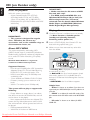
– Remove the protective
plastic tab before using the
Station’s remote control.
– Always point the remote
control directly towards IR area on the
Center or Station you wish to operate.
– Some functional keys on Center’s remote
control are exclusively used for Center (for
example, CD/MP3-CD, MARK/UNMARK,
MUSIC BROADCAST etc.)
Preparation
Using Center’s remote control
Battery usage: As a remote control with
synchronous display, Center’s remote control
consumes more power than normal remote
controls. When its batteries are low or empty, the
icon appears on the remote control’s display.
Replace the batteries with new alkaline batteries.
1
2
By default, Center’s remote control works with
Center only. To operate Station using
Center’s remote control,
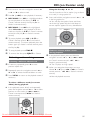
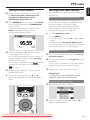
Press and hold REFRESH until the select
screen appears on the display of Center’s
remote control
Press the navigation controls 3 or 4 and 2
to select Station
On Center’s remote control:
➜ Display shows current status of Station
after Station is connected
➜ You can use Center’s remote control to
operate Station now
Helpful hints:
– To operate Center using the remote control
again, repeat the above steps 1-2 to select Center.
– Center’s remote control will return to its
default setting (works with Center only)
when you insert new batteries into it.
Using the display on the Center’s remote
control
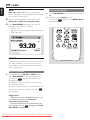
You can synchronize the status of your Center or
Station onto the display of Center’s 2-way
remote control. With the synchronized display,
your operation of remote control becomes
quicker and easier.
Downloaded From DvDPlayer-Manual.com Philips Manuals
22
Note:
– Avoid placing your Center or Station close to the
plasma TV. It may resuit in improper display on
your Center’s remote control.
– If you switch on your Center or Station using the
STANDBY-ON/ ECO POWER button on the
set, press REFRESH on Center’s remote control
to synchronize the remote control’s display.
– The display supports 6 European languages:
English, French, Spanish, Dutch, Italian and German
English
Preparation
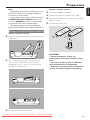
Station’s remote control:
1
2
3
4
Press and hold 1 as indicated
Simultaneously, pull the battery tray at 4
Remove the old battery and put a new CR2025
battery in place
Put back the battery tray
To replace the remote controls’ batteries
Center’s remote control:
1
2
Open the battery compartment and remove the
old batteries
1
➠
3
CR 2
02
5
LI
TH
IUM
2
3
1
2
3
Insert 4 batteries type R03 or AAA into the
remote control with the correct polarity as
indicated by the "+" and "-" symbols inside
the battery compartment
CAUTION!
– Remove batteries if they are
exhausted or will not be used for a long
time.
– Do not use old and new or different
types of batteries in combination.
– Batteries contain chemical substances,
so they should be disposed of properly.
Put back the compartment door
Downloaded From DvDPlayer-Manual.com Philips Manuals
23
Preparation
English
Using the navigation controls
When selecting options on the set’s screen, you
often need to use the navigation controls 1 / 2
/ 3 / 4.
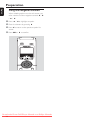
1
2
3
4
Press 3 / 4 to highlight an option
Enter its submenu by pressing 2
Press 1 to return to the previous option list
screen
Press OK or 2 to confirm
Downloaded From DvDPlayer-Manual.com Philips Manuals
24
Switching to power-saving mode
Switching to standby/on and
selecting functions
1
2
In the power-saving Eco power mode, the set’s
display and Wi-Fi connection are turned off. The
Center’s harddisk also stops working. When you
switch Center to Eco power, it is impossible to
move music between Center and Station or
import music from PC to Center.
When the set is on, press STANDBY-ON/
ECO POWER to switch it to standby (or y
on the remote control)
➜ Display shows GoodBye. Then,
Center: ➜ The screen dims out. Display shows
Station Status screen and the number of
stations found
1
Station: ➜ Display shows Center Status
screen and the number of centers found
➜ The Center Status screen is empty if no
center is found
2
To switch on, press STANDBY-ON/ ECO
POWER on the set
➜ The set switches to the last source selected
To select your function, press SOURCE once
or more on the set (or HARDDISK, CD/
MP3-CD, TUNER/AUX on the remote
control)
● On Station’s remote control, press Center to
select HD source (music stored on Center)
To switch on, press and hold STANDBY-ON/
ECO POWER (or y on the remote control)
or press and hold SOURCE on the set
➜ The set switches to the last source selected
Helpful hints:
– In the standby/Eco power mode, the settings of
networking, sound, display, language and CD
recording, the tuner presets, and the volume level
(maximum: the moderate level) will be retained in
the set’s memory.
OR
On the remote control, press the source button
(e.g. HARDDISK, CD/MP3-CD, TUNER/
AUX, Center).
3
When the set is on, press and hold STANDBYON/ ECO POWER to switch it to Eco
power (or y on the remote control)
➜ The display is switched off
Auto-standby
● When the set has reached the end of playback/
recording and remains in the stop position for
more than 5 minutes, the set will switch to
standby automatically to save power.
Helpful hints:
– CD/MP3-CD source is only available on Center.
Volume control
1
2
Check the playback starts
Adjust the volume with VOL +/- buttons
➜ Display shows the volume bar, indicating the
volume level
Downloaded From DvDPlayer-Manual.com Philips Manuals
25
English
Basic functions
Basic functions
English
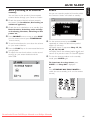
MUTE
Bass adjustment
During playback, you can temporarily switch off
the sound without switching off the set.
1
2
Press MUTE to switch off the sound
appears. Playback continues
➜ The icon
without sound
To switch on the sound, press MUTE again or
adjust the volume with VOL +/– You can also switch on the sound by activating
MUSIC BROADCAST on the Center.
disappears
➜ The icon
SMART EQ
SAME ARTIST
● Press DBB (Dynamic Bass Boost) once or
more to select your option: DBB OFF (by
default), DBB 1, DBB 2 or DBB 3
● To select Treble/Bass options:
1
2
3
4
Press MENU to enter the MENU screen
Use the navigation controls 3 or 4 and 2
to select Settings
Press 3 or 4 and 2 to select Treble/Bass
Press 1 / 2 / 3 / 4 to select your options:
Treble (+3 to -3), Bass (+3 to -3)
Helpful hints:
– Some discs might be recorded in high
modulation, which causes a distortion at high
volume. If this occurs, switch off DBB or reduce
the volume.
Sound control
Equalizer
Equalizer enables you to select predefined
sound settings.
1
2
3
4
Press MENU to enter the MENU screen
Use the navigation controls 3 or 4 and 2
to select Equalizer
Press 3 or 4 and 2 to select Rock,
Pop (default), Jazz, Neutral, Techno,
Classical or Bass/Treble
Press OK or 2 to confirm
Incredible surround
● Press Incr. Surr. once or more to turn the
surround sound effect on or off
➜ Display shows IS ON or IS OFF
SMART EQ
Downloaded From DvDPlayer-Manual.com Philips Manuals
26
SAME ARTIST
Selecting languages
Display adjustment
You can adjust the display’s backlight and
contrast settings
1
2
3
4
Press MENU to enter the MENU screen
Use the navigation controls 3 or 4 and 2
to select Settings
Press 3 or 4 and 2 to select Display
Press 1 / 2 / 3 / 4 to select your
options:
English
Basic functions
1
2
3
4
Press MENU to enter the MENU screen
Use the navigation controls 3 or 4 and 2
to select Settings
Use the navigation controls 3 or 4 and 2
to select Language
Press 3 or 4 and 2 to select:
English, French, Spanish, Dutch, Italian
and German
Backlight:
Press 3 or 4 and 2 to select on or off
● You can also turn the backlight on or off by
pressing DIM on the remote control
SMART EQ
SAME ARTIST
Contrast:
Press 1 / 2 to reduce or enlarge the contrast
Downloaded From DvDPlayer-Manual.com Philips Manuals
27
HD
English
Playing Harddisk (HD)
On WAC700 Center is located a 40GB
hard disk, where music is centrally stored.
Via Wi-Fi, all the stored music can be
streamed and played on Station.
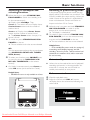
1
Check the Center or Station is switched on or
to standby
● For Station: also check the Center is switched
on or to standby (See Basic functions)
2
Press SOURCE once or more to select HD
(on Center’s remote control, press
HARDDISK on Station’s remote control, press
Center)
➜ Display shows HD and the categories of your
music library Playlists, Artists, Albums,
Genres, All tracks
➜ Demo tracks are stored in Playlists
): custom collection of your
Playlists(
favorite tracks sorted by the playlists’ name in
alphanumeric order
Artists (
): collection of albums sorted by
the artists’ name in alphanumeric order
Albums (
4
Press the navigation controls 3 or 4 and 2
to select your option
Press 2 (or OK) to start playback, if necessary
● Press OK on a highlighted artist, genre or album
to start playback from the beginning of the item
(orÉÅ on Center’s remote control; the Play
keyÉ on Station’s remote control)
➜ The playback screen shows:
on the top: your HD option (e.g. Playlist, Artist);
in the middle: current track name, elapsed
playing time and some track information;
at the bottom: equalizer setting and, if DBB is
activated, DBB setting.
5
): albums sorted by the albums’
name in alphanumeric order
): artists’ album collection sorted
Genres (
by music style
All tracks (
3
6
To pause playback, press OK (orÉÅ on
Center’s remote control; Å on the Station’s
remote control). To resume playback, press the
button again (on Station’s remote control, press
the Play keyÉ)
To stop playback, press STOPÇ
Selecting and searching
): tracks sor ted by the tracks’
name in alphanumeric order
Selecting a different album or track
1
2
3
If necessary, repeatedly press 1 to enter
previous option lists
Repeatedly press the navigation controls 3 or
4 and 2 to select the desired album or track.
Press VIEW to return to the playback screen, if
necessary
Downloaded From DvDPlayer-Manual.com Philips Manuals
28
To select a different track in current
album during playback
● In the playback screen, briefly and repeatedly
press the navigation controls 3 or 4 to select
previous or next tracks (or 4 or ¢ on
Center’s remote control; O, P on Station’s
remote control)
English
HD
Selecting tracks of a particular artist
● During playback, press SAME ARTIST
➜ Playback of current artist’s tracks continues
after current track
Selecting tracks of a particular genre
● During playback, press SAME GENRE
➜ Playback of current genre’s tracks continues
after current track
Different play modes: REPEAT,
SHUFFLE
– plays the current track continuously
Using the fast skip 3 or 4
– repeats all the tracks (under current artist,
genre or album )
Use this function to find an option (e.g. an album
or a track) in a long option list
– repeats all the tracks (under current
artist, genre or album) in random order
● Press and hold the navigation controls 3 or 4
in the long option list
➜ You will skip the options faster and faster
➜ At the high speed skip, the initial letter of
current options appears for easy identification
– tracks (under current artist, genre or
album) are played in random order
1
2
During playback, press once or more REPEAT
or/ and SHUFFLE to select play modes
To return to normal playback, press REPEAT or
SHUFFLE repeatedly until the various modes
are no longer displayed
SMART EQUALIZER
This function enables you to playback music of
current genre with the match sound settings.
Finding a passage within a track
during playback
1
2
In the playback screen, press and hold the
navigation controls 3 or 4 (or 4 or ¢
on Center’s remote control; à / áon
Station’s remote control)
➜ The HD plays at a high speed
● During playback, press SMART EQUALIZER
➜ The icon
appears if SMART
EQUALIZER is activated
● To deactivate SMART EQUALIZER, adjust
the sound settings (DBB, Treble/Bass setting,
Incr. Surr. or Equalizer)
➜ The icon
disappears
When you recognize the passage you want,
release 3 or 4 (or 4 or ¢ on Center’s
remote control; à / áon Station’s remote
control)
➜ Normal playback resumes
Downloaded From DvDPlayer-Manual.com Philips Manuals
29
HD
English
5
6
SMART EQ
1
On Center’s hard disk., you can create up to 99
playlists consisting of your favorite tracks in the
desired sequence.
Helpful hints:
– You can also create your playlists on your
computer via Philips Digital Media Manager
(DMM). For details, see DMM’s help file. Refer to
the manual Connect to your PC to learn how to
install DMM software.
1
2
3
4
Repeat steps 3, 4 , 5 to select and store all
desired tracks in this way
Deleting a playlist, album or
track
SAME ARTIST
Creating Playlist: custom
collection of your favorite music
Use the navigation controls 3 or 4 and 2
to select the desired playlist
➜ Display shows: Track(s) added to playlist
Use the navigation controls 3 or 4 and 2 to
enter a category (Playlist, Artists, Albums, Genres,
All tracks)
● If necessary, press 3 or 4 and 2 once or
more to enter the album/track list
2
3
4
Press 3 or 4 to highlight a selected playlist,
album or track
To select Delete Playlist, Delete Album or
Delete Track
a. Press MENU to enter the MENU screen
b. In the MENU screen, use the navigation
controls 3 or 4 and 2 to select.
Press 3 or 4 and 2 to select Yes
Press MENU to enter the MENU screen
Use the navigation controls 3 or 4 and 2
to select Create Playlist
➜ A new playlist is created. Display shows:
Playlist created. To add tracks, select
“ Add to Playlist”
Use the navigation controls 1 / 2 / 3 / 4 to
highlight the desired track/album (see Selecting
and searching)
To select Add to Playlist,
a. Press MENU to enter the MENU screen
b. In the MENU screen, use the navigation
controls 3 or 4 and 2 to select
➜ A list of playlists appears
Downloaded From DvDPlayer-Manual.com Philips Manuals
30
Building music library on Center
1
Printed side
this way
Pr
IMPORTANT!
– Recording is permissible if copyright
or other rights of third parties are not
infringed upon.
– For CDs encoded with copyright
protection technologies by some record
companies, recording is restricted.
in
Music recognition technology and
related data are provided by
Gracenote®. Gracenote is the
industry standard in music
recognition technology and
related content delivery. For
more information, visit www.
gracenote.com.
CD and music-related data from Gracenote, Inc.,
copyrightC 2000-2005 Gracenote. Gracenote CDDB®
Client Software, copyright 2000-2005 Gracenote. This
product and service may practice one or more of the
following U.S. Patents: #5,987,525; #6,061,680;
#6,154,773, #6,161,132, #6,230,192, #6,230,207,
#6,240,459, #6,330,593, and other patents issued or
pending. Services supplied and/or device manufactured
under license for following Open Globe, Inc. United
States Patent 6,304,523.
Gracenote and CDDB are registered trademarks of
Gracenote. The Gracenote logo and logotype, and the
“Powered by Gracenote” logo are trademarks of
Gracenote.
t e d Si
➜ Display shows: Reading CD
➜ List of tracks appears
Ripping CDs
With WAC700 Center, you can rip audio CD
tracks from your pre-recorded CDs and store
them as MP3 files in the Center’s hard disk.
The Gracenote® music recognition service
enables your set to look up from its built-in
database the CD track information (including
album, artist, genre, track information). It allows
the ripped CD tracks to be properly categorized
(for example, under Artists, Albums, Genres
or All tracks) and also merged with the
existing tracks in the harddisk. To update your
Gracenote® music recognition service database,
see the manual Connect to your PC.
de
By ripping CDs, Importing from PC and
Recording from radio or external source
you can build your music library on Center’s
hard disk.
To rip a disc at fast speed (default)
(For audio CDs, MP3/WMA CDs)
Insert a CD into Center’s CD loader, CD graphic
printed side facing you
● MP3/WMA: To enter the track list, press 2 on a
highlighted file folder
2
3
In the screen of track list, press RECORD
➜ List of track checkboxes appears
Press MARK•UNMARK once or more to
select or deselect the tracks to be recorded
● To select/deselect all tracks, press and hold
MARK• UNMARK
4
5
To select Rec quality,
a. Press MENU
b. Use the navigation controls 3 or 4 and 2 to
enter Settings menu
c. In Settings menu, use the navigation
controls 3 or 4 and 2 to select
To star t recording, press RECORD or OK
➜ Display shows CD-Rec and the album
name of the track being recorded.
(a default album name, e.g. Album_001, is
assigned if the CD track information cannot be
found in Center’s built-in Gracenote® music
recognition service database)
Downloaded From DvDPlayer-Manual.com Philips Manuals
31
English
HD
HD
English
Important!
– It takes some time to convert the ripped tracks
into MP3 files. During the conversion, the
ACTIVE indicator lights up green.
– If power failure occurs during the conversion,
you will lose all the ripped tracks.
6
7
➜ Center will return to CD mode when ripping
is finished
➜ All the functions are available at this time
To rip another CD, repeat the step 1-5 above
(Up to 8 CDs can be ripped consecutively)
To stop recording, press STOP/Ç
To rip a disc during playback
(for audio CDs only)
● During playback, press RECORD.
➜ Recording and playback start from current
track
Or
1 Follow the Step 1-3 under To rip a disc at fast
speed
2 Select Normal speed by
a. Press MENU
b. Use the navigation controls 3 or 4 and 2 to
enter Settings menu
c. In Settings menu, use the navigation
controls 3 or 4 and 2 to select Rec
speed
d. Press 3 or 4 and 2 to select
3 To start recording, press RECORD
➜ Recording and playback start
➜ Display shows the album name of the track
being recorded
Importing from PC
The supplied PC Installer CD contains Digital
Media Manager (DMM) software. It will help
you organize the music files on your PC and
import them to WAC700 Center. For details,
see DMM’s help file. Refer to the manual
Connect to your PC to learn how to install
DMM software.
Recording from Radio or External
source
A maximum of 3-hour recording can be made
from the radio or external source.
1
2
3
1
2
Press RECORD
➜ Recording starts
To stop recording, press STOP/Ç
➜ The recording is saved as a file under RADIO
or AUX in Albums. A file name is given, e.g.
Radio_xx, or Aux_xx (where xx denotes a
number)
To find your recording
1
To find your ripped tracks
You can find and playback the ripped tracks in
Albums.
In Radio mode, tune to the desired radio
station (See Tuner,Tuning to radio stations)
or In AUX mode, start playback from the
external source (see AUX)
2
Select HD source
In Albums, use the navigation controls 3 or 4
and 2 to enter RADIO or AUX
Select HD source
In Albums, use the navigation controls 3 or 4
and 2 to enter the album of recorded tracks
– Only the completely ripped track can be
found on Center’s harddisk
Downloaded From DvDPlayer-Manual.com Philips Manuals
32
Display track information
1
During playback, press VIEW once or more to
enter the playback screen
➜ The display shows:
on the top: HD
in the middle: current track name, elapsed
playing time and some track
information
at the bottom: equalizer setting and, if DBB is
activated, DBB setting.
2
3
Press 2
➜ The display shows track information (e.g.
track name, file type, file size, bit rate of mp3/
wma files).
● MUSIC FOLLOWS ME will be automatically
deactivated if you do not activate MUSIC
FOLLOWS ME on the second unit within 5
minute
On the second unit (Center or Station),
where music will continue
4
5
Press VIEW once or more to return to the
playback screen
Press MUSIC FOLLOWS ME within 5
minutes after MUSIC FOLLOWS ME is
activated on the first unit
➜ Selected music stops on the first unit and
continues on the second unit. The icon
disappears
➜ Selected play modes (e.g.
,
)are
retained on the second unit (see Different
play modes: REPEAT, SHUFFLE)
Moving between Center and
Station
Up to 5 WAS700 Stations can be to connected
to WAC700 Center. Via Wi-Fi, music can move
between Center and Stations. Even in different
places of your house, you and your family will
enjoy and share music with ease.
Check you have selected HD, CD or AUX
source on the second unit or have switched the
unit to standby mode (see Basic functions,
Switch on/to standby and selecting
functions)
6
To stop MUSIC FOLLOWS ME, press
STOP/Çon the second unit
MUSIC FOLLOWS ME
As you move around at home, let music move
around you, from Center to Station or
from Station to Center.
SMART EQ
SAME ARTIST
On the first unit (Center or Station), where
music will leave:
1
2
During HD playback, select the album or playlist
you wish to play on the second unit (see
Selecting and searching, Selecting a
different album or track)
Press MUSIC FOLLOWS ME to activate
➜ The icon
appears. Playback continues
● To start playback from the beginning on the
second unit, first pressÉÅ on the Center’s
remote control (or Å on the Station’s remote
control, and then, press MUSIC FOLLOWS
ME
3
Helpful hints:
After MUSIC FOLLOWS ME is activated on
the second unit, on the first unit:
– make sure the first unit is switched on or to
standby mode.
– you can select other tracks or source for
playback.
To deactivate MUSIC FOLLOWS ME, press
MUSIC FOLLOWS ME again or other
functional keys (e.g. SLEEP, RDS/NEWS
or 1 / 2 / 3 / 4)
Downloaded From DvDPlayer-Manual.com Philips Manuals
33
English
HD
HD
English
Station management
MUSIC BROADCAST
Adding a station
MUSIC BROADCAST allows you to
broadcast music from Center to Station (s).
You can add a station to an existing Wi-Fi
network of Center and Station. Up to 5
WAS700 stations can be connected to a
WAC700 Center.
On Center
On Station(s)
1
Check you have selected HD/AUX source on
the Station(s) or have switched the Station(s) to
standby mode (see Basic functions, Switch
on/to standby and selecting functions)
On Center
2
3
1
2
During HD playback, select the album or playlist
you wish to broadcast to Station(s)
Press MUSIC BROADCAST to activate
appears on Center and
➜ The icon
Station(s). 5-second countdown starts
Switch on WAC700 Center and select HD
source
To select Add New Station on Center
a. Press MENU
b. Use the navigation controls 3 or 4 and 2 to
enter Station Mgnt menu
c. In Station Mgnt menu, use the
navigation controls 3 or 4 and 2 to select
➜ You will enter the Installation Mode.
Searching for the new station start
➜ Playback stops on the previously associated
Station if you are playing the HD source
3
4
➜ On Center and Station (s): Selected
music plays simultaneously several seconds after
the 5-second countdown
4
For a station to exit MUSIC BROADCAST,
press STOP/Ç on the Station
● To broadcast music to the station again, you have
to stop MUSIC BROADCAST on Center
and then, activate MUSIC BROADCAST
again on Center
5
To stop MUSIC BROADCAST, press STOP/
Ç on the Center
On Station
Connect the new station to power supply
Select AUX mode and enter Installation
Mode by:
a. Press MENU
b. Use the navigation controls 3 or 4 and 2 to
select Installation Mode
On Center
5
Press STOP/Ç on the Center when all the
stations are found
Helpful hints:
– To change your setting of Wi-Fi connection, see
the manual Connect to your PC.
Helpful hints: MUSIC BROADCAST will
also stop when:
– you switch Center to Standby or Eco power;
– the selected album or playlist has reached
the end.
Downloaded From DvDPlayer-Manual.com Philips Manuals
34
Firmware
Deleting a station
1
2
3
4
1
2
3
Switch on WAC700 Center and select HD
source
2
Restoring previous firmware
After the Center’s firmware is upgraded, you can
restore it to its previous version as desired.
Press 3 or 4 and 2 to select the station you
wish to delete
1
Press 3 or 4 and 2 to select Yes
2
Viewing station status
3
4
To select Station Status on Center
a. Press MENU
b. Use the navigation controls 3 or 4 and 2 to
enter Station Mgnt menu
c. In Station Mgnt menu, use the
navigation controls 3 or 4 and 2 to select
➜ On the Center ‘s display shows the list of
stations connected or ever connected
Press 2 to view the connection information
Information about your
WACS700
1
Upgrading firmware
The supplied PC Installer CD contains Digital
Media Manager (DMM) software. It will help
you get the upgrades for WAC700 Center. For
details, see DMM’s help file. Refer to the manual
Connect to your PC to learn how to install
DMM software.
To select Delete Station on Center
a. Press MENU
b. Use the navigation controls 3 or 4 and 2 to
enter Station Mgnt menu
c. In Station Mgnt menu, use the navigation
controls 3 or 4 and 2 to select
➜ On the Center ‘s display shows the list of
connected stations
Switch on WAC700 Center and select HD
source
Switch on WAC700 Center (or WAS700
Station) and select HD source
To select Information on Center or Station
a. Press MENU
b. Use the navigation controls 3 or 4 and 2 to
enter Information menu
➜ The display shows: the name of Center or
Station, firmware version and free harddisk space
(for Center only)
English
HD
5
In Center’s HD mode, press MENU
Use the navigation controls 3 or 4 and 2 to
enter Settings menu
Press 3 or 4 and 2 to select Firmware
Press 3 or 4 and 2 to select Restore
firmware
Press 3 or 4 and 2 to select Yes.
Re-establishing Wi-Fi connection
After upgrading or restoring the Center’s
firmware, you need to re-establish the Wi-Fi
connection between Center and Stations.
On Center,
● Select HD mode and then, enter Installation
Mode by:
a. Press MENU
b. Use the navigation controls 3 or 4 and 2 to
enter Station Mgnt menu
c. In Station Mgnt menu, use the
navigation controls 3 or 4 and 2 to select
Add New Station
➜ Searching for Stations starts
On the Stations,
● Select AUX mode and enter Installation
Mode by:
a. Press MENU
b. Use the navigation controls 3 or 4 and 2 to
select Installation Mode
On Center,
● Press STOPÇto exit Installation
Mode when Center has found all the stations
Downloaded From DvDPlayer-Manual.com Philips Manuals
35
CD (on Center only)
English
IMPORTANT!
– Make sure that the file names of MP3
files end with .mp3.
– For DRM protected WMA files, use
Windows Media Player 10 (or later) for
CD burning/conversion. Visit www.
microsoft.com for details about Windows
Media Player and WM DRM (Windows
Media Digital Rights Management).
Discs for playback
With this system, you can play
– all pre-recorded audio CDs (CDDA)
– all finalized audio CD-Rs and CD-RWs
(12cm CD and 8cm 185 or 200 MB CD)
– MP3WMA-CDs (CD-Rs/CD-RWs with MP3/
WMA files)
Playing discs
1
About MP3/ WMA
Insert a CD/CD-R(W) into Center’s CD slot
load, with the graphics facing you
● Make sure you have removed any other disc
from the loader
Printed side
this way
Pr
The music compression technology MP3
(MPEG1 Audio Layer 3) and WMA (Windows
Media Audio) significantly reduces the digital data
of an audio CD while maintaining CD quality
sound.
2
Check the Center is switched on or to standby
(See Basic functions, Switching on/to
standby and selecting functions,
Switching to Eco power/ on)
in
de
IMPORTANT!
– This system is designed for regular
discs. Therefore, do not use any
accessories such as disc stabilizer rings or
disc treatment sheets, etc.
t e d Si
Windows Media Audio® is a registered
trademark of Microsoft Corporation.
Supported formats:
– Disc format ISO9660, Joliet, UDF (created on
Adaptec Direct CD v5.0 and Nero Burning
ROM UDF v5.5) and multi-session CDs
– MP3 bit rate (data rate): 32-320 Kbps and
variable bit rate
– 12-cm 650Mb and 700Mb CD-R/ CD-RWs
– Directory nesting up to a maximum of 8
levels
– WMA v7 or earlier (max. 192Kbps cbr)
The system will not play or support the
following:
• Empty albums: an empty album is an album
that does not contain MP3/WMA files, and will
not be shown in the display.
• Non-supported file formats are skipped. This
means that e.g.: Word documents .doc or MP3
files with extension .dlf are ignored and will not
be played.
• DRM protected WMA files
• WMA files in Lossless or VBR format
➜ Reading CD is displayed as the player scans
the contents of a disc.
➜ Audio CD: the list of tracks appears (track
information appears if it is available after the
lookup of Gracenote Music Recognition Service
database)
➜ MP3/WMA: the list of albums appears
Helpful hints:
– “Others” is shown as an album, if you have not
organized your MP3/WMA files into any albums on
your disc.
– “CDDA” is an album for audio CD tracks if the
disc contains both CD Audio tracks and MP3/WMA
files.
– “All tracks” is shown as an album for MP3/
WMA CD.
Downloaded From DvDPlayer-Manual.com Philips Manuals
36
3
4
Press once or more the navigation controls 3
or 4 and 2 to select a track
Press 2 (or OK) to start playback, if necessary
● MP3/WMA: Press OK on a highlighted album
to star t playback of the album (orÉÅ on
Center’s remote control; the Play keyÉ on
Station’s remote control)
● MP3/WMA: Press OK on the highlighted
album All tracks to start playback of all the
tracks on the disc (orÉÅ on Center’s remote
control; the Play keyÉ on Station’s remote
control)
5
6
7
Using the fast skip 3 or 4
Use this function to find an option (e.g. an album
or a track) in a long option list.
● Press and hold the navigation controls 3 or 4
in the long option list
➜ You will skip the options faster and faster
➜ At the high speed skip, the initial letter of
current options appears for easy identification
To pause playback, press OK (orÉÅ on
Center’s remote control; Å on the Station’s
remote control). To resume playback, press the
button again (on Station’s remote control, press
the Play keyÉ)
To stop playback, press STOPÇ
Finding a passage within a track
during playback
To remove the disc, press EJECT on Center
1
Selecting and searching
Selecting a different album/track
1
2
3
If necessary, repeatedly press 1 to enter
previous option lists
Repeatedly press the navigation controls 3 or
4 and 2 to select the desired album or track.
Press VIEW to return to the playback screen, if
necessary
2
In the playback screen, press and hold the
navigation controls 3 or 4 (or 4 or ¢
on Center’s remote control; à / áon
Station’s remote control)
➜ The CD plays at a high speed
When you recognize the passage you want,
release 3 or 4 (or or 4 or ¢ on Center’s
remote control; à/ áon Station’s remote
control)
➜ Normal playback resumes
To select a different track (in current
album) during playback
● In the playback screen, briefly and repeatedly
press the navigation controls 3 or 4 to select
previous or next tracks (or 4 or ¢ on
Center’s remote control; O, P on Station’s
remote control)
Downloaded From DvDPlayer-Manual.com Philips Manuals
37
English
CD (on Center only)
CD (on Center only)
English
Different play modes: REPEAT,
SHUFFLE
Display track information
1
– plays the current track continuously
– repeats all the tracks (under current
album )
– repeats all the tracks (under current
album) in random order
– tracks (under current album) are played
in random order
1
2
During playback, press once or more REPEAT
or/ and SHUFFLE to select play modes
on the top: CD
in the middle: current track name, elapsed
playing time and some track
information
at the bottom: equalizer setting and, if DBB is
activated, DBB setting.
2
To return to normal playback, press REPEAT or
SHUFFLE repeatedly until the various modes
are no longer displayed
3
SMART EQ
During playback, press VIEW once or more to
enter the playback screen
➜ The display shows:
Press 2
➜ The display shows track information (e.g.
track name, file type, file size, bit rate of mp3/
wma files)
Press VIEW once or more to return to the
playback screen
SAME ARTIST
Downloaded From DvDPlayer-Manual.com Philips Manuals
38
1
2
Tuning to radio stations
Storing preset radio stations
Check the set is switched on or to standby
(See Basic functions, Switching on/to
standby and selecting functions,
Switching to Eco power/ on)
You can store up to 40 preset radio stations in
the memory.
Press SOURCE once or more to select Radio
(on the remote control, press TUNER/AUX
once or more)
➜ Playback screen appears. Display shows:
Radio, radio station frequency and If
programmed, a preset number
English
FM radio
Autostore: automatic programming
Autostore automatically starts programming
radio stations from preset 1. Available stations
are programmed in the order of radio
frequencies: RDS stations followed by FM
stations. Maximum 10 RDS stations will be
stored (from Preset 01 to Preset 10).
● To select Autostore radio,
a. Press MENU
b. Use the navigation controls 3 or 4 and 2 to
select
➜ Display shows: Autostore Please wait...
➜ After all stations are stored, the first autostore
preset station will then automatically play
3
4
Press and hold 3 or 4 until the frequency
in the display starts running
➜ The radio automatically tunes to a station of
sufficient reception. Display shows searching
during automatic tuning
➜ If a station is received in stereo,
is shown
➜ When you are receiving an RDS station,
is shown
Repeat step 3 if necessary until you find the
desired radio station
Manual programming
1
2
Tune to your desired radio station (see Tuning
to radio stations)
On the remote control, press Program to store
the station
➜ The station is stored in the 1st vacant preset
position. Display shows its preset number
3
Repeat steps 1-2 to store other stations
Helpful hints:
– If you store more than 40 stations, the new
station will replace the 1st preset station.
● To tune to a weak station, press 3 or 4
briefly and repeatedly until optimal reception is
found
To listen to a preset station
1
2
Press 1 to enter the list of presets
Use the navigation controls 3 or 4 and 2 to
select the desired station
Downloaded From DvDPlayer-Manual.com Philips Manuals
39
FM radio
English
RDS
RDS (Radio Data System) is a service that
allows FM stations to send additional information
along with FM radio signal
1
2
Tune to the desired RDS radio station (see
Autostore: automatic programming)
Deactivating NEWS
● Press RDS/NEWS again on the remote control
or
● Switch the set to Radio source
➜ The icon
disapears and NEWS OFF is
displayed briefly
Press RDS/NEWS repeatedly to view the
following information (if available):
– Station name
– program type (for example: News, Pop Music)
– RDS radio text
SMART EQ
NEWS
While listening to HD, CD or AUX source, you
can activate NEWS. The set will tune to the
news station if the related signals are received
from a RDS station.
Activating NEWS
● During playback in HD, CD or AUX source,
press RDS/NEWS on the remote control
➜ The icon
appears and NEWS ON is
displayed briefly
➜ Playback continues when the set scans the
first 10 preset stations
➜ When news transmission is detected, the set
will switch to the news station. The icon
starts flashing
Helpful hints:
– Make sure you have stored RDS stations in the
first 10 preset locations (see Autostore:
automatic programming).
– If no news transmission is detected during the
disappears and NO
set’s scanning, the icon
RDS NEWS is displayed.
Downloaded From DvDPlayer-Manual.com Philips Manuals
40
SAME ARTIST
AUX (Listening to an external
source)
SLEEP
You can set a certain period of time after which
the Center or Station will switch to standby.
You can listen to the sound of the connected
external device through your Center or Station.
1
2
3
4
5
6
Check the external device has been properly
connected. (See Installation, Connecting an
additional appliance)
Check the set is switched on or to standby (See
Basic functions, Switching on/to standby
and selecting functions, Switching to Eco
power/ on)
Press SOURCE once or more to select AUX
(on the remote control, press TUNER/AUX
once or more)
1
To avoid noise distor tion, turn down the volume
on your external device
Press the PLAY key on the connected device to
start playback
To adjust the sound and volume, use the sound
controls on your external device and the
WACS700
2
On the remote control, press SLEEP
repeatedly to select the desired time period
options (in minutes):
➜ Display shows in sequence: Sleep 15, 30,
45, 60, 90, 120, Off
➜ Display shows the selected option briefly and
Z
returns to its previous status. The icon Z appears
To view the time countdown to the standby
mode, press SLEEP again
To deactivate the sleep timer, press
SLEEP until Sleep Off is displayed
or
Press STANDBY-ON/ ECO POWER to
switch the set to standby (or y on the remote
control)
SMART EQ
SAME ARTIST
Downloaded From DvDPlayer-Manual.com Philips Manuals
41
English
AUX/ SLEEP
Reset
English
If both Center and Stations are reset:
Reset
If desired, you can restore your Center or
Stations to their default setting (including the
network setting).
1
2
3
4
5
6
Check the set is switched on (See Basic
functions, Switching on/to standby and
selecting functions, Switching to Eco
power/ on)
● Do as you did in the first-time Wi-Fi connection
(see Installation, Set up Wi-Fi connection
between Center and Station)
7
On Center, press STOPÇto exit Installation
Mode when all the Stations are found
Press MENU to enter the MENU screen
Use the navigation controls 3 or 4 and 2
to enter Settings
Use the navigation controls 3 or 4 and 2
to enter Restore settings
Press 3 or 4 and 2 to select Yes
➜ The set is rebooted. Language selection
screen appears
Select your desired language: English, French,
Spanish, Dutch, Italian and German
➜ The set enters Installation Mode
➜ The search for Center or Stations starts. The
Wi-Fi connection is being re-established
If the Center is reset and Stations are
not reset:
● On the Stations, select AUX mode
and enter Installation Mode by:
a. Press MENU.
b. Use the navigation controls 3 or 4 and 2 to
select Installation Mode
➜ The Stations start to connect Center
If a Station is reset and the Center is
not:
● On the Center, select HD mode and then, enter
Installation Mode by:
a. Press MENU
b. Use the navigation controls 3 or 4 and 2 to
enter Station Mgnt menu
c. In Station Mgnt menu, use the
navigation controls 3 or 4 and 2 to select
Add New Station
➜ Searching for Stations starts
Downloaded From DvDPlayer-Manual.com Philips Manuals
42
General
AC Power
WAC700 ..................................................... 220V ±10%
WAS700 ...................................................... 220V ±10%
Power consumption
Active
WAC700 ............................................................... < 35W
WAS700 ................................................................ < 25W
Standby
WAC700 ............................................................... < 18W
WAS700 ................................................................ < 14W
Eco Power Standby
WAC700 .................................................................. < 1W
WAS700 ................................................................... < 1W
Dimensions (w x h x d)
WAC700 .................................. 608 x 303 x 175mm
WAS700 ................................... 360 x 283 x 128mm
Weight
WAC700 ................................................................... 7.7 kg
WAS700 .................................................................... 4.2 kg
Amplifier
Output power
WAC700 .............................. 2 x 15W + 2 x 25 W
WAS700 ................................... 2 x 5W + 1 x 10W
Frequency response ............... 50-16,000Hz, - 3dB
S/N ratio ................................................. ≥ 72 dBA (IEC)
Input sensitivity
AUX/CDR IN ................................................ 500mV/1V
Output
Impedance speakers
(WAC700) ..... ≥16 Ω (Panel) ≥8 Ω (Subwoofer)
(WAS700) ...... ≥6 Ω (Panel) ≥12 Ω (Subwoofer)
Impedance headphones .......................... 32Ω -150Ω
Wireless
Wireless standard .................................................................
.......... 802.11g, backwards compatible to 802.11b
Wireless security ...................................................................
.................................... WEP (64 or 128bit), WPA-PSK
Frequency range 2412-2462 MHz (CH1-CH11)
Tuner
Wave range
FM .......................................................... 87.5-108 MHz
Number of presets ................................................ 40x
FM Antenna/cable ...........................................................
............... COAX / T-antenna (75Ω IEC-connector)
HDD/CD player (wac700 only)
Frequency range ........................ 30-18000 Hz, -3 dB
S/N ratio ................................................ ≥ 72 dBA (IEC)
MPEG 1 Layer 3 (MP3-CD) .......... MPEG AUDIO
MP3-CD bit rate ...................................................................
.......................... 32-256 kbps, VBR, 128 kbps advised
WMA bit rate ......................................... up to 160kbps
Sampling frequencies ....................... 32, 44.1, 48 kHz
HDD Storage capacity (WAC700 only) .. 40GB*
Recording quality ...................... 128kbps or 160kbps
Recording speed ....................................................... 1x, 4x
* Actual formatted capacity will be less
Specifications and external appearance are
subject to change without notice.
Downloaded From DvDPlayer-Manual.com Philips Manuals
43
English
Specifications
Troubleshooting
English
WARNING
Under no circumstances should you try to repair the system yourself, as this will
invalidate the warranty. Do not open the system as there is a risk of electric shock.
If a fault occurs, first check the points listed below before taking the system for repair. If
you are unable to remedy a problem by following these hints, consult your dealer or
Philips for help.
Problem
Solution
Wi-Fi connection:
During the first-time setup, Station’s
display shows “Searching for Center”.
✔ Check you have placed the Center and Station
side by side on a flat and firm surface
✔ Check you have connected the Center to power
supply
✔ When adding a new station, check your center is
in Installation mode (See HD, Station
management)
✔ Turn off the wireless router nearby if there is
difficulty in connecting your Center and Station.
I get interference on my wireless (WiFi)
link between center and station.
The WACS 700 operate in the 2.4GHz radio
frequency spectrum. Many other household/IT
devices also operate in the frequency spectrum,
for example: microwave ovens, Dect phones,
bluetooth devices like bluetooth headphones,
computer mouse, wireless routers, cordless
phones, WiFi compatible printers, PDAs.
These devices can interfere with the WiFi link
between Center and Station, resulting in such
interference as the pause during playback , the
set’s slow response to your operation. The
severity of interference varies depending on the
extent of radiation from the device and the
strength of Wi-Fi signals in the position.
✔
✔
✔
✔
✔
Remote control:
When I am using the Center’s 2-way
remote control, it starts to show
"connecting ....connecting" on the display
endlessly.
When you read this message on the 2-way
remote control, there could be the following
interference on your remote control:
1) interference signals from the Plasma TV screen
(if this device is turned on);
2) conflicting IR signals from a nearby WAS700
Station
If you are playing the set, stop playback and take
the appropriate measures as follows:
Keep the Center or Station at least 3 meters
away from such devices.
Use the WEP key when connecting your
Center and Station to an existing wireless PC
network. Refer to the owner’s manual of your
router and Option 2 in Connect to your
PC.
Change the operating channel of your Center
and Station when connecting them to an existing
wireless PC network. To learn about how to
change channels, see the manual Connect to
your PC.
If possible, change the operating channels of
the other Wi-Fi devices at your home.
Turn the devices in different directions to
minimize interference.
✔ Check your plasma TV is turned off
✔ Check you have placed two IR operated devices
( Station) in separate rooms wherever possible.
Downloaded From DvDPlayer-Manual.com Philips Manuals
44
Stations react when you operate
Center’s remote control
✔ Center’s remote control is powerful enough to
“x” flashes on the sychro display of
Center’s remote control
✔ Signal error. Check you have pointed the remote
After the set is switched on, nothing
appears on the sychronous display of
Center’s remote control
✔ You switched on the set by using the control on
The remote control does not function
properly.
✔ Remove the protective plastic tab before using
operate several Stations within certain distance
or angle. Check you have placed the Stations in
different rooms or place Stations in different
angles
✔ Use Station’s remote control or the controls on
the set.
control toward the IR area of the set you wish
to operate
the set instead of center’s remote control.
Press REFRESH on center’s remote control to
synchronize its display.
the Station’s remote control.
✔ Reduce the distance between the remote
control and the set.
Insert the batteries with their polarities
(+/– signs) aligned as indicated.
✔ Replace the batteries.
✔ Point the remote control directly towards the IR
sensor.
✔
CD
“No Disc”/ “Cannot read CD” is
displayed
✔ Insert a suitable disc.
✔ Check if the disc is inserted with graphics facing
front
✔ Wait until the moisture condensation at the lens
has cleared.
✔ Replace or clean the disc, see “Maintenance”.
✔ Use a finalized CD-RW or CD-R.
Sound cannot be heard or is of poor
quality.
✔ Adjust the volume.
✔ Disconnect the headphones.
✔ Switch off MUTE.
The disc skips tracks
✔ Replace or clean disc
✔ Switch off SHUFFLE
Sound skips during MP3/WMA playback
✔ MP3 file made at compression level exceeding
320kbps. Use a lower compression level to rip
audio CD tracks.
✔ Replace or clean disc.
Downloaded From DvDPlayer-Manual.com Philips Manuals
45
English
Troubleshooting
Troubleshooting
English
Tuner
Radio reception is poor
✔ If the signal is too weak, adjust the antenna or
connect an external antenna for better
reception.
✔ Increase the distance between the set and your
TV or VCR.
There will be interference on the radio
reception whenever my Center or
Station is near the PC.
Such interference happens to most of the built-in
tuner product.
✔ Install the supplied FM wire antenna for better
reception.
✔ Keep your Center or Station at least 1 meter
away from PC.
Wall mounting
How do I mount the Center or Station
onto walls?
✔ Use the by-packed wall mounting kits. It is
recommended you get a qualified person to fix
the mounting brackets safely onto your walls
before you mount the Center or Station. For
details, refer to the Appendix : How to
mount your Center or Station onto Walls
Downloaded From DvDPlayer-Manual.com Philips Manuals
46
How to mount your Center and
Station onto walls
IMPORTANT!
– The wall mounting instructions are for
the use of the qualified wall mounting
person only!
– Ask a qualified person to help you
with the wall mounting, which includes
drilling holes on the wall, fixing the
mounting brackets to the wall, and
mounting the sets onto the brackets.
What’s in the supplied mounting kits
For Center:
1 x mounting bracket
English
Appendix
Preparation
● To find a suitable location for mounting, try
your necessary rear connections and the Wi-Fi
connection between Center and Station (see
the chapter Installation).
● Ask a qualified person to help you with the
wall mounting, who should:
– to avoid unexpected damage, learn about the
piping, wiring and other relevant information
inside your walls;
– according to your walls’ materials, decide what
type of screws you need to fix the mounting
brackets and hold the weight of a Center or
Station;
– according to the drilling requirements, choose
suitable drilling tools;
– take other precautions necessary for the wall
mounting work.
Mounting your Center or Station
1
Align the bracket (for Center or Station) in the
chosen location on a wall. Use a pencil to mark
the drilling positions.
3 x screws (for Center
mounting)
1 x protective card sheet
Center
2
3
For Station:
1 x mounting bracket
4
Station
Drill holes as marked.
Fix the brackets to the wall using suitable screws
(not supplied).
As shown, fasten the supplied screws to your
Center or Station using a screwdriver
2 x screws (for Station
mounting)
What else you’ll need
Center
– 8 x screws for fixing the Center’s bracket
– 6 x screws for fixing the Station’s bracket
– Drilling tools (e.g. electric drill)
Downloaded From DvDPlayer-Manual.com Philips Manuals
Station
47
Appendix
English
5
To detach the stand from Center or Station,
a. As shown, hold down the Lock•unlock
button(s).
b. Move out the stand to detach.
7
As shown, hook and mount Center or Station
in place.
Center
Center
Station
6
Station
On Center, insert the supplied protective card
sheet where the stand was installed.
Downloaded From DvDPlayer-Manual.com Philips Manuals
48