1
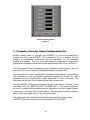
10. Computer Interface using DynaHost Software
DynaHost software provides serial communication between a PC or laptop and the
AF900PC. DynaHost will run on a PC with 133MHz Intel Pentium processor, 32
MB of RAM, and a minimum of 100MB of hard disk space. DynaHost is compatible
with Windows 95/NT/98/2000/XP.
The AF900PC must be connected via a standard RS-232, 9-pin, male-female,
serial
communication
cable.
The
HOST
software
communicates
to the AF900PC via Dynalink, Dynalco Control’s ASCII-based serial communication
protocol.
When the program is running there are two major sections: the Control Panel and
the Current Screen.
10.1 Control Panel Specifications
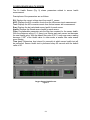
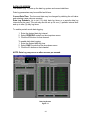
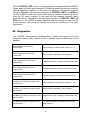
The Control Panel is located at the top of the application screen on the laptop or
PC and allows the user to view the status of the host application, showing the
communication settings and status.
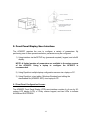
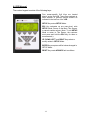
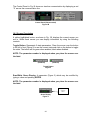
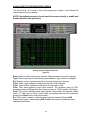
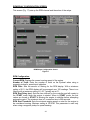
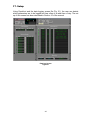
Control Panel (Connected)
Figure 1A
The Control Panel above (Fig. 1A) shows an active communication which allows
the user to navigate through the multiple screens (Main, O2 Health, Learn, Data
log, Trip 1, Trip 2, AI Config, Pre-Cat Cfg, Post-Cat Cfg, RPM Cfg and DynaTrend).
The Control Panel also contains the basic commands:
• Power: Closes the host application.
• Upload: Uploads the current configuration of the AF900PC to a configuration file
(.spc).
• Download: Downloads a configuration file (.spc) to the AF900PC.
• Store: Stores the current configuration.
• Recall: Recalls the last configuration stored.
• Cmd: Sends a command to the AF900PC.
• Resp: Shows the response to a command sent to the AF900PC.
• Screen Buttons: Show the current screen being displayed and allows you to
switch to other screens.
19