1
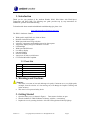
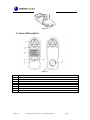
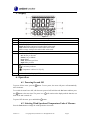
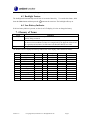
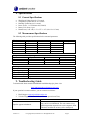
Ambient Weather WM-3 Handheld Wind Meter with Temperature and Humidity User Manual Table of Contents 1. Introduction ..................................................................................................................................... 2 1.1 Parts List................................................................................................................................. 2 2. Warnings and Cautions ................................................................................................................... 2 3. Getting Started ................................................................................................................................ 2 4. General Description ........................................................................................................................ 3 5. Display ............................................................................................................................................ 4 6. Operation......................................................................................................................................... 4 6.1 Powering On and Off ............................................................................................................. 4 6.2 Selecting Wind Speed and Temperature Units of Measure .................................................... 4 6.3 Backlight Feature ................................................................................................................... 5 6.4 Low Battery Indicator ............................................................................................................ 5 7. Glossary of Terms ........................................................................................................................... 5 8. Specifications .................................................................................................................................. 6 8.1 General Specifications............................................................................................................ 6 8.2 Measurement Specifications................................................................................................... 6 9. Troubleshooting Guide.................................................................................................................... 6 10. Accessories ................................................................................................................................. 7 11. Liability Disclaimer .................................................................................................................... 7 12. Warranty Information ................................................................................................................. 7 Battery Recycle Statement ...................................................................................................................... 8 Version 1.0 ©Copyright 2014, Ambient LLC. All Rights Reserved. Page 1 1. Introduction Thank you for your purchase of the Ambient Weather WM-3 Wind Meter with Wind Speed, Temperature and Wind Chill. The following user guide provides step by step instructions for installation, operation and troubleshooting. To download the latest manual and additional troubleshooting tips, please visit: http://ambientweather.wikispaces.com/wm3 The WM-3 wind meter features: Wind speed in mph, Km/h, m/s, ft/min or Knots Beaufort wind scale bar graph Wind Speed min/max/average selection “Open Air” temperature and humidity sensors for fast response Temperature display in degrees Fahrenheit or Celsius LED backlight Wind Speed HOLD feature Low battery display Lanyard included Soft case included Auto power off with override feature CE Certified & RoHS Compliant 1.1 Parts List QTY 1 1 1 1 1 Item Wind Meter CR2032 3 Volt Lithium Battery Lanyard Soft Carrying Case User Manual 2. Warnings and Cautions Warnings: This meter is accurate at low and mid-range air speeds. Consistent use at very high speeds (example, from the window of a fast moving car) will damage the impeller’s bearing and reduce accuracy. This meter is not a personal safety device 3. Getting Started 1. Open the battery cover, as shown in Figure 1. Turn counter clockwise to open. 2. Inset the included 3V CR2032 lithium cell battery, with the (+) terminal up. 3. Replace the cover by turning clockwise. All of the LED segments will briefly light up. Version 1.0 ©Copyright 2014, Ambient LLC. All Rights Reserved. Page 2 Figure 1 4. General Description Figure 2 No 1 2 3 4 5 6 7 8 Version 1.0 Description Vane Impeller (wind speed) Temperature and humidity sensors LCD with backlight Wind Speed Units and temperature selection button Power button Set button Battery cover Lanyard attachment point ©Copyright 2014, Ambient LLC. All Rights Reserved. Page 3 5. Display Figure 3 No 1 2 3 4 5 6 Description Beaufort Scale Primary Display for Air Velocity (wind speed) HOLD: Displayed when meter is on hold mode MAX: Maximum wind speed recorded while in this mode MIN: Minimum wind speed recorded while in this mode AVG: Average wind speed recorded while in this mode Temperature Display (℃/℉ switchable) Air Velocity measurement options: m/s: Meters per Second ft/min: Feet per Minute knots: Knots km/h: Kilometers per Hour mph: Miles per Hour Auto Power Off Function is overridden Low battery indicator Temperature is below 32 ℉ (0 ℃) 7 Relative Humidity Display (%RH) 6. Operation 6.1 Powering On and Off To power ON the meter, press the after 10 minutes. button. To save power, the meter will power off automatically To override the Auto Power Off, with the meter powered off, hold down the Set button and then press the button at the same time. The power icon down or the unit is turned off. To power OFF the meter, press and hold the will remain on the display until the batteries run button. 6.2 Selecting Wind Speed and Temperature Units of Measure Press the Units button to change the wind speed units of measure. Version 1.0 ©Copyright 2014, Ambient LLC. All Rights Reserved. Page 4 Press and Hold the Units button to change the temperature units of measure. 6.3 Backlight Feature The backlight will automatically turn off after 10 seconds of inactivity. To override this feature, hold down the Units button and then press the button at the same time. The backlight will stay on. 6.4 Low Battery Indicator If the low battery indictor is present, or there is no LCD display, it is time to change the battery. 7. Glossary of Terms Term Accuracy Beaufort Scale Range Definition Accuracy is defined as the ability of a measurement to match the actual value of the quantity being measured. The Beaufort Scale is an empirical measure for describing wind speed based mainly on observed sea conditions (on land it is categorized by the physical effects it has on vegetation and structures). Its full name is the Beaufort Wind Force Scale. Range is defined as the amount or extent a value can be measured. The Beaufort Scale is displayed on the top and left side of the display, and is defined as follows: No 0 1 2 3 4 5 6 7 8 9 10 11 12 Version 1.0 Description Calm Light air Light breeze Gentle breeze Moderate breeze Fresh breeze Strong breeze Near gale Gale Strong gale Storm Violent storm Hurricane force m/s 0-0.2 0.3-1.5 1.6-3.3 3.4-5.4 5.5-7.9 8.0-10.7 10.8-13.8 13.9-17.1 17.2-20.7 20.8-24.4 24.5-28.4 28.5-32.6 〉32.6 kts 0-1 1-3 4-6 7-10 11-16 17-21 22-27 28-33 34-40 41-47 48-55 56-63 >63 mph 0-1 1-3 4-7 8-12 13-18 19-24 25-31 32-38 39-46 47-54 55-63 64-72 >72 ©Copyright 2014, Ambient LLC. All Rights Reserved. km/h 0-1 1-5 6-11 12-19 20-28 29-38 39-49 50-61 62-74 75-88 89-102 103-117 >117 ft/min 0-58 59-314 315-668 669-1082 1083-1574 1575-2125 2126-2735 2736-3385 3386-4093 4094-4822 4823-5609 5610-6417 >6417 Page 5 8. Specifications 8.1 General Specifications Wind Speed Update Interval: 0.5 seconds Temperature Update Interval: 0.1 seconds Humidity Update Interval: 1 second Power Source: 1 x 3V lithium cell (CR2032) Battery Life: About 1 year Dimensions (L x W x H): 1.6” x 0.75” x 4.5” (40 x 19 x 115 mm) 8.2 Measurement Specifications The following table provides specifications for the measured parameters. Wind speed range: Unit Range M/s 0 ~ 30 Ft/min 0 ~ 5860 Knots 0 ~ 55 Km/hr 0 ~ 55 Mph 0 ~ 65 Resolution 0.1 19 0.2 0.2 0.2 Temperature and Humidity range: Unit Range °C -10 ~ 50 °F 14 ~ 122 %RH 20 ~ 90% Other specifications: Battery Operating temperature Operating humidity Current consumption Weight Threshold 0.1 39 0.1 0.3 0.2 Resolution 0.1 0.1 1 Accuracy ±5% Accuracy ±1 ±2 ±5% CR2032 2.0V -10 ~ 50°C (14 ~ 122℉) ≤ 90% About 2.5mA 60g 9. Troubleshooting Guide To download the latest manual and additional troubleshooting tips, please visit: http://ambientweather.wikispaces.com/wm3 If your question is not answered here, you can contact us as follows: 1. Email Support: [email protected] 2. Technical Support: 480-346-3398 (M-F 8am to 4pm Arizona Time) Problem Impeller appears imbalanced. Version 1.0 Solution It is normal for the impeller to oscillate as it comes to a stop, and it is not imbalanced. The unit contains a very small magnet that responds to the earth’s magnetic fields. This does not affect the accuracy of the wind speed ©Copyright 2014, Ambient LLC. All Rights Reserved. Page 6 Problem Solution readings and only appears when breaking or accelerating. This is normal for the vane to vibrate at high speed. Do not operate above 67 mph. Above 67 mph, the unit will display ---. The LCD display will not operate below approximately 14 °F. Use the warmth of your body or environment for use in cold weather conditions, or Battery is dead. Replace the battery. Vane is noisy at high speed. Display is dim or disappears. 1. The 10. Accessories The following software and hardware accessories are available for this weather station at www.AmbientWeather.com . Accessory Ambient Outdoors CR2032 3 Volt Lithium Button Cell Battery Description Standard CR2032 3 Volt Lithium Battery (1 battery) 11. Liability Disclaimer Please help in the preservation of the environment and return used batteries to an authorized depot. The electrical and electronic wastes contain hazardous substances. Disposal of electronic waste in wild country and/or in unauthorized grounds strongly damages the environment. Reading the “User manual” is highly recommended. The manufacturer and supplier cannot accept any responsibility for any incorrect readings and any consequences that occur should an inaccurate reading take place. This product is designed for use in the home only as indication of weather conditions. This product is not to be used for medical purposes or for public information. The specifications of this product may change without prior notice. This product is not a toy. Keep out of the reach of children. No part of this manual may be reproduced without written authorization of the manufacturer. Ambient, LLC WILL NOT ASSUME LIABILITY FOR INCIDENTAL, CONSEQUENTIAL, PUNITIVE, OR OTHER SIMILAR DAMAGES ASSOCIATED WITH THE OPERATION OR MALFUNCTION OF THIS PRODUCT. 12. Warranty Information Ambient, LLC provides a 1-year limited warranty on this product against manufacturing defects in materials and workmanship. This limited warranty begins on the original date of purchase, is valid only on products purchased and only to the original purchaser of this product. To receive warranty service, the purchaser must contact Ambient, LLC for problem determination and service procedures. Warranty service can only be performed by a Ambient, LLC. The original dated bill of sale must be Version 1.0 ©Copyright 2014, Ambient LLC. All Rights Reserved. Page 7 presented upon request as proof of purchase to Ambient, LLC. Your Ambient, LLC warranty covers all defects in material and workmanship with the following specified exceptions: (1) damage caused by accident, unreasonable use or neglect (lack of reasonable and necessary maintenance); (2) damage resulting from failure to follow instructions contained in your owner’s manual; (3) damage resulting from the performance of repairs or alterations by someone other than an authorized Ambient, LLC authorized service center; (4) units used for other than hobbyist use (5) applications and uses that this product was not intended and (6) extreme acts of nature, such as lightning strikes or floods. This warranty covers only actual defects within the product itself, and does not cover the cost of installation or removal from a fixed installation, normal set-up or adjustments, claims based on misrepresentation by the seller or performance variations resulting from installation-related circumstances. Battery Recycle Statement Recycle Rechargeable Batteries Recycle your old rechargeable batteries at one of the many collection sites in the U.S. and Canada. To find the site nearest you, visit www.call2recycle.org or call toll-free 1-877-2-RECYCLE. Version 1.0 ©Copyright 2014, Ambient LLC. All Rights Reserved. Page 8