1
6.0 Setting the Daily Alarm
Hold [M] during the Daily Alarm Mode to select
the setting display, the 'hour' digits will start
flashing.
[M]
[M]
6.1 Turn the Alarm and Chime ON/OFF
1.
2.
3.
4.
Alarm off / Chime off
Alarm on / Chime off
Alarm off / Chime on
Alarm on / Chime on
This icon will appear
when chime is on.
1
2
Press the [HR1]
with your index
finger for more
than 1 second.
8.0 Heart Rate Mode Display
Make sure
[HR2] on the
back of the
watch sits firmly
on your skin.
[M]
Press [S] or hold [S] to set ì hourî and ì minuteî .
There are 4 status can be This icon will appear
switched by pressing [S] : when alarm is on.
7.0 Heart Rate Mode
- Getting a Heart Rate Reading
NOTE: The user MUST input the "zone alert on/off",
"below zone limit" & "upper zone limit" into the watch,
please refer to chapter 5.0.
When zone alert is on,
4
3
"
"will flash
when you enter
Heart Rate Mode .
Hold [HR1]
for few
seconds
Below
zone
there are three possible results:
Bi-Bi will be heard for below zone.
No sound will be heard for in zone.
Bi-Bi-Bi will be heard for above zone.
In
zone
Above
zone
9 . 0 Potential Causes for NO Heart Rate
Reading or Long Response Time
1)
Cause: Dry skin.
Solution: Apply conductive gel or saliva thoroughly to
fingers and the wrist area. (Even water will help if
conductive gel is not available).
2)
Cause: Fingers are not placed firmly over the sensors.
Solution: Make sure fingers (not the tips) lay flat and
firmly over the sensors and the watch is placed
securely on the wrist. Do not use the very tips of your
fingers (e.g. visualize tip toeing with your fingertips).
Fingertips do not allow for enough contact, therefore,
electrocardiogram will not be picked up.
Icon is on when zone
alert is enabled.
Flashing follows
the heart rate
pulse.
100 beats
per minute
3)
Cause: Muscle tremors, caused by:
A) Pressing down too hard on the sensors with
fingertips. B) Person is in motion and hold the watch
in an awkward manner.
Solution: It is best to place your index finger on
the ''front'' contact [HR1]. This will ensure good and
consistent readings even while walking or jogging
with arms swung naturally.
10.0 Precautions for Water Resistance
& Battery
4)
Cause: Dead skin on the wrist.
Solution: Usually rubbing your skin with a towel will
help.
5)
Cause: A thin layer of body grease can insulate the
electrocardiogram signal from the back sensor on the
watch.
Solution: Wipe the wrist and the back of watch
[HR2] with a tissue or a soft towel.
6)
Cause: Hairy arms.
Solution: Apply conductive gel to the wrist area.
7)
Cause: Irregular heart beats.
Solution: N/A
It is difficult to consistently pick up a reading for those
with irregular heart beats.
Inconsistent response times are expected for those
with arrhythmia.
Water Resistance
Water damage may occur if the push buttons are pressed
under water. Should water or condensation appear in the
watch, please check the watch immediately, as corrosion of
electronic parts can occur inside the case.
Battery Life
The battery in your SOLUS watch is estimated to last for 2
years, depending on frequency and use of certain features.
Battery Replacement
If the display dims or the EL backlight is dim, you are
recommended to go to the authorized SOLUS service center
for correct battery replacement and power on set in order
to retain a valid warranty and avoid any damage on the water
resistance function.
WARNING!
Always keep watch batteries away from children. If
swallowed, contact a doctor immediately. Batteries contain
chemical substances. They should be disposed of properly
according to local regulations.
SM - 704.1
impact. The watch is designed to withstand impact under normal use. It
is advisable to subject it to severe impact or rough usage.
Thank you for purchasing this watch. With this watch, you can get 5) Clean your watch occasionally with a soft moistened cloth only.
Avoid using chemicals, especially soap as the waterproof gasket will
electrocardiogram heart rate without using a chest strap.
corrode. 6) For PU straps, please wash them with mild soapy water
Simply put the watch on your wrist, place your finger on the metal only and not to apply perfume or moisturizers around your wrist as the
contact located on the face of the watch, and read your heart rate in chemicals can erode them. 7) There may be discoloration for light
the digital window within seconds!
colors and transparent straps after normal wear for some time. An
original replacement on straps is possible to be re-ordered through an
authorized service center. 8) Store the watch in a dry place when it is
IMPORTANT Notes
1) Do not use this watch for commercial or professional purposes. not in use.
2) Make sure that you read this user manual thoroughly and fully
Heart Rate Mode
3.0 Specifications
understand the functions and limitations of this watch before using
Measuring range: 30 to 240
it. 3) This watch is a supplementary device for measuring heart
beats per minute
rate; it is not a substitute for medical devices. You should Current Time Mode
periodically compare the heart rate reading acquired by this watch Hour, minute and second
with the reading from your doctor. 4) Do not use heart rate 12 / 24 hour format selectable Others
5 ATM water resistance
measurement under water.
Hourly chime on the hours
1.0 General Guide
2.0 Care and Maintenance
Current Date Mode
Month and date
1) This watch contains electronic components. Never attempt to
open the case or remove the back cover. 2) Avoid exposing the Daily Alarm Mode
watch to extreme temperature, chemicals which will damage the Daily alarm: 1 daily alarm
watch. 3) Keep the watch away from the conditions of strong Alarm duration: about 30
electric field and static electricity. 4) Avoid rough usage or severe seconds
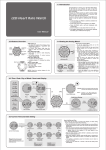
4.0 Functional Modes & Displays
3.1 Design of the Watch
[HR1]: Sensor 1
Hold [HR1] to enter
Heart Rate Mode .
[M]: Mode Button
Press to change modes .
Hold [M] to enter/exit
the setting display .
In the setting display, press
to select the next item.
Electro-luminescent backlight
[M]
Time
[M]
Date
Daily Alarm
hold
Time Mode
[M]
[M] DATE FORMAT
[S]: Toggle second/
day of week display
[M]
12/24 HOUR [M]
Hold [S]: Confirm second/
day of week display
SEC
[S]: Setup Button
Press to toggle items,
Hold [S] to confirm items.
Hold [M] to switch to the setting display,
the display will start flashing.
Press [U] or [D] to adjust,
then press [M] to confirm.
Hold [M] anytime to exit
the setting display.
[M]
Two alternative displays
in Current Time Mode
[EL]: Light Button
Press to turn ON
the EL backlight
for about 3 seconds.
*Water-related usage for 5 ATM:
Light spray perspiration, light rain,
bathing, etc
*The illumination provided by the
backlight may be hard to see when viewed
under direct sunlight
[HR2]: Sensor 2
When you wear the watch,
the sensor will be activated.
5.0 Setting the Current Time
& Heart Rate Zone Alert
SEC
DAY
BEEP ON/OFF
[M]
[M]
[M]
MINUTE
MONTH
[M]
[M]
ZONE ALERT ON/OFF
DOW
4.1 Power Saving Mode
During Date Mode , hold [M] for 4 seconds
to enter Power Saving Mode , LCD will be off .
Press any buttons to resume normal.
[M] ABOVE ZONE
[M] BELOW ZONE
[M]
WWW.SOLUSWATCH.COM
HOUR
YEAR
[M]