1
2.2.3
Data storage for further analysis
In case of water simulations a rule of thumb tells to sample coordinates each 0.3 ps. In
case of room-temperature ionic liquids 1 ps seems already sufficient and might be due to
the slow dynamics increased even more if disc space is an issue. For analysis of velocity
autocorrelation function and ionic conductivity the velocities of the system should be sampled
each 40 fs = 0.04 ps (according to Maginn, for 4 ns), be cautious, this fast results in several
GB of disk space needed per simulation.
2.3
Running replicas
There are three possibile ways to get a set of independet system configurations (replicas) for
improving analysis quality and covering the whole thermodynamic ensemble.
2.3.1
Independent initial configurations by different random seeds
Preparation of independent initial configurations by using different seeds with Packmol. Seed
numbers that have been tested so far are 191917, 171719, 151517, 191317, 111719. Any large
primary number should do the job as well.
2.3.2
Grabbing frames from a trajectory
For simulating replicas it might be useful to take the first sucessful production run and only
grep a few configurations out of it. While assigning random velocities and / or additional
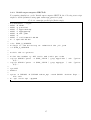
heating in many cases the configurations can be taken as independant. The following script
takes the .xtc files from a directory called ”anneal”. Then it greps coordinate files out of
these .trr files using the Gromacs tool trjconv. The resulting frames are stored with the given
name "$name"_rep.gro plus a running number, e.g. "$name"_rep0.gro, "$name"_rep1.gro,
"$name"_rep2.gro, etc.
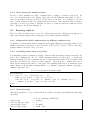
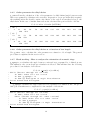
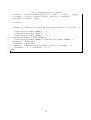
Code 19: grepreplicas.sh (Bash script)
1
2
3
4
5
# !/ bin / bash
for itrr in ’ ls ./ anneal /*. xtc ’; do
name = ’ echo $itrr | sed " s /. xtc // g " ’
echo 0$ ’\ n ’ q | trjconv -s " $name " . tpr -f " $name " . xtc -o "
$name " _rep . gro - sep -b 120 - dt 50
done
2.3.3
System heating
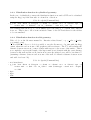
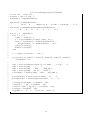
After the preparation of one coordinate file it is possible to heat the system using the annealing
algorithm.
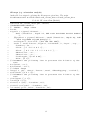
1
2
3
4
annealing
annealing_npoints
annealing_time
annealing_temp
Code 20: annealing (ASCII file)
= single
= 2
= 0 1000
= 1500 350
15