1
Assadaqah Althahabia for Trading and Importing
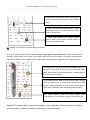
--------------------------------------------------------------------------------------------------------------------------------------------6. Press “DOWN” key this interface:
Temp.: 30.2℃
Status: Automatic
Now 0 Alarms
Check>>
Display inverter inner temperature, working state and how many alarms
currently.
No matter which panel you are operating now, press “ENTER” key to enter into “Input Password” (refer to
below interface 6).
7. Password:
Input Password
Showing password, default 4 zero. For user, no need to change
password.
0000
Press “ENTER” key 4 times, enter into system menu, there are 9 contents, each interface shows 3 contents.
8. System menu first interface:
==System Menu==
1. Work mode
2. ON/OFF
3. Parameters
Under System Menu, press “UP’’, “DOWN’’ to select your wanted
content, press “ENTER’’ key to enter into corresponding menu.
9. Press “DOWN” key to enter into system menu second interface:
==System Menu==
4. Reset
5. Reset password
6. Version
Under System Menu, press “UP’’, “DOWN’’ to select your wanted content,
press “ENTER’’ key to enter into corresponding menu.
Press “ESC” 2 times to System menu interfaces, press “UP” or “DOWN” to select your wanted content, then press “ENTER”
key to enter into corresponding parameter setting.
17