1
1. Getting Started
Guide to Names and Functions of Components
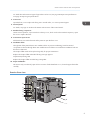
Guide to Components
• Do not obstruct the machine's vents. Doing so risks fire caused by overheated internal
components.
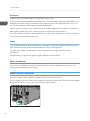
Exterior: Front view
7
6
8
9
5
4
3
2
1
10
BYK004
1. Tray 1
Up to 550 sheets of plain paper can be loaded.
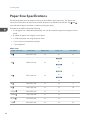
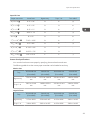
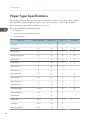
For details about the sizes and types of paper that can be used, see page 28 "Paper Size Specifications"
and page 30 "Paper Type Specifications".
2. Remaining paper indicator
Indicates the approximate amount of paper remaining in the tray.
3. Extender for the bypass tray
Pull this extender out when loading A5 or larger size paper in the bypass tray.
4. Bypass tray
Up to 100 sheets of plain paper can be loaded.
8