1
provide reasonable protection against harmful
interference when the equipment is operated in a
commercial environment. This equipment generates,
uses, and can radiate radio frequency
energy and, if not installed and used in accordance
with the instruction manual, may cause harmful
interference to radio communications. Operation of
this equipment in a residential area is likely to cause
harmful interference in which case the user will be
required to correct the interference at his own
expense.
Power Connections
Use a cord set consisting of a minimum 18 AWG
cord and grounding type attachment plug rated a
minimum of 15A, 250V. The cord set should have
the appropriate safety approvals for the country in
which the equipment will be installed and marked
HAR.
Mounting
The VC-24 was designed for wall mounting only.
Using the enclosed paper template, mark the locations
for the mounting screws on a plywood backboard
(minimum ½” thick). Insert screws and tighten to
within 1/8” of the surface. Hang the unit on the
screws, slide the unit left to the narrow end of the
slots and tighten screws firmly.
The VC-24 may be provided with one of the
following:
•
•
•
NEMA 5-15 cordset for North American use
CEE/7 cordset for Continental European use
BS1363 cordset for United Kingdom use
Connect cordset to unit via IEC 320 female connector located on one
end of cordset to IEC 320 male appliance coupler located on VC-24.
•
For 115 VAC use, verify fuse rating of 1 amp and voltage
selector switch displays 115 V.
•
For 230 VAC use, verify fuse rating of .5 amp and voltage
selector switch display 230 V.
•
After all required connections have been made, plug the cordset
into appropriate AC wall outlet.
Connections
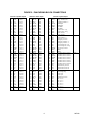
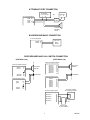
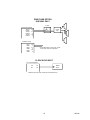
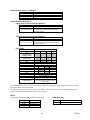
Mount (3) 66B type punchdown blocks on the
backboard near the VC-24 control unit. Make
connections to the punchdown blocks as specified in
Figure 2 - Punchdown Block Connections. (System
Inputs - Block P7, Speaker Outputs - Block P3,
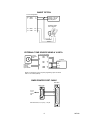
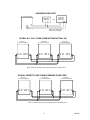
Switch Inputs - Block P6). Also refer to the
following diagrams for connections of each
application.
For United Kingdom use:
As the colors of the cores in the main lead may not
correspond with the colored markings identifying the
terminals in your plug, proceed as follows:
• The core which is colored green and yellow must
be connected to the terminal in the plug which is
marked with the letter E or by the earth symbol
(inverted Christmas tree), or colored green and
yellow.
• The core which is colored blue must be
connected to the terminal which is marked with
the letter N or colored black.
• The core which is colored brown must be
connected to the terminal which is marked with
the letter L or colored red.
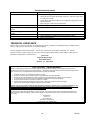
Setting Option Switches
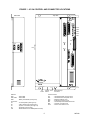
After all connections have been made, set the option
switches to fit the specific user requirements. Refer
to Figure 1 for location and Table 1 for the default
values of the various switches. Make changes as
required.
NOTE: This unit provides an option for
disabling Talkback Alert Tone and Repeating
Privacy Tones. Check local privacy
regulations prior to disabling these tones.
4
947226