1
LaCie DVD±RW Drive User’s Manual
FireWire
Table of Contents
page 1
Table of Contents
Foreword
Precautions
1. Unpacking Your LaCie Drive
1.1. Minimum System Requirements
1.1.1. Mac Users
1.1.2. Windows Users
2. Getting Connected
2.1 Install the Recording Software
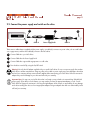
2.2 Connect the Power Supply and Switch On the Drive
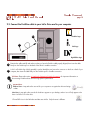
2.3 Connect the FireWire Cable to the Drive and to Your Computer
3. Using Your LaCie Drive
3.1. Supported DVD and CD Formats
3.1.1. CD and DVD Media Definitions
3.1.2. DVD-Video Zone
3.2. Inserting Discs
3.3. Ejecting Discs
3.4. Emergency Ejection of Discs
3.5. Accessing Discs
3.6. Writing Discs
4. Helpful Information
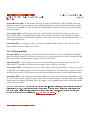
4.1. Advice for Optimizing FireWire Connections
4.1.1. What Is FireWire?
4.1.2. Disconnecting FireWire Devices
4.1.3. Data Transfers
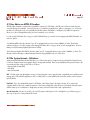
4.2 User Advice on MPEG-II Decoders
4.3 File System Formats - Definitions
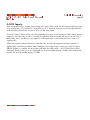
4.4 DVD Capacity
5. Troubleshooting
6. Contacting Customer Support
7. Warranty
2
4
6
7
7
8
9
10
11
12
13
13
14
15
16
17
17
18
18
20
20
20
21
22
23
23
24
25
30
32
LaCie DVD±RW Drive User’s Manual
FireWire
Foreword
page 2
Copyrights
Copyright © 2004 LaCie. All rights reserved. No part of this publication may be reproduced, stored in a retrieval system, or
transmitted in any form or by any means, electronic, mechanical, photocopying, recording or otherwise, without the prior
written consent of LaCie.
Trademarks
Apple, Mac, Macintosh and FireWire are registered trademarks of Apple Computer, Inc. Sony and iLink are registered
trademarks of Sony Electronics. Microsoft, Windows, Windows 98 SE, Windows Millennium Edition, Windows 2000 and
Windows XP are registered trademarks of Microsoft Corporation. All trademarks mentioned in this manual are the property
of their respective owners.
Changes
The material in this document is for information only and is subject to change without notice. While reasonable efforts have
been made in the preparation of this document to assure its accuracy, LaCie assumes no liability resulting from errors or
omissions in this document, or from the use of the information contained herein. LaCie reserves the right to make changes or
revisions in the product design or the product manual without reservation and without obligation to notify any person of such
revisions and changes.
Federal Communications Commission Radio Frequency Interference Statement (FCC)
WARNING: Changes or modifications to this unit not expressly approved by the
LaCie Optical Drive - FireWire - 5I4
party responsible for compliance could void the user’s authority to operate the
equipment. This equipment has been tested and found to comply with the limits for a
Tested To Comply
Class B digital device, pursuant to Part 15 of the FCC Rules. These limits are
With FCC standards
designed to provide reasonable protection against harmful interference when the
equipment is operated in a commercial environment. This equipment generates, uses,
FOR HOME OR OFFICE USE
and can radiate radio frequency energy, and if not installed and used in accordance
with the instructions, may cause harmful interference to radio communications. However, there is no guarantee that
interference will not occur in a particular installation. If this equipment does cause harmful interference to radio or television
reception, which can be determined by turning the equipment off and on, the user is encouraged to correct the interference
by one of the following measures:
• Reorient or relocate the receiving antennas.
• Increase the separation between the equipment and the receiver.
• Connect the equipment into an outlet on a circuit different from that to which the receiver is connected.
• Consult the reseller or an experienced radio/TV technician for help.
Shielded cables and I/O cards must be used for this equipment to comply with the relevant FCC regulations.
This device complies with Part 15 of the FCC rules. Operation is subject to the following two conditions: (1) this device may
not cause harmful interference, and (2) this device must accept any interference received, including interference that may
cause undesired operation.
LaCie DVD±RW Drive User’s Manual
FireWire
Foreword
page 3
Canada Compliance Statement
This Class A digital apparatus meets all requirements of the Canadian Interference-Causing Equipment Regulations.
Manufacturer’s Declaration for CE Certification
We hereby certify that this device is in compliance with both the EMC Directive (89/336/EEC) and the Low Voltage Directive
(73/23/EEC) issued by the Commission of the European Community.
Compliance with these directives implies conformity to the following European Norms:
Class B EN60950, EN55022, EN50082-1, EN61000-3-2
With reference to the following conditions:
73/23/EEC Low Voltage Directive
89/336/EEC EMC Directive
Laser Products
This equipment is certified to comply with DHHS Rule 21 CFR Chapter I, subchapter J in effect as of date of manufacture. This
equipment is classified as a Class I Laser product and no hazardous laser radiation is emitted outside the drive.
LaCie DVD±RW Drive User’s Manual
FireWire
Precautions
page 4
Health, Safety and General Use Precautions
The drive you have just purchased includes a laser diode device, which classifies it as a "Laser Class I" product. This laser is
not dangerous for the user under normal operating conditions. However, we strongly advise you not to place any reflective
objects in the disc loading system, due to the risk of exposure to laser emissions that may be reflected by such objects.
Always follow the basic precautions listed below to use your LaCie drive safely and correctly. Respecting these guidelines will
help to avoid the possibility of personal injury to yourself or others, as well as to prevent damage to your device and other
computer equipment. These precautions include, but are not limited to, the following:
Health and Safety Precautions:
• Read this User's Manual carefully, and follow the correct procedure when setting up the device.
• Do not look inside or place your hand over the open DVD/CD media tray. Never look directly or indirectly (with a mirror)
at the laser diode, even when the device is not in operation. If you expose your eyes or skin to the laser inside you drive, you
risk damage or loss of your vision or other personal injury.
• Do not open your drive or attempt to disassemble or modify it. Never insert any metallic object into the drive to avoid any
risk of electrical shock, fire, short-circuiting or dangerous emissions. Your drive contains no user-serviceable parts. If it
appears to be malfunctioning, have it inspected by qualified LaCie service staff.
• Never expose your device to rain or use it near water or in damp or wet conditions. Never place containers on it
containing liquids that may spill into its openings. Doing so increases the risk of electrical shock, short-circuiting, fire or
personal injury.
• Make sure that the computer and drive are electrically grounded. If the devices are not grounded, there is an increased risk
of electrical shock.
• Do not listen to audio with headphones at an excessive volume for prolonged periods of time. Doing so increases the risk of
hearing damage or loss.
• Before listening to music with your drive, set the volume control to minimum. Sudden bursts of sound at loud volumes can
cause immediate hearing damage or loss.
LaCie DVD±RW Drive User’s Manual
FireWire
Precautions
page 5
General Use Precautions:
• Do not expose the drive to temperatures outside the range of 5° C to 40° C (41° F to 104° F) during operation. Doing so
may damage the drive or disfigure its casing. Avoid placing your drive near a source of heat or exposing it to sunlight (even
through a window). Inversely, placing your drive in an environment that is too cold or humid may damage the unit.
• Do not block the ventilation outlets on the rear of the drive. These help to keep your drive cool during operation. Blocking
the ventilation outlets may cause damage to your drive and cause an increased risk of short-circuiting or fire.
• Always unplug the drive if there is a risk of lightning or if it will not be used for an extended period of time. Otherwise,
there is an increased risk of electrical shock, short-circuiting or fire.
• Do not place heavy objects on top of the drive or use excessive force on its buttons, connectors and tray. Doing so increases
the risk of damage to the device.
• Always place your drive in a horizontal position before using it. Otherwise, it may fall, causing damage to the device and
/ or corruption or loss of data.
• Always remove the disc from the disc tray before transporting your drive. Otherwise, written data may be destroyed or the
drive's internal components may be damaged.
• Never use excessive force on the disc loading system; discs should be inserted effortlessly into your drive. If you detect a
problem, consult the Troubleshooting section.
• Protect your drive from excessive exposure to dust during use or storage. Dust can build up inside the device, increasing the
risk of damage or malfunction.
• Never use benzene, paint thinners, detergent or other chemical products to clean the outside of the drive. Such products will
disfigure and discolor the front panel and casing. Instead, use a soft, dry cloth to wipe the device.
Unpacking Your LaCie Drive
page 6
LaCie DVD±RW Drive User’s Manual
FireWire
1. Unpacking Your LaCie DVD±RW Drive
Become the producer, director and star of your own DVD epics, the DJ with the freshest music compilations, and the IT expert
that archives all of your important files and data. Use your LaCie DVD±RW Drive in conjunction with the included software to
create a wide-range of multimedia projects, view DVDs and backup critical volumes and folders.
Double Layer DVD Recording
With the same technology that underpins Hollywood-style DVD-Videos, Double Layer (DL) discs are compatible with most
consumer set-top DVD players and computer DVD-ROM drives. On one DVD+R9 DL disc, you’ll be able to store up to four
hours of MPEG-2 video, sixteen hours of VHS-quality video or increase the video bit rate for higher quality movies. And with
8.5GB of storage space on a single DL disc, they’re ideal for archiving and backup applications, and could even be used as
replacement for tape in some instances.
Now you have the tools to make high-impact, professional quality DVD videos, conveniently make system backups and
preserve all of your memories for the future.
Within minutes you’ll be connected and creating. There’s no worries about compatibility, either, because the LaCie DVD±RW
Drive supports all the major DVD formats and works with both Macs and PCs.
1
1
2
2 FireWire 6-pin to 6-pin cable
3
3
4
5
LaCie DVD±RW Drive
Power supply and adapter cable
4 LaCie DVD Utilities CD-ROM (2)
5 Blank LaCie DVD-R media (1)
LaCie DVD±RW Drive User’s Manual
FireWire
1.1. Minimum System Requirements
1.1.1. Mac Users
Hardware Requirements –
Computer equipped with a FireWire interface card.
System Requirements –
Double Layer Recording
• 8.5GB Double Layer disc
• 700MHz G4 or later
• Mac OS 10.2 or later
• 64MB of RAM
(256MB is recommended)
• QuickTime 6 or later
Single Layer Recording
• 4.7GB Single Layer disc
• 700MHz G4 or later
• Mac OS 9.1 or later
• 16MB of RAM
(24MB is recommended)
• QuickTime 4.0 or later
Unpacking Your LaCie Drive
page 7
Tech Note: Mac Users!
DVD Playback:
At the time of publication (May, 2004),
Apple only supports DVD playback on
Macintosh computers with a built-in
DVD-ROM drive. If your system does
not have a built-in DVD-ROM drive, in
order to enable DVD playback you will
need to utilize a third-party utility.
Apple Disc Recording Updater:
In order to provide maximum
compatibility with Apple software
products, LaCie is constantly providing
drive support updates. Visit our Web
site, www.lacie.com/support, choose
Optical from the pull-down menu and
download the LaCie DiscRecording
Support for Mac OS X 10.3.2 or later
Important Note: MPEG encoding is a system intensive application and to add LaCie drive support to
requires most of a CPU’s power. This process can take several hours on applications that utilize Apple’s
slower systems.
DiscRecording framework. These
include, but are not limited to, the
Additional Requirements for DVD playback and Pre-Mastering –
following applications: Finder, iTunes,
Monitor resolution of 1024 x 768, 24-bit color
iPhoto, Backup, Disk Utility and DVD
Studio Pro.
Additional Requirements for DV Capturing and DVD Authoring –
Minimum of 128MB of RAM (256MB is recommended)
1GB of free hard disk space for every 5 minutes of DV video capture
4.5GB of free hard disk space for copying a single layer DVD-Video disc
8GB of free hard disk space for copying a double layer DVD-Video disc
Important Note: To
ensure optimal recording results, avoid copying from a CD or DVD and record directly from
a hard drive that supports sustained data transfer rates for the following speeds:
• 8x = 11.08MB/s
• 4x = 5.54MB/s
• 2x = 2.77MB/s
• 1x = 1.385MB/s
Getting Connected
page 8
LaCie DVD±RW Drive User’s Manual
FireWire
1.1.2. Windows Users
Hardware Requirements –
Computer equipped with a FireWire/IEEE 1394/iLink/DV interface card.
System Requirements –
Double Layer Recording
• 8.5GB Double Layer disc
• Windows 2000 (SP4 or later) or XP (SP1 or later)
• 500-MHz Intel® Pentium III or equivalent
• 128MB of RAM (256MB is recommended)
Single Layer Recording
• 4.7GB Single Layer disc
• Windows 98SE, Me, 2000 or XP
• 500-MHz Intel Pentium III or equivalent
• 128MB of RAM
Important Note: MPEG encoding is a system intensive application and requires most of a CPU’s power. This
process can take several hours on slower systems.
Additional Requirements for DVD Playback and Pre-Mastering –
SVGA video card supporting DirectDraw Standard
Sound Blaster compatible sound card
Microsoft DirectShow 6.4 or greater
Monitor resolution of 1024 x 768, 24-bit color
Additional Requirements for DV Capturing and DVD Authoring –
Minimum of 128MB of RAM (256MB is recommended)
1GB of free hard disk space for every 5 minutes of DV video capture
4.5GB of free hard disk space for copying a DVD-Video disc
8GB of free hard disk space for copying a double layer DVD-Video disc
Additional Requirements for Roxio Easy CD & DVD Creator and Easy Media Creator –
Easy CD & DVD Creator
Easy Media Creator
Video Editing
Intel Pentium III 500-MHz or faster
Intel Pentium III 1.2-GHz or faster
DV/Analog to MPEG encoding
Intel Pentium III 800-MHz or faster
Intel Pentium III 1.2-GHz or faster
Important Note: To
ensure optimal recording results, avoid copying from a CD or DVD and record directly from
a hard drive that supports sustained data transfer rates for the following speeds:
• 8x = 11.08MB/s
• 4x = 5.54MB/s
• 2x = 2.77MB/s
• 1x = 1.385MB/s
LaCie DVD±RW Drive User’s Manual
FireWire
Getting Connected
page 9
2. Getting Connected
Follow these steps to quickly get your LaCie Drive powered on and connected to your computer. Click on
a step to get started!
2.1. Install the Recording Software
2.2. Connect the Power Supply and Switch On the Drive
2.3. Connect the FireWire Cable to Your LaCie Drive and to Your Computer
Once you’ve gotten the drive powered on and connected to your computer, move on to section 3. Using
Your LaCie Drive for important information on how to utilize your drive.
LaCie DVD±RW Drive User’s Manual
FireWire
English
page 10
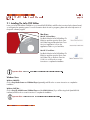
2.1. Installing The LaCie DVD Utilities
Insert your LaCie DVD Utilities CD-ROM into your internal DVD/CD-ROM, and follow the instructions below that are based
on each particular operating system. For more information about the various programs, please refer to the Help sections of
the specific software program.
Mac Users:
til
DU
DV
itie
s
Mac OS 10.2 and later –
Double-click the the LaCie DVD Utilities CDROM icon and then open the “Roxio Toast
Lite” folder. Drag and drop the Roxio Toast
Lite 6.x.x.L application icon into the
Applications folder on your hard drive.
Mac OS 9.1 and later –
Double-click the the LaCie DVD Utilities CDROM icon and then open the “Roxio Toast
Lite” folder. Click on the Roxio Toast Lite
5.2.2L icon on follow the on-screen
instructions to complete the installation.
Important Note:
Mac OS 9.1 and later does not support double layer recording.
Windows Users:
Windows 2000/XP –
Click on Easy Media Creator and DVDMax Player (separately) and follow the on-screen instructions to complete the
installation.
Windows 98SE/Me –
Click on Easy CD & DVD Creator, DVDMax Player and the USB 2.0 Drivers (if you will be using the Hi-Speed USB 2.0
interface) and follow the on-screen instructions to complete the installation.
Important Note:
Windows 98SE/Me do not support double layer recording.
Getting Connected
page 11
LaCie DVD±RW Drive User’s Manual
FireWire
2.2. Connect the power supply and switch on the drive.
1
4
2
Cable A
Power Supply Brick
3
Cable B
There are two cables that are supplied with the power supply: one cable (A) connects to a power outlet, such as a wall outlet
or a surge protector; and the other cable (B) connects to the LaCie drive.
1
Connect Cable A to your LaCie Drive.
2
Connect Cable B to the Power Supply brick.
3
Connect Cable B to a grounded surge protector or wall outlet.
4
Turn the drive on and off by using the On/Off switch.
Warning! Use only the AC adapter supplied with your specific LaCie drive. Do not use a power supply from another
LaCie drive or another manufacturer. Using any other power cable or power supply may cause damage to the device
and void your warranty. Always remove the AC adapter before transporting your LaCie drive. Failure to remove the
adapter may result in damage to your drive and will void your warranty.
Important Note: You may use your LaCie drive when in a foreign country, thanks to its autoswitching 100-240 Volt
power supply. To be able to use this feature, you may need to purchase an appropriate adapter or cord. Consult
LaCie Technical Support for assistance in choosing the right adapter. LaCie accepts no responsibility for any damage
to the drive resulting from the use of an inappropriate adapter. Using an adapter other than one authorized by LaCie
will void your warranty.
LaCie DVD±RW Drive User’s Manual
FireWire
Getting Connected
page 12
2.3. Connect the FireWire cable to your LaCie Drive and to your computer.
2
FireWire Logo
1
iLink Logo
DigitalVideo Logo
1
Examine the cable carefully and make sure that you have the FireWire cable properly aligned, then insert the cable
firmly into the FireWire port on the back of the drive for a stable connection.
2
Look for a FireWire logo (which generally is used to identify the port) next to the connector on the front or back of your
computer, then insert the cable firmly into the FireWire port for a stable connnection.
Tech Note: Please refer section 4.1 Advice for Optimizing FireWire Connections for important information on
disconnecting FireWire devices and ensuring optimum performance.
Important Note:
Windows Users: It may take a few seconds for your computer to recognize the drive and assign
it a letter.
Mac Users: It may take a few seconds for the drive to appear on your desktop, and an icon will only appear when
there is a DVD or CD in the drive.
CD and DVD icons in both Windows and Mac are similiar. Only the name is different.
Using Your LaCie Drive
page 13
LaCie DVD±RW Drive User’s Manual
FireWire
3. Using Your LaCie Drive
3.1. Supported DVD/CD Formats
Your LaCie drive is compatible with most popular DVD and CD formats:
Format
Type of Disc
Record
DVD
DVD+R9 DL
X
DVD+R
X
DVD+RW
X
DVD-R 4.7GB for General use (Ver. 2.0)
X
DVD-ROM
-DVD-R 3.95GB, 4.7GB for Authoring
-DVD-R (General use only for write)
X
DVD-RW (General use only for write)
X
DVD-ROM (single and dual layer)
-DVD (single and dual layer) 80 mm disc
-CD
CD-R
X
CD-RW (supports AM2)
X
CD-ROM
-CD-ROM XA Mode2 (form 1, form 2)
-CD-Extra
--
Read
X
X
X
X
X
X
X
X
X
X
X
X
X
X
X
Use your LaCie DVD±RW Drive to:
• Create audio CDs
• Create a DVD-Video
• Create data CD/DVDs
• Create a backup
• Duplicate a CD/DVD
Tech Note: When recording video, audio or data to DVD+R9 DL, DVD+R/RW, DVD-R/RW or CD-R/RW media,
LaCie recommends that you use media from one of the following manufacturers:
• LaCie
• Apple
• Taiyo Yuden
• Sony
• TDK
• Verbatim
• Ricoh
Ideal recording techniques:
• Close all other open programs and disconnect from the internet;
• Copy data to your hard drive first;
• Use the correct media with the appropriate speed rating;
• Use media that is free of scratches and fingerprints;
Check LaCie’s Web site (www.lacie.com) often for the latest information on creating CDs and DVDs.
LaCie DVD±RW Drive User’s Manual
FireWire
Using Your laCie Drive
page 14
3.1.1. CD and DVD Media Definitions
Your LaCie DVD±RW Drive will let you create, save and share your digital files to CD-R/RW, DVD-R/RW, DVD+R/RW and
DVD+R9 DL media. Please refer to section 2.1. Minimum System Requirements and your recording software’s documentation
to see which recording techniques your computer supports.
DVD+R9 DL Discs:
• Best suited for: recording high-quality DVD videos, backing up systems and archiving large data DVDs.
• These discs follow the DVD+ recording techniques, but with 8.5GB of capacity versus 4.7GB for DVD±R discs.
• With the increased capacity, it is now possible to increase the video bit rate for higher quality DVD videos.
DVD+R Discs:
• Best sutied for: recording DVD videos, storing multiple photo albums and data DVDs under 4.7GB.
• These discs have the same write-once concept as CD-R media, but with 4.7GB of capacity versus 700MB for CD-R discs.
• DVD+R supports “lossless linking” and the combination of Constant Angular Velocity (CAV) and Constant Linear Velocity
(CLV) recording techniques.
DVD+RW Discs:
• Best sutied for: backing up and archiving digital content.
• These discs are functionally similiar to CD-RW and DVD-RW discs, but utilizes the same recording techniques as DVD+R.
• Incorporates the Direct Overwrite (DOW) system, allowing data to be written directly over existing data in a single pass.
DVD-R Discs:
• Best sutied for: recording DVD videos, storing multiple photo albums and data DVDs under 4.7GB.
• These discs are also functionally similiar to CD-R media, and have the same capacity as DVD+R discs.
• There are two types of DVD-R discs: DVD-R General, which are intended for home applications, and DVD-R Authoring,
which are intended for professional DVD-Video development applications.
DVD-RW Discs:
• Best sutied for: backing up and archiving digital content.
• These discs serve the same general purpose as CD-RW media, but with 4.7GB of space versus 650MB.
• Discs can be written and erased up to 1,000 times.
CD-R Discs:
• Best sutied for: recording audio CDs, store photos and data CDs.
• Files can not be deleted from CD-R discs, and you cannot write over existing files on a CD-R disc.
CD-RW Discs:
• Best suited for: passing medium sized files around an office or among students.
• Discs can be reformated up to 1,000 times, and files can be written over.
• Most CD-ROM drives and audio CD players cannot read CD-RW discs.
LaCie DVD±RW Drive User’s Manual
FireWire
Using Your LaCie Drive
page 15
3.1.2. DVD-Video Zone
Nearly all commercially-available DVD discs feature a Region Protection Code (RPC). In order to watch DVD-Video discs, the
RPC needs to match the setting on the DVD player. By default, all LaCie DVD-Video-compatible drives are set to the RPC zone
of the country in which it was purchased. This RPC setting may be changed using your hardware or software MPEG-II
decoder (please refer to the documentation supplied with your decoder for more information). DVD-Video discs that do not
feature RPC II encoding may be played on all DVD players set to Zone 1.
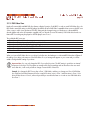
The worldwide RPC zones are:
Zone 1
USA and Canada
Zone 2
Europe, Japan, the Middle East and South Africa
Zone 3
Southeast Asia (including Hong Kong)
Zone 4
Australia, New Zealand, Central and South America
Zone 5
Northwest Asia, North Africa
Zone 6
China
When you insert a DVD-Video disc into your drive for the first time, the hardware or software MPEG-II decoder will detect if
the setting of your drive is the same as on the DVD-Video. If not, a message will appear on your screen and you will be
asked to change the RPC setting of your drive.
Important Note: You can only change the RPC of your drive four times. The RPC setting is copied into an internal
component in the drive. This chip makes an average of the first five readings and sets the drive to the most read
zone. After this, it will not be possible to change or reset the RPC of the drive.
Example: You change the RPC Zone to play a Zone 1 DVD-Video, and then you change to a Zone 2 DVD-Video.
You switch back and forth between the zones a total of five times, twice in Zone 1 and three times in Zone 2. Your
drive will then be set on Zone 2, without the possibility to reset the drive later on in order to view DVD-Video discs
from Zone 1.
Using Your LaCie Drive
page 16
LaCie DVD±RW Drive User’s Manual
FireWire
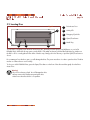
3.2. Inserting Discs
Fig.3.2
5
1
2
3
1
Drive Access Door
2
Activity LED
3
Emergency Eject Hole
4
Open/Close Button
5
Media Tray
4
To insert a disc, first gently lower the Drive Access Door (#1), and then push the Open/Close (#4) button on your LaCie
DVD±RW Drive. When the disc tray opens, put the DVD or CD media into the tray with the label side facing up. Make sure
the DVD or CD is correctly placed in the center of the disc tray. Gently push in the disc tray or push the Open/Close button to
close it.
Do not attempt to force the door open, you will damage the drive. The power must be on in order to open the drive. The drive
must be on a flat surface to work correctly.
To close your LaCie DVD±RW Drive, press the Open/Close button on the front of the drive and then gently close the Drive
Access Door.
Warning!
• Do not force the tray closed. You will damage the drive.
• Always remove discs before transporting the drive.
• Never move the drive while it is in operation.
LaCie DVD±RW Drive User’s Manual
FireWire
Using Your laCie Drive
page 17
3.3. Ejecting Discs
Warning! Do not attempt to open the drive's disc tray or remove the DVD or CD while the unit is in use and being
accessed by the computer. You may injure yourself, and damage the drive and/or your computer system. Do not
transport the drive with the tray open or with a DVD or CD disc inside it. Doing so may damage the drive and/or
data stored on the disc, and will void your warranty.
Windows Users
After you have finished using the DVD±RW drive and the computer is no longer accessing it, push the Open/Close button
(fig.3.2 #4). When the disc tray is fully open, remove the DVD or CD. After removing the disc, gently push in the disc tray or
push on the Open/Close button to close it.
You can also go into My Computer and right-click the DVD±RW drive icon. In the drop-down menu that follows, select the
Eject option. The disc tray will open, then you can access your media.
Mac Users
Drag the DVD/CD icon on the desktop to the Trash. The DVD±RW drive's tray will then open. Remove the DVD or CD.
Gently push in the disc tray or push the load/eject button to close it.
3.4. Emergency Ejection of Discs
In the event that a CD or DVD cannot be ejected with the Open/Close button and the software is not controlling the drive, use
the emergency eject operation to open the disc tray. First, switch off your computer and the DVD±RW drive and unplug the
drive's power.
Warning! Make sure the DVD±RW drive is off and the power unplugged before attempting the emergency ejection
procedure.
On the front of the drive is the Emergency Eject Hole (fig.3.2 #3). Insert a small metal poker, such as an unbent paper clip,
into the Emergency Eject Hole until the poker presses against the manual eject mechanism. You will feel the mechanism eject
the disc tray. Only use this method when the Open/Close button is not working.
LaCie DVD±RW Drive User’s Manual
FireWire
Using Your LaCie Drive
page 18
3.5. Accessing Discs
Windows Users
The CD or DVD volume will appear in My Computer. Click on My Computer to view the contents of the CD or DVD and to
have access to the folders and files on it.
You can also gain access to the files and folders contained on the disc by going into Windows Explorer
and clicking on the CD/DVD-ROM drive icon.
Mac Users
The CD or DVD volume will appear as an icon on the Desktop. Click on the icon to have access to the contents of the CD or
DVD.
Important Note: At the time of publication, if your Mac does not have a native, built-in DVD-ROM or Combo (CDRW and DVD-ROM) Drive, Apple does not support DVD-Video playback over external, third-party DVD drives.
3.6. Writing Discs
The following is a brief overview of some of the recording terminology to help you understand how to use your drive to write
discs.
Important Note: Please refer to your recording software’s user's guide for information on how to best use your
LaCie DVD±RW drive in write mode.
3.6.1. DVD Writing Methods
Disc at Once (DAO) – A DVD writing process in which the entire DVD is recorded in one session, and data cannot be added
after the recording is finished. Differs from the CD-R DAO method because the lead-in, data area and lead-out areas are all
written sequentially.
Incremental Recording (IR) – A DVD writing process that is similiar to the Session at Once (SAO) CD-R writing method; files
may be added directly to the DVD-R disc one recording at a time, instead of recording the files to a hard drive before writing
the disc. The minimum recorded size, though, must be at least 32KB (even if the file to be recorded is smaller than that), and
capacities and write speeds are decreased due to the overhead of combined lead-in/out areas and data. Also, the disc must
be finalized before it may be played back by a drive other than the drive recording the disc.
Multi-Border Recording (MBR) – A DVD writing process that is very similiar to IR, MBR allows you to make an IR disc and
then play the disc back on a device that recognizes this type of recording method. MBR creates a very short boundary zone
around a recording session so a compatible player or DVD-ROM drive does not attempt to play beyond the border of the
recorded area, instead allowing the unfinalized disc to be read by a player that supports this recording method.
LaCie DVD±RW Drive User’s Manual
FireWire
Using Your LaCie Drive
page 19
Restricted Overwriting (RO) – A DVD writing process that only applies to DVD±RW discs. With this method, if a disc has
already been written to, new data segments can be randomly inserted anywhere within the recorded boundary. New data,
however, can only be added to an area of the disc that has already been recorded over and from the point where the last
session was stopped.
Session at Once (SAO) – A DVD writing process which is similar to DAO, where all of the information is written in one
session, but SAO allows for the ability to begin another session and record at a later time. This mode allows for greater
control of the recording process than Packet Writing (PW) or TAO, and more disc space can be utilized because there is no
need for gaps between tracks.
Packet Writing (PW) – A writing process that is very useful for data backup. Buffer underrun* is impossible in this mode,
because the data is written in “packets” of a few KBs.
3.6.2. CD Writing Methods
Disc at Once (DAO) – A CD writing process in which the entire CD is recorded in one session, and data cannot be added
after the recording is finished. This mode allows for the most control of the recording process for audio CDs because the gap
between tracks can be set and the maximum capacity of the CD can be utilized.
Packet Writing (PW) – A CD writing process that is very useful for data backup, but cannot be used to write audio CDs.
Buffer underrun* is impossible in this mode, because the data is written in “packets” of a few KBs.
Session at Once (SAO) – A CD writing process which is similar to DAO, where all of the information is written in one session,
but SAO allows for the ability to begin another session and record at a later time. This mode allows for greater control of the
recording process than PW or TAO, and more disc space can be utilized because there is no need for gaps between tracks.
Track at Once (TAO) – A CD writing process where data is added one track at a time, and the data can be added at a later
time. The CD being written to, though, can only be read in the CD rewritable drive that is recording it until the disc is finalized
(meaning that no more data can be added). There is also a gap of 2 seconds added between tracks, which will be heard as
noise in some audio players.
Tech Note: *Buffer Underrun – The
recording of a disc is a system-intensive application, and the rewritable drive needs a
constant stream of data. A buffer underrun occurs when the stream of data to the rewritable drive is not fast enough to
keep the rewritable drive’s buffer full, causing the an error in the recording process. If this problem occurs often, turn
down the recording speed and consult section 5.6. Optimizing Data Transfers.
LaCie DVD±RW Drive User’s Manual
FireWire
Helpful Information
page 20
4. Helpful Information
4.1. Advice For Optimizing FireWire Connections
The following technical information relates to your LaCie DVD±RW Drive and gives some practical advice:
4.1.1. What is FireWire/IEEE 1394?
A serial bus used to connect external computer and consumer electronic devices to computers and consumer electronic
consoles.
What does IEEE 1394 mean?
“1394” is an abbreviation of IEEE 1394, the name given to this high-performance serial bus.
IEEE (the Institute of Electrical and Electronic Engineers) is the name of the engineering corps
that developed this standard. The 1394 refers to the 1,394th stanard that the IEEE has
produced.
What is the relationship between IEEE 1394, FireWire, iLink and DV?
These four names all refer to the same interface:
•IEEE 1394 - the name of the standard, used in the computer industry.
•FireWire - the brand name used by Apple.
•iLink - the brand name used by Sony.
•DV - logo used by video camcorder manufacturers.
DigitalVideo
FireWire
iLink
What can the FireWire interface be used for?
With its high data transfer rates, FireWire is a great interface for consumer electronics, like CD and DVD recorders, external
hard drives and video devices, such as digital camcorders, because it has an extremely large bandwidth and supports two
types of data transfer (anyschronus and isochronous) which help to guarantee the transfer of time-critical data.
FireWire is also a point-to-point interface, meaning that a FireWire device can transmit data to another FireWire device
without having to go through a computer. This lets several computers share a given device, and also allows up to 63 devices
to be daisy-chained to the same FireWire bus (with a max of 16 devices on one branch). To daisy-chain, connect your one
FireWire drive directly to the computer, then connect another FireWire drive to the first FireWire drive, then another until you
reach 16. Then do the same on the rest of the ports on the FireWire bus.
FireWire Cables and Connectors
There are three different types of FireWire cables on the market: 6-to-6-pin, 6-to4-pin and 4-to-4-pin. LaCie FireWire devices
are shipped with a certified 6-to-6-pin FireWire cable. Most FireWire-equipped laptop computers feature a 4-pin FireWire
connector, so in order to connect your LaCie drive to a laptop with a 4-pin FireWire port, you will need to purchase a LaCie
certified 6-to-4-pin FireWire cable (sold separately).
If your computer does not have a FireWire port, or only has a 4-pin port, consult your LaCie reseller or LaCie Customer
Support for information about adding a LaCie FireWire PCI or PCMCIA card.
LaCie DVD±RW Drive User’s Manual
FireWire
Helpful Information
page 21
4.1.2. Disconnecting FireWire Devices
FireWire external devices feature "plug & play" connection. This means that your drive can be connected and disconnected
while the computer is running. To prevent failures, it is important you follow these steps when disconnecting your FireWire
device.
Windows Users
Important Note: Windows 98 SE Users: If you have installed the Windows Storage Supplement Update, you will
have to unmount the drive before disconnecting it or powering it down. If you have not installed the update, simply
disconnect the drive when it is not active. No unmounting is required.
1) From the System Tray (located in the lower right-hand side of your screen), click on the Eject icon
(a small green arrow over a hardware image).
Fig.4.1.2
2) A message will appear, detailing the devices that the Eject icon controls, i.e. "Safely remove…" Click on this prompt.
3) You will then be given the following message: "Safe to Remove Hardware" (or similar). It is now safe to disconnect the
device.
Mac Users
You must unmount the drive before disconnecting it or powering it down. Drag the disc icon
to the Trash. Once the device’s icon no longer appears on the desktop, the drive can be
disconnected.
Mac OS 9.x
Mac OS 10.x
LaCie DVD±RW Drive User’s Manual
FireWire
Helpful Information
page 22
4.1.3. Data Transfers
Data transfers are the flow of data that accomplishes a task, usually related to moving data from storage to computer RAM or
between storage devices. During data transfers, it’s best to wait before launching other applications on the same FireWire
port. Anomalies may arise with computers that have FireWire controllers* that do not conform to OHCI (Open Host Controller
Interface) standards. In any other configurations, we cannot ensure 100% correct operation. Due to this, you may encounter
hanging problems. If this happens, proceed as follows:
1) Make sure that the FireWire cable is connected tightly and securely on both ends of the cable, from the drive to the
computer. If you are using a FireWire cable other than the one supplied with your LaCie drive, check that it is FireWire (IEEE
1394) certified. The cable that is provided with your LaCie drive is FireWire (IEEE 1394) certified.
Warning! Do not connect FireWire cables so that they form a ring of devices. There is no need for terminators on
FireWire devices, so the unused FireWire connectors should be left empty.
2) Check that the power supply and ground connection are seated properly.
3) Disconnect your computer’s FireWire cable. Wait 30 seconds. Reconnect.
Tech Note: *Controller - This is a component or an electronic card (referred to in this case as a “controller card”) that
enables a computer to communicate with or manage certain peripherals. An external controller is an expansion
card which fills one of the free slots (i.e. PCI or PCMCIA) inside your PC and which enables a peripheral (i.e. CDR/RW drive, Hard Drive, scanner or printer) to be connected to the computer. If your computer is not equipped with
a FireWire controller card, you can purchase an external controller through LaCie. Contact your LaCie reseller or
LaCie Technical Support (6. Contacting Customer Support) for more information.
LaCie DVD±RW Drive User’s Manual
FireWire
Helpful Information
page 23
4.2 User Advice on MPEG-II Decoders
All DVD-Video material is compressed using MPEG-II compression. DVD-Video, with full-motion video and multi-channel
sound (multi-lingual soundtracks, surround sound, etc.), is a data-hungry application. Without compression, you would only
be able to fit a 5-minute movie onto a 4.5GB disc (the DV format is equivalent to 13GB per hour). MPEG-II compression
allows you to fit a full-length feature film, plus bonus material, on just one disc.
In order to play DVD-Video discs using your LaCie DVD±RW Drive, you need to have an appropriate MPEG-II decoder. You
have two options:
1) Install the MPEG-II decoder software if your PC is equipped with a processor that is 400MHz or faster. The decoder
software will give you smoother images when playing DVD-Video discs using your drive (as with any application, the more
RAM you have, the better playback performance will be).
2) Purchase and install a PCI MPEG-II decoder card if your PC is equipped with a processor that is 400MHz or slower. The
decoder card should help you obtain better performance during playback with your LaCie drive.
4.3 File System Formats - Definitions
When writing DVD±R/RW and CD-R/RW discs, you will have the option to assign the disc a particular file format (the way
in which a computer names and organizes files for storage and retrieval). There are essentially three file system formats to be
concerned with when using a LaCie DVD or CD Drive:
• Universal Disk Format (UDF)
• ISO 9660
• Mac OS Extended
UDF - This file system was developed to ensure consistency between various optical media, compatibility across platforms and
among various CD and DVD applications. UDF is used by DVD to contain MPEG audio and video streams, and is required
by DVD-ROMs.
ISO 9660 - This is the standard file system for CD-ROMs, which allows them to be read on a Mac, PC or other major
computer platform. Microsoft created an extension to the format, called Joliet, which allows for Unicode file character names
and file names up to 64 characters in length (twice as many as the ISO 9660 Level 2 and 3 specifications).
Mac OS Extended - Also known as HFS+, this is the file system used by Mac OS 8.1 and higher. If you will be using your
disc only on Macs, this is the preferred file format.
LaCie DVD±RW Drive User’s Manual
FireWire
Helpful Information
page 24
4.4 DVD Capacity
There are important factors to consider when recording video, audio or data to DVD. The DVD media specification provides
for two physical sizes: 4.7” (12cm) and 3.1” (8cm) (both are .47” (1.2cm) thick). DVD discs can also be single-sided (SS) or
double-sided (DS), and each side can have one (SL) or two (DL) layers of data.
The amount of data or video that a disc can hold are dependent upon factors such as the amount of audio and the degree of
compression of the data, video or audio. For example, a single-layer DVD±R disc typically will store just over two hours of
MPEG-II video, but it is possible to put up to eight hours of VHS-quality video or one hundred sixty hours of audio on a
single-layer disc.
When media companies reference the amount of data that a disc can hold, they represent the total amount in terms of
gigabytes (GB), or a billion bytes (1000 x 1000 x 1000 bytes). This number, though, is not the way in which a computer
addresses the data; to a computer the value is binary and larger than a billion bytes – 1,073,741,824 (1024 x 1024 x
1024 bytes). Therefore, when you put in a 4.7GB DVD disc, the actual available capacity is 4.38GB; and a 8.5GB Double
Layer disc has an actual available capacity of 7.95GB.
Troubleshooting
page 25
LaCie DVD±RW Drive User’s Manual
FireWire
5. Troubleshooting
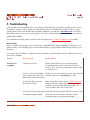
In the event that your LaCie DVD±RW Drive is not working correctly, please refer to the following checklist to find out where
the problem is coming from. If you have gone through all of the points on the checklist and your drive is still not working
correctly, please have a look at the FAQs that are regularly published on our Web site – www.lacie.com. One of these
FAQs may provide an answer to your specific question. You can also visit the drivers pages, where the most recent software
updates will be available.
If you need further assistance, please contact LaCie Technical Support (see 6. Contacting Customer Service for details).
Manual Updates
LaCie is constantly striving to give you the most up-to-date, comprehensive User’s Manuals available on the market. It is our
goal to provide you with a friendly, easy-to-use format that will help you quickly install and utilize the many functions of your
new device.
If your manual does not reflect the configurations of the product that you purchased, please check our Web site for the most
current version available.
The Issue
Questions to Ask
Possible Solutions
The drive is not
recognized.
Is the drive’s power on?
Check to see that all of the power cords are properly
connected and that the switch on the rear of the drive is
turned on. If you are using a surge protector, make sure that
it is switched on, too.
Does an icon for the drive appear Check for an icon on the Desktop (on a Mac, a disc has to be
on the computer (On a Mac a CD- inserted in the drive) or in My Computer (on a PC).
ROM must be inserted in the drive)?
Are all of the cables connected
securely and correctly?
Make sure that all the steps in section 2. Getting Connected
have been followed correctly. Examine the connections
carefully to ensure that all the cables are inserted in the
correct orientation and in the correct location.
Are both ends of the FireWire cable Check both ends of the FireWire cable. Disconnect them, wait
connected and properly seated?
10 seconds, and reconnect them. If the drive is still not
recognized, restart your computer and try again.
Troubleshooting
page 26
LaCie DVD±RW Drive User’s Manual
FireWire
The Issue
Questions to Ask
The drive is not
recognized.
Are the FireWire drivers installed
correctly and enabled?
Possible Solutions
Mac Users: Open Apple System Profiler and click on the
Devices and Volumes tab. If your device is not listed, recheck
the cables and try the other troubleshooting solutions listed
here.
Tech Note: Mac Users: Apple is constantly providing updated support for drive mechanisms within OS 10.x. To
ensure that you have the latest support, upgrade to the latest version of OS 10.x. To access the latest updates an
upgrades, pull down the Apple Menu and click on System Preferences. In the section titled System, click on
Software Update and then click Update Now. Your computer will then automatically connect via the Internet to
access the latest updates from Apple.
Tech Note: Windows 98 SE Users: Microsoft
has released an IEEE 1394 Storage
Supplement update to enhance compatibility
and help alleviate lock-ups. Check Microsoft’s
Web site, support.microsoft.com, for more
information.
Tech Note: Windows Users: Microsoft
consistently posts updated drivers and support
fixes for their operating systems. Go to
Microsoft’s Web site, support.microsoft.com,
for more information.
Windows 98 SE & Me Users: Go to Start > Settings >
Control Panel > System > Device Manager > IEEE 1394
Controller > click on the plus sign next to the controller icon,
and you should see your device listed.
Windows 2000 Users: Go to Start > Settings > Control
Panel > System > Hardware tab > Device Manager button >
IEEE 1394 Controller > click on the plus sign next to the
controller icon, and you should see your device listed.
Windows XP Users: Go to Start > Control Panel >
Performance and Maintenance > System > Hardware tab >
Device Manager button > IEEE 1394 Controller > click on the
plus sign next to the controller icon, and you should see your
device listed.
If you cannot see the device, recheck the cables and try the
other troubleshooting solutions listed here.
Is there a conflict with other device
drivers or extensions?
Consult LaCie Technical Support. See section 6. Contacting
Customer Support for more details.
Troubleshooting
page 27
LaCie DVD±RW Drive User’s Manual
FireWire
The Issue
Questions to Ask
Possible Solutions
The drive is not
recognized.
Is there a conflict with other device
drivers or extensions?
Mac OS 9.x Users: If your LaCie drive is not being
recognized by the recording software, you may be
experiencing an extension conflict between the software and
iTunes or Disc Burner. There are two possible solutions to this
problem.
Tech Note: You will find important information
about the compatibility of LaCie CD-RW
Drives and iTune’s and Disc Burner at Apple’s
Web site: www.apple.com.
If you do not plan on using iTunes or Disc Burner, follow these
steps:
1) From the Apple Menu, go to Control Panels and open the
Extensions Manager.
2) Scroll down to the Extensions folder and disable (uncheck)
the USB Authoring Support and the FireWire Authoring
Support.
3) Click on the Restart button to restart your computer.
4) Launch the recording software again, and check to see if it
recognizes the drive now.
If you plan on using both the recording software and iTunes
or Disc Burner, you may want to create a separate Extension
Set for the recording software.
1) From the Apple Menu, go to Control Panels and open the
Extensions Manager.
2) Press the Duplicate Set button.
3) Give the new Extension set a name, such as Writing.
4) Scroll down to the Extensions folder, and disable (uncheck)
the USB Authoring Support and the FireWire Authoring
Support.
5) Click on the Restart button to restart your computer.
Now when you want to use this set, simply go back into
Extensions Manager, and from the pull-down menu from
Selected Sets:, choose your new Extension set.
Troubleshooting
page 28
LaCie DVD±RW Drive User’s Manual
FireWire
The Issue
Questions to Ask
Possible Solutions
The drive's media tray
will not open.
Are you using a Mac?
Drag the Disc icon onto the Trash icon. The disc will eject
automatically. If this does not work, try using the eject function
of the software program that you are using.
Has a running software program
locked the eject function?
To check, disconnect the FireWire cable, then reconnect and
press the Open/Close button.
If the disc will still not eject, go to section 3.4 Emergency
Ejection of Discs for more instructions on how to eject your
media.
The drive automatically Is the disc already full?
ejects a disc when you
try to record on it, or
the drive is not writing
to CD/DVD correctly.
Verify the contents of the disc by using your recording
software or viewing its contents in My Computer for
Windows users, or File > Get Info for Mac users. If you’ve
checked and it still won’t record, try recording on a new
blank disc.
Does the drive support the format of Check section 3.1 Supported DVD/CD Formats for the disc
the disc you have inserted?
formats supported by your drive.
Is the disc damaged?
Carefully inspect the disc. Look to see if there are highly
visible scratches to the recording surface (the bright shiny
side) of the disc. If in doubt, try another disc.
Has the recording software been
installed correctly?
Double-check the installation of your recording software and
reinstall the recording software, if necessary. Review the
recording software’s troubleshooting and help sections for
further tips.
Has buffer underrun occurred (has • Disable all other software programs that are running during
something interrupted the stream of the recording session.
• Disconnect the network, if you are using one. On a Mac,
data to the recorder)?
deactivate File Sharing.
• Check to see that your hard drive is fast enough.
• If recording from CD or DVD-ROM to disc, make sure that
the speed of the source device is high enough to provide a
sufficient data stream to the LaCie drive. Reduce the write
speed of the LaCie drive using the appropriate menu in the
recording software.
Troubleshooting
page 29
LaCie DVD±RW Drive User’s Manual
FireWire
The Issue
Questions to Ask
Possible Solutions
DVD-Video playback
will not work.
Are you using a Mac?
This is normal. For legal reasons, if you do not have a built-in
DVD-ROM or Combo Drive, your LaCie DVD Drive cannot
currently be used for DVD-Video playback on a Mac.
DVD-Video playback
will not work under
Windows.
Have you installed the appropriate Ensure that the MPEG-II software has been installed correctly.
MPEG-II decoder software?
See the help section of the software program for more
information.
Do you have a Pentium II 350 MHz Check your processor (Start > Settings > Control Panel >
(or equivalent) processor or
System > General tab.) If your processor does not meet the
greater?
minimum requirements (see section 1.1 Minimum System
Requirements), you may need to purchase an MPEG-II
decoder card. Consult your computer supply specialist for
details.
Has the LaCie drive been set as the Consult the help section of your DVD playback software for
default DVD drive in your DVD
information on how to configure your drive as your
playback software?
computer’s default DVD player.
Are you running other software
programs simultaneously?
Check to see if other programs are running. If so, close them.
Depending on your computer’s configuration, playback may
be possible only if the DVD player software is the only
program running.
DVD playback is not as If using Windows, do you have a Check your processor (Start > Settings > Control Panel >
smooth as it should be. Pentium II 350 MHz (or equivalent) System > General tab.) If your processor does not meet the
processor or greater?
minimum requirements (see section 1.1 Minimum System
Requirements), you may need to purchase an MPEG-II
decoder card. Consult your computer supply specialist for
details.
Are you running other software
programs simultaneously?
Check to see if other programs are running. If so, close them.
Playback may become smoother when only the DVD player
software is running.
LaCie DVD±RW Drive User’s Manual
FireWire
Contacting Customer Support
page 30
6. Contacting Customer Support
Before You Contact Technical Support
1) Read the manuals and review the Troubleshooting section.
2) Try to isolate the problem. If possible, make the drive the only external device on the CPU, and make sure that all of the
cables are correctly and firmly attached.
If you have asked yourself all of the pertinent questions in the troubleshooting checklist, and you still can't get your LaCie drive
to work properly, contact us via the provided Web link. Before contacting us, make sure that you are in front of your
computer and that you have the following information on hand:
• Your LaCie drive's serial number
• Operating system(Mac OS or Windows) and version
• Computer brand and model
• Names of CD or DVD drives installed on your computer
• Amount of memory installed
• Names of any other devices installed on your computer
Serial Number Sticker
LaCie DVD±RW Drive User’s Manual
FireWire
Contacting Customer Support
page 31
LaCie Technical Support
LaCie Australia
Contact Us At:
http://www.lacie.com/au/contact/
LaCie Belgium
Contact Us At:
http://www.lacie.com/be/contact/
LaCie Canada (English)
Contact Us At:
http://www.lacie.com/caen/contact/
LaCie Denmark
Contact Us At:
http://www.lacie.com/dk/contact/
LaCie Finland
Contact Us At:
http://www.lacie.com/fi/contact
LaCie France
Contact Us At:
http://www.lacie.com/fr/contact/
LaCie Germany
Contact Us At:
http://www.lacie.com/de/contact/
LaCie Italy
Contact Us At:
http://www.lacie.com/it/contact/
LaCie Japan
Contact Us At:
http://www.lacie.co.jp
LaCie Netherlands
Contact Us At:
http://www.lacie.com/nl/contact/
LaCie Norway
Contact Us At:
http://www.lacie.com/no/contact/
LaCie Spain
Contact Us At:
http://www.lacie.com/es/support/request
LaCie Sweden
Contact Us At:
http://www.lacie.com/se/contact/
LaCie Switzerland
Contact Us At:
http://www.lacie.com/chfr/contact
LaCie United Kingdom & Ireland
Contact Us At:
http://www.lacie.com/uk/support/request
LaCie USA
Contact Us At:
http://www.lacie.com/contact/
LaCie Grand Export
Contact Us At:
http://www.lacie.com/intl/contact/
LaCie DVD±RW Drive User’s Manual
FireWire
Warranty
page 32
7. Warranty
LaCie warrants your drive against any defect in material and workmanship, under normal use, for the period designated on
your warranty certificate. In the event this product is found to be defective within the warranty period, LaCie will, at its option,
repair or replace the defective drive.
This warranty is void if:
• The drive was operated/stored in abnormal use or maintenance conditions;
• The drive is repaired, modified or altered, unless such repair, modification or alteration is expressly authorized in writing by
LaCie;
• The drive was subjected to abuse, neglect, lightning strike, electrical fault, improper packaging or accident;
• The drive was installed improperly;
• The serial number of the drive is defaced or missing;
• The broken part is a replacement part such as a pickup tray, etc.
• The tamper seal on the drive casing is broken.
LaCie and its suppliers accept no liability for any loss of data during the use of this device, or for any of the problems caused
as a result. As a precaution, it is recommended that the CD-R/RW, DVD-R/RW and DVD+R/RW media be tested after they
have been written to. Under no circumstances do LaCie or its suppliers guarantee the reliability of the DVD or CD media used
in this drive.
LaCie will not, under any circumstances, be liable for direct, special or consequential damages such as, but not limited to,
damage or loss of property or equipment, loss of profits or revenues, cost of replacement goods, or expense or inconvenience
caused by service interruptions.
Any loss, corruption or destruction of data while using a LaCie drive is the sole responsibility of the user, and under no
circumstances will LaCie be held liable for the recovery or restoration of this data.
Under no circumstances will any person be entitled to any sum greater than the purchase price paid for the drive.
To obtain warranty service, call LaCie Technical Support. You may be asked to furnish proof of purchase to confirm that the
drive is still under warranty.
All drives returned to LaCie must be securely packaged in their original box and shipped with postage prepaid.
Register online for free technical support: www.lacie.com/register