1
Preface
Copyright
This publication, including all photographs, illustrations and software, is protected
under international copyright laws, with all rights reserved. Neither this manual, nor
any of the material contained herein, may be reproduced without written consent of
the author.
Version 3.0
Disclaimer
The information in this document is subject to change without notice. The manufacturer makes no representations or warranties with respect to the contents hereof and
specifically disclaims any implied warranties of merchantability or fitness for any
particular purpose. The manufacturer reserves the right to revise this publication and
to make changes from time to time in the content hereof without obligation of the
manufacturer to notify any person of such revision or changes.
Trademark Recognition
Microsoft, MS-DOS and Windows are registered trademarks of Microsoft Corp.
MMX, Pentium, Pentium-II, Pentium-III, Celeron are registered trademarks of Intel
Corporation.
Other product names used in this manual are the properties of their respective
owners and are acknowledged.
Federal Communications Commission (FCC)
This equipment has been tested and found to comply with the limits for a Class B
digital device, pursuant to Part 15 of the FCC Rules. These limits are designed to
provide reasonable protection against harmful interference in a residential installation. This equipment generates, uses, and can radiate radio frequency energy and, if
not installed and used in accordance with the instructions, may cause harmful interference to radio communications. However, there is no guarantee that interference
will not occur in a particular installation. If this equipment does cause harmful
interference to radio or television reception, which can be determined by turning the
equipment off and on, the user is encouraged to try to correct the interference by one
or more of the following measures:
•
•
•
•
Reorient or relocate the receiving antenna
Increase the separation between the equipment and the receiver
Connect the equipment onto an outlet on a circuit different from that to
which the receiver is connected
Consult the dealer or an experienced radio/TV technician for help
Shielded interconnect cables and a shielded AC power cable must be employed with
this equipment to ensure compliance with the pertinent RF emission limits governing
this device. Changes or modifications not expressly approved by the system’s manufacturer could void the user’s authority to operate the equipment.
Preface
ii
Declaration of Conformity
This device complies with part 15 of the FCC rules. Operation is subject to the
following conditions:
•
This device may not cause harmful interference.
•
This device must accept any interference received, including interference that may cause undesired operation.
Canadian Department of Communications
This class B digital apparatus meets all requirements of the Canadian Interferencecausing Equipment Regulations.
Cet appareil numérique de la classe B respecte toutes les exigences du Réglement sur
le matériel brouilieur du Canada.
About the Manual
The manual consists of the following:
Describes features of the
motherboard.
Chapter 1
Introducing the Motherboard
Go to
H
page 1
Describes installation of
motherboard components.
Chapter 2
Installing the Motherboard
Go to
H
page 7
Provides information on using
the BIOS Setup Utility.
Chapter 3
Using BIOS
Go to
Chapter 4
Using the Motherboard Software
H
page 25
Describes the motherboard
software
Go to
H
page 57
Provides basic trouble shooting tips
Chapter 5
Trouble Shooting
Go to
Preface
H
page 61
iii
TABLE OF CONTENTS
Preface
i
Chapter 1
1
Introducing the Motherboard
1
Introduction...................................................................................1
Feature............................................................................................2
Specifications................................................................................4
Motherboard Components..........................................................5
Chapter 2
7
Installing the Motherboard
7
Safety Precautions............................................................................7
Choosing a Computer Case.............................................................7
Installing the Motherboard in a Case............................................7
Checking Jumper Settings...............................................................8
Setting Jumpers........................................................................8
Checking Jumper Settings........................................................9
Jumper Settings........................................................................9
Installing Hardware...................................................................10
Installing the Processor..........................................................10
Installing Memory Modules...................................................12
Expansion Slots......................................................................14
Connecting Optional Devices.................................................16
Installing a SATA Hard Drive................................................19
Connecting I/O Devices............................................................... 20
Connecting Case Components.....................................................21
Front Panel Header................................................................24
Chapter 3
25
Using BIOS
25
About the Setup Utility........................ ......................................... 25
The Standard Configuration........................ ...........................25
Entering the Setup Utilities......................................................25
Resetting the Default CMOS Values....................................26
Using BIOS......................................................................................26
BIOS Navigation Key.............................................................27
Main Menu.............................................................................27
Advanced Menu......................................................................28
Chipset Menu..........................................................................39
M.I.B.III(MB Intelligent BIOS III) Menu................................46
Boot Menu...............................................................................49
iv
Security Menu.........................................................................51
Exit Menu...............................................................................54
Updating the BIOS..................................................................55
Chapter 4
57
Using the Motherboard Software
57
Auto-installing under Windows XP/7/8.......................................57
Running Setup.........................................................................57
Manual Installation...........................................................................59
ECS Utility Software .......................................................................59
Chapter 5
61
Trouble Shooting
61
Start up problems during assembly..............................................61
Start up problems after prolong use............................................62
Maintenance and care tips..............................................................62
Basic Troubleshooting Flowchart...................................................63
1
Chapter 1
Introducing the Motherboard
Introduction
Thank you for choosing the H61H2-M2 motherboard. This motherboard is a high
performance, enhanced function motherboard designed to support the LGA1155
socket for latest Intel® CoreTM Family/Pentium®/Celeron® processors*1 for high-end
business or personal desktop markets.
This motherboard is based on Intel® H61 Express Chipset for best desktop platform
solution. H61 is a single-chip, highly integrated, high performance Hyper-Threading
peripheral controller, unmatched by any other single chip-device controller. This
motherboard supports up to 16 GB of system memory with dual channel DDR3
1600* 2/1333/1066 SDRAM. High resolution graphics via PCI Express x16 slot,
intended for Graphics Interface. In addition, two PCI Express slots are supported. It
implements an EHCI (Enhanced Host Controller Interface) compliant interface that
provides eight USB 2.0 ports (four USB 2.0 ports at the back panel and two USB 2.0
headers support additional four USB 2.0 ports).
The motherboard is equipped with advanced full set of I/O ports in the rear panel,
including PS/2 mouse and PS/2 keyboard connectors, one DVI(HDMI Optional)
port, one D_sub (VGA) port, one Lan port, four USB 2.0 ports, and audio jacks for
microphone, line-in and line-out.
In addition, this motherboard supports four SATA 3Gb/s connectors for expansion.
*1 When accommodating Intel 3rd Generation CPU, the PCI Express 16X
slot can run at Gen3 speed, which accelerates on 32GB/s rate that effectively
delivers double of PCI Express Gen2 speed.
*2 Ivy Bridge CPU required.
Introducing the Motherboard
2
Feature
Processor
The motherboard uses an LGA1155 type of socket that carries the following
features:
•
Accommodates the latest Intel® CoreTM Family/Pentium ®/Celeron® processors
•
Supports “Hyper-Threading” technology CPU
•
DMI 5.0GT/s
•
One PCI Express x16 slot
•
Supports 22nm & 32nm Intel® CoreTM micro-architecture
“Hyper-Threading” technology enables the operating system into thinking
it’s hooked up to two processors, allowing two threads to be run in parallel, both
on separate “logical” processors within the same physical processor.
Chipset
The Intel H61 Chipset is a single-chip with proven reliability and performance.
•
•
•
•
•
•
Support two PCI Express x1 slots
Integrated four SATA 3.0 Gb/s Host Controller
Eight USB 2.0 ports supported
Serial Peripheral Interface (SPI) support
Integrated Graphics Support with PAVP 1.5
Intel® High Definition Audio Controller
Memory
•
•
•
Supports DDR3 1600/1333/1066 DDR3 SDRAM with Dual-channel architecture
Accommodates two unbuffered DIMMs
Up to 8 GB per DIMM with maximum memory size up to 16 GB
Audio
•
•
•
•
•
•
5.1+2 Channel High Definition Audio Codec
Meets Microsoft WLP3.x (Windows Logo Program) audio
requirements
All DACs supports 44.1k/48k/96k/192kHz sample rate
Software selectable 2.5V/3.2V/4.0V VREFOUT
Direct Sound 3D. compatible
Power Support: Digital: 3.3V; Analog: 5.0V
Introducing the Motherboard
3
Onboard LAN (Optional)
The onboard LAN provides the following features:
•
•
•
Supports PCI ExpressTM 1.1
Integrated 10/100/1000 transceiver
Wake-on-LAN and remote wake-up support
•
•
•
Supports PCI ExpressTM 1.1
Integrated 10/100 transceiver
Wake-on-LAN and remote wake-up support
Expansion Options
The motherboard comes with the following expansion options:
•
•
•
One PCI Express x16 slot for Graphic Interface
Two PCI Express x1 slots
Four SATA 3.0 Gb/s connectors
Integrated I/O
The motherboard has a full set of I/O ports and connectors:
•
One LAN port
•
One D-sub (VGA) port
•
One DVI port (Optional)
•
One HDMI port (Optional)
•
Four USB 2.0 ports
•
One PS/2 keyboard and PS/2 mouse connectors
•
Audio jacks for microphone, line-in and 6-ch line-out
BIOS Firmware
This motherboard uses AMI BIOS that enables users to configure many system
features including the following:
•
•
•
•
•
Power management
Wake-up alarms
CPU parameters
CPU and memory timing
Graphic parameters
The firmware can also be used to set parameters for different processor clock
speeds.
1. Some hardware specifications and software items are subject to change
without prior notice.
2. Due to chipset limitation, we recommend that motherboard be operated
in the ambiance between 0 and 50 ° C.
Introducing the Motherboard
4
Specifications
•
•
LGA1155 socket for the latest Intel® CoreTM Family/Pentium®/
Celeron® processors
Supports “Hyper-Threading” technology CPU
DMI 5.0GT/s
Chipset
•
Intel® H61 Chipset
Memory
•
•
•
Dual-channel DDR3 memory architecture
2 x 240-pin DDR3 DIMM sockets support up to 16 GB
Supports 1600/1333/1066 DDR3 SDRAM
Expansion
Slots
•
•
1 x PCI Express x16 slot
2 x PCI Express x1 slots
Storage
•
Supported by Intel® H61 Express Chipset
-4 x Serial ATA 3.0 Gb/s devices
Audio
•
•
VIA VT1705 6-Ch HD audio CODEC
Compliant with HD audio specification
LAN
•
•
Atheros AR8152-B 10/100 Lan (Optional)
Atheros AR8152-B Gigabit Fast Ethernet Controller (Optional)
CPU
•
Rear Panel I/O •
•
•
•
•
•
•
4
1
1
1
1
1
1
x USB 2.0 ports
x D-sub (VGA)
x DVI port (optional)
x HDMI port (optional)
x RJ45 LAN connector
x Audio port (Line in, microphone in, line out)
x PS/2 keyboard & PS/2 mouse connectors
•
Internal I/O
Connectors & •
•
Headers
•
•
•
•
•
•
•
•
•
•
1
1
1
1
2
4
1
1
1
1
1
1
1
x
x
x
x
x
x
x
x
x
x
x
x
x
24-pin ATX Power Supply connector
4-pin ATX Power Supply connector
4-pin CPU_FAN connector
3-pin SYS_FAN connector
USB 2.0 headers support additional four USB 2.0 ports
Serial SATA 3.0 Gb/s connectors
COM header
Case Open header
SPDIF out header
TPM header
ME_UNLOCK header
Speaker header
Clear CMOS header
System BIOS
•
•
•
AMI BIOS with 64Mb SPI Flash ROM
Support Multi-language BIOS Utility
Support ECS M.I.B III Utility
AP support
•
Support eBLU/eDLU/eSF (Warning: Microsoft .NET Framework 3.5 is required)
Form Factor
•
Micro ATX Size, 225mm x 180mm
Introducing the Motherboard
5
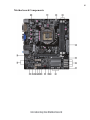
Motherboard Components
Introducing the Motherboard
6
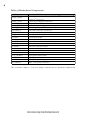
Table of Motherboard Components
LABEL
1. CPU Socket
2. CPU_FAN
3. DDR3_1~2
4. ATX_POWER
5. SPI_DEBUG
6. SATA1~4
7. F_PANEL
8. F_USB1~2
9. CASE
10. ME_UNLOCK
11. TPM
12. SPK
13. COM
14. CLR_CMOS
15. SPDIFO
16. SYS_FAN
17. F_AUDIO
18. PCIE1~2
19. PCIEX16
20. ATX12V
COMPONENTS
LGA1155 socket for the latest Intelϟ CoreTM Family/Pentium®
/Celeron® Processors
4-pin CPU cooling fan connector
240-pin DDR3 SDRAM slots
Standard 24-pin ATX power connector
SPI debug header-for factory use only
Serial ATA 3.0 Gb/s connectors
Front panel switch/LED header
Front panel USB headers
CASE open header
ME unlock header-for factory use only
Trusted Platform Module header (Optional)
Speaker header
Onboard serial port header
Clear CMOS jumper
SPDIF out header
3-pin system cooling fan connector
Front panel audio header
PCI Express x1 slots
PCI Express slot for graphics interface
4-pin +12V power connector
This concludes Chapter 1. The next chapter explains how to install the motherboard.
Introducing the Motherboard
7
Chapter 2
Installing the Motherboard
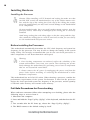
Safety Precautions
•
•
•
•
•
Follow these safety precautions when installing the motherboard
Wear a grounding strap attached to a grounded device to avoid damage from static electricity
Discharge static electricity by touching the metal case of a safely
grounded object before working on the motherboard
Leave components in the static-proof bags they came in
Hold all circuit boards by the edges. Do not bend circuit boards
Choosing a Computer Case
There are many types of computer cases on the market. The motherboard complies
with the specifications for the micro ATX system case. Some features on the
motherboard are implemented by cabling connectors on the motherboard to indicators and switches on the system case. Make sure that your case supports all the
features required.
Most cases have a choice of I/O templates in the rear panel. Make sure that the I/O
template in the case matches the I/O ports installed on the rear edge of the
motherboard.
This motherboard carries a micro ATX form factor of 225 x 180 mm. Choose a case
that accommodates this form factor.
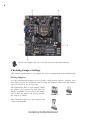
Installing the Motherboard in a Case
Refer to the following illustration and instructions for installing the motherboard in
a case.
Most system cases have mounting brackets installed in the case, which correspond
the holes in the motherboard. Place the motherboard over the mounting brackets
and secure the motherboard onto the mounting brackets with screws.
Ensure that your case has an I/O template that supports the I/O ports and expansion
slots on your motherboard.
Installing the Motherboard
8
Do not over-tighten the screws as this can stress the motherboard.
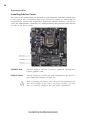
Checking Jumper Settings
This section explains how to set jumpers for correct configuration of the motherboard.
Setting Jumpers
Use the motherboard jumpers to set system configuration options. Jumpers with
more than one pin are numbered. When setting the jumpers, ensure that the jumper
caps are placed on the correct pins.
The illustrations show a 2-pin jumper. When
the jumper cap is placed on both pins, the
jumper is SHORT. If you remove the jumper
cap, or place the jumper cap on just one pin,
the jumper is OPEN.
SHORT
This illustration shows a 3-pin jumper. Pins
1 and 2 are SHORT.
Installing the Motherboard
OPEN
9
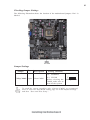
Checking Jumper Settings
The following illustration shows the location of the motherboard jumpers. Pin 1 is
labeled.
Jumper Settings
Jumper
Type
Description
Setting (default)
1-2: NORMAL
CLR_CMOS 3-pin
Clear CMOS
2-3: CLEAR
Before clearing the
CMOS, make sure to
turn off the system.
1
CLR_CMOS
To avoid the system instability after clearing CMOS, we recommend
users to enter the main BIOS setting page to “Load Default Settings”
and then “Save and Exit Setup”.
Installing the Motherboard
10
Installing Hardware
Installing the Processor
Caution: When installing a CPU heatsink and cooling fan make sure that
you DO NOT scratch the motherboard or any of the surface-mount resistors with the clip of the cooling fan. If the clip of the cooling fan scrapes
across the motherboard, you may cause serious damage to the motherboard
or its components.
On most motherboards, there are small surface-mount resistors near the
processor socket, which may be damaged if the cooling fan is carelessly
installed.
Avoid using cooling fans with sharp edges on the fan casing and the clips.
Also, install the cooling fan in a well-lit work area so that you can clearly
see the motherboard and processor socket.
Before installing the Processor
This motherboard automatically determines the CPU clock frequency and system bus
frequency for the processor. You may be able to change the settings in the system
Setup Utility. We strongly recommend that you do not over-clock processors or
other components to run faster than their rated speed.
Warning:
1. Over-clocking components can adversely affect the reliability of the
system and introduce errors into your system. Over-clocking can permanently damage the motherboard by generating excess heat in components
that are run beyond the rated limits.
2. Always remove the AC power by unplugging the power cord from the
power outlet before installing or removing the motherboard or other
hardware components.
This motherboard has an LGA1155 socket. When choosing a processor, consider the
performance requirements of the system. Performance is based on the processor
design, the clock speed and system bus frequency of the processor, and the quantity
of internal cache memory and external cache memory.
Fail-Safe Procedures for Over-clocking
When end-users encounter failure after attempting over-clocking, please take the
following steps to recover from it.
1. Shut down the computer.
2. Press and hold the “Page Up Key (PgUp)” of the keyboard, and then boot the PC
up.
3. Two seconds after the PC boots up, release the “Page Up Key (PgUp)”.
4. The BIOS returns to the default setting by itself.
Installing the Motherboard
11
CPU Installation Procedure
The following illustration shows CPU installation components.
A.
Disengaging of the Load Lever
· Press the hook of lever down and pull
it to the right side to release it from
retention tab.
B. Opening of the Load Plate
· Lift the tail of the load lever.
· Rotate the load plate to fully open
position.
C. Removing the Cap
· Be careful not to touch the contact at
any time.
D. Inserting the Package
· Grasp the package. Ensure to grasp
on the edge of the substrate.
· Make sure pin 1 indicator is on your
bottom-left side.
· Aim at the socket and place the
package carefully into the socket by
purely vertical motion.
E. Closing the Load Plate
· Rotate the load plate onto the package
IHS (Intergraded Heat Spreader).
· Engage the load lever while pressing
down lightly onto the load plate.
· Secure the load lever with the hook
under retention tab.
F. Fasten the cooling fan supporting base
onto the CPU socket on the motherboard.
G. Make sure the CPU fan is plugged to the
CPU fan connector. Please refer to the
CPU cooling fan user’s manual for more
detail installation procedure.
Installing the Motherboard
12
1. To achieve better airflow rates and heat dissipation, we suggest that you
use a high quality fan with 3800 rpm at least. CPU fan and heatsink
installation procedures may vary with the type of CPU fan/heatsink supplied. The form and size of fan/heatsink may also vary.
2. DO NOT remove the CPU cap from the socket before installing a CPU.
3. Return Material Authorization (RMA) requests will be accepted only if the
motherboard comes with the cap on the LGA1155 socket.
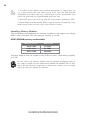
Installing Memory Modules
This motherboard accommodates two memory modules. It can support two 240-pin
DDR3 1600/1333/1066. The total memory capacity is 16 GB.
DDR3 SDRAM memory module table
Memory module
Memory Bus
DDR3 1066
DDR3 1333
533 MHz
667 MHz
DDR3 1600
800 MHz
You must install at least one module in any of the two slots. Total memory capacity
is 16 GB.
Do not remove any memory module from its antistatic packaging until you
are ready to install it on the motherboard. Handle the modules only by their
edges. Do not touch the components or metal parts. Always wear a grounding strap when you handle the modules.
Installing the Motherboard
13
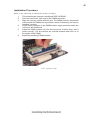
Installation Procedure
Refer to the following to install the memory modules.
1
2
3
4
5
6
This motherboard supports unbuffered DDR3 SDRAM .
Push the latches on each side of the DIMM slot down.
Align the memory module with the slot. The DIMM slots are keyed with
notches and the DIMMs are keyed with cutouts so that they can only be
installed correctly.
Check that the cutouts on the DIMM module edge connector match the
notches in the DIMM slot.
Install the DIMM module into the slot and press it firmly down until it
seats correctly. The slot latches are levered upwards and latch on to
the edges of the DIMM.
Install any remaining DIMM modules.
* For reference only
Installing the Motherboard
14
Expansion Slots
Installing Add-on Cards
The slots on this motherboard are designed to hold expansion cards and connect them
to the system bus. Expansion slots are a means of adding or enhancing the
motherboard’s features and capabilities. With these efficient facilities, you can increase the motherboard’s capabilities by adding hardware that performs tasks that are
not part of the basic system.
PCIEX16 Slot
The PCI Express x16 slot is used to install an external PCI
Express graphics card.
PCIE1/2 Slots
The PCI Express x1 slots are fully compliant to the PCI Express Base Specification revision 2.0.
Before installing an add-on card, check the documentation for
the card carefully. If the card is not Plug and Play, you may
have to manually configure the card before installation.
Installing the Motherboard
15
Follow these instructions to install an add-on card:
1
2
3
Remove a blanking plate from the system case corresponding to the
slot you are going to use.
Install the edge connector of the add-on card into the expansion slot.
Ensure that the edge connector is correctly seated in the slot.
Secure the metal bracket of the card to the system case with a screw.
* For reference only
1. For some add-on cards, for example graphics adapters and network
adapters, you have to install drivers and software before you can begin using
the add-on card.
2. The onboard PCI interface does not support 64-bit SCSI cards.
Installing the Motherboard
16
Connecting Optional Devices
Refer to the following for information on connecting the motherboard’s optional
devices:
F_AUDIO: Front Panel Audio header
This header allows the user to install auxiliary front-oriented microphone and lineout ports for easier access.
Pin
1
3
5
7
9
Signal Name
Pin
Signal Name
PORT 1L
2
AUD_GND
PORT 1R
4
PRESENCE#
PORT 2R
6
SENSE_SEND
PORT 2L
8
10
SENSE1_RETURN
KEY
SENSE2_RETURN
SATA1~4: Serial ATA connectors
These connectors are used to support the Serial ATA 3.0Gb/s device, simpler disk
drive cabling and easier PC assembly. It eliminates limitations of the current Parallel
ATA interface. But maintains register compatibility and sofeware compatibility with
Prallel ATA.
Pin
Signal Name
1
3
Ground
5
7
Pin
Signal Name
TX+
TX-
2
4
RXGround
6
-
RX+
-
Ground
Installing the Motherboard
17
F_USB1~2: Front Panel USB headers
The motherboard has two USB 2.0 headers supporting four USB 2.0 ports. Additionally, some computer cases have USB ports at the front of the case. If you have this
kind of case, use auxiliary USB connector to connect the front-mounted ports to the
motherboard.
Pin
Signal Name
Function
1
USBPWR
2
3
4
5
6
7
8
9
10
USBPWR
Front Panel USB Power
USB_FP_P0-
USB Port 0 Negative Signal
USB_FP_P1-
USB Port 1 Negative Signal
Front Panel USB Power
USB_FP_P0+
USB Port 0 Positive Signal
USB_FP_P1+
USB Port 1 Positive Signal
GND
GND
Ground
Ground
Key
No pin
NC
Not connected
Please make sure that the USB cable has the same pin assignment as
indicated above. A different pin assignment may cause damage or system
hang-up.
TPM(Optional): Trusted Platform Module header
Trusted platform module (TPM) is a published specification detailing a
microcontrollerthat can store secured information, and implementations of that
specification.
Pin
1
2
3
4
5
6
7
8
9
10
Signal Name
Pin
Signal Name
TPM_CLK
11
LAD0
GND
12
13
14
15
16
17
18
19
20
GND
LFRAME#
KEY
LREST#
SMBDATA
LAD3
LAD2
VCC3
LAD1
RESERVE0
RESERVE1
VCC3_DUAL
SERIRQ
GND
GND
LPCPD#
SMBCLK
Installing the Motherboard
18
SPDIFO: SPDIF out header
This is an optional header that provides an SPDIFO (Sony/Philips Digital Interface)
output to digital multimedia device through optical fiber or coaxial connector.
Pin
1
2
3
4
Signal Name
SPDIFOUT
VCC
KEY
GND
CASE: Chassis Intrusion Detect Header
This detects if the chassis cover has been removed. This function needs a chassis
equipped with instrusion detection switch and needs to be enabled in BIOS.
Pin 1-2
Function
Short
Chassis cover is removed
Open
Chassis cover is closed
ME_UNLOCK: ME Unlock Header
Pin 1-2
Function
Short Unlock
Open Lock
COM: Onboard serial port header
Connect a serial port extension bracket to this header to add a serial port to your
system.
Pin
1
2
3
4
5
6
7
8
9
10
Signal Name
DCDB
SINB
SOUTB
Function
Data Carrier Detect
Serial Input
UART B Serial Output
DTRB
UART B Data Terminal Ready
GND
Ground
DSRB
Data Set Ready
RTSB
CTSB
RART B Request to Send
Clear to Send
RI
Key
Ring Indicator
No pin
Installing the Motherboard
19
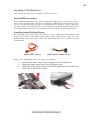
Installing a SATA Hard Drive
This section describes how to install a SATA Hard Drive.
About SATA Connectors
Your motherboard features four SATA connectors supporting a total of four drives.
SATA refers to Serial ATA (Advanced Technology Attachment) is the standard interface for the IDE hard drives which are currently used in most PCs. These connectors
are well designed and will only fit in one orientation. Locate the SATA connectors on
the motherboard and follow the illustration below to install the SATA hard drives.
Installing Serial ATA Hard Drives
To install the Serial ATA (SATA) hard drives, use the SATA cable that supports the
Serial ATA protocol. This SATA cable comes with a SATA power cable. You can
connect either end of the SATA cable to the SATA hard drive or the connector on the
motherboard.
SATA cable
(optional)
SATA power cable
(optional)
Refer to the illustration below for proper installation:
1
2
3
Attach either cable end to the connector on the motherboard.
Attach the other cable end to the SATA hard drive.
Attach the SATA power cable to the SATA hard drive and connect the
other end to the power supply.
* For reference only
Installing the Motherboard
20
Connecting I/O Devices
The backplane of the motherboard has the following I/O ports:
PS2 Mouse
Use the upper PS/2 port to connect a PS/2 pointing device.
PS2 Keyboard
Use the lower PS/2 port to connect a PS/2 keyboard.
DVI Port (HDMI
optional)
Connect the DVI port to the monitor.
VGA Port
Connect your monitor to the VGA port.
LAN Port
Connect an RJ-45 jack to the LAN port to connect your
computer to the Network.
USB 2.0 Ports
Use the USB 2.0 ports to connect USB 2.0 devices.
Audio Ports
Use the three audio ports to connect audio devices. The
first jack is for stereo line-in singal. The second jack is for
stereo line-out singal. The third jack is for microphone.
Installing the Motherboard
21
Connecting Case Components
After you have installed the motherboard into a case, you can begin connecting the
motherboard components. Refer to the following:
1
2
3
4
5
6
Connect the CPU cooling fan cable to CPU_FAN.
Connect the standard power supply connector to ATX_POWER.
Connect the case switches and indicator LEDs to the F_PANEL.
Connect the system cooling fan connector to SYS_FAN.
Connect the auxiliary case power supply connector to ATX12V.
Connect the case speaker cable to SPK.
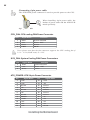
Connecting 24-pin power cable
The ATX 24-pin connector allows you to connect to ATX v2.x power supply.
With ATX v2.x power supply, users please
note that when installing 24-pin power
cable, the latches of power cable and the
ATX match perfectly.
24-pin power cable
Installing the Motherboard
22
Connecting 4-pin power cable
The ATX12V4P power connector is used to provide power to the CPU.
When installing 4-pin power cable, the
latches of power cable and the ATX12V4P
match perfectly.
4-pin power cable
CPU_FAN: CPU cooling FAN Power Connector
Pin
1
2
3
4
Signal Name
GND
+12V
Sense
PWM
Function
System Ground
Power +12V
Sensor
PWM
Users please note that the fan connector supports the CPU cooling fan of
1.1A ~ 2.2A (26.4W max) at +12V.
SYS_FAN: System Cooling FAN Power Connectors
Pin
1
2
3
Signal Name
GND
+12V
Sense
Function
System Ground
Power +12V
Sensor
ATX_POWER: ATX 24-pin Power Connector
Pin
Signal Name
1
2
3
4
5
6
7
8
9
+3.3V
10
11
+12V
12
+3.3V
Ground
+5V
Ground
+5V
Ground
PWRGD
+5VSB
Pin
13
14
15
16
17
18
19
20
21
Signal Name
+3.3V
-12V
Ground
PS_ON
Ground
Ground
Ground
-5V
+5V
+5V
+12V
22
23
+3.3V
24
Ground
+5V
Installing the Motherboard
23
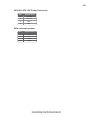
ATX12V: ATX 12V Power Connector
Pin
1
2
3
4
Signal Name
Ground
Ground
+12V
+12V
SPK: Internal speaker
Pin
Signal Name
1
2
3
4
VCC
Key
GND
Signal
Installing the Motherboard
24
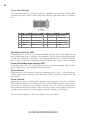
Front Panel Header
The front panel header (F_PANEL) provides a standard set of switch and LED headers
commonly found on ATX or Micro ATX cases. Refer to the table below for information:
Pin
Signal
Function
Pin
Signal
Function
1
HD_LED_P Hard disk LED(+)
2
FP PWR/SLP *MSG LED(+)
3
HD_LED_N Hard disk LED(- )
4
FP PWR/SLP *MSG LED(-)
5
RST_SW_N Reset Switch(-)
6
PWR_SW_P Power Switch(+)
7
RST_SW_P
Reset Switch(+)
8
PWR_SW_N Power Switch(-)
9
RSVD
Reserved
10 Key
No pin
* MSG LED (dual color or single color)
Hard Drive Activity LED
Connecting pins 1 and 3 to a front panel mounted LED provides visual indication that
data is being read from or written to the hard drive. For the LED to function properly,
an IDE drive should be connected to the onboard IDE interface. The LED will also
show activity for devices connected to the SCSI (hard drive activity LED) connector.
Power/Sleep/Message waiting LED
Connecting pins 2 and 4 to a single or dual-color, front panel mounted LED provides
power on/off, sleep, and message waiting indication.
Reset Switch
Supporting the reset function requires connecting pin 5 and 7 to a momentarycontact switch that is normally open. When the switch is closed, the board resets and
runs POST.
Power Switch
Supporting the power on/off function requires connecting pins 6 and 8 to a momentary-contact switch that is normally open. The switch should maintain contact for at
least 50 ms to signal the power supply to switch on or off. The time requirement is
due to internal de-bounce circuitry. After receiving a power on/off signal, at least two
seconds elapses before the power supply recognizes another on/off signal.
This concludes Chapter 2. The next chapter covers the BIOS.
Installing the Motherboard
25
Chapter 3
Using BIOS
About the Setup Utility
The computer uses the latest “American Megatrends Inc.” BIOS with support for
Windows Plug and Play. The CMOS chip on the motherboard contains the ROM
setup instructions for configuring the motherboard BIOS.
The BIOS (Basic Input and Output System) Setup Utility displays the system’s
configuration status and provides you with options to set system parameters. The
parameters are stored in battery-backed-up CMOS RAM that saves this information
when the power is turned off. When the system is turned back on, the system is
configured with the values you stored in CMOS.
The BIOS Setup Utility enables you to configure:
•
Hard drives, diskette drives and peripherals
•
Video display type and display options
•
Password protection from unauthorized use
•
Power Management features
The settings made in the Setup Utility affect how the computer performs. Before
using the Setup Utility, ensure that you understand the Setup Utility options.
This chapter provides explanations for Setup Utility options.
The Standard Configuration
A standard configuration has already been set in the Setup Utility. However, we
recommend that you read this chapter in case you need to make any changes in the
future.
This Setup Utility should be used:
•
when changing the system configuration
•
when a configuration error is detected and you are prompted to make
changes to the Setup Utility
•
when trying to resolve IRQ conflicts
•
when making changes to the Power Management configuration
•
when changing the password or making other changes to the Security
Setup
Entering the Setup Utility
When you power on the system, BIOS enters the Power-On Self Test (POST)
routines. POST is a series of built-in diagnostics performed by the BIOS. After the
POST routines are completed, the following message appears:
Press DEL to enter SETUP
Using BIOS
26
Press the delete key to access BIOS Setup Utility.
Above image is for reference only, for details please refer to actual image.
Resetting the Default CMOS Values
When powering on for the first time, the POST screen may show a “CMOS
Settings Wrong” message. This standard message will appear following a clear
CMOS data at factory by the manufacturer. You simply need to Load Default
Settings to reset the default CMOS values.
Note: Changes to system hardware such as different CPU, memories, etc. may also
trigger this message.
Using BIOS
When you start the Setup Utility, the main menu appears. The main menu of the
Setup Utility displays a list of the options that are available. A highlight indicates
which option is currently selected. Use the cursor arrow keys to move the highlight
to other options. When an option is highlighted, execute the option by pressing
<Enter>.
Some options lead to pop-up dialog boxes that prompt you to verify that you wish to
execute that option. Other options lead to dialog boxes that prompt you for information.
Some options (marked with a triangle f) lead to submenus that enable you to change
the values for the option. Use the cursor arrow keys to scroll through the items in the
submenu.
Using BIOS
27
In this manual, default values are enclosed in parenthesis. Submenu items are denoted
by a triangle f .
The default BIOS setting for this motherboard apply for most conditions
with optimum performance. We do not suggest users change the default
values in the BIOS setup and take no responsibility to any damage caused
by changing the BIOS settings.
BIOS Navigation Keys
The BIOS navigation keys are listed below:
KEY
ESC
mnlk
+/Enter
FUNCTION
Exits the current menu
Scrolls through the items on a menu
Modifies the selected field’s values
Select
F1
General Help
F2
Previous Value
F3
Optimized Defaults
F4
Save & Exit
1. For the purpose of better product maintenance, the manufacture
reserves the right to change the BIOS items presented in this manual.
The BIOS setup screens shown in this chapter are for reference only and
may differ from the actual BIOS. Please visit the manufacture’s website
for updated manual.
2. In this Gui BIOS, you can operate by mouse or keyboard. Click : select
item; Double click: enter; Right click: exit.
Language
Select the language icon and press <Enter> or double click the left key of the mouse
to display the screen. Then you can choose the language: English, Traditional
Chinese, Simple Chinese, Russian, Korean, German, Spanish, Italian, Portuguese,
Japanese.
Default
Select the default icon and press <Enter> or double click the left key of the mouse
to display the screen. Then you can load optimized defaults or not.
Boot
Select the boot icon and press <Enter> or double click the left key of the mouse to
display the screen. Then you can choose the boot device.
Advanced
Select the advanced icon and press <Enter> or double click the left key of the
mouse to display the screen.
Using BIOS
28
Main Menu
This menu shows the information of BIOS and enables you to set the system
language, date and time.
Main
Advanced
Chipset
M.I.B III
Boot
BIOS Information
System Language
System Date
System Time
Security
Exit
Choose the system default
language
English
Mon 12/27/2010
21:54:45
lk : Select Screen
mn /Click: Select Item
Enter/Dbl Click : Select
+/- : Change Opt.
F1: General Help
F2: Previous Values
F3: Optimized Defaults
F4: Save & Exit
ESC/Right Click: Exit
System Language (English)
This item is used to set system language.
Date & Time
The Date and Time items show the current date and time on the computer. If you are
running a Windows OS, these items are automatically updated whenever you make
changes to the Windows Date and Time Properties utility.
Using BIOS
29
Advanced Menu
The Advanced menu items allow you to change the settings for the CPU and other
system.
Main
Advanced
Chipset
M.I.B III
Boot
Security
Exit
LAN Configuration Parameters
LAN Configuration
PC Health Status
Power Management Setup
ACPI Settings
CPU Configuration
SATA Configuration
USB Configuration
Super IO Configuration
Trusted Computing
lk : Select Screen
mn /Click: Select Item
Enter/Dbl Click : Select
+/- : Change Opt.
F1: General Help
F2: Previous Values
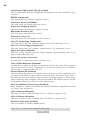
F3: Optimized Defaults
F4: Save & Exit
ESC/Right Click: Exit
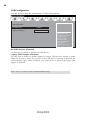
LAN Configuration
The item in the menu shows the LAN-related information that the BIOS
automatically detects.
Main
Advanced
Chipset
M.I.B III
Boot
LAN Configuration
Onboard LAN Controller
Enabled
Network Stack
Ipv4 PXE Support
Ipv6 PXE Support
Enabled
Enabled
Enabled
Security
Exit
Enabled/Disabled Onboard
LAN1 Controller
lk : Select Screen
mn /Click: Select Item
Enter/Dbl Click : Select
+/- : Change Opt.
F1: General Help
F2: Previous Values
F3: Optimized Defaults
F4: Save & Exit
ESC/Right Click: Exit
Onboard LAN Controller (Enabled)
Use this item to enable or disable the Onboard LAN.
Network stack (Enabled)
Use this item to enable or disable UEFI network stack.
Ipv4/6 PXE Support (Enabled)
Use these items to enable Ipv4/6 PXE Boot Support. If disabled Ipv4/6 PXE, boot
option will not be created.
Using BIOS
30
PC Health Status
On motherboards support hardware monitoring, this item lets you monitor the
parameters for critical voltages, temperatures and fan speeds.
Main
Advanced
Chipset
M.I.B III
Boot
Security
Exit
PC Health Status
Smart Fan Function
CPU Fan Speed
CPU Voltage
DIMM Voltage
VAXG Voltage
:
:
:
4687 RPM
1.212V
1.548V
0.468V
-=- PECI Mode -=Offset to TCC Activation Temp :
-21
lk : Select Screen
mn /Click: Select Item
Enter/Dbl Click : Select
+/- : Change Opt.
F1: General Help
F2: Previous Values
F3: Optimized Defaults
F4: Save & Exit
ESC/Right Click: Exit
fSmart Fan Function
Scroll to this item and press <Enter> to view the following screen:
Main
Advanced
Chipset
CPU Smart Fan Control
SMART Fan Mode
SMART Fan start PWM value
SMART Fan start PWM TEMP(-)
Delta T
SMART Fan Slope PWM value
CPU Fan Full Speed Offset (-)
M.I.B III
Boot
Security
Exit
Enabled
Normal
180
30
+3
10 PWM value/unite
23
lk : Select Screen
mn /Click: Select Item
Enter/Dbl Click : Select
+/- : Change Opt.
F1: General Help
F2: Previous Values
F3: Optimized Defaults
F4: Save & Exit
ESC/Right Click: Exit
CPU SMART FAN Control (Enabled)
This item allows you to enable/disable the control of the CPU fan speed by changing
the fan voltage.
Using BIOS
31
SMART Fan Mode (Normal)
This item allows you to select the fan mode (Normal, Quiet, Silent, or Manual) for a
better operation environment. If you choose Normal mode, the fan speed will be auto
adjusted depending on the CPU temperature. If you choose Quiet mode, the fan speed
will be auto minimized for quiet environment. If you choose Silent mode, the fan
speed will be auto restricted to make system more quietly. If you choose Manual
mode, the fan speed will be adjust depending on users’ parameters.
SMART Fan start PWM value (180)
This item is used to set the start PWM value of the smart fan.
SMART Fan start TEMP(-) (30)
This item is used to set the start temperature of the smart fan.
DeltaT (+3)
This item specifies the range that controls CPU temperature and keeps it from going
so high or so low when smart fan works.
SMART Fan Slope PWM value (10 PWM value/unite)
This item is used to set the Slope Select PWM of the smart fan.
CPU Fan Full Speed Offset(-) (23)
This item is used to set the CPU fan full speed offset value.
Press <Esc> to return to the PC Health Status page.
System Component Characteristics
These items display the monitoring of the overall inboard hardware health events,
such as System & CPU temperature, CPU & DIMM voltage, CPU & system fan
speed...etc.
•
•
•
•
CPU Fan Speed
CPU Voltage
DIMM Voltage
VAXG Voltage
Press <Esc> to return to the Advanced Menu page.
Using BIOS
32
Power Management Setup
This page sets up some parameters for system power management operation.
Main
Advanced
Chipset
M.I.B III
Boot
Resume By RING
Resume By PME
Resume By USB (S3)
Resume By PS2 KB (S3)
Resume By PS2 MS (S3)
EUP Function
Power Led Type
Security
Exit
About Resume by Ring
Power Management Setup
Disabled
Disabled
Disabled
Disabled
Disabled
Enabled
Dual Color LED
lk : Select Screen
mn /Click: Select Item
Enter/Dbl Click : Select
+/- : Change Opt.
F1: General Help
F2: Previous Values
F3: Optimized Defaults
F4: Save & Exit
ESC/Right Click: Exit
Resume By RING (Disabled)
The system can be turned off with a software command. If you enable this item, the
system can automatically resume if there is an incoming call on the Modem. You
must use an ATX power supply in order to use this feature.
Resume By PME (Disabled)
The system can be turned off with a software command. If you enable this item, the
system can automatically resume if there is an incoming call on the PCI Modem or
PCI LAN card. You must use an ATX power supply in order to use this feature. Use
this item to do wake-up action if inserting the PCI card.
Resume By USB (S3) (Disabled)
This item allows you to enable/disable the USB device wakeup function from S3
mode.
Resume By PS2 KB (S3) (Disabled)
This item enables or disables you to allow keyboard activity to awaken the system
from power saving mode.
Resume By PS2 MS (S3) (Disabled)
This item enables or disables you to allow mouse activity to awaken the system from
power saving mode.
EUP Support (Enabled)
This item allows user to enable or disable EUP support.
Power Led Type (Dual Color LED)
This item shows the type of the power LED.
Press <Esc> to return to the Advanced Menu page.
Using BIOS
33
ACPI Configuration
The item in the menu shows the highest ACPI sleep state when the system enters
suspend.
Aptio Setup Utility - Copyright (C) 2011 American Megatrends, Inc.
Main
Advanced
Chipset
M.I.B III
Boot
ACPI Settings
ACPI Sleep State
Security
Exit
Select the highest ACPI
sleep state the system
will enter when the
suspend button is pressed.
S3 (Suspend to RAM)
lk : Select Screen
mn /Click: Select Item
Enter/Dbl Click : Select
+/- : Change Opt.
F1: General Help
F2: Previous Values
F3: Optimized Defaults
F4: Save & Exit
ESC/Right Click: Exit
ACPI Sleep State (S3(Suspend to RAM))
This item allows user to enter the ACPI S3 (Suspend toRAM) Sleep State (default).
Press <Esc> to return to the Advanced Menu page.
CPU Configuration
The item in the menu shows the CPU.
Main
Advanced
Chipset
M.I.B III
Boot
CPU Configuration
Intel(R) Core(TM) i3-2100 CPU @ 3.10GHz
EMT64
Supported
Processor Speed
3100 MHz
Processor Stepping
206a7
Microcode Revision
25
Processor Cores
2
Intel HT Technology
Supported
Intel VT-x Technology
Supported
Hyper-threading
Active Processor Cores
Limit CPUID Maximum
Execute Disable Bit
Intel Virtualization Technology
CPU C3 Report
CPU C6 Report
Enhanced Halt (C1E)
Enabled
All
Disabled
Enabled
Enabled
Disabled
Enabled
Enabled
Using BIOS
Security
Exit
Enabled for Windows XP and
Linux (OS optimized for
Hyper-Threading Technology)
and Disabled for other OS(OS
not optimized for
Hyper-Threading Technology).
When Disabled only one thread
per enabled core is enabled.
lk : Select Screen
mn /Click: Select Item
Enter/Dbl Click : Select
+/- : Change Opt.
F1: General Help
F2: Previous Values
F3: Optimized Defaults
F4: Save & Exit
ESC/Right Click: Exit
34
Inter(R) Core(TM) i3-2100 CPU @ 3.10GHz
This is display-only field and diaplays the information of the CPU installed in your
computer.
EMT64 (Supported)
This item shows the computer supports EMT64.
Processor Speed (3100MHz)
This item shows the current processor speed.
Processor Stepping (206a7)
This item shows the processor stepping version.
Microcode Revision (25)
This item shows the Microcode version.
Processor Cores (2)
This item shows the core number of the processor.
Intel HT Technology (Supported)
This item shows that your computer supports Intel HT technology or not.
Intel VT-x Technology (Supported)
This item shows that your computer supports Intel VT-x technology or not.
Hyper-threading (Enabled)
This item is only available when the chipset supports Hyper-threading and you are
using a Hyper-threading CPU.
Active Processor Cores (All)
Use this item to control the active processor cores.
Limit CPUID Maximum (Disabled)
Use this item to enable or disable the maximum CPUID value limit. When supports
Prescott and LGA775 CPUs, enables this to prevent the system from “rebooting”
when trying to install Windows NT 4.0.
Excute Disable Bit (Enabled)
This item allows the processor to classify areas in memory by where application code
can execute and where it cannot. When a malicious worm attempts to insert code in
the buffer, the processor disables code execution, preventing damage or worm propagation. Replacing older computers with Execute Disable Bit enabled systems can halt
worm attacks, reducing the need for virus related repair.
Intel Virtualization Technology (Disabled)
When disabled, a VMM cannot utilize the additional hardware capabilities provided
by Vandor Pool Technology.
CPU C3 Report (Disabled)
This item is used to enable or disable CPU C3 (ACPI C2) report to OS.
CPU C6 Report (Disabled)
This item is used to enable or disable CPU C6 (ACPI C3) report to OS.
Enhanced Halt (C1E) (Enabled)
This item enables or disables enhanced halt.
Press <Esc> to return to the Advanced Menu page.
Using BIOS
35
SATA Configuration
Use this item to show the mode of serial-ATA configuration options.
Main
Advanced
Chipset
M.I.B III
Boot
SATA Configuration
Security
Exit
Determines how SATA
Controller(s) operate.
SATA Mode
IDE Mode
SATA Port1
Not Present
SATA Port2
Not Present
SATA Port3
Not Present
SATA Port4
Not Present
lk : Select Screen
mn /Click: Select Item
Enter/Dbl Click : Select
+/- : Change Opt.
F1: General Help
F2: Previous Values
F3: Optimized Defaults
F4: Save & Exit
ESC/Right Click: Exit
SATA Mode (IDE Mode)
Use this item to select SATA mode.
SATA Port 1~4 (Not Present)
This motherboard supports four SATA channel and each channel allows one SATA
device to be installed. Use these items to configure each device on the SATA channel.
z
H61 Chipset is not fully support AHCI Mode. HW support only.
Press <Esc> to return to the Advanced Menu page.
Using BIOS
36
USB Configuration
Use this item to show the information of USB configuration.
Main
Advanced
Chipset
M.I.B III
Boot
Security
Exit
Use Support Parameters
USB Configuration
All USB Devices
Enabled
Legacy USB Support
Enabled
lk : Select Screen
mn /Click: Select Item
Enter/Dbl Click : Select
+/- : Change Opt.
F1: General Help
F2: Previous Values
F3: Optimized Defaults
F4: Save & Exit
ESC/Right Click: Exit
All USB Devices (Enabled)
Use this item to enable or disable all USB devices.
Legacy USB Support (Enabled)
Use this item to enable or disable support for legacy USB devices. Setting to Audio
allows the system to detect the presence of the USB device at startup. If detected, the
USB controller legacy mode is enabled. If no USB device is detected, the legacy USB
support is disabled.
Press <Esc> to return to the Advanced Menu page.
Using BIOS
37
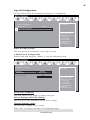
Super IO Configuration
Use this item to show the information of Super IO configuration.
Main
Advanced
Chipset
M.I.B III
Boot
Security
Exit
Set Parameters of Serial
Port 0 (COMA)
Super IO Configuration
Super IO Chip
Serial Port 0 Configutation
IT8728
lk : Select Screen
mn /Click: Select Item
Enter/Dbl Click : Select
+/- : Change Opt.
F1: General Help
F2: Previous Values
F3: Optimized Defaults
F4: Save & Exit
ESC/Right Click: Exit
Super IO Chip (IT8728)
This item shows the information of the super IO chip.
fSerial Port 0 Configuration
Scroll to this item and press <Enter> to view the following screen:
Main
Advanced
Chipset
M.I.B III
Boot
Serial Port 0 Configuration
Serial Port
Device Settings
Change Settings
Security
Exit
Enabled or Diabled Serial
Port (COM)
Enabled
IO=3F8h; IRQ=4;
Auto
lk : Select Screen
mn /Click: Select Item
Enter/Dbl Click : Select
+/- : Change Opt.
F1: General Help
F2: Previous Values
F3: Optimized Defaults
F4: Save & Exit
ESC/Right Click: Exit
Serial Port (Enabled)
This item allows you to enable or disable serial port.
Device Settings (IO=3F 8h; IRQ=4)
This item shows the information of the device settings.
Change Settings (Auto)
Use this item to change device settings.
Press <Esc> to return to the Super IO Configuration page.
Using BIOS
38
Press <Esc> to return to the Advanced Menu page.
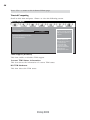
Trusted Computing
Scroll to this item and press <Enter> to view the following screen.
Main
Advanced
Chipset
TPM Configuration
TPM Support
M.I.B III
Boot
Enabled
Current TPM Status Information
NO TPM Hardware
Security
Exit
Enables or Disables TPM
support. O.S. will not show
TPM. Reset of platform is
required.
lk : Select Screen
mn /Click: Select Item
Enter/Dbl Click : Select
+/- : Change Opt.
F1: General Help
F2: Previous Values
F3: Optimized Defaults
F4: Save & Exit
ESC/Right Click: Exit
TPM Support (Enabled)
This item enables or disables TPM support.
Current TPM Status Information
This item shows the information of current TPM status.
NO TPM Hardware
This item shows the TPM status.
Using BIOS
39
Chipset Menu
The chipset menu items allow you to change the settings for the North Bridge
chipset, South Bridge chipset and other system.
Main
Advanced
Chipset
M.I.B III
Boot
System Agent Configuration
PCH Configuration
ME Subsystem
Security
Exit
System Agent (SA)
Parameters
lk : Select Screen
mn /Click: Select Item
Enter/Dbl Click : Select
+/- : Change Opt.
F1: General Help
F2: Previous Values
F3: Optimized Defaults
F4: Save & Exit
ESC/Right Click: Exit
f System Agent Configuration
Scroll to this item and press <Enter> and view the following screen:
Main
Advanced
Chipset
M.I.B III
Boot
System Agent Configuration
IGD Memory
DVMT Memory
IGD Multi-Monitor
64M
256M
Disabled
Security
Exit
Select DVMT 5.0 Pre-Allocated (Fixed) Graphics
Memory size used by the Internal Graphics Device.
lk : Select Screen
mn /Click: Select Item
Enter/Dbl Click : Select
+/- : Change Opt.
F1: General Help
F2: Previous Values
F3: Optimized Defaults
F4: Save & Exit
ESC/Right Click: Exit
IGD Memory (64M)
This item shows the information of the IGD (Internal Graphics device) memory.
DVMT Memory (256M)
This item is used to select DVMT 5.0 Total Graphic Memory size by the internal
Graphics Device.
IGD Multi-Monitor (Disabled)
This item enables or disables IGD (Internal Graphics device) multi-monitor.
Press <Esc> to return to the Chipset Menu page.
Using BIOS
40
Multi-Monitor technology
Multi-Monitor technology can help you to increase the area available for programs
running on a single computer system through using multiple display devices.
It is not only to increase larger screen viewing but aslo to improving personal
productivity.
Intel Integrated Graphics
PCI-Express Graphics
Please note that Multi-Monitor technology supports up to four monitors:
one or two Intel integrated Graphics and one or two PCI-Express graphics
devices under Windows 7/8.
Step 1. Insert ECS drives DVD to run Auto setup or browse the DVD to install Intel
chipset drivers, VGA and sound drivers.(If you want know the detail information,
please refer to chapter 4.)
Using BIOS
41
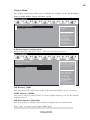
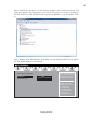
Step 2. Install all the drivers of PCI-Express graphic cards. Click the Browse CD
item, then appears the following screen. Select the driver you want to install(e.g
NVIDIA GeForce 8400 GS(Microsoft Corporation-WDDM v1.1)) and double click
it.
Step 3. Enable IGD Multi-Monitor from BIOS. In the following BIOS screen, please
set IGD Multi-Monitor to [Enabled].
Main
Advanced
Chipset
M.I.B III
Boot
System Agent Configuration
IGD Memory
DVMT Memory
IGD Multi-Monitor
64M
256M
Disabled
Security
Exit
Select DVMT 5.0 Pre-Allocated (Fixed) Graphics
Memory size used by the Internal Graphics Device.
lk : Select Screen
mn /Click: Select Item
Enter/Dbl Click : Select
+/- : Change Opt.
F1: General Help
F2: Previous Values
F3: Optimized Defaults
F4: Save & Exit
ESC/Right Click: Exit
Using BIOS
S
w
a
42
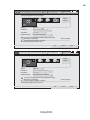
Step 4. Change the appearance of your displays under Windows 7/8.
1. Enter the Control Panel menu, select the Display in the All Control Panel Items
and click the Screen Resolution, then appears the following screen.
Show the path of the setting location
Display devices
Control Panel
All Control Panel Items
Display
Screen Resolution
Search Control Panel
Change the apprearance of your displays
2
3
1
Display:
1. DELL U2410
Resolution:
1920 x 1200 (recommended)
Orientation:
Landscape
Multiple displays:
Extend desktop to this display
4
This is currently your main display.
Detect
Identify
Advance settings
Make text and other items larger or smaller
What display settings should I choose?
OK
Cancel
Apply
The type of the display
Set the multiple displays
2.Select display devices, set the multiple displays option and to extend destop for
display “Multi-Monitor technology”.
Control Panel
All Control Panel Items
Display
Screen Resolution
Search Control Panel
Change the apprearance of your displays
2
1
3
Display:
3. DELL U2410
Resolution:
1920 x 1200 (recommended)
Orientation:
Landscape
4
Multiple displays:
!
Disconnect this display
Extend desktop to this display
You must select Apply
beforethis
making
additional changes.
Disconnect
display
Make this my main display
Detect
Identify
Advance settings
Make text and other items larger or smaller
What display settings should I choose?
OK
Using BIOS
Cancel
Apply
43
Control Panel
All Control Panel Items
Display
Screen Resolution
Search Control Panel
Change the apprearance of your displays
3
2
1
Display:
4. AL1717
Resolution:
1920 x 1200 (recommended)
Orientation:
Landscape
Multiple displays:
Disconnect this display
!
4
You must select Apply before making additional changes.
Make this my main display
Detect
Identify
Advance settings
Make text and other items larger or smaller
What display settings should I choose?
OK
Control Panel
All Control Panel Items
Display
Screen Resolution
Cancel
Apply
Search Control Panel
Change the apprearance of your displays
2
3
1
Display:
4. AL1717
Resolution:
1920 x 1200 (recommended)
Orientation:
Landscape
Multiple displays:
Extend desktop to this display
!
4
3
You must select Apply before making additional changes.
Make this my main display
Detect
Identify
Advance settings
Make text and other items larger or smaller
What display settings should I choose?
OK
Using BIOS
Cancel
Apply
44
fPCH Configuration
Scroll to this item and press <Enter> to view the following screen:
Main
Advanced
Chipset
M.I.B III
Boot
PCH Configuration
Restore AC Power Loss
Power Off
Audio Configuration
Azalia HD Audio
Azalia Internal HDMI codec
Enabled
Enabled
Case Open Warning
Chassis Opened
Disabled
No
Security
Exit
Select AC power state
when power is re-applied
after a power failure
lk : Select Screen
mn /Click: Select Item
Enter/Dbl Click : Select
+/- : Change Opt.
F1: General Help
F2: Previous Values
F3: Optimized Defaults
F4: Save & Exit
ESC/Right Click: Exit
Restore AC Power Loss (Power Off)
This item enables your computer to automatically restart or return to its operating
status.
Audio Configuration
This item shows the information of the audio configuration.
Azalia HD Audio (Enabled)
This item enables or disables Azalia HD audio.
Azalia Internal HDMI codec (Enabled)
This item enables or disables Azaia Internal HDMI codec.
Case Open Warning (Disabled)
This item enables or disables the warning if the case is opened up, and the item below
indicates the current status of the case.
Chassis Opened (No)
This item indicates whether the case has been opened.
Press <Esc> to return to the Chipset Menu page.
Using BIOS
45
f ME Subsystem
Scroll to this item and press <Enter> to view the following screen.
Main
Advanced
Chipset
M.I.B III
Boot
Management Engine Technology Configuration
ME FW Version
Security
Exit
ME Subsystem Help
8.1.0.1248
lk : Select Screen
mn /Click: Select Item
Enter/Dbl Click : Select
+/- : Change Opt.
F1: General Help
F2: Previous Values
F3: Optimized Defaults
F4: Save & Exit
ESC/Right Click: Exit
ME FW Version (8.1.0.1248)
This item shows the ME FW version.
Press <Esc> to return to the Chipset Menu page.
Using BIOS
46
M.I.B III (MB Intelligent BIOS III) Menu
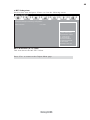
This page enables you to set the clock speed and system bus for your system. The
clock speed and system bus are determined by the kind of processor you have
installed in your system.
Main
Advanced
Chipset
M.I.B III
Boot
Security
Exit
CPU
OverClocking
ME
Subsystem
Help
Configuration
M.I.B III (MB Intelligent BIOS III)
CPU OverClocking Configuration
Chipset OverClocking Configuration
B.O.M.P Technology
Enabled
Auto Detect DIMM/PCI Clk
Spread Spectrum
Enabled
Enabled
Intel(R) Core(TM) i3-2100 CPU @ 3.10GHz
Processor Speed
3100 MHz
Memory Frequency
1333 MHz
Total Memory
1024 MB (DDR3)
lk : Select Screen
mn /Click: Select Item
Enter/Dbl Click : Select
+/- : Change Opt.
F1: General Help
F2: Previous Values
F3: Optimized Defaults
F4: Save & Exit
ESC/Right Click: Exit
fCPU OverClocking Configuration
Scroll to this item to view the following screen:
Main
Advanced
Chipset
M.I.B III
Boot
Security
Exit
Enhance Intel SpeedStep
Technology
CPU OverClocking Configuration
CPU Frequency(1/100 MHz)
CPU Ratio
Enhanced Intel SpeedStep Technology
10000
31
Enabled
lk : Select Screen
mn /Click: Select Item
Enter/Dbl Click : Select
+/- : Change Opt.
F1: General Help
F2: Previous Values
F3: Optimized Defaults
F4: Save & Exit
ESC/Right Click: Exit
CPU Frequency(1/100 MHz) (10000)
This item shows the information of the CPU frequency.
CPU Ratio (31)
This item allows users to control non turbo CPU ratio.
Using BIOS
47
Enhanced Intel SpeedStep Technology (Enabled)
This item allows users to enable or disable the EIST (Enhanced Intel SpeedStep
Technology).
Press <Esc> to return to the M.I.B III Menu page.
f Chipset OverClocking Configuration
Scroll to this item to view the following screen:
Main
Advanced
Chipset
M.I.B III
Boot
Memory Multiplier Configuration
Performance Memory Profiles
Automatic
Security
Exit
The selection of Performance
Memory Profiles which impacts
memory sizing behavior.
Memory Timing Configuration
CAS# Latency(tCL)
RAS# to CAS# Delay(tRCD)
Row Precharge Time(tRP)
RAS# Active Time(tRAS)
Write Recovery Time(tWR)
Row Refresh Cycle Time(tRFC)
Active to Active Delay(tRRD)
Write to Read Delay(tWTR)
Read CAS# Precharge(tRTP)
Four Active Window Delay(tFAW)
8
8
8
24
10
74
4
5
5
20
Intel Graphics Configuration
Graphics Core Ratio Limit
Graphics Voltage(1/256)
22
0
lk : Select Screen
mn /Click: Select Item
Enter/Dbl Click : Select
+/- : Change Opt.
F1: General Help
F2: Previous Values
F3: Optimized Defaults
F4: Save & Exit
ESC/Right Click: Exit
Performance Memory Profiles (Automatic)
This item allows you to select the memory mode: Automatic, Manual, XMP Profile
1 or 2.
CAS# Latency(tCL) (8)
This item determines the operation of DDR SDRAM memory CAS (column address
strobe). It is recommended that you leave this item at the default value. The 2T
setting requires faster memory that specifically supports this mode.
RAS# to CAS# Delay(tRCD) (8)
This item specifies RAS# to CAS# delay to Rd/Wr command to the same bank.
Row Precharge Time(tRP) (8)
This item specifies Row precharge to Active or Auto-Refresh of the same bank.
RAS# Active Time(tRAS) (24)
This item specifies the RAS# active time.
Write Recovery Time(tWR) (10)
This item specifies the write recovery time.
Using BIOS
48
Row Refresh Cycle Time(tRFC) (74)
This item specifies the row refresh cycle time.
Active to Active Delay(tRRD) (4)
This item controls the active bank x to active bank y in memory clock cycles.
Write to Read Delay(tWTR) (5)
This item specifies the write to read delay time.
Read CAS# Precharge(tRTP) (5)
This item controls the Read to precharge delay for memory devices, in memory
clock cycles.
Four Active Window Delay(tFAW) (20)
This item controls the four bank activate time in memory clock cycles.
Graphics Core Ratio Limit (22)
This item allows you to control the internal GFX Turbo ratio.
Graphics Voltage (1/256) (0)
This item allows you to adjust the internal GFX voltage.
Press <Esc> to return to the M.I.B III Menu page.
B.O.M.P Technology (Enabled)
This item allows users to enable or disable B.O.M.P technology. This function can
run safe setting to setup menu when system boot fail 3 times.
Auto Detect DIMM/PCI Clk (Enabled)
When this item is enabled, BIOS will disable the clock signal of free DIMM/PCI slots.
Spread Spectrum (Enabled)
If you enable spread spectrum, it can significantly reduce the EMI (Electro-Magnetic
Interference) generated by the system.
Intel(R) Core(TM) i3-2100 CPU @ 3.10GHz
This is display-only field and displays the information of the CPU installed in your
computer.
Processor Speed (3100 MHz)
This item shows the CPU speed.
Memroy Frequency (1333 MHz)
This item shows the memroy frequency.
Total Memory (1024 MB(DDR3))
This item shows the total momery of DDR3.
Using BIOS
49
Boot Menu
This page enables you to set the keyboard NumLock state.
Main
Advanced
Chipset
M.I.B III
Boot
Security
Exit
Boot Configuration
Operation System Select
Launch PXE OpROM
Launch Storage OpROM
Bootup NumLock State
Quiet Boot
Boot mode select
Set Boot Priority
Boot Option #1
Boot Option #2
Boot Option #3
Boot Option #4
Boot Option #5
Boot Option #6
Boot Option #7
Windows7 or other OS
Disabled
Enabled
On
Enabled
LEGACY
Hard Disk
CD/DVD
USB / Floppy
USB CD/DVD
USB Hard Disk
USB Key: Ut165 1.00
Network
Hard Disk Drive Priorities
CD/DVD ROM Drive Priorities
USB/ Floppy Drive Priorities
USB CD/DVD ROM Drive Priorities
USB HardDisk Drive Priorities
USB Flash Drive Priorities
Network Device Priorities
[Press Enter]
[Press Enter]
[Press Enter]
[Press Enter]
[Press Enter]
[Press Enter]
[Press Enter]
CSM parameters
[Press Enter]
Windows 7 or other OS:
Boot policy for Legacy OS
Windows 8: Boot Policy for
UEFI OS without
Compatibility Support
Module (CSM)
Manual: User customized
CSM parameters & boot
policy
lk : Select Screen
mn /Click: Select Item
Enter/Dbl Click : Select
+/- : Change Opt.
F1: General Help
F2: Previous Values
F3: Optimized Defaults
F4: Save & Exit
ESC/Right Click: Exit
Boot Configuration
This item shows the information of the Boot Configuration.
Operation System Select (Windows7 or other OS)
This item is used to select the operation system.
Launch PXE OpROM (Disabled)
The item enables or disables launch PXE Option ROM.
Launch Storage OpROM (Enabled)
The item enables or disables launch Storage Option ROM.
Bootup NumLock State (On)
This item enables you to select NumLock state.
Quiet Boot (Enabled)
This item enables or disables quiet boot.
Boot mode select (LEGACY)
Use this item to select boot mode.
Set Boot Priority
This item enables you to set boot priority for all boot devices.
Boot Option #1/2/3/4/5/6/7
These items show the boot priorities.
Using BIOS
50
Hard Disk / CD/DVD ROM / USB Floppy / USB CD/DVD ROM / USB HardDisk /
USB Flash / Network Boot Drive Priorities
These items enable you to specify the sequence of loading the operating system.
Press <Enter> to see the submenu.
CSM parameters
OpROM execution, boot options filter,etc.
f CSM parameters
Scroll to this item and press <Enter> to view the following screen.
Main
Advanced
Chipset
Launch CSM
Boot option filter
Launch PXE OpROM policy
Launch Storage OpROM policy
Launch Video OpROM policy
Other PCI device ROM priority
M.I.B III
Boot
Always
UEFI and Legacy
Do not launch
Legacy only
Legacy only
Legacy OpROM
Security
Exit
This option controls if CSM
will be launched
lk : Select Screen
mn /Click: Select Item
Enter/Dbl Click : Select
+/- : Change Opt.
F1: General Help
F2: Previous Values
F3: Optimized Defaults
F4: Save & Exit
ESC/Right Click: Exit
Launch CSM
This option controls if CSM will be launched.
Boot option filter
This option controls what devices system can boot to.
Launch PXE OpROM policy
This controls the execution of UEFI and Legacy PXE OpROM.
Launch Storage OpROM policy
This controls the execution of UEFI and Legacy Storage OpROM.
Launch Video OpROM policy
This controls the execution of UEFI and Legacy Video OpROM.
Other PCI device ROM priority
For PCI devices other than Network, Mass storage or Video defines which OpROM to
launch.
Press <Esc> to return to the Boot Menu page.
Using BIOS
51
Security Menu
This page enables you to set setup administrator password and user password.
Main
Advanced
Administrator Password Status
User Password Status
Chipset
M.I.B III
Boot
Secure Boot
Secure Boot Mode
Image Execution Policy
Key Management
Exit
Secure Boot mode selector.
‘Standard’ -fixed Secure
boot policy, ‘Custom’ changeable Image
Execution policy and Secure
Boot Key databases
Setup
Disabled
lk : Select Screen
mn /Click: Select Item
Enter/Dbl Click : Select
+/- : Change Opt.
F1: General Help
F2: Previous Values
F3: Optimized Defaults
F4: Save & Exit
ESC/Right Click: Exit
Administrator Password
System Mode state
Secure Boot state
Security
Not Install
Not Install
Enabled
Custom
Administrator Password Status (Not Install)
This item shows administrator password installed or not.
User Password Status (Not Install)
This item shows user password installed or not.
System Mode state (Setup)
This item shows system mode setup or not.
Secure Boot state (Disabled)
This item allows you to enable or disable the secure boot state.
Secure Boot (Enabled)
This item is used to control the secure boot flow, it is possible only if system runs in
User Mode.
Secure Boot Mode (Custom)
This item is used to select secure boot mode, when you select standard mode, secure
boot policy is fixed; when you select custom mode, the image execution policy and
secure boot key databases are changeable.
Using BIOS
52
f Image Execution Policy
Scroll to this item to view the following screen:
Main
Advanced
Internal FV
Option ROM
Removable Media
Fixed Media
Chipset
M.I.B III
Boot
Always Execute
Deny Execute
Deny Execute
Deny Execute
Security
Exit
Image Execution Policy per
device path on Security
Violation. Note: Only users
logged with Administrative
password can exercise
Query User policy setting
lk : Select Screen
mn /Click: Select Item
Enter/Dbl Click : Select
+/- : Change Opt.
F1: General Help
F2: Previous Values
F3: Optimized Defaults
F4: Save & Exit
ESC/Right Click: Exit
Internal FV/Option ROM/Removable Media/Fixed Media (Always Execute/
Deny Execute)
These items allow you to select image execution policy per device path on security
violation. Only users logged with administrative password can exercise query user
policy setting.
Press <Esc> to return to the Security Menu page.
Using BIOS
53
f Key Management
Scroll to this item to view the following screen:
Main
Advanced
Chipset
M.I.B III
Default Key Provisioning
Manage All Factory Keys (PK, KEK, DB, DBX)
Install default Secure Boot keys
Platform Key (PK)
Set PK from File
Get PK to File
Delete the PK
Key Exchange Key Database (KEK)
Set KEK from File
Get KEK to File
Delete the KEK
Append an entry to KEK
Authorized Signature Database (DB)
Set DB from File
Get DB to File
Delete the DB
Append an entry to DB
Forbidden Signature Database (DBX)
Set DBX from File
Get DBX to File
Delete the DBX
Append an entry to DBX
Boot
Disabled
Security
Exit
Force OEM default Secure
Boot Keys if System is in
Setup Mode.
NOT INSTALLED
NOT INSTALLED
NOT INSTALLED
NOT INSTALLED
lk : Select Screen
mn /Click: Select Item
Enter/Dbl Click : Select
+/- : Change Opt.
F1: General Help
F2: Previous Values
F3: Optimized Defaults
F4: Save & Exit
ESC/Right Click: Exit
Default Key Provisioning (Disabled)
This item enables or disables you to force OEM default secure boot keys if system is
in setup mode.
Platform Key (PK)
This item shows the information of the platform key.
Set PK/KEK/DB/DBX from File
This item launches the file browser to set Efi Variable from the file. The file data
must be formatted as Efi Variable with TimeBased Authenticated Header.
Get PK/KEK/DB/DBX to File
This item is used to store secure variable to a file with a matching name in selected
file system’s root.
Delete the PK/KEK/DB/DBX
This item is used to delete the variable.
Key Exchange Key Database (KEK)
This item shows the information of the key exchange key database.
Authorized Signature Database (DB)
This item shows the information of the authorized signature database.
Forbidden Signature Database (DBX)
This item shows the information of the forbidden signature database.
Append an entry to KEK/DB/DBX
This item launches the file browser to Append new signature database from the file.
The file data must be formatted as Efi Variable with TimeBased Authenticated Header.
Using BIOS
54
Exit Menu
This page enables you to exit system setup after saving or without saving the
changes.
Main
Advanced
Chipset
M.I.B III
Boot
Save Changes and Exit
Discard Changes and Exit
Save Changes and Reset
Discard Changes and Reset
Security
Exit
Exit system setup after
saving the changes.
Save Options
Save Changes
Discard Changes
lk : Select Screen
mn /Click: Select Item
Enter/Dbl Click : Select
+/- : Change Opt.
F1: General Help
F2: Previous Values
F3: Optimized Defaults
F4: Save & Exit
ESC/Right Click: Exit
Restore Defaults
Save as User Defaults
Restore User Defaults
Boot Override
Save Changes and Exit
This item enables you to save the changes that you have made and exit.
Discard Changes and Exit
This item enables you to discard any changes that you have made and exit.
Save Changes and Reset
This item enables you to save the changes that you have made and reset.
Discard Changes and Reset
This item enables you to discard any changes that you have made and reset.
Save Options
This item enables you to save the options that you have made.
Save Changes
This item enables you to save the changes that you have made.
Discard Changes
This item enables you to discard any changes that you have made.
Restore Defaults
This item enables you to restore the system defaults.
Save as User Defaults
This item enables you to save the changes that you have made as user defaults.
Restore User Defaults
This item enables you to restore user defaults.
Boot Override
Use this item to select the boot device.
Using BIOS
55
Updating the BIOS
You can download and install updated BIOS for this motherboard from the
manufacturer’s Web site. New BIOS provides support for new peripherals, improvements in performance, or fixes for known bugs. Install new BIOS as follows:
1
If your motherboard has a BIOS protection jumper, change the setting to
allow BIOS flashing.
2
If your motherboard has an item called Firmware Write Protect in Advanced BIOS features, disable it. (Firmware Write Protect prevents
BIOS from being overwritten.)
3
Prepare a bootable device or create a bootable system disk. (Refer to
Windows online help for information on creating a bootable system
disk.)
4
Download the Flash Utility and new BIOS file from the manufacturer’s
Web site. Copy these files to the bootable device.
5
Turn off your computer and insert the bootable device in your computer. (You might need to run the Setup Utility and change the the boot
priority items on the Advanced BIOS Features Setup page, to force
your computer to boot from the bootable device first.)
6
At the C:\ or A:\ prompt, type the Flash Utility program name and the file
name of the new BIOS and then press <Enter>. Example: AFUDOS.EXE
040706.ROM
7
When the installation is complete, remove the bootable device from the
computer and restart your computer. If your motherboard has a Flash
BIOS jumper, reset the jumper to protect the newly installed BIOS from
being overwritten. The computer will restart automatically.
This concludes Chapter 3. Refer to the next chapter for information on the software
supplied with the motherboard.
Using BIOS
56
Memo
Using BIOS
57
Chapter 4
Using the Motherboard Software
Auto-installing under Windows XP/7/8
The auto-install DVD-ROM makes it easy for you to install the drivers and software.
The support software DVD-ROM disc loads automatically under Windows XP/7/8.
When you insert the DVD-ROM disc in the DVD-ROM drive, the auto-run feature
will automatically bring up the installation screen. The screen has four buttons on it:
Setup, Utilities, Browse CD and Exit.
Information:
Displays the path for all
software and drivers
available on the disk.
Click “Exit” button to
close the Auto-Setup
window.
Browse CD:
Open Windows Explorer
and show the contents
of the support disk.
C l i c k t h e “Setup”
button to select and
run the software
installation program.
Click the “ Utilities”
button to select and
install ECS Intelligent
Utility.
Running Setup
Follow these instructions to install device drivers and software for the motherboard:
1.
Click Setup. The installation program begins:
The following screens are examples only. The screens and driver lists will
be different according to the motherboard you are installing.
The motherboard identification is located in the upper left-hand corner.
Using the Motherboard Software
58
2.
Click Next. The following screen appears:
3.
Check the box next to the items you want to install. The default options are recommended.
4.
Click Next to run the Installation Wizard. An item installation screen appears:
5.
Follow the instructions on the screen to install the items.
Drivers and software are automatically installed in sequence. Follow the
onscreen instructions, confirm commands and allow the computer to
restart a few times to complete the installation.
Windows 8 will show the following screen after system restart, you
must select “Desktop” in the bottom left to install the next driver.
Using the Motherboard Software
59
Windows 7/8 will appear below UAC (User Account Control) message after
the system restart. You must select “Yes” to install the next driver. Continue
this process to complete the drivers installation.
Manual Installation
If the auto-install DVD-ROM does not work on your system, you can still install
drivers through the file manager for your OS (for example, Windows Explorer).
Look for the chipset and motherboard model, and then browse to the directory and
path to begin installing the drivers. Most drivers have a setup program (SETUP.EXE)
that automatically detects your operating system before installation. Other drivers
have the setup program located in the operating system subfolder.
If the driver you want to install does not have a setup program, browse to the
operating system subfolder and locate the readme text file (README.TXT or
README.DOC) for information on installing the driver or software for your operating system.
ECS Utility Software (Intelligent EZ Utility)
ECS Intelligent EZ Utility provides friendly interfaces under Windows O.S, which
makes your computing more easily and conveniently.
These software(s) are subject to change at anytime without prior notice. Please
refer to the support disk for available software.
Using the Motherboard Software
60
eSF
eSF(Smart Fan) utility provides easy and safe way to adjust fan speed in accordance
with your PC’s system loading and temperature.
It has five modes to adjust fan speed in a safe range without entering the BIOS to
optimize your system cooling environment.
Microsoft .NET Framework 3.5 is required.
eDLU
ECS eDLU utility makes updating drivers fast and easy. eDLU saves time and hassle
by listing all the latest drivers online. Just select the one you prefer and start to
download and install the drivers.
eBLU
ECS eBLU utility makes BIOS update faster and easier. eBLU will list the latest BIOS
with a default check-mark. Click”install” button to install.
Microsoft .NET Framework 3.5 is required.
Using the Motherboard Software
61
Chapter 5
Trouble Shooting
Start up problems during assembly
After assembling the PC for the first time you may experience some start up
problems. Before calling for technical support or returning for warranty, this chapter
may help to address some of the common questions using some basic troubleshooting
tips.
a) System does not power up and the fans are not running.
1.Disassemble the PC to remove the VGA adaptor card, DDR memory, LAN, USB
and other peripherals including keyboard and mouse. Leave only the motherboard,
CPU with CPU cooler and power supply connected. Turn on again to see if the
CPU and power supply fans are running.
2. Make sure to remove any unused screws or other metal objects such as screwdrivers
from the inside PC case. This is to prevent damage from short circuit.
3. Check the CPU FAN connector is connected to the motherboard.
4. For Intel platforms check the pins on the CPU socket for damage or bent. A bent
pin may cause failure to boot and sometimes permanent damage from short circuit.
5. Check the 12V power connector is connected to the motherboard.
6. Check that the 12V power & ATX connectors are fully inserted into the
motherboard connectors. Make sure the latches of the cable and connector are
locked into place.
b) Power is on, fans are running but there is no display
1. Make sure the monitor is turned on and the monitor cable is properly connected
to the PC.
2. Check the VGA adapter card (if applicable) is inserted properly.
3. Listen for beep sounds. If you are using internal PC speaker make sure it is
connected.
a. continuous 3 short beeps : memory not detected
b. 1 long beep and 8 short beeps : VGA not detected
c) The PC suddenly shuts down while booting up.
1. The CPU may experience overheating so it will shutdown to protect itself.
Ensure the CPU fan is working properly.
Trouble Shooting
62
2. From the BIOS setting, try to disable the Smartfan function to let the fan run at
default speed. Doing a Load Optimised Default will also disable the Smartfan.
Start up problems after prolong use
After a prolong period of use your PC may experience start up problems again.
This may be caused by breakdown of devices connected to the motherboard such as
HDD, CPU fan, etc. The following tips may help to revive the PC or identify the
cause of failure.
1. Clear the CMOS values using the CLR_CMOS jumper. Refer to CLR_CMOS
jumper in Chapter 2 for Checking Jumper Settings in this user manual. When
completed, follow up with a Load Optimised Default in the BIOS setup.
2. Check the CPU cooler fan for dust. Long term accumulation of dust will reduce
its effectiveness to cool the processor. Clean the cooler or replace a new one if
necessary.
3. Check that the 12V power & ATX connectors are fully inserted into the
motherboard connectors. Make sure the latches of the cable and connector are
locked into place.
4. Remove the hard drive, optical drive or DDR memory to determine which of
these component may be at fault.
Maintenance and care tips
Your computer, like any electrical appliance, requires proper care and maintenance.
Here are some basic PC care tips to help prolong the life of the motherboard and
keep it running as best as it can.
1. Keep your computer in a well ventilated area. Leave some space between
the PC and the wall for sufficient airflow.
2. Keep your computer in a cool dry place. Avoid dusty areas, direct sunlight
and areas of high moisture content.
3. Routinely clean the CPU cooler fan to remove dust and hair.
4. In places of hot and humid weather you should turn on your computer once
every other week to circulate the air and prevent damage from humidity.
5. Add more memory to your computer if possible. This not only speeds up the
system but also reduces the loading of your hard drive to prolong its life span.
6. If possible, ensure the power cord has an earth ground pin directly from the
wall outlet. This will reduce voltage fluctuation that may damage sensitive devices.
Trouble Shooting
If fail, contact RMA
CLR CMOS and restart.
Yes
Halt at POST screenΛ
Yes
Check if monitor has
display
Yes
Check if Power Supply
Unit (PSU) is working
Power Bu on is pressed
but PC fails to start.
-
need to CLRCMOS.
HDD problem.
CMOS setup error,
-
Peripheral device issue
No
No
No
VGA not detected
- If 1 long beep and 8 short beeps:
inserted or memory failure
DIMM memory not properly
- If 3 short beeps:
Yes
Any Beep soundΛ
No
Yes
Check if monitor
has display6
Restart the PC
is connected
if CPU 12V power
CLR CMOS and check
Basic Troubleshooting Flowchart
Problem with PSU or board?
Yes
-> contact RMA
Board problem
If board problem -> contact RMA
a er modify BIOS se ng.
System fail to start or unstable
No
AC power cord is plugged
and PSU switch is turned on?
CLR CMOS and restart
and restart.
or connect to wall socket
Turn on PSU switch
No
63
64
Memo
Trouble Shooting