1
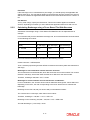
Brokerage User Guide Oracle FLEXCUBE Universal Banking Release 12.0.2.0.0 Part No. E49740-01 September 2013 Brokerage User Guide September 2013 Oracle Financial Services Software Limited Oracle Park Off Western Express Highway Goregaon (East) Mumbai, Maharashtra 400 063 India Worldwide Inquiries: Phone: +91 22 6718 3000 Fax:+91 22 6718 3001 www.oracle.com/financialservices/ Copyright © 2007, 2013, Oracle and/or its affiliates. All rights reserved. Oracle and Java are registered trademarks of Oracle and/or its affiliates. Other names may be trademarks of their respective owners. U.S. GOVERNMENT END USERS: Oracle programs, including any operating system, integrated software, any programs installed on the hardware, and/or documentation, delivered to U.S. Government end users are "commercial computer software" pursuant to the applicable Federal Acquisition Regulation and agency-specific supplemental regulations. As such, use, duplication, disclosure, modification, and adaptation of the programs, including any operating system, integrated software, any programs installed on the hardware, and/or documentation, shall be subject to license terms and license restrictions applicable to the programs. No other rights are granted to the U.S. Government. This software or hardware is developed for general use in a variety of information management applications. It is not developed or intended for use in any inherently dangerous applications, including applications that may create a risk of personal injury. If you use this software or hardware in dangerous applications, then you shall be responsible to take all appropriate failsafe, backup, redundancy, and other measures to ensure its safe use. Oracle Corporation and its affiliates disclaim any liability for any damages caused by use of this software or hardware in dangerous applications. This software and related documentation are provided under a license agreement containing restrictions on use and disclosure and are protected by intellectual property laws. Except as expressly permitted in your license agreement or allowed by law, you may not use, copy, reproduce, translate, broadcast, modify, license, transmit, distribute, exhibit, perform, publish or display any part, in any form, or by any means. Reverse engineering, disassembly, or decompilation of this software, unless required by law for interoperability, is prohibited. The information contained herein is subject to change without notice and is not warranted to be error-free. If you find any errors, please report them to us in writing. This software or hardware and documentation may provide access to or information on content, products and services from third parties. Oracle Corporation and its affiliates are not responsible for and expressly disclaim all warranties of any kind with respect to third-party content, products, and services. Oracle Corporation and its affiliates will not be responsible for any loss, costs, or damages incurred due to your access to or use of third-party content, products, or services. Contents 1. Preface ...................................................................................................... 1-1 1.1 1.2 1.3 1.4 1.5 2. 2.3 2.4 2.5 2.6 Introduction.............................................................................................................. 2-1 Capturing Broker Details ......................................................................................... 2-1 2.2.1 Broker’s Address ........................................................................................ 2-2 Defining a Brokerage Rule ...................................................................................... 2-4 2.3.1 Building a Brokerage Rule.......................................................................... 2-6 2.3.2 Calculating Brokerage using a Tenor-Based Tier/Slab Structure ............. 2-11 2.3.3 The Sequence in Which ICCF Rules are Resolved.................................. 2-12 2.3.4 Copying an ICCF Rule.............................................................................. 2-12 Associating a Broker and product with a Rule....................................................... 2-12 Processing Brokerage on a Contract..................................................................... 2-13 2.5.1 Brokerage Details Maintenance ............................................................... 2-13 2.5.2 Brokerage Discount Maintenance ............................................................ 2-15 2.5.3 Liquidating Brokerage Manually ............................................................... 2-16 2.5.4 Accounting Entries.................................................................................... 2-19 Brokerage Association Report............................................................................... 2-20 2.6.1 Selected Options ...................................................................................... 2-20 2.6.2 Contents of the Report ............................................................................. 2-21 Glossary ................................................................................................... 3-1 3.1 4. 1-1 1-1 1-1 1-1 1-1 Processing Brokerage ............................................................................ 2-1 2.1 2.2 3. Introduction ............................................................................................................. Organization ............................................................................................................ Documentation Accessibility.................................................................................... Glossary of Icons..................................................................................................... Related Documents ................................................................................................. List of Important Terms............................................................................................ 3-1 Function ID Glossary ............................................................................... 4-1 1. Preface 1.1 Introduction This manual is intended as a guide to help you maintain and process brokerages that are applicable to a contract involving a product in Oracle FLEXCUBE. You can further obtain information specific to a particular field by placing the cursor on the relevant field and striking <F1> on the keyboard. 1.2 Organization This manual is organized as follows: 1.3 Chapter 1 About this Manual gives information on the intended audience. It also lists the various chapters covered in this User Manual. Chapter 2 Processing Brokerage explains how brokerage can be set up and processed. It details the procedure involved in defining brokerage rules and associating a broker with a brokerage rule and product, so that the brokerage is applicable to all deals involving the product. It also explains how to make contract-specific changes. Chapter 3 Glossary provides a list of important terms used in the module. Chapter 4 Function ID Glossary has alphabetical listing of Function/Screen ID's used in the module with page references for quick navigation. Documentation Accessibility For information about Oracle's commitment to accessibility, visit the Oracle Accessibility Program website at http://www.oracle.com/pls/topic/lookup?ctx=acc&id=docacc. 1.4 Glossary of Icons This User Manual may refer to all or some of the following icons. Icons Function Exit Add row Delete row Option List 1.5 Related Documents For further information on procedures discussed in the manual, refer to the Oracle FLEXCUBE manuals on: 1-1 Common Procedures Products 1-2 2. Processing Brokerage 2.1 Introduction A Broker is a party who mediates between a buyer and a seller. The Brokerage paid to a broker is a fee for acting as intermediary between buyer and seller. There are many types of brokerages added in areas such as Money Market, For Ex, Securities, etc. Brokerage will usually be based on either a percentage of the transaction or a flat fee. They can also be a combination of the two. Oracle FLEXCUBE supports Trade Finance activities, Securities, Derivatives, For Ex Deals etc. where Brokerage is involved. This manual explains the processing of brokerage in Oracle FLEXCUBE. Using the Brokerage service that Oracle FLEXCUBE provides, you can: Capture and maintain the details of brokers - assign a broker code, and record the name and address of the broker Specify brokerage discounts for a broker Specify the currency of booking Specify whether brokerage is to be paid on the deal in advance or in arrears Define a brokerage rule with amount slabs for specifying a flat amount, a percentage of the deal or the deal amount, within certain limits Specify whether the brokerage amount should be in the deal currency or converted to the LCY Book brokerage to an internal account - by debiting the expense and crediting the brokerage payable account (brokerage is booked on initiation of the deal). Opt to liquidate brokerage either automatically or manually at deal initiation or liquidation. (You can manually liquidate the consolidated brokerage payable to a broker involved in many deals. That is, a broker may be entitled to brokerage from more than one deal. You can liquidate the brokerage payable for all these deals, once and for all, using the manual liquidation function). Associate a broker with a brokerage rule and a product so that the brokerage is applicable to all the deals involving the product Make deal - specific changes Generate reports on the brokerage payable and the brokerage that has been already paid You process brokerage in Oracle FLEXCUBE in the following manner: Maintain broker details Maintain brokerage rules Associate a broker and product with a brokerage rule Associating a broker and a product with a rule is explained in the Products Manual. 2.2 Process brokerage on a contract Capturing Broker Details You can capture the basic details of brokers with whom your bank deals with in the ‘Broker Master Maintenance’ screen. In this screen, you can specify the following: The broker’s code 2-1 The name and address of the broker The booking currency The transaction code under which the system should track accounting entries involving the liquidation Whether it is to be paid in advance or as arrears The tax scheme applicable The tax paid and the tax payable accounts You can invoke the ‘Broker Master Maintenance’ screen by typing ‘BRDMAST’ in the field at the top right corner of the Application tool bar and clicking the adjoining arrow button. Broker Identification In the ‘Broker Master Maintenance’ screen, you should specify a (unique) Broker Identification for every broker with whom you deal. The Broker Identification has to be the same as the broker’s Customer Identification Number (since a broker will have an account with you that is, will be a customer of your bank). The Customer Identification Number can be selected from a list that is displayed. This Broker ID will be used to identify the broker. For example, when processing a deal on which you have to pay brokerage, or when generating reports for a broker, you need to enter the code of the broker involved. 2.2.1 Broker’s Address When you select a Customer Identification Number to identify a broker, the system maps and displays the name and address of the broker .You cannot change the name which displays in this screen, but according to the defined details you can enter the changed address of the broker. 2-2 The fields to be entered are as follows: Name Street City Country Liquidation Transaction Code A broker gets the brokerage amount only after liquidation through the brokerage liquidation function. You should specify a liquidation transaction code from the codes maintained in the Core Entities module of Oracle FLEXCUBE. The system passes accounting entries under the selected transaction code. Tax Scheme A tax scheme holds the tax rules for the tax applicable on the brokerage paid. Payable Currency The brokerage is booked into the Broker Account defined in this screen. If this account is either not specified or is not available when brokerage is being booked, the brokerage will be booked in any one of the broker’s savings or current accounts (in the currency specified here). For every broker, you can specify the currency in which you would like to pay brokerage. If the currency that you specify is not the broker’s account currency, the standard exchange rate (for the day) will be used to convert the brokerage into the currency of the broker’s account. Booking You can opt to book the brokerage payable to a broker either in: Advance Arrears If you select: Advance: brokerage will be booked when the deal is initiated Arrears: brokerage will be booked when the deal is liquidated Category This defines the category of the entity whether a broker, an Exchange member or a Clearing member Broker Exchange Clearing Member Applicable For Check or uncheck the box ‘Exchange Trade Derivatives’ accordingly. If the flag is checked then it means that the broker defined is available for the Exchange trade derivative module. 2.2.1.1 Tax Paid If any tax is to be paid on the brokerage, you have to specify the following details: Account – The account from which the broker’s tax component debits Transaction code You have to specify the transaction code for the tax payable account by selecting one from the list so that the system passes accounting entries for this transaction. The transaction code identifies the nature of the entry which passes. 2-3 If any tax is payable on the brokerage, you have to specify the following details: Account The account to which the broker’s tax component credits Transaction code – You have to specify the transaction code for the tax payable account so that the system passes accounting entries for this transaction. Under the ‘Broker Account’ table you can specify the following. Account Specify the account of the broker. The adjoining option list gives you a list of accounts. Choose the appropriate one. You cannot specify the same account number for another broker. Each broker should have account numbers unique to him. Note It is mandatory for you to specify at least one account number for the broker. If the broker is dealing with Exchange Traded Derivatives, his external accounts have to be maintained here. You cannot specify the same account numbers for different brokers. Each broker should have unique account numbers. Description Enter a brief description for the account. 2.3 Defining a Brokerage Rule A brokerage rule identifies the basic nature of a brokerage component. Each brokerage rule is defined by a ten-character code, called the Rule ID. Attributes are defined for this Rule ID, which is then associated with a broker and product. When a deal is processed, the brokerage attributes defined for the Rule ID that is associated with a broker and product will be applied on the deal. A brokerage rule is created in the same way that any Interest, Commission, Charge and Fee (ICCF) rule is created, as follows: The rule is created at the head office branch, by giving it a unique identification and description, in the ICCF Rule Availability Maintenance screen. In this screen, the rule is made available for use in the required branches by maintaining an allowed / disallowed list of branches. At the required branch, in the ICCF Rule Maintenance Screen, the attributes for the rule are defined. Maintaining the attributes in this screen is subject to whether maintenance of ICCF rules is allowed for the branch, and also whether the rule for which attributes are being defined, is allowed for the branch. To recall, at the head office of your branch, you can create appropriate ICCF rules and make the rules available to the required branches. In the ‘ICCF Rule Availability Maintenance’ screen, you can maintain ICCF rules, which you can make available to desired branches. You can do this by maintaining a list of branches for which the use of the rule is allowed, or disallowed. You can invoke this screen by typing 2-4 ‘CFDICCFR’ in the field at the top right corner of the Application tool bar and clicking the adjoining arrow button. In this screen, you must specify the following information: Rule Identification and Description You must specify a unique identification for the ICCF rule you are creating. If you are creating a brokerage rule, specify a unique identification for the brokerage rule. This is the identification that will be used as to identify for the rule, in all subsequent references to it. You must also specify a unique description for the rule. Every brokerage rule is identified by a unique ten-character code, called a Rule ID. You can link a valid Brokerage Rule ID to the appropriate broker and product. When a deal is processed, the brokerage attributes defined for the Rule ID that is associated with a broker and product will be applied on the deal. Note After the rule has been created in the ICCF Rule Availability Maintenance screen, the attributes for the rule must be defined in the ICCF Rule Maintenance Screen. Branch Restrictions You can maintain a list of allowed branches (that is, the rule will be available for use in the allowed list of branches) or disallowed branches (the rule will not be available for use in the branches in the disallowed list). To recall, the attributes for the rule are defined, in the ICCF Rule Maintenance Screen. Maintaining the attributes in this screen, for a branch, is subject to whether maintenance of ICCF rules is allowed for the branch, and also whether the rule for which attributes are being defined, is allowed for the branch. 2-5 For details about the Common Branch Restrictions, refer the Security Management System user manual. 2.3.1 Building a Brokerage Rule After a brokerage rule has been created in the ‘ICCF Rule Branch Availability Maintenance’ screen, the attributes of the brokerage rule are defined in the ‘ICCF Rule Maintenance’ screen. You can invoke this screen by typing ‘CFDRUMNE’ in the field at the top right corner of the Application tool bar and clicking on the adjoining arrow button. While indicating the rule type in this screen, choose Brokerage from the option list. If you are defining a brokerage type of component, you need to specify the following details through the ICCF Rule Maintenance Screen. Rule Type Specify whether the Rule type for calculating brokerage is Aggregation Type or Individual Type. Aggregation type indicates that brokerage is calculated on the total value of the deals Individual Type indicates that brokerage is calculated on a deal-by -deal basis Rule Identification Enter the ID of the rule for which you are defining attributes. Every brokerage rule is identified by a unique ten-character code, called a Rule ID. You can link a valid Brokerage Rule ID to the appropriate broker and product. When a deal is processed, the brokerage attributes defined for the Rule ID that is associated with a broker and product will be applied on the deal. To recall, the Rule ID for a brokerage rule is specified in the ICCF Rule Branch Availability maintenance. Accordingly, in the Rule ID field in this screen, you must select the ID of the brokerage rule that you wish to build by maintaining the attributes. 2-6 The option list in the Rule ID field is populated based on the following conditions: Only those Rule IDs that are available for users at the current branch according to the ICCF Rule Branch Availability maintenance are displayed The maintenance of ICCF rules must be allowed for users at the current branch, according to the restrictions maintained in the Common Branch Restrictions maintenance for the restriction type ICCFRULE. If no Common Branch Restrictions have been maintained, and the restriction type ICCF RULE has not been maintained in the SMS Branch Restriction Type maintenance, the option list in the Rule ID field only displays those rules that are available for users in the current branch, according to the ICCF Rule Branch Availability maintenance. Description Enter a description for the brokerage rule. This description will be associated with the brokerage rule for information retrieval purposes. Transaction Currency If you wish to define the attributes for all currencies, you can select the ALL option in the Currency Code field to indicate this. If you are maintaining the attributes for the selected ICCF rule in specific currency other than the ALL, select the Transaction Currency on which the rule mapping maintenance is to be made applicable. Customer Group Select the customer group on which the rule mapping maintenance is to be made applicable. You can create a generalized brokerage rule mapping record by selecting the ALL option in the Customer Group field. This specification is defaulted to the Customer and Customer Account fields. You are forbid to change the specification. Customer Specify the Customer ID of the customer for whom you are maintaining the rule mapping. Branch Code If you are maintaining the attributes for the selected ICCF rule from the head office branch, you can select the branch for which the attributes are being defined. If you wish to define the attributes for all branches, you can select the ALL option in the Branch Code field to indicate this. If you are maintaining the attributes for the selected ICCF rule from a branch other than the head office, you can only select those branches that are found in the allowed list of branches for: the ICCF rule definition Restriction Type (ICCFRULE), in the Common Branch Restrictions maintenance for the current branch the selected rule being built, according to the ICCF Rule Availability maintenance In other words, the option list in the Branch Code field would display only those branches that are allowed both for the rule and the current branch. 2.3.1.1 Defining the brokerage rule application factors You can apply a brokerage rule on any contract, irrespective of the currency of the contract, the customer and the branch involved. In the ICCF Rule Details screen, rules to be applicable for contracts involving all branches, transaction currencies, customers and customer categories must be maintained at the head office branch. Subsequently, you can maintain the specific rules to be applicable for contracts involving for the following combinations: 2-7 A specific branch, customer category, customer and currency A specific branch, customer category, customer and all currencies A specific branch, customer category, currency and all customers A specific branch, currency and all customer categories and customers A specific branch, customer categories and all currencies and customers A specific branch and all customer categories, customers and currencies A specific customer category, customer, currency, and all branches A specific customer category, customer and all currencies and branches A specific customer category, currency and all customers and branches A specific currency and all customer categories, customers and branches A specific customer category and all customers, currencies and branches All branches, customer categories, customers and currencies Note As mentioned earlier, the rules applicable for combinations involving all branches (the ALL option in the Branch Code field) can be maintained only from the head office branch. Once an ICCF Rule has been defined, you should associate it with a broker and product through the Brokerage Association screen. Depending on the broker and product involved in a contract, the appropriate rule will be made applicable. Rate Type The Rate Type indicates whether the Brokerage to be applied for the Rule ID is a flat amount or a percentage of the basis amount. Select the rate type from the following: Flat amount – You can specify a fixed amount as brokerage. This will be the brokerage amount for all contracts involving the brokerage rule you are defining. Fixed rate - You can specify a percentage as brokerage. The rate that you specify will be applied on the contract amount to calculate the brokerage amount. The specific rates and amounts applicable have to be specified subsequently through this screen. 2.3.1.2 Rounding When rule type is brokerage no need to give value in this field. Amount Limits for a Brokerage Calculation If you indicated that brokerage should be calculated as a flat amount, you can specify the amount range (minimum and maximum amounts) within which the amount calculated using the brokerage rate should fall. Rate Limits for a Brokerage for Brokerage Calculation If you have chosen not to maintain the minimum and maximum amounts, you can specify the minimum and maximum rates for brokerage calculations. If the brokerage calculated using this Rule ID exceeds the amount calculated using the maximum rate specified here, the maximum rate amount will be applied as brokerage. Similarly, if the brokerage amount falls below the amount calculated using the minimum rate, the minimum rate amount will be considered as brokerage. 2-8 Note If you have specified a flat amount as the Rule Type, then you need not specify the minimum and maximum amount/rate limits. Tenor basis You should specify whether the Rule ID you are defining is to be applied based on the tenor of the contract. The tenor of the contract is calculated as the difference between the Maturity Date and the Value Date of the contract. After the tenor is calculated, brokerage will be computed based on the tenor slabs defined in the ‘Tenor Based Rates’ section of the screen. The following sections will explain how brokerage is calculated using a tenor based structure. 2.3.1.3 Interest Basis This specifies the calculation basis for the brokerage based on the Contract Currency or Rule Currency. Check this box if you wish to calculate the brokerage based on the contract currency. If you wish to calculate the brokerage based on the rule currency, then you have to choose the brokerage calculation value from dropdown list next to this field. Tiered Amount You can define the brokerage to be applied on contracts in any one of the following ways: In a tier structure (cumulative) In a slab structure (non-cumulative) You should first indicate whether the Basis Amount that you specify subsequently should be considered as a Slab or a Tier. Check the ‘Tiered Amount’ option if you wish to maintain the Basis Amount structure as Tiers. Leave it blank if you are maintaining a slab structure. The Basis Amount is the upper limit of the slab or tier to which a particular rate or amount should be applied as brokerage. As per Contract Currency This specifies whether the brokerage is paid in the charge currency or in the currency of the contract. Tiered Tenor Tiered tenor is applicable only for duration based (explained later) brokerage. You can indicate that brokerage is to be calculated on the basis of a tiered tenor structure, by choosing the Tiered Tenor option. 2.3.1.4 Rate Code For a contract, you can calculate brokerage in a currency other than the contract currency. The rate code specified here will be used to compute exchange rates between the currency pair involved in the contract. Specify whether the currency rate for deal or slab currency from the following: Mid Buy Sell Booking Currency You should indicate the currency in which the brokerage amount is to be calculated: 2-9 2.3.1.5 Charge Ccy - If you specify the brokerage currency as charge currency, brokerage will be calculated in the currency selected in the ‘Charge Currency’ field. For a contract in foreign currency, the contract amount is converted into the charge currency equivalent before brokerage is applied. Contract Ccy - If you specify the brokerage currency as the contract currency, brokerage will be calculated in the currency of the contract Bracket Tenor You can create a Brokerage Rule which calculates brokerage charges on the basis of an amount structure. In this table you define the different attributes of amount structure based on which the brokerage charges would be calculated. Basis Amount To You should specify the upper limit of the slab or tier to which a particular rate or amount should be applied as brokerage. The brokerage rate or amount (depending on the rate type) is to be specified in the subsequent field. Fixed Rate If the brokerage is in the form of a percentage of the contract amount, you should specify the applicable rate. This rate will be applied for the Basis Amount To, depending on whether you have defined the application basis as a slab or a tier. Charge Unit The Charge Unit specifies the unit for rounding up a brokerage basis amount to the nearest amount. The brokerage will be calculated on the rounded basis amount. Flat Amount If the brokerage is in the form of a flat amount, the amount should be specified. This amount will be applied for the Basis Amount To, depending on whether you have defined the application basis as a slab or a tier. Floor Basis Amount You should specify this only if the amount basis is a Tier. This will be the upper limit of the previous tier limit. By default, the amount specified as the Basis Amount To for the previous tier limit will be displayed. For the first limit in the tier do not specify this. This amount is used to calculate the brokerage, along with the Floor CCF Amount that is to be specified next. Floor CCF Amount You should specify this only if the Rule Type is a Commission. This amount need not be the same as the amount calculated using the Basis Amount and rate for the previous slab. 2.3.1.6 Tenor Based Rates Tenor From and Tenor To You can define a tenor-based tier or slab structure for every amount slab that you have built. The Tenor From refers to the start of the tenor period and the Tenor To refers to the end of the period. The rate or flat amount will be specified subsequently. Note Please note that the Tenor From and Tenor To is defined in days. 2-10 Fixed rate If the brokerage is to be calculated as a percentage, you should specify the applicable rate against each tenor. This rate will be applied on the transaction amount, based on the amount slab and on whether the application basis defined for the tenor based structure is a slab or a tier. Flat Amount To levy a flat charge, specify the flat amount. This amount will be applied on the Basis Amount, depending on whether you have defined the application basis as a slab or a tier. 2.3.2 Calculating Brokerage using a Tenor-Based Tier/Slab Structure Calculation of brokerage using a Tenor-Based Tier/Slab Structure is explained with an example Let us assume that you have defined a brokerage rule, to be associated with contracts based on the following tenor basis: Amount Basis Tenor (Slab) (0-100 days) (101-200 days) (201-250 days) 0 - 100,000 0.1% 0.15% 0.17% 100,001 - 1,000,000 0.2% 0.25% 0.3% 1,000,001 - 99,000,000 0.5% 0.75% 1% Let us see how the brokerage is calculated for the following contract: Contract Amount = USD 800,000 Tenor = 250 days (assuming that the difference between the maturity date and value date is 250 days) Brokerage for non-cumulative amount and tenor structure: The contract amount is USD 800,000, which falls under the second amount slab. The contract duration is 250 days, which falls under the third tenor defined for this amount slab. Therefore, brokerage= 800,000 * 0.3% = 2400. Brokerage for a tiered amount and non-tiered tenor combination: For this combination, the contract amount will be distributed amongst the various slabs and depending on the tenor, the rate corresponding to the tenor will be used to calculate the brokerage. Brokerage for the first 100,000 (1st amount slab) is calculated as follows: The contract tenor is 250 days, which falls in the 3rd tenor. Therefore, brokerage = 100,000 * 0.17% = USD 170 Brokerage on the remaining 700,000 = 700,000 * 0.3% = USD 2100 The total brokerage = (170+2100) = 2270 2-11 2.3.2.1 Specifying a Duration Based Brokerage At the time of defining a brokerage rule, you can also specify whether the brokerage amount should be calculated based on the duration of the contract. In effect, you indicate whether the duration of the contract is a component in the formula for calculating the brokerage amount. The formula used will be (Rate %* Contract Amount*Duration of the contract) The duration of the contract will be calculated based on the Interest basis that you specify. You can either choose to apply the interest basis associated with the contract currency or opt for a different Interest basis from the drop-down list. Interest basis is defaulted from the Currency Definition table if you select the ‘As per contract ccy’ option. 2.3.3 The Sequence in Which ICCF Rules are Resolved ICCF Rules that you maintain are resolved in the following sequence: 2.3.4 Rule Branch Customer Category Customer Currency Specific Specific Specific Specific Specific Specific Specific Specific Specific ALL Specific Specific Specific ALL Specific Specific Specific ALL ALL Specific Specific Specific Specific ALL ALL Specific Specific ALL ALL ALL Specific ALL Specific Specific Specific Specific ALL Specific Specific ALL Specific ALL Specific ALL Specific Specific ALL ALL ALL Specific Specific ALL Specific ALL ALL Specific ALL ALL ALL ALL Copying an ICCF Rule In order to make the definition of ICCF rules easier, you can copy an existing rule and modify its attributes. 2.4 Associating a Broker and product with a Rule Brokerage association enables you to link a product, a rule, a currency or a currency pair (in the case of foreign exchange products) and a broker. Further, you can make a Brokerage Rule applicable for a broker, product and currency combination. For a Foreign Exchange deal, you can make the brokerage applicable only when the contract involves a specific currency pair. 2-12 Invoke the ‘Brokerage Association Maintenance’ screen by typing ‘BRDASSOC’ in the field at the top right corner of the Application tool bar and clicking the adjoining arrow button. Features of the screen You have to give the following inputs in the Broker Association screen to define an association: Broker Code (or Broker ID): Enter the broker code, or select a Broker Code from the option list by clicking on the option list available Product Code: Select a Product Code from the option list Currency: If the rule you are defining is for MM contracts in a specific currency, enter the S.W.I.F.T. Code of the currency in this field. If the rule being defined is for Foreign Exchange contracts, you can make it applicable for contracts involving a specific currency pair by entering the pair at Currency1 and Currency2. SWIFT code here means the ISO code for currency as specified in SWIFT standards. The attributes of the brokerage rule will be associated with contracts defined in this combination. Rule Code: Select a Rule Code from the option list. This rule associates with the Broker + Product and currency or currency pair combination. Note While processing security deals you can choose to add the brokerage computed at the deal level to the cost of the asset, instead of being expensed while processing the SE deal. 2.5 Processing Brokerage on a Contract Details about Brokerage Processing on a Contract are explained below. 2.5.1 Brokerage Details Maintenance When capturing the details of a contract, you will have to specify the brokerage details applicable to the contract. By default, the brokerage details specified for the product apply to the contract as well. However, if you want to change some details, like the booking of brokerage — whether the brokerage should be booked in advance, in arrears, or waived altogether or the currency of the contract, you will have to invoke the ‘Brokerage Details’ screen. 2-13 You can invoke this screen through the Contract Details screen by clicking ‘Brokerage’ button in the screen. In case of a new contract, if brokerage already exists for the product, to which the contract is associated, the system will pick up the values and display them in this screen. However, if the product has not been associated with a brokerage rule, you will not see any values in this screen. You can define brokerage for a specific contract, even if it has not been defined for the other contracts involving the product. When you invoke the Contract Brokerage Details screen, you can change the values only if you have clicked the Modify option from the Action Menu. You have to give the following inputs in the Brokerage Details screen to define the contract brokerage details: Reference Number This is a display field which displays the corresponding contract reference number. Broker Code This displays the broker code selected in the contracts main screen Broker Name This displays the description of the broker code. The broker code displays along with the broker’s name in the screen. You cannot change the broker, through this screen, for the contract that you are processing. 2.5.1.1 Payable If the brokerage Payable Currency is the same as the brokerage Paid Currency, then the same amounts (brokerage paid and brokerage payable) displays against the currencies. You can change these currencies if you wish to. While you cannot alter the brokerage payable amount which displays, you can change the ‘brokerage paid amount’ value. Currency: This is the currency which books the brokerage amount specified in the Broker Master screen Amount: This displays the brokerage amount calculated for the transaction 2-14 2.5.1.2 Liquidation This designates the status of the brokerage, whether the brokerage is liquidated or is still outstanding for the contract. If it is liquidated, it displays the liquidation reference number. 2.5.1.3 Status: This represents the status of the brokerage amount .whether it is Outstanding/ Liquidated Reference number: If the brokerage Amount pertaining to that contract is liquidated then the liquidation reference no that is generated for brokerage wil be displayed here. Rule This indicates the brokerage rule code and description on the basis of which brokerage is calculated. 2.5.1.4 Code Description Brokerage Currency: This indicates the currency in which brokerage is paid. Select a currency code from the option list Amount: This field displays the amount payable to the broker .You cannot change this amount Booking This indicates when the brokerage applicable to the transaction is booked. The preference that you specify for the broker becomes default. You have the option to change the default , that is ,from advance to arrears or from arrears to advance. To waive brokerage for the transaction, choose the 'No Booking' option. The options available are as follows: No Booking Advance Arrears Consider for Discount This option is defaulted from the deal product level. However, checkbox is unchecked if the booking method is other than ‘Advance’. 2.5.2 Brokerage Discount Maintenance A stockbroker who carries out buy and sell orders at a reduced commission compared to a full-service broker, but provides no investment advice is called as a Discount Broker. It used to be that only the wealthy could afford a broker and access to the stock market. The internet has brought an explosion of discount brokers which let you trade at a smaller brokerage. However, it is important to remember that discount brokers don't provide personalized advice. Because of discount brokers, nearly anybody can afford to invest in the market. We can maintain discount for a Broker through the ‘Brokerage Discount Maintenance’ screen. You can invoke this screen by typing ‘BRDDISCO’ in the field at the top right corner of the Application tool bar and clicking the adjoining arrow button. Amount Slabs can be maintained 2-15 in this screen where a discount will be done on the brokerage amount that is due for the broker. 2.5.3 Liquidating Brokerage Manually You can liquidate brokerage payable on a contract through the ‘Brokerage Liquidation Input’ screen. You can invoke this screen by typing ‘BRDLIQD’ in the field at the top right corner of the Application tool bar and clicking the adjoining arrow button. In this screen, you can opt to 2-16 liquidate the consolidated brokerage (due from more than one contract) that is due to a broker. Broker Code Select the broker code for which brokerage is liquidated from the option list. To manually pay brokerage for various contracts, involving a specific broker, you have to specify the Broker Code of the individual concerned. Value Date Contracts whose value date is same as that is mentioned here will be queried. Currency Select from the option list, the currency in which the brokerage has to be paid to the broker. Module Choose the module for which the brokerage is being calculated. If you wish to calculate brokerage for all the modules, choose the ‘ALL’ option. The date on which the brokerage is booked will also be displayed in this screen. Brokerage is calculated for the following modules: BC DV FX LD MM OT SD 2-17 ID MC Liquidation Reference Number Each broker code associates a Liquidation reference number. The Liquidation Ref No is automatically generated by the system. This number is based on the event code (not on the product code) and is used to generate the transaction reference number for the liquidation. The particular broker code you have specified displays this number in this screen. Tax Scheme The tax scheme you have defined for the broker displays in this field. The tax scheme applicable on the brokerage would be the scheme specified in the Broker Master Detail screen. Total Amount Payable Select the check box against each Contract Reference number to populate the Total Amount Payable field in the screen. As and when you select a contract, the brokerage amount applicable to the contract gets added to the amount displayed in the Total Amount Payable field. Brokerage Discount This displays the discount amount if any discounting is attached at the broker level. Remarks You can enter some information about the broker confirmation which is internal to the bank. This is not printed on any correspondence with the counterparty. Query Click ‘Query’ button to see all the contracts for which brokerage is yet to be paid, after the required inputs are given. Recalculate On clicking ‘Query’ button, the system will fetch all contracts and by default the Select check box will be selected and the total amount payable will display the consolidated amount. If only a few contracts need to be liquidated then we can uncheck those contracts and recalculate the total amount field. Transaction Details The contract details displays in the Transaction Details section of the screen. Contract Reference Booking Account Amount Payable Value Date Status Tax You can invoke the ‘Tax Details’ screen by clicking ‘Tax’ button in the ‘Brokerage Liquidation Input’ screen. In this screen you will see the tax details applicable on the contract. Settlements You can invoke the ‘Settlement Details’ screen by clicking ‘Settlement’ button in the ‘Brokerage Liquidation Input’ screen. Events You can invoke the ‘Event Details’ screen by clicking ‘Events’ button in the ‘Brokerage Liquidation Input’ screen to view the events associated with brokerage liquidation. 2-18 Advices If any brokerage advices are present, they can be viewed from the ‘Contract Advices’ screen. Click ‘Advices’ button in the ‘Brokerage Liquidation Input’ screen. 2.5.4 Accounting Entries The brokerage that is calculated on a contract is parked in a suspense account before it is paid to the broker. This account would be an internal account of the bank. It is specified at the time of defining the accounting roles and event-wise accounting entries for the product (which involves the contract on which brokerage is to be calculated). Accounting entries for brokerage liquidation are defined at the time of product definition, both, for booking, or, initiation and liquidation. The brokerage payable account (the broker’s account into which the actual brokerage for a particular deal is to be paid) is defined in the brokerage liquidation screen in the Settlements module. Although a broker may have to be paid brokerage on several deals, the manual liquidation function of the system consolidates these into a single settlement amount to be passed to the settlement account. The brokerage payment advice specified at the time of defining advices for a product will be triggered. If you click ‘Accounting Entries’ button on the ‘Events’ screen invoked from the contract main screen, you will see the accounting entries screen for the particular Liquidation reference number. The event is ‘Liquidation’ and the transaction date is today’s date. You will see the following in the ‘Accounting Entries’ screen: Value date Branch Account no Ccy 2-19 2.6 Dr/Cr Transaction code FCY amount Exchange rate for FCY LCY amount Brokerage Association Report This report gives details of all associated brokers. It is printed daily as part of the batch process. 2.6.1 Selected Options You can configure this report to display details of brokerage contract. You can generate the report based on the following criteria: The From and the To record which includes broker and product code, currencies involved in transactions You can invoke this screen by typing ‘BRRASSOC’ in the field at the top right corner of the Application tool bar and clicking on the adjoining arrow button. Specify the following details: Broker Code Specify the broker code from which you want to generate the report. Product Code Specify the product code for which you want to generate the report. Currency 1 Specify the first currency from which you want to generate the report. Currency 2 Specify the second currency from which you want to generate the report. Broker Code Specify the broker code until which you want to generate the report. 2-20 Product Code Specify the product code until which you want to generate the report. Currency 1 Specify the first currency to which you want to generate the report. Currency 2 Specify the second currency to which you want to generate the report. Once you have specified the details, click ‘OK’ button to generate the report. 2.6.2 Contents of the Report The contents of the ‘Brokerage Association Report’ are discussed under the following heads: Header of the Report The Header carries the title of the Report, information on the branch code, the branch date, the user ID, the module name, the date and time at which the report was generated and the page number of the report. Body of the Report The details of the borrower that would be displayed in the report are as follows: Field Name Field Description Record Number This is the sequence number of the record Broker Code This is the code that identifies the broker Product Code This is the product code Rule This rule is made available for use in the required branches by maintaining an allowed/ disallowed list of branches. Currency 1 This is the currency of booking associated to the broker Currency 2 This is the currency of booking associated to the broker 2-21 3. Glossary 3.1 List of Important Terms Important terms used in this manual have been listed here. Beginning of Day This is the automatic processes initiated in the system at the beginning of each business day, as part of the AEOD. The system date change is executed and the change authorized, and the system is in readiness to accept transaction input for the day. End of Cycle This is the stage of Automated End of Day (AEOD) processing wherein automatic functions that are marked EOC, after the End of Financial Input (EOFI) and before the EOD (End of Day) process, will be executed. End of Day This is the last stage of AEOD processing in the system at the end of each business day, which indicates that all activities are complete for the business day. Any further activities in the system can only begin after the Beginning of Day stage, when the system date is changed to the next working day. Basis Amount To This is the higher limit of the slab or tier to which a charge is to be applied, either as a fixed rate or flat amount. Charge Rule The nature of application of a charge can be defined uniquely as a charge rule. Customer Category This is a group of customers with logically similar features or attributes. Event This represents each of the different stages in the processing life-cycle of a contract. Floating Interest In a contract, the interest that is applicable based on prevailing market rates, unlike a fixed rate, which is fixed at the time of initiation of the contract. The interest could be applied each time the prevailing market rate changes or periodically. A spread could be applied on a floating interest rate. Grace Days to Penalty In case of repayment made by the drawee after the repayment date, the grace period is the number of days after the repayment date for which no penal interest is charged. ICCF Rule A rule that identifies the manner in which appropriate charges and fees, as well as interest components and commissions, can be applied on a transaction in a product in FLEXCUBE. Main Interest When more than one interest component is applicable on a contract involving a product, one of the components may be designated as the main interest component for the contract. It helps identify and differentiate the different interest components applicable for the component. 3-1 Interest Method This is the method to be used for the calculation of interest in transactions. . Product This is an identifier, in Oracle FLEXCUBE, for any type of service that a bank offers its customers. A set of attributes and preferences are maintained for the product, which will apply to the processing of any contracts, transactions or deals involving the product (service). Rule Type This indicates the basic nature of an ICCF (interest, commission, charge or fee) rule. Tenor Basis This is the basis upon which a charge or interest rule is defined, if applied based on the tenor of a contract. Transaction Codes Unique identifiers can be maintained in Oracle FLEXCUBE for different types of cash transfers (transactions) within the branch. A transaction code is also an identifier for each accounting entry that describes the nature (i.e., debit or credit) of the entry. Brokerage Rule This is a rule that identifies the calculation of a specific brokerage component applicable on a contract. Brokerage Booking Method This is the manner in which the brokerage payable to a broker must be booked. It could be either at the time of initiation of the contract (in advance) or at liquidation of the contract, as arrears. GL This is the module that forms the single repository in Oracle FLEXCUBE for financial information and accounting for all types of accounts held by the bank. Balances, turnovers and so on for any account or type of account can be maintained and consolidated. LCY This is a local currency in which profit and loss entries can be posted to a GL. Reporting will obtain details in this currency. FCY This is a foreign currency in which record of the profit and loss entries posted to a GL can be maintained. Chart of Accounts This is the structure or framework in which the different GLs are maintained, in the bank. Rate Code This is an identifier for a floating interest rate maintained for a specific currency and account type, in the Rates Maintenance. Slab Structure This is the pattern in which interest can be applied on a balance type account. In this pattern, interest is calculated according to the rate applied for the slab in which the entire amount falls. Tier Structure This is the pattern in which interest can be applied on a balance type account. In this pattern, the entire amount is split into tiers, and interest is calculated according to the rate applied for each tier. 3-2 User Data Element This is the component that is used to build an interest rule for the application of interest on a balance type account in Oracle FLEXCUBE. Unlike a system data element, a user data element is not updated in the database by the system, but is specified by the user, and can take different values as specified. An example of a user data element would be the rate at which interest must be calculated. Import LC This is the incoming Letter of Credit that involves an applicant who is a customer of the processing bank. Export LC This is the outgoing Letter of Credit that involves the beneficiary who is a customer of the processing bank. Guarantees Guarantee is a form of comfort, issued by the bank to its client, in cases where the bank is not very comfortable with the credit rating of the customer. Unlike a letter of credit, in which the bank has to pay on maturity, the amount is payable only on invocation of guarantee by the creditor. Amount Tag This is the amount entry that is passed into a general ledger / sub ledger in the chart of accounts for each transaction. Commission Calculation Type This is the basis upon which commission applicable on a letter of credit is to be computed. It can be computed on a periodic or non-periodic basis. Commission Collection Type This is the manner in which commission applicable on a letter of credit can be collected. Commission could be collected either in advance or as arrears. Commission Collection This is the collection of commission applicable on a letter of credit. Commission may be collected by the issuing bank or the advising bank, for an LC, or against amendments to an LC. Commission Calculation This is the computation of commission applicable on a letter of credit. Accrual Entries Level The level at which commission accrual entries for letters of credit must be passed, by the automatic commission accrual process. Two levels are possible – product-level, indicating that a single entry for all the LCs for which commission was accrued automatically will be passed; or contract level, wherein accrual entries will be passed for each of the LCs for which commission was accrued. Schedule Type The kind of repayment schedule defined for a MM contract. It could be amortized, normal or capitalized. Schedule Frequency The frequency at which the repayment of the MM amount will be amortized in equated installments over the tenor of the contract. 3-3 Accrual Frequency This is the frequency at which components of a contract such as interest, charges or commissions must be accrued over the tenor of the contract. Tenor This is the default period during which a contract is effective. The default Maturity Date of a contract is calculated from tenor. Pre-Payment Repayment of principal (whole or part) of a MM contract before the repayment schedule falls due. Prepayment involves a re-computation of subsequent interest schedule amounts. Interest Application Method This is the basis upon which interest on a contract is applied. Interest on a contract could be applied as an amount, or a fixed rate, or floating rate. Interest Collection Method This is the manner in which the main interest payable on a MM contract is collected or liquidated. The methods could be Bearing, Discounted or True Discounted. ICCF (Interest, Commission, Charge and Fee) The different charges and fees (including commissions and brokerage) and the interest components that are applicable on a contract are set up from the same ICCF Rule Details screen in Oracle FLEXCUBE. ICCF Rule An ICCF Rule identifies the calculation of a specific charge, fee, interest, commission or brokerage component applicable on a contract. Interest Class A specific type of interest component in Oracle FLEXCUBE, with specifically defined attributes, that could be applied on a contract. MM - Money Market This is the market for issuing and trading of short-term investment instruments, typically debt instruments such as bills, commercial paper, etc. Securities General term used to refer to all tradable instruments such as equities, bonds, zero coupon bonds, warrants, rights, etc. Securities Deal This is the transaction in which a security is bought/sold. Coupon This is the annual rate of interest payable to the holder of a bond, on the face value of the bond. The coupon also refers to the certificate representing the bond, which is proof of the interest due on it. Cascade Amount The commission will be calculated on the amended amount of an LC/BG, if Cascade Amount is chosen in the Commission Rule. Rounding Period If you indicate the rounding period as 0, the commission will be calculated for the actual number of days of the LC Contract. Otherwise, the commission will be rounded up to the nearest rounding period. 3-4 Rate Period The rate period is used to define the period for which, the fixed commission rate is applicable. Instead of expressing the commission rate on a per annum basis, you should specify it on a rate period basis, which is expressed in months. Brokerage Discount Maintenance A stockbroker who carries out buy-and-sell orders, at a reduced commission compared to a full-service broker, but provides no investment advice is called as a Discount Broker. 3-5 4. Function ID Glossary BRRASSOC .............................2-20 B BRDASSOC ............................. 2-13 BRDDISCO .............................. 2-15 BRDLIQD ................................. 2-16 BRDMAST ................................. 2-2 C CFDICCFR .................................2-5 CFDRUMNE ...............................2-6 4-1