1
DMX Values and Functions
DMX Address
To controll the unit via DMX signal, each DMX product need to have their own address. All
this series LED P AR-Cans, can be controlled by 5 DMX channels, and can be addressed
at the back-side of the unit through the 10-button dip switch. First step is always to select dip
switch no. 10. This is the DMX mode and also the first (starting) address. As you can see in
below figure each dip switch has his own digital number. Since dip switch number 10 is address
number 1 any other address will be the address number minus 1. For example address number
2 needs the digital value 2-1= 1.
Address number 3 is 3-1= 2. Address number 10 is 10-1=9. To get address 9 you need to select
dip switches 1 and 4. Please keep in mind in all cases dip switch number 10 must always be
selected.
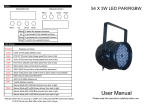
LED PAR64
Product Specification
The stage lighting LED PAR-64 is a RGB colour mixing unit with 181 peaces of 10mm
LED: 49 peaces RED, 7 2 peaces GREEN and 60peaces BLUE. The LED PAR-64 is available
in 90V/60Hz and 260V/50Hz. With a power consumption of 12Watt and a LED lifetime rated
between 80,000 and 100,000 hrs it’s a revolutionairy tool which suites in many applications.
The unit comes complete with130cm power cable including Schuko plug.
USING MANUAL
Set up
Unpacking
Thank you for purchasing the PAR-LED production Every LED PAR-64 has been
well tested and has been shipped in perfect operating condition. When receiving our products
carefully check the shipping carton for damage that might have happen during transport. In case
of damage inspect the fixture for any damage or missing accessories necessary to operate. If
parts are missing or fixture has been damaged please contact the distributor.
Introduction
The LED PAR-64 Pro is part of a wider range DMX intelligent LED PAR CANS. This LED PAR64 Pro is compact and light weight and very easy to use. Ideal for any rental job or installation.
The unit can be controlled by any DMX controller or in stand alone mode.
• Before plugging this unit to power make sure the voltage in you area matches the required
voltage for the LED PAR-64 Pro.A l l PAR-LED production unites are available in 90/260V
and 50/60Hz. Please always make sure this unit voltages matches your area outlet voltage
before attempting to operate the unit.
•There are 2 ways to control PAR-LED production. The first option is by ‘stand
alone’ function, and probably the most used option by an external controller via DMX. DMX
(Digital MultipleX) is the standard language allowing communication between controller and all
kind of DMX products from different manufacturers. The order in which fixtures are connected
in a DMX line does not influence the DMX addressing. For example it does not matter if the last
selected address is in the beginning or in the middle of a DMX line, the controller always will
recognize the fixture by his address.
• In case of controlling your unit via DMX, be sure to use standard 2 conductor shielded cable
which can be purchased at goldbright lighting stores.
XLR Wiring
Caution!
Do not attempt any repairs yourself! Doing so will void your manufactures warranty. In the
unlikely event your unit may require service please contact the distributor
XLR Male Socket
Warning!
Pin 2 = Data Compliment(negative)
1. Ground
Safety precautions
General instructions
First Familiarize yourself with the basic operation principals of this unit by reading the attached
user manual carefully. These instructions contain important safety information regarding the use
and maintenance of this unit.
Pin 1 = Ground
2. Cold
To prevent or reduce the risk of electrical shock or fire, do not expose this unit to rain or any
moisture.
Please read this user manual carefully to familiarize yourself with the basic operations of this
unit.
• Do not expose this unit to rain or other moisture
• Before plugging to power be sure the local power outlet matches with the required voltage of
the unit
• Do not remove the cover under any circumstances in case your not qualified to do so.
• Never connect to power when cover is removed.
• Never use this unit if it becomes damaged.
• Never connect this unit to any kind of dimmer- and/or power-pack.
• If the unit will not be used for a long time, disconnect it from power supply.
• Always mount this unit safe and stable, and make sure the area will have proper ventilation.
Take care this unit will not mounted in areas close to heat sources such as lighting fixtures,
amplifiers, heat registors, stoves and radiotors.
• Always contact us in case you have any doubts.
XLR Pin Configuration
XLR Female Socket
3. Hot
1. Ground
Pin 3 = Data True (positive)
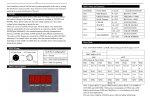
Stand Alone Mode
Below all dip switch setting for stand alone use (without controller)
ON
DIP
ON
1 2 3 4 5 6 7 8 9 10
1 2 3 4 5 6 7 8 9 10
1 2 3 4 5 6 7 8 9 10
Red
Sound
ON
DIP
DIP
ON
Green
DIP
ON
Blue
ON
Cambridge blue
DIP
ON
1 2 3 4 5 6 7 8 9 10
1 2 3 4 5 6 7 8 9 10
White
Pink
ON
1 2 3 4 5 6 7 8 9 10
Color gradual change
1 2 3 4 5 6 7 8 9 10
1 2 3 4 5 6 7 8 9 10
1 2 3 4 5 6 7 8 9 10
DIP
ON
Yello
Press
7 and 10 will be strobe,
DIP
ON
add 1-6 adjust the speed
Press 8 and 10 will be color
gradual change
add 1-7 adjust the speed
DIP
1 2 3 4 5 6 7 8 9 10
1 2 3 4 5 6 7 8 9 10
Strobe
DMX Mode
ON