1
74 Mini Converter Heavy Duty HDMI to SDI 4K
Mini Switches
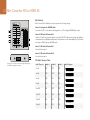
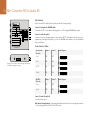
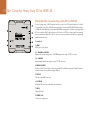
Mini Converter Heavy Duty HDMI to SDI 4K mini switches provide the following settings:
Switch 8 - Analog Audio, AES/EBU Audio
Set switch 8 to OFF to select balanced analog audio, or to ON for digital AES/EBU audio input. To use
these inputs Switch 7 must also be set to ON.
Switch 7 - HDMI Audio - Input Audio
Set switch 7 to OFF to select embedded HDMI audio, or to ON for analog or AES/EBU audio.
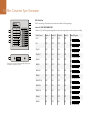
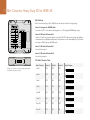
Format
There are 2 conversion formats to choose from.
AUTO - switch 1 to OFF, switch 2 to OFF.
In this mode, the SDI output resolution will match the HDMI input. For example, if the HDMI input is
Ultra HD, the SDI output will be Ultra HD.
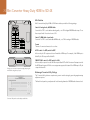
ON
1
2
3
4
5
6
7
8
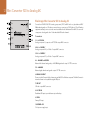
Change your converter's internal settings by adjusting the
mini switches using the tip of a pen.
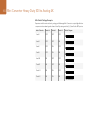
FORCE TO HD - switch 1 to OFF, switch 2 to ON.
In this mode, the output is forced to HD if the input is Ultra HD. The Mini Converter will attempt to switch
the HDMI input format to HD if the source equipment supports this feature. If the HDMI input is SD, the
output will remain SD.
Blackmagic Converter Utility Settings
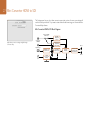
The Converter Utility software complements your mini switch settings by providing supplementary
adjustment options.
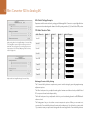
The Audio Levels pane lets you adjust audio levels for analog channels or AES/EBU audio reference levels.
Converter Utility can be used to adjust audio levels.