1
4.4 Check of module state (Hardware test)
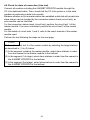
Check that the module operates normally using the module proper.
Ensure to perform this check before configuring the system.
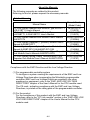
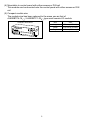
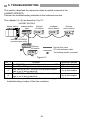
A hardware test requires the following type of testing optical cable.
Obtain this optional testing optical cable from your nearest Mitsubishi
representative.
Item
Type
Testing optical cable
Description
Remarks
Optical cable for loopback self-test for CC-Link
AN-CCLT
Optional
system optical repeater module (0.5m (1.64ft.))
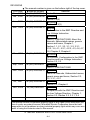
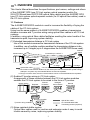
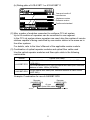
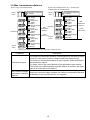
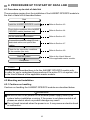
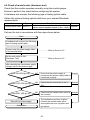
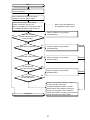
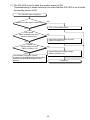
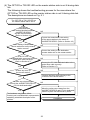
Perform the test in accordance with the steps shown below.
Start
A hardware test requires the following
type of testing optical cable.
Connect only the power supply cable
to the terminal block.
................... Refer to Section 4.3.
Set the test switch to ON
(Hardware Test).
................... Refer to Section 4.3.
After checking the input power supply
voltage, turn on the power supply.
Does PW LED light up?
NO
Check that the power supply is
Normal
normal and the power supply cable is
connected correctly.
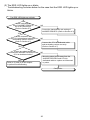
NO
Check that the test switch is set to
ON.
NO
Check that the transmission speed is Normal
set correctly.
YES
Does TEST LED light up?
Normal
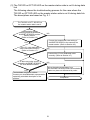
YES
Does ERR. LED go off?
YES
Shut off the power supply.
Completion
The hardware may have a defect.
Contact the nearest sales office,
and explain the error symptom and
get advice.
22