1
Visible Spectrophotometer
V-1100D
OPERATION MANUAL
M.R.C LTD.
OFFICES: HAGAVISH 3, HOLON 58394
P.O.B. 1684, TEL-AVIV 61016, ISRAEL
TEL: 972-3-5593105,972-3-5595252 FAX: 972-3-5594529
Contents
Safety ……….……………………………………………………………………. 1
General ……………………………………………………………………….
1
Electrical ……………………………………………………………………..
1
Warning …………………………………………………………………………
2
Working Principle
2
…………………………………………………………
Unpacking Instructions
Specifications
Installation
……………………………………………………
3
……………………………………………..………………
3
……………………………………………………………………
3
Introduction……………………………………………………..………………
4
Description of keys and operating method………………….….…………… 5
Operating Procedures………………………………….…………..…………… 9
Maintenance……………………………………………………..………………… 9
Calibration and trouble shooting……………………………………………… 10
Replace W lamp……………………………….……………………
10
Calibration of Wavelength Accuracy……………………………
12
Trouble Shooting…………………………………………….……… 13
V-1100 USER’S MANUAL
Safety:
The safety statements in this manual comply with the requirements of the HEALTH AND
SAFETY AT WORK ACT, 1974.
Read the following before installing and using the instrument and its accessories. The
V-1100 should be operated by appropriate laboratory technicians.
General:
The apparatus described in this manual is designed to be used by properly trained
personnel in a suitable equipped laboratory. For the correct and safe use of this
apparatus it is essential that laboratory personnel follow generally accepted safe
procedures in addition to the safety precautions called for in this manual.
The covers on this instrument may be removed for servicing. However, the inside of the
power supply unit is a hazardous area and its cover should not be removed under any
circumstances. There are no serviceable components inside this power supply unit.
For V-1100, avoid touching the high voltage power supply at all times.
Some of the chemicals used in spectrophotometer are corrosive and/or inflammable and
samples may be radioactive, toxic, or potentially infective. Care should be taken to
follow the normal laboratory procedures for handling chemicals and samples.
Electrical:
Before switching on the apparatus, make sure it is set to the voltage of the local power
supply.(The Voltage Switch is on the bottom of the instrument. 220V & 110V are under
your choice. Let the visible value on the switch match your local power supply.)
Holder Changer Knob
Voltage Switch
Fig. 1-1
The power cord shall be inserted in a socket provided with a protective earth contact.
The protective action must not be negated by the use of an extension cord without a
protective conductor.
1
V-1100 USER’S MANUAL
Warning:
Any interruption of the protective conductor inside or outside the apparatus or
disconnection of the protective earth terminal is likely to make the apparatus dangerous.
Intentional interruption is prohibited.
Whenever it is likely that the protection has been impaired, the apparatus shall be made
inoperative and be secured against any unintended operation.
NEVER touch or handle the power supply on V-1100 due to the high voltage.
The protection is likely to be impaired if, for example, the apparatus
Shows visible damage
Fails to perform the intended measurements
Has been subjected to prolonged storage under unfavorable conditions
Has been subjected to severe transport stresses
Working Principle:
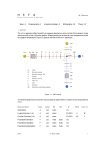
The spectrophotometer consists of five parts: 1) Halogen or deuterium lamps to supply the
light; 2) A Mono-chromator to isolate the wavelength of interest and eliminate the
unwanted second order radiation; 3) A sample compartment to accommodate the sample
solution; 4) A detector to receive the transmitted light and convert it to an electrical signal;
and 5) A digital display to indicate absorbance or transmittance. The block diagram (Fig
1-2) below illustrates the relationship between these parts.
Block diagram for the Spectrophotometer
100%T
0 Abs
Light
Source
Monochromator
Sample
Detector
Display
Compartment
Fig1-2
In your spectrophotometer, light from the lamp is focused on the entrance slit of the
mono-chromator where the collimating mirror directs the beam onto the grating. The
grating disperses the light beam to produce the spectrum, a portion of which is focused on
the exit slit of the mono-chromator by a collimating mirror. From here the beam is
passed to a sample compartment through one of the filters, which helps to eliminate
unwanted second order radiation from the diffraction grating. Upon leaving the sample
compartment, the beam is passed to the silicon photodiode detector and causes the
detector to produce an electrical signal that is displayed on the digital display.
2
V-1100 USER’S MANUAL
Unpacking Instructions:
Carefully unpack the contents and check the materials against the following packing list to
ensure that you have received everything in good condition.
Packing List
Description
Quantity
Spectrophotometer ...............................................................
1
Mains Lead ...........................................................................
1
Cuvette ............................................................................. Set of 4, glass
Manual ..................................................................................
1
Black block……………………………………………………… 1
NOTE:
:If there is any change in this package, an accessories & spare parts list
attached should be referred to as final。
Specifications:
Model
V-1100
Wavelength Range
325-1000nm
Spectral Bandwidth
Optical System
4nm
Single Beam, Grating 1200lines/mm
Wavelength Accuracy
±2nm
Wavelength Repeatability
1nm
Photometric Accuracy
±0.5%T
Photometric Repeatability
±0.3%T
Photometric Range
-0.097-1.999A 0-125%T
Stray Light
≤0.3%T @ 340nm
Stability
±0.004A/h @500nm
Display
Graphic LCD (3.5bits)
Keyboard
Membrane keypad
Photometric Mode
T, A, C
Detector
Si Photodiode
Sample Compartment
Standard 10mm path length cuvette
Accommodates 100mm path length cuvette with optional holder
Light Source
Tungsten lamp
Output
RS-232C Port
Power Requirement
AC 220V/50Hz or 110V/60Hz
Dimensions (W x D x H)
480 x 360 x 160mm
Weight
10kg
Installation:
1.
After carefully unpacking the contents, check the materials with the packing list
(page 3) to ensure that you have received everything in good condition.
3
V-1100 USER’S MANUAL
2.
Place the instrument in a suitable location away from direct sunlight. In order to
have the best performance from your instrument, keep it as far as possible from
any strong magnetic or electrical fields or any electrical device that may generate
high-frequency fields. Set the unit up in an area that is free of dust, corrosive
gases and strong
LCDvibrations.
& PANEL
COMPARTMENT
WL.SETTING KNOB
HOLDER
CHANGER KNOB
3.
Fig.1-3
Remove any obstructions or materials that could hinder the flow of air under and
around the instrument.
4.
Use the appropriate power cord and plug into a grounded outlet.
RS-232C
FAN
SWITCH
FUSE
POWER CORD INLET
Fig.1-4
5. Turn on your V-1100 model spectrophotometer. Allow it to warm up for at least 20
minutes before taking any readings.
Introduction:
Visible spectrophotometer, an analytical instrument commonly used in physic-chemical
laboratories to make quantitative and qualitative analysis of specimen materials in the
near ultraviolet, visible spectral range finds much scope for its service in such fields as
medicine, clinical examination, biochemistry, quality control, petro-chemical industry and
environmental protection.
4
V-1100 USER’S MANUAL
A
T
C
F
V-1100
SPECTROPHOTOMETER
0Abs.
100%T
0%T
MODE
PRINT
Fig. 1-5
Description of keys & Operating Methods
The four keys on the keyboard are:
1.MODE
3. ▽ /0%T
2.PRINT
4.△
△0Abs/100%T
MODE key used to select the Transmittance、Absorbance、Concentration and Factor
mode.
PRINT key has two functions:
a. To be used in RS232 serial interface and date transmission (one –way transmission
from the instrument to the computer).
b. When in F mode, to confirm the current F value,and to switch automatically to C ,
whose value will be calculated (C= F *A ).
A
T
C
F
V-1100
SPECTROPHOTOMETER
0%T
MODE
0Abs.
100%T
PRINT
Fig.1-6
/0%T key has two functions :
a. To set zero. It is effective only in T mode. Insert the Black Block into the cuvette
holder, close the sample compartment cover then pull it into the light path. Press
the key, and it will show 000.0。(Fig.1-7)
5
V-1100 USER’S MANUAL
A
T
C
0
0
0
0
F
V-1100
SPECTROPHOTOMETER
0Abs.
100%T
0%T
MODE
PRINT
Fig.1-7
b. As the descending key. when in F mode , press the ▽/0%T key and the F value will
decrease by 1,Holding the key will speed up the decrease . When the F value
reaches 0, another press on the key will change the value to 1999.。
。
A
T
C
1
0
0
0
F
V-1100
SPECTROPHOTOMETER
0Abs.
100%T
0%T
MODE
PRINT
Fig.1-8
A
T
9
C
9
9
F
V-1100
SPECTROPHOTOMETER
0%T
MODE
PRINT
Fig.1-9
/0Abs/100%T key has the following two functions:
6
0Abs.
100%T
V-1100 USER’S MANUAL
a.
When in A or T mode, close the sample compartment, press the key and it will read
0.000 (Fig.1-10) or 100.0 (Fig.1-11).
A
T
0
C
0
0
0
F
V-1100
SPECTROPHOTOMETER
0Abs.
100%T
0%T
MODE
PRINT
Fig.1-10
A
T
1
C
0
0
0
F
V-1100
SPECTROPHOTOMETER
0Abs.
100%T
0%T
MODE
b.
PRINT
Fig.1-11
To be used as the ascending key (effective only in F mode). Press the key and the
F value will increase by 1(Fig.1-12 & Fig.1-13). A long press will speed up the
increase. When the F value reaches 1999, another press of the key will change it
to 0. And still another press it will increase by 1.
A
T
9
C
9
9
F
V-1100
SPECTROPHOTOMETER
0%T
MODE
PRINT
Fig.1-12
7
0Abs.
100%T
V-1100 USER’S MANUAL
A
T
C
1
0
0
0
F
V-1100
SPECTROPHOTOMETER
0Abs.
100%T
0%T
MODE
PRINT
Fig.1-13
Example :
Let the F value be 1500.
Method I
a.
Press MODE to set it at F mode. (Fig.1-14)
A
T
C
1
0
0
0
F
V-1100
SPECTROPHOTOMETER
0Abs.
100%T
0%T
MODE
PRINT
Fig.1-14
b.
If the current F value is 1000 , press the △/0Abs/100%T key, until it goes up to
1500。(Fig.1-15)
A
T
C
1
5
0
0
F
V-1100
SPECTROPHOTOMETER
0%T
MODE
PRINT
Fig.1-15
8
0Abs.
100%T
V-1100 USER’S MANUAL
c.
Press the PRINT key,and the current F value shows 1500 (Fig.1-16). Then C
mode automatically appears. Suppose the A value measures 0.234, then the C
value reads 0.351。
A
T
C
1
5
0
0
F
V-1100
SPECTROPHOTOMETER
0%T
MODE
0Abs.
100%T
PRINT
Fig.1-16
Method II
a.
b.
Press MODE key to set it at F mode 。
If the current F value is 1000 , press the △/0Abs/100%T key,till it reaches 1500.
Press the MODE key again to go to C mode. If the value measures 0.234, then
the C value reads 0.351。
Operation Procedures
1.
2.
3.
4.
5.
6.
7.
Plug the instrument into a grounded outlet
Turn the instrument on. Allow the instrument to warm up for at least 20 minutes.
Set to desired wavelength with the Wavelength Knob, press the MODE key to
select A/T/C/F.
If you want to know T value, press MODE key to change to “T” mode,fill one of
matched cuvettes with a blank solution.
Insert the black block into the first cuvette holder, close the sample
compartment cover, set 0.000%T by pressing the ▽/0%T key until display
reads “0.000”.
Pull the holder to make the black block not in the light path, set 100%T by
pressing the /0Abs/100%T key until display reads 100.0.
Insert the sample solution to be measured into the cuvette holder. Close the
sample compartment cover, then pull the sample into the light path, read results
directly on the digital display.
Maintenance
1.
2.
3.
4.
To ensure the steady operation of the instrument, it is recommended to use an AC
voltage stabilized power source。
After operation , turn off the power and cut off the power supply。
Put a dusk cover with some desiccants over the instrument when it is not in use to
keep it clean and dry。
After months of operation or after it is moved, the instrument should be checked for
its wavelength accuracy。
9
V-1100 USER’S MANUAL
Calibration And Trouble-shooting
After a long time of use, the instrument needs calibrating or repairing, as its
performance index may have changed, here are some tips。
1. Replacement of tungsten-halogen lamp:
1) Turn off and unplug the instrument.
2) Remove the four screws on the sides of the spectrophotometer.
3) Remove the three screws on the front of the bottom of the spectrophotometer(Fig2-1)
①
4)
5)
②
③
Fig. 2-1
Remove the Cuvette Holder Control Knob by unscrewing the rod counterclockwise.
Remove the WL. Setting Knob.
a) Use a Flat Head Screw Driver to pick the cover out from the knob.
b) Use a Spanner or Sleeve to loosen the screw in the knob, then remove the knob.
Fig.2-2
6)
Remove the cover of the instrument very carefully and place it in the back of the
instrument.
BE SURE NOT TO PULL PANEL WIRING LOOSE!
10
V-1100 USER’S MANUAL
7)
Unscrew the two screws ⅰ & ⅱ from the Lamp Cover and remove the
cover.(Fig.2-3)
(Caution: The cover may be HOT,
,be sure to wear gloves when act)
ⅰ
ⅱ
Fig.2-3
③
④
Fig. 2-4
8)
①
②
Unscrew ① & ② in Fig.2-4, then unscrew & .Unplug and remove the lamp from
ceramic base (the white connector). Insert the new lamp; pushing it in as far as it
will go. Then tighten screw & .
CAUTION:
a) Do not handle the lamp with bare fingers. Use tissue or cloth when handling lamp.
b) There’s no difference in polarity of the two legs of Tungsten-halogen lamp.
9)
Tighten screw ① & ②, Set the wavelength of the instrument at 500nm, Switch on the
power, move the lamp up and down and from side to side, until its focus falls exactly
on the entrance slit. Observe the reading in T mode without adjusting the
/0Abs/100%T key,Readjust the lamp to make the reading at its maximum。
11
V-1100 USER’S MANUAL
10) Switch the instrument off, fixed the lamp cover and tighten the two screws. Reinstall
the instrument cover. Be sure to prevent all wires from being pinched in the process.
11) Reinstall the seven screws. Reposition the Cuvette Holder Control Knob and the
Wavelength Setting Knob.
2. Calibration of wavelength accuracy
V-1100 series spectrophotometer is checked for its wavelength accuracy by a
point-to-point method against the two characteristic absorption peaks of a didymium
filter---529nm and 808nm.
In case the point-to–point measurement shows a wavelength different from the peak
wavelength of the didymium filter (maximum permissible error is ±2nm), remove the
wavelength knob, loosen the three positioning screws on the wavelength dial (Fig.2-5),
adjust the dial pointer to the characteristic absorption peak wavelength value, and
tighten the screws。
①
②
③
Fig.2-5
12
V-1100 USER’S MANUAL
3. Troubleshooting
Troubles
1. No functioning
power is on .
Causes
Remedies
after 1.Powersupply
not
connected。
2.Power fuse melted
3.Loose contact of power
switch。
2.Unstable display
1Check power line。
2.Replace fuse 。
3.Replace power switch。
1.Insufficient warm-up time
2.Excessive
vibration,
strong air current near light
source ,or strong external
light.。
3.Unstable voltage。
4.Poor grounding。
1.Ensure 20 mins warm-up
time 。
2.Improve
working
conditions
3.Unable to set zero
1.black block in the light
path
2.Amplifier failure。
1.Remove the block。
2.Repair amplifier。
4.Unable to set 100%T
1.Tungsten-halogen lamp
not lit。
2.Inaccurate light path 。
3.Amplifier failure。
1Check or repair lamp
power circuit。
2.Readjust light path。
3.Call Repair amplifier。
5.Concentration incorrectly
calculated
1.Display
order。
1.Repair or replace display
board.。
board
13
out
of
3.Use a voltage stablizer。
4.Check
ground
connection 。