1
PLUCKED
PI A NO
by
S P I T F I R E
USER MANUAL
Welcome.
Thanks for being part of the Spitfire Audio project.
We’ve tried to make this as brief and interesting as possible but we also understand that reading manuals is a bore,
so stick this next to your loo and give it a read whenever you can.
About Spitfire:
Spitfire was formed in 2008 by a group of successful British composers as a means of producing the tools they
needed for their busy work schedules. Sick of dry, humourless, ugly, unrealistic sounding libraries, Spitfire set about
redefining the way samples were created.
Our aim is to reproduce the conditions of top movie recording sessions and approach sampling as if we were recording a film score one note at a time. To record performances, and parts thereof, not scientifically created samples. To
capture the timbre of a world-class set of players but also to record the room they were playing in.
If you are wanting perfectly tuned, normalised or “dry” samples you have probably come to the wrong place. For
here you may find the odd string squeak, a “fruity” note, and lots and lots of “room” but put the whole package together, write some fierce music and suddenly this library and our approach will make perfect sense.
About Plucked Piano
As composers we’re always on that quest to find a “lead” string instrument that does the job of a piano, harp, or guitar
without sounding like one, without having the stereotypical association. Or indeed that can play like a dulcimer or
cimbalom, but doesn’t have the geographical connection or insinuation. So spitfire took quarter of a million pounds
worth of concert grand heard on countless film, scores from Harry Potter to Inception, and... well, we plucked it.
Recorded by Jake Jackson at Lyndhurst Hall - Air Studios, on one of the finest scoring stages in the world, through
an array of priceless vintage microphones via Neve “Montserrat” pre-amps, to a beautifully serviced Studer 2” tape
machine and then into digital at 96k via the best Prism AD converters: this is an unparalleled signal chain.
We’ve sampled the full range of the piano diatonically with two pluckung styles; finger pad and nail with a selection
of mic positions for you to mix to get up front and personal. Or a more contextual perspective that will mix seemlessly in with your Albion and BML ranges of orchestral tools. What’s more we’ve included both direct and tape
signals for if you’d prefer pristine and clean to that rounded top and tidy bottom of tape!
2.
System Requirements
KONTAKT - PLUCKED PIANO IS NOT A KONTAKT PLAYER LIBRARY, PLEASE MAKE SURE YOU
HAVE A FULL VERSION OF KONTAKT. Please also make sure you have the absolute latest version. 98% of
all enquiries to our support dept’ are cured by the upgrade. This is a cutting edge library and it simply won’t
work on anything but the latest version.
RECOMMENDED SPEC:
The better your computer, the better the performance of the Plucked Piano. But not to worry if you’re not spec’d
up to the hilt. All programs are provided with a set of parameters that enable you to tone back the CPU demands of any given patch. But moving forward, we’re confident this module will keep your computer busy for
many years to come! We recommend a combination of high processor speeds, a good chunk of memory and
a devoted 7200rpm eSata, USBII, Thunderbolt, or Firewire audio drive. The more memory you have, the less
demand placed on your drive, and having a totally devoted drive gives you the chance to load less into memory
and reduce load times. The higher the speed of your CPU, the more capable your computer will be to deal with
some of the amazing but complicated scripts we’ve written.
PCs:
We recommend an i5, or i7 Quad or 8 Core machine with 8 Gig or above memory. Vista 64 or Windows 7.
However, it will work with SP2, Pentium or Athlon XP 1.4GHz 1Gig RAM.
MACs:
We recommend a Mac-Pro Intel Based Dual, Quad or 8 Core machine with 8 Gig or above memory. Mac OS
10.6.1 (Snow Leopard). However, we have made the module work satisfactorily on a Mac Mini 2.4 GHz and a
MacBook Pro 2.4GHz Intel Core 2 Duo.
DRIVES:
Firewire, USBII, or eSata, 7200rpm. Ask your dealer for drives that are suitable for “AV use”. We always recommend as small a drive as possible, as the platter will be smaller and the seek time less. The library will eventually take up 25 Gig on your hard drive. If using several large libraries, or a number of Spitfire modules from
the same machine, we really recommend having your samples distributed over a number of drives. W highly
recommend Lacie eSata or Quadras 7200rpm. Moreover, an exciting development lies in the recent arrival of
some amazing solid state (SSD) drives. With seek times reduced to a fraction (0.1ms vs 6-9ms) of what standard drives can offer, we are certain you will be able to reduce your sampler’s “pre-load” (page 24) buffer tenfold,
meaning you’ll be able to load enormous orchestral palettes into a single machine.
HOST:
The Kontakt 4 platform should work comfortably on most commonly found platforms and DAWs. As always
make sure you’re as up-to-date as you can afford! If you’re planning on building or adding Spitfire to an already
large orchestral palette, we recommend running your library independently of your DAW, either on your host
computer (e.g. via Re-Wire) or on a slave device (e.g.. via Midi or MOL). This will assist your load-in times,
and will allow your DAW to do what it does best, sort out all your note ons and note offs! We heartily endorse
Plogue Bidule (www.plogue.com) as a virtual rack/ routing system. For more advice and information about
setting up please check our website.
3.
CONTENTS:
INSTALLATION & GETTING STARTED
05
THE FRONT PANEL06
MERCURY SYNTH10
A QUICK THANKS12
INSTALLATION
Because you’re reading this manual, we can presume you have successfully downloaded Plucked Piano. Included in your download email are some detailed installation instructions, please follow these carefully before
going any further. We’ll see you back here when you’re installed!
GETTING STARTED
Before opening Kontakt please make sure you have THE LATEST VERSION OF KONTAKT 4.2.4 OR 5 INSTALLED. 95% of all service enquiries relating to spurious or strange behaviour of our wares are solved by
installing the most recent version.
As this is NOT a Kontakt Player Library
YOU WILL NOT SEE THE MODULE IN THE LIBRARY PANE.
Simply navigate to the Plucked Piano via the “File” browser pane.
If you have never used Kontakt before we wholeheartedly recommend your familiarise yourself with the basics
of patch (or instrument) loading, multi management, outputting and MIDI routing detailed in the Kontakt
user-manual provided with your copy of Kontakt, or in the “documentation” folder of your Kontakt file.
5.
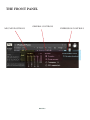
THE FRONT PANEL
MIC/ MIX POSITIONS
GENERAL CONTROLS
PA G E 6
EXPRESSION CONTROLS
ARTICULATIONS AND ADVANCED STAVE
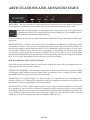
RAM CHIPS - The chips beneath the articulations denote load status of the articulations. If you play an
articulation that isn’t loaded the front panel will alert you. Click on the memory chip to load.
i
Make sure Kontakt displays the instrument load status as pictured. If the left hand bar
is illuminated and red it’s in a queue and hasn’t started loading yet, if the middle bar is lit and yellow the instrument is still loading up.
To save on RAM you may wish to unload articulations click off the chip to unload and it will become
greyed out.
ARTICULATIONS - Click on these notes to select the different articulations, or indeed press their
associated key switches. There are four articulations to choose from; “Direct Mod Wheel Xfade” that
mixes between finger pad and Paul’s poor nails via CC1 Modulation Wheel control; or “Direct Velocity Controlled”, which switches between these two sample sets depending how hard you play. These
are both direct ADD signals for the cleanest recording. These two sets have also been recorded onto
the pristinely maintained Studer tape machine for that rounded top, tidy bottom and general analogue
love! To access these articulations click on the icons with the tape images.
SIDE BAR DISPLAY AND ADVANCE TOOLS
On the left of your articulation stanza is a side bar that displays the name of the articulation you’re currently playing. Beneath it are three options:
KEYSWITCH SHIMMIER - This shimmys the position of all the keyswitches left or right by clicking
and dragging while holding the mouse button down, convenient if you’re creating your own “multi”
instruments and don’t want to hit keyswitches by mistake.
KEYSWITCH TO CC SELECTOR - Use this to assign a CC controller to act as articulation/ keyswitcher. Click on “CC” and you’ll be prompted to move the controller you wish to use in order for the
instrument to “learn” how you’d like to select articulations.
ARTICULATION LOCK - Many composers like to have a single articulation loaded to each instance
of an instrument. Once you have unloaded all unwanted samples and have settled to your preferred
articulation click this to lock so you can’t accidentally hit keyswitches and suddenly become mute. This
way of working is particularly vital if you’re using slave computers where not all UIs will be instantly
visible to you (use this in conjunction with the template builder presets).
PA G E 7
GENERAL CONTROLS
OPTIONS
PRESETS - This allows you to load predetermined sets of articulations, affectionately called “Brush
Sets”, quickly and easily to optimise your system speedily for essential articulations, or to start building
templates using empty “shells”.
PURGE UNUSED - This control keeps unloading any samples you are not using to keep your memory
usage as low as possible.
TRANSPOSE - Toggle this on and tweak the number to the right to transpose your instrument. Please
note that this is not the same as tuning, the instrument will actually offset the samples to the selected
pitch.
CC1 MAPPED VEL(OCITY) - Click this to have velocity controlled dynamics (for the shorts for instance) mapped to CC1 as it is with the longs.
ROUND ROBINS & LEGATO
ROUND ROBINS - This refers to the number of round robins (multiple instances of the same notes
that cycle around as you repeatedly play a note) this can be toggled on or off.
RESET FROM F7 - This enables you to control the round robin cycle (so it sounds identical every time
you play) toggle on & play the key selected (default F0) to reset.
RESET ON TRANSPORT - As above but resets every time you press play! Genius!
EXPRESSION CONTROLS
Visual representation of the various expression controllers available to you.
Right/ ctrl click to reassign/ learn different controller assignments.
DYNAMICS - For use with the velocity controlled patches.
EXPRESSION - (DEFAULT CC11) For “Modwheel XFade” patches. This controls the amount of finger
nail versus finger pad!
PA G E 8
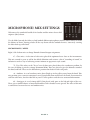
MICROPHONE/ MIX SETTINGS
Welcome to the wonderful world of Air Studios and the mixes of our chief
engineer Jake Jackson.
Use the blobs beneath the faders to load/unload different microphones and the faders above to tweak
the balance of them. Turning a fader all the way down will also unload the mics, conversely turning
the fader back up will reload.
MICROPHONES / MIXES
Right/ Ctrl click on mics to change Kontakt channel/output assignment.
C - Close mics. A selection of valve mics placed for optimum focus close to the instruments.
This mic control is great to add in for added definition and at times a bit of “rounding of sound”, in
isolation it can be a way of achieving a more intimate or pop-music style sound.
T - Tree. This refers to the “Decca” tree of three mics placed above the conductors podium. In
the case of Albion; 3 priceless vintage Neumann M50s. These are placed to give the ultimate sound of
the band, and hall. These are the default mic position that loads in with each patch.
A - Ambient. A set of condenser mics placed high up in the gallery, away from the band. This
mic position gives a massive amount of stereo spread and room sound over the band. Great mixed in
with the other mics, but also ideal fed to your Ls & Rs speaker sends for true surround information.
O - Outriggers A set of vintage AKG C20s placed wide apart to the left and right of the tree.
These give a similar balance of room and band but with a broader stereo spread. The effect of this mic
is somewhere between the tree and ambient mics.
PA G E 9
PLUCKED PIANO MERCURY SYNTH
2.
3.
1.
7.
4.
10.
5.
6.
7.
10
8.
9.
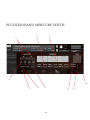
THE PLUCKED PIANO MERCURY SYNTH
Although these sound excellent out of the box, we’ve also given you an easy to use and ingenious front panel.
1. Lo & Hi Pass Filters
LPF = Low, HPF = Hi. For some, a counter intuitive industry standard in titling. Adjust the graph on
the LPF to chop off the top end, HPF to chop off the bottom. So if you want to reduce your fizzing synth sound
to a muted sub tone just drag the LPF graph from right to left.
2. Wobble Amount
Three modulator windows that give you wobble, or sometimes WAB WAB WAB! Adjust the AMT to
effect the amount of WAB WAB.
3. Wobble Frequency
Adjust the graph to change the frequency or speed of your wobbles. For tempo sync’d modulators this
will tune coarsely to provide you with 8th triplet, 16th, etc etc.
4. A.D.S.R.
Attack, Decay, Sustain Release envelope. These knobs will adjust the shape of the sound from a volume
point of view. Adjust attack to make the sound come thudding in or gradually fade in. Adjust release to make
the sound go from a sharp end or off to a gradual decay. For an 808 style bass pull up one of the subbier sounds
and pull the attack all the way to the right. Then release to about mid way (to taste) and play some short notes.
5. FX Parameter Display
We’ve pre-loaded a selection of FX. Activate by clicking the FX icons along this bar.
6. Portamento Glide On/ Off Toggle
Click this to make the sound monophonic (so you only can play one note at a time) and to activate the
portamento glide function.
7. Portamento Glide Amount
Now that your Glide toggle is on, hold one key down and whilst holding press another. Because you’re
in monophonic mode the sound will transition from the first pitch you depressed to the second, this fader
controls the time this transition takes.
8. Yoke X&Y FX Selector
The yoke (10.) is a dual FX controller that adjusts your FX parameters in real time for fantastic sequencing options. Y = vertical controller, X = horizontal. Scroll down to select which FX you wish to control.
9. Yoke X&Y FX Parameter Selector
Determines which parameter from your selected FX you wish to map to the X or Y yoke controller.
You can also alter the FX parameters further and map them directly to the Yoke controller (right/ ctrl click)
by accessing the additional FX parameter Bar; Command/ Right Click on the FX Icon you’d like to acces additional parameters for.
11
A QUICK THANKS
Christian & Paul would like to thank the cabal of genius assembled herein. To Dominic Kelly and the searing talents of the English Session Orchestra, to Alison Burton and the whole of the Air-Studios team. To Jake
Jackson for wrangling and controlling this beast. To the remarkable talents, immense intellect and invention of
Stanley Gabriel, and Blake Robinson, oh and of course Paul Thomson’s poor finger nails.
Most of all we’d like to thank the amazing support and loyalty of our user-base, our Facebook friends and everyone on VI Control.
We are in the same boat as all of you. We’re not software developers by trade, so appreciate your honesty in paying your way to be a part of our family and not distributing this illegally. But more importantly, if you have any
ideas or criticism please let us know directly via our website and in a constructive manner . You never know,
you just may have thought of something that we hadn’t considered. We want to make our entire range the best
there is, and we rely on you to help us achieve that..... With thanks.
Christian & Paul.
COPYRIGHT SPITFIRE AUDIO LLP 2013
www.spitfireaudio.com