1
SECTION 4—FRONT RIGGINGS
Adjusting Footplate Height
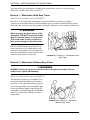
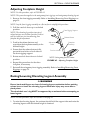
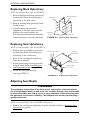
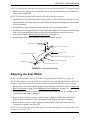
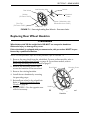
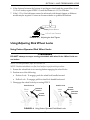
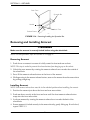
NOTE: For this procedure, refer to FIGURE 4.2.
NOTE: This procedure applies to the swingaway front riggings and swingaway elevating legrest.
1. Remove the front rigging assembly. Refer to Installing/Removing Front Riggings on
page 30.
NOTE: Lay the front rigging assembly on a flat surface to simplify this procedure.
2. Pull the cam lock lever up to unlocked
position.
Front Rigging Support
NOTE: The elevating legrest has two sets of
release buttons, one set above the other. Each set
will be visible one at a time allowing finer
footplate height adjustment.
Release Button
Adjustment
Holes
3. Push in the release buttons and
reposition the footplate assembly to the
desired height.
4. Ensure that the release buttons fully
protrude from holes on both sides of
the front rigging support.
Footplate
Assembly
Cam Lock Lever
5. Rotate cam lock lever down to locked
position.
NOTE: Swingaway footrest shown.
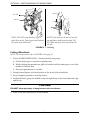
FIGURE 4.2 Adjusting Footplate Height
6. Repeat this procedure for the other
footplate, if necessary.
7. Reinstall the swingaway front rigging assembly. Refer to Installing/Removing Front
Riggings on page 30.
Raising/Lowering Elevating Legrest Assembly
WARNING
Ensure hands and fingers are clear of elevating legrest mechanism before pushing
release lever to lower the elevating legrest. Otherwise injury may occur due to
pinch points.
The wheelchair user’s leg MUST be supported by an assistant before attempting to
lower legrest.
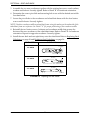
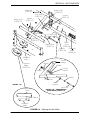
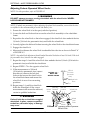
NOTE: For this procedure, refer to FIGURE 4.3 on page 32.
1. To raise the elevating legrest, the assistant should hold the support tube and raise the
elevating legrest until the desired height is obtained.
Part No. 1110550
31
Tracer® SX5