1
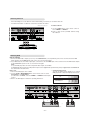
- Shown is a simplified representation of the set.
- Here shown may be somewhat different from your set.
- This manual explains the features available on the DT-50PY10 series.
DIGITAL AUDIO (OPTICAL)
DVD
.
DTV
INPUT
COMPONENT 2
COMPONENT 1
UPGRADE
PORT
REMOTE
CONTROL
DVI
INPUT
COMPONENT 1
OUTPUT
INPUT
DVI INPUT
(PC/DTV)
AUDIO INPUT
RGB INPUT
(PC/DTV)
R
L
1
2
3
4
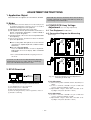
2. CONTROL LOCK / REMOTE CONTROL
3. DVI INPUT/COMPONENT 1 INPUT/OUTPUT (DIGITAL
AUDIO (OPTICAL))
Connect digital audio from various types of equipment.
Note: In standby mode, these ports will not work.
A/V
INPUT 1
VIDEO
S-VIDEO
VIDEO
Antenna
ANALOG/DTV
AC INPUT
VIDEO INPUT
5
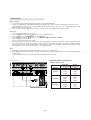
1. UPGRADE PORT
This port is used to upgrade the software version and debug
without changing the hardware.
Be careful not to use this port. Just contact your dealer or service centre.
MONITOR
OUTPUT
R AUDIO L
AUDIO INPUT
9
R AUDIO L/MONO
A/V INPUT 2
S-VIDEO
<Back Panel>
6
7
8
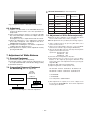
6. AUDIO/VIDEO IN SOCKETS (A/V INPUT 1)
Connect the audio/video out sockets of external equipment to
these sockets.
S-VIDEO/AUDIO IN SOCKETS
Connect the S-VIDEO out socket of the VCR to the S-VIDEO
socket.
Connect the audio out sockets of the VCR to the audio sockets as in A/V INPUT 1.
AUDIO/VIDEO OUT SOCKETS (MONITOR OUTPUT)
7. ANTENNA INPUT
4. DVI INPUT / AUDIO INPUT / RGB INPUT (PC/DTV)
Connect the monitor output socket of the PERSONAL COMPUTER to this socket.
Note: If you want to use RGB/DVI audio, we strongly recommend that you use the cable that has a core, or the EMI Filter
core along with separate cable.
8. POWER CORD SOCKET
This Monitor operates on an AC power. The voltage is indicated on the Specifications page. Never attempt to operate
the Monitor on DC power.
9. AUDIO/VIDEO IN SOCKETS (A/V INPUT 2)
S-VIDEO/AUDIO IN SOCKETS
5. COMPONENT INPUT
Connect DVD video outputs to Y, PB, PR of COMPONENT
INPUT and audio outputs to Audio sockets of AUDIO INPUT.
- 6 -