1
Troubleshooting and Repair
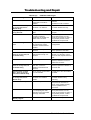
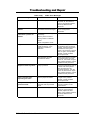
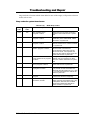
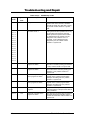
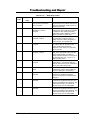
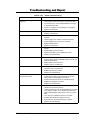
Table 6-1(a)
Message
Diskette drive A failure
POST Error Messages
Possible Cause
Action
The drive failed or is missing.
Check the drive to determine the
problem.
Floppy Disk Controller is
disabled.
Enabled the FDD Controller.
Diskette read failure - press
F1 to retry boot, F2 for
SETUP utility
The diskette is either not
formatted or is defective.
Replace the diskette with a
bootable diskette and retry.
Display adapter failed,
using alternate
The primary video adapter
failed.
Check the primary video
adapter.
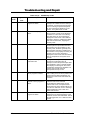
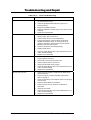
Gate A20 failure
The keyboard controller is not
accepting command,
specifically, the enable and
disable A20 command.
Check the keyboard controller
and system board. Turn the
power off, then back on again. If
the problem persists contact
qualified service personnel.
Fixed disk configuration
error
The specified configuration is
not supported or doesn't
match the actual hardware
installed.
Correct the fixed disk
configuration.
Fixed disk controller failure
The fixed disk may be
defective.
Try rebooting. If that doesn't
work, replace the fixed disk.
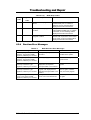
Fixed disk read failurepress F1 to retry boot, F2
for SETUP utility
The fixed disk may be
configured incorrectly or is
defective.
Check the drive type selected in
SETUP. Try rebooting. If that
does not work, replace the fixed
disk.
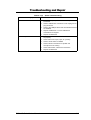
Pointer device failure
The PS/2-style mouse failed.
Try rebooting. If problem
persists, check the mouse, it's
cable and connector.
No boot device available press F1 to retry boot, F2
for SETUP utility
Either diskette drive A:, the
fixed disk, or both the
diskette and fixed disk are
defective.
Try rebooting. If problem
persists, replace the diskette or
the fixed disk.
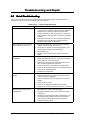
No boot sector on fixed
disk – press F1 to retry
boot, F2 for SETUP utility
The C: drive is not formatted
or is not bootable.
Format the C: drive and make it
bootable.
Not a boot diskette - press
F1 to retry boot, F2 for
SETUP utility
The diskette in drive A: is not
formatted as a bootable
diskette.
Replace the diskette with a
bootable diskette and try
rebooting.
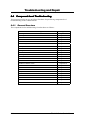
No timer tick interrupt
The timer chip has failed.
Check the system board, Turn
the power off, then back on
again. If the problem persists,
contact qualified service
personnel.
Shutdown failure
Either the keyboard controller
is not accepting the reset
command or the associated
reset logic has failed.
Check the keyboard controller
and system board. Turn the
power off, then back on again. If
the problem persists, contact
qualified service personnel.
Time of day not set - run
SETUP program
Real Time Clock not set.
Run SETUP utility.
6-2
FIC A440 Series Service Manual