1
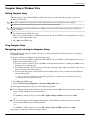
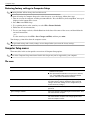
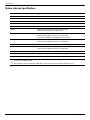
Computer Setup
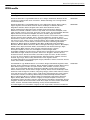
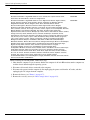
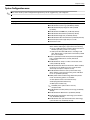
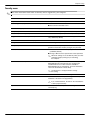
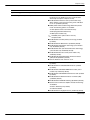
Security menu
✎ Some of the menu items listed in this section may not be supported by your computer.
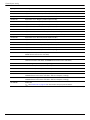
Select
To do this
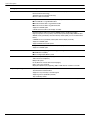
Setup BIOS Administrator Password
Set up a BIOS administrator password.
User Management (requires a BIOS administrator password)
■ Create a new BIOS user account.
■ View a list of ProtectTools users.
Password Policy (requires a BIOS administrator password)
Revise password policy criteria.
HP SpareKey
Enable/disable HP SpareKey (enabled by default).
Always Prompt for HP SpareKey Enrollment
Enable/disable HP SpareKey enrollment (enabled by default).
Fingerprint Reset on Reboot (If Present)
Reset/clear the fingerprint reader ownership (select models
only; disabled by default).
Allow reset of HP ProtectTools security keys
Enable/disable reset of HP ProtectTools security keys.
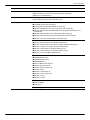
Change Password
Enter, change, or delete a BIOS administrator password.
HP SpareKey Enrollment
Enroll or reset HP SpareKey, which is a set of security
questions and answers used if you forget your password.
DriveLock Passwords
■ Enable/disable DriveLock on any computer hard drive
(enabled by default).
■ Change a DriveLock user password or master password.
settings are accessible only when you enter
✎ DriveLock
Computer Setup by turning on (not restarting)
the computer.
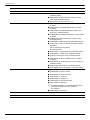
TPM Embedded Security
Enable/disable support for Trusted Platform Module (TPM)
Embedded Security, which protects the computer from
unauthorized access to owner functions available in
Embedded Security for ProtectTools. For more information,
refer to the ProtectTools software Help.
must have a setup password to change
✎ You
this setting.
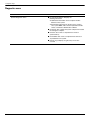
Automatic DriveLock
Enable/disable Automatic DriveLock support.
Disk Sanitizer
Run Disk Sanitizer to destroy all existing data on the primary
hard drive or the drive in the upgrade bay.
Ä
System IDs
Maintenance and Service Guide
If you run Disk Sanitizer, the data on the selected drive
is destroyed permanently.
Enter a user-defined computer asset tracking number and
ownership tag.
5–9