1
Optical Adjustments
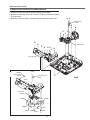
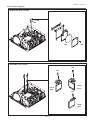
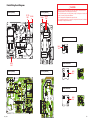
Condenser lens (Out) adjustment
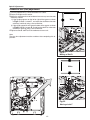
1 Turn the projector on by a state of without FPC cables.
2 Project all of lights on the screen.
3 Adjust the adjustment base of condenser lens out assy to make color
uniformity in white.
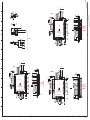
1) If the shading appears on the left or right of the screen as shown
in Fig.2-1, loosen 1 screw C , and adjust the slot D to make color
uniformity in white by using a slot screwdriver.
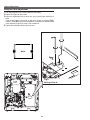
2) If the shading appears on the top or bottom of the screen as shown
in Fig.2-2, loosen 2 screws E, and adjust the slots F to make color
uniformity in white by using a slot screwdriver
4 Tighten screws C and E to fix the condenser lens out unit.
White
D
C
Note:
The relay lens adjustment must be carried out after completing this adjustment.
Fig.2-1
Moving of Slot D
White
E
E
F
F
Fig.2-2
Moving of slot F
-27-