1
Export Service Bulletin 00-088
Applies To:
August 2001
ALL Models
Brake Disc Refinishing Guidelines
(Replaces 86-020, dated July 1999)
Replacement of brake discs under warranty is not
allowed unless the brake disc is beyond its service limit
for refinishing. If the brake disc is within its service limit,
it must be refinished. You can find the maximum
refinishing limits in the Conventional Brakes section of
the appropriate shop manual.
You need to refinish brake discs every time they are
replaced. You also need to refinish brake discs when
they become scored, or if there is pulsation when the
brakes are applied.
American Honda recommends two tools for brake disc
refinishing: the Kwik-Way Brake Lathe and the KwikWay Power Drive System. These tools let you refinish
both front and rear brake discs on the vehicle for most
Honda models. On-vehicle refinishing ensures against
brake pulsation that can result from off-vehicle
refinishing.
American Honda highly recommends using the power
drive system to turn the front and rear brake discs. You
can also use the vehicle’s engine to turn the brake
discs, depending on the model, but the power drive
system turns the brake disc at the proper torque and
speed, allowing the brake lathe to make a smooth,
consistent cut. The power drive system also offers
these advantages:
• No need to climb in and out of the vehicle to start
and stop the engine or to shift the transmission.
• No need to secure the opposite wheel with a
tie-down strap.
• No waiting for the engine to return to idle; no concern
about engine speed changes that can adversely
affect brake disc cut and finish.
• No involvement with the Traction Control System
(TCS) or Vehicle Stability Assist (VSA).
• Increased cutting tool life because of consistent
cutting speed.
ORDERING INFORMATION
To order the Kwik-Way Brake Lathe, its component
parts, and the Kwik-Way Power Drive System,
contact the Honda Tool and Equipment Program at
1-888-424-6857. Phone lines are open Monday thru
Friday from 7:30 a.m. to 7:00 p.m. Central Time. When
calling, make sure you enter the appropriate access
code first (see the Honda Tool and Equipment Catalog
for a list of these codes).
2001 American Honda Motor Co., Inc. – All Rights Reserved
WARRANTY CLAIM INFORMATION
None; this bulletin is for information only.
FRONT BRAKE DISCS
Whenever you replace a front brake disc, you must
refinish the new disc on the vehicle to avoid brake
vibration. Time for refinishing new front brake discs is
included in the flat rate time for brake disc replacement.
Follow these guidelines to get the best results from
your Kwik-Way brake lathe and power drive system.
(For detailed instructions, refer to the appropriate
operating manual.)
Setting Up the Vehicle
Put the transmission in Neutral. If you are not using the
power drive system, start the engine, and let it warm up
to its normal operating temperature so the idle speed
will stabilize to its lowest rpm.
Raise the vehicle on a lift.
Check for loose wheel bearings. You must correct for
loose wheel bearings before you refinish the brake
discs. If you do not, the brake lathe will not correct for
brake disc runout, resulting in an uneven finish and
brake pulsation.
Remove the front wheels, then reinstall the wheel nuts
with flat washers to compensate for the removed
wheel. Torque the wheel nuts to the required
specification (see the appropriate shop manual).
Remove the caliper assembly. Use a wire or an S-hook
to hold the caliper to the spring or shock tower. Do not
kink the brake hose or use it to support the caliper. If
you are not using the power drive system and the
vehicle has TCS or VSA, make sure you install a brake
pad spreader between the pads on the hanging caliper.
Also, make sure the system is turned off anytime the
engine is started. If the system is not turned off, the
brakes may activate, causing the brake pads on the
hanging caliper to strike each other or the pistons to fall
out.
XTB 20383-22705 (0108)
1 of 5
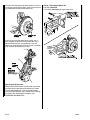
Install the vibration damper on the brake disc. If you are
not using the power drive system, make sure you install
the protective band around the wheel nuts.
VIBRATION
DAMPER
Honda 1-Piece Speed Mount Kit
P/N KWI-108003000
or P/N KWI-108004000 (for large brake discs):
PROTECTIVE
BAND
If you are not using the power drive system, use a
fabric tie-down strap to secure the brake disc that is
opposite to the one you are refinishing. If you are
working on a Prelude with ATTS, do not use a tie-down
strap; let both front wheels turn freely.
BRAKE
CALIPER
BOLTS
FABRIC
TIE-DOWN
STRAP
FRONT
BRAKE DISC
(Opposite to
the one you
are refinishing.)
Mounting the Brake Lathe
Remove the tool bed from the brake lathe, then mount
the brake lathe to the steering knuckle with a Honda
1-Piece Speed Mount Kit. This kit provides quicker,
more accurate mounting. You can order this kit through
the Honda Tool and Equipment Program (see
ORDERING INFORMATION).
2 of 5
00-088
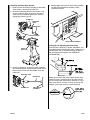
Attaching the Power Drive System
1. Make sure the drive motor assembly on the power
drive system is level with the brake disc.
2. Attach the mounting yoke to the brake disc, and
secure it with one of the wheel nuts. Torque the
wheel nut to the required specification (see the
appropriate service manual).
4. Set the toggle switch on the drive motor assembly
to FWD (counterclockwise rotation) or REV
(clockwise rotation).
ION
CAOIDUTINJAURROYF
WHEEL NUT
AV CLE PART
KEOETPATING
R
MOUNTING
YOKE
DRIVESHAFT
FWD
DRIVE MOTOR ASSEMBLY
Setting Up and Adjusting the Brake Lathe
Use Kwik-Way cutting bits, P/N KWI-109109223, and
the holding screws that come with them. These bits are
stamped “KW” and are available through the Honda
Tool and Equipment Program (see ORDERING
INFORMATION).
POWER
DRIVE UNIT
TOOL HOLDER
HOLDING SCREW
3. Attach the driveshaft on the drive motor assembly
to the mounting yoke, making sure the center line of
the driveshaft is level with the spindle nut on the
wheel hub.
KWIK-WAY
CUTTING BIT
("KW" must
face upward.)
MOUNTING YOKE
DRIVESHAFT
SPINDLE NUT
DRIVE MOTOR
ASSEMBLY
Before you use the brake lathe, inspect the tips of the
cutting bits with a magnifying glass to make sure the
tips are not worn out. Each bit has three tips. If a tip is
worn, rotate the bit, and use a new tip. A worn tip will
produce a poor finish and may cause chattering.
This tip is worn
out and should
not be used.
00-088
3 of 5
Reinstall the tool bed on the brake lathe with the top of
the cutting bits facing up and the feed knobs facing
down. Adjust the tool bed until the brake disc is
centered between the cutting bits. For proper
refinishing, the brake disc must turn toward the top of
the cutting bits.
must
top
Brake disc
toward the
cutting bits.
turn
of the
LATHE MOVEMENT
You may need to adjust the bit holder(s)
for proper cutting of the brake disc.
Do not set the cutting depth on the brake lathe to more
than 0.2 mm. This is two divisions on the cutting knob.
Make sure you start your cut at least 3 mm beyond the
worn area on the brake disc.
If you are cutting a larger diameter brake disc such as
that used on 1986–90 Legends, make sure you use the
15° cutting bit holders. These bit holders, available
through the Honda Tool and Equipment Program (see
ORDERING INFORMATION), supersede the original
bit holders and provide better cutting coverage for
larger diameter brake discs. Each bit holder is clearly
marked for proper installation on the tool holder.
ROTOR
TOOL
HOLDER
4 of 5
Cutting the Brake Disc
To get the smoothest cut and the best brake disc finish,
always use the slowest feed speed on the tool bed feed
motor. Place the drive belt on the smallest pulley of the
feed motor and on the largest pulley of the hand wheel.
Make sure the lower toggle switch on the power drive
system drive motor assembly is set to the proper
rotation to turn the brake disc toward the top of the
cutting bits. Plug the tool bed feed motor into the power
outlet on the drive motor assembly, then turn on the
drive motor with the upper toggle switch on the
assembly.
If you are not using the power drive system, make sure
the transmission is in 1st gear (2nd gear on Preludes
with ATTS) or reverse and the engine is idling, but not
at a fast idle. If the transmission and engine are at
higher gears and speeds, you will damage the cutting
bits.
Turn on the tool bed feed motor, and snap it into place;
there should be tension on the feed belt. Cut the brake
disc until the cutting bits clear the outer edge of the
disc. The cutting bits should produce a smooth,
consistent finish with no chatter marks or grooves.
If the disc did not clean up entirely on the first pass,
reset the brake lathe, and make a second pass. When
done, turn off the tool bed feed motor, and turn off the
drive motor on the power drive system. If you are not
using the power drive system, turn off the engine, and
wait until the wheels come to a complete stop; do not
press the brake pedal. If the vehicle has A/T, do not put
the transmission in Park until the engine is off and the
wheels have stopped.
Finishing the Job
Remove the vibration damper and the protective band
(if used). Use a micrometer to measure the thickness of
the brake disc. Make sure the thickness is within the
shop manual specifications. Clean the brake disc with
soapy water or brake cleaner, then wipe it dry. Use a
vacuum cleaner to remove any dust or chips, but do not
use compressed air.
Unplug the tool bed feed motor from the drive motor
assembly, and remove the mounting yoke from the
brake disc. Remove the speed mount from the steering
knuckle.
Apply a small amount of Molykote 77 grease to the
brake pad shims. Reinstall the caliper assembly. (If you
did not use the power drive system, use the brake pad
spreader to push the pistons back into the caliper.)
Torque the nuts and bolts to the required specification
(see the appropriate shop manual).
Refinish the other front brake disc using the same
guidelines. If you used a fabric tie-down strap, make
sure you switch it to the other side. When you are done
refinishing the brake disc, reinstall the front wheels,
and torque the wheel nuts to the required specification
(see the appropriate shop manual).
00-088
Lower the vehicle. Check the brake fluid level, then
test-drive the vehicle to make sure the brake pedal is
firm and does not pulsate. Lightly apply the brakes
about 20 times during the test-drive to seat the brake
pads.
REAR BRAKE DISCS
You can either refinish the rear brake discs on the
vehicle using the Kwik-Way Brake Lathe and the KwikWay Power Drive System; or, refinish them off the
vehicle using conventional brake disc refinishing
equipment.
Follow the same guidelines you used for refinishing
front brake discs, noting these differences:
• Do not install the protective band around the wheel
nuts.
• Mount the brake lathe to the rear knuckle with the
Honda Two-Piece Adapter. You can order the twopiece adapter through the Honda Tool and
Equipment Program (see ORDERING
INFORMATION).
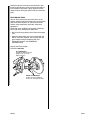
Honda Two-Piece Adapter
P/N KWI-108002000
KIT COMPONENTS
[Torque the bolts to 33 N.m
(24 lb-ft); do not use an
impact wrench.)
BRAKE CALIPER BOLTS
[Torque to 54 N.m (40 lb-ft);
do not use an impact wrench.]
00-088
5 of 5