1
Instructions for use
SES 113
SES 113 B vacuum
SES 225 B vacuum
Contents
Page
Introduction . . . . . . . . . . . . . . . . . . . . . . . . . . . . . . . . . . . . . . . . . . . . 3
Suitable loads . . . . . . . . . . . . . . . . . . . . . . . . . . . . . . . . . . . . . . . . . . 3
EschmannCare . . . . . . . . . . . . . . . . . . . . . . . . . . . . . . . . . . . . . . . . . 3
1.0
Controls and displays . . . . . . . . . . . . . . . . . . . . . . . . . . . . . . . . 6
2.0
3.0
Getting started . . . . . . . . . . . . . . . . . . . . . . . . . . . . . . . . . . . . . 7
Running a cycle . . . . . . . . . . . . . . . . . . . . . . . . . . . . . . . . . . . . 8
4.0
5.0
Direct Data Download instructions . . . . . . . . . . . . . . . . . . . . . 10
Printer instructions . . . . . . . . . . . . . . . . . . . . . . . . . . . . . . . . . 13
6.0
Technical data . . . . . . . . . . . . . . . . . . . . . . . . . . . . . . . . . . . . 15
APPENDIX 1 - Installation . . . . . . . . . . . . . . . . . . . . . . . . . . . . . . . . 18
APPENDIX 2 - Warnings and cautions . . . . . . . . . . . . . . . . . . . . . . 19
APPENDIX 3 - Loading the autoclave . . . . . . . . . . . . . . . . . . . . . . . 21
APPENDIX 4 - Daily Testing, Vacuum ( B type) autoclaves . . . . . . 22
APPENDIX 5 - Maintenance . . . . . . . . . . . . . . . . . . . . . . . . . . . . . . 23
APPENDIX 6 - Cycle errors and faults and Display messages . . . . 24
APPENDIX 7 - Special Functions . . . . . . . . . . . . . . . . . . . . . . . . . . 26
APPENDIX 8 - Accessories and spares . . . . . . . . . . . . . . . . . . . . . 32
Figures
P2/33
Fig. 1.
Fig. 2.
Identification of the main parts of the autoclave . . . . . . . . . 4
The main information display and control buttons . . . . . . . . 5
Fig. 3.
Fig. 4.
Filling and draining the reservoirs . . . . . . . . . . . . . . . . . . . . 5
DDD - Controls active, connected . . . . . . . . . . . . . . . . . . . 10
Fig. 5.
Fig. 6.
DDD - Download button symbols . . . . . . . . . . . . . . . . . . . 10
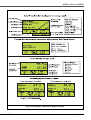
‘Cycle Select’ and various display screens . . . . . . . . . . . . 11
Fig. 7.
Fig. 8.
Various display screens . . . . . . . . . . . . . . . . . . . . . . . . . . . 12
Printer control panel . . . . . . . . . . . . . . . . . . . . . . . . . . . . . 13
ST-IM84c
SES 113 and 225
AUTOCLAVES
Introduction
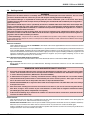
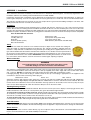
The Eschmann Little Sister SES 113 and 225 autoclaves have been designed to meet the needs of the healthcare professional
and have been designed in accordance with European Standards (e.g. BS EN 13060) and Department of Health guidelines.
SES 113 Autoclave – The SES 113 is an ‘N’ type displacement autoclave with an 11 litre chamber. It is intended for the sterilization
of solid instruments which have not been wrapped.
SES 113 B Autoclave – The SES 113 B vacuum is a ‘B’ type vacuum autoclave with an 11 litre chamber. It is intended for the
sterilization of solid and hollow instruments, pouched or wrapped instruments and porous loads.
SES 225 B Autoclave – The SES 225 B vacuum is a ‘B’ type vacuum autoclave with an 22 litre chamber. It is intended for the
sterilization of solid and hollow instruments, pouched or wrapped instruments and porous loads.
Suitable loads
The following table details the types of load that may be successfully processed in each model. Please refer to the table in the
‘Technical Data’ section for details of the cycles available on each model.
Type of load and cycle type
Solid instruments for immediate use (N)
Solid instruments processed for aseptic storage (N)
Hollow/cannula instruments (B)
Single wrapped pouched instruments (B)
Single wrapped cassettes (B)
Single wrapped hollow instruments (B)
Double wrapped instruments (B)
Double wrapped hollow instruments (B)
Porous loads (B)
SES 113
SES 113 B Vacuum
SES 225 B Vacuum
9
9
8
8
8
8
8
8
8
9
9
9
9
9
9
9
9
9
Warning markings
The warning markings on this equipment have the following meanings:
Caution; refer to accompanying documents (i.e. these Instructions for Use).
Caution; hot surface.
EschmannCare
Eschmann recommends direct installation and commissioning in the UK for all its autoclaves by its own EschmannCare team of
professional engineers. Eschmann also recommends a programme of after sales service and maintenance for all Eschmann
autoclaves, using only the correct Eschmann spare parts. Service and maintenance programmes can include PSSR 2000 certification
and testing to HTM 2010 (DB9804).
The EschmannCare service department is staffed and equipped to provide advice and assistance during normal office
hours. To avoid delays when making enquiries, please quote the Model and Serial Number of your Autoclave which is
shown on the Serial Label, the location of which is shown in Fig. 1, item 20 please include all alpha and numeric digits.
For further information visit www.eschmann.co.uk
All correspondence relating to the after sales service of Eschmann Equipment to be addressed to :
UK Customers
EschmannCare, Peter Road, Lancing, West Sussex
BN15 8TJ, England. Tel: +44 (0) 1903 765040. Fax: +44 (0) 1903 875711.
Overseas Customers
Contact your local distributor. In case of doubt contact Eschmann Equipment.
ST-IM84c
P3/33
1
3
2
4
24
5
18
6
7
17
8
9
16
15
14
20
13
12
11 10
21
18
23
22
19
1
2
3
4
5
6
7
8
9
10
11
12
Autoclave door
Door handle
Process display (Fig. 2)
Start button (Fig. 2)
Indicators (Fig. 2)
Digital display (Fig. 2)
Cycle select button (Fig. 2)
Control buttons (Fig. 2)
Printer
Mains ‘on/off’ switch
Adjustable foot
USB port
Part rear view
13
14
15
16
17
18
19
20
21
22
23
24
Part rear view
Serial Label (front)
Overheat indicator
Waste water drain
Waste water reservoir (Fixed)
Fresh water drain
Fresh water reservoir (Slides out to fill))
Drain release clip
Serial label (back)
Mains fuses
IEC Mains connection
Antibacterial air filter (B type units only)
Basic instructions (UK models only)
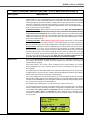
Fig. 1. Identification of the main parts of the autoclave
P4/33
ST-IM84c
SES 113 and 225
AUTOCLAVES
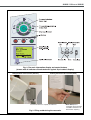
Fig. 2. The main information display and control buttons
(shown with all indicators illuminated and a typical ‘Cycle select’ display)
Filling the fresh water reservoir (slide out)
Draining the waste water reservoir (fixed)
Each reservoir has a capacity of 3.36 litres.
Fig. 3. Filling and draining the reservoirs
ST-IM84c
Drain tube (before
connection, direct end into
a suitable container of at
least 4 litres capacity )
P5/33
1.0
Controls and displays
Mains switch (Fig. 1, item 10)
The mains switch is positioned on the front of the autoclave. The symbol ‘I‘ indicates ‘on’ and the symbol ‘0’ indicates ‘off’.
The switch illuminates green when ‘on’.
Push buttons
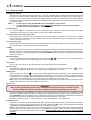
Cycle select button (Fig. 1, item 7). Press to select a sterilization cycle. The Autoclave Manager may have enabled
more than one cycle. Cycle details will be shown in the main display. After scrolling the available cycles which may
include the test cycles (T1 and T3), the ‘Cycle Count’ (the number of cycles started) will be displayed.
Start (cycle) button (Fig. 1, item 4). Press to start the selected cycle.
Control Buttons. The control buttons shown in Fig. 2 are behind the hinged panel (below the main display). Their
use is explained in Appendix 7, ‘Special functions’. They are not required during ‘normal’ use of the autoclave.
Note: When a button is pressed a ‘beep’ will sound (unless disabled, refer to Appendix 7 - ‘Audio’).
Digital display (Fig. 2)
The digital display provides the information required during ‘normal’ use of the autoclave (e.g. to select the required
cycle) and to provide information on the cycle status. It may display other details, instructions and warnings as detailed
in this manual and configuration information when using the ‘Special Functions’.
Indicators (Fig. 2)
‘Low water’ indicator. When illuminated the fresh water reservoir (top one) should be refilled before a new cycle
is started (section 2). It will flash if the reservoir is low and an attempt to start a cycle is made.
‘Drain reservoir’ indicator. When illuminated the waste water reservoir (bottom one) is full and should be emptied
before a new cycle is started (section 2). It will flash if the reservoir is full and an attempt to start a cycle is made.
Door indicator. This is illuminated to indicate the door is locked, or flashing to indicate the door should be
opened or closed (the digital display provides a related message). It will be off after you close the door prior to starting
a cycle.
Cycle complete indicator. This is illuminated at the end of a successful completed cycle.
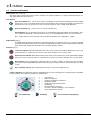
Progress indicators. The display has indicators that illuminate in turn as the cycle progresses. The main stages are identified
by three symbols. The symbols and stages are detailed below:
1
2
3
4
5
6
7
8
9
Pre conditioning.
P6/33
–
–
–
–
–
–
–
–
–
Cycle started
Water fill completed
Heating to sterilization temperature
Sterilization started
Sterilization stage passed halfway
Condensing
Drying started (vacuum only)
Less than 1 minute remaining to cycle completion
Cycle completed successfully
Sterilizing.
Post sterilization cooling/drying.
ST-IM84c
SES 113 and 225
AUTOCLAVES
2.0
Getting started
WARNING
Read these instructions before use and keep them in a safe convenient place for future reference. The use of this
autoclave should be under the control of a person with adequate training (the Autoclave Manager*).
The Autoclave Manager* is responsible for ensuring that the correct sterilization cycle is used for the items being
sterilized, ensuring that records are kept correctly and keeping the amended PIN code confidential (refer to Appendix 7 Special functions).
The autoclave should only be used as specified by Eschmann as detailed within these instructions. Never tamper with,
bypass or interfere with any of the safety features. There are no ‘user’ serviceable parts inside the autoclave. Eschmann
Equipment is not responsible for malfunction, or a reduced level of protection provided by the equipment, if it is used in a
manner not specified in these instructions.
Only use Eschmann accessories and mains leads. Any spare parts required must be supplied by Eschmann. They must
be fitted in accordance with the Service Manual or the instructions supplied with them by EschmannCare engineers or
engineers who have been trained by Eschmann.
* Autoclave Manager - The person who is ultimately accountable for the operation of the premises. Depending on the nature
of the organisation, this may be the owner, or other person of similar authority. In small, autonomous installations the manager
might also be the user.
Autoclave Installation
Full installation details are provided in APPENDIX 1, this includes a list of items supplied with the autoclave and a note to observe
if the autoclave is relocated.
Ensure the autoclave has been correctly installed before use, by an EschmannCare trained engineer (contact the EschmannCare
team on 01903 765040). Installation will also include initial training covering the use of these autoclaves. It is essential that the
autoclave is levelled and connected to the electrical mains supply correctly. On request and during installation, programmes and
autoclave configuration can be adjusted by the EschmannCare engineer. (To protect against tampering, access for such
adjustment can only be gained by use of a PIN code).
Direct Data Download (DDD) Software Installation
Refer to the instructions provided with the Direct Data Download Software and install the DDD application.
Warnings and Cautions
Before using the autoclave ensure you understand the ‘Warnings and Cautions’ which are set out and summarised in
APPENDIX 2 .
RESERVOIR CARE AND WATER QUALITY CAUTION
a.
Eschmann recommends filling the water reservoir with ‘Sterile Water for Irrigation’. This is low in dissolved solids
and has a low microbial count. In the U.K. the Department of Health recommends that ‘Sterile Water for Irrigation’
is used in bench-top Autoclaves (NHS Estates document HTM2031).
b.
If ‘Sterile Water for Irrigation’ is not being used then Eschmann strongly recommends the use of either distilled
water, deionized water, purified water or water treated by the reverse osmosis process. These types of water are
low in dissolved solids and can help reduce the effects of tap water detailed below.
c.
DO NOT USE TAP WATER, this is high in dissolved solids and can deposit lime scale, block filters and cause damage
to the pressure vessel.
d
Don’t leave water standing in the reservoir for more than a few hours. If you are not sure how long the water has
been there, change it. Also contents of part used containers of sterile water for irrigation should be discarded
(microbiological purity will be compromised once opened).
e
At the end of the working day, or whenever the sterilizer is to be left unused for several hours, drain both the water
reservoirs and leave them to dry.
Fill the reservoir
Open the left hand access door (Fig. 3) and slide the (top) fresh water reservoir out about 100 mm. Press down gently the
back of the reservoir cover, slide it forward and remove it (Fig. 3).
DO NOT USE TAP WATER. Fill the reservoir up to the ‘MAX’ mark engraved on the internal mesh cover (3.36 litres maximum).
When the reservoir is filled to the ‘MAX’ mark the autoclave will run 8 cycles before it needs to be filled again
Replace and slide the reservoir cover back until it clicks into position and return the reservoir to its normal (rear) position before
using the autoclave. Close the left hand access door.
ST-IM84c
P7/33
3.0
Running a cycle
Switching ‘on’ and ‘off’.
Switch the autoclave ‘on’ using the mains switch (Fig. 1, item 10). The digital display and applicable indicators will illuminate
to show the autoclave has been switched ‘on’. After normal checks and a ‘Welcome’ message (shown for 30 seconds, for
the first few cycles) the ‘Cycle select’ screen will be displayed (Fig. 6). If the door is closed the green door indicator will flash
to indicate the door should be opened, together with a display message ‘Open Door’. To switch the autoclave ‘off’ press ‘0’
on the mains switch.
Notes: 1
2
At times, the message ‘PLEASE WAIT’ may be displayed for a few seconds.
‘B’ type autoclave - If running test T1, run it directly after switching ‘on’ (a cold and dry chamber).
For notes on T1, refer to Appendix 7 - Special Functions.
To open the door.
The autoclave must be switched ‘on’. Once the normal ‘Cycle select ‘ display is shown (Fig. 6) turn the door handle
anticlockwise until vertical (12 o’clock position). The green door indicator light will flash.
To close the door onto the secondary catch.
With the handle vertical push the door closed gently and turn the door handle 45° clockwise (2 o’clock position). It will meet
a stop at this position and the door will only be partially closed. The door should be shut onto the secondary catch at all times
when the autoclave is not in use.
To close the door fully.
With the handle vertical push the door shut firmly and turn the door handle clockwise until horizontal (3 o’clock position). The
door indicator light will stop flashing and will not be illuminated.
Loading
Note: Prior to sterilization, instruments should be thoroughly cleaned, ideally in an Eschmann Instrument Washer Disinfector.
Open the door fully. The door indicator light will flash, indicating the door should be closed (after loading) together with a display
message ‘Close Door’. Following the guidance provided in APPENDIX 3 and local procedures, load the autoclave with the
items to be sterilized.
Reservoir warning
If a Reservoir Warning Indicator (detailed on page 6) is illuminated (
to page 7 (Fill the reservoir) or page 9 (Draining a reservoir) as required.
), fill or drain reservoir as indicated referring
Closing door
Close the door fully. The green door indicator light will stop flashing and will not be illuminated.
Cycle selection
The digital display indicates the default cycle. If another cycle is required press the ‘Cycle select’ button (
required cycle is displayed. Ensure the cycle is appropriate for the load (refer to section 6).
) until the
Starting cycle
Press the ‘Start (cycle)’ button
. The green door indicator light will illuminate indicating the door is locked and cannot
be opened until cycle completion. The printer (if fitted) will start printing a cycle record (refer to section 5). Indicators will show
the status of the cycle. The digital display will indicate the chamber temperature, pressure and an animated progress bar. The
‘Cycle Count’ can be displayed if the ‘Cycle select’ button is pressed during a cycle (Fig. 6 and 7).
Note: Cycles cannot be started when the green door indicator is flashing and the ‘Open Door’ message is displayed. Open
and then close the door to correct this situation should it occur.
Cycle errors
WARNING
When a cycle is aborted and/or an error display is indicated, the load must be treated as non-sterile. The load
must be sterilized by running the cycle again. If wrapped or pouched, new packaging must be used.
If the autoclave detects a fault it will display a message (e.g. ‘Door not closed’, Fig. 6) or if it detects an error it will display ‘CYCLE
FAILED’ or ‘SYSTEM ERROR’, there will be five rapid ‘beeps’ and illuminated progress indicators will flash. Refer to ‘Errors and
Faults’ Appendix 6. Anyone who becomes aware of a fault when using the autoclave should report it immediately to the Autoclave
Manager and all necessary remedial action should be taken before the autoclave is used again.
Should the overheat cutout trip, its indicator light (Fig. 1, item 14) will illuminate, refer to Appendix 6.
Completed cycles
Completion of a successful cycle will be indicated by
illuminating and the display showing ‘Cycle Complete’ and ‘Ready
to Open’, the normal end of cycle display (refer to Fig. 6). There will be three audible ‘beeps’ (unless disabled). Open the door
fully (take care - the load will be hot) and remove the load using the tray lifter.
Note: On ‘N’ type autoclaves ONLY, at the end of cycles with drying, the beep (if enabled) will continue intermittently. During
these ‘beeps’ open the door and remove the load. It should still be hot enough to self-dry. If the door is not opened during
the intermittent ‘beeps’ the load may not dry when removed. Items sterilized using an ‘N’ type cycle are for immediate
use only.
P8/33
ST-IM84c
SES 113 and 225
AUTOCLAVES
Unloading the chamber
WARNING: TAKE CARE WHEN UNLOADING, THE LOAD AND CHAMBER MAY BE VERY HOT. Use the tray lifter as
detailed in the following section. If running consecutive cycles, Eschmann recommends waiting for five minutes between
cycles with the door open to allow the chamber conditions to stabilise. If the autoclave is not to be used for several minutes
close the door onto the secondary catch (as detailed opposite).
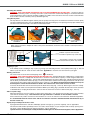
Using the tray lifter.
The tray lifter has one bottom support and two pairs of top clips. The top pair is for Hand Free instrument Transfer (HFiT)
cassettes and the bottom pair is for trays. Do not use the top clips when lifting trays. The spacing of the top clips enables HFiT
cassettes to be held at the side or end. Refer to illustrations below:
Tray in bottom clips
CORRECT
Tray in top clips
INCORRECT
HFiT cassette gripped
at the side.
HFiT cassette gripped
at the end.
When using a tray lifter to hold pouch racks or the porous load basket, ensure the rack or basket is correctly located as
illustrated below:
End bar of pouch rack or basket
located in tray lifter’s top centre clip.
Second bar of pouch rack or basket
located in the tray lifter’s top channel.
Stopping a cycle
In the unlikely event of needing to stop a cycle (e.g. wrong cycle selected) press the ‘Cancel (Exit)’ button (Fig. 2). This will
induce ‘Cycle Error No. 02’. Refer to ‘Errors and Faults’ Appendix 6 to clear this error and start the cycle again.
Draining a reservoir
The ‘waste water’ reservoir will need emptying when
illuminates.
WARNING: TAKE CARE THE WASTE WATER MAY BE VERY HOT. Using the drain tube supplied (if lost a replacement
can be ordered, Part No. 115036) drain the water into a container of at least 4 litres capacity, or a sink. Plug the drain tube’s
connector into the drain socket (Fig. 1, item 15) this automatically opens the socket’s drain valve, if the plug cannot be pushed
into the drain, push the drain release clip (Fig. 1, item 19) until it clicks and then insert the plug. Release the red clip on the
end of the drain tube with the drain tube pointing into the container or sink. Note that a direct drain kit (REF 87-271-55) can
be fitted, please contact EschmannCare for details. Also note that the waste water reservoir is fixed.
To release the drain tube from the autoclave push the drain release clip (Fig. 1, item 19). Don’t forget to close the red clip.
To drain the fresh water reservoir pull it forward about 100mm (as for filling, Fig. 2) and drain the water into a 4 litre container
as detailed above, but plug the drain tube’s connector into the fresh water reservoir’s drain socket (Fig. 1, item 17).
After use (end of day)
When the autoclave is not in use switch it ‘off’ at the mains switch (Fig. 1, item 10). Also leave the door open on the secondary
catch with the chamber empty. Note: Whenever a B type autoclave is switched ‘on’ the chamber is heated.
At the end of the day and/or week ensure the instructions for care of the autoclave are followed as detailed in Appendix 5.
It is recommended that the ‘waste water’ and the ‘fresh water’ reservoirs should be drained and allowed to dry, at
the end of each day.
Display ‘beep’ and Special function’ notes
At programmed intervals the autoclave will display special messages (e.g. ‘Service required’), refer to Appendix 6.
The autoclave will sound 5 rapid ‘beeps’ if there is a fault, 3 slower ‘beeps’ on cycle complete and one ‘beep’ per key press.
The ‘beep’ can be disabled using the ‘Special Functions’, refer to Appendix 7.
‘Special functions’ should only be used by the Autoclave Manager or an EschmannCare engineer, refer to Appendix 7.
ST-IM84c
P9/33
4.0
Direct Data Download instructions
Introduction
The Eschmann Little Sister SES 113 and 225 autoclaves include Direct Data Download (DDD) application software as
standard. All cycle records are stored on the unit. IMPORTANT After 20,000 cycles the autoclave’s memory may be getting
full and data storage could stop, please contact Eschmann for details of how the autoclave’s memory can be replaced.
DDD allows cycle records to be downloaded via a USB cable direct to a PC or Laptop. Cycle records can then be stored directly
on the PC, printed out using a conventional printer, several records to a page or, ‘pasted’ directly into the computerised patient
record. DDD enables the implementation of instrument/patient management and traceability. DDD application removes the
need for an integral printer and the issues relating to accurately managing this type of paper based data.
Using the DDD application
If in doubt refer to the instructions supplied within the Application CD or contact Eschmann.
The DDD application software should be installed on a PC, refer to the instructions provided with the DDD Software.
To open the DDD application click on the DDD icon on the Desktop of your PC or Laptop.
Using the cable provided connect the PC to the autoclave’s USB port (Fig. 1, item 12). Switch on the autoclave. The application
will access the autoclave, refer to Fig. 4.
Start
Disk
button
Stop
Progress
bar
Fig. 4
Controls active, Connected
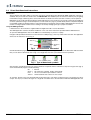
Click the ‘disk button’ (Fig. 4) to select the type of download required. The image shown next to the ‘disk button’ indicates which
files you are about to download, refer to Fig. 5. For single files enter the cycle number in the box provided.
Single file
Files not downloaded
All files
Fig. 5 Type of download, symbols
After selection, click the green button to start the download. If required click the red button to stop. The ‘Progress bar’ (Fig. 4)
shows the download progress and the following:
Off
=
Green =
Red =
Yellow =
Normal
File retrieval is complete, all files retrieved OK.
An error occurred that prevented the retrieval.
Retrieved all files but at least one was corrupt.
To view files, browse to the user allocated folder storing these files. If the letter ‘E’ appears by the cycle number, this file is
corrupt. You may try to retrieve this again as a single file. If in doubt refer to the instructions within the DDD Application CD.
P10/33
ST-IM84c
SES 113 and 225
AUTOCLAVES
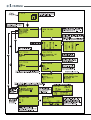
Fig. 6 ‘Cycle Select’ and various display screens
ST-IM84c
P11/33
Fig. 7 Various display screens
P12/33
ST-IM84c
SES 113 and 225
AUTOCLAVES
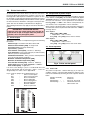
5.0
Printer instructions
All Eschmann Little Sister SES 113 and 225 autoclaves
incorporate direct data download via a USB port. They may also
be bought with a built-in printer. Installation of a printer can also
be arranged at a later date through the EschmannCare service
team (contact 01903 765040) and order REF 87-270-23 a printer
for these autoclaves, fitted with 1 roll of paper and 4 spare rolls.
(Note: This must be fitted by an EschmannCare Engineer)
5.2 Interpretation of printer output
The most important part of the printout that should be checked
is the final line coded [STS], this should be followed by Cycle
Complete indicating a successful cycle. Should any aspect of
the cycle not match the correct parameters the indication
following [STS] is ***FAIL***. This will be accompanied by an
error number, refer to ‘Appendix 6 - Errors and Faults’.
The following instructions only apply to autoclaves fitted with a
Other aspects of the printout that can be checked if required are
printer.
as follows, but note that any deviation will result in the ***FAIL***
message above:IMPORTANT OPERATOR NOTES
Follow the notes and cautions below when changing the
121°C Cycles:
paper roll. Do not pull on the paper whilst the printer is in
[TSS], [TSE], [TMX], [TMN]
operation, since it may damage the printer.
Temperature - >121°C <124°C
Time [TSS] - Time [TSE] not less than 15 minutes
5.1 Printer Output
The printer output (refer to example below) gives the following
information:
134°C Cycles:
[TSS], [TSE], [TMX], [TMN]
Temperature - >134°C <137°C
Time [TSS] - Time [TSE] not less than 3 min. 20sec.
Autoclave type - Eschmann Little Sister SES 113B
Autoclave Serial number [SRN] - A unique code
5.3 Printer operation
Cycle type [CYC] (e.g. B134) followed by,
Cycle count (e.g. 00345)
Time and Date started [STD] - hh:mm:ss dd\mm\yy
Cycle information - Cycle stage codes (key to codes is below)
with time, pressure and temperature.
Sterilization information - Time, pressure and temperature
every 20 seconds during sterilization.
Maximum sterilization temperature [TMX]
Minimum sterilization temperature [TMN]
Time and Date finished [ETD] - hh:mm:ss dd\mm\yy
Fig. 8 Printer control panel
Status [STS] followed by Cycle Complete or ***FAIL***
Error number [ERR] - If applicable
If an error occurs during a cycle, it is recorded with time and 5.3.1 Status LED
date on the printout and the message ***FAIL***, errors are
The printer incorporates a Status LED (Fig. 8) to report its
designated by error codes, refer to Appendix 6.
condition. If there is a fault, the LED will flash in sequence. The
Key to codes on printout (if not detailed above) are:
fault can be identified by observing the flash sequence detailed
TPV
Time of vacuum pulse
below.
TPP
Time of pressure pulse
LED On continually
Printer On
TSS
Start of sterilization
LED Off
Printer Off
TSE
End of sterilization
LED flashing * * *
Paper out, fit new roll
TDS
Start of drying phase
LED
flashing
**
**
**
Thermal
head too hot,
TDE
End of drying phase
allow head to cool.
ETD
End time and date
STS
ST-IM84c
-
Status at cycle end
P13/33
5.3.2 Loading paper
Do not close the lid with one finger
as shown below.
CAUTION
DO NOT USE ALTERNATIVE PAPER ROLLS
The quality and size of paper rolls used in the
printer, should only be supplied by Eschmann.
The printer will automatically detect when the printer’s paper
has run out and report this using the Status LED (section 5.3.1).
Use the Paper feed button to feed through the last few
centimetres of paper and fit a new roll as follows:
i
Pull the top of the opaque centre window (at the finger hold)
forward until the lid is released from its locked position. To
v
avoid damage do not use excessive force.
Now tear the spare paper away by pulling the printout down
towards the tear bar and tear from one side to the other
across the serrated edge.
ii
Remove any paper remaining in the paper recess.
5.3.3 Removing a printout
iii
Reel off a few centimetres from a new roll of paper. Hold
approximately 50 mm of paper outside the printer as you
place the new roll into the paper’s recess with the roll
unwinding from the back and bottom of the roll when placed
in the recess (left picture below). Note the paper can only
be printed on one side (the outside of the roll), do not
place the roll in back to front.
Push the paper feed button to advance the paper about 5 mm if
required. To remove a printout from the printer, pull the printout
down towards the tear bar and tear from one side to the other
across the serrated edge as ‘5.3.2 - v’.
5.3.4 Printer door
During use the printer door can be closed, the printout will feed
through the recess in the bottom of the door. When closing the
door hold the printout down and take care not to trap any paper
in the door.
5.4 Printer maintenance
Power On Self Test
The self test procedure is initiated by supplying power to the
printer (i.e. switch the autoclave on) whilst depressing the paper
feed button (Fig. 8) until the printer starts printing the test print.
iv
Head Thermal Limit
Close the lid by applying equal amounts of pressure on After extensive printing the print head temperature may rise to
each side, ensure the lid is in the locked position.
an unacceptable level. The Status LED will report when this
occurs (section 5.3.1). Printing will be suspended until the head
temperature returns to normal levels, once cooled the printout
will continue and no information will be lost.
Spares Pack
A spare printer roll will be provided with the autoclave, when
you require more please contact the EschmannCare team on
01903 765040 and order the following:
REF 87-270-45 a set of 4 thermal paper rolls for the
Eschmann Little Sister SES 113/113 B vacuum autoclaves.
P14/33
ST-IM84c
SES 113 and 225
AUTOCLAVES
6.0
6.1
Technical data
Electrical
6.5.2 Dimensions and Weight (approx.) 225 autoclave
Supply 230 V (±10%) or 220 V (-6%, +15%), see
rating plate. 50/60 Hz a.c.
For use with alternating current
Loading at 220 V 1.85 kW 10 A (max.)
Loading at 230 V 2.0 kW
10 A (max.)
Fuses: 2 - T12.5A 440 V (Part No. 112474)
Protection Class I
6.2
Dimensions:
582 mm wide, 435 mm high*, 580 mm deep
*435±5 mm depending on adjustment of feet.
Weight:
SES 225 B vacuum - 48 kg
Shipping (includes unit, accessories and packing):
Dimensions (WxDxH): 720 x 720 x 640 mm
Weight: SES 225 B vac. - 60 kg
Sterilizing and test data
Sterilizing time (refer to Note below):
3 minutes 20 seconds at 134/137 °C, or
15 minutes at 121/124 °C
The useable space is defined as:
Trays carrier 370 mm length by cross section shown.
197 mm
‘B’ type cycle drying time (if selected) is 15 minutes.
Maximum time for T1 - less than 20 minutes
Maximum time for T3 - less than 25 minutes
Operating pressure:
1.03 bar at 121 °C, 1.23 bar at 124 °C
2.03 bar at 134 °C, 2.32 bar at 137 °C
For basic cycle details refer to section 6.12 and for more
detailed cycle information sections 6.13 to 6.14.
Note. An Eschmann trained engineer can increase the
sterilization times (up to a max. of 30 minutes) on request,
contact the EschmannCare team on 01903 765040.
Chamfers
20 x 20 mm
197 mm
6.6
Standards compliance
These autoclaves have been designed in accordance
with the following standards:
BS EN 13060: 2004
BS EN 980: 2003
PD 5500: 2006
BS EN 61010-1: 1993
BS EN 61326: 1998 Class A
BS EN 1041:1998
EN 61010-2-041: 1997
BS EN ISO 14971: 2007
6.3
Maximum Loads
6.4
113 autoclave
Maximum load per tray, pouch rack or cassette is 1.5 kg.
Maximum load for the porous load basket is 0.87 kg.
6.7 Applicability
Maximum weight per item is 1.5 kg.
Maximum total load is 3 kg.
This manual applies to the following autoclave models:225 autoclave
SES 113 Autoclave (N type) (from Serial Number
Maximum load per tray, pouch rack or cassette is 1.5 kg.
L1NA.... or S1NA.... or S1XA....) REF 87-11*-**
Maximum load for the porous load basket is 1.0 kg.
SES 113 B Vacuum Autoclave (B type) (from Serial
Maximum weight per item is 1.5 kg.
Number L1BA.... or S1BA....) REF 87-12*-**
Maximum total load is 6 kg.
SES 225 B Vacuum Autoclave (B type) (from Serial
Water and reservoir
Number L2BA.... or S2BA....) REF 87-13*-**
Reservoir capacity - 3360 ml (maximum)
Minimum fill - 750 ml (approx.)
Volume used for 1 cycle - 350 ml (approx.)
6.5.1 Dimensions and Weight (approx.) 113 autoclave
Dimensions:
582 mm wide, 435 mm high*, 530 mm deep
*435±5 mm depending on adjustment of feet.
Weight:
SES 113 - 35.0 kg, SES 113 B vacuum - 39.5 kg
*-** indicate model variant numbers
6.8 Environmental considerations
During cleaning and disinfection procedures any potentially
contaminated waste materials produced during these actions,
should be handled in accordance with local procedures and
National legislation for the disposal of potentially contaminated
waste.
At the end of the working life of the autoclave it should be
dismantled and recycled as much as possible in line with the
recommended procedure available from Eschmann Equipment
and in accordance with local procedures and National legislation.
Shipping (includes unit, accessories and packing):
Dimensions (WxDxH): 720 x 720 x 640 mm
Weight: SES 113 - 46.5 kg, SES 113 B vac. - 51.5 kg 6.9 Technical Lifetime
The Eschmann Little Sister SES 113 and 225 autoclaves are
The useable space is defined as:
designed to have a technical lifetime of 36,000 operating cycles
Porous load basket: 280 x 147 x 87 mm (external)
(10 years normal use) subject to their being used in accordance
Trays cassettes etc.: 290 mm by cross section
with these instructions, and subject to proper maintenance and
shown (dimensions in mm)
repair.
6.10 International Symbols
This symbol indicates that the equipment is for
use on alternating current.
This symbol indicates that fuses adjacent to the
symbol have a rating and type as detailed.
ST-IM84c
P15/33
This symbol warns the user to read the accompanying documents, these ‘Instructions for use’.
SN
This symbol indicates the unit serial number is
as indicated adjacent to the symbol.
REF
This symbol indicates the catalogue number is
as indicated adjacent to the symbol.
This symbol indicates that the date of manufacture
is as indicated adjacent to the symbol.
This symbol indicates the manufacturer is as
indicated adjacent to the symbol.
This symbol warns the user of potentially hot
surfaces.
This symbol indicates that this product was
placed on the market after 13th August 2005. At
the end of its working life it should be deposited
at an appropriate facility to enable recycling. For
information on how to recycle this product
responsibly contact Eschmann.
6.11 Miscellaneous
For ‘Conditions for safe use’ refer to Appendix 2.
The autoclave will be ready for use (after initial installation and
setup) in less than 1.0 minute.
The pressure relief valve is nonadjustable and set to 2.85 bar*.
* Catalogue numbers ending ‘...4-80’ or ‘...3-80’ have an
adjustable pressure relief valve set during manufacture to
2.85 bar.
P16/33
ST-IM84c
SES 113 and 225
AUTOCLAVES
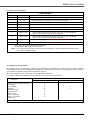
6.12 Basic cycle information
CYCLE DETAILS
Cycle No.
Cycle Type
Load Type, Cycle Information
1
N134 °C
Solid instruments (unwrapped), non vacuum and no drying.
2**
N121 °C
Solid instruments (unwrapped), non vacuum and no drying.
3
N134 °C Dry
Solid instruments (unwrapped), non vacuum with drying.
4**
N121 °C Dry
Solid instruments (unwrapped), non vacuum with drying.
5
B134 °C
Solid or Hollow instruments, vacuum cycle without drying.
6**
B121 °C
Solid or Hollow instruments, vacuum cycle without drying.
7
B134 °C Dry
Solid or Hollow instruments and porous loads, vacuum cycle with drying
(items can be pouched, single or double wrapped).
8*
B121 °C Dry
Solid or Hollow instruments and porous loads, vacuum cycle with drying
(items can be pouched, single or double wrapped).
T1
Test 1
Chamber integrity test. MUST NOT be used to process loads.
T3
Test 3
Steam penetration test. MUST NOT be used to process loads.
*
**
This cycle is not normally installed on any autoclave.
Not installed on SES 225 B vacuum autoclave
Note:
On ‘N’ type autoclaves ONLY, at the end of cycles with drying, a beep will continue intermittently. Refer
to section 3 ‘Completed cycles’.
6.13 Detailed cycle information
The operating cycles are detailed in the diagrams and explanation text provided in 6.13 and 6.14. These sections detail the
maximum temperature for each sterilization cycle (within the useable space). The autoclave can be fitted with a printer producing
cycle records, interpretation of the printout is detailed in section 5.
Note: The configuration of the load support system is detailed in Appendix 3.
In accordance with BS EN 13060 the relevant type tests for the cycles listed, are as below:
Sterilization cycle type and cycle number
Type tests
B type cycle
Dynamic sterilizer chamber pressure
Air Leakage
Empty chamber
Solid load
Small porous loads
Full porous load
Hollow load A
Dryness, solid load
Dryness, porous load
Residual air
X
X
X
X
X
X
X
X
X
N type cycle
X
X
X: in compliance with all applicable clauses of BS EN 13060
ST-IM84c
P17/33
6.14 Detailed ‘N’ type cycle (N type autoclave) information
Stage on
diagram
1
Stage detail
Water enters chamber (i.e. the boiler is filled with the correct volume of water)
2
Pressure rises during initial heating to 90 °C
3
Air removal stage, temperature held at 90 °C
4
Pressure rises (i.e. heating to sterilization temperature)
N134 - 134 °C to 137 °C (approx. 318 kPa)
N121 - 121 °C to 124 °C (approx. 215 kPa)
5
Sterilization, temperature and pressure held (i.e. at temperature and pressure as above)
6
Chamber pressure reduced to atmospheric (i.e. condensing and draining chamber)
6.15 Detailed ‘B’ type cycle information
Stage on
diagram
Stage detail
1
Pressure drops to below 15 kPa (Initial vacuum)
2
Pressure increase as chamber (i.e. boiler) fills with the required volume of water
3
Initial pressure rise during initial heating (temperature is pressure related)
B134 pressure is - 175 to 185 kPa
B121 pressure is - 125 to 135 kPa
4
Pressure maintained as above, the precondition hold
5
Pressure drops to below 30 kPa, the steam penetration pulse
6
Pressure rises (i.e. heating to sterilization temperature)
B134 - 134 °C to 137 °C (approx. 318 kPa)
B121 - 121 °C to 124 °C (approx. 215 kPa)
7
Sterilization, temperature and pressure held (i.e. at temperature and pressure as above)
8a,b,c
Cycle without drying - pressure returned to atmospheric pressure
Cycle with drying - drying pulses of varying pressure
Note: For cycles with drying there are several drying pulses, the chamber is then returned to atmospheric pressure.
P18/33
ST-IM84c
SES 113 and 225
AUTOCLAVES
APPENDIX 1 - Installation
These Autoclaves should be installed by an EschmannCare or Eschmann Trained Engineer. For Warranty Registration, Free
Installation and Free User Training contact EschmannCare on 01903 765040.
Programmes and autoclave configuration can be adjusted by an EschmannCare or Eschmann Trained Engineer, on request. To
protect against tampering, access for such adjustment can only be gained by use of a PIN code, refer to ‘User PIN number’ below.
The Autoclave should be lifted or moved by at least two people. Observe good manual handling techniques at all times, with
hands placed under the base each side of the autoclave.
Unpacking
Remove the outer packaging and all packaging pieces carefully and place the autoclave on a flat, water and heat resistant
surface. Ensure there is a working clearance of 50mm around the unit. Do not cover the ventilation ports at the rear or side of the
autoclave. The following items should be checked and placed to one side (some will be packed within the chamber). All packaging
should be recycled in accordance with local recycling practices. DO NOT connect to the mains until setup has been completed.
Items included with the autoclave:
Instructions for Use
Levelling bull’s-eye
Drain tube
Furniture (model specific)
Misc. Documentation
Mains power cable
Spare printer roll (if printer fitted)
Tray carrier and tray lifter
DDD Software (CD, Manual and USB cable)
Setup
Adjustable feet enable the autoclave to be levelled correctly. To adjust the feet slacken the locking nut,
adjust the height as required and tighten the locking nut. The autoclave should be adjusted (when the
chamber is cold) until level in all directions using the bull’s-eye levelling device supplied. Note that on ‘B’
type units the band heater will warm the chamber when switched on, once the door has been opened switch
the autoclave off until levelled. The levelling device should be positioned directly on top of the flat heater
plate inside and at the back of the chamber. IMPORTANT Remove levelling device before use and if moved
to a new location after installation, check the autoclave is levelled again, adjusting if required.
Mains connection
WARNING
This equipment must be earthed. Ensure that the mains plug is easily
accessible during use as this is the means of disconnection.
The autoclave is supplied with an IEC mains input socket at the rear and a mains power cable. If the cable has a fused plug the
correct fuse will be installed. Connect the mains power cable (as supplied) to the mains supply and to the rear IEC mains socket
(Fig. 1, item 22). DO NOT use equivalent mains leads. Switch the mains supply ‘on’ if controlled by a switch.
If changing the plug, ensure that the plug is earthed. Check the fuse (if a fused plug) is appropriate for the equipment. The
connections to observe when connecting a mains plug are:
Yellow/Green - Earth
Brown- Live
Blue - Neutral
Switch the autoclave ‘on’ using the mains switch (Fig. 1, item 10). The switch is marked ‘0’ for ‘off’ and ‘I’ for ‘on’ it illuminates
green when ‘on’. The digital display and applicable indicators will illuminate to show the autoclave has been switched ‘on’. After
normal checks and a ‘Welcome, Please contact Eschmann’ message (shown for 30 seconds, for the first few cycles) the ‘Cycle
select’ screen will be displayed. To switch the autoclave ‘off’ press ‘0’ on the mains switch.
Opening/Closing the door
To open the door. The autoclave must be switched ‘on’. Once the normal ‘Cycle select ‘ display is shown (Fig. 6) turn the door
handle anticlockwise until vertical (12 o’clock position). The green door indicator light will flash.
To close the door onto the secondary catch only. With the handle vertical push the door closed gently and turn the door handle
45° clockwise (2 o’clock position). It will meet a stop at this position and the door will only be partially closed. The door should be
shut onto the secondary catch at all times when the autoclave is not in use.
To close the door fully. With the handle vertical push the door shut firmly and turn the door handle clockwise until horizontal (3
o’clock position). The door indicator light will stop flashing and will not be illuminated.
User PIN number
The autoclave is supplied with the ‘User’ PIN number 00001. This should be changed before the autoclave is used, the new PIN
number should ONLY be available to the Autoclave Manager. Refer to Appendix 7 - Special Functions to change the PIN number.
Direct drain kit
If you require the waste reservoir to drain directly (e.g. into an adjacent sink) a direct drain kit can be fitted (REF 87-251-55).
Please contact EschmannCare (Tel. 01903 765040) for information.
ST-IM84c
P19/33
APPENDIX 2 - Warnings and cautions
The grouped warnings and cautions below should be followed at all times, all users/operators should be made aware them.
Potential Hazards
The operator should be aware of the following hazards:a.
All autoclaves operate with steam at high temperatures and pressure. The autoclave door must only be opened when the
machine indicates it is safe to do so. Care must be taken to avoid contact with any residual steam or hot water. The
Eschmann ‘tray lifter’ must be used to remove trays etc. Contact with hot internal surfaces of the chamber and door must
be avoided. Water in the waste reservoir can be very hot, take care when draining to avoid contact with the hot water.
b.
During certification, service and maintenance work it may be necessary to remove covers. This increases the risk of
exposure to hot surfaces and electrical systems. Accordingly all service and maintenance work should be carried out by an
Eschmann engineer or at the least by an engineer recently trained and certified by Eschmann.
c.
If reservoirs are not emptied and left to dry after use (preferably on a daily basis) water may become contaminated.
d.
If the load is not suitable for the cycle selected, the load may remain non-sterile. It is recommended that the user consults the
‘Instructions for Use’ of the items to be processed. If in doubt contact EschmannCare or an expert on sterilizing processes
such as an Authorized Person (AP) in the UK.
Limitations on use
The operator should be aware of the following limitations during use:
a
Do not process hollow, pouched or wrapped items or porous loads, using an ‘N’ type cycle.
b.
Never use trays or cassettes without perforations.
c.
Do not process fluids in this autoclave.
d.
Items in pouches should only be processed as detailed in these instructions.
e.
Do not use autoclaves near inflammable materials or gases (e.g. anaesthetics).
f.
When sterilizing instruments not of solid metal construction, the manufacturer of the instrument must be consulted about
its suitability for processing in an autoclave.
Electrical safety
The user should ensure the following electrical safety measures are followed:a.
This equipment must be earthed.
b.
The autoclave is switched ‘off’ and disconnected from the mains power supply before renewing fuses, checking and
cleaning the autoclave.
c.
No attempt is made to service this autoclave internally.
General safety
IMPORTANT
The design of the autoclave pressure vessel is certified by a third party accredited test house to International Standards.
In order to ensure safety and to comply with UK and/or International regulations, the vessel and fittings should be
inspected by a ‘competent person’ at regular intervals. Eschmann recommends this should be carried out at least
once every 14 months by an Eschmann trained engineer.
The operator should follow these general safety measures:a.
Do not cover any of the ventilation grills or attempt to use the autoclave if the covers are damaged, loose or missing or if
the door seal is damaged or missing.
b.
Always refer to the ‘Errors and Faults’ section of Appendix 6 if the normal cycle select display is not shown on the display
or it is blank or corrupted.
c.
Ensure the fresh water reservoir lid is in place and returned to its normal (rear) position before using the autoclave. Check
the fresh water reservoir inlet filter is cleaned if dirty or replaced if damaged.
d.
Do not use abrasive powders, chemicals, or solutions containing chlorine to clean the autoclave.
e.
Do not attempt to open the chamber door until the message ‘Ready to Open’ has been displayed.
f.
If an error display appears during a cycle, do not switch-off power, refer to ‘Errors and Faults’ Appendix 6.
g.
Do not place heavy items on top of the autoclave or containers with liquids (e.g. cups etc.).
h.
Do not operate this autoclave if obviously damaged, deformed or if parts are missing.
NOTE: This may be accompanied by the message “CAUTION HOT” when the chamber is above 55 °C.
P20/33
ST-IM84c
SES 113 and 225
AUTOCLAVES
Environmental conditions for safe use
This autoclave has been designed for use in the following conditions only:a.
Indoor use.
b.
Pressure 700 to 1060 mbar
c.
Temperature: 5 °C to 40 °C.
d.
Relative humidity: 20% to 90% non-condensing.
e.
Mains supply voltage fluctuations: Not to exceed ±10% of the 230 V supply.
Note: If it is required to operate this Autoclave outside of these conditions, contact Eschmann Equipment.
Warning markings
The warning markings on this equipment have the following meanings:
Caution; refer to accompanying documents (i.e. these Instructions for Use).
Caution; hot surface.
Safety features
Eschmann autoclaves are designed to be safe and effective. No changes should be made to them except by an EschmannCare
engineer. In particular, the following safety features must not be interfered with, circumvented or overridden:a.
Door closed (position) sensor and door locks (position) sensors. These prevent a cycle starting if the door is not closed and
locked.
b.
Pressure Relief Valve (safety valve). This valve safely releases excess pressure up to a maximum of 2.85+10% barG.
Also refer to section 6.11 for autoclaves fitted with an adjustable pressure relief valve.
c.
Independent cycle control and monitoring. There are two microcomputers independently monitoring each other and other
autoclave components. Either is able to stop a cycle and place the autoclave into a safe condition in the event of a failure.
In the case of a venting valve failure the autoclave may not be able to eject water and steam (i.e. pressure will remain until
cool) and the door will remain locked until the pressure / temperature has dropped to a safe level.
d.
Overheat Control. The microcomputer operates in conjunction with an independent manual reset thermostat to protect the
heating element from overheating.
e.
f.
Band Heater Thermostat. This prevents the band heater exceeding a preset temperature.
Pressure door switch. Prevents the door being opened when the residual chamber pressure is too high by removing power
to a door lock so that it locks the door closed.
Safety Checks
The user should ensure that the following safety checks are carried out:
Daily (by User)
i
Check that the door opens and closes easily.
ii
Check the door seal and chamber face for any signs of damage.
iii
Check for any obvious escape of steam or water during a cycle.
iv
For type ‘B’ autoclaves run a steam penetration test (Helix or Bowie Dick type).
If any problems are found, please contact an EschmannCare engineer (Tel. 01903 765040). Do not use the autoclave until repair
has been effected.
Annually (by an EschmannCare engineer)
i
Check that the pressure relief valve operates correctly at the set pressure.
ii
Inspect the pressure system for integrity.
iii
Check calibration.
iv
Check door locking mechanism for integrity.
NOTE: Annual inspections should only be undertaken by properly trained engineers. EschmannCare comprehensive service
contracts cover preventive maintenance and repair to ensure trouble free operation of the autoclave, including annual inspections
of the pressure system to satisfy the requirements of all relevant legislation and guidelines, including the Pressure Systems
Safety Regulations 2006. Please contact the EschmannCare team for details (Tel. 01903 765040). The EschmannCare team can
also provide testing and certification against HTM2010, DB9804 and DB2002 (06). Refer to Eschmann’s Instructions for Testing
Vacuum Autoclaves (ST-IM85) or contact the EschmannCare team.
ST-IM84c
P21/33
APPENDIX 3 - Loading the autoclave
CAUTION
When loading the autoclave take care that you do not damage the door or front face of the chamber, especially the
door seal and mating face. Damage to these parts can adversely affect performance. When loading pouches ensure
they do not make ‘paper cuts’ in the door seal. Do not reprocess single-use items.
The autoclave is designed to sterilize instruments, it does not wash or clean them. Effective cleaning and drying of items prior to
sterilization is an essential part of the decontamination cycle. Air retained within the load can also prevent steam contact. Prior to
sterilization, instruments should be thoroughly cleaned, ideally in an Eschmann Instrument Washer Disinfector (contact the
EschmannCare team on 01903 765040 for more information).
When placed in an autoclave, items with hinges or ratchets should be open and unlocked. Multiple-part items should be dismantled
or only loosely assembled to allow steam penetration. Once loaded the autoclave cycle should be started, do not leave items
awaiting processing in the autoclave.
Check the suitability of nonmetallic items for processing in an autoclave and that the temperatures are acceptable.
Load types and load arrangements should conform to that specified below and detailed in section 6.3. If in doubt about loads and
processing details please discuss this directly with EschmannCare.
Eschmann Instrument Management System (EiMS)
This autoclave uses furniture and accessories from the Eschmann instrument Management System. Instrument trays and Hands
Free instrument Transfer (HFiT) cassettes are available in a variety of sizes and colours designed to help initiate instrument
traceability within the surgery environment. ‘Examination’ sized accessories enable a ‘one set of instrument-per tray-per patient’
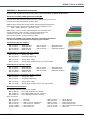
policy to be adopted. Full details can be found in the accompanying EiMS brochure, also refer to Appendix 8.
Unwrapped solid items (‘N’ or ‘B’ type cycles)
Place unwrapped solid items loose on trays or into hands-free instrument transfer (HFiT) cassettes. Do not overload trays or HFiT
cassettes (TECHNICAL DATA details maximum tray loads and maximum load). Avoid ‘bunching’ items together and ensure all items
are positioned so that they do not touch and drain freely. Only use trays or HFiT cassettes supplied by Eschmann. Loaded trays and
HFiT cassettes should then be placed in the sterilizing chamber. All items must be positioned so that they drain freely and do not trap
rising air bubbles. Unwrapped items are for immediate use only. For details on the choice of cycle refer to Section 6.
Hollow instruments including items with narrow lumens (e.g. dental handpieces) porous loads
and single wrapped (e.g. pouched) hollow or solid instruments (‘B’ type cycles ONLY)
Items in pouches should only be sterilized using the special pouch rack (which holds 9 pouches) with only one instrument per
pouch (otherwise instruments touch together in the pouch, restricting steam from penetrating all surfaces). Avoid packing pouches
too tightly and note that paper/film pouches must be loaded such that the film sides of adjacent pouches are face to face and
sterilized using a ‘B’ type vacuum cycle with drying. Only use pouches recommended for steam sterilization (i.e. conform to
EN868), details are provided below. Ensure all seals have been made correctly to maintain sterility post sterilization.
All items must be positioned so that they drain freely and do not trap rising air bubbles. Wrapped item can be stored for later use.
For details on the choice of cycle refer to Section 6.
The following sterilisation pouches are available from Eschmann:
Pouch, box of 200 small (90 mm x 230 mm)
Pouch, box of 200 medium (133 mm x 254 mm)
Pouch, box of 200 large (190 mm x 330 mm)
REF 87-033-10
REF 87-033-18
REF 87-033-29
The configuration of the load support system follows, the load should be confined to the usable space as defined in
section 6.5. Full details on the cassettes etc. can be found in the accompanying EiMS brochure, also refer to Appendix 8.
SES 113 and SES 113 B vacuum Autoclave load capacity
The tray carrier (load configuration) has four levels that can accommodate the following:
Top: 1 x examination tray or HFiT 10 cassette (140 mm x 180 mm).
Upper Middle: 1 x standard tray or HFiT 20 cassette (280 mm x 180 mm), or 2 x examination trays or HFiT 10 cassettes.
Lower Middle: 1 x standard tray or HFiT 20 cassette, or 2 x examination trays or HFiT 10 cassettes.
Bottom: 1 x examination tray or HFiT 10 cassette.
SES 113 B vacuum Autoclave ONLY load capacity
If all trays are removed, one porous load basket (external dimensions 280 x 147 x 87 mm) or one 9 slot pouch rack can be
accommodated.
SES 225 B vacuum Autoclave load capacity
The tray carrier (load configuration) has five levels that can accommodate the following:
15 x examination trays or HFiT 10 cassettes with instruments or
5 x standard trays or HFiT 20 cassettes and 5 x examination trays or HFiT 10 cassettes with instruments.
P22/33
ST-IM84c
SES 113 and 225
AUTOCLAVES
APPENDIX 4 - Daily Testing
Vacuum ( B type) autoclaves
IMPORTANT:
The Steam Penetration Test Device (hereafter called ‘Device’) must only be used and stored as detailed in the
‘Instructions for Use’ supplied with the ‘Device’. Failure to do so could lead to failure of the ‘Device’ and dangerously
misleading results.
In order to sterilize products and devices by steam, the steam must be able to penetrate through to and contact all surfaces. Items
such as packaging, pouches and narrow or hollow instruments are not easy to penetrate with steam. For this reason, the SES 113 B
vacuum autoclave has been fitted with a pump to actively remove air and thus allow steam to penetrate into the load.
The ‘Device’ (order REF 87-272-32) which complies with BS EN 13060 for B type autoclaves hollow load A, has been designed
to test the steam penetration ability of the autoclave, by presenting a defined challenge to the autoclave. The ‘Device’ consists of
a plastic tubular device with an indicator receptacle at the end and is supplied with indicator strips. The ‘Device’ must be replaced
after 250 uses. This ‘Device’ satisfies the requirement to perform a daily steam penetration test as given in:
EN 554:1994 Sterilization of medical devices - Validation and routine control of sterilization by moist heat, British Standards
Institution, clause 6.3.4
DB 2002(06) Device Bulletin, Benchtop Steam Sterilizers-Guidance on purchase, Operation and Maintenance, Medical Devices
Agency, clause 5.3.1
SN 2002(24) Safety Notice, Steam penetration tests in vacuum benchtop sterilizers, Medical Devices Agency.
DB 2000(05) Device Bulletin, Guidance on the Purchase, Operation and Maintenance of Vacuum Benchtop Steam Sterilizers,
Medical Devices Agency, clause 5.3.1
DB 9804 Device Bulletin, The validation and periodic testing of benchtop vacuum steam sterilizers, Medical Devices Agency,
clause 5.1
Note: Some of the above documents are available on the MHRA’s website, www.mhra.gov.uk
Frequency of use
To comply with the requirements of the documents listed above, Test T1 (chamber integrity test) and Test T3 (steam penetration
test) must be conducted at the start of each day the autoclave is to be used. If the tests are passed it ‘verifies’ the suitability of the
autoclave’s air removal stage for the day ahead. Eschmann recommends the daily use of the ‘Device’ and a ‘Test Log’.
EschmannCare can provide a ‘Test Log’ for this purpose, please contact EschmannCare (Tel. 01903 765040) and order Part No.
113885.
Conducting the tests
To run T1 refer to Appendix 7 - Special Functions, for T3 proceed as follows:
Full instructions are provided with the device. The autoclave should be loaded with the ‘Device’ ONLY. Use the T3 cycle (or T3 via
the special functions, if T3 has been disabled as a cycle) to run the test. Remember the ‘Device’ must be removed within 10
minutes of the cycle end. Compare the indicator test strip with the device’s instructions.
HTM2010/DB2002(06)/DB9804 Testing
Where there is a requirement to satisfy the guidance in HTM2010, DB2002 (06) and DB9804 then further Daily, Weekly, Quarterly
and Annual Testing may be required. Our recommendations on these testing requirements are detailed within our ‘Manufacturer’s
recommended Instructions for Testing Vacuum Autoclaves’ (reference ST-IM85).
N and B type autoclaves
For details on the automatic control test for HTM2010 please contact EschmannCare.
ST-IM84c
P23/33
APPENDIX 5 - Maintenance
Cleaning and care
CAUTION
Chlorine, even in the concentrations found in tap water, can cause stainless steel to crack and could
damage the chamber. Disconnect from the mains electrical supply before cleaning the Autoclave. Do not use flammable
liquids, abrasive powders, chemicals, or solutions containing chlorine to clean the autoclave.
Keep chamber trays, door seal, chamber and chamber face clean. The door seal and chamber face should be checked for damage
and cleaned every day using only a lint-free cloth moistened ideally with ‘Sterile Water for Irrigation’ or as a minimum the same
water used in the reservoir (refer to section 2). Clean the outside of the autoclave by wiping down with a cloth dampened with a 70%
solution of industrial methylated spirit (IMS) and water. Allow to dry by evaporation. The tray lifter should be cleaned and sterilized
regularly (e.g. once a week).
CAUTION
In common with other systems containing static water reservoirs, water in this autoclave can become contaminated
over a period of time, or an aborted cycle, and should be treated as a potential risk of infection.
It is recommended that the reservoirs are drained daily and allowed to dry. Do not leave water in either reservoir when the
autoclave is not in use. To drain the reservoirs refer to section 2.0. Refill the fresh water reservoir (refer to section 2) only when
required. For guidance on clean steam management and HTM2031 contact Eschmann.
Attention to the following will increase the life of the your Autoclave:a.
b.
c.
d.
Always leave the chamber empty and the door open on its secondary catch when not in use.
Replace the antibacterial air filter (Fig. 1, item 23) on vacuum autoclaves every three months (order Part No. 115190). To
remove the filter pull gently whilst twisting. Replace by pushing a new one into the mount.
At weekly intervals remove the chamber furniture and clean out any dirt or debris that has collected around the filter mesh
cone in the base at the back of the chamber. At monthly intervals remove any dirt or debris around the filter and then gently
pull it out of its recess. Clean the recess and the filter carefully. Replace the filter before using the autoclave again. If the
filter is damaged or blocked it should be replaced (order Part No. 391037).
On a weekly basis rinse out the fresh water reservoir with ‘Sterile Water for Irrigation’ drain and allow to dry.
Check the drain tube and the ‘O’ ring on its connector regularly, replace if damaged (order Part No. 115036).
Fuse Renewal
Fuses (Part No. 112474) are at the rear of the autoclave (Fig. 1, item 23). For fuse ratings refer to ‘TECHNICAL DATA’. To extract
a fuse switch ‘off’ and disconnect the autoclave from the mains supply. Insert a screwdriver or small coin in the slot of the fuse
holder and twist it counter-clockwise. After inspecting or renewing a fuse, reverse the above procedure to secure the fuse. Internal
fuses should not be replaced by the user, this should only be performed by an Eschmann trained service engineer.
Service
The Service Manual (ST-SM48) which also contains an illustrated spare parts list and a Manual (reference ST-IM85) providing the
‘Manufacturer’s recommended instructions for testing vacuum autoclaves’ to the applicable parts of HTM2010 and DB9804, are
available from EschmannCare.
The EschmannCare team is staffed and equipped to provide advice and assistance during normal office hours. To avoid delays
when making enquiries, please quote the Model and Serial Number (refer to Fig. 1, item 20) and the error number displayed (if
applicable). All correspondence relating to the after sales service of Eschmann Equipment should be addressed to :
EschmannCare, Eschmann Equipment, Peter Road, Lancing, West Sussex, BN15 8TJ
Tel: +44 (0) 1903 765040 Fax: +44 (0) 1903 875711
CarePlan service cover
EschmannCare CarePlan service cover should be taken out for your Autoclave. An autoclave will only continue to function
correctly if it is properly serviced and maintained. CarePlan provides the assurance that the exacting conditions necessary for
sterilization are maintained throughout the autoclave’s working life.
Safety Checks
Refer to ‘General safety’ and ‘Safety Checks’ in Appendix 2.
Cycle History
When the message ‘Please Download Your Cycle Data For Archiving’ appears consult the ‘Direct Data Download Software’ CD
package supplied with the autoclave and download the autoclave data to a PC.
Certification
Eschmann can offer certification to PSSR 2006 regulations as part of our CarePlan maintenance packages. This certification
entails inspecting the pressure vessels and testing a number of safety critical devices to ensure continued safe operation for the
next year.
P24/33
ST-IM84c
SES 113 and 225
AUTOCLAVES
APPENDIX 6 - Cycle errors and faults and Display messages
Cycle errors and faults
The autoclave is continually checking the parameters required for effective sterilization, if a problem is encountered a CYCLE
FAILED or SYSTEM ERROR message will be displayed, followed by an error number and ‘Please Wait...’. There will be five rapid
‘beeps’ and also any illuminated progress indicators will flash.
For future reference record the type and error number before continuing.
The autoclave returns to a safe condition and displays either ‘Enter PIN Code’ or ‘Press Enter and Cancel’, depending on
configuration, refer to Appendix 7. The factory set PIN code is 00001 (this should be changed refer to Appendix 7 - Special
Functions).
CYCLE FAILED and SYSTEM ERROR message.
The cycle will abort and provided power supply to the autoclave is maintained, the message ‘CYCLE FAILED, Please
Wait...’ or ‘SYSTEM FAILED, Please Wait...’ and an error number will be displayed. Finally the message ‘Enter PIN Code’
or ‘Press Enter and Cancel’ will be displayed refer to ‘Enter PIN Code’ or ‘Press Enter and Cancel’ below. Follow the
section below ‘Attending to an error’ and run the cycle again.
Overheat cutout (Error 8).
If the heating element reset thermostat operates (e.g. in a nil water condition) indicated by the overheat indicator light
illuminating (Fig. 1, item 14) and ‘Error 8’, proceed as follows. Allow the autoclave to cool and press the ‘reset button’ on
the underside of the autoclave (position indicated by the serial label, Fig. 1, item 13) then clear the error in the normal way.
DO NOT clear the error first and then press the reset button, the unit will try to reset with the thermostat tripped inducing
errors.
No mains power.
If after switching ‘on’ power, there is no visual display, check the power supply and connections, both fuses at the back of
the autoclave (refer to Fuse Renewal) and the fuse in the mains plug.
‘Enter PIN Code’ Message*.
Enter the user PIN code as follows (refer to Fig. 2 for button information). Press ‘Up’ or ‘Down’ to select the first digit, press
‘Enter (Select)’ to accept this digit and move to the next. The accepted digit changes to an asterisk (*) to protect the PIN.
Continue to select and enter the PIN. If the PIN is incorrect you will be asked for it again.
‘Press Enter and Cancel’ Message*.
Press the ‘Enter (select)’ and ‘Cancel (Exit)’ buttons together (refer to Fig. 2 for button detail) and hold until error clears.
* Selection of which message is displayed is via the SETTINGS menu, refer to Special Functions Appendix 7.
Attending to a cycle error.
Items must be considered non-sterile if an error occurs and all items in the load should be reprocessed before use. All
items should be removed and dried. If applicable new pouches or wrapping should be used.
CAUTION
Take care during the following procedure the water, chamber and load could be very hot and potentially contaminated.
Remove the tray carrier and check for water in the rear of the chamber (350 ml maximum), drain any found using for
example a suitable syringe and tube. Replace the tray carrier. The chamber should be allowed to dry before starting
another cycle.
Errors that can be ‘corrected or checked’ by the operator are detailed in the error table on page 25, ensure these checks
(if applicable) are performed before running the cycle again.
For errors that are not detailed try running the cycle again checking procedures during loading. If the same error persists
contact the EschmannCare team (Tel. 01903 765040).
Do not attempt to solve an error using tools or tampering with the autoclave. The engineer will need to know the Model,
Serial Number (refer to label in Fig. 1, item 20) and the error number displayed.
Display messages
Certification Expired
The ‘certification date’ has been set in the factory to 18 months after manufacture. When the date is reached, the digital display
will show the message:
Certification Expired Please contact Eschmann
This message will be displayed for 5 seconds and appears when the power is switched ‘on’ and after each cycle. It will not be
displayed if the ‘service due’ message has been triggered because ‘service due’ takes precedence.
ST-IM84c
P25/33
Service Due
The ‘service due date’ will be set in the factory for 10 months after manufacture or 1500 cycles (i.e. whichever comes first). When
the date or cycle count is reached, the digital display will show the message:
Service Required Please Contact Eschmann
This message will be displayed for 5 seconds and appears when the power is switched ‘on’ and after each cycle.
Warranty Reminder
The ‘warranty reminder’ will be set in the factory to appear until 30 Cycles have been completed. If still active the digital display will
show the message:
Welcome Please contact Eschmann to register for FREE installation and training
Whilst still active, the message will be displayed for 30 seconds when the power is switched ‘on’. Please contact Eschmann and
you will be advised which buttons to press (when this message is displayed) to cancel the message irrespective of the cycle count.
Warranty arrangements will also be advised and initiated.
Cycle Errors Table
Error
Cause
Items to check before running another cycle
1
Power failure during cycle
Check mains supply, check mains connections, check mains fuses
and mains lead fuse. Run cycle again.
2
User ‘cycle abort’
Correct reason for ‘Cycle abort’. Run required cycle.
3
Door lock failed
Visually check door locks for a cause of failure (e.g. foreign body
stopping door lock operating), check door is firmly closed. Correct
visual faults (if possible) then run cycle again.
4
Initial vacuum pulse timeout
Visually check for obstructions in door seal area, clean door seal
and its mating face. Run cycle again.
6
Water in chamber at cycle start
Empty water from chamber, check load is dry and run cycle again.
7
Failed to fill boiler
Ensure fresh water reservoir is full and run cycle again.
8
Overheat cutout has tripped or a leak
Refer to ‘Overheat cutout’ section page 24. If cutout has not
tripped visually check for obstructions in door seal area, clean door
seal and its mating face. Run cycle again.
17
Boiler water level low during cycle
Consider reducing load (Note: Error may be due to a particularly
cold load). Check fresh water reservoir level. Run cycle again.
19
Temperature/pressure error
Visually check for obstructions in door seal area, clean door seal
and its mating face. Run cycle again.
20
Temperature error
Check chamber and load is dry. Run cycle again.
25
Not enough water in fresh water tank
Fill fresh water reservoir. Run cycle again.
26
Too much water in waste water tank
Empty waste water reservoir. Run cycle again.
29
Air detected in chamber
Check door seal for damage and cleanliness in door seal area. Clean
door seal and its mating face. Run cycle again.
30
Pressure fell too much during leak test
Leave Autoclave to cool for a few minutes then repeat test.
31
Pressure rose too much during leak test
Visually check for obstructions in door seal area, clean door seal and
its mating face. Ensure chamber is dry Run cycle again.
37
Temperature change during leak test
Leave Autoclave to cool for a few minutes then repeat test.
47
Temperature/pressure error
Visually check for obstructions in door seal area, clean door seal
and its mating face. Run cycle again.
48-95
Various errors during cycle
Refer to ‘Overheat cutout’ section page 24. If cutout has not
tripped visually check for obstructions in door seal area, clean door
seal and its mating face. Run cycle again.
102
User setup corrupted
All user settings will need to be reset as the autoclave will revert back
to the original factory defaults, refer to Appendix 7 and enter your
user settings (refer to list provided on page 26). Run cycle again.
103
Button locked pressed
A button may have stuck momentarily. Run cycle again.
P26/33
ST-IM84c
SES 113 and 225
AUTOCLAVES
APPENDIX 7 - Special Functions
IMPORTANT These special functions should only be used by the Autoclave Manager and the EschmannCare Engineer.
The autoclave’s special functions include:
Amending display language (except ‘UK’ models)
Setting the date and time
Enabling additional cycles
Running special tests
Printing or downloading cycle history
Switching the audible ‘beep’ on or off
Programming a delayed start.
PIN Number Some special functions are protected by a PIN code, this has been set in the factory to 00001. One of the special
functions (SETTINGS menu, Set user PIN code) enables this to be changed, but ensure the new code is kept confidential. The
PIN code should be changed before the autoclave is used.
NOTE: When using the buttons shown in the Figure below note they will auto-repeat when required (i.e. when changing items
such as date or time, simply press and hold button to effect multiple changes).
Left
Up
Right
Control Button detail
and function
Enter (Select)
Down
Cancel (Exit)
To gain access to the special functions press the ‘Enter (Select)’ button when the normal ‘Cycle Select’ display is shown, the
‘CYCLE’ screen is displayed. To select this option press the ‘Enter (Select)’ button or to access the next option ‘SETTINGS’ press
the ‘Down’ button.
To return to the normal ‘Cycle Select’ display without selecting a ‘Special Function’ press the ‘Cancel (Exit)’ button. To return to the
‘CYCLE’ screen from the ‘SETTINGS’ screen press the ‘Up’ button.
The Special Function menus available are shown below, they are explained in greater detail on the following pages.
CYCLE menu options
Cycle Options
Cycle History
SETTINGS menu options
Date/Time
Language*
Test Cycles
Delayed Start
Display
Set user PIN code
Audio
* Not applicable on ‘UK’ models.
NOTE: There is a third option ‘SERVICE’ which will be displayed if the ‘Down’ button is pressed when the ‘SETTINGS’ screen is
displayed. This option is not applicable to the user (it requires knowledge of a special service PIN code, if this is required please
contact Eschmann) and is not discussed or detailed within this manual. If this is selected in error press the ‘Cancel (Exit)’ button
to return to the ‘Cycle Select’ display.
NOTE: When any parameters are changed using the special functions use the table below to record your settings. This will ensure
your settings can be entered quickly in the unlikely event of them being lost (time, date and language are obvious, do not write
down the pin code).
Speaker (tick)
On
Cycles enabled (tick)
1
2
3
4
5
6
7
8
9
Default cycle (tick)
1
2
3
4
5
6
7
8
9
Cycle History (tick)
D
W
M
3M
6M
NONE
ST-IM84c
Off
P27/33
TABLE 3 - SPECIAL FUNCTIONS - ‘SETTINGS’ MENU (also refer to page 28)
Note: To access a menu option shown below, move the cursor to the required option by pressing the ‘Up’ or ‘Down’ buttons,
then press the ‘Enter (Select)’ button. If the ‘Exit’ option is selected this will return you to the normal ‘SETTINGS’ screen, press
the ‘Cancel (Exit)’ button to exit the special function options.
Menu Option
Method of use
Date/Time
When selected the display will show ‘Set Time’ followed by the hour and minutes indicated by
‘hh mm’, below this is ‘Set Date’ followed by the day, month and year indicated by ‘dd mm
20yy’. The cursor shows which element of the time or date can be changed. Using the ‘Left’ and
‘Right’ buttons move the cursor to the time or date element to change, adjust this element using
the ‘Up’ or ‘Down’ buttons. When both the time and date are correct pressing the ‘Enter (Select)’
button confirms this and returns you to the main ‘SETTINGS’ menu.
Language*
The display shows ‘Language’ followed by a list of the available languages (all options may not
be displayed at the same time). Move the cursor up or down to the required language using the
‘Up’ or ‘Down’ buttons and press the ‘Enter (Select)’ button to confirm the language required and
return to the main ‘SETTINGS’ menu. Select the ‘Exit’ option (at the bottom of the language list)
or press the ‘Cancel (Exit)’ button to return to the ‘SETTINGS’ menu if no change of display
language is required. * Not applicable on ‘UK’ models.
Display
The display shows ‘Adjust Viewing Angle’ with an up and down arrow and a row of lines. Use the
‘Up’ or ‘Down’ buttons to adjust the viewing angle of the display and press the ‘Enter (Select)’
button when set as required (i.e. provides the clearest contrast) or press the ‘Cancel (Exit)’
button if no change of display angle is required or to reject any adjustments made. You will be
returned to the ‘SETTINGS’ menu.
Set User PIN Code
This function requires knowledge of the PIN code (5 digits, 00001-59999) factory set to 00001.
The PIN code is normally restricted to those people responsible for control and management of
the autoclave. Access to this function is not normally available to the operator.
The display shows ‘Enter PIN Code’ and 0. To enter the PIN code press ‘Up’ or ‘Down’ to change
the first digit, press ‘Enter (Select)’ to accept this digit and move to the next. The accepted digit
changes to an asterisk (*) to protect the code. Continue to enter the other digits. If the wrong
code is entered, you will be prompted to ‘Enter PIN Code’ again. To escape this option if the PIN
has been forgotten press ‘Cancel (Exit)’.
The options provided are ‘Change PIN’ and ‘Key Combination’. Use the ‘Up’ or ‘Down’ buttons to
move the cursor to the required option and press the ‘Enter (Select)’ button, the selected option
will be marked with an asterisk. Move the cursor to the ‘Exit’ option and press the ‘Enter (Select)’
button, proceed as detailed below for the option selected.
If ‘Key Combination’ is selected you will be returned to the ‘SETTINGS’ menu and cycle errors
can be cleared by the operator using a key combination [‘Enter (Select)’ and ‘Cancel (Exit)’
buttons pressed together] and not the PIN code.
If ‘Change PIN’ is selected the display will show ‘Enter New PIN’ and a 0. Enter the new pin code
as above. The display will then show ‘Confirm New PIN’ and a 0, enter the new PIN code again
to confirm it. If the second entry does not match you will be prompted to ‘Enter New PIN’ again.
If the PIN code is not between 00001 and 59999, the change will not be successful and the
message ‘PIN must be between 1 and 59999 Try Again? Enter Yes Cancel No’. Press ‘Enter
(Select)’ to try again or ‘Cancel (Exit)’ to abort the PIN change. When the change of PIN is
accepted the message ‘PIN Confirmed’ appears and you will be returned to the ‘SETTINGS’
menu.
Audio
P28/33
The display shows three options, ‘Speaker On’, ‘Speaker Off’ and ‘Exit’. The current option is
identified by an asterisk. Move the cursor up or down to the required option using the ‘Up’ or
‘Down’ buttons and press the ‘Enter (Select)’ button to confirm selection. When correct, select
the ‘Exit’ option to return to the main ‘SETTINGS’ menu or press the ‘Cancel (Exit)’ button.
ST-IM84c
SES 113 and 225
AUTOCLAVES
ST-IM84c
P29/33
TABLE 2 - SPECIAL FUNCTIONS - ‘CYCLE’ MENU (also refer to pages 30 and 31)
Note: To access a menu option shown below, move the cursor to the required option by pressing the ‘Up’ or ‘Down’ buttons,
then press the ‘Enter (Select)’ button. Select the ‘Exit’ menu option, or press the ‘Cancel (Exit)’ button to exit the special
function options.
Menu Option
Cycle Options
Method of use
To use this function requires knowledge of the PIN code (5 numeric digits) factory set to 00001.
The PIN code is should be restricted to those people responsible for the use and management
of the autoclave only. Access to this function is not normally available to the operator.
The display shows ‘Enter PIN Code’ and a 0. To enter the PIN code press ‘Up’ or ‘Down’ to
change the first digit, press the ‘Enter (Select)’ button to accept this and move to the next digit.
The digit will be transformed into an asterisk to protect the PIN code. Continue enter the PIN
code until the ‘Cycle Option’ display is shown. If the PIN code entry is incorrect the display will
reset to enable PIN code entry again. If the PIN code cannot be entered correctly (e.g. forgotten)
press the ‘Cancel (Exit)’ button, then contact EschmannCare (Tel 01903 765040)
The available cycles will be shown and numbered in a table, the default cycle will be marked
with an asterisk (*). Note: The default cycle cannot be disabled. The cycle type will be indicated
by ‘N’ for non vacuum or ‘B’ for vacuum, drying will be indicated by the inclusion of a drying
symbol ( )and the temperature will be shown in °C. Cycles available to the operator (enabled)
will be indicated by a ‘9’ and those not available to the operator (disabled) will be indicated by a
‘8’. One cycle will be selected and indicated by a cursor on the left, to move the cursor press the
‘Up’ or ‘Down’ buttons as required.
To change the ‘9’ to a ‘8’ (or a ‘8’ to a ‘9’) for a cycle press ‘Up’ or ‘Down’ to select the cycle and
then press the ‘Right’ button to move the cursor in front of the ‘9’ or ‘8’ to be changed. To select
a ‘9’ press the ‘Up’ button or to select a ‘8’ press the ‘Down’ button. Press the ‘Left’ button to
move the cursor left to enable another cycle to be selected by pressing ‘Up’ or ‘Down’.
To change the default cycle (indicated by an ‘ ’) press ‘Up’ or ‘Down’ to select the cycle and then
press the ‘Right’ button twice to move the cursor past the tick. Note: To make a cycle the default,
the cycle must be enabled. Press the ‘Enter (Select)’ button to make that cycle the default. Press
the ‘Left’ button twice (moves cursor left) so that another cycle can be selected.
CAUTION: If the default cycle is changed it is of paramount importance all users are
informed, helping ensure the correct cycle is always selected when processing items.
*
To return to the ‘CYCLE’ menu press the ‘Cancel (Exit)’ button.
Cycle History
The options available are ‘Print’, ‘Download’ and ‘Exit’ (Note that if a printer is not fitted the
download option will automatically be selected). Press the ‘Up’ or ‘Down’ buttons to select the
required option (indicated by the cursor on the left) then press the ‘Enter (Select)’ button to
access that option. To return to the ‘CYCLE’ menu press the ‘Cancel (Exit)’ button or select the
‘Exit’ option.
‘Print’:
This option is only available if a printer is fitted. There are three options ‘Last Successful
(10)’, ‘Last Failed (10)’ and ‘Exit’. Press the ‘Up’ or ‘Down’ buttons to select the required option
(indicated by the cursor on the left) then press the ‘Enter (Select)’ button to accept that option.
The required printout will be executed providing there is paper in the printer, you will be returned
to the ‘CYCLE’ menu.
‘Download’:
This option alters the frequency of the reminder to ‘Download’ the cycle history.
There are seven options ‘Day’, ‘Week’, ‘Month’, ‘3 Month’, ‘6 Month’, ‘Don’t Remind me’ and
‘Exit’, the currently selected option will be indicated by an asterisk. Press the ‘Up’ or ‘Down’
buttons to select the required option (indicated by the cursor) then press the ‘Enter (Select)’
button to accept that option. The required frequency will be set and indicated by an asterisk. To
return to the ‘CYCLE’ menu select the ‘Exit’ option or press the ‘Cancel (Exit)’ button.
Table 2 is continued over the page
P30/33
ST-IM84c
SES 113 and 225
AUTOCLAVES
TABLE 2 (continued) - SPECIAL FUNCTIONS - ‘CYCLE’ MENU (also refer to page 30)
Menu Option
Method of use
Test Cycles (‘B’ type units) The three options below will be provided plus ‘Exit’. Press the ‘Up’ or ‘Down’ buttons to select the
required option, T1, T3 etc. (indicated by the cursor on the left). Pressing the ‘Enter (Select)’ button
returns you to the cycle select display with the test selected as the cycle. To start the test (after
checking the door is closed and chamber is empty) press the ‘Start (cycle)’ button. To cancel the
test before starting it press the ‘Enter (Select)’ button, this returns you to the ‘CYCLE’ screen.
To return to the ‘CYCLE’ menu press the ‘Enter (Select)’ button or the ‘Cancel (Exit)’ button to
return to the normal cycle select display.
T1 Chamber Integrity MUST NOT be used to process loads. Note: The chamber MUST be
dry and at ambient temperature before running T1. Once switched on the chamber is heated,
run T1 directly after switching on. The autoclave reduces pressure in accordance with BS EN
13060 and measures the leak rate, various display messages detail progress. The Chamber
Integrity Test is deemed a pass if the rate of pressure rise is less than 1.3mbar/minute or a fail if
greater than 1.3mbar/minute.
T3 Steam penetration MUST NOT be used to process loads. This test runs a cycle suitable
for the ‘B’ type Helix test, basically a B134°C cycle without drying. Check the test device is
placed in the usable space in an empty chamber before starting the test. Also refer to Appendix 4.
User Can Select When this function is enabled the operator will be able to select any of the two
options listed (i.e. T1 or T3) as a ‘cycle’ using the cycle select button. To enable or disable this
option, press the ‘Up’ or ‘Down’ buttons to select this option (indicated by the cursor) then press
the ‘Enter (Select)’ button. An asterisk will indicate when this option is enabled. The cursor will
return to the T1 option after pressing the ‘Enter (Select)’ button. To return to the ‘CYCLE’ menu
press the ‘Cancel (Exit)’ button or select ‘Exit’. Note: The user should be trained how to use
T1 and T3, they are user selectable until disabled by the Autoclave Manager.
Delayed start
For this option do not enter the ‘CYCLE’ menu until you have completed the following, open
the autoclave door, load the chamber, select the required cycle and check reservoirs do not
required filling or emptying.
Press ‘Enter (Select)’, the ‘CYCLE’ screen is displayed. Press ‘Enter (Select)’, the ‘CYCLE’
menu is displayed. Press ‘Up’ or ‘Down’ to move the cursor to the ‘Delayed start’ option, press
‘Enter (Select)’.
The display shows ‘Set Start Time’ with the hour and minutes indicated by ‘hh mm’. Use the ‘Left’
or ‘Right’ buttons to move the cursor to each time element and adjust them with the ‘Up’ or ‘Down’
buttons. When the start time is correct, press ‘Enter (Select)’.
Press ‘Cancel (Exit)’ twice. You will be prompted to close the door. When the door is closed the
‘Delayed Start’ display will be shown (illustrated below). The message ‘Delayed Start’ and the
start time are shown. Note: The cycle select button cannot be used after setting the delayed start,
the cycle must be selected first as detailed above.
On completion of the ‘delayed start’ cycle the autoclave is ready for normal use.
To cancel a delayed start press the ‘Cancel (Exit)’ button or the ‘Cycle Start’ button. The display
will show ‘Delayed Start’ alternating with ‘Abort?’ and possibly ‘CAUTION HOT’. Pressing the
‘Cancel (Exit)’ button whilst ‘Abort?’ is displayed stops the cancellation. Pressing the ‘Enter
(select)’ button whilst ‘Abort?’ is displayed cancels the delayed start. If a delayed start is
cancelled, the Autoclave will record a ‘User abort’ for the Cycle (Error number 2) and increment
the Cycle count.
ST-IM84c
P31/33
P32/33
ST-IM84c
SES 113 and 225
AUTOCLAVES
APPENDIX 8 - Accessories and spares
For prices and to order any of these accessories call EschmannCare, telephone 01903 775730
Eschmann instrument Management System EiMS.
The Little Sister SES autoclave range incorporates furniture accessories from the
Eschmann instrument Management System - EiMS.
EiMS has been developed to provide effective instrument/patient management,
allowing the tracking of all instruments through the decontamination cycle:
Chair > washer disinfector > autoclave > chair.
EiMS features a choice of colour coded instrument trays and Hands Free
instrument Transfer (HFiT) cassettes, in particular ‘Examination’ size
components that allow the cost effective implementation of a
‘One set of instruments, per tray, per patient’ regime.
Details of the full EiMS range together with prices and ordering information
can also be found in the brochure accompanying your autoclave.
Standard Trays 280 mm x 180 mm
REF
REF
REF
REF
87-244-51 ........ Aluminium Silver
87-244-52 ........ Aluminium Blue
87-244-53 ........ Aluminium Red
87-254-50 ........ Stainless Steel
REF 87-244-54 ............. Aluminium Green
REF 87-244-55 ............. Aluminium Yellow
REF 87-244-56 ............. Aluminium Turquoise
Standard Covers and Storage (280 mm x 180 mm)
REF 87-214-51 ........ Storage Lid - Silver
REF 87-214-52 ........ Instrument Support (16)
REF 87-214-55 ........ Storage Rack - empty
REF 87-214-58 ........ Storage Rack complete with 6 x trays, lids & holders
Examination Trays 180 mm x 140 mm
REF
REF
REF
REF
87-244-61 ........ Aluminium Silver
87-244-62 ........ Aluminium Blue
87-244-63 ........ Aluminium Red
87-254-60 ........ Stainless Steel
REF 87-244-64 ............. Aluminium Green
REF 87-244-65 ............. Aluminium Yellow
REF 87-244-66 ............. Aluminium Turquoise
Examination Covers and Storage (180 mm x 140 mm)
REF 87-214-61 ........ Storage Lid - Silver
REF 87-214-62 ........ Instrument Support (10)
REF 87-214-65 ........ Storage Rack - empty
REF 87-214-68 ........ Storage Rack complete with 6 x trays, lids & holders
Miscellaneous Accessories
The following sterilisation pouches are available:
REF 87-033-10 ........ Box of 200 small (90 mm x 230 mm)
REF 87-033-18 ........ Box of 200 medium (133 mm x 254 mm)
REF 87-033-29 ........ Box of 200 large (190 mm x 330 mm)
Other accessories:
REF 87-270-23 ............
REF 87-271-21 ............
REF 87-272-20 ............
REF 87-272-32 ............
Part No. 115036 ..........
Part No. 391037 ..........
ST-IM84c
Printer Kit
Tray Lifter
SES 113 Porous Load Basket
Helix Test Pack - 250 Uses
Spare Drain Tube
Filter mesh cone
REF 87-270-45 .............. Printer Rolls (4)
REF 87-271-55 .............. Direct Drain Kit
REF 87-272-25 .............. SES 113 Pouch Rack
REF 87-272-66 .............. Bowie Dick Test Pack
Part No. 112782 ............ Direct Data Download USB cable
Part No. 112474 ............ Mains fuse
P33/33
Patents and Trade marks
The ESCHMANN name and logo; “Little Sister”; “EschmannCare” and “SES” are trade marks of Eschmann Holdings Limited. “Eschmann Equipment”
is a trading name of Eschmann Holdings Limited.
Patents Pending:
Copyright © 2007 Eschmann Holdings Limited
All rights reserved. This booklet is protected by copyright. No part of it may be reproduced, stored in a retrieval system or transmitted in any form or by
any means, electronic, mechanical, photocopying, recording or otherwise without written permission from Eschmann Holdings Limited. The information
in this publication was correct at the time of going to print. The Company, however, reserves the right to modify or improve the equipment referred to.
The CE marking affixed to the product certifies that it complies with the European
Medical Devices Directive 93/42/EEC as amended and related legislation.
P34/33
ST-IM84c
November 2007
ST-IM84c
Eschmann Equipment, Peter Road, Lancing, West Sussex, BN15 8TJ, England.
Tel: +44 (0) 1903 753322. Fax: +44 (0) 1903 875789. www.eschmann.co.uk
113387
ST-IM84c